






KptnKMan
Members
-
Joined
-
Last visited
Everything posted by KptnKMan
-
Actually, yeah I think I fixed it. I took a look in those files after I posted and just deleted the listing for eth3. Seemed to work: I think I might have fixed it, by deleting the eth3 entry from the network-rules.cfg I have the Mellanox as primary now, need to setup the second server and do some tests. Oh I see, I was thinking I could use the MAC of my onboard as the bond0 MAC. Maybe that's a bad idea then, and I should just configure the Mellanox as the only card. I should probably do that, just reconfigure the router DHCP rather than be lazy. 😄 That sounds useful. I'll definitely read through this, thanks.
-
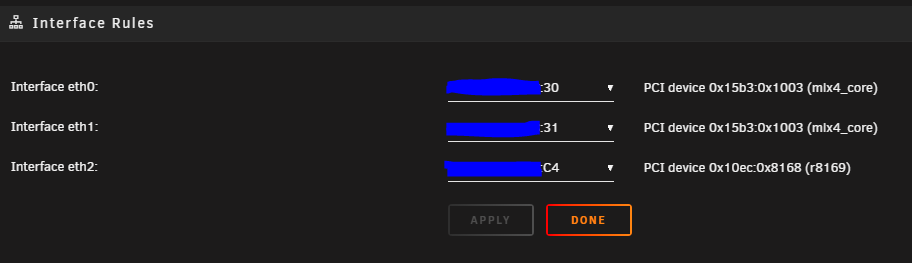
I think I may need to open a new thread for this issue. I'm trying to setup acive-backup on bond0, so that the (eth1) Mellanox 10Gb port1 is primary, and the (eth0) onboard 1Gb is backup. The duplicate MAC error seems to be blocking it. From what I'm reading I can't seem to query the bond status.
-
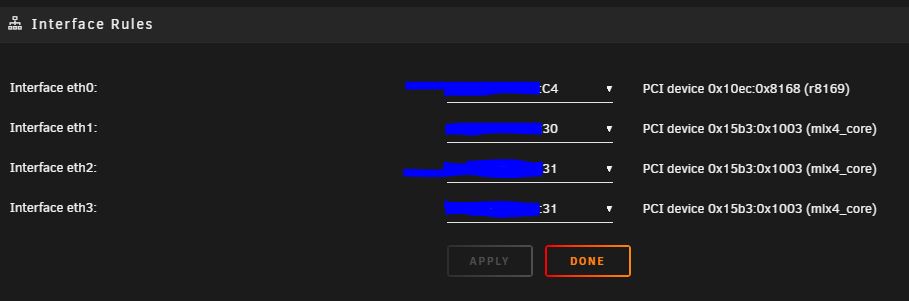
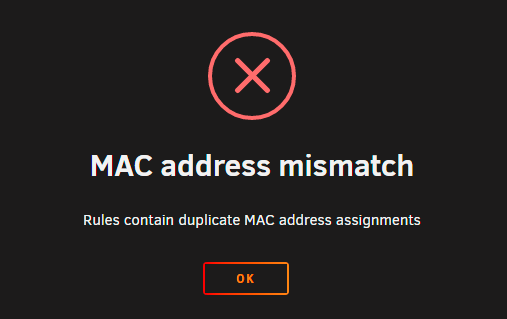
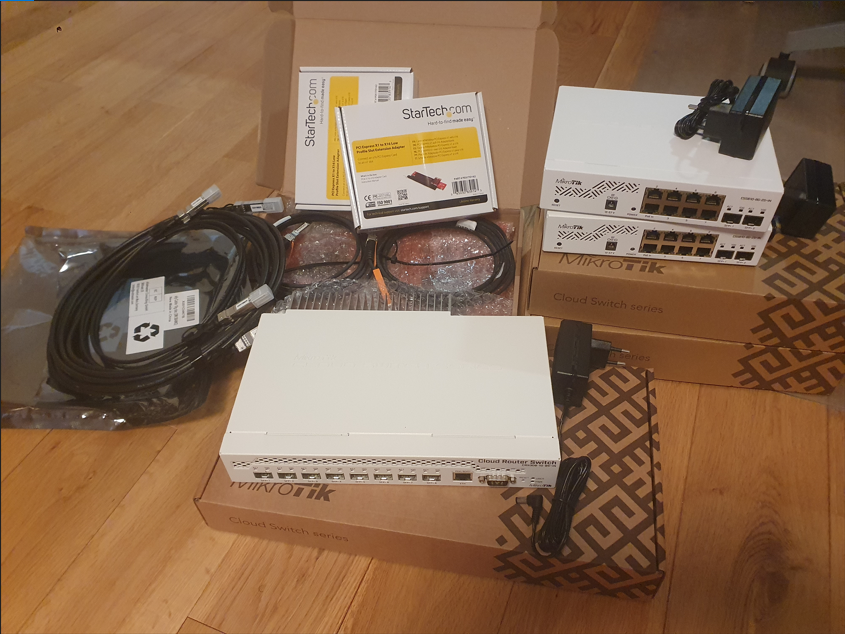
It was on the old unmanaged Netgear switch I was using until this upgrade. I just finished getting everything installed and setting up the links, and looks like the core CRS309+CSS610 have booted up ok and pushing data. Before I get into setting them up, I seem to have run into a strange issue with the MACs of the interfaces. The bonding configuration seems to think there are duplicate MAC adresses: eth0 is the oboard 1Gb, and eth1/2/3 seem to be the Mellanox dual-port card. I think I need to delete one of the interfaces, reading up on why this might have happened. If I try to change something in the GUI I get an error: 🤔
-
Thanks, I've got everything setup... I even managed to move some hardware around, and I have both the Mellanox NICs in the 2nd PCIe x16 slot. I'll need to move them at some point, but for now I'll ideally get full speed out of them, and glad I have the x1-to-x16 adaptors. 😄 This is from the old 1Gb cards, but one is the onboard 1Gb and an Intel 2x 1Gb card. I had them bonded but the performance was still lacklustre from what they should be. I should be getting about 3Gb/s out of the bonded link... but the 10Gb card should do better.
-
Looks like I'm having fun today: And some current iperf3 results between servers:
-
Hey, although I have an AMD build, what you've listed is essentially what I've been doing with my setup. I've had great results, everything is listed in my signature below.
-
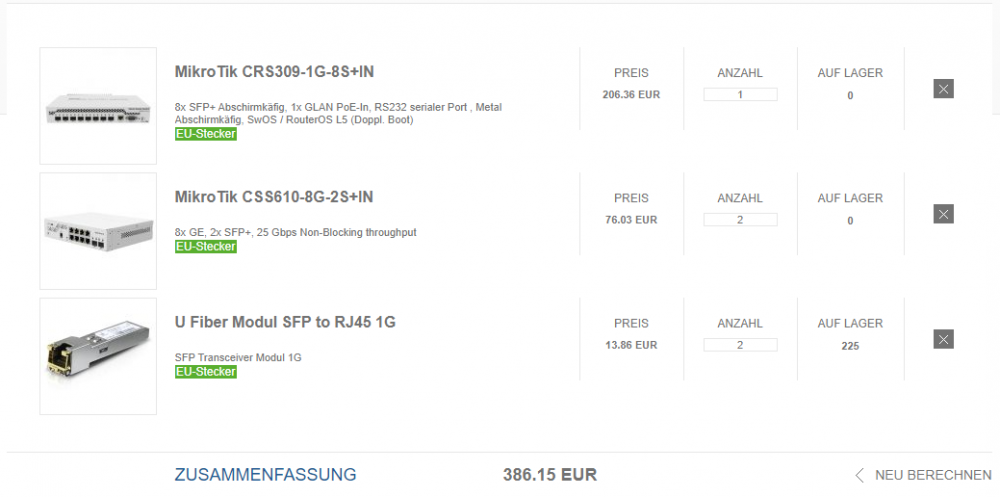
Thanks I really appreciate you helping me out with this, and of course everyone else in this thread. It's been a long time figuring this out, getting feedback, deciding the setup. 😅 I just ordered the eurodk kit. Once I get confirmation, I'll get the amazon order done. Also, yeah everything shows in stock for me. Not sure why it's not showing up in the screenshot as such.
-
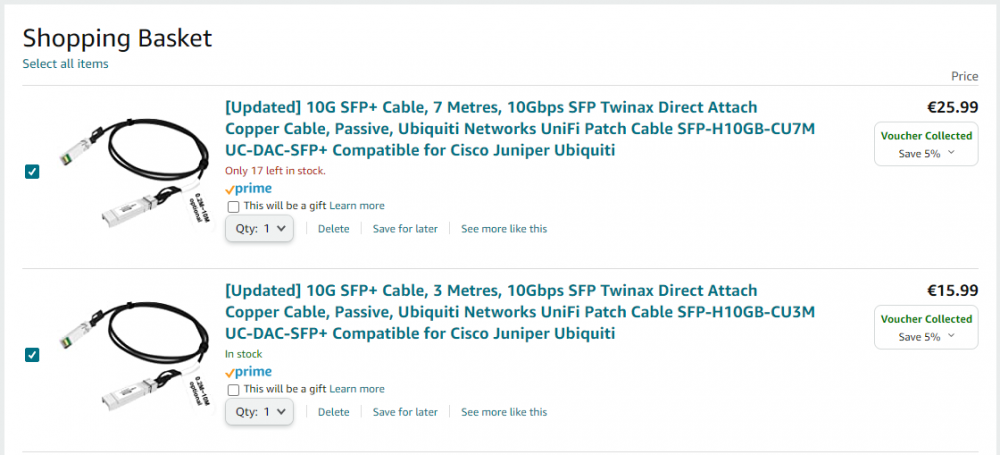
Updated the shopping list: Saw that I left the RJ45 transceivers, not getting those. 😅
-
@Ford Prefect Sorry, reading back, I think I may have fudged my explanation. My bad, I really appreciate you spending your time to respond to me about this. I'll try again. 😅 So, I'm pretty set on having the CRS309 as my core switch, in the server room, which my servers would DAC directly into. I have 2x 3m DACs with the cards I got already, so I'm super happy about that. 😁 For expansion or other devices (WAN router, WiFi AP, anything else) in the server room, I think could either get a couple 1Gb RJ45 transceivers or short DAC to a CSS610? That is sounding more like a better option, the more I think about it. For the office/desk I'm thinking of another CSS610 with a 10Gb uplink to the core CRS309, which would definitely satisfy that requirement. Currently I have an unmanaged netgear 8-port switch on my desk so it would be a major upgrade there also. I guess the question becomes how do I uplink from the office/desk to the server room. This is a very nice find, I could see getting a 7m DAC for 26euros being perfect for the uplink. 😁 Yeah the 0.5m would be because they would be right next to each other. You've got a good point though, a 1m or 2m DAC would be a better idea in case I need to move them in the room (Likely). Yes, my idea is that the CRS309 would be replace and be my new core switch, and would spoke out to other places in the house. Doing a quick review now, I have a few things hooked into my current core server room switch: -both unraid servers (direct, currently RJ45) -office/desk (uplink via 1Gb RJ45) -home automation cabinet (uplink via 1Gb RJ45) -WiFi AP (direct 1Gb RJ45) -pfSense WAN router (uplink via 1Gb RJ45) I didn't mention before, but the WAN router is on the other side of the house, in the living room where the outside line comes in. That uplinks via an unmanaged switch, via a very long ~30m CAT5 ethernet cable that I consider "dirty" WAN. Xbox is on that switch also. I'm going to rerun at some point, as 2x CAT6/7 ethernet, so that the WAN router has a dedicated ethernet and I can move the WAN router to the server room. Or I could replace the unmanaged switch there with a CSS610 or something, and I can VLAN it. Not sure yet. Yeah, looking at my quick review above, I might well need the extra ports of the CSS610 after all. 🤔 The 7m DAC might be the best option for me here, for 26 euros it seems simple and ideal. a 24 euro jump to 10m though... not sure if I need the extra length. I use my primary unraid as my GPU passthrough desktop and have some 7m/5m cables run between the rooms already. Works pretty well. 😁 I should really do that, draw it out. Gonna have a look at that today. As it is right now, I think the CRS309 core and 2x CSS601 uplink will work pretty well going forward. Just need a 1/2/3m + 7m DAC, and I should be good to go.
-
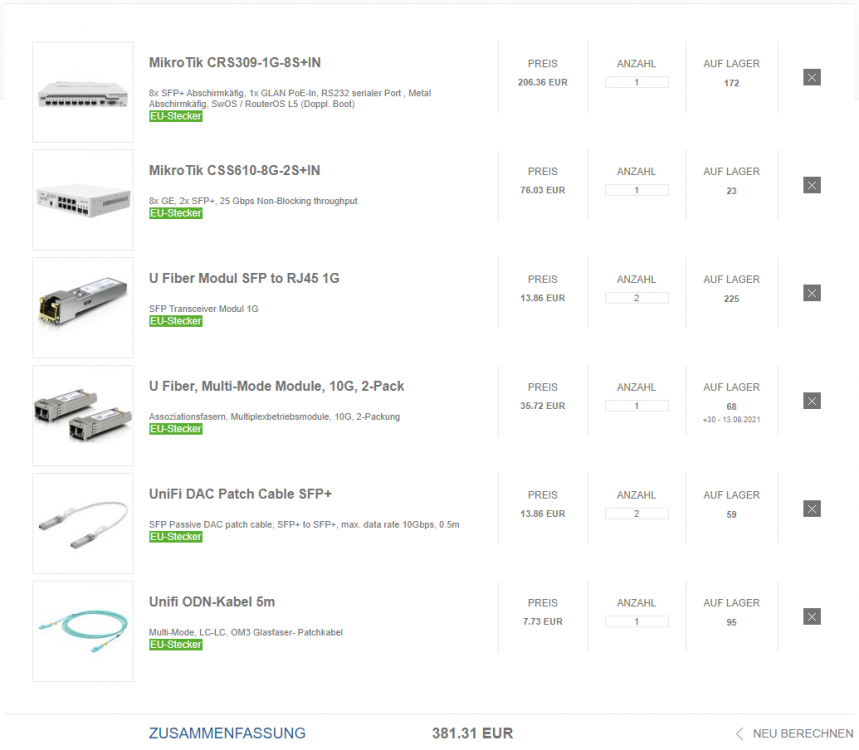
Hi, sorry for the delay, had some stuff going on and getting back on track with this now. @Ford Prefect thanks for the link to eurodk.de, that's a great site. I made up a shopping list some time ago, and want to confirm if it looks about right: So something critical I'm wondering about, is that I have a distributed setup in my house. My servers are in one room with the core switch, and I have my desk/office in another room where my current uplink lab switch is. The room my servers are in, there's not much in there at the moment (basically by themselves apart from a couple 1Gb devices), but could I reasonably get away with a couple 1Gb SFP modules? I need at least 1x 1Gb for my WAN router and another for WiFi AP. After that I suppose its more cost-effective to have a CSS610? I know you said its better to get a CSS610, but is that really a better idea than getting a couple transceivers? I guess cost-wise it ends up not much more (extra ~40 euros instead of 2 transceivers). If I put the CSS610 on my office desk for lab work, and uplink to it via the multi-mode fiber, will a couple transceivers be better, or should I really just fess up the ~40e for a second CSS610 in the server room with the short DAC? Maybe I'm overthinking it, just get the second CSS610? I feel like I'm deciding the future of the entire infrastructure right now.
-
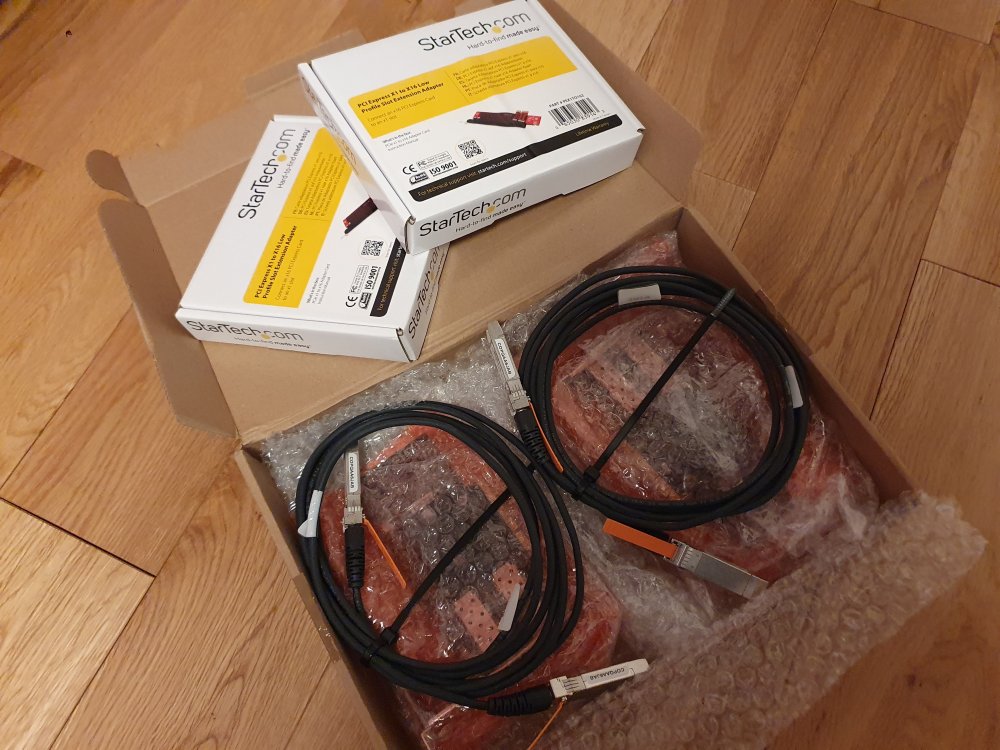
Well its been an interesting few days ordering parts. I ordered the PCI-E x1 risers and dual-port 10Gb cards, and they have arrived. I also tried to acquire an CRS309-1G-8S+IN on ebay but the seller refused to ship to Netherlands, from Germany and would not respond to enquiries. I'm pretty disappointed in that actually, as it would have been perfect. So now I'm looking to purchase a CRS309-1G-8S+IN new with a couple transceivers for other connectivity (I have DACs for servers now). @Ford Prefect and @SimonF I'm wondering if I can use any SFP 1Gb RJ-45 transceiver or are specific models compatible? I'm looking at this listing and wondering if it would be compatible or if I should order from fs.com as suggested? As far as I know, either should be compatible?
-
Oh Damn, sorry @SimonF wrong shoutout to @Ford Prefect my bad. Thanks to you both for the advice still. I would like to eventually use the second port for failover, and I don't see any issue with 8 SFP+ ports any time soon. Currently I'm using a 1Gb unmanaged switch, as I had an old HP Procurve 100Mb switch I used years ago with VLANs, but use the unmanaged now for the 1Gb bandwidth (And it was free and has lots of RJ45 ports). I've been looking at basically a new setup, which is why I haven't purchased anything yet, but just haven't got around to it until recently. I'm planning to use the MT CRS309-1G-8S+IN switch as a 10Gb core for my servers with a 1Gb port for my WAN router and a 1Gb/10Gb uplink to a 1Gb switch for the rest of the network, which I would also need to purchase. I was looking at the CRS326-24G-2S+IN as a good uplink switch with plenty of 1Gb RJ45 ports, but then maybe I should look at a single switch that can do everything... but that sounds more expensive. Alternatively I could purchase any other new/used 1Gb managed switch, doesn't have to be MT branded. Still looking at options there. Anyhow I think maybe having a separate switch would make placement easier for me, as I could leave the 10Gb close to my core servers and continue with the rest of the house hooked into the 1Gb switch. I think if I used something like the CRS317-1G-16S+RM, then I would also have to purchase 1Gb transceivers for everything, and it seems preferable to maintain my network direct to an ethernet switch. I also want to add more 10Gb later without compromising the 1Gb connectivity. In the end I think I can stretch to the dual-port Mellanox cards, even if I don't use the second port just yet (Especially as the card bandwidth is already limited to 6Gb).
-
@Ford Prefect Thanks so much for the pictures, these are perfect for what I was wondering about. The riser looks like its doing a great job, glad I ordered 2 already. I didn't realise until seeing the pics that you're using a dual-port 10Gb card. Are you using those for Dynamic Link Aggregation, Backup Redundancy, Load Balancing or another use? Since the card bandwidth is limited to 6Gb, you'd get 3Gb out of each if used together? I'm checking ebay.de listings at the moment, and wondering if I should get a single-port or dual-port card? Listings like this and this have multiple single-port cards, but other listings like this and this have dual-port cards for about the same price as a bundle of single cards. I found another listing here for a pair of dual-port cards with a couple DAC cables included. Wondering if that last deal would be an ideal setup for a good start with the MT switch? The 2 included DACs would get me started, but I'd have to look at getting tranceivers if I'm going to expand. I guess that would give me the most flexibility at this time to expand how I want. Personally, I'm into redundancy as well so the dual-port cards would allow for that as well if I pick up a few more DACs, I guess?
-
@SimonF I saw some pictures, but I would appreciate a pic if its easy for you. I saw another item, this one, that has the plate I think you're referring to. Is it much of an issue without it, I guess its secure with the usual bracket screw? Edit: Looks like the metal bracket wouldn't fit the X1-to-X16 riser anyway. I've ordered 2 just now, worth it.
-
@Ford Prefect Yeah this all makes a lot of sense. Looks like there's even more reason to stretch for the bigger MT switch now, with the HW-offloading for VLANs being something I'd like. Are the SR tranceivers you're referring to 10Gb capable, as I see the 1Gb tranceivers cheaper when I look around. Honestly, I'd rather use ethernet if I can as I have spare CAT6/7, so this would be fine for me.
-
Thanks everyone for responding and sharing your experiences, took some time but this is what I was hoping to discover before investing into some Mellanox cards. In the coming weeks/months I'm hoping to finally find the time to invest in the hardware. @JorgeB I'm looked into that CRS309-1G-8S+IN and it looks amazing. Currently my top pick. @Ford Prefect From what I've seen the DAC seems to be cheaper. Do you mean a pair of transcievers and a patch cable as comparison? @SimonF I've never seen that adaptor before, does that convert the physical x1 to a x16 SFF? That's amazing. The throughput of 6.09 Gbits/sec is a perfect compromise, I can do that. Did you have any issues with the SFF fitting or does it secure down well? You're using SFF cards for this to work? I've seen a few different models. @deveth0 thanks for the numbers, this is what I'm looking for. @JamesAdams it looks like that adapto could be useful, i'm gonna look into that. That's a quality suggestion.
-
@Dexmorgan You have not mentioned if you have created a compatible BIOS, but that's an important step. You hexed your BIOS like I did?
-
Just wondering/asking (I've been following these issues): Should this be in the release notes of a new version on GitHub for better visibility? I agree, this seems like a good way forward.
-
Update: Finally upgraded my backup Unraid using my spare Ryzen parts, as planned. Purchased and installed an ASUS TUF GAMING X570-PRO (WI-FI) motherboard, upgraded BIOS to latest v3405. Looks like the temp monitors don't work for some reason on this board, even though it seems to use the same sensors, and is almost identical to the ASUS TUF GAMING X570-PLUS (WI-FI) in my primary Unraid. Even detects the same drivers, but seems unable to detect any of the sensors.
-
I'm interested to find out more about this, I've tried researching, and I've tried starting a thread to find out more, but is there a way to "reclaim" the passthrough GP back to the unraid UI? Is this script part of the method of doing so?
-
I'm not sure if this has been mentioned here, I don't want to assume I'm the first... But I'd really love to see better support for managing VM-passthrough devices natively in Unraid, like GPU passthrough and PCIe device management. I don't mean some bespoke configuration/profiles for particular hardware, what I mean is that I would appreciate if the VM config UI could be updated to set PCIe attributes like multifunction, slot, bus, etc... for GPUs, PCIe devices, or USB controllers (Which are just PCIe devices of course). We can set a BIOS file for a GPU, but most of the issues I see on this forum with GPU/USB passthrough is related to editing the XML for setting attributes. It would just be awesome if this was more transparent to the Unraid UI, maybe even with some logical opinionated defaults. I love Unraid and I use it literally every day as my base OS for nearly everything I do, even as my daily workstation. Device passthrough is something that I find makes it hard to recommend to other people because of the configuration required. I'm ok with getting into it, but most people are not, and would like a UI element for most things. Unraid is great, I think this would make it that much more great.
-
Can you post your latest xml?
-
Hi @egtrev I cant tell what you're doing wrong exactly, but this sounds similar to the issues I experienced, and maybe your GPU BIOS is not working or invalid somehow. When I see nvidia passthrough issues (I made AMD work as well but nvidia seems a bit more stubborn), I usually try to advise the method I used. I upgraded my passthrough 1080Ti to a 3090 using the method by SpaceInvaderOne but I made a guide here: I made my 3090 work using the exact same method, and I'm using it right now, rock solid, multiple restarts, everything working. I'd advise taking a look at the HOWTO I wrote above, try the instructions precisely, and let me know if it helped you. Edit: Also I can't see what make and model of GTX960 you're working with. Could you mention what the make and model is?
-
An update for this thread. I upgraded my system from the "EVGA 1080Ti FTW3 Gaming" to a "Gigabyte RTX3090 Turbo 24G" over this past weekend. Using these instructions in this thread everything worked fine. I downloaded a new bios from techpowerup and hex-edited it, confirmed all the hostdev addresses and everything worked. I hope this helps other people, post a reply if you found this useful.
-
So I'm wondering, since there has been no response from anyone at Limetech, is this something that would be viable for the future? With Linux projects like LookingGlass picking up traction and waiting for hardware vendors to catch up, I'm optimistic about it. I'm hoping to use SR-IOV one day in Unraid, or another platform for VM use. Is this even a possibility in Unraid?





