





sgibbers17
Members
-
Joined
-
Last visited
Everything posted by sgibbers17
-
I am getting ready to buy some new drives. While doing my research I found that Red Pro is more optimized for use in a NAS but I have not found how it is optimized. Is there a benefit to use NAS drives over enterprise drives in unRAID? Since unRAID does not operate the same as a consumer NAS that uses a traditional RAID does it matter that the Red Pro is optimized for use in a NAS?
-
I just installed a clean install of Ubuntu 24 in a test VM and the GPU was detected and driver installed. is there anyway to fix my current VM to work so I do not have to spend all that time to migrate everything over to the new VM and hope everything still works?
-
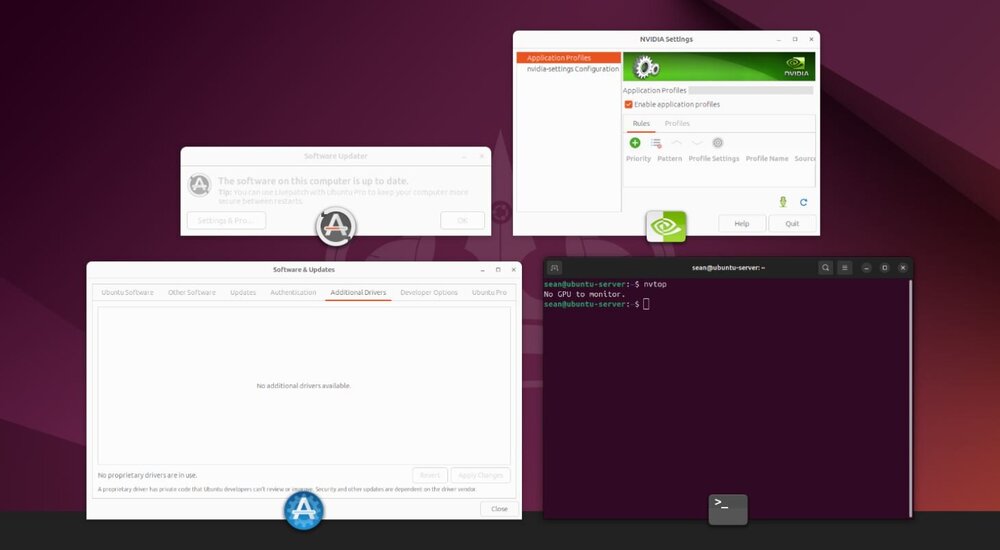
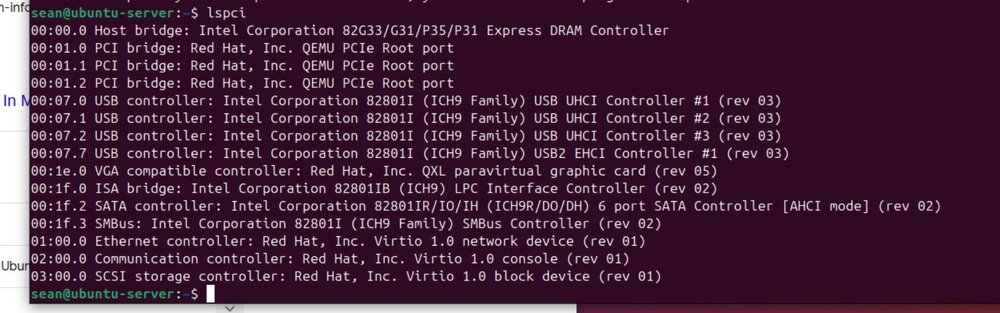
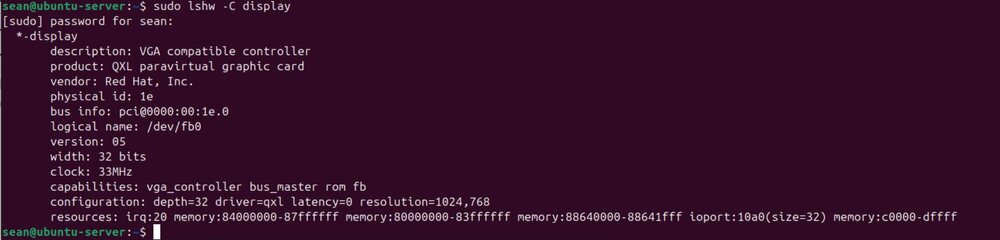
I get this error, but installed it anyways. The rest of the install when will no errors. Still no GPU passed through.

-
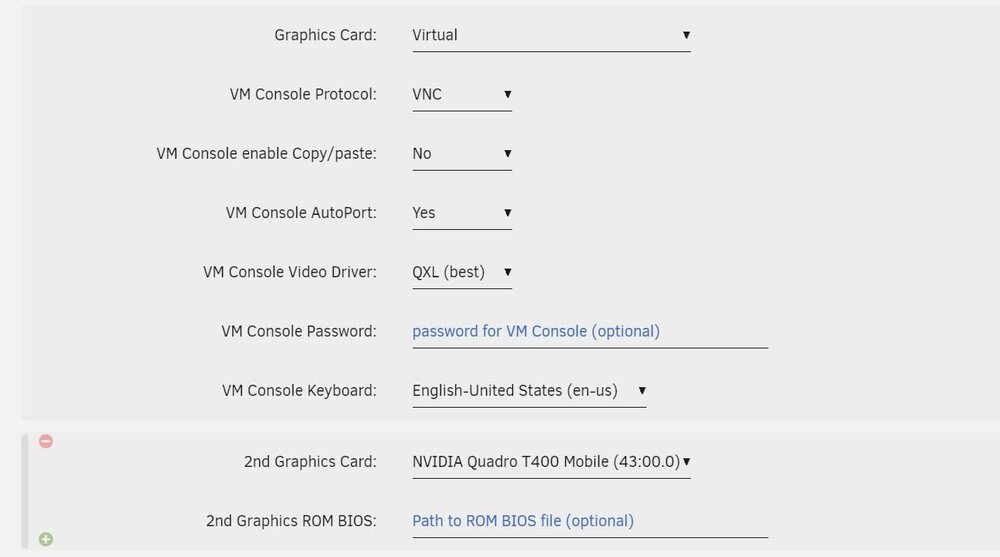
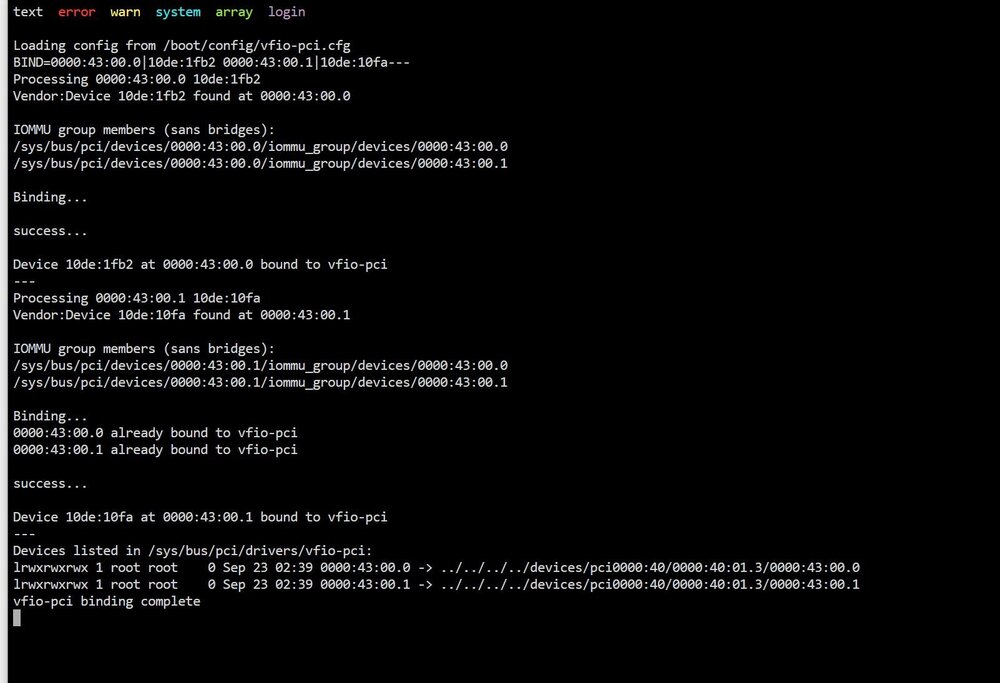
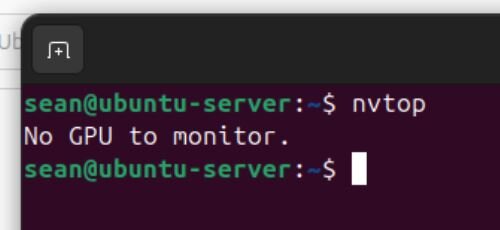
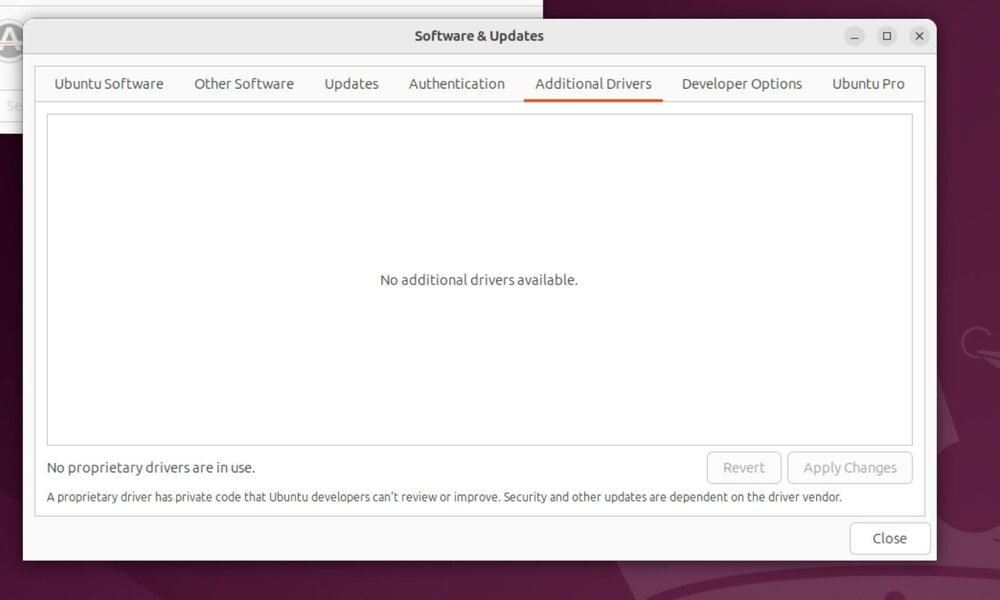
I use a Ubuntu VM as a plex server with a Nvidia T400 passed through for hardware encoding. All the way until yesterday passthrough worked just fine. I did the update and the VM is no longer seeing my GPU. I went through all my setting to see if there is anything obvious but I couldn't find anything. I am not a well versed linux user and pretty much google and copy/paste what I find. I have found some forums that others have lost passthrough to VMs but I believe that they are running ubuntu as the main OS and not the VM like I am.

-
Thanks, I don't get on my server very often. So when I got on yesterday half of my shares that should have moved to the array showed the yellow triangle for some of the files being stored on the cache drive. I started looking at the share settings and seeing how they had changed and the new descriptions on that page made it sound that the mover was working differently than before. It turns out that the mover was not deleting the empty folders off the cache drive causing unRAID to think I had files in the share stored on the cache drive. I do have shares that I use in different ways I have shares that are cache only, prefer cache, use cache then write to array, and write directly to array. Just wanted to make sure that the settings are correct. I don't see why they needed to change the setting from the old way to the new way. They could have used the old terminology and just added a drop down menu to select what cache pool to use.
-
So if I want my temp video folder to be cache prefered where if I am copying a lot to the cache drive to a share that is Cache only and it gets filled up and when the mover starts it will move files from the cache drive to the array to free up some space. And once there is space back on the cache drive the mover will move the temp video files from the array to the cache drive. Would I use these settings? Primary = Cache Secondary = Array mover = Array --> Cache
-
This is right from the shares page the way it is described is like what used to be called "cache prefered."
-
I have my mover scheduled to run at midnight every day will all files on the cache drive move from the primary storage to the secondary storage at that time? What is stated on the shares page on my unRAID server makes me think it will not move till there is no room left on the cache drive.
-
I'm a little confused with the new primary and secondary storage and how the mover will work with these. In unRAID it states this Does this still work the same way it used to? I want new files to be written to the cache drive then when the mover gets invoked the files get written to the array and stay there. The way I read the new descriptions it sounds like you pick where you want the files stored primarily and moved back and forth between primary and secondary based on disk space. This sounds like the old "Prefer Cache", where the files are stored on the cache drive unless the cache is full then moves to array, then when there is room on the cache drive again it moves back.
-
I have been searching for a way to enable a faster virtual network connection between my Ubuntu VM and my unRAID server than the 1gig connection that it is currently using. All my searches either are not for VMs or for windows or for how to pass through a network card. Maybe I'm just searching the wrong terms. When I set up my windows VM it just worked as a 10g connection. If a faster than 10g connection is possible that would be better as I am using nvme drives for my VMs and Cache drive.
-
I want to install a docker that is not in the community apps. It is the Floatplane downloader. Sadly I can not find the instructions on how to actually install it even tho there is a link to a wiki for installation instructions and they just seam to be a guide on how to set it up after it is installed. I left a message on the creators form post over a month ago and never got a response. If someone here can give me some help that would be great. https://hub.docker.com/r/inrix/floatplane-downloader https://linustechtips.com/topic/859522-floatplane-downloader-plex-with-code-guide/ I have set it up using the windows app but I can't seem to get it running with windows task scheduler and would really prefer it to be in a docker.
-
I have a few 10 gigabit network cards and would like to have my unRAID server act as a network switch. I have seen a few posts on how to have a 10 gig connection between the PC and server but those wanted to setup another subnet. I want to keep it all one sudnet and make sure my router can assign ip addresses to devices connected to the server. Setting up a docker or VM to run something like PFsense or opnsense but not a router but something that may be stripped down so it is not bloated with router features I will not use and to only act as a switch would work
-
I am finishing up my testing phase of my surveillance set up and would like to know if a purple drive aka surveillance drive would be appropriate for a recording to from a docker. These drives were ment to be placed in a standalone NVR or DVR. Will Shinobi record data in the same way or close enough for it not to matter? My cameras have a two lower resolution sub streams available to record from and my plan was to use a purple drive to do 1080p 24hr recording and save 4k motion detection saved to the array via a cache drive. Would using a purple drive be beneficial over a NAS drive they are about the same price? Sent from my LE2125 using Tapatalk
-
I am currently using unbalance to move all the data off the disks
-
Thanks. I was trying to avoid rebuilding the parity, I don't have anything really important on the server I'll just make sure I have a backup of the stuff I'd rather not lose just incase. Too bad there isn't a just a button to remove a drive an unraid would just redistribute the data for you then remove it. I've been wanting that since v4.7
-
I am getting ready to shrink two drives out of my array and was reading through the wiki and I have a question. this is the first step. I am constantly having new data written to my server how do I prevent new data from being written to the drive I am trying to clear and remove? Because one of the later steps says I am removing two 6TB drives in total, I saw that you can only remove one at a time witch is fine. My issue is that a clear takes a very long time to clear and I can't have my server down for that amount of time. What do I need to do to make sure the dive that I am clearing does not get accessed or written to?
-
Thanks, I didn't even think to disable the VM manager. Once I did that I was able to change it.
-
Currently my libvirt.img is stored in, /mnt/user/system/libvirt/libvirt.img I would like to move it to my dedicated virtual machine SSD. /mnt/disks/Virtual_Machines/libvirt/libvert.img
-
I was able to install speedtest and preclear using the app installer.
-
I am running unRAID 6.5.3 and I am trying to install unBALANCE from the Comm. Apps. but I get this error. I also get the error when go through plugins > install plugin manually. plugin: installing: https://raw.githubusercontent.com/jbrodriguez/unraid/master/plugins/unbalance.plg plugin: downloading https://raw.githubusercontent.com/jbrodriguez/unraid/master/plugins/unbalance.plg plugin: downloading: https://raw.githubusercontent.com/jbrodriguez/unraid/master/plugins/unbalance.plg ... done ----------------------------------------------------------- unBALANCE has been installed. Copyright (c) Juan B. Rodriguez Version: v2018.06.05 ----------------------------------------------------------- plugin: unable to create file: /tmp/unbalance-chkconf Updating Support Links
-
+1
-
I just tried creating a new VM and get the same error. Also I tried editing the current VM using the gui VM setup wizard and same error. I suspect something happened with my flash drive. Should I try copying over a fresh copy of unraid or is there another option?
-
I can't make any changes by editing the xml after I got the error. I'll try editing the VM with the Web gui by changing one of the drop down opinions and see if that will change the xml. I have not tried creating a new VM yet.
-
I was using the Web gui, but like I said I have made other changes to the xml recently without issue. What is the domain.img?
-
0a:00.0 Multimedia controller: Philips Semiconductors SAA7164 (rev 81) Here is my XML file I am trying to edit <domain type='kvm'> <name>Windows</name> <uuid>79bf8325-47e9-8d99-4794-5149debe8f0c</uuid> <metadata> <vmtemplate name="Custom" icon="windows.png" os="windows"/> </metadata> <memory unit='KiB'>8388608</memory> <currentMemory unit='KiB'>8388608</currentMemory> <memoryBacking> <nosharepages/> <locked/> </memoryBacking> <vcpu placement='static'>1</vcpu> <cputune> <vcpupin vcpu='0' cpuset='0'/> </cputune> <os> <type arch='x86_64' machine='pc-i440fx-2.3'>hvm</type> </os> <features> <acpi/> <apic/> <hyperv> <relaxed state='on'/> <vapic state='on'/> <spinlocks state='on' retries='8191'/> </hyperv> </features> <cpu mode='host-passthrough'> <topology sockets='1' cores='1' threads='1'/> </cpu> <clock offset='localtime'> <timer name='hypervclock' present='yes'/> <timer name='hpet' present='no'/> </clock> <on_poweroff>destroy</on_poweroff> <on_reboot>restart</on_reboot> <on_crash>restart</on_crash> <devices> <emulator>/usr/bin/qemu-system-x86_64</emulator> <disk type='file' device='disk'> <driver name='qemu' type='raw' cache='writeback'/> <source file='/mnt/cache/vdisks/Windows 8.1/win81.img'/> <target dev='hdc' bus='virtio'/> <boot order='1'/> <address type='pci' domain='0x0000' bus='0x00' slot='0x05' function='0x0'/> </disk> <controller type='usb' index='0'> <address type='pci' domain='0x0000' bus='0x00' slot='0x01' function='0x2'/> </controller> <controller type='pci' index='0' model='pci-root'/> <controller type='virtio-serial' index='0'> <address type='pci' domain='0x0000' bus='0x00' slot='0x04' function='0x0'/> </controller> <interface type='bridge'> <mac address='52:54:00:02:79:19'/> <source bridge='br0'/> <model type='virtio'/> <address type='pci' domain='0x0000' bus='0x00' slot='0x03' function='0x0'/> </interface> <serial type='pty'> <target port='0'/> </serial> <console type='pty'> <target type='serial' port='0'/> </console> <channel type='unix'> <source mode='bind' path='/var/lib/libvirt/qemu/channel/target/Windows.org.qemu.guest_agent.0'/> <target type='virtio' name='org.qemu.guest_agent.0'/> <address type='virtio-serial' controller='0' bus='0' port='1'/> </channel> <input type='tablet' bus='usb'/> <input type='mouse' bus='ps2'/> <input type='keyboard' bus='ps2'/> <graphics type='vnc' port='-1' autoport='yes' websocket='-1' listen='0.0.0.0' keymap='en-us'> <listen type='address' address='0.0.0.0'/> </graphics> <video> <model type='vmvga' vram='16384' heads='1'/> <address type='pci' domain='0x0000' bus='0x00' slot='0x02' function='0x0'/> </video> <memballoon model='virtio'> <address type='pci' domain='0x0000' bus='0x00' slot='0x06' function='0x0'/> </memballoon> <hostdev mode='subsystem' type='pci' managed='yes'> <driver name='vfio'/> <source> <address domain='0x0000' bus='0x0a' slot='0x00' function='0x0'/> </source> </hostdev> </devices> </domain> My problem is that I can not save the file. What I don't understand is that I was able to edit it in the past.


