





fka
Members
-
Joined
-
610.43.02 seems to be back to working fine for me
-
Disabled hotplug for the onboard ports and now only showing Bad Enable SATA link power management for host0 Bad Enable SATA link power management for host15 Bad Enable SATA link power management for host3 Bad Enable SATA link power management for host14 Bad Enable SATA link power management for host1 Bad Enable SATA link power management for host2Which are the dummy ports dmesg | grep -E "ATA-[0-9]|ata[0-9]" [ 0.942384] ata1: DUMMY [ 0.942385] ata2: DUMMY [ 0.942385] ata3: DUMMY [ 0.942386] ata4: DUMMY ----------------------->> [ 0.957202] ata15: DUMMY [ 0.957203] ata16: DUMMYThanks for your help
-
Hotplug is enabled for those ports. I'll try disabling I did attempt to mask the onboard also but it didn't work. I *edit* may *edit* have got something wrong
-
I didn't read the link. I should have read the link 😁 However, I still have tee: /sys/class/scsi_host/host0/link_power_management_policy: Operation not supported tee: /sys/class/scsi_host/host1/link_power_management_policy: Operation not supported tee: /sys/class/scsi_host/host14/link_power_management_policy: Operation not supported tee: /sys/class/scsi_host/host15/link_power_management_policy: Operation not supported tee: /sys/class/scsi_host/host2/link_power_management_policy: Operation not supported tee: /sys/class/scsi_host/host3/link_power_management_policy: Operation not supported tee: /sys/class/scsi_host/host4/link_power_management_policy: Operation not supported tee: /sys/class/scsi_host/host5/link_power_management_policy: Operation not supported tee: /sys/class/scsi_host/host6/link_power_management_policy: Operation not supported tee: /sys/class/scsi_host/host7/link_power_management_policy: Operation not supported5, 6, 7 and 8 are on the MB controller not the ASM1166 [ 0.942392] ata5: SATA max UDMA/133 abar m2048@0x82c02000 port 0x82c02300 irq 128 lpm-pol 1 ext [ 0.942394] ata6: SATA max UDMA/133 abar m2048@0x82c02000 port 0x82c02380 irq 128 lpm-pol 1 ext [ 0.942397] ata7: SATA max UDMA/133 abar m2048@0x82c02000 port 0x82c02400 irq 128 lpm-pol 1 ext [ 0.942399] ata8: SATA max UDMA/133 abar m2048@0x82c02000 port 0x82c02480 irq 128 lpm-pol 1 extOnly 1,2,3,4,15,16 show as DUMMY dmesg | grep -E "ATA-[0-9]|ata[0-9]" [ 0.942384] ata1: DUMMY [ 0.942385] ata2: DUMMY [ 0.942385] ata3: DUMMY [ 0.942386] ata4: DUMMY ----------------------->> [ 0.957202] ata15: DUMMY [ 0.957203] ata16: DUMMYI could be wrong but it appears I still have no power management for drives on the onboard controller
-
Thanks for your reply For your ASM1166 have you followed this so ASPM is enabled? https://wireless.docs.kernel.org/en/latest/en/users/documentation/aspm.html Also ref https://forums.unraid.net/topic/98070-reduce-power-consumption-with-powertop/page/41/#findComment-1518456 Just wondering why we'd need to use "ahci.mask_port_ext=XXXXXXXXX" if the card has native ASPM enabled? Also my "tee: /sys/class/scsi_host/host0/link_power_management_policy: Operation not supported" are for all drives including those connected to scsi hosts on the MB?? For your unused/ dummy scsi hosts just enable link power management for your populated hosts as per the first post # Enable SATA link power management (this skips SATA host3 and host4) echo med_power_with_dipm | tee /sys/class/scsi_host/host1/link_power_management_policy echo med_power_with_dipm | tee /sys/class/scsi_host/host2/link_power_management_policy echo med_power_with_dipm | tee /sys/class/scsi_host/host5/link_power_management_policy echo med_power_with_dipm | tee /sys/class/scsi_host/host6/link_power_management_policy
-
My power saving settings have been working fine for years but recently I see this for all scsi hosts root@myunraid:~# echo med_power_with_dipm | tee /sys/class/scsi_host/host*/link_power_management_policy med_power_with_dipm tee: /sys/class/scsi_host/host0/link_power_management_policy: Operation not supported tee: /sys/class/scsi_host/host1/link_power_management_policy: Operation not supported tee: /sys/class/scsi_host/host10/link_power_management_policy: Operation not supported tee: /sys/class/scsi_host/host11/link_power_management_policy: Operation not supported tee: /sys/class/scsi_host/host12/link_power_management_policy: Operation not supported tee: /sys/class/scsi_host/host13/link_power_management_policy: Operation not supported tee: /sys/class/scsi_host/host14/link_power_management_policy: Operation not supported tee: /sys/class/scsi_host/host15/link_power_management_policy: Operation not supported tee: /sys/class/scsi_host/host16/link_power_management_policy: Operation not supported tee: /sys/class/scsi_host/host17/link_power_management_policy: Operation not supported tee: /sys/class/scsi_host/host18/link_power_management_policy: Operation not supported tee: /sys/class/scsi_host/host19/link_power_management_policy: Operation not supported tee: /sys/class/scsi_host/host2/link_power_management_policy: Operation not supported tee: /sys/class/scsi_host/host20/link_power_management_policy: Operation not supported tee: /sys/class/scsi_host/host21/link_power_management_policy: Operation not supported tee: /sys/class/scsi_host/host22/link_power_management_policy: Operation not supported tee: /sys/class/scsi_host/host23/link_power_management_policy: Operation not supported tee: /sys/class/scsi_host/host24/link_power_management_policy: Operation not supported tee: /sys/class/scsi_host/host25/link_power_management_policy: Operation not supported tee: /sys/class/scsi_host/host26/link_power_management_policy: Operation not supported tee: /sys/class/scsi_host/host27/link_power_management_policy: Operation not supported tee: /sys/class/scsi_host/host28/link_power_management_policy: Operation not supported tee: /sys/class/scsi_host/host29/link_power_management_policy: Operation not supported tee: /sys/class/scsi_host/host3/link_power_management_policy: Operation not supported tee: /sys/class/scsi_host/host30/link_power_management_policy: Operation not supported tee: /sys/class/scsi_host/host31/link_power_management_policy: Operation not supported tee: /sys/class/scsi_host/host32/link_power_management_policy: Operation not supported tee: /sys/class/scsi_host/host33/link_power_management_policy: Operation not supported tee: /sys/class/scsi_host/host34/link_power_management_policy: Operation not supported tee: /sys/class/scsi_host/host35/link_power_management_policy: Operation not supported tee: /sys/class/scsi_host/host36/link_power_management_policy: Operation not supported tee: /sys/class/scsi_host/host37/link_power_management_policy: Operation not supported tee: /sys/class/scsi_host/host38/link_power_management_policy: Operation not supported tee: /sys/class/scsi_host/host39/link_power_management_policy: Operation not supported tee: /sys/class/scsi_host/host4/link_power_management_policy: Operation not supported tee: /sys/class/scsi_host/host5/link_power_management_policy: Operation not supported tee: /sys/class/scsi_host/host6/link_power_management_policy: Operation not supported tee: /sys/class/scsi_host/host7/link_power_management_policy: Operation not supported tee: /sys/class/scsi_host/host8/link_power_management_policy: Operation not supported tee: /sys/class/scsi_host/host9/link_power_management_policy: Operation not supportedBar OS updates, currently 7.3.0, nothing has changed #!/bin/bash # Start the Management Utility /usr/local/sbin/emhttp cp /boot/config/sensor-quirk /etc/sensors.d #Start nvidia-persistenced nvidia-persistenced #ASPM fix for Aquantia AQC100 sudo setpci -s 00:1c.0 0x50.B=0x43 sudo setpci -s 04:00.0 0x50.B=0x43 #ASPM fix for Realtek RTL8125 sudo setpci -s 00:1d.0 0x50.B=0x43 sudo setpci -s 05:00.0 0x80.B=0x43 #powertop auto tune #powertop --auto-tune &>/dev/null # ------------------------------------------------- # powertop tweaks # ------------------------------------------------- # Enable SATA link power management echo med_power_with_dipm | tee /sys/class/scsi_host/host*/link_power_management_policy # Runtime PM for I2C Adapter (i915 gmbus dpb) #echo auto | tee /sys/bus/i2c/devices/i2c-*/device/power/control # Autosuspend for USB device echo auto | tee /sys/bus/usb/devices/*/power/control # Runtime PM for disk echo auto | tee /sys/block/sd*/device/power/control # Runtime PM for PCI devices echo auto | tee /sys/bus/pci/devices/????:??:??.?/power/control # Runtime PM for ATA devices echo auto | tee /sys/bus/pci/devices/????:??:??.?/ata*/power/control ASPM is all good for my ASM1166 sata controller lspci -vv | awk '/ASPM/{print $0}' RS= | grep --color -P '(^[a-z0-9:.]+|ASPM )' 00:01.0 PCI bridge: Intel Corporation 12th Gen Core Processor PCI Express x16 Controller #1 (rev 05) (prog-if 00 [Normal decode]) LnkCap: Port #2, Speed 32GT/s, Width x16, ASPM L0s L1, Exit Latency L0s <4us, L1 <16us LnkCtl: ASPM L1 Enabled; RCB 64 bytes, LnkDisable- CommClk+ 00:06.0 PCI bridge: Intel Corporation 12th Gen Core Processor PCI Express x4 Controller #0 (rev 05) (prog-if 00 [Normal decode]) LnkCap: Port #5, Speed 16GT/s, Width x4, ASPM L0s L1, Exit Latency L0s <4us, L1 <16us LnkCtl: ASPM L0s L1 Enabled; RCB 64 bytes, LnkDisable- CommClk+ 00:1a.0 PCI bridge: Intel Corporation Raptor Lake PCI Express Root Port #25 (rev 11) (prog-if 00 [Normal decode]) LnkCap: Port #25, Speed 16GT/s, Width x4, ASPM L1, Exit Latency L1 <64us LnkCtl: ASPM L1 Enabled; RCB 64 bytes, LnkDisable- CommClk+ 00:1c.0 PCI bridge: Intel Corporation Raptor Lake PCI Express Root Port #1 (rev 11) (prog-if 00 [Normal decode]) LnkCap: Port #1, Speed 8GT/s, Width x4, ASPM L1, Exit Latency L1 <64us LnkCtl: ASPM L0s L1 Enabled; RCB 64 bytes, LnkDisable- CommClk+ 00:1d.0 PCI bridge: Intel Corporation Raptor Lake PCI Express Root Port #15 (rev 11) (prog-if 00 [Normal decode]) LnkCap: Port #15, Speed 16GT/s, Width x1, ASPM L1, Exit Latency L1 <64us LnkCtl: ASPM L0s L1 Enabled; RCB 64 bytes, LnkDisable- CommClk+ 01:00.0 VGA compatible controller: NVIDIA Corporation AD107 [GeForce RTX 4060] (rev a1) (prog-if 00 [VGA controller]) LnkCap: Port #0, Speed 16GT/s, Width x8, ASPM L1, Exit Latency L1 <4us LnkCtl: ASPM L1 Enabled; RCB 64 bytes, LnkDisable- CommClk+ 01:00.1 Audio device: NVIDIA Corporation AD107 High Definition Audio Controller (rev a1) (prog-if 00 [HDA compatible]) LnkCap: Port #0, Speed 16GT/s, Width x8, ASPM L1, Exit Latency L1 <4us LnkCtl: ASPM L1 Enabled; RCB 64 bytes, LnkDisable- CommClk+ 02:00.0 SATA controller: ASMedia Technology Inc. ASM1166 Serial ATA Controller (rev 02) (prog-if 01 [AHCI 1.0]) LnkCap: Port #0, Speed 8GT/s, Width x2, ASPM L0s L1, Exit Latency L0s <4us, L1 <64us LnkCtl: ASPM L0s L1 Enabled; RCB 64 bytes, LnkDisable- CommClk+ 03:00.0 Non-Volatile memory controller: Phison Electronics Corporation E18 PCIe4 NVMe Controller (rev 01) (prog-if 02 [NVM Express]) LnkCap: Port #0, Speed 16GT/s, Width x4, ASPM L1, Exit Latency L1 <64us LnkCtl: ASPM L1 Enabled; RCB 64 bytes, LnkDisable- CommClk+ 04:00.0 Ethernet controller: Aquantia Corp. AQtion AQC100 NBase-T/IEEE 802.3an Ethernet Controller [Atlantic 10G] (rev 02) pcilib: LnkCap: Port #0, Speed 8GT/s, Width x4, ASPM L0s L1, Exit Latency L0s unlimited, L1 unlimited sysfs_read_vpd: read failed: No such device LnkCtl: ASPM L0s L1 Enabled; RCB 64 bytes, LnkDisable- CommClk+ 05:00.0 Ethernet controller: Realtek Semiconductor Co., Ltd. RTL8125 2.5GbE Controller (rev 05) LnkCap: Port #0, Speed 5GT/s, Width x1, ASPM L0s L1, Exit Latency L0s unlimited, L1 <64us LnkCtl: ASPM L0s L1 Enabled; RCB 64 bytes, LnkDisable- CommClk+ Any ideas would be appreciated Thanks myunraid-diagnostics-20260513-2317.zip
-
See here. Seems this latest driver 595.58.03 is a fault https://forums.unraid.net/topic/98978-plugin-nvidia-driver/page/229/#findComment-1619400
-
For me this is driver version related, specifically since 595.58.03 so I assume it's an Nvidia problem not the driver plugin I have Intel integrated GPU along with Nvidia RTX 4060 The 4060 is passed to a gaming VM when it's started and handed back to host when the VM stops so power management persists by use of the following script in /etc/libvirt/hooks/qem #!/bin/bash if [ "$2" == "prepare" ] then killall nvidia-persistenced elif [ "$2" == "release" ] then nvidia-persistenced echo auto | tee /sys/bus/pci/devices/????:??:??.?/power/control fi exit 0 This worked fine until updating the driver to 595.58.03. At which point I started seeing the following when shutting the VM down. My limited understanding, the host was trying to take back control of the audio part of the 4060 before the VM had released it Apr 15 09:24:07 myunraid kernel: vfio-pci 0000:01:00.0: vgaarb: VGA decodes changed: olddecodes=io+mem,decodes=io+mem:owns=none Apr 15 09:24:07 myunraid kernel: nvidia 0000:01:00.0: vgaarb: VGA decodes changed: olddecodes=io+mem,decodes=none:owns=none Apr 15 09:24:07 myunraid kernel: [drm] [nvidia-drm] [GPU ID 0x00000100] Loading driver Apr 15 09:24:10 myunraid kernel: [drm] Initialized nvidia-drm 0.0.0 for 0000:01:00.0 on minor 2 Apr 15 09:24:10 myunraid kernel: nvidia 0000:01:00.0: vgaarb: deactivate vga console Apr 15 09:24:10 myunraid kernel: fbcon: nvidia-drmdrmfb (fb0) is primary device Apr 15 09:24:10 myunraid kernel: BUG: kernel NULL pointer dereference, address: 000000000000001c Apr 15 09:24:10 myunraid kernel: #PF: supervisor read access in kernel mode Apr 15 09:24:10 myunraid kernel: #PF: error_code(0x0000) - not-present page Apr 15 09:24:10 myunraid kernel: PGD 0 P4D 0 Apr 15 09:24:10 myunraid kernel: Oops: Oops: 0000 [#1] PREEMPT SMP NOPTI Apr 15 09:24:10 myunraid kernel: CPU: 7 UID: 0 PID: 2118002 Comm: qemu-event Tainted: P U O 6.12.54-Unraid #1 Apr 15 09:24:10 myunraid kernel: Tainted: P]=PROPRIETARY_MODULE, [U]=USER, [O]=OOT_MODULE Apr 15 09:24:10 myunraid kernel: Hardware name: Micro-Star International Co., Ltd. MS-7E13/MAG B760M MORTAR WIFI II (MS-7E13), BIOS 1.B0 03/04/2026 Apr 15 09:24:10 myunraid kernel: RIP: 0010:nv_audio_dynamic_power+0x8f/0x110 [nvidia] Apr 15 09:24:10 myunraid kernel: Code: c0 74 7c f6 80 a4 01 00 00 10 75 73 48 8b 80 40 01 00 00 48 85 c0 74 67 48 8b 90 a8 01 00 00 48 05 a0 01 00 00 48 39 c2 74 55 <83> 7a 1c 03 75 10 48 8b 7a 20 48 83 bf 40 03 00 00 00 75 08 eb 3f Apr 15 09:24:10 myunraid kernel: RSP: 0018:ffffc9000b126b98 EFLAGS: 00010207 Apr 15 09:24:10 myunraid kernel: RAX: ffff8881404d39a0 RBX: 0000000000000000 RCX: ffff888101570bb8 Apr 15 09:24:10 myunraid kernel: RDX: 0000000000000000 RSI: 0000000000000000 RDI: ffff8881017fc100 Apr 15 09:24:10 myunraid kernel: RBP: ffff888161c85bf0 R08: ffff8881017fb000 R09: 00000000ffffffff Apr 15 09:24:10 myunraid kernel: R10: 00000000ffffffff R11: ffffffffa65b06a8 R12: ffff888161c85c50 Apr 15 09:24:10 myunraid kernel: R13: ffffffffa17c3dc0 R14: ffff888345c36820 R15: ffff888161c85d50 Apr 15 09:24:10 myunraid kernel: FS: 0000152e70eff6c0(0000) GS:ffff88885f5c0000(0000) knlGS:0000000000000000 ......... To remedy this I changed the hooks script to #!/bin/bash if [ "$2" == "prepare" ]; then killall nvidia-persistenced 2>/dev/null elif [ "$2" == "release" ]; then nvidia-persistenced fi exit 0and created /boot/config/modprobe.d/nvidia.conf containing "options nvidia NVreg DynamicPowerManagement=0x00" without "" And appended boot option in SysLinux Configuration "nvidia_drm.fbdev=0" without "" This worked fine when the VM was shutdown. However, when I attempt to stop all containers binhex-krusader (I think) was somehow holding onto the 4060 as below: Apr 22 17:00:28 myunraid kernel: [drm] Initialized nvidia-drm 0.0.0 for 0000:01:00.0 on minor 2 Apr 22 17:00:28 myunraid nvidia-persistenced: Started (37875) Apr 22 17:01:06 myunraid kernel: docker0: port 4(vethdb03243) entered disabled state Apr 22 17:01:06 myunraid kernel: veth88185cb: renamed from eth0 Apr 22 17:01:07 myunraid kernel: docker0: port 4(vethdb03243) entered disabled state Apr 22 17:01:07 myunraid kernel: vethdb03243 (unregistering): left allmulticast mode Apr 22 17:01:07 myunraid kernel: vethdb03243 (unregistering): left promiscuous mode Apr 22 17:01:07 myunraid kernel: docker0: port 4(vethdb03243) entered disabled state Apr 22 17:01:07 myunraid kernel: docker0: port 1(veth200eb14) entered disabled state Apr 22 17:01:07 myunraid kernel: vethb8b2976: renamed from eth0 Apr 22 17:01:07 myunraid kernel: docker0: port 1(veth200eb14) entered disabled state Apr 22 17:01:07 myunraid kernel: veth200eb14 (unregistering): left allmulticast mode Apr 22 17:01:07 myunraid kernel: veth200eb14 (unregistering): left promiscuous mode Apr 22 17:01:07 myunraid kernel: docker0: port 1(veth200eb14) entered disabled state Apr 22 17:01:09 myunraid kernel: veth9c6c9dd: renamed from eth0 Apr 22 17:01:09 myunraid kernel: docker0: port 3(vethcdc26e9) entered disabled state Apr 22 17:01:09 myunraid kernel: veth3146c42: renamed from eth0 Apr 22 17:01:09 myunraid kernel: docker0: port 3(vethcdc26e9) entered disabled state Apr 22 17:01:09 myunraid kernel: vethcdc26e9 (unregistering): left allmulticast mode Apr 22 17:01:09 myunraid kernel: vethcdc26e9 (unregistering): left promiscuous mode Apr 22 17:01:09 myunraid kernel: docker0: port 3(vethcdc26e9) entered disabled state Apr 22 17:01:10 myunraid kernel: br-ba13ce51d72c: port 4(vethadd7090) entered disabled state Apr 22 17:01:10 myunraid kernel: veth899b005: renamed from eth0 Apr 22 17:01:10 myunraid kernel: br-ba13ce51d72c: port 4(vethadd7090) entered disabled state Apr 22 17:01:10 myunraid kernel: vethadd7090 (unregistering): left allmulticast mode Apr 22 17:01:10 myunraid kernel: vethadd7090 (unregistering): left promiscuous mode Apr 22 17:01:10 myunraid kernel: br-ba13ce51d72c: port 4(vethadd7090) entered disabled state Apr 22 17:01:10 myunraid kernel: br-ba13ce51d72c: port 3(veth09f6b7d) entered disabled state Apr 22 17:01:10 myunraid kernel: veth8511e99: renamed from eth0 Apr 22 17:01:10 myunraid kernel: br-ba13ce51d72c: port 3(veth09f6b7d) entered disabled state Apr 22 17:01:10 myunraid kernel: veth09f6b7d (unregistering): left allmulticast mode Apr 22 17:01:10 myunraid kernel: veth09f6b7d (unregistering): left promiscuous mode Apr 22 17:01:10 myunraid kernel: br-ba13ce51d72c: port 3(veth09f6b7d) entered disabled state Apr 22 17:01:11 myunraid kernel: br-ba13ce51d72c: port 2(vethc9c0771) entered disabled state Apr 22 17:01:11 myunraid kernel: vetha24d22e: renamed from eth0 Apr 22 17:01:11 myunraid kernel: br-ba13ce51d72c: port 2(vethc9c0771) entered disabled state Apr 22 17:01:11 myunraid kernel: vethc9c0771 (unregistering): left allmulticast mode Apr 22 17:01:11 myunraid kernel: vethc9c0771 (unregistering): left promiscuous mode Apr 22 17:01:11 myunraid kernel: br-ba13ce51d72c: port 2(vethc9c0771) entered disabled state Apr 22 17:01:11 myunraid kernel: br-ba13ce51d72c: port 1(veth7559afd) entered disabled state Apr 22 17:01:11 myunraid kernel: vethe345a06: renamed from eth0 Apr 22 17:01:11 myunraid kernel: br-ba13ce51d72c: port 1(veth7559afd) entered disabled state Apr 22 17:01:11 myunraid kernel: veth7559afd (unregistering): left allmulticast mode Apr 22 17:01:11 myunraid kernel: veth7559afd (unregistering): left promiscuous mode Apr 22 17:01:11 myunraid kernel: br-ba13ce51d72c: port 1(veth7559afd) entered disabled state Apr 22 17:01:11 myunraid kernel: Oops: general protection fault, probably for non-canonical address 0x7369645f766564b6: 0000 [#1] PREEMPT SMP NOPTI Apr 22 17:01:11 myunraid kernel: CPU: 6 UID: 99 PID: 24821 Comm: Xvnc Tainted: P U O 6.12.54-Unraid #1 Apr 22 17:01:11 myunraid kernel: Tainted: [P]=PROPRIETARY_MODULE, [U]=USER, [O]=OOT_MODULE Apr 22 17:01:11 myunraid kernel: Hardware name: Micro-Star International Co., Ltd. MS-7E13/MAG B760M MORTAR WIFI II (MS-7E13), BIOS 1.B0 03/04/2026 Apr 22 17:01:11 myunraid kernel: RIP: 0010:_nv000022kms+0xaa/0xbb0 [nvidia_modeset] Apr 22 17:01:11 myunraid kernel: Code: 00 83 c1 01 48 05 78 0e 00 00 83 f9 04 75 bc be 01 00 00 00 bf 40 52 00 00 e8 32 02 f9 ff 49 89 c5 48 85 c0 0f 84 9e 05 00 00 <41> 8b 47 40 49 8d b5 20 0c 00 00 31 d2 45 31 f6 48 89 75 a8 41 89 Apr 22 17:01:11 myunraid kernel: RSP: 0000:ffffc90021f97960 EFLAGS: 00010282 Apr 22 17:01:11 myunraid kernel: RAX: ffffc90000c56008 RBX: ffff8881c6bdc000 RCX: 0000000000000000 Apr 22 17:01:11 myunraid kernel: RDX: 0000000000005248 RSI: 0000000000000000 RDI: ffffc90000c5b248 Apr 22 17:01:11 myunraid kernel: RBP: ffffc90021f979d0 R08: 000000000000000c R09: ffffc90000c56000 Apr 22 17:01:11 myunraid kernel: R10: 0000000000000006 R11: ffff888197974070 R12: ffffffffa06d7a80 Apr 22 17:01:11 myunraid kernel: R13: ffffc90000c56008 R14: 0000000000000000 R15: 7369645f76656476 Apr 22 17:01:11 myunraid kernel: FS: 0000000000000000(0000) GS:ffff88885f580000(0000) knlGS:0000000000000000 Apr 22 17:01:11 myunraid kernel: CS: 0010 DS: 0000 ES: 0000 CR0: 0000000080050033 Apr 22 17:01:11 myunraid kernel: CR2: 00001474ae97e6b0 CR3: 0000000005618002 CR4: 0000000000772ef0 Apr 22 17:01:11 myunraid kernel: PKRU: 55555554 Apr 22 17:01:11 myunraid kernel: Call Trace: Apr 22 17:01:11 myunraid kernel: <TASK> Apr 22 17:01:11 myunraid kernel: ? prep_new_page+0x32/0x50 Apr 22 17:01:11 myunraid kernel: ? get_page_from_freelist+0x803/0x950 Apr 22 17:01:11 myunraid kernel: ? nv_drm_atomic_apply_modeset_config+0x41a/0x570 [nvidia_drm] Apr 22 17:01:11 myunraid kernel: ? drm_atomic_check_only+0x6f3/0x820 [drm] Apr 22 17:01:11 myunraid kernel: ? nv_drm_atomic_state_alloc+0x1b/0x60 [nvidia_drm] Apr 22 17:01:11 myunraid kernel: ? lruvec_stat_mod_folio.constprop.0+0x10/0x20 Apr 22 17:01:11 myunraid kernel: ? drm_atomic_commit+0x6b/0xd0 [drm] Apr 22 17:01:11 myunraid kernel: ? __pfx___drm_printfn_info+0x10/0x10 [drm] Apr 22 17:01:11 myunraid kernel: ? __pfx___drm_printfn_info+0x10/0x10 [drm] Apr 22 17:01:11 myunraid kernel: ? nv_drm_revoke_modeset_permission+0x1a0/0x220 [nvidia_drm] Apr 22 17:01:11 myunraid kernel: ? kmem_cache_free_bulk+0x197/0x1f0 Apr 22 17:01:11 myunraid kernel: ? nv_drm_master_drop+0x2f/0x1c0 [nvidia_drm] Apr 22 17:01:11 myunraid kernel: ? __pfx_drm_gem_object_release_handle+0x10/0x10 [drm] Apr 22 17:01:11 myunraid kernel: ? drm_drop_master+0x18/0x30 [drm] Apr 22 17:01:11 myunraid kernel: ? drm_master_release+0x57/0xa0 [drm] Apr 22 17:01:11 myunraid kernel: ? drm_file_free+0x182/0x1e0 [drm] Apr 22 17:01:11 myunraid kernel: ? drm_release+0x5c/0xa0 [drm] Apr 22 17:01:11 myunraid kernel: ? __fput+0x10a/0x1d0 Apr 22 17:01:11 myunraid kernel: ? task_work_run+0x68/0x80 Apr 22 17:01:11 myunraid kernel: ? do_exit+0x36f/0x8d0 Apr 22 17:01:11 myunraid kernel: ? mtree_range_walk+0xf3/0x170 Apr 22 17:01:11 myunraid kernel: ? do_group_exit+0x79/0x80 Apr 22 17:01:11 myunraid kernel: ? get_signal+0x617/0x660 Apr 22 17:01:11 myunraid kernel: ? arch_do_signal_or_restart+0x28/0x1d0 Apr 22 17:01:11 myunraid kernel: ? fatal_signal_pending+0x9/0x30 Apr 22 17:01:11 myunraid kernel: ? fault_signal_pending+0x1b/0x60 Apr 22 17:01:11 myunraid kernel: ? do_user_addr_fault+0x2c0/0x490 Apr 22 17:01:11 myunraid kernel: ? irqentry_exit_to_user_mode+0x49/0x80 Apr 22 17:01:11 myunraid kernel: ? asm_exc_page_fault+0x22/0x30 Apr 22 17:01:11 myunraid kernel: </TASK> Apr 22 17:01:11 myunraid kernel: Modules linked in: xt_CHECKSUM ipt_REJECT nf_reject_ipv4 vhost_net tun vhost vhost_iotlb tap ipvlan br_netfilter nf_conntrack_netlink xt_nat xt_tcpudp veth xt_conntrack xt_MASQUERADE xfrm_user xfrm_algo ip6table_nat iptable_nat nf_nat nvidia_uvm(PO) af_packet nfnetlink dm_crypt dm_mod md_mod zfs(PO) spl(O) ntfs3 tcp_diag inet_diag i915(O) intel_gtt iptable_mangle xt_addrtype iptable_raw xt_comment xt_connmark nf_conntrack nf_defrag_ipv6 nf_defrag_ipv4 xt_mark ip6table_mangle ip6table_raw wireguard curve25519_x86_64 libcurve25519_generic libchacha20poly1305 chacha_x86_64 poly1305_x86_64 ip6_udp_tunnel udp_tunnel libchacha ip6table_filter ip6_tables iptable_filter ip_tables x_tables bridge stp llc atlantic r8125(O) intel_rapl_msr intel_rapl_common iosf_mbi x86_pkg_temp_thermal intel_powerclamp coretemp kvm_intel kvm crct10dif_pclmul crc32_pclmul crc32c_intel ghash_clmulni_intel sha512_ssse3 sha256_ssse3 sha1_ssse3 aesni_intel crypto_simd cryptd rapl intel_cstate mei_pxp mei_hdcp iwlmvm nvidia_drm(PO) Apr 22 17:01:11 myunraid kernel: nvidia_modeset(PO) xe mac80211 btusb btrtl drm_gpuvm btbcm libarc4 btintel drm_exec nvidia(PO) iwlwifi gpu_sched drm_buddy bluetooth i2c_algo_bit drm_suballoc_helper drm_display_helper drm_ttm_helper ttm sr_mod input_leds drm_kms_helper ecdh_generic cdrom cfg80211 led_class ecc joydev drm intel_uncore wmi_bmof mxm_wmi i2c_i801 mei_me i2c_smbus mei rfkill agpgart i2c_core thermal fan video wmi backlight acpi_tad acpi_pad button [last unloaded: atlantic] Apr 22 17:01:11 myunraid kernel: ---[ end trace 0000000000000000 ]--- Apr 22 17:01:11 myunraid kernel: pstore: backend (efi_pstore) writing error (-28) Apr 22 17:01:11 myunraid kernel: RIP: 0010:_nv000022kms+0xaa/0xbb0 [nvidia_modeset] Apr 22 17:01:11 myunraid kernel: Code: 00 83 c1 01 48 05 78 0e 00 00 83 f9 04 75 bc be 01 00 00 00 bf 40 52 00 00 e8 32 02 f9 ff 49 89 c5 48 85 c0 0f 84 9e 05 00 00 <41> 8b 47 40 49 8d b5 20 0c 00 00 31 d2 45 31 f6 48 89 75 a8 41 89 Apr 22 17:01:11 myunraid kernel: RSP: 0000:ffffc90021f97960 EFLAGS: 00010282 Apr 22 17:01:11 myunraid kernel: RAX: ffffc90000c56008 RBX: ffff8881c6bdc000 RCX: 0000000000000000 Apr 22 17:01:11 myunraid kernel: RDX: 0000000000005248 RSI: 0000000000000000 RDI: ffffc90000c5b248 Apr 22 17:01:11 myunraid kernel: RBP: ffffc90021f979d0 R08: 000000000000000c R09: ffffc90000c56000 Apr 22 17:01:11 myunraid kernel: R10: 0000000000000006 R11: ffff888197974070 R12: ffffffffa06d7a80 Apr 22 17:01:11 myunraid kernel: R13: ffffc90000c56008 R14: 0000000000000000 R15: 7369645f76656476 Apr 22 17:01:11 myunraid kernel: FS: 0000000000000000(0000) GS:ffff88885f580000(0000) knlGS:0000000000000000 Apr 22 17:01:11 myunraid kernel: CS: 0010 DS: 0000 ES: 0000 CR0: 0000000080050033 Apr 22 17:01:11 myunraid kernel: CR2: 00001474ae97e6b0 CR3: 00000002aaf52006 CR4: 0000000000772ef0 Apr 22 17:01:11 myunraid kernel: PKRU: 55555554 Apr 22 17:01:11 myunraid kernel: Fixing recursive fault but reboot is needed! Apr 22 17:01:11 myunraid kernel: BUG: using smp_processor_id() in preemptible [00000000] code: Xvnc/24821 Apr 22 17:01:11 myunraid kernel: caller is __schedule+0x2d/0x760 Apr 22 17:01:11 myunraid kernel: CPU: 6 UID: 99 PID: 24821 Comm: Xvnc Tainted: P UD O 6.12.54-Unraid #1 Apr 22 17:01:11 myunraid kernel: Tainted: [P]=PROPRIETARY_MODULE, [U]=USER, [D]=DIE, [O]=OOT_MODULE Apr 22 17:01:11 myunraid kernel: Hardware name: Micro-Star International Co., Ltd. MS-7E13/MAG B760M MORTAR WIFI II (MS-7E13), BIOS 1.B0 03/04/2026 Apr 22 17:01:11 myunraid kernel: Call Trace: Apr 22 17:01:11 myunraid kernel: <TASK> Apr 22 17:01:11 myunraid kernel: dump_stack_lvl+0x47/0x70 Apr 22 17:01:11 myunraid kernel: check_preemption_disabled+0xb7/0xd0 Apr 22 17:01:11 myunraid kernel: __schedule+0x2d/0x760 Apr 22 17:01:11 myunraid kernel: ? _printk+0x58/0x80 Apr 22 17:01:11 myunraid kernel: do_task_dead+0x3e/0x40 Apr 22 17:01:11 myunraid kernel: make_task_dead+0xfc/0x110 Apr 22 17:01:11 myunraid kernel: rewind_stack_and_make_dead+0x16/0x20 Apr 22 17:01:11 myunraid kernel: RIP: 0033:0x1474aefff6c0 Apr 22 17:01:11 myunraid kernel: Code: Unable to access opcode bytes at 0x1474aefff696. Apr 22 17:01:11 myunraid kernel: RSP: 002b:00007ffcd73ac978 EFLAGS: 00010246 Apr 22 17:01:11 myunraid kernel: RAX: 00001474aefff6c0 RBX: 00001474b9f08fa8 RCX: 0000000000000001 Apr 22 17:01:11 myunraid kernel: RDX: 0000000000000003 RSI: 0000000000000000 RDI: 00001474b635dc00 Apr 22 17:01:11 myunraid kernel: RBP: 00007ffcd73ac9d0 R08: 00001474b635dc00 R09: 0000000000000007 Apr 22 17:01:11 myunraid kernel: R10: 000055dac13cbf80 R11: 1556005f37d461e2 R12: 000000000000096c Apr 22 17:01:11 myunraid kernel: R13: 0000000000000000 R14: 00001474b9f07680 R15: 000055dac13c83f0 Apr 22 17:01:11 myunraid kernel: </TASK> Apr 22 17:01:11 myunraid kernel: BUG: scheduling while atomic: Xvnc/24821/0x00000000 Apr 22 17:01:11 myunraid kernel: Modules linked in: xt_CHECKSUM ipt_REJECT nf_reject_ipv4 vhost_net tun vhost vhost_iotlb tap ipvlan br_netfilter nf_conntrack_netlink xt_nat xt_tcpudp veth xt_conntrack xt_MASQUERADE xfrm_user xfrm_algo ip6table_nat iptable_nat nf_nat nvidia_uvm(PO) af_packet nfnetlink dm_crypt dm_mod md_mod zfs(PO) spl(O) ntfs3 tcp_diag inet_diag i915(O) intel_gtt iptable_mangle xt_addrtype iptable_raw xt_comment xt_connmark nf_conntrack nf_defrag_ipv6 nf_defrag_ipv4 xt_mark ip6table_mangle ip6table_raw wireguard curve25519_x86_64 libcurve25519_generic libchacha20poly1305 chacha_x86_64 poly1305_x86_64 ip6_udp_tunnel udp_tunnel libchacha ip6table_filter ip6_tables iptable_filter ip_tables x_tables bridge stp llc atlantic r8125(O) intel_rapl_msr intel_rapl_common iosf_mbi x86_pkg_temp_thermal intel_powerclamp coretemp kvm_intel kvm crct10dif_pclmul crc32_pclmul crc32c_intel ghash_clmulni_intel sha512_ssse3 sha256_ssse3 sha1_ssse3 aesni_intel crypto_simd cryptd rapl intel_cstate mei_pxp mei_hdcp iwlmvm nvidia_drm(PO) Apr 22 17:01:11 myunraid kernel: nvidia_modeset(PO) xe mac80211 btusb btrtl drm_gpuvm btbcm libarc4 btintel drm_exec nvidia(PO) iwlwifi gpu_sched drm_buddy bluetooth i2c_algo_bit drm_suballoc_helper drm_display_helper drm_ttm_helper ttm sr_mod input_leds drm_kms_helper ecdh_generic cdrom cfg80211 led_class ecc joydev drm intel_uncore wmi_bmof mxm_wmi i2c_i801 mei_me i2c_smbus mei rfkill agpgart i2c_core thermal fan video wmi backlight acpi_tad acpi_pad button [last unloaded: atlantic] Apr 22 17:01:11 myunraid kernel: Preemption disabled at: Apr 22 17:01:11 myunraid kernel: [<0000000000000000>] 0x0 Apr 22 17:01:11 myunraid kernel: CPU: 6 UID: 99 PID: 24821 Comm: Xvnc Tainted: P UD O 6.12.54-Unraid #1 Apr 22 17:01:11 myunraid kernel: Tainted: [P]=PROPRIETARY_MODULE, [U]=USER, [D]=DIE, [O]=OOT_MODULE Apr 22 17:01:11 myunraid kernel: Hardware name: Micro-Star International Co., Ltd. MS-7E13/MAG B760M MORTAR WIFI II (MS-7E13), BIOS 1.B0 03/04/2026 Apr 22 17:01:11 myunraid kernel: Call Trace: Apr 22 17:01:11 myunraid kernel: <TASK> Apr 22 17:01:11 myunraid kernel: dump_stack_lvl+0x47/0x70 Apr 22 17:01:11 myunraid kernel: __schedule_bug+0x85/0xa0 Apr 22 17:01:11 myunraid kernel: __schedule+0x63/0x760 Apr 22 17:01:11 myunraid kernel: ? _printk+0x58/0x80 Apr 22 17:01:11 myunraid kernel: do_task_dead+0x3e/0x40 Apr 22 17:01:11 myunraid kernel: make_task_dead+0xfc/0x110 Apr 22 17:01:11 myunraid kernel: rewind_stack_and_make_dead+0x16/0x20 Apr 22 17:01:11 myunraid kernel: RIP: 0033:0x1474aefff6c0 Apr 22 17:01:11 myunraid kernel: Code: Unable to access opcode bytes at 0x1474aefff696. Apr 22 17:01:11 myunraid kernel: RSP: 002b:00007ffcd73ac978 EFLAGS: 00010246 Apr 22 17:01:11 myunraid kernel: RAX: 00001474aefff6c0 RBX: 00001474b9f08fa8 RCX: 0000000000000001 Apr 22 17:01:11 myunraid kernel: RDX: 0000000000000003 RSI: 0000000000000000 RDI: 00001474b635dc00 Apr 22 17:01:11 myunraid kernel: RBP: 00007ffcd73ac9d0 R08: 00001474b635dc00 R09: 0000000000000007 Apr 22 17:01:11 myunraid kernel: R10: 000055dac13cbf80 R11: 1556005f37d461e2 R12: 000000000000096c Apr 22 17:01:11 myunraid kernel: R13: 0000000000000000 R14: 00001474b9f07680 R15: 000055dac13c83f0 Apr 22 17:01:11 myunraid kernel: </TASK>Rolled the driver back to 590.48.01 and all is well in my world again I've attached diagnostics taken with each driver installed myunraid-diagnostics-20260422-1702-Nvidia595.58.03.zip myunraid-diagnostics-20260422-1647-Nvidia590.48.01 .zip
-
Recently experienced Kernel panics relating to the audio part of the GPU when the VM exited and the GPU was handed back to the host Apr 15 09:24:07 myunraid kernel: vfio-pci 0000:01:00.0: vgaarb: VGA decodes changed: olddecodes=io+mem,decodes=io+mem:owns=none Apr 15 09:24:07 myunraid kernel: nvidia 0000:01:00.0: vgaarb: VGA decodes changed: olddecodes=io+mem,decodes=none:owns=none Apr 15 09:24:07 myunraid kernel: [drm] [nvidia-drm] [GPU ID 0x00000100] Loading driver Apr 15 09:24:10 myunraid kernel: [drm] Initialized nvidia-drm 0.0.0 for 0000:01:00.0 on minor 2 Apr 15 09:24:10 myunraid kernel: nvidia 0000:01:00.0: vgaarb: deactivate vga console Apr 15 09:24:10 myunraid kernel: fbcon: nvidia-drmdrmfb (fb0) is primary device Apr 15 09:24:10 myunraid kernel: BUG: kernel NULL pointer dereference, address: 000000000000001c Apr 15 09:24:10 myunraid kernel: #PF: supervisor read access in kernel mode Apr 15 09:24:10 myunraid kernel: #PF: error_code(0x0000) - not-present page Apr 15 09:24:10 myunraid kernel: PGD 0 P4D 0 Apr 15 09:24:10 myunraid kernel: Oops: Oops: 0000 [#1] PREEMPT SMP NOPTI Apr 15 09:24:10 myunraid kernel: CPU: 7 UID: 0 PID: 2118002 Comm: qemu-event Tainted: P U O 6.12.54-Unraid #1 Apr 15 09:24:10 myunraid kernel: Tainted: P]=PROPRIETARY_MODULE, [U]=USER, [O]=OOT_MODULE Apr 15 09:24:10 myunraid kernel: Hardware name: Micro-Star International Co., Ltd. MS-7E13/MAG B760M MORTAR WIFI II (MS-7E13), BIOS 1.B0 03/04/2026 Apr 15 09:24:10 myunraid kernel: RIP: 0010:nv_audio_dynamic_power+0x8f/0x110 [nvidia] Apr 15 09:24:10 myunraid kernel: Code: c0 74 7c f6 80 a4 01 00 00 10 75 73 48 8b 80 40 01 00 00 48 85 c0 74 67 48 8b 90 a8 01 00 00 48 05 a0 01 00 00 48 39 c2 74 55 <83> 7a 1c 03 75 10 48 8b 7a 20 48 83 bf 40 03 00 00 00 75 08 eb 3f Apr 15 09:24:10 myunraid kernel: RSP: 0018:ffffc9000b126b98 EFLAGS: 00010207 Apr 15 09:24:10 myunraid kernel: RAX: ffff8881404d39a0 RBX: 0000000000000000 RCX: ffff888101570bb8 Apr 15 09:24:10 myunraid kernel: RDX: 0000000000000000 RSI: 0000000000000000 RDI: ffff8881017fc100 Apr 15 09:24:10 myunraid kernel: RBP: ffff888161c85bf0 R08: ffff8881017fb000 R09: 00000000ffffffff Apr 15 09:24:10 myunraid kernel: R10: 00000000ffffffff R11: ffffffffa65b06a8 R12: ffff888161c85c50 Apr 15 09:24:10 myunraid kernel: R13: ffffffffa17c3dc0 R14: ffff888345c36820 R15: ffff888161c85d50 Apr 15 09:24:10 myunraid kernel: FS: 0000152e70eff6c0(0000) GS:ffff88885f5c0000(0000) knlGS:0000000000000000 .........I've created /boot/config/modprobe.d/nvidia.conf containing "options nvidia NVreg DynamicPowerManagement=0x00" without "" I've appended boot option in SysLinux Configuration "nvidia_drm.fbdev=0" without "" Amended the hooks script to #!/bin/bash if [ "$2" == "prepare" ]; then killall nvidia-persistenced 2>/dev/null elif [ "$2" == "release" ]; then nvidia-persistenced fi exit 0Now all is well in the world :)
-
Actually the above didn't work too well. The shell_exec of nvidia-persistenced in /etc/libvirt/hooks/qemu kept a grip on the drive my libvirt.img resides on (cache) and prevented the array stopping, should I need it to. I had to killall nvidia-persistenced and umount /dev/loop3 as per losetup output Have ended up with this is script in /etc/libvirt/hooks/qemu.d/ directory. Which works well. nvidia-persistenced stops and starts when start/ stop a VM. GPU goes back to P8 when the VM is stopped. CPU C states never seem to recover though. CPU can drop to C6 after a reboot/ fresh start of unraid. After start/ stopping a VM, CPU only drops to C2. Not the end of the world.. #!/bin/bash if [ "$2" == "prepare" ] then killall nvidia-persistenced elif [ "$2" == "release" ] then nvidia-persistenced echo auto | tee /sys/bus/pci/devices/????:??:??.?/power/control fi exit 0
-
hookscript to kill/ start nvidia-persistenced when VM starts/ stops assume you have "nvidia-persistenced" in go file
-
Interestingly powertop shows the GPU as bad under tunables even though I can see it's in P8 after the VM closes. >> Bad VM writeback timeout Bad Runtime PM for I2C Adapter i2c-12 (NVIDIA i2c adapter 2 at 1:00.0) Bad Runtime PM for I2C Adapter i2c-14 (NVIDIA i2c adapter 4 at 1:00.0) Bad Runtime PM for I2C Adapter i2c-16 (NVIDIA i2c adapter 6 at 1:00.0) Bad Runtime PM for I2C Adapter i2c-13 (NVIDIA i2c adapter 3 at 1:00.0) Bad Runtime PM for I2C Adapter i2c-15 (NVIDIA i2c adapter 5 at 1:00.0) Bad Runtime PM for PCI Device NVIDIA Corporation AD107 High Definition Audio Controller Bad Runtime PM for PCI Device NVIDIA Corporation AD107 [GeForce RTX 4060] Have ended up with this to sort that out if ($argv[2] == 'prepare'){ shell_exec('date +"%b %d %H:%M:%S libvirt hook: killall nvidia-persistenced" >> /var/log/syslog'); shell_exec('killall nvidia-persistenced'); } if ($argv[2] == 'release' && $argv[3] == 'end'){ shell_exec('date +"%b %d %H:%M:%S libvirt hook: start nvidia-persistenced" >> /var/log/syslog'); shell_exec('nvidia-persistenced'); shell_exec('date +"%b %d %H:%M:%S libvirt hook: Runtime PM for PCI device" >> /var/log/syslog'); shell_exec('echo auto | tee /sys/bus/pci/devices/????:??:??.?/power/control'); }
-
Is there a cleaner way to do this i.e other than using killall? It works fine, just feel killall is a bit OTT <?php if ($argv[2] == 'prepare'){ shell_exec('date +"%b %d %H:%M:%S libvirt hook: killall nvidia-persistenced" >> /var/log/syslog'); shell_exec('killall nvidia-persistenced'); } if ($argv[2] == 'release' && $argv[3] == 'end'){ shell_exec('date +"%b %d %H:%M:%S libvirt hook: start nvidia-persistenced" >> /var/log/syslog'); shell_exec('nvidia-persistenced'); }
-
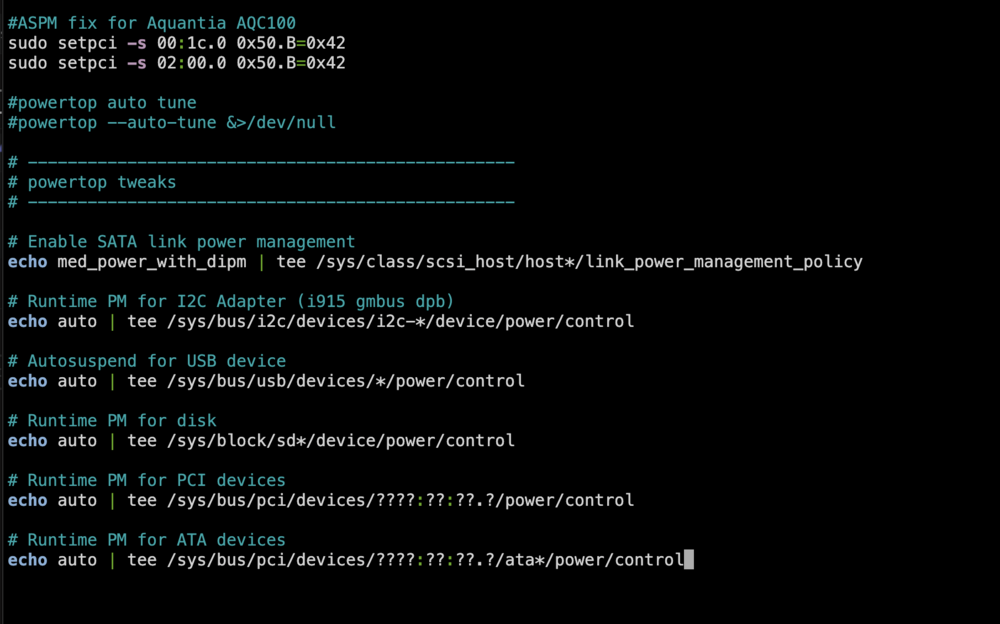
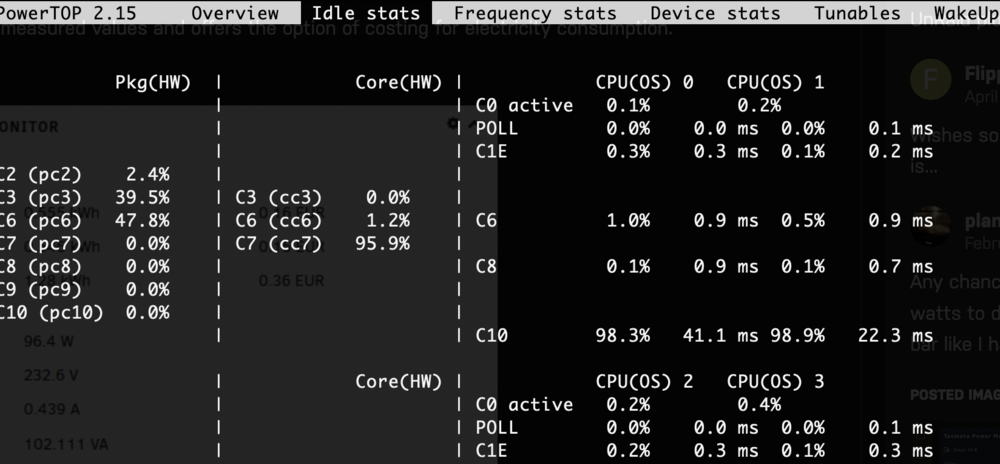
Great thread. Thank you! I managed to get aspm enabled for my Aquantia AQC100 10gbe card after I found this post 179082-asrock-n100m-aspm-enable-with-all-pci-slots-populated and followed this excellent guide it links to https://wireless.docs.kernel.org/en/latest/en/users/documentation/aspm.html This has my i5 12400 dropping to C6 which I'm more than happy with. Previously only got to C3. It's a busy machine so just happy to save a few $$ on the odd occasion it is idle. I need a pcie 3x2 or 2x4 card as I'm short or slots on my micro atx board. Struggled to find anything officially supporting IEEE 802.3az at a reasonable price and the 1.5w max power consumption on this card tickled my fancy. So more then please to get aspm working Please do not copy the "#ASPM fix for Aquantia AQC100" part of my go file. You need to follow the guide in the aspm documentation and work it out for your specific hardware. I've ended up with this Seems to be zero performance impact but continuing to monitor... .


-
It will automatically copy any new files from source to remote when it completes it's sleep period and re-runs the copy service. It doesn't continuously look for and auto detect new files and transfer them. What have you set in the container variable "RCLONE_SLEEP_PERIOD"? Default is 24h. i.e it runs the copy process once every 24hrs. You can set this to 1m for example and it will run the copy service every minute. However if you're local and remote have large number of files, despite nothing being copied if there are no new files, it will still run the post check which will take a long time to complete and use a lot of system resources. Thus isn't practical.



