





propman07
Members
-
Joined
-
Last visited
Everything posted by propman07
-
Update: Finally able to get the server back up and running. I installed the replacement nvme drive, and was finally able to get things back up and running. It looks like I probably lost my VMs, but I can re-create those. I did have some trouble logging into the server once I had the hardware replaced. It looks like the GUI does not like special characters in the password field. I had a "$" in my password, and I was unable to get it to save with that character in the password field. I removed it, and that seemed to be the fix. I'm running about 17 dockers for a total docker.img size of 17.6 GB. Thanks again to all that replied.
-
JorgeB- Thanks for the reply. I ran through that yesterday. I don't want to lose the other passwords, so I may try the second method shown to remove the characters in between the two colon characters. Thanks.
-
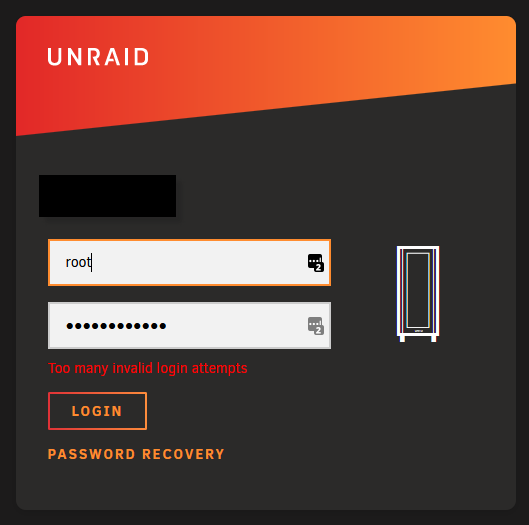
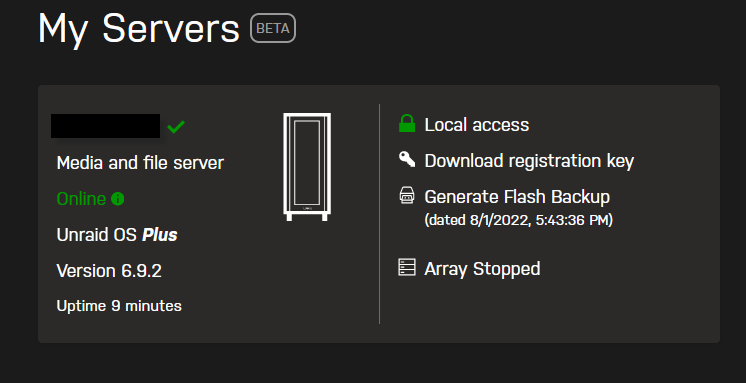
Here is where I am at. Installed new cache drive. Booted server. At login screen used username/password combination. Screen said they were invalid? Made a few more attempts only to now be locked out? I went through the My Servers page, and it shows the server is online, but I can't seem to login, even though I did not change my username/password settings prior to the cache drive failing.
-
JorgeB- Thanks....figured that was part of the issue. I'm working on installing a replacement. Obviously, I've got something incorrect with my config. I've noticed that some of the youtube videos on setting up the "rrs" have changed since I put the system together back in 2019. Since the appdata folder was on this drive, I take it that I'll have to re-configure all of my dockers once I get a new image created? I was running the CA Backup docker, but it looks like the last time I ran it was back in 2021. Maybe that's as good of a place to start as any. Thanks again for the reply.
-
JorgeB- Thanks for the help. I performed a reboot and started the array. It's currently going through a parity check, but here is the log as requested. dlvtower-diagnostics-20220730-1307.zip
-
Trurl- Thanks for helping to get things cleaned up, from a thread perspective. I was going to try to get the individual app settings from the docker page earlier today, but I tried to get to that page, and it is telling me that no dockers are installed. I went ahead and stopped the docker process. Also noted that I can access some of the shares on the unRAID server, but they appear to be read-only. Anyway....here is the attached diagnostic file. I plan on shutting down the server so that I can pull the failed drive (nvme) and install a new one which arrived earlier today. Thanks. tower-diagnostics-20220729-2037.zip
-
RobJ- Not sure where else to go for support....thought that was the intent of the forums. ChatNoir- Thanks for splitting my question to it's own thread....not sure where to find it.... JorgeB- I'd love to post the diagnostics....but don't want to break any more rules, and can't seem to find the new thread where asking for support / posting diagnostic log would be acceptable....so now I'm kind of stuck... Here is a link to another thread (*moderator edit* the threads have been merged.) that I started about an error I was getting in the unRAID GUI which I was informed that the cache drive had failed, and that the docker.img file was set to read only: https://forums.unraid.net/topic/126552-warning-mkdir-inputoutput-error-in-dockerclientphp-on-line-331/#comment-1153112
-
Hi- I've been having issues with my Unraid server, and I've come to learn that my cache drive is failing. I can still read some data off of it, and I've ordered a replacement drive. Is there a way to copy / clone the failing cache drive to the new cache drive? I'm using Unraid 6.9.2 and the failing cache drive is a Samsung_SSD_970_EVO_500GB. Thanks.
-
well that's not good. I checked the SMART log for the drive....it has failed. Any help in next steps to recover would be appreciated. Looking at replacement drives now so I can work on getting back up and running. So far, the system is still working as some of the dockers are still running....Plex is one that I use a lot....any advice on whether or not I should shut the system down to avoid further damage? Thanks.
-
diagnostic file attached. tower-diagnostics-20220728-1447.zip
-
Hello Running Unraid 6.9.2 I'm getting this error on my docker page for several of my dockers: Warning: mkdir(): Input/output error in /usr/local/emhttp/plugins/dynamix.docker.manager/include/DockerClient.php on line 331 Tried to update plugins, but that doesn't seem to have helped the issue any. Looking for some troubleshooting guidance. Thanks.
-
Thanks. I'll take a look.
-
Spoke too soon. Downloads seem to work but sonarr and radarr cannot seem to move the downloaded files. Sent from my SM-G973U1 using Tapatalk
-
I wound up trying another container (nzbget), and pointed it towards the config file for the binhex-nzbget. I can get the other nzbget container to start successfully, and get into the web gui. I have three errors indicating that I don't have three directories configured correctly (Nzbdir, Quedir, and Tmpdir)....but at least I can get that container to start up. Update: revised the maindir to point to the /downloads directory instead of the /data directory. Now, it looks like everything is up and running using the different nzbget docker container.
-
Squid- It does not start. I can try to start the container, but it (Unraid) returns the red stop button. Log file ends with the line starting supervisor with no indication of a server execution error.
-
Running into this issue as of 7/4/2022....unable to start container. No changes made to system, and it was working fine a few days ago. Here is a copy of the log file that is available: 2022-07-04 13:16:44.945564 [info] Host is running unRAID 2022-07-04 13:16:44.963024 [info] System information Linux c3f2370ea855 5.10.28-Unraid #1 SMP Wed Apr 7 08:23:18 PDT 2021 x86_64 GNU/Linux 2022-07-04 13:16:44.984956 [info] OS_ARCH defined as 'x86-64' 2022-07-04 13:16:45.004622 [info] PUID defined as '99' 2022-07-04 13:16:45.028680 [info] PGID defined as '100' 2022-07-04 13:16:45.086031 [info] UMASK defined as '000' 2022-07-04 13:16:45.107446 [info] Permissions already set for volume mappings 2022-07-04 13:16:45.133020 [info] Deleting files in /tmp (non recursive)... 2022-07-04 13:16:45.154531 [info] Starting Supervisor... Container play/stop button indicates stop
-
Hi- I'm trying to use syncthing as a backup of the My Documents folder on a PC on the network. I keep getting an error message when I try to start syncthing. I create a backup folder with a path that points to the backup share on my Unraid server (/mnt/user/Backup/PC-001/My Documents). I went into the versioning tab, and set it to 30 days. When I create the folder, syncthing gives me an error about not having access to create the directory? Maybe I'm not using syncthing correctly....but what I was trying to do was have it backup the My Documents folder on the PC to the Unraid share (which is backed up via CrashPlan). Thanks.
-
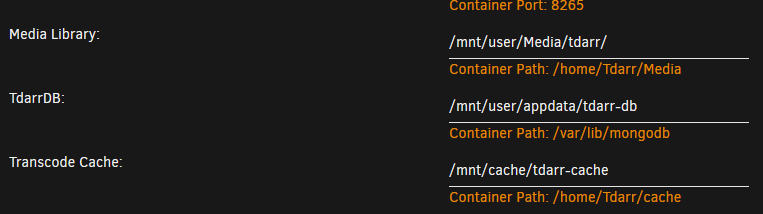
Thanks for the reply. I was able to get tdarr to browse to the correct folder....thanks to you reply...I needed to look to where the docker half of the mapping was pointed to. Now, I need to figure out how to add files for transcoding.
-
I'm trying to get tdarr configured, but not having much luck. I have edited the container to try to point it to a test folder that I have on the server. Here is my folder structure: /mnt/user/media/movies (movie folder) /mnt/user/media/series (tv shows) /mnt/user/media/tdarr (tdarr test folder) Plan is to copy some movies / tv shows into the tdarr folder for testing purposes. I can start the container, but when I try to browse to the test folder, it keeps telling me that the path is invalid? I tried to add "/" to the folder path, then hit the browse button, but I am only able to get to a folder called media. Not really sure where that is.... I'm having the same trouble setting up the cache folder as well...I thought that was defined in the docker config setting? Thanks.
-
Another issue that I noticed....if I add a single movie to a folder that I have unmanic pointed to watch, it will start both workers (I have unmanic set to use two workers) on the same movie....with one being a few percent ahead of the second one. I was wondering if anyone else noticed this behavior. Thanks.
-
For some reason, unmanic is not picking up a movie that I placed on the monitored folder for conversion. Where does it keep the list of movies it thinks it has converted? I've restarted the docker, and checked the log, but it still comes back with nothing to convert.
-
ice- I went ahead and disabled audio conversion, and tried the same file. It appears that did the trick. I've got the audio coming out of the correct channels. Thanks for the suggestion, and another thanks to Josh for a great plugin. Merry Christmas.
-
ice- I'll give that a try....thanks for the suggestion.
-
Hi- I ran the docker on a folder that contained a TV series. For some reason, it appears that unmanic "rotated" the audio channels so that the center channel on a 5.1 setup was switched to the rear left channel. The other channels appear to have rotated as well. Am I missing something in the settings? Here is the audio info from the original file: Codec AC3 Channels 6 Bitrate 640 kbps Language English Audio Channel Layout 5.1(side) Sampling Rate 48000 Hz Display Title English (AC3 5.1) Here is the audio info from the converted file: Codec AAC Channels 6 Bitrate 394 kbps Language English Profile lc Sampling Rate 48000 Hz Display Title English (AAC 5.1) Thanks for all of the hard work on the docker. It really looks like it has a lot of potential to save hard drive space....which would be really nice.
-
Thanks for taking a look at the setup. I'll work on copying the plex library back to the usual location so that I can take advantage of the backup plugin. Maybe I'll see about adding the SSD to the cache and get it out of the UD where it is now. Thanks again for your help.

