





dave
Members
-
Joined
-
Last visited
Everything posted by dave
-
I certainly would appreciate that! I've been thinking of trying this for my Dockers but do not have a managed switch. However, I can connect my server directly to a port on my EdgeRouterX. That would remove the managed switch dependency, right?
-
Edit the Docker container and change the Repository field to "homeassistant/home-assistant:0.37.3" or whatever version you want.
-
Thanks, that worked!
-
I understand having secure remote access is the reason to do this but, silly question, what are the downsides to doing so?
-
Same question here. Anyone have some tips? Thanks!
-
You can do a force update to get it to the new .23 How do you force an update?
-
I think I borked my container. I had originally set up the output folder to be on my array. I wanted to change this to be the cache drive instead so I went in to edit the container and changed the folder location. Clicked done and got an error about EOF. Now my docker doesn't appear in the list at all! Anyone know where I went wrong???
-
I'm using sata no problem.
-
I was trying to find this program the other day - but the link to the download for version 1.3 is broken on the kodi forum. Do you know where I can find it elsewhere?
-
Detect requires perl be installed. Search this thread. Aha! Thanks for the tip!
-
Hey guys, I've recently moved away from ESXi and my Windows 7 VM to run with the new V6 of unRAID. I was wondering what everyone is using to manage the metadata of their media collection? I previously ran Media Center Master on Windows to scrape everything. I am using the MakeMKV Docker to rip my Blu Ray collection and I do not use any downloaders like SB/CP/Sonarr/etc. Thanks! Dave
-
I assume that if I click "Detect" for the System Temp plugin and nothing is returned that my hardware is not supported?
-
I figured out from reading other posts that the https mapping was causing my issue. I have removed it for now and was able to get to the GUI. I'll have to setup my own SSL certs next.
-
I'm having a similar problem with the ownCloud docker - I'm getting "ERR_CONNECTION_REFUSED" when clicking on the WebUI link. I used the default configuration, see attached:

-
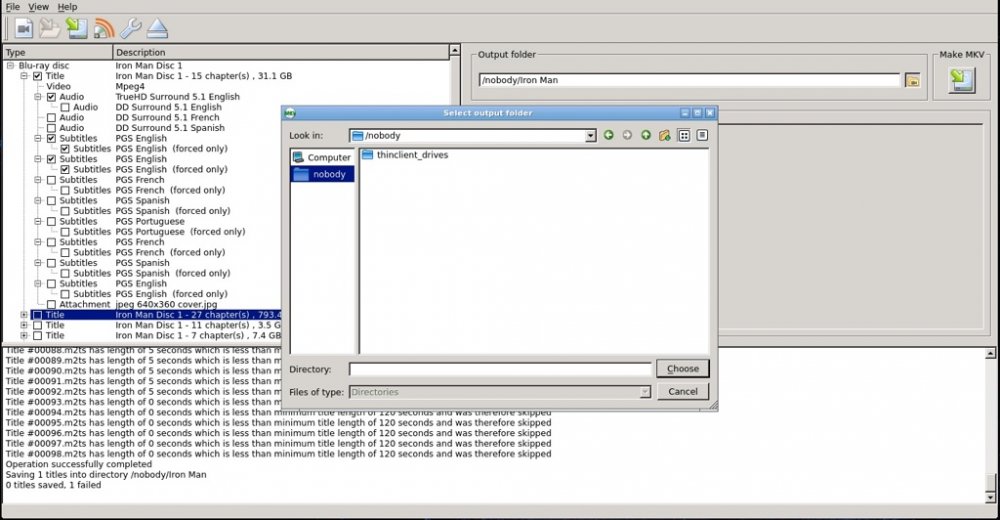
That was it! I didn't think I had access to that folder but it turns out the UP arrow took me straight there. Thanks for your help! I'm ripping a test BD right now
-
Here's the Docker screen:

-
What did I set up wrong? I set my export/save location in the Docker settings to a folder on my array but when I choose the location within MakeMKV it's showing something completely different. Also, it said there were only 5070mb available but my array should have 5+TB free. Sorry for my noob questions - this is my first Docker install & setup
-
Excellent - thanks for your work on this!!! My last hangup with getting rid of ESXi setup was how to rip BDs. Everything else was already Docker-able.
-
Does the file permission being incorrect cause any issues with encoding or playback?
-
I already knew this drive was bad - just how bad is it? Should I just toss it? It took a looong time preclear, lol: ========================================================================1.15 == invoked as: ./preclear_disk.sh /dev/sdh == WDCWD20EADS-00R6B0 WD-WCAVY1843494 == Disk /dev/sdh has been successfully precleared == with a starting sector of 63 == Ran 1 cycle == == Using :Read block size = 8388608 Bytes == Last Cycle's Pre Read Time : 48:48:17 (11 MB/s) == Last Cycle's Zeroing time : 7:46:57 (71 MB/s) == Last Cycle's Post Read Time : 35:57:51 (15 MB/s) == Last Cycle's Total Time : 92:34:42 == == Total Elapsed Time 92:34:42 == == Disk Start Temperature: 29C == == Current Disk Temperature: 31C, == ============================================================================ ** Changed attributes in files: /tmp/smart_start_sdh /tmp/smart_finish_sdh ATTRIBUTE NEW_VAL OLD_VAL FAILURE_THRESHOLD STATUS RAW_VALUE Raw_Read_Error_Rate = 181 182 51 ok 1250509 Reallocated_Sector_Ct = 41 43 140 FAILING_NOW 1265 Seek_Error_Rate = 100 200 0 ok 0 Temperature_Celsius = 121 123 0 ok 31 Reallocated_Event_Count = 1 1 0 near_thresh 1076 *** Failing SMART Attributes in /tmp/smart_finish_sdh *** ID# ATTRIBUTE_NAME FLAG VALUE WORST THRESH TYPE UPDATED WHEN_FAILED RAW_VALUE 5 Reallocated_Sector_Ct 0x0033 041 041 140 Pre-fail Always FAILING_NOW 1265 24 sectors were pending re-allocation before the start of the preclear. 24 sectors were pending re-allocation after pre-read in cycle 1 of 1. 16 sectors were pending re-allocation after zero of disk in cycle 1 of 1. 16 sectors are pending re-allocation at the end of the preclear, a change of -8 in the number of sectors pending re-allocation. 1256 sectors had been re-allocated before the start of the preclear. 1265 sectors are re-allocated at the end of the preclear, a change of 9 in the number of sectors re-allocated. SMART overall-health status = FAILED! ============================================================================
-
Does that mean the drive corrected itself? Or is this a leading indicator of future failure? Should I RMA the disk? Also, for the first disk I posted above about, 2 sectors had been re-allocated before the preclear and then there were still 2 re-allocated. The number did not increase, so the disk is fine? Or should I RMA that one? Thanks for your help!!!
-
And disk2, WD20EADS: ========================================================================1.13 == invoked as: ./preclear_disk.sh /dev/sdf == WDC WD20EADS-00R6B0 WD-WCAVY1843494 == Disk /dev/sdf has been successfully precleared == with a starting sector of 63 == Ran 1 cycle == == Using :Read block size = 8225280 Bytes == Last Cycle's Pre Read Time : 9:11:28 (60 MB/s) == Last Cycle's Zeroing time : 7:14:09 (76 MB/s) == Last Cycle's Post Read Time : 15:34:00 (35 MB/s) == Last Cycle's Total Time : 32:00:46 == == Total Elapsed Time 32:00:46 == == Disk Start Temperature: 33C == == Current Disk Temperature: 34C, == ============================================================================ ** Changed attributes in files: /tmp/smart_start_sdf /tmp/smart_finish_sdf ATTRIBUTE NEW_VAL OLD_VAL FAILURE_THRESHOLD STATUS RAW_VALUE Temperature_Celsius = 118 119 0 ok 34 No SMART attributes are FAILING_NOW 12 sectors were pending re-allocation before the start of the preclear. 12 sectors were pending re-allocation after pre-read in cycle 1 of 1. 0 sectors were pending re-allocation after zero of disk in cycle 1 of 1. 0 sectors are pending re-allocation at the end of the preclear, a change of -12 in the number of sectors pending re-allocation. 0 sectors had been re-allocated before the start of the preclear. 0 sectors are re-allocated at the end of the preclear, the number of sectors re-allocated did not change. ============================================================================ ============================================================================ == == S.M.A.R.T Initial Report for /dev/sdf == Disk: /dev/sdf smartctl 5.39.1 2010-01-28 r3054 [i486-slackware-linux-gnu] (local build) Copyright (C) 2002-10 by Bruce Allen, http://smartmontools.sourceforge.net === START OF INFORMATION SECTION === Model Family: Western Digital Caviar Green family Device Model: WDC WD20EADS-00R6B0 Serial Number: WD-WCAVY1843494 Firmware Version: 01.00A01 User Capacity: 2,000,398,934,016 bytes Device is: In smartctl database [for details use: -P show] ATA Version is: 8 ATA Standard is: Exact ATA specification draft version not indicated Local Time is: Thu Mar 1 10:20:15 2012 CST SMART support is: Available - device has SMART capability. SMART support is: Enabled === START OF READ SMART DATA SECTION === SMART overall-health self-assessment test result: PASSED General SMART Values: Offline data collection status: (0x84)^IOffline data collection activity ^I^I^I^I^Iwas suspended by an interrupting command from host. ^I^I^I^I^IAuto Offline Data Collection: Enabled. Self-test execution status: ( 0)^IThe previous self-test routine completed ^I^I^I^I^Iwithout error or no self-test has ever ^I^I^I^I^Ibeen run. Total time to complete Offline data collection: ^I^I (42360) seconds. Offline data collection capabilities: ^I^I^I (0x7b) SMART execute Offline immediate. ^I^I^I^I^IAuto Offline data collection on/off support. ^I^I^I^I^ISuspend Offline collection upon new ^I^I^I^I^Icommand. ^I^I^I^I^IOffline surface scan supported. ^I^I^I^I^ISelf-test supported. ^I^I^I^I^IConveyance Self-test supported. ^I^I^I^I^ISelective Self-test supported. SMART capabilities: (0x0003)^ISaves SMART data before entering ^I^I^I^I^Ipower-saving mode. ^I^I^I^I^ISupports SMART auto save timer. Error logging capability: (0x01)^IError logging supported. ^I^I^I^I^IGeneral Purpose Logging supported. Short self-test routine recommended polling time: ^I ( 2) minutes. Extended self-test routine recommended polling time: ^I ( 255) minutes. Conveyance self-test routine recommended polling time: ^I ( 5) minutes. SCT capabilities: ^I (0x303f)^ISCT Status supported. ^I^I^I^I^ISCT Feature Control supported. ^I^I^I^I^ISCT Data Table supported. SMART Attributes Data Structure revision number: 16 Vendor Specific SMART Attributes with Thresholds: ID# ATTRIBUTE_NAME FLAG VALUE WORST THRESH TYPE UPDATED WHEN_FAILED RAW_VALUE 1 Raw_Read_Error_Rate 0x002f 200 200 051 Pre-fail Always - 0 3 Spin_Up_Time 0x0027 155 147 021 Pre-fail Always - 9233 4 Start_Stop_Count 0x0032 100 100 000 Old_age Always - 41 5 Reallocated_Sector_Ct 0x0033 200 200 140 Pre-fail Always - 0 7 Seek_Error_Rate 0x002e 100 253 000 Old_age Always - 0 9 Power_On_Hours 0x0032 099 099 000 Old_age Always - 731 10 Spin_Retry_Count 0x0032 100 253 000 Old_age Always - 0 11 Calibration_Retry_Count 0x0032 100 253 000 Old_age Always - 0 12 Power_Cycle_Count 0x0032 100 100 000 Old_age Always - 22 192 Power-Off_Retract_Count 0x0032 200 200 000 Old_age Always - 15 193 Load_Cycle_Count 0x0032 200 200 000 Old_age Always - 338 194 Temperature_Celsius 0x0022 119 116 000 Old_age Always - 33 196 Reallocated_Event_Count 0x0032 200 200 000 Old_age Always - 0 197 Current_Pending_Sector 0x0032 200 200 000 Old_age Always - 12 198 Offline_Uncorrectable 0x0030 200 200 000 Old_age Offline - 3 199 UDMA_CRC_Error_Count 0x0032 200 200 000 Old_age Always - 0 200 Multi_Zone_Error_Rate 0x0008 200 200 000 Old_age Offline - 0 SMART Error Log Version: 1 No Errors Logged SMART Self-test log structure revision number 1 No self-tests have been logged. [To run self-tests, use: smartctl -t] SMART Selective self-test log data structure revision number 1 SPAN MIN_LBA MAX_LBA CURRENT_TEST_STATUS 1 0 0 Not_testing 2 0 0 Not_testing 3 0 0 Not_testing 4 0 0 Not_testing 5 0 0 Not_testing Selective self-test flags (0x0): After scanning selected spans, do NOT read-scan remainder of disk. If Selective self-test is pending on power-up, resume after 0 minute delay. == ============================================================================ ============================================================================ == == S.M.A.R.T Final Report for /dev/sdf == Disk: /dev/sdf smartctl 5.39.1 2010-01-28 r3054 [i486-slackware-linux-gnu] (local build) Copyright (C) 2002-10 by Bruce Allen, http://smartmontools.sourceforge.net === START OF INFORMATION SECTION === Model Family: Western Digital Caviar Green family Device Model: WDC WD20EADS-00R6B0 Serial Number: WD-WCAVY1843494 Firmware Version: 01.00A01 User Capacity: 2,000,398,934,016 bytes Device is: In smartctl database [for details use: -P show] ATA Version is: 8 ATA Standard is: Exact ATA specification draft version not indicated Local Time is: Fri Mar 2 18:21:00 2012 CST SMART support is: Available - device has SMART capability. SMART support is: Enabled === START OF READ SMART DATA SECTION === SMART overall-health self-assessment test result: PASSED General SMART Values: Offline data collection status: (0x84)^IOffline data collection activity ^I^I^I^I^Iwas suspended by an interrupting command from host. ^I^I^I^I^IAuto Offline Data Collection: Enabled. Self-test execution status: ( 0)^IThe previous self-test routine completed ^I^I^I^I^Iwithout error or no self-test has ever ^I^I^I^I^Ibeen run. Total time to complete Offline data collection: ^I^I (42360) seconds. Offline data collection capabilities: ^I^I^I (0x7b) SMART execute Offline immediate. ^I^I^I^I^IAuto Offline data collection on/off support. ^I^I^I^I^ISuspend Offline collection upon new ^I^I^I^I^Icommand. ^I^I^I^I^IOffline surface scan supported. ^I^I^I^I^ISelf-test supported. ^I^I^I^I^IConveyance Self-test supported. ^I^I^I^I^ISelective Self-test supported. SMART capabilities: (0x0003)^ISaves SMART data before entering ^I^I^I^I^Ipower-saving mode. ^I^I^I^I^ISupports SMART auto save timer. Error logging capability: (0x01)^IError logging supported. ^I^I^I^I^IGeneral Purpose Logging supported. Short self-test routine recommended polling time: ^I ( 2) minutes. Extended self-test routine recommended polling time: ^I ( 255) minutes. Conveyance self-test routine recommended polling time: ^I ( 5) minutes. SCT capabilities: ^I (0x303f)^ISCT Status supported. ^I^I^I^I^ISCT Feature Control supported. ^I^I^I^I^ISCT Data Table supported. SMART Attributes Data Structure revision number: 16 Vendor Specific SMART Attributes with Thresholds: ID# ATTRIBUTE_NAME FLAG VALUE WORST THRESH TYPE UPDATED WHEN_FAILED RAW_VALUE 1 Raw_Read_Error_Rate 0x002f 200 200 051 Pre-fail Always - 0 3 Spin_Up_Time 0x0027 155 147 021 Pre-fail Always - 9233 4 Start_Stop_Count 0x0032 100 100 000 Old_age Always - 41 5 Reallocated_Sector_Ct 0x0033 200 200 140 Pre-fail Always - 0 7 Seek_Error_Rate 0x002e 100 253 000 Old_age Always - 0 9 Power_On_Hours 0x0032 099 099 000 Old_age Always - 761 10 Spin_Retry_Count 0x0032 100 253 000 Old_age Always - 0 11 Calibration_Retry_Count 0x0032 100 253 000 Old_age Always - 0 12 Power_Cycle_Count 0x0032 100 100 000 Old_age Always - 22 192 Power-Off_Retract_Count 0x0032 200 200 000 Old_age Always - 15 193 Load_Cycle_Count 0x0032 200 200 000 Old_age Always - 340 194 Temperature_Celsius 0x0022 118 116 000 Old_age Always - 34 196 Reallocated_Event_Count 0x0032 200 200 000 Old_age Always - 0 197 Current_Pending_Sector 0x0032 200 200 000 Old_age Always - 0 198 Offline_Uncorrectable 0x0030 200 200 000 Old_age Offline - 3 199 UDMA_CRC_Error_Count 0x0032 200 200 000 Old_age Always - 0 200 Multi_Zone_Error_Rate 0x0008 200 200 000 Old_age Offline - 0 SMART Error Log Version: 1 Warning: ATA error count 123 inconsistent with error log pointer 1 ATA Error Count: 123 (device log contains only the most recent five errors) ^ICR = Command Register [HEX] ^IFR = Features Register [HEX] ^ISC = Sector Count Register [HEX] ^ISN = Sector Number Register [HEX] ^ICL = Cylinder Low Register [HEX] ^ICH = Cylinder High Register [HEX] ^IDH = Device/Head Register [HEX] ^IDC = Device Command Register [HEX] ^IER = Error register [HEX] ^IST = Status register [HEX] Powered_Up_Time is measured from power on, and printed as DDd+hh:mm:SS.sss where DD=days, hh=hours, mm=minutes, SS=sec, and sss=millisec. It "wraps" after 49.710 days. Error 123 occurred at disk power-on lifetime: 731 hours (30 days + 11 hours) When the command that caused the error occurred, the device was active or idle. After command completion occurred, registers were: ER ST SC SN CL CH DH -- -- -- -- -- -- -- 40 51 00 3f 00 74 e5 Error: UNC at LBA = 0x0574003f = 91488319 Commands leading to the command that caused the error were: CR FR SC SN CL CH DH DC Powered_Up_Time Command/Feature_Name -- -- -- -- -- -- -- -- ---------------- -------------------- c8 00 00 00 00 74 e5 08 6d+18:53:45.278 READ DMA c8 00 00 00 ff 73 e5 08 6d+18:53:45.277 READ DMA c8 00 00 00 fe 73 e5 08 6d+18:53:45.276 READ DMA c8 00 00 00 fd 73 e5 08 6d+18:53:45.275 READ DMA c8 00 00 00 fc 73 e5 08 6d+18:53:45.273 READ DMA SMART Self-test log structure revision number 1 No self-tests have been logged. [To run self-tests, use: smartctl -t] SMART Selective self-test log data structure revision number 1 SPAN MIN_LBA MAX_LBA CURRENT_TEST_STATUS 1 0 0 Not_testing 2 0 0 Not_testing 3 0 0 Not_testing 4 0 0 Not_testing 5 0 0 Not_testing Selective self-test flags (0x0): After scanning selected spans, do NOT read-scan remainder of disk. If Selective self-test is pending on power-up, resume after 0 minute delay. == ============================================================================ Any input as to the offline uncorrectable and pending sector counts would be appreciated!!!
-
Precleared two suspect hard drives, here are the results: Disk1, WD10EARS ========================================================================1.13 == invoked as: ./preclear_disk.sh /dev/sdb == WDC WD10EARS-00Z5B1 WD-WMAYM0039713 == Disk /dev/sdb has been successfully precleared == with a starting sector of 63 == Ran 1 cycle == == Using :Read block size = 8225280 Bytes == Last Cycle's Pre Read Time : 4:01:42 (68 MB/s) == Last Cycle's Zeroing time : 3:48:11 (73 MB/s) == Last Cycle's Post Read Time : 7:50:42 (35 MB/s) == Last Cycle's Total Time : 15:41:43 == == Total Elapsed Time 15:41:43 == == Disk Start Temperature: 25C == == Current Disk Temperature: 25C, == ============================================================================ No SMART attributes are FAILING_NOW 0 sectors were pending re-allocation before the start of the preclear. 0 sectors were pending re-allocation after pre-read in cycle 1 of 1. 0 sectors were pending re-allocation after zero of disk in cycle 1 of 1. 0 sectors are pending re-allocation at the end of the preclear, the number of sectors pending re-allocation did not change. 2 sectors had been re-allocated before the start of the preclear. 2 sectors are re-allocated at the end of the preclear, the number of sectors re-allocated did not change. ============================================================================ ============================================================================ == == S.M.A.R.T Initial Report for /dev/sdb == Disk: /dev/sdb smartctl 5.39.1 2010-01-28 r3054 [i486-slackware-linux-gnu] (local build) Copyright (C) 2002-10 by Bruce Allen, http://smartmontools.sourceforge.net === START OF INFORMATION SECTION === Device Model: WDC WD10EARS-00Z5B1 Serial Number: WD-WMAYM0039713 Firmware Version: 80.00A80 User Capacity: 1,000,204,886,016 bytes Device is: Not in smartctl database [for details use: -P showall] ATA Version is: 8 ATA Standard is: Exact ATA specification draft version not indicated Local Time is: Thu Mar 1 10:21:28 2012 CST SMART support is: Available - device has SMART capability. SMART support is: Enabled === START OF READ SMART DATA SECTION === SMART overall-health self-assessment test result: PASSED General SMART Values: Offline data collection status: (0x82)^IOffline data collection activity ^I^I^I^I^Iwas completed without error. ^I^I^I^I^IAuto Offline Data Collection: Enabled. Self-test execution status: ( 0)^IThe previous self-test routine completed ^I^I^I^I^Iwithout error or no self-test has ever ^I^I^I^I^Ibeen run. Total time to complete Offline data collection: ^I^I (22080) seconds. Offline data collection capabilities: ^I^I^I (0x7b) SMART execute Offline immediate. ^I^I^I^I^IAuto Offline data collection on/off support. ^I^I^I^I^ISuspend Offline collection upon new ^I^I^I^I^Icommand. ^I^I^I^I^IOffline surface scan supported. ^I^I^I^I^ISelf-test supported. ^I^I^I^I^IConveyance Self-test supported. ^I^I^I^I^ISelective Self-test supported. SMART capabilities: (0x0003)^ISaves SMART data before entering ^I^I^I^I^Ipower-saving mode. ^I^I^I^I^ISupports SMART auto save timer. Error logging capability: (0x01)^IError logging supported. ^I^I^I^I^IGeneral Purpose Logging supported. Short self-test routine recommended polling time: ^I ( 2) minutes. Extended self-test routine recommended polling time: ^I ( 254) minutes. Conveyance self-test routine recommended polling time: ^I ( 5) minutes. SCT capabilities: ^I (0x3031)^ISCT Status supported. ^I^I^I^I^ISCT Feature Control supported. ^I^I^I^I^ISCT Data Table supported. SMART Attributes Data Structure revision number: 16 Vendor Specific SMART Attributes with Thresholds: ID# ATTRIBUTE_NAME FLAG VALUE WORST THRESH TYPE UPDATED WHEN_FAILED RAW_VALUE 1 Raw_Read_Error_Rate 0x002f 200 200 051 Pre-fail Always - 0 3 Spin_Up_Time 0x0027 201 179 021 Pre-fail Always - 4941 4 Start_Stop_Count 0x0032 100 100 000 Old_age Always - 107 5 Reallocated_Sector_Ct 0x0033 199 199 140 Pre-fail Always - 2 7 Seek_Error_Rate 0x002e 200 200 000 Old_age Always - 0 9 Power_On_Hours 0x0032 090 090 000 Old_age Always - 7700 10 Spin_Retry_Count 0x0032 100 100 000 Old_age Always - 0 11 Calibration_Retry_Count 0x0032 100 100 000 Old_age Always - 0 12 Power_Cycle_Count 0x0032 100 100 000 Old_age Always - 105 192 Power-Off_Retract_Count 0x0032 200 200 000 Old_age Always - 50 193 Load_Cycle_Count 0x0032 074 074 000 Old_age Always - 380717 194 Temperature_Celsius 0x0022 125 114 000 Old_age Always - 25 196 Reallocated_Event_Count 0x0032 199 199 000 Old_age Always - 1 197 Current_Pending_Sector 0x0032 200 200 000 Old_age Always - 0 198 Offline_Uncorrectable 0x0030 200 200 000 Old_age Offline - 0 199 UDMA_CRC_Error_Count 0x0032 200 200 000 Old_age Always - 0 200 Multi_Zone_Error_Rate 0x0008 200 200 000 Old_age Offline - 0 SMART Error Log Version: 1 No Errors Logged SMART Self-test log structure revision number 1 No self-tests have been logged. [To run self-tests, use: smartctl -t] SMART Selective self-test log data structure revision number 1 SPAN MIN_LBA MAX_LBA CURRENT_TEST_STATUS 1 0 0 Not_testing 2 0 0 Not_testing 3 0 0 Not_testing 4 0 0 Not_testing 5 0 0 Not_testing Selective self-test flags (0x0): After scanning selected spans, do NOT read-scan remainder of disk. If Selective self-test is pending on power-up, resume after 0 minute delay. == ============================================================================ ============================================================================ == == S.M.A.R.T Final Report for /dev/sdb == Disk: /dev/sdb smartctl 5.39.1 2010-01-28 r3054 [i486-slackware-linux-gnu] (local build) Copyright (C) 2002-10 by Bruce Allen, http://smartmontools.sourceforge.net === START OF INFORMATION SECTION === Device Model: WDC WD10EARS-00Z5B1 Serial Number: WD-WMAYM0039713 Firmware Version: 80.00A80 User Capacity: 1,000,204,886,016 bytes Device is: Not in smartctl database [for details use: -P showall] ATA Version is: 8 ATA Standard is: Exact ATA specification draft version not indicated Local Time is: Fri Mar 2 02:03:12 2012 CST SMART support is: Available - device has SMART capability. SMART support is: Enabled === START OF READ SMART DATA SECTION === SMART overall-health self-assessment test result: PASSED General SMART Values: Offline data collection status: (0x84)^IOffline data collection activity ^I^I^I^I^Iwas suspended by an interrupting command from host. ^I^I^I^I^IAuto Offline Data Collection: Enabled. Self-test execution status: ( 0)^IThe previous self-test routine completed ^I^I^I^I^Iwithout error or no self-test has ever ^I^I^I^I^Ibeen run. Total time to complete Offline data collection: ^I^I (22080) seconds. Offline data collection capabilities: ^I^I^I (0x7b) SMART execute Offline immediate. ^I^I^I^I^IAuto Offline data collection on/off support. ^I^I^I^I^ISuspend Offline collection upon new ^I^I^I^I^Icommand. ^I^I^I^I^IOffline surface scan supported. ^I^I^I^I^ISelf-test supported. ^I^I^I^I^IConveyance Self-test supported. ^I^I^I^I^ISelective Self-test supported. SMART capabilities: (0x0003)^ISaves SMART data before entering ^I^I^I^I^Ipower-saving mode. ^I^I^I^I^ISupports SMART auto save timer. Error logging capability: (0x01)^IError logging supported. ^I^I^I^I^IGeneral Purpose Logging supported. Short self-test routine recommended polling time: ^I ( 2) minutes. Extended self-test routine recommended polling time: ^I ( 254) minutes. Conveyance self-test routine recommended polling time: ^I ( 5) minutes. SCT capabilities: ^I (0x3031)^ISCT Status supported. ^I^I^I^I^ISCT Feature Control supported. ^I^I^I^I^ISCT Data Table supported. SMART Attributes Data Structure revision number: 16 Vendor Specific SMART Attributes with Thresholds: ID# ATTRIBUTE_NAME FLAG VALUE WORST THRESH TYPE UPDATED WHEN_FAILED RAW_VALUE 1 Raw_Read_Error_Rate 0x002f 200 200 051 Pre-fail Always - 0 3 Spin_Up_Time 0x0027 201 179 021 Pre-fail Always - 4941 4 Start_Stop_Count 0x0032 100 100 000 Old_age Always - 107 5 Reallocated_Sector_Ct 0x0033 199 199 140 Pre-fail Always - 2 7 Seek_Error_Rate 0x002e 200 200 000 Old_age Always - 0 9 Power_On_Hours 0x0032 090 090 000 Old_age Always - 7715 10 Spin_Retry_Count 0x0032 100 100 000 Old_age Always - 0 11 Calibration_Retry_Count 0x0032 100 100 000 Old_age Always - 0 12 Power_Cycle_Count 0x0032 100 100 000 Old_age Always - 105 192 Power-Off_Retract_Count 0x0032 200 200 000 Old_age Always - 50 193 Load_Cycle_Count 0x0032 074 074 000 Old_age Always - 380718 194 Temperature_Celsius 0x0022 125 114 000 Old_age Always - 25 196 Reallocated_Event_Count 0x0032 199 199 000 Old_age Always - 1 197 Current_Pending_Sector 0x0032 200 200 000 Old_age Always - 0 198 Offline_Uncorrectable 0x0030 200 200 000 Old_age Offline - 0 199 UDMA_CRC_Error_Count 0x0032 200 200 000 Old_age Always - 0 200 Multi_Zone_Error_Rate 0x0008 200 200 000 Old_age Offline - 0 SMART Error Log Version: 1 No Errors Logged SMART Self-test log structure revision number 1 No self-tests have been logged. [To run self-tests, use: smartctl -t] SMART Selective self-test log data structure revision number 1 SPAN MIN_LBA MAX_LBA CURRENT_TEST_STATUS 1 0 0 Not_testing 2 0 0 Not_testing 3 0 0 Not_testing 4 0 0 Not_testing 5 0 0 Not_testing Selective self-test flags (0x0): After scanning selected spans, do NOT read-scan remainder of disk. If Selective self-test is pending on power-up, resume after 0 minute delay. == ============================================================================


