






DevXen
Members
-
Joined
-
Last visited
Everything posted by DevXen
-
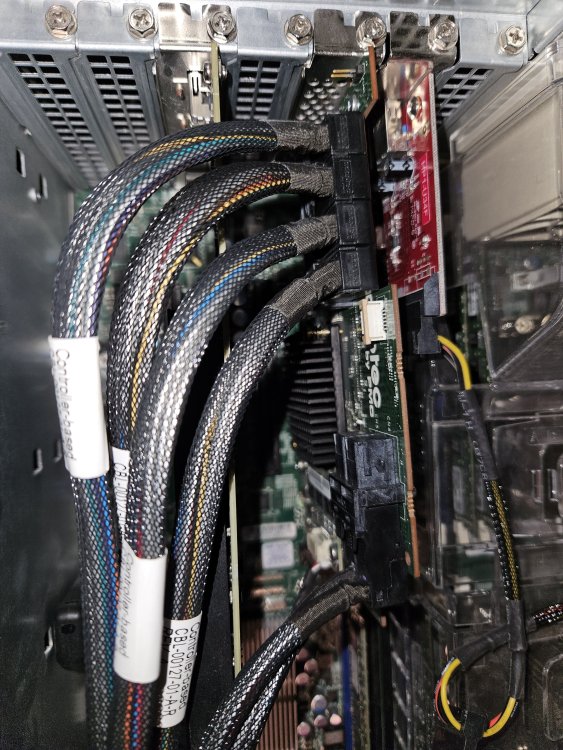
No. I tried with the first ones that had write errors and the smart tests stuck At 100% and would never finish. But the diagnostics have the smart info for each drive I saw so that's good. Here's a little back story... (Didn't put it here cause I already posted a different post about it. But here... On Sat I had 2 drives disabled for write errors. Then I swapped them out and rebuilt data separately on them. Took one out ran an extensive chkdsk looking for bad sectors. It didn't find any. The second one still has like 6 days to go on it's check but so far no errors. And then today I woke up to 2 drives disabled due to read errors. One brand New one I replaced on Sat and a different drive in the array. About 3 hours into the rebuild on one of the drives I got 2 more drives with read errors. So at that point I turned my server off. Thinking it's the hba controller card or the cables. But it would be strange for multiple cables die at the same time. They are really thick cables. Here's a pic.
-
Oh here's the diagnostics mediaxen-diagnostics-20231205-1818.zip
-
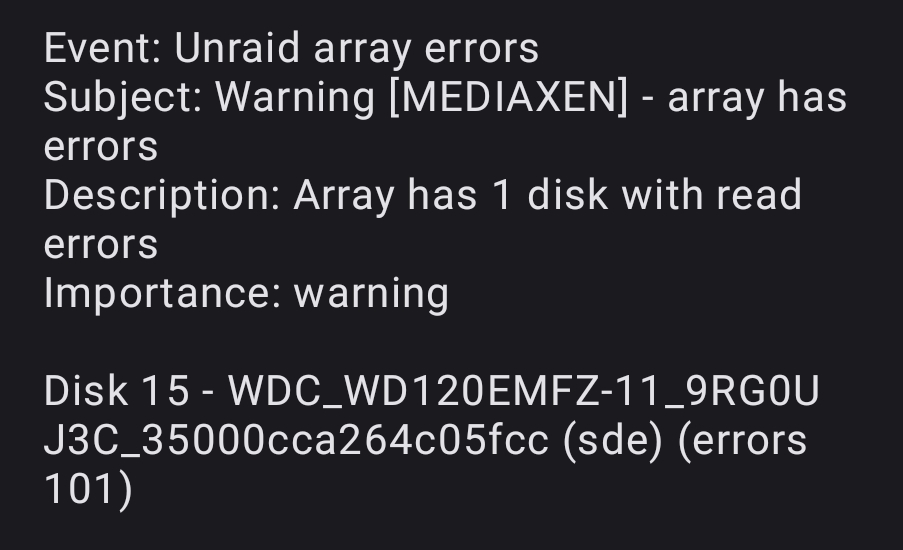
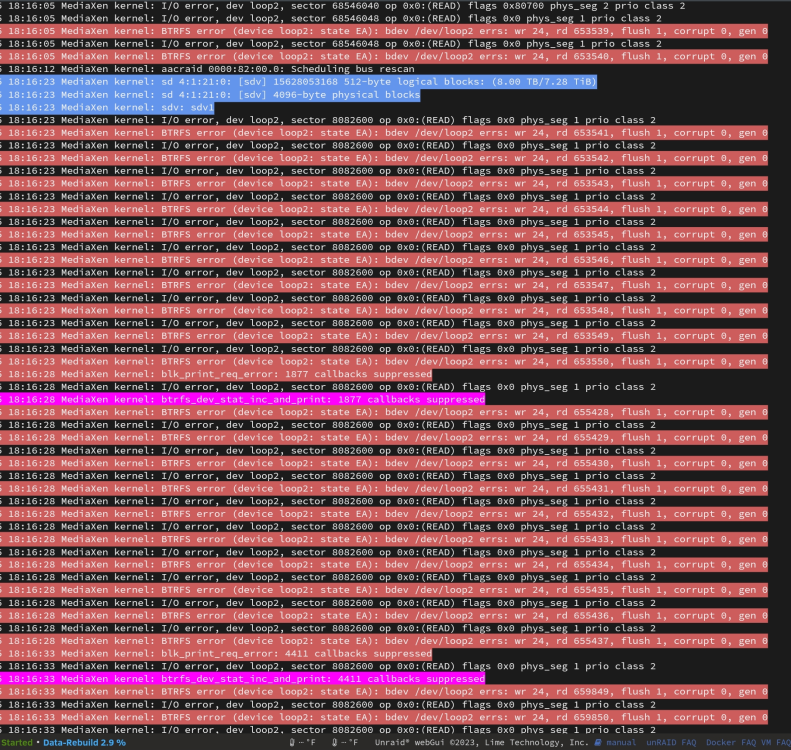
So I'm rebuilding my parity on one of my 2 drives that was disabled earlier today for free l read errors and not 3a 3rs one has had read errors. Not sure what to do..
-
I woke up to 2 drives with read errors, one had 9, one had 32, this after having 2 drives with write errors a few days ago and replacing them. but scanning them in chkdsk for bad sectors in windows didn't find anything wrong with the previous 2 drives. So i'm rebuilding parity on one of the drives with read errors., but this keeps pulling up, and the server seems to hang for a bit when it does. also the parity rebuild goes from 1day to fluxuates between 10-70 days) can only guess this is the issue... Dec 5 16:36:21 MediaXen kernel: aacraid: Host adapter abort request. Dec 5 16:36:21 MediaXen kernel: aacraid: Outstanding commands on (4,1,16,0): Dec 5 16:36:21 MediaXen kernel: aacraid: Host adapter abort request. Dec 5 16:36:21 MediaXen kernel: aacraid: Outstanding commands on (4,1,16,0): Dec 5 16:36:21 MediaXen kernel: aacraid: Host adapter abort request. Dec 5 16:36:21 MediaXen kernel: aacraid: Outstanding commands on (4,1,16,0): Dec 5 16:36:21 MediaXen kernel: aacraid: Host adapter abort request. Dec 5 16:36:21 MediaXen kernel: aacraid: Outstanding commands on (4,1,6,0): Dec 5 16:36:21 MediaXen kernel: aacraid: Host adapter abort request. Dec 5 16:36:21 MediaXen kernel: aacraid: Outstanding commands on (4,1,6,0): Dec 5 16:36:21 MediaXen kernel: aacraid: Host adapter abort request. Dec 5 16:36:21 MediaXen kernel: aacraid: Outstanding commands on (4,1,6,0): Dec 5 16:36:21 MediaXen kernel: aacraid: Host adapter abort request. Dec 5 16:36:21 MediaXen kernel: aacraid: Outstanding commands on (4,1,6,0): Dec 5 16:36:21 MediaXen kernel: aacraid: Host adapter abort request. Dec 5 16:36:21 MediaXen kernel: aacraid: Outstanding commands on (4,1,6,0): Dec 5 16:36:21 MediaXen kernel: aacraid: Host adapter abort request. Dec 5 16:36:21 MediaXen kernel: aacraid: Outstanding commands on (4,1,12,0): Dec 5 16:36:21 MediaXen kernel: aacraid: Host adapter abort request. Dec 5 16:36:21 MediaXen kernel: aacraid: Outstanding commands on (4,1,4,0): Dec 5 16:36:21 MediaXen kernel: aacraid: Host adapter abort request. Dec 5 16:36:21 MediaXen kernel: aacraid: Outstanding commands on (4,1,4,0): Dec 5 16:36:21 MediaXen kernel: aacraid: Host adapter abort request. Dec 5 16:36:21 MediaXen kernel: aacraid: Outstanding commands on (4,1,4,0): Dec 5 16:36:21 MediaXen kernel: aacraid: Host adapter abort request. Dec 5 16:36:21 MediaXen kernel: aacraid: Outstanding commands on (4,1,3,0): Dec 5 16:36:21 MediaXen kernel: aacraid: Host adapter abort request. Dec 5 16:36:21 MediaXen kernel: aacraid: Outstanding commands on (4,1,3,0): Dec 5 16:36:21 MediaXen kernel: aacraid: Host adapter abort request. Dec 5 16:36:21 MediaXen kernel: aacraid: Outstanding commands on (4,1,9,0): Dec 5 16:36:21 MediaXen kernel: aacraid: Host adapter abort request. Dec 5 16:36:21 MediaXen kernel: aacraid: Outstanding commands on (4,1,9,0): Dec 5 16:36:21 MediaXen kernel: aacraid: Host adapter abort request. Dec 5 16:36:21 MediaXen kernel: aacraid: Outstanding commands on (4,1,9,0): Dec 5 16:36:21 MediaXen kernel: aacraid: Host adapter abort request. Dec 5 16:36:21 MediaXen kernel: aacraid: Outstanding commands on (4,1,5,0): Dec 5 16:36:21 MediaXen kernel: aacraid: Host adapter abort request. Dec 5 16:36:21 MediaXen kernel: aacraid: Outstanding commands on (4,1,5,0): Dec 5 16:36:21 MediaXen kernel: aacraid: Host adapter abort request. Dec 5 16:36:21 MediaXen kernel: aacraid: Outstanding commands on (4,1,5,0): Dec 5 16:36:21 MediaXen kernel: aacraid: Host adapter abort request. Dec 5 16:36:21 MediaXen kernel: aacraid: Outstanding commands on (4,1,11,0): Dec 5 16:36:21 MediaXen kernel: aacraid: Host adapter abort request. Dec 5 16:36:21 MediaXen kernel: aacraid: Outstanding commands on (4,1,11,0): Dec 5 16:36:21 MediaXen kernel: aacraid: Host adapter abort request. Dec 5 16:36:21 MediaXen kernel: aacraid: Outstanding commands on (4,1,11,0): Dec 5 16:36:21 MediaXen kernel: aacraid: Host adapter abort request. Dec 5 16:36:21 MediaXen kernel: aacraid: Outstanding commands on (4,1,11,0): Dec 5 16:36:21 MediaXen kernel: aacraid: Host adapter abort request. Dec 5 16:36:21 MediaXen kernel: aacraid: Outstanding commands on (4,1,11,0): Dec 5 16:36:21 MediaXen kernel: aacraid: Host adapter abort request. Dec 5 16:36:21 MediaXen kernel: aacraid: Outstanding commands on (4,1,11,0): Dec 5 16:36:21 MediaXen kernel: aacraid: Host adapter abort request. Dec 5 16:36:21 MediaXen kernel: aacraid: Outstanding commands on (4,1,11,0): Dec 5 16:36:21 MediaXen kernel: aacraid: Host adapter abort request. Dec 5 16:36:21 MediaXen kernel: aacraid: Outstanding commands on (4,1,13,0): Dec 5 16:36:21 MediaXen kernel: aacraid: Host adapter abort request. Dec 5 16:36:21 MediaXen kernel: aacraid: Outstanding commands on (4,1,13,0): Dec 5 16:36:21 MediaXen kernel: aacraid: Host adapter abort request. Dec 5 16:36:21 MediaXen kernel: aacraid: Outstanding commands on (4,1,14,0): Dec 5 16:36:21 MediaXen kernel: aacraid: Host adapter abort request. Dec 5 16:36:21 MediaXen kernel: aacraid: Outstanding commands on (4,1,14,0): Dec 5 16:36:21 MediaXen kernel: aacraid: Host adapter abort request. Dec 5 16:36:21 MediaXen kernel: aacraid: Outstanding commands on (4,1,14,0): Dec 5 16:36:21 MediaXen kernel: aacraid: Host adapter abort request. Dec 5 16:36:21 MediaXen kernel: aacraid: Outstanding commands on (4,1,21,0): Dec 5 16:36:21 MediaXen kernel: aacraid: Host adapter abort request. Dec 5 16:36:21 MediaXen kernel: aacraid: Outstanding commands on (4,1,10,0): Dec 5 16:36:21 MediaXen kernel: aacraid: Host adapter abort request. Dec 5 16:36:21 MediaXen kernel: aacraid: Outstanding commands on (4,1,10,0): Dec 5 16:36:21 MediaXen kernel: aacraid: Host adapter abort request. Dec 5 16:36:21 MediaXen kernel: aacraid: Outstanding commands on (4,1,10,0): Dec 5 16:36:21 MediaXen kernel: aacraid: Host adapter abort request. Dec 5 16:36:21 MediaXen kernel: aacraid: Outstanding commands on (4,1,10,0): Dec 5 16:36:21 MediaXen kernel: aacraid: Host adapter abort request. Dec 5 16:36:21 MediaXen kernel: aacraid: Outstanding commands on (4,1,15,0): Dec 5 16:36:21 MediaXen kernel: aacraid: Host adapter abort request. Dec 5 16:36:21 MediaXen kernel: aacraid: Outstanding commands on (4,1,15,0): Dec 5 16:36:21 MediaXen kernel: aacraid: Host adapter abort request. Dec 5 16:36:21 MediaXen kernel: aacraid: Outstanding commands on (4,1,7,0): Dec 5 16:36:21 MediaXen kernel: aacraid: Host adapter abort request. Dec 5 16:36:21 MediaXen kernel: aacraid: Outstanding commands on (4,1,7,0): Dec 5 16:36:21 MediaXen kernel: aacraid: Host adapter abort request. Dec 5 16:36:21 MediaXen kernel: aacraid: Outstanding commands on (4,1,7,0): Dec 5 16:36:21 MediaXen kernel: aacraid: Host bus reset request. SCSI hang ? Dec 5 16:36:21 MediaXen kernel: aacraid 0000:82:00.0: outstanding cmd: midlevel-0 Dec 5 16:36:21 MediaXen kernel: aacraid 0000:82:00.0: outstanding cmd: lowlevel-0 Dec 5 16:36:21 MediaXen kernel: aacraid 0000:82:00.0: outstanding cmd: error handler-0 Dec 5 16:36:21 MediaXen kernel: aacraid 0000:82:00.0: outstanding cmd: firmware-42 Dec 5 16:36:21 MediaXen kernel: aacraid 0000:82:00.0: outstanding cmd: kernel-0 Dec 5 16:36:21 MediaXen kernel: aacraid 0000:82:00.0: Controller reset type is 3 Dec 5 16:36:21 MediaXen kernel: aacraid 0000:82:00.0: Issuing IOP reset
-
I don't have another one i can try with. it's weird cause it's been working fine for the last 4 years i guess. i'll try resenting it in the server. then do i just unassign both these disks then reassign them and rebuild parity one them? - one at a time? it was weird cause like i said i replaced 2, one at a time just a few days ago and the parity rebuild ran fine on both of them which is pretty intensive for the drives i hear.
-
Sunday i woke up to an email with 2 of my disks (one of my parity drives, and disk 4) disabled for write errors. i replaced both disks with new 14tb drives. the first disk i ran through chkdsk looking for bad sectors in windows and after 1.2 days it didn't find any errors. the 2nd disk is still checking and has like 7 days to go looking for bad sectors. i installed each disk one at a time then did the parity rebuild. everything finished with no problems. I then yesterday updated the Unraid OS to 6.12.6. (I was on 6.11.5). and i had been copying 4TB From my Array to my newly free disk i took out of the array. which is now going to be a cold storage backup disk. it copied that for 2 days i think (but i paused it to update the OS). resumed it last night. had no issues. woke up today 2 of my disks are disabled due to read errors. one of them being one of the disks I replaced a couple days ago. then a few hours later 4 more disks i think it was that had 1 read error each. so i'm not sure what to do. i'm probably going to replace the one that was disabled that hasn't been replaced yet. then check it as well in chkdsk. but here's my diagnostics i'm not sure whats causing this or how to fix it. if someone there can look through them and help me out, that would be great. thank you. -Dev mediaxen-diagnostics-20231205-1126.zip
-
Haven't had time to check out the update. I'll mess with it this weekend after work. But did we get the option to add the YouTube id and the name to the files yet by chance?
-
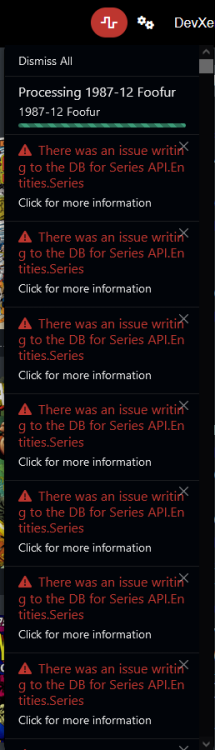
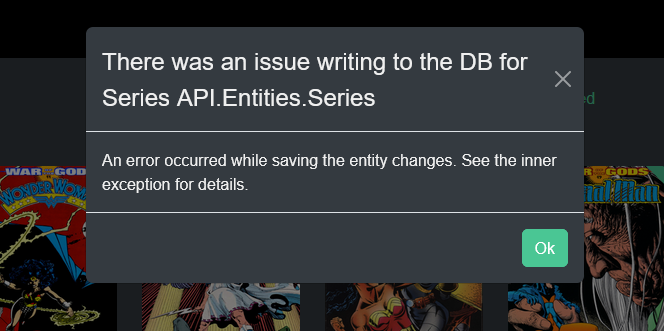
So i installed Kavita last night and let it scan my ebooks/comics/etc. I'm getting this error: There was an issue writing to the DB for Series API.Entities.Series An error occurred while saving the entity changes. See the inner exception for details. Not sure how to get to the inner exception. but i have included pics. and this is from the docker log.. and I dunno what to do or how to fix it?
-
Hey i found an issue. - Youtube has changed usernames to have a @ in the beginning. and i think thats causing an issue. For example I want to get all the videos of this channel: https://www.youtube.com/@8BitUniverse/videos which it doesn't add, and the log shows: WARNING:root:Illegal channel-URL WARNING:root:Illegal playlist-URL
-
Hahaha this was fixed long ago. We talked about it in the unRAID group. It was just never replied to on here. I'm Clint W. On fb..
-
I'm not much of a programmer. These days. But you have both naming conventions already I may be able to figure it out. If I can find some free time to dabble with it. I'll see what I can do. Good luck on your study!
-
Any word on adding the ability to append the YouTubeID to the file and folder names? I was thinking of editing the docker container myself to do that. But I wouldn't know how to edit the container directly or if you can even edit them. Or if they have to just be loaded from the GitHub for changes. And if I could any update would remove that.. So I'm not sure if that's worth it. So I haven't looked into it yet. But I didn't use the YouTube agent without the YouTube IDs. I can't see the name then with the YouTube IDs cause then I would have no ones what each video is looking at them in the folders..heck I wouldn't even import which folder has what. And being able to find videos is important for me. But I did read the YouTube agent works if the id is appended to end of the folder/file so that's nice. Haha.
-
-
Hey, I noticed my container keeps stopping. even though it's set to auto run. it'll run. and mostly get videos. anyways today i had a minute so i checked the log and it has this in it: Checking for new Videos Checking for new Videos Traceback (most recent call last): File "/usr/local/lib/python3.9/urllib/request.py", line 1346, in do_open h.request(req.get_method(), req.selector, req.data, headers, File "/usr/local/lib/python3.9/http/client.py", line 1285, in request self._send_request(method, url, body, headers, encode_chunked) File "/usr/local/lib/python3.9/http/client.py", line 1331, in _send_request self.endheaders(body, encode_chunked=encode_chunked) File "/usr/local/lib/python3.9/http/client.py", line 1280, in endheaders self._send_output(message_body, encode_chunked=encode_chunked) File "/usr/local/lib/python3.9/http/client.py", line 1040, in _send_output self.send(msg) File "/usr/local/lib/python3.9/http/client.py", line 980, in send self.connect() File "/usr/local/lib/python3.9/http/client.py", line 1447, in connect super().connect() File "/usr/local/lib/python3.9/http/client.py", line 946, in connect self.sock = self._create_connection( File "/usr/local/lib/python3.9/socket.py", line 823, in create_connection for res in getaddrinfo(host, port, 0, SOCK_STREAM): File "/usr/local/lib/python3.9/socket.py", line 954, in getaddrinfo for res in _socket.getaddrinfo(host, port, family, type, proto, flags): socket.gaierror: [Errno -3] Temporary failure in name resolution During handling of the above exception, another exception occurred: Traceback (most recent call last): File "/app/main.py", line 13, in <module> pytubDef.loop() File "/app/pytubDef/__init__.py", line 296, in loop playlistArray = returnMonitoredPlaylist() File "/app/pytubDef/__init__.py", line 399, in returnMonitoredPlaylist logstr = logstr + monitoredPlaylistArray[monitoredPlaylistArray.__len__() - 1].title File "/usr/local/lib/python3.9/site-packages/pytube/contrib/playlist.py", line 351, in title return self.sidebar_info[0]['playlistSidebarPrimaryInfoRenderer'][ File "/usr/local/lib/python3.9/site-packages/pytube/contrib/playlist.py", line 93, in sidebar_info self._sidebar_info = self.initial_data['sidebar'][ File "/usr/local/lib/python3.9/site-packages/pytube/contrib/playlist.py", line 81, in initial_data self._initial_data = extract.initial_data(self.html) File "/usr/local/lib/python3.9/site-packages/pytube/contrib/playlist.py", line 58, in html self._html = request.get(self.playlist_url) File "/usr/local/lib/python3.9/site-packages/pytube/request.py", line 53, in get response = _execute_request(url, headers=extra_headers, timeout=timeout) File "/usr/local/lib/python3.9/site-packages/pytube/request.py", line 37, in _execute_request return urlopen(request, timeout=timeout) # nosec File "/usr/local/lib/python3.9/urllib/request.py", line 214, in urlopen return opener.open(url, data, timeout) File "/usr/local/lib/python3.9/urllib/request.py", line 517, in open response = self._open(req, data) File "/usr/local/lib/python3.9/urllib/request.py", line 534, in _open result = self._call_chain(self.handle_open, protocol, protocol + File "/usr/local/lib/python3.9/urllib/request.py", line 494, in _call_chain result = func(*args) File "/usr/local/lib/python3.9/urllib/request.py", line 1389, in https_open return self.do_open(http.client.HTTPSConnection, req, File "/usr/local/lib/python3.9/urllib/request.py", line 1349, in do_open raise URLError(err) urllib.error.URLError: <urlopen error [Errno -3] Temporary failure in name resolution> olution>
-
Yeah I saw that in another reply. but its not even making the .txt of the manually added playlist or second channel. the first one i have gotten it to download twice (one playlist and one channel) but only the ones it has allowed me to add through the webui. and again it's only allowed me to add the one unless i remove it and install it fresh. then it has let me add one item. and thats it. nothing in the docker log. weird.
-
So i've done a bunch of testing. and i've taken spaces out of my download folder and brackets, i've moved it to the array. and it'll only let me add one channel or playlist but its not downloading it. even if i manually add it, it'll show but not download. hmm.
-
Yeah even trying to add the playlist manually and restarting the docker it's not loading them. but the log does keep showing this. * Serving Flask app 'app' (lazy loading) * Environment: production WARNING: This is a development server. Do not use it in a production deployment. Use a production WSGI server instead. * Debug mode: off * Running on all addresses. WARNING: This is a development server. Do not use it in a production deployment. * Running on http://[redacted]:5000/ (Press CTRL+C to quit) * Serving Flask app 'app' (lazy loading) * Environment: production WARNING: This is a development server. Do not use it in a production deployment. Use a production WSGI server instead. * Debug mode: off * Running on all addresses. WARNING: This is a development server. Do not use it in a production deployment.
-
yup. here's another one i just tried. when i paste it and click add. the page refreshes and its not listed. https://www.youtube.com/playlist?list=PLimhOT0Avg-RrTX14TmLCSeB90wCK69x- but the log for the container shows this: 192.168.0.2 - - [10/Apr/2022 13:41:47] "POST /index.html HTTP/1.1" 200 - 192.168.0.2 - - [10/Apr/2022 13:42:10] "[36mGET /static/style.css HTTP/1.1[0m" 304 - not sure if thats important or not. also not sure why it has 192.168.0.2 listed. thats the pc i'm not. not my server. howerver when i added the Ryan George the full channel. it did add that and got all his videos. just not the playlists. strange.
-
is there a way to add playlists? i was able to add a channel but not any of the playlists i've tried. however the appdata has a empty file named monitoredplaylists.txt was thinking i'd rather get specific playlists and their updates vs getting the whole channel. thanks, -Dev
-
Hello, So I've been using this script for line a year or longer. It's awesome. But whenever I check logs of anything. The text is gray but the background is white making it impossible to read without highlighting/selecting the text. I've noticed it on all containers. But i was thinking maybe sooner of my containers just don't have any theming on it. But then it's weird the text is light gray. Anyways. It's I get to add that each container I use to make the background black is there an easy way to do that? Thanks, -Dev
-
So i disabled remote access in my servers and swag. But I'm still getting them in the logs. No idea what is allowing them to try to connect.
-
I just disabled swag to see if that stops it. But if not I might have to sign out of the my servers as well. That uses the let's encrypt ssl as well.
-
No. I have openVPN and wireguard. But I also have swag/let's encrypt setup for a few docker containers. Is where I would guess it's from. from what I was able to find in think it's then trying to use an inner ssl exploit to get access. But no the admin interface isn't accessible over the internet.
-
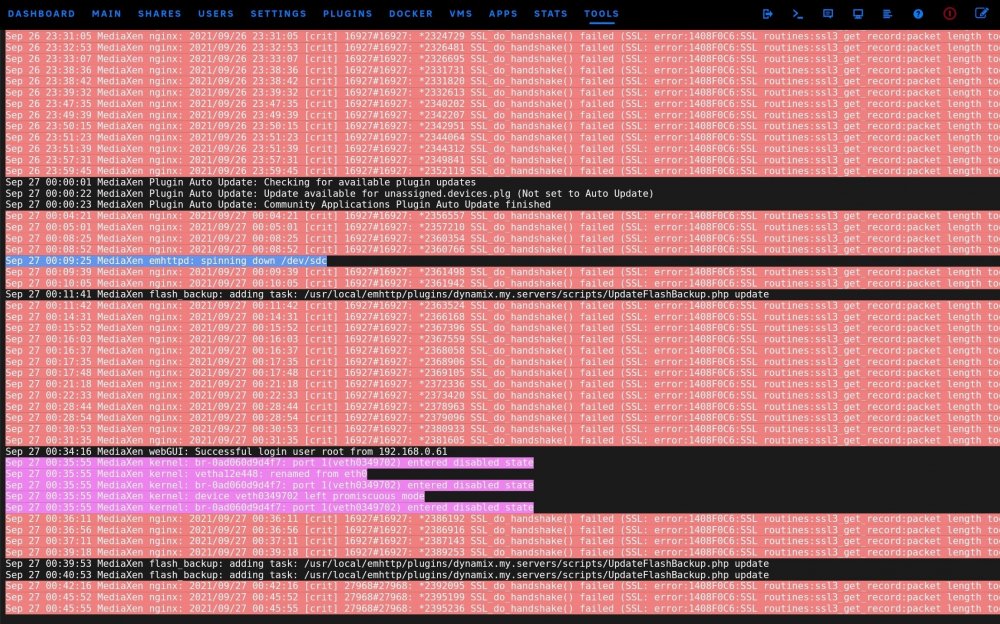
So this keeps pulling up. anyway to just block it all together? it's all dsifferent IP Addresses. I'm just now sure what to do here? Sep 26 15:52:15 MediaXen nginx: 2021/09/26 15:52:15 [crit] 16927#16927: *2000343 SSL_do_handshake() failed (SSL: error:1408F0C6:SSL routines:ssl3_get_record:packet length too long) while SSL handshaking, client: 101.100.137.168, server: 0.0.0.0:443 Sep 26 15:54:04 MediaXen nginx: 2021/09/26 15:54:04 [crit] 16927#16927: *2001136 SSL_do_handshake() failed (SSL: error:1408F0C6:SSL routines:ssl3_get_record:packet length too long) while SSL handshaking, client: 5.79.73.142, server: 0.0.0.0:443 Sep 26 15:55:14 MediaXen nginx: 2021/09/26 15:55:14 [crit] 16927#16927: *2001688 SSL_do_handshake() failed (SSL: error:1408F0C6:SSL routines:ssl3_get_record:packet length too long) while SSL handshaking, client: 123.139.75.167, server: 0.0.0.0:443 Sep 26 15:56:01 MediaXen nginx: 2021/09/26 15:56:01 [crit] 16927#16927: *2002034 SSL_do_handshake() failed (SSL: error:1408F0C6:SSL routines:ssl3_get_record:packet length too long) while SSL handshaking, client: 185.200.181.7, server: 0.0.0.0:443 Sep 26 15:56:10 MediaXen nginx: 2021/09/26 15:56:10 [crit] 16927#16927: *2002111 SSL_do_handshake() failed (SSL: error:1408F0C6:SSL routines:ssl3_get_record:packet length too long) while SSL handshaking, client: 62.210.204.20, server: 0.0.0.0:443 Sep 26 15:56:46 MediaXen nginx: 2021/09/26 15:56:46 [crit] 16927#16927: *2002359 SSL_do_handshake() failed (SSL: error:1408F0C6:SSL routines:ssl3_get_record:packet length too long) while SSL handshaking, client: 5.79.73.142, server: 0.0.0.0:443 Sep 26 16:02:44 MediaXen nginx: 2021/09/26 16:02:44 [crit] 16927#16927: *2005596 SSL_do_handshake() failed (SSL: error:1408F0C6:SSL routines:ssl3_get_record:packet length too long) while SSL handshaking, client: 73.145.57.16, server: 0.0.0.0:443 Sep 26 16:04:11 MediaXen nginx: 2021/09/26 16:04:11 [crit] 16927#16927: *2006280 SSL_do_handshake() failed (SSL: error:1408F0C6:SSL routines:ssl3_get_record:packet length too long) while SSL handshaking, client: 95.217.113.45, server: 0.0.0.0:443 Sep 26 16:07:16 MediaXen nginx: 2021/09/26 16:07:16 [crit] 16927#16927: *2007823 SSL_do_handshake() failed (SSL: error:1408F0C6:SSL routines:ssl3_get_record:packet length too long) while SSL handshaking, client: 72.21.17.57, server: 0.0.0.0:443 Sep 26 16:09:17 MediaXen nginx: 2021/09/26 16:09:17 [crit] 16927#16927: *2008848 SSL_do_handshake() failed (SSL: error:1408F0C6:SSL routines:ssl3_get_record:packet length too long) while SSL handshaking, client: 177.91.249.202, server: 0.0.0.0:443 Sep 26 16:09:55 MediaXen nginx: 2021/09/26 16:09:55 [crit] 16927#16927: *2009197 SSL_do_handshake() failed (SSL: error:1408F0C6:SSL routines:ssl3_get_record:packet length too long) while SSL handshaking, client: 47.145.201.154, server: 0.0.0.0:443 Sep 26 16:10:48 MediaXen nginx: 2021/09/26 16:10:48 [crit] 16927#16927: *2009656 SSL_do_handshake() failed (SSL: error:1408F0C6:SSL routines:ssl3_get_record:packet length too long) while SSL handshaking, client: 177.91.249.202, server: 0.0.0.0:443 Sep 26 16:14:16 MediaXen nginx: 2021/09/26 16:14:16 [crit] 16927#16927: *2011308 SSL_do_handshake() failed (SSL: error:1408F0C6:SSL routines:ssl3_get_record:packet length too long) while SSL handshaking, client: 72.21.17.57, server: 0.0.0.0:443 Sep 26 16:14:17 MediaXen nginx: 2021/09/26 16:14:17 [crit] 16927#16927: *2011318 SSL_do_handshake() failed (SSL: error:1408F0C6:SSL routines:ssl3_get_record:packet length too long) while SSL handshaking, client: 5.79.73.142, server: 0.0.0.0:443 Sep 26 16:15:05 MediaXen nginx: 2021/09/26 16:15:05 [crit] 16927#16927: *2011690 SSL_do_handshake() failed (SSL: error:1408F0C6:SSL routines:ssl3_get_record:packet length too long) while SSL handshaking, client: 5.79.73.142, server: 0.0.0.0:443 Sep 26 16:15:37 MediaXen nginx: 2021/09/26 16:15:37 [crit] 16927#16927: *2011954 SSL_do_handshake() failed (SSL: error:1408F0C6:SSL routines:ssl3_get_record:packet length too long) while SSL handshaking, client: 46.42.233.169, server: 0.0.0.0:443 Sep 26 16:15:39 MediaXen nginx: 2021/09/26 16:15:39 [crit] 16927#16927: *2011965 SSL_do_handshake() failed (SSL: error:1408F0C6:SSL routines:ssl3_get_record:packet length too long) while SSL handshaking, client: 94.110.141.162, server: 0.0.0.0:443 Sep 26 16:15:51 MediaXen nginx: 2021/09/26 16:15:51 [crit] 16927#16927: *2012047 SSL_do_handshake() failed (SSL: error:1408F0C6:SSL routines:ssl3_get_record:packet length too long) while SSL handshaking, client: 5.79.73.142, server: 0.0.0.0:443 Sep 26 16:21:14 MediaXen nginx: 2021/09/26 16:21:14 [crit] 16927#16927: *2014620 SSL_do_handshake() failed (SSL: error:1408F0C6:SSL routines:ssl3_get_record:packet length too long) while SSL handshaking, client: 47.147.35.197, server: 0.0.0.0:443 Sep 26 16:26:30 MediaXen nginx: 2021/09/26 16:26:30 [crit] 16927#16927: *2017115 SSL_do_handshake() failed (SSL: error:1408F0C6:SSL routines:ssl3_get_record:packet length too long) while SSL handshaking, client: 101.100.137.168, server: 0.0.0.0:443 Sep 26 16:30:16 MediaXen nginx: 2021/09/26 16:30:16 [crit] 16927#16927: *2019165 SSL_do_handshake() failed (SSL: error:1408F0C6:SSL routines:ssl3_get_record:packet length too long) while SSL handshaking, client: 5.79.73.142, server: 0.0.0.0:443 Sep 26 16:33:49 MediaXen nginx: 2021/09/26 16:33:49 [crit] 16927#16927: *2021042 SSL_do_handshake() failed (SSL: error:1408F0C6:SSL routines:ssl3_get_record:packet length too long) while SSL handshaking, client: 101.98.190.49, server: 0.0.0.0:443 Sep 26 16:33:53 MediaXen nginx: 2021/09/26 16:33:53 [crit] 16927#16927: *2021076 SSL_do_handshake() failed (SSL: error:1408F0C6:SSL routines:ssl3_get_record:packet length too long) while SSL handshaking, client: 5.79.73.142, server: 0.0.0.0:443 Sep 26 16:34:30 MediaXen nginx: 2021/09/26 16:34:30 [crit] 16927#16927: *2021417 SSL_do_handshake() failed (SSL: error:1408F0C6:SSL routines:ssl3_get_record:packet length too long) while SSL handshaking, client: 118.183.147.48, server: 0.0.0.0:443 Sep 26 16:35:05 MediaXen nginx: 2021/09/26 16:35:05 [crit] 16927#16927: *2021695 SSL_do_handshake() failed (SSL: error:1408F0C6:SSL routines:ssl3_get_record:packet length too long) while SSL handshaking, client: 177.91.249.202, server: 0.0.0.0:443 Sep 26 16:35:13 MediaXen nginx: 2021/09/26 16:35:13 [crit] 16927#16927: *2021749 SSL_do_handshake() failed (SSL: error:1408F0C6:SSL routines:ssl3_get_record:packet length too long) while SSL handshaking, client: 177.91.249.202, server: 0.0.0.0:443 Sep 26 16:41:34 MediaXen nginx: 2021/09/26 16:41:34 [crit] 16927#16927: *2024967 SSL_do_handshake() failed (SSL: error:1408F0C6:SSL routines:ssl3_get_record:packet length too long) while SSL handshaking, client: 5.79.73.142, server: 0.0.0.0:443 Sep 26 16:42:03 MediaXen nginx: 2021/09/26 16:42:03 [crit] 16927#16927: *2025230 SSL_do_handshake() failed (SSL: error:1408F0C6:SSL routines:ssl3_get_record:packet length too long) while SSL handshaking, client: 212.32.244.72, server: 0.0.0.0:443 Sep 26 16:42:10 MediaXen nginx: 2021/09/26 16:42:10 [crit] 16927#16927: *2025303 SSL_do_handshake() failed (SSL: error:1408F0C6:SSL routines:ssl3_get_record:packet length too long) while SSL handshaking, client: 5.79.73.142, server: 0.0.0.0:443 Sep 26 16:43:38 MediaXen nginx: 2021/09/26 16:43:38 [crit] 16927#16927: *2025991 SSL_do_handshake() failed (SSL: error:1408F0C6:SSL routines:ssl3_get_record:packet length too long) while SSL handshaking, client: 107.147.58.114, server: 0.0.0.0:443
-
Ok I got the graphql issue fixed. I guess it didn't save the port I set for port forwarding on it. So the my servers is working just fine now.




