






DevXen
Members
-
Joined
-
Last visited
Everything posted by DevXen
-
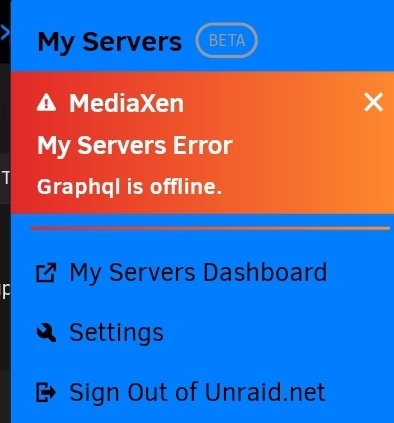
See that's what I thought too. But the My Servers plugin is installed. And I'm signed in. But it does say the graphql is offline. Hmm.
-
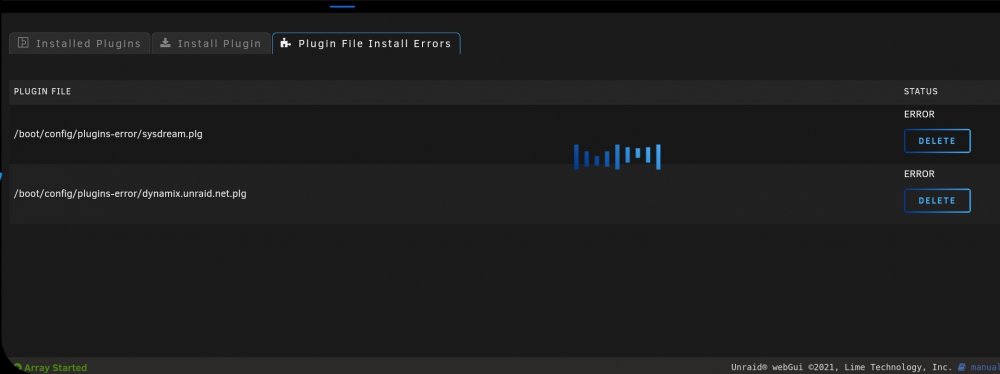
TL;DR: I couldn't access my docker page except on my server directly. I couldn't access the plugins page from anywhere. So I disabled the new plug-in notifications and that worked. However I noticed these two plugins in the plugin error page. They aren't in the community apps to install them. So I'm not sure how to reinstall them? Additional info: So a few days ago I tried to update my plugins and my docker images at the same time. The server was active but it wasn't updating either. Then I couldn't get the docker page to load. So I rebooted the system. Last night I was watching a movie on Plex. And I tried to rewind it and Plex errored out and I couldn't restart the docker image. So I restarted the server. Which took a few mins longer than normal to boot up. But it did and Plex was working fine. Today I noticed I am having issues getting the docker page and plugin's page to load. The docker page will load on the server just fine. But on my PC or phone it won't load at all. The plugins page I can't get to load on the server or anywhere. Though fix community problems says there's a plug-in that needs an update. So I disabled the plugin notification as found on the forums and the showed me to access both the docker Andy plugin pages on all my devices. I did notice this in Install errors tab though. Should I delete these? What can I do to fix our reinstall them? Thanks, -Dev
-
ddns-updater. is working great for duckdns. but not for FreeDNS. it shows: 'Failure (bad HTTP status: 404: Error 404 : Page not found ), 1m48s ago' I set the host/domain. and the token. which i got from afraid.org. the direct link to update my ip has the token in it.
-
I'm not sure if its relevant or not but when i installed the Enigma-BBS container it would load but would keep closing the connection if i pressed anything. But i was able to get it up and working by running the setup command in a terminal window that went through the settings it needs. after that the container worked great. just can't run door games cause i can't figure out how to get DOSEMU to work inside the container.
-
Thanks. That will help i think. Strange. I don't use subtitles at all. Hmm. Guess I'll have to look into any Docker containers that support subtitles to see if any are causing it.
-
So I started to notice these errors that repeat every 2-20 minutes about. it seems to be random on when they repeat. kernel: traps: ccextractor[19268] general protection fault ip:557939c90c79 sp:7ffe7ab8e5a0 error:0 in ccextractor[557939c00000+380000] kernel: ccextractor[20783]: segfault at 7373612e676e ip 0000559c80a90c79 sp 00007ffdebe58260 error 4 in ccextractor[559c80a00000+380000] kernel: Code: c3 55 48 89 e5 48 83 ec 30 48 89 7d d8 c7 45 e8 00 00 00 00 c7 45 ec 00 00 00 00 eb 1c 8b 45 ec 48 63 d0 48 8b 45 d8 48 01 d0 <0f> b6 00 3c 2c 75 04 83 45 e8 01 83 45 ec 01 83 7d e8 01 7e de 48 kernel: ccextractor[22364]: segfault at 10 ip 000014ca400ede9a sp 00007fff2d97ba28 error 6 in libc.so.6[14ca40054000+178000] kernel: Code: 4c 29 c7 4c 01 c2 48 3b 15 1b 23 13 00 0f 87 cc 00 00 00 0f 10 06 0f 10 4e 10 0f 10 56 20 0f 10 5e 30 48 83 c6 40 48 83 ea 40 <0f> 29 07 0f 29 4f 10 0f 29 57 20 0f 29 5f 30 48 83 c7 40 48 83 fa kernel: ccextractor[22891]: segfault at 10 ip 00001512d6f7fe9a sp 00007ffde0cb3bd8 error 6 in libc.so.6[1512d6ee6000+178000]
-
What are the chances we can get Enigma-BBS Built with DOSEMU included so we can add door games? I installed the DOSEMU Docker and it works but i can't get it to talk to the Enigma docker container or even know if that's even possible and i have no idea how to manually go inside the docker container to install it. so having it included in the docker container sounds like a good solution. thanks, -Dev
-
i had to go in and update the DNS but its working now for me as well. thank you.
-
the my servers pulldown menu says: request to https://mothership.unraid.ney/graphql failed, reason: certificate has expired. when i go to settings the it says the certificate expires on june 11th, and won't let me renew it. (its grayed out.). any ideas of what to do?
-
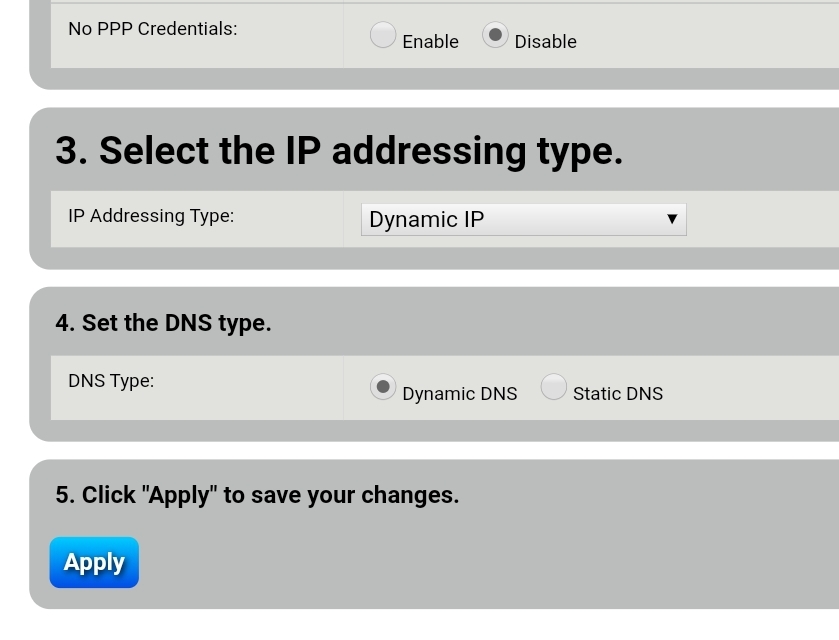
It's not DHCP i am not sure but i think the issue waa my router won't let me loopback to it. So like i have swag setup i can't access it from my local network if i use the domain i setup. No i have to use my internal ip. And that's true for any Internet facing service that runs on my server. But again my router sucks. So i assumed that was the dns binding issue and saw i could change my dns to dynamic and hey it worked.
-
It's a crappy actiontec c1900a modem/router from centurylink.
-
Just a heads up. I couldn't get it to provision on my server. I went into my router and changed the dns room static to dynamic and then it worked. So maybe that will help someone else.
-
Aww i tried incognito mode it didnt let me login. I went back to ssl. But maybe I'll disable it and clear the cache and see if that works. But it had me freaking out cause i couldn't access my server. Luckily it was still logged in on another tab and i was able to enable the ssl and get back into it.
-
I was more concerned with the fact when i disabled SSL and accessed my http://ip as well as http://tower it wanted me to login and wouldnt accept my login credentials. Or allow me to login.
-
I think swag has too have port 443 forwarded to whichever port swag is set for. So it can intercept all https connections and redirect them as set since services like nextcloud will attempt to connect on 443.
-
my remote access isn't working cause its conflicting with swag I think. if i change the port from 443 to a different port it works but then i have to add that to my webgui to use unraid and thats kinda a pain.
-
So now i'm kinda afraid that if i disable or remove the plugin i won't be able to access my server.
-
So I disabled SSL and the IP address worked but would not let me sign in. however tower/Main still worked and was logged in. so i enabled ssl again and now its forwarding to the unraid.net page instead of the local IP. Hmm.
-
i can access it with: https://IP:port but since my local ip doesn't have a ssl. it has a big warning in Firefox. Warning: Potential Security Risk Ahead. that i have to accept the risk each time.
-
So i got it all up and running. - Except now when i go to tower/ or [ip address] it changes it to the unraid.net page. is there a way to access directly it on my local network inside my network and from the unraid.net page outside of my network?
-
I went with unraid because it solved all the issues that I didn't like about raid. Not losing all your data if the array fails, adding drives as you need them and not having to rebuild/erase the array. Being able to use drives of different sizes. Are the main ones. Plus to finally move to an os with redundancy is the best thing ever. Haha.


