





DanW
Members
-
Joined
-
Last visited
Everything posted by DanW
-
Not long now.
-
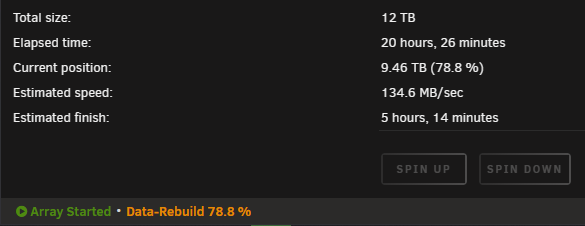
Apologies, please see attached. Rebuild of disk 8, the second disk to fail, is still underway. The array is live, the data that originally disappeared (when the first error with disk 7 occurred) is back, which is really positive. Disk 8 was emulated immediately when it failed so I didn't notice any data loss the second time. dansunraidnas-diagnostics-20230125-2349.zip
-
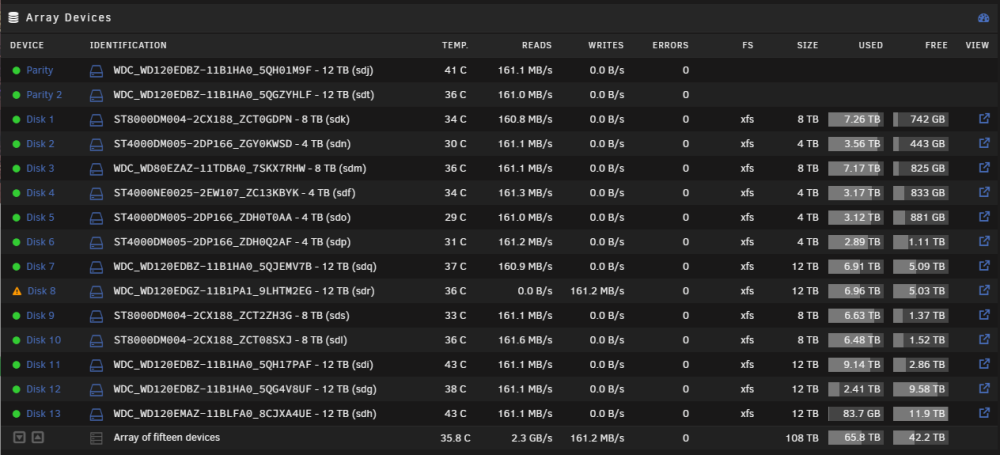
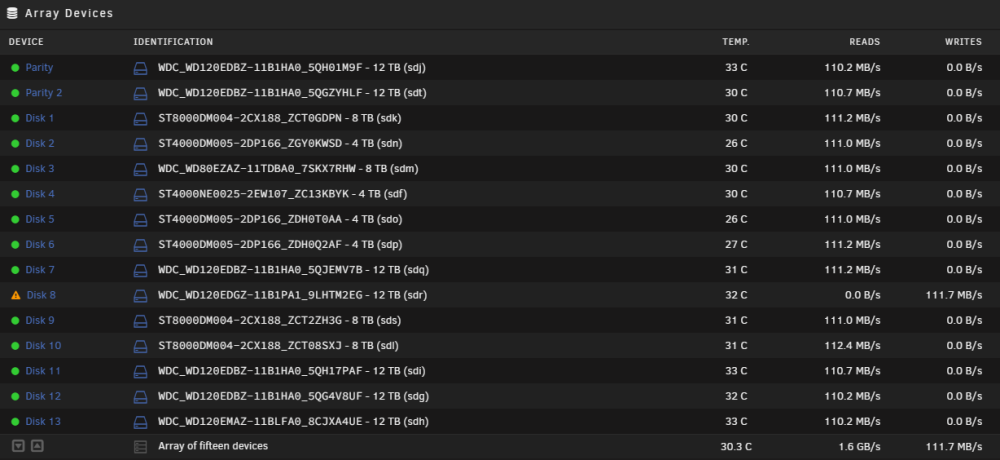
Disk 8 is rebuilding, no other issues so far.
-
Thank you for your help 🙂 I really appreciate your knowledge and suggestions. I'm going to go ahead and replace disk 8 now and rebuild it hopefully without any more issues 🤞
-
Interesting, is that an issue?
-
I haven't replaced disk 8 yet (I replaced disk 7 first as it was the initial problem disk with filesystem corruption), I'm going to change some SAS cables and insert a new drive to replace disk 8 then start the rebuild soon. I will provide updates.
-
Really? I've replaced the disk (disk 7) and the disk has been rebuilt without any issues. Phase 1 - find and verify superblock... Phase 2 - using internal log - zero log... - scan filesystem freespace and inode maps... - found root inode chunk Phase 3 - for each AG... - scan (but don't clear) agi unlinked lists... - process known inodes and perform inode discovery... - agno = 0 - agno = 1 - agno = 2 - agno = 3 - agno = 4 - agno = 5 - agno = 6 - agno = 7 - agno = 8 - agno = 9 - agno = 10 - process newly discovered inodes... Phase 4 - check for duplicate blocks... - setting up duplicate extent list... - check for inodes claiming duplicate blocks... - agno = 0 - agno = 1 - agno = 2 - agno = 3 - agno = 4 - agno = 5 - agno = 6 - agno = 7 - agno = 8 - agno = 9 - agno = 10 No modify flag set, skipping phase 5 Phase 6 - check inode connectivity... - traversing filesystem ... - traversal finished ... - moving disconnected inodes to lost+found ... Phase 7 - verify link counts... No modify flag set, skipping filesystem flush and exiting. I've got to replace disk 8 now as it failed during the rebuild of disk 7, lucky I had two parity drives.

-
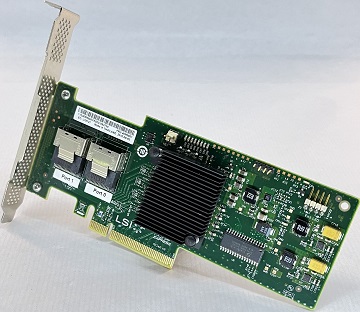
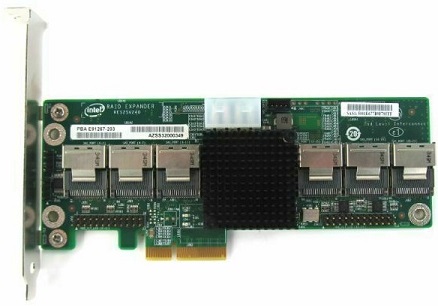
I didn't attempt the recovery, I put a new drive in to replace this drive. Shortly after starting recovery, disk 8 reported an I/O error too and has been disabled. These drives are old and have a lot of uptime but seems to be a strange coincidence that they would both die together so soon. To rule out heat issues I've pointed fans at my SAS devices. I've also ordered some higher quality SAS cables. Going to be keeping an eye on the SAS controller & HBA, it has been fine for months and my drives are old, so could just be a coincidence. I'm currently using the following SAS devices: IBM SAS HBA M1015 IT Mode 6Gbps PCI-e 2.0 x8 LSI 9220-8i Intel 24 port 6 Gb/s SATA SAS RAID Expander Card PBA E91267-203 RES2SV240
-
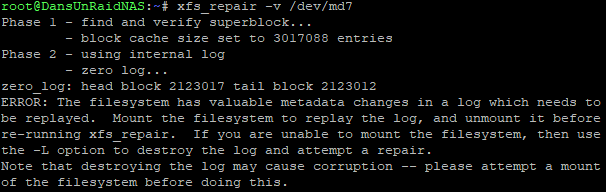
I got this when running the xfs_repair -v command. I didn't see anything about this in the instructions so i have no idea what to do next. Im going to just remove the drive and drop the new one in.
-
I think I'm going to attempt to recover the file system then replace the drive later today.
-
Have you changed the SATA data cable? Could be a bad sata cable or something wrong with the SATA port on the motherboard. Especially if a new drive dropped in its place does the same thing, it's unlikely you have two bad drives in a row.
-
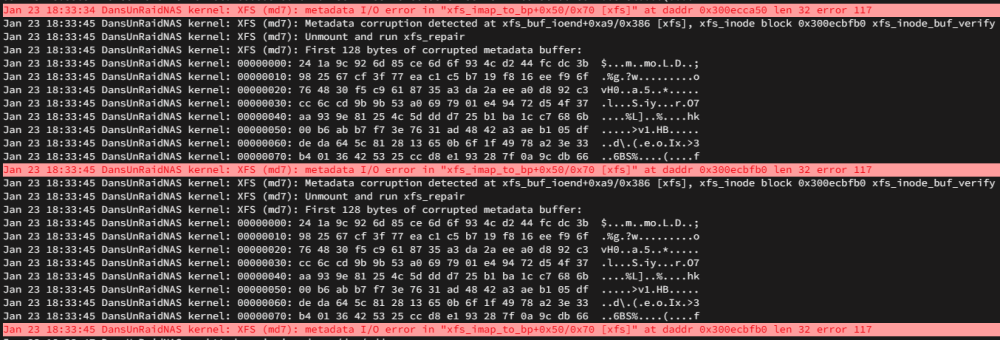
Hey everyone, I started getting I/O errors on one of my drives. Noticed a load of my files suddenly disappear in my shares and went straight to the system log to see what was going on. I've ran the check on all 13 drives in maintenance mode and it's just the one playing up (disk 7) from what I can see. Any recommendations? Just run the check without -nv and see if it recovers the drive? I have two parity drives and I have a new drive spare that I could drop in to replace it. Some advice from someone who has experience in this area would be greatly appreciated, thank you check-nv.txt dansunraidnas-diagnostics-20230123-2257.zip
-
Hey @MrX, this is really good news, thank you for checking in and confirming. I look forward to the stable release of 6.10
-
I haven't tried the 6.10 RC although I have been trying to find a changelog or something that might point to issues with AMD CPUs being resolved. All I've been able to find so far shows that there have been some onboard GPU improvements for AMD and Intel. So I'm not sure if 6.10 is going to fix the issue either.
-
3 months later and I still haven't figured this out. I've tried passing through a USB with the pfSense installer on it. I've upgraded to the latest MOBO BIOS. Maybe an unraid update will fix this?
-
Hey Impossible, Thanks for the reply, it's good to see that I'm not alone. If you passthrough a USB stick and install successfully, does pfSense boot normally once the installation is complete? I just used OBS to capture the window then compressed the video with handbrake so it's only 1mb. It worked pretty well My pfSense VM is still running emulated, it's running fine but I would like to get moved over to host passthrough. I was thinking of just switching the xml config but I haven't messed around yet.
-
Would be nice to see a proper fix for this.
-
Hey, I'm running UNRAID on a Ryzen 5 5600X and MSI MAG B550M MORTAR WIFI and I cannot get pfSense to boot if you use host passthrough. My Windows 10 and Windows Server VMs are working using host passthrough with no issues. I suppose it could be a FreeBSD issue. I'm using a fresh FreeBSD template and have tried pfSense 2.4.5, 2.5.0, 2.5.1 and 2.5.2 beta (with and without NICs passed through). For now, emulating the CPU with QEMU works but it doesn't support AIS which is going to be a problem in the future. Has anyone experienced this? 2021-06-03 17-02-44.mp4
-noVNC-Profile1-MicrosoftEdge.thumb.png.37db52040d662f9dfce77de238f91de6.png)





-noVNC-Profile1-MicrosoftEdge.png.dd636eb8a039c145fc4d54df5d9436a1.png)