





sureguy
Members
-
Joined
-
Last visited
Everything posted by sureguy
-
I have this strange issue with both the grafana and influxDB docker templates where Community Applications is convinced they're not installed but they are. I've tried recreating them (deleting the xml files and docker container image information) and then redownloading them via community apps and reconfiguring them. I keep my appdata in /mnt/cache/Docker/xxxxxxx which I know isn't standard, but this doesn't break any other docker container configurations. Any thoughts?
-
Still appears to be down for me, same error message as above. Legacy mode appears to work. I'm running 6.6.0-rc3, not sure if that is the cause.
-
I requested it on their git page - but aside from one other person asking for the same thing there's been no other traction. You could just make a script that you can run after it's updated - you'd have to run it manually, but it's easier than having to remember the commands (apt vs apk etc).
-
Just a heads up gfjardim (the plugin creator) appears to have updated the preclear plugin for 6.5.0 compatibility. It's available at: https://raw.githubusercontent.com/gfjardim/unRAID-plugins/master/plugins/preclear.disk.plg
-
Just a small note that if there is a docker update you will have to perform the above steps again. At least I did after the last docker update.
-
I successfully precleared a 1TB drive with 3 cycles (pre and post read enabled). Notifications via notification agent worked.
-
Done: I downloaded both md5 summed them and ran diff against them - here's the output: bishop@ubuntu-pihole:~$ md5sum preclear.new preclear.old 9b38439b09c9a763d50414a4a328485d preclear.new 739681c3298b9be7bacbf1ca5f5fc802 preclear.old bishop@ubuntu-pihole:~$ diff preclear.new preclear.old 395c395 < '7.2.0'|'7.3.0') --- > '7.2.0')
-
If you look at my post above, it's in there. https://raw.githubusercontent.com/dohlin/unRAID-plugins/master/plugins/preclear.disk.plg
-
If you install the linked plugin it maintains backward compatibility as it replaces the gcc version line like so: case $gcc_version in '7.2.0'|'7.3.0')
-
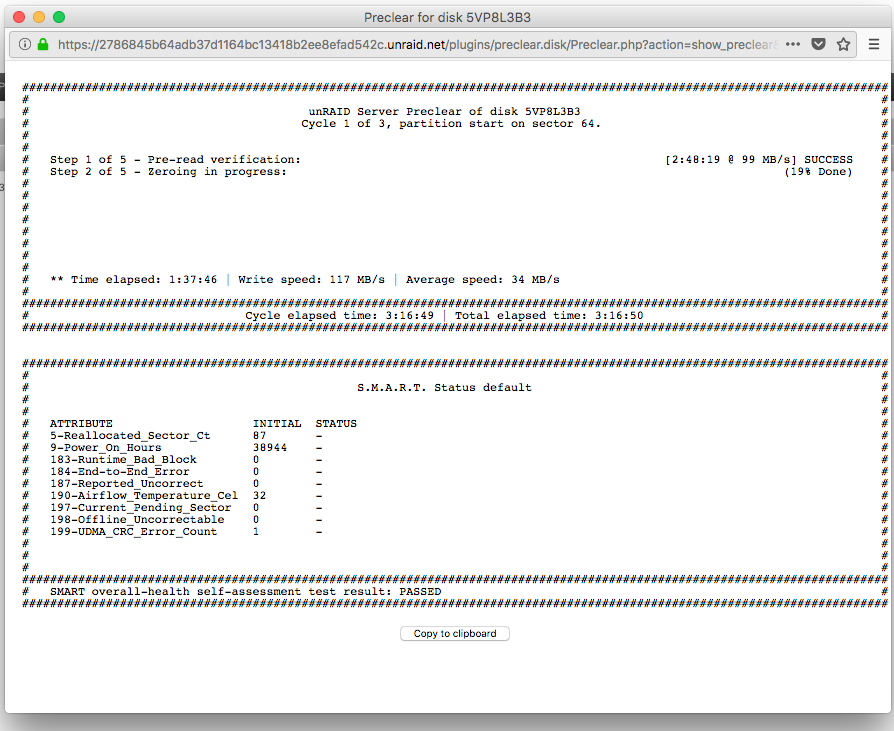
Doesn't seem to. Tmux is probably being used in order to show the progress window (that's the only reason I can imagine that it's needed). And I'm running a preclear right now - and it's being used and outputting progress: root@Phatstore:~# uname -a Linux Phatstore 4.14.16-unRAID #1 SMP PREEMPT Wed Jan 31 08:51:39 PST 2018 x86_64 Intel(R) Core(TM) i7-2600 CPU @ 3.40GHz GenuineIntel GNU/Linux root@Phatstore:~# ps axu | grep tmux root 17733 0.0 0.0 27864 6304 ? Ss 11:28 0:06 /usr/bin/tmux new-session -d -x 140 -y 200 -s preclear_disk_5VP8L3B3 root 27355 0.0 0.0 9764 2108 pts/3 S+ 13:33 0:00 grep tmux Included is a screenshot showing tmux installed by preclear_disk in nerd tools, and the current progress report.

-
The script appears to use the mail command, which is not installed by default on unRAID (and isn't available from NerdPack). Without that installed email notifications will not work and the command will probably fail. The options in the script would be: -m [email protected] = optional recipient address. If blank and -M option is used, it will default to default e-mail address of "root" -M 1 = Will send an e-mail message at the end of the final results (default if -m is used, but no other -M option given) -M 2 = Will send an e-mail same as 1 plus at the end of a cycle (if multiple cycles are specified) -M 3 = Will send an e-mail same as 2 plus at the start and end of the pre-read, zeroing, post-read -M 4 = Will send an e-mail same as 3 plus also at intervals of 25% during the long tests The -m, -M options requires that a valid working mail command is installed.
-
Dontlookoverthere over on the unRAID subreddit figured out how to get the plugin running again with a simple edit to the plg: https://www.reddit.com/r/unRAID/comments/7wjpus/preclear_working_on_641/ Caveat emptor and all that. I'm testing it on a drive in my server presently, it seems to be working properly. ohlin5 in the same post has provided an installable version that works with 6.4.1 and should maintain backwards compatiblity here: https://raw.githubusercontent.com/dohlin/unRAID-plugins/master/plugins/preclear.disk.plg
-
strings-BSD generates the same output as strings so I guess updating the script would be best. Thanks!
-
Any chance of getting strings as an installable command? As the preclear plugin is no longer working, and users wanting to preclear need to rely on the script, it would be nice if it didn't generate any errors. Line 236 of the script calls strings but the command is not found. I checked my Ubuntu VM, and my raspberry pi and both distros have the command included. I don't know if this used to be part of the unRAID install and was removed for a valid reason or not - but it doesn't seem like a harmful utility: Usage: strings [option(s)] [file(s)] Display printable strings in [file(s)] (stdin by default) Thanks.
-
Looks like the strings command is missing - I'll ask if it can be added to Nerd Pack Found a solution to the error, and another line that is incorrect. Issue the following to fix these errors: sed -i -e "s|strings|strings-BSD|" -e "s|\/root\/mdcmd|\/usr\/local\/sbin\/mdcmd|" preclear_disk.sh
-
Yes. If I try to re-add the docker, it fails (as the ports are in use by the running dockers). I tried to add the docker, changing the ports/name (named it Influxdb2) which worked, but then 2 instances of the docker showed up under previous apps, One of the previous apps was named Influxdb and the other was Influxdb2
-
That's odd, as they are currently installed, but listed in the previous apps list.
-
Where does CA store information about previous dockers? I have a couple dockers that I installed multiple copies of for testing, which I subsequently removed. Now they show up on my previous apps list, but if I delete them the templates that I"m using for my currently used dockers get deleted. If I restore the templates, they re-appear on the list of previous apps. I know this isn't super important, but I'm afraid I'll forget and delete them.
-
I figured out a few things for telegraf: Sensors (CPU temperature etc): The docker image doesn't come with lm_sensors - you need to add it: ssh into unRAID and do the following: docker exec -ti telegraf /bin/sh apk update apk add lm_sensors Edit your telegraf.conf and remove the # in front of [[inputs.sensors]] Restart your telegraf docker. Disk Serial Numbers: I set up Influx/Grafana/Telegraf by following PanzerschreckGER's guide here: https://www.reddit.com/r/unRAID/comments/7c2l2w/howto_monitor_unraid_with_grafana_influxdb_and/ An issue with this set up is you cannot monitor drives by Serial number, only sdx (these designations change on reboot requiring reconfiguration of Grafana) or mdx (this precludes monitoring Parity or cache drives). I owe big thanks to danielnelson on the telegraf GIT who helped me figure out getting the HDD serial info working with diskio in telegraf Diskio HDDs by Serial Add the following path to the telegraf docker: https://imgur.com/a/3qZXE Then in telegraf.conf under: [[inputs.diskio]] put device_tags = ["ID_SERIAL"] Restart your telegraf docker HDD Temps by Serial: Change the extra parameters in hddtemp docker: From: Extra Parameters: -e HDDTEMP_ARGS="-q -d -F /dev/sd*" To: Extra Parameters: -e HDDTEMP_ARGS="-q -d -F /dev/disk/by-id/*" Restart your hddtemp docker
-
Getting an XML Parse error when trying to install manually, using Community Applications I don't get an option to install. Edit - Rebooted - and installation worked - odd
-
Ahh - I did fat finger something when setting up a docker, and then just removed the folder via ssh. Sorry for the confusion. Removing the appdata.cfg fixed the issue. Thanks for the help and your work.
-
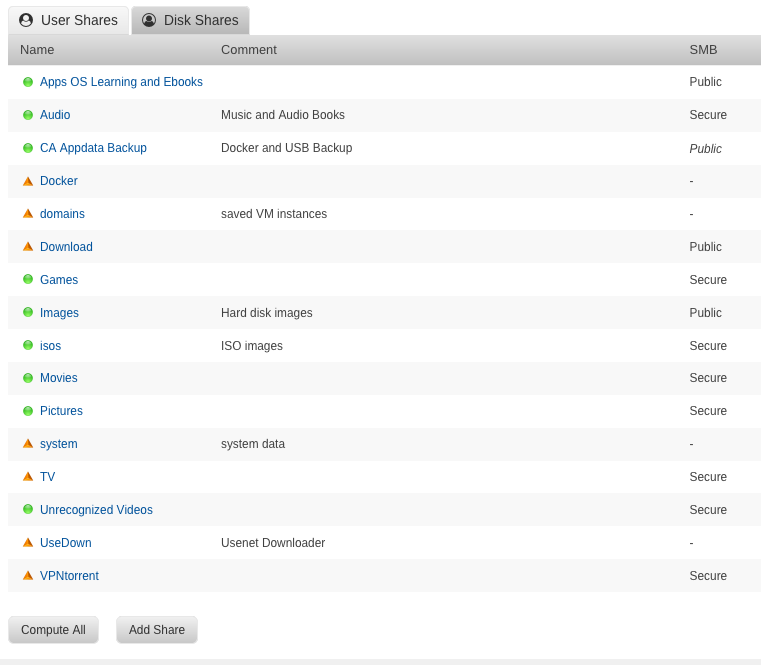
I don't have an appdata share - I've attached a picture of my shares - unless the "CA Appdata Backup" share is confusing things
-
phatstore-diagnostics-20180109-2208.zip
-
I'm receiving an error that my "Default docker appdata location is not a cache-only share" what's strange is I wasn't getting this error before. I'm not using the appdata share, instead I'm using a share called Docker, that is set to cache-only, and is set as the "Default appdata storage location" within Docker advanced settings. I've ignored the error for now, but find it odd that this wasn't an issue previously.
-
Not sure about the IP address instructions. I just set the HOST field to unRAID's IP address, as that's how I was accessing hydra1. That worked properly. Other than that everything worked fine (migrated install from hydra1 without issue). Thanks for your work.



