Richamc01
Members
-
Joined
-
Last visited
Everything posted by Richamc01
-
Where is all of the data for bookstack saved? I believe it is saved in the database, but my mariadb saves to the appdata folder which lives on my cache drive. I am right to be concerned about high usage on my cache drive?
-
Thanks for the reply. Rebooting the server seemed to fix the problem for me. I didn't think to reboot as no changes were made to have caused this.
-
I am using PRTG to monitor my unraid machine using this plugin. About an hour ago, most of my sensors went down. I connected via SSH and ran the "snmpwalk -v2c -c public localhost" command and received "Timeout: No Response from localhost". After reading some other suggestions on this forum, I logged into the server and I was able to ping "localhost". I then ran the "curl -I http://localhost/" command and below if what I received back. Can anyone help me out with this? Nothing changed on the server, so I am a little baffled as to why it just randomly stopped working. HTTP/1.1 302 Moved Temporarily Server: nginx Date: Mon, 01 Jun 2020 19:06:17 GMT Content-Type: text/html Content-Length: 138 Connection: keep-alive Location: http://localhost/Dashboard
-
I completed Windows updates and I still have no mouse. I can still click on things, I just cannot see the cursor.
-
My mouse completely disappears after installing the Red Hat QXL controller for the display adapter. I was able to roll back the driver and get it back. Installing Windows updates now to hopefully fix this. Anyone else have this problem?
-
I tested the indexers on Jackett before posting my question and they all passed. This time I tested them all through Radarr and now my searching works fine....this being said, when I checked my logs, I see the message below over and over. I downloaded this (yes, i own the movie), and it only downloaded a .mkv file and did not put it in a folder. I checked in my media folder and it did not move the file automatically, so I moved it manually. After seeing this in the logs, I changed the name back and put it back into the folder but I am still getting the message. I know Radarr has access to the folder, because this happened for another download and when I put it back, the message stopped. Now it's just this one on repeat. EDIT: Deleted the logs that I originally posted. I figured out that those titles were stuck in the activity queue which was causing this. Deleting them from the queue fixed the problem.
-
I just updated to Radarr Ver. 0.2.0.1358 and I am unable to manually search for downloads. Before the update I could manually search and select the download that I wanted, now when trying to search, it only searches for a split second and then displays "No results found:. Before the update, I had successfully searched for, and downloaded, a movie. I tried to search for this movie again as I know there are results but it shows the same error. Any suggestions?
-
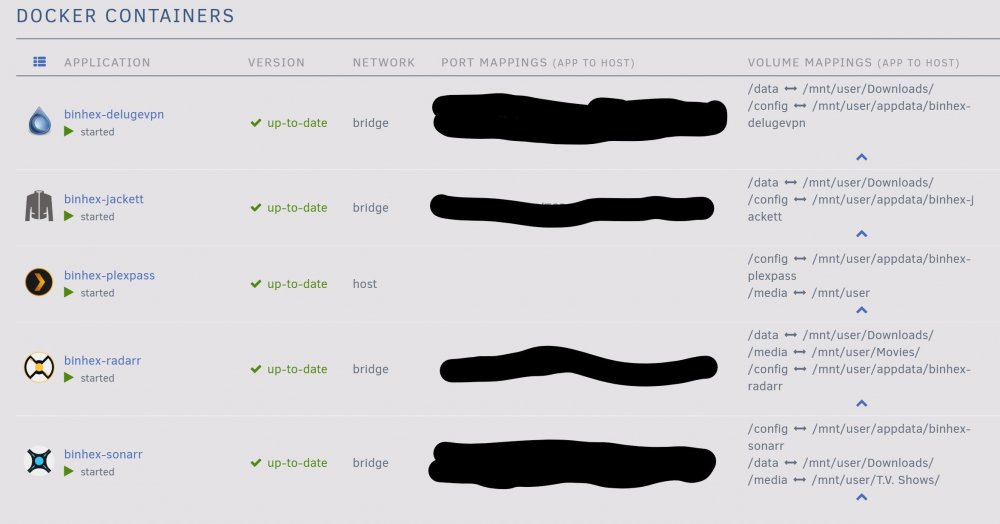
Let me start by saying, I don't believe I am having and issues with my setup; everything seems to be working as it should. This is more for my personal knowledge. Now, these are probably dumb questions and have probably already been answered but I was unable to find a solid answer from my searches. I am very new to this so please forgive my ignorance.... I have DelugeVPN setup to download "/data/incomplete", once the download completes, it moves to file/folder to "/data/completed". This is working flawlessly. I have the Sonarr container path: /media set to "/mnt/user/T.V. Shows/" and the container path: /data set to "/mnt/user/Downloads/". I have Radarr set up similarly; container path: /media set to "/mnt/user/Movies/" and the container path: /data set to "/mnt/user/Downloads/". I set Sonarr to download a TV Show, it went into Deluge as it should have. When it began downloading it was in the "incomplete" folder. When it finished downloading, it was moved to the "completed" folder. I then looked in my T.V. Shows folder and found the new folder with the individual season folder inside. I have Sonarr, Radarr, and Jackett setup to fetch the downloads. This is where my confusion sets in. To my understanding, Sonarr and Radarr are supposed to move the downloads from "/data/completed" to the appropriate media folders once Deluge has finished downloading them. As I mentioned, this appears to be happening. My first question is, how does this magic happen? I guess I'm just confused about the flow of everything. Second question: after Sonarr moved the download file from the "completed" folder, I now have two copies of the downloaded file. One copy is still in the "completed" folder and the other is in "/mnt/user/T.V. Shows/" folder. Is this because the file is still seeding in Deluge? Sorry for the long post, I also attached an image of my settings in unraid.