Richamc01
Members
-
Joined
-
Last visited
Everything posted by Richamc01
-
I just started using Maintainerr about 3 minutes ago, so I apologize if this is an obvious question to most, but how are these overlays different than the ones that are built into Maintainerr?
-
Is there a guide available to set all of this up?
-
This is amazing! I'll get moved over to Gluetun today. Thank you for the prompt response. If I have any issues, I'll post over in that support forum.
-
@binhex First, thank you for all of the hard work you put in for the Unraid community! I'm using @ich777 's openvpn-client docker container and I am routing deluge and all of my arr apps through it. I'm using your containers for all of them. I am using ghcr.io/binhex/arch-prowlarr, binhex/arch-radarr, binhex/arch-sonarr, and ghcr.io/binhex/arch-deluge. I run two of the radarr containers; one is for 4K only. ich777 has built a "connected containers" feature into his openvpn-client container and I'm hoping you can help me get this working correctly. This feature automatically restarts any containers using the VPN in the event that the VPN loses connection and has to restart. Here's a screenshot of the feature explained in the container template: A few other links: Here's a link to a post where he helped someone who is using his containers get this configured. Here's a link to his response to me asking him for the same assistance. He mentioned that you might already have a similar feature. Any help you can provide would be greatly appreciated! Thank you.

-
Fair. Thank you!
-
@binhex any chance you can help me out?
-
Any chance you let me know what I need to create in my containers to get this feature to work? binhex/arch-prowlarr binhex/arch-radarr binhex/arch-sonarr ghcr.io/binhex/arch-deluge flaresolverr/flaresolverr
-
You are a life saver! Almost 5 years later and Unraid still has this bug! Thanks for coming back and posting the solution for other future users like me.
-
I am having some troubles getting Plex to start after I had some disk issues. The disk issues are resolved, but now I am getting this in the logs for the binhex-plexpass docker: 2024-06-04 07:18:17,027 DEBG fd 8 closed, stopped monitoring <POutputDispatcher at 22529554127248 for <Subprocess at 22529553309520 with name plexmediaserver in state RUNNING> (stdout)> 2024-06-04 07:18:17,028 DEBG fd 10 closed, stopped monitoring <POutputDispatcher at 22529551749136 for <Subprocess at 22529553309520 with name plexmediaserver in state RUNNING> (stderr)> 2024-06-04 07:18:17,028 WARN exited: plexmediaserver (exit status 255; not expected) 2024-06-04 07:18:17,029 DEBG received SIGCHLD indicating a child quit 2024-06-04 07:18:18,031 INFO spawned: 'plexmediaserver' with pid 1086 2024-06-04 07:18:19,033 INFO success: plexmediaserver entered RUNNING state, process has stayed up for > than 1 seconds (startsecs) 2024-06-04 07:18:22,245 DEBG 'plexmediaserver' stdout output: Error: Unable to set up server: sqlite3_statement_backend::loadOne: database disk image is malformed (N4soci10soci_errorE) I have tried using the DBRepair script from github by following this video, based on this Reddit post, but I get to the part where I need to stop the plex services (not the container) and I receive a message that says "Start/Stop feature not available." I then tried what someone in the comments of the video said, but when I kill the process this way, it stops the container, which then gives me an error when attempting to docker exec in the container: root@Tower:~# docker exec -it binhex-plexpass /bin/bash Error response from daemon: Container 58e6183097cdedbfbdbc707db8c5395c00d310694cb27601a55485b84559ec6a is not running I'm stuck at this point. Any help would be appreciated.
-
Haha! This is great. I see my typo now. Thanks for the assistance with my "technical problem."
-
I cannot get this working for the life of me. Every time I save the docker template and check the logs, I get: grep: /etc/odoo/odoo.conf: No such file or directory When I attempt to open the webui, I see this in the logs: 2023-03-20 20:04:50,346 1 ERROR ? odoo.modules.loading: Database odoo not initialized, you can force it with `-i base` 2023-03-20 20:04:50,347 1 INFO ? odoo.modules.registry: Registry loaded in 0.178s 2023-03-20 20:04:50,350 1 ERROR odoo odoo.http: Exception during request handling. Traceback (most recent call last): File "/usr/lib/python3/dist-packages/odoo/http.py", line 1584, in _serve_db return service_model.retrying(self._serve_ir_http, self.env) File "/usr/lib/python3/dist-packages/odoo/service/model.py", line 134, in retrying result = func() File "/usr/lib/python3/dist-packages/odoo/http.py", line 1598, in _serve_ir_http ir_http = self.registry['ir.http'] File "/usr/lib/python3/dist-packages/odoo/modules/registry.py", line 190, in __getitem__ return self.models[model_name] KeyError: 'ir.http' During handling of the above exception, another exception occurred: Traceback (most recent call last): File "/usr/lib/python3/dist-packages/odoo/http.py", line 1990, in __call__ response = request._serve_db() File "/usr/lib/python3/dist-packages/odoo/http.py", line 1590, in _serve_db exc.error_response = self.registry['ir.http']._handle_error(exc) File "/usr/lib/python3/dist-packages/odoo/modules/registry.py", line 190, in __getitem__ return self.models[model_name] KeyError: 'ir.http' 2023-03-20 20:04:50,356 1 INFO odoo werkzeug: 192.168.89.249 - - [20/Mar/2023 20:04:50] "GET / HTTP/1.1" 500 - 8 0.195 0.086 2023-03-20 20:04:50,604 1 ERROR odoo odoo.http: Exception during request handling. Traceback (most recent call last): File "/usr/lib/python3/dist-packages/odoo/http.py", line 1584, in _serve_db return service_model.retrying(self._serve_ir_http, self.env) File "/usr/lib/python3/dist-packages/odoo/service/model.py", line 134, in retrying result = func() File "/usr/lib/python3/dist-packages/odoo/http.py", line 1598, in _serve_ir_http ir_http = self.registry['ir.http'] File "/usr/lib/python3/dist-packages/odoo/modules/registry.py", line 190, in __getitem__ return self.models[model_name] KeyError: 'ir.http' During handling of the above exception, another exception occurred: Traceback (most recent call last): File "/usr/lib/python3/dist-packages/odoo/http.py", line 1990, in __call__ response = request._serve_db() File "/usr/lib/python3/dist-packages/odoo/http.py", line 1590, in _serve_db exc.error_response = self.registry['ir.http']._handle_error(exc) File "/usr/lib/python3/dist-packages/odoo/modules/registry.py", line 190, in __getitem__ return self.models[model_name] KeyError: 'ir.http' 2023-03-20 20:04:50,605 1 INFO odoo werkzeug: 192.168.89.249 - - [20/Mar/2023 20:04:50] "GET /favicon.ico HTTP/1.1" 500 - 2 0.012 0.037 2023-03-20 20:04:56,372 1 ERROR odoo odoo.sql_db: bad query: SELECT latest_version FROM ir_module_module WHERE name='base' ERROR: relation "ir_module_module" does not exist LINE 3: FROM ir_module_module ^ 2023-03-20 20:04:56,373 1 WARNING odoo odoo.addons.base.models.ir_cron: Tried to poll an undefined table on database odoo. 2023-03-20 20:04:58,377 1 ERROR odoo odoo.sql_db: bad query: SELECT latest_version FROM ir_module_module WHERE name='base' ERROR: relation "ir_module_module" does not exist LINE 3: FROM ir_module_module ^ 2023-03-20 20:04:58,378 1 WARNING odoo odoo.addons.base.models.ir_cron: Tried to poll an undefined table on database odoo. I created a config file in the appdata folder (which is set in the docker template as /etc/odoo) and I still have the same problem. Would you mind sharing some screenshots of the setup that you were able to get working?
-
I'm getting the following error with my installation: I took a look at the config.php file found here: /www/nextcloud/config and I already have the "default_phone_region" set to US as seen below. 'maintenance' => false, 'defualt_phone_region' => 'US', 'theme' => '', 'loglevel' => 0, 'filesystem_check_changes' => 1, 'app_install_overwrite' => Does this also need to be set somewhere else? Or is there another variable that needs to be set in conjunction with this?
-
I had the same issue. This worked for me. Thank you!
-
Did you ever get this answered? I recently installed the docker and it would be great to be able to save to the array. When saving to the "device" or "browser" I am very confused about where it actually saves.
-
I am having some problems when exporting a page to PDF. The pictures are either behind the text or just do not show up at all. When I export as an HTML, the pictures show up as they should. Edit: I am on Unraid 6.8.3 and BookStack v21.08.5 Any help would be appreciated. Screenshot of the page when viewing in BookStack: Screenshot of the exported PDF with images behind the text: Screenshot of the PDF with the image not appearing: (Image should be between the large text and the smaller text)

-
I'm having major issues getting Nextcloud to update. I tried to update through the GUI and eventually had to restore my appdata from a backup as Nextcloud became inoperable. Now I'm trying through the CLI. Option 2 from the first page of this forum results in: Step 6 is currently in process. Please call this command later. So, I tried Option 3 (manual upgrade using occ) when I run the perform upgrade step, I am presented with: Nextcloud or one of the apps require upgrade - only a limited number of commands are available You may use your browser or the occ upgrade command to do the upgrade Setting log level to debug Turned on maintenance mode Exception: Updates between multiple major versions and downgrades are unsupported. Update failed Maintenance mode is kept active Resetting log level Then I found your post and I tried the first command you mention and I get: sudo: unknown user: abc sudo: unable to initialize policy plugin It seems way too complicated to update Nextcloud. Any idea what my options are now?
-
Do you remember how you fixed this? I am trying to update and I'm experiencing the exact same.
-
Did you ever get an answer to this? I just ran into this same issue when trying to disable the docker service.
-
Hello, everyone. I have a problem that was caused by the system temp plugin (I think). Motherboard: Supermicro X8DTL-6F CPU: Dual Intel Xeon X5680 Unraid version: Latest stable (6.8, I think) I installed this plugin almost two years ago and it worked great. About a year ago, it stopped working. I tried to re-detecting the drivers (it found one) and I was able to get the CPU temp to show, but my motherboard was now showing a negative number and I could no longer see any fan stats. Today, I tried to fix this issue. I did some Googling and I came across this article in the unraid wiki. I followed the steps in the "older versions" (at the time, I thought this meant older hardware. I now know this means older unraid version) and after completing step 7, I logged into the GUI with my phone (I did the steps before while using a monitor and keyboard connected directly to the server) and tried to load the drivers. I clicked on detect and it pulled in 5 different drivers (coretemp, i5500_temp, jc42, w83627ehf, and w83795). I clicked on save and then tried to select the sensors from the drop-down menus. While I was doing this, the page tried to load and failed. I went back to the keyboard and mouse and tried pressing enter to get a response, but the system was frozen. I reset the server using the reset button on the front of my case and let it boot. I logged into the GUI again and it froze while trying to load the dashboard. I shut down the server by holding the power button on the front of the case and then turned it back on. I logged into the GUI again and I was able to get to the settings page, and then it froze again. At this point, I shut the server back down and I pulled the flash drive. I put it into my laptop to view the most recently modified files. This is where I stand now. Can someone offer some assistance, please? I would really like to not lose all of my data. I can pull information from the flash drive and upload here if it will be helpful, but I don't know what to even upload. Since the system locks up, I cant really pull the logs either. Please help! Edit: Brief update. I decided to power up the server amd take a look in the BIOS for any leads. When I load into the BIOS, it is very slow and gets to the point where it becomes unresponsive. I am going to try and re-flash the BIOS and see what happens.
-
Take a look at spaceinvader one’s YouTube channel. He’s the only reason my server is as successful as it is. Edit: to answer a little more specifically, I am using Mariadb for the database. There’s a docker for it in CA. You create the database and user manually, before installing Bookstack. Edit 2: here is a walkthrough tutorial. It’s up to you if you want to put yours behind a reverse proxy or not. https://technicalramblings.com/blog/how-to-install-bookstack-and-reverse-proxy-it-using-linuxserver-letsencrypt-on-unraid/#:~:text=Installing Bookstack,let the container start up.
-
Can confirm: using Method 1 would try to install Catalina. I switched to Method 2 and it is now installing Big Sur.
-
No problem @Janddy! Sorry for the delayed response, but I do not remember needing to modify the .env file, but I will double-check. Unless you already figured this out?
-
Here you go, @Janddy. This is my config file for subdomain. Just make sure that you add the CNAME in the DNS settings of your domain provider. I followed one of SpaceInvader's videos to set up a different docker behind the reverse proxy and then just kind of fumbled my way through other ones. # make sure that your dns has a cname set for bookstack and that your bookstack container is named bookstack # Ensure you have the APP_URL Environment Variable set correctly in your Docker Run/Compose or in BookStack Env File (/www/.env) # https://github.com/linuxserver/docker-bookstack#docker server { listen 443 ssl; listen [::]:443 ssl; server_name bookstack.*; include /config/nginx/ssl.conf; client_max_body_size 0; # enable for ldap auth, fill in ldap details in ldap.conf #include /config/nginx/ldap.conf; # enable for Authelia #include /config/nginx/authelia-server.conf; location / { #enable the next two lines for http auth #auth_basic "Restricted"; #auth_basic_user_file /config/nginx/.htpasswd; # enable the next two lines for ldap auth #auth_request /auth; #error_page 401 =200 /ldaplogin; # enable for Authelia #include /config/nginx/authelia-location.conf; include /config/nginx/proxy.conf; resolver 127.0.0.11 valid=30s; set $upstream_app bookstack; set $upstream_port 80; set $upstream_proto http; proxy_pass $upstream_proto://$upstream_app:$upstream_port; } }
-
I have mine working with swag and duck dns. Do you have your own domain? I can send you my working config file. Edit: I'm on mobile and Tapatalk was giving me issues with the quote inside of the quote. Gave up and deleted it. Sent from my iPhone using Tapatalk
-
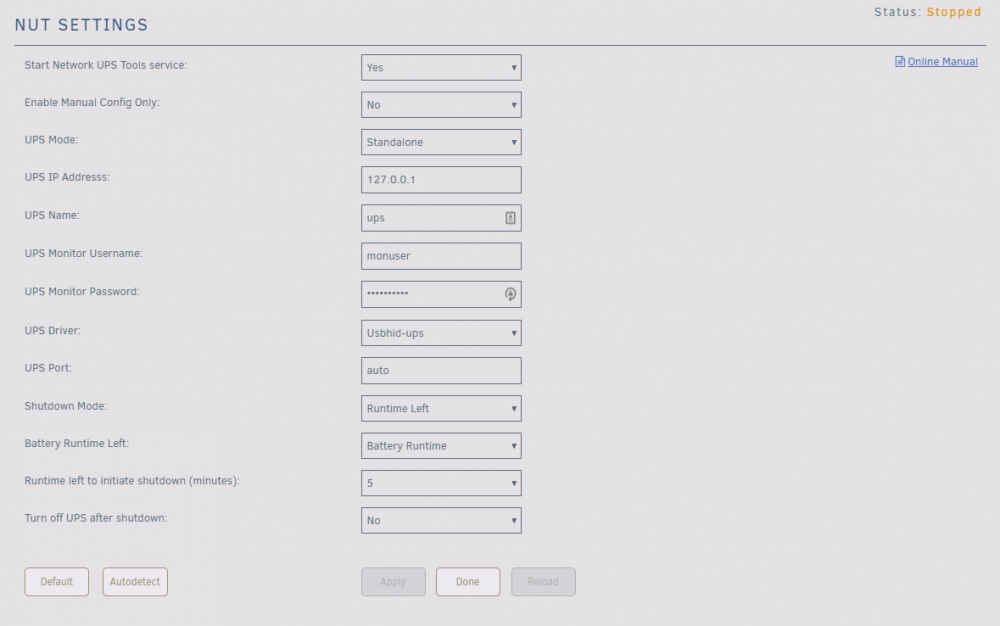
Hello, I recently started using the NUT-InfluxDB-Exporter Docker container and it was working great up until yesterday. My Grafana dashboard stopped showing any data on the UPS. Upon looking in the logs for the container, it shows the below over and over. Also, it seems that the NUT plugin stopped working. I went to the settings to look at the settings and It showed that it was running, but it was not showing me any data. I used the "Reload" button and this did not help. I then stopped the service by setting the first option to "No" and then set it back to "Yes" to start it again. Now, even when it is set to yes, the status shows "stopped". Screenshot below. Connecting to InfluxDB host:192.168.89.5, DB:nut Connected successfully to InfluxDB Connecting to NUT host 192.168.89.5:3493 Traceback (most recent call last): File "/usr/local/lib/python3.8/site-packages/nut2.py", line 97, in _connect self._srv_handler = telnetlib.Telnet(self._host, self._port, File "/usr/local/lib/python3.8/telnetlib.py", line 218, in __init__ self.open(host, port, timeout) File "/usr/local/lib/python3.8/telnetlib.py", line 235, in open self.sock = socket.create_connection((host, port), timeout) File "/usr/local/lib/python3.8/socket.py", line 808, in create_connection raise err File "/usr/local/lib/python3.8/socket.py", line 796, in create_connection sock.connect(sa) ConnectionRefusedError: [Errno 111] Connection refused During handling of the above exception, another exception occurred: Traceback (most recent call last): File "/src/nut-influxdb-exporter.py", line 47, in <module> ups_client = PyNUTClient(host=nut_host, port=nut_port, login=nut_username, password=nut_password, debug=(verbose == 'true')) File "/usr/local/lib/python3.8/site-packages/nut2.py", line 70, in __init__ self._connect() File "/usr/local/lib/python3.8/site-packages/nut2.py", line 112, in _connect raise PyNUTError("Socket error.") nut2.PyNUTError: Socket error. Any ideas??