





Harmani
Members
-
Joined
-
Last visited
Everything posted by Harmani
-
See attached. A server crash and reboot last night did not help 😅 Nevermind! The crash was caused by (or caused?) corruption of my USB flash. Upon further investigation one of the files affected was tips_and_tweaks.cfg which was corrupted. I migrated to a new USB flash, replaced the pluging files from an older backup and now the settings part is back! Thnx anyway.
-
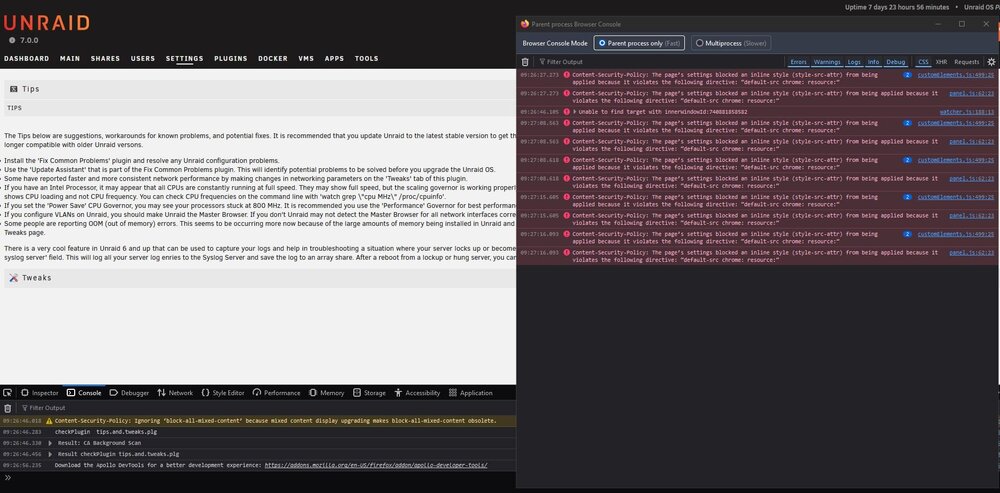
Thnx for your reply. See a screenshot from Firefox attached. Not sure if I'm showing you the right stuff, as I don't see "Java Script console" you mentioned. I've tried Chrome and Firefox on 2 separate clients.
-
I have a weird issue with the plugin: since the update to Unraid 7.0.0, the Tweaks section is empty? I only see the Tips (textual) and the Tweaks header, but nothing else. Reinstalling the plugin did not solve this. Any suggestions?
-
ok good to know that it's possible to get it lower! But unfortunately it's the least of my worries now Can't have the host crash on every reboot.
-
Yeah seems we're on the same boat then. I've also tried booting "bare metal" and all is fine! The GPU does a pretty decent job in the games I play. Could have been the best €290 ever spend, if only I could get it to work in my Gaming VM... What about that bluetooth? Is that maybe for RGB LED's or something? Never heard of a GPU with integrated BT 😂
-
Ok thanks a lot for clarifying that! Most discussions I encountered where from like a year ago, so I hoped things got better by now. I could opt for keeping the VM powered on all the time, but the GPU's 40W idle makes that a big no no 😅
-
Hi all, I picked up an Arc A770 during black Friday as an upgrade to my 1060. I was kind of hesitating because I couldn’t find definitive answers if the card would work for my use case or not, but I couldn’t resist the bang for buck 😊 Maybe I should not be as cheap in the future, because now I run into some deal-breaking-issues. Searching these forums, Reddit, etc gave me a lot of info, but it did not clarify everything unfortunately. So I’ll try my luck here: First my relevant hardware and use case: ASRock Intel Arc A770 Challenger 16GB OC Gigabyte Aorus X570 Ultra AMD Ryzen 9 5900X Samsung 990 Pro 1TB Unraid Version: 6.12.5 The SSD is passed through directly as a (newly created) Windows 11 Pro VM. My goal is to use this VM for gaming. It worked flawlessly with my previous setup (Win10 & nvidia 1060). But now with the A770 I run into the following issues: The VM boots up just fine with the A770 passed through (After setting Hyper-V to No). But when shutting down the VM, the Unraid host locks up and can only be reset the hard way... With a monitor connected to a second GPU, the last messages are something along the lines of: vfio-pci 000:0e:00.0: not ready 1234ms after FLR: waiting This happens ONLY when the sound card of the GPU is also passed through. ReBAR is reported as disabled in Intel software and performance is sub-par. It is enable in system BIOS though (together with Above 4G something..) Now googling these symptoms give a lot of hits. But not a definitive answer. I saw some tweaks etc in this forum, but not sure if they are still relevant to the current Unraid version. So my main question is: Will the above issues be resolved when I use a custom kernel with Linux 6.2+ ? Or am I better of returning the card and spend a few hundred bucks more if I want a seamless experience? EDIT: is this also your usecase @SimonF ? And did you get it working?
-
For anyone still struggling with getting an APC UPS to connect with Unraid using a Network Management Card (like I did for the last couple of hours...), this might help: in the newer interface of the NMS, setting the user and passphrase for PCnet is done at: Configuration > Shutdown Very hard miss in my opinion.
-
Same happened here (v6.9.2). Tried many things and in the end got it working by: installing HA as a VM instead of docker, installing the Deconz add-on (not the integration, but the HA add-on). This add-on makes it possible to use Phoscon from within the HA interface. I can add devices from there and then they show up in the Deconz integration. I'm glad I got it working and am now able to tinker with home automation, but I'm still wondering: - Can it not work without the Deconz add-on, just using ZHA integration? - I can not use ZHA integration now, because the USB is "taken" by the Deconz add-on. So what am i missing out of? Is ZHA a lot better? - Why do some people use Zigbee2MQTT? What is the benefit of that?
-
I've managed to start the VM (Win10) using your method, but Windows device managers just shows it as a "unknown device" and "SCSI-controller". It will not install the drivers from virtio-win-0.1.160-1.iso. How did you get windows to install the correct drivers???


