





dhstsw
Members
-
Joined
-
Last visited
Everything posted by dhstsw
-
Found it. Thanks!
-
So, i left the ports redirected and the container working and indeed, the certificates renewed. Thanks. I have a script that starts letsencrypt (ad the containers using it) at 10:00 in the morning and turn them off at 14:00, basically for when i need them. Also, i usually keep ports 80 and 443 un-redirected, i don't really want to keep them open to the internet without the need for them. Is it there any way to configure the hour the cronjob runs (any variable for the docker? i checked on the github but didn't find anything). Thanks again.
-
I did that after having the container not updating the keys (received email from letsencrypt stating certs are expiring in 20 days). Anyway, i keep a backup of all the appdata folder, keys and certs are the way they used to be. Never the less, it's not updating. [s6-init] making user provided files available at /var/run/s6/etc...exited 0. [s6-init] ensuring user provided files have correct perms...exited 0. [fix-attrs.d] applying ownership & permissions fixes... [fix-attrs.d] done. [cont-init.d] executing container initialization scripts... [cont-init.d] 01-envfile: executing... [cont-init.d] 01-envfile: exited 0. [cont-init.d] 10-adduser: executing... usermod: no changes ------------------------------------- _ () | | ___ _ __ | | / __| | | / \ | | \__ \ | | | () | |_| |___/ |_| \__/ Brought to you by linuxserver.io We gratefully accept donations at: https://www.linuxserver.io/donate/ ------------------------------------- GID/UID ------------------------------------- User uid: 99 User gid: 100 ------------------------------------- [cont-init.d] 10-adduser: exited 0. [cont-init.d] 20-config: executing... [cont-init.d] 20-config: exited 0. [cont-init.d] 30-keygen: executing... using keys found in /config/keys [cont-init.d] 30-keygen: exited 0. [cont-init.d] 50-config: executing... Variables set: PUID=99 PGID=100 TZ=Europe/Athens URL=somedomain.com SUBDOMAINS=nextcloud,oo EXTRA_DOMAINS= ONLY_SUBDOMAINS=true DHLEVEL=2048 VALIDATION=http DNSPLUGIN= [email protected] STAGING= 2048 bit DH parameters present SUBDOMAINS entered, processing SUBDOMAINS entered, processing Only subdomains, no URL in cert Sub-domains processed are: -d nextcloud.somedomain.com -d oo.somedomain.com E-mail address entered: [email protected] http validation is selected Certificate exists; parameters unchanged; starting nginx [cont-init.d] 50-config: exited 0. [cont-init.d] 99-custom-files: executing... [custom-init] no custom files found exiting... [cont-init.d] 99-custom-files: exited 0. [cont-init.d] done. [services.d] starting services [services.d] done. nginx: [alert] detected a LuaJIT version which is not OpenResty's; many optimizations will be disabled and performance will be compromised (see https://github.com/openresty/luajit2 for OpenResty's LuaJIT or, even better, consider using the OpenResty releases from https://openresty.org/en/download.html) Server ready
-
So, i guess it's the usual problem: root@cc3c920d7a5b:/# certbot renew Saving debug log to /var/log/letsencrypt/letsencrypt.log - - - - - - - - - - - - - - - - - - - - - - - - - - - - - - - - - - - - - - - - Processing /etc/letsencrypt/renewal/nextcloud.somedomain.com.conf - - - - - - - - - - - - - - - - - - - - - - - - - - - - - - - - - - - - - - - - Cert is due for renewal, auto-renewing... Plugins selected: Authenticator standalone, Installer None Renewing an existing certificate Performing the following challenges: http-01 challenge for nextcloud.somedomain.com http-01 challenge for oo.somedomain.com Cleaning up challenges Attempting to renew cert (nextcloud.somedomain.com) from /etc/letsencrypt/renewal/nextcloud.somedomain.com.conf produced an unexpected error: Problem binding to port 80: Could not bind to IPv4 or IPv6.. Skipping. All renewal attempts failed. The following certs could not be renewed: /etc/letsencrypt/live/nextcloud.somedomain.com/fullchain.pem (failure) - - - - - - - - - - - - - - - - - - - - - - - - - - - - - - - - - - - - - - - - All renewal attempts failed. The following certs could not be renewed: /etc/letsencrypt/live/nextcloud.somedomain.com/fullchain.pem (failure) - - - - - - - - - - - - - - - - - - - - - - - - - - - - - - - - - - - - - - - - 1 renew failure(s), 0 parse failure(s) Of course ports 80 and 443 are forwarded correcly to the container. Deleting certificates and key and try to get new ones leads it to generate them, download them and then saying there the same error (and of course, the new ones don't work): Generating new certificate Saving debug log to /var/log/letsencrypt/letsencrypt.log Plugins selected: Authenticator standalone, Installer None Obtaining a new certificate IMPORTANT NOTES: - Congratulations! Your certificate and chain have been saved at: /etc/letsencrypt/live/nextcloud.somedomain.com-0002/fullchain.pem Your key file has been saved at: /etc/letsencrypt/live/nextcloud.somedomain.com-0002/privkey.pem Your cert will expire on 2020-04-30. To obtain a new or tweaked version of this certificate in the future, simply run certbot again. To non-interactively renew *all* of your certificates, run "certbot renew" - If you like Certbot, please consider supporting our work by: Donating to ISRG / Let's Encrypt: https://letsencrypt.org/donate Donating to EFF: https://eff.org/donate-le ERROR: Cert does not exist! Please see the validation error above. The issue may be due to incorrect dns or port forwarding settings. Please fix your settings and recreate the container Any hint? Thanks.
-
Hi, in my /boot/config there's no telegram folder. I made it nonetheless and did the chatid file inside with the group chat id (of course) but with no avail. found this: /boot/config/plugins/dynamix/telegram Inside there's the chatid, with a 9 digits number. The chatid for the group is a 9 digits too but with a "g" at the start (10 characters in total). Modified with both the "g" and without, no results. Any hints? Thanks. EDIT: solved by myself. It needs the "-" symbol before the number, something like: -123456789 Cheers.
-
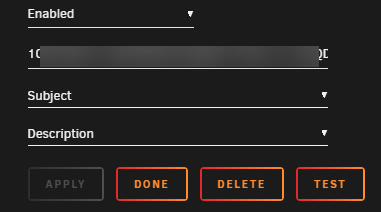
So, i tried to set up my telegram for notificartion, i created the bot and got the "token to access HTTP API. Configured in Unrad notifications: Disabled it, re-enabled it. Test. Nothing. Any clue? Thanks. EDIT: some hour after it started working.
-
HI, i'm really interested in this container but i must admit that after reading here (and the github for it) i still don't understand anything how to run it (i'm also a really fresh newbie in linux). Could you please make a little step by step guide with example files (configs and so on) how to run it? Expecially using an audio card (built in or not) to output the sound? Thanks.
-
Thanks for the clarification, i thought so. Anyway, i just wanted to see if it was working. I won't pass all those devices mainly because i don't know what they are (beside the USB controller). Anyway, i'm waiting for a cheap USB audiocard from china, i'll use that. Thanks again!
-
Ok, this was a bad idea. Windows VM started, didn't show anything and in the while parity disk and cache got corrupted. I guess i forced things a bit too much
-
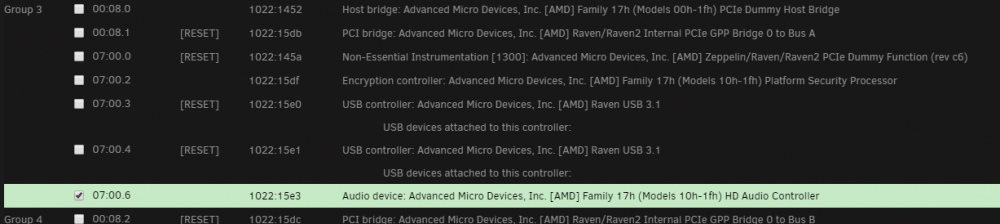
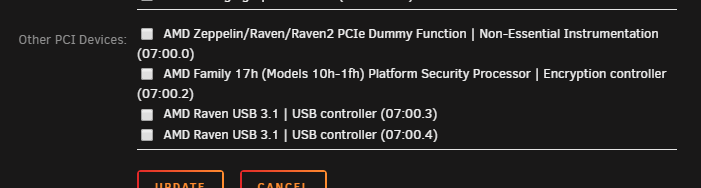
Hi, tried to bind the built-in audio controller: But, at reboot, this is what i find as bindable devices: Any hints? Thanks! Edit: of course it previously showed up in the avaiable soundcards, but unusable. Selecting it now (again, under the "Sound Card" section of configuration) the built in audio is now avaiable to the VM!! THANKS!!! When i'll have time i'll try to pass through the iGPU too, wich has been impossible with Ryzen APU so far. I'll let you know. Thanks again!
-
As far as i see when enabled it will route *all* the unraid traffic trough the VPN. As you i've been looking around like a maniac for a container actiong as a VPN Gateway but without any luck (also in hub.docker.com there's none). My solution has been to make up a VM with ubuntu server and configure it as a VPN Gateway. Wasted resources but i really don't have the time to study how to build a container to do the same job. C.
-
Weird. Starting today when i try to connecto to the webui i get: Request Entity Too Large Your request was dropped because it was too long. Generated by darkhttpd/1.12 on Mon, 18 Nov 2019 15:31:07 GMT Beside that, the RPC is working (i'm conneting to it with the chrome extension). Log looks ok: Download Results: gid |stat|avg speed |path/URI ======+====+===========+======================================================= [s6-finish] sending all processes the KILL signal and exiting. [s6-init] making user provided files available at /var/run/s6/etc...exited 0. [s6-init] ensuring user provided files have correct perms...exited 0. [fix-attrs.d] applying ownership & permissions fixes... [fix-attrs.d] done. [cont-init.d] executing container initialization scripts... [cont-init.d] 10_add_user_app.sh: executing... ----------------------------------- GID/UID ----------------------------------- User uid: 99 User gid: 100 ----------------------------------- [cont-init.d] 10_add_user_app.sh: exited 0. [cont-init.d] 45_syslog.sh: executing... [cont-init.d] 45_syslog.sh: exited 0. [cont-init.d] 50_mail_relay.sh: executing... [cont-init.d] 50_mail_relay.sh: exited 0. [cont-init.d] 60_crond.sh: executing... [cont-init.d] 60_crond.sh: exited 0. [cont-init.d] 90_configure_aria2.sh: executing... chmod: /config/rss_download_wget.sh: No such file or directory [cont-init.d] 90_configure_aria2.sh: exited 0. [cont-init.d] 91_configure_darkhttpd.sh: executing... [cont-init.d] 91_configure_darkhttpd.sh: exited 0. [cont-init.d] done. [services.d] starting services darkhttpd/1.12, copyright (c) 2003-2016 Emil Mikulic. [services.d] done. 2019-11-18T17:59:14.137057+00:00 912cc23a6ed1 rsyslogd: [origin software="rsyslogd" swVersion="8.34.0" x-pid="386" x-info="http://www.rsyslog.com"] start listening on: http://0.0.0.0:80/ 1574100002 10.0.1.21 "GET /" 413 443 "" "Mozilla/5.0 (Windows NT 10.0; Win64; x64) AppleWebKit/537.36 (KHTML, like Gecko) Chrome/78.0.3904.97 Safari/537.36" any idea? Thanks. EDIT: Deleted a cookie, now it works (toh i can't authenticate with any other browser).

