





dhstsw
Members
-
Joined
-
Last visited
Everything posted by dhstsw
-
ok, done that (except 4, dunno what that means, from unraid console says bash: tler: command not found): Anyway, now under diagnostics/econders it shows: Detected: nvenc, libx265 Devices: dri=2, nvidia=2 So i should be ok. Thx.
-
Hi, --runtime=nvidia in Extra Parameters; Correct variables are already set by default. No NVidia gpu detected (i have the drivers installed [v580.178.04] and already working with unmanic, jellyfin and so on). If i run: docker exec x265-butler nvidia-smi -L I get: OCI runtime exec failed: exec failed: unable to start container process: exec: "nvidia-smi": executable file not found in $PATH Diagnostics page (copy/paste) txt file attecched (inside the zip). Thanks. Diagnostics.zip
-
Not in my template. I guess template was update since i first installed it. I'll check it out. thx.
-
Hi, Just noticed the same, since last version automatic backup are enabled by default literally eating up my disk space. And i didn't find any way to disable it. My DB also is without filters and amounts for about 23.000.000 items (postgres folder is 156Gb at the moment). You can imagine what happens when it starts making backups daily.... :-/
-
Yeah, i ripristinate everything 5 minutes after the event. So i guess i'll have to re-do everything to produce the diagnostics file :-/ For now i can tell you (after producing the very detailed encryption info that: -All array disks (4) show: Slot 0: Original encryption key -One standalone disk (i guess one that is mounted with Unassigned Devices) shows: Slot 0: Original encryption key -Pool devices (2) show: 🔐 Slot 0: Original encryption key ⭐ Slot 31: ⭐ Hardware-derived (2025-09-28 13:20:42 EEST) So, only the pool devices got the new key in slot 31. Also, i have 3 pool devices (Cache on a sata SSD, another one on an M.2 and another final one on a mechanical disk). The detailed info reports only 2 ( /dev/sdh1 and /dev/sdi1). See attacched report. I'll try again when i'll be drunk enough not to get scared again like 4 hours ago :-/ Thanks. luks_analysis_20250928_181429.txt
-
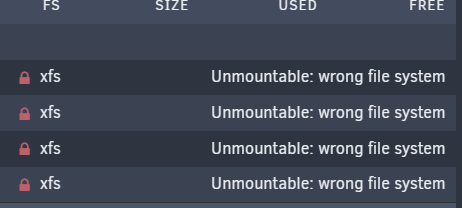
Did everything, enabled autostart, removed the copy procedure from go file. Result above. It unlocked the pool devices tho, not the array (wrong passkey). ?
-
Hi, I had to do some works on my server without using a remote computer (as i do usually). So i booted with GUI on, everything ok (including dashboard). Restarted in normal mode, connecting remotely to the dashboard page and every single "realtime" parameter shown is updating like at 5FPS: -Processors Stats/Graphic. -ETH Interface graphic. Tried everything to restore a normal situation, nothing fixed it. The only thing that solved it wa: -Stopping the array, -> shutdown; -Taking out the USB flash drive; -(with another computer) deleting the config folder and replacing it with on from a flash backup; That fixed the issue. To be sure it's not some plugin update or change of configuration i disabled every automatic update. Everything works fine. Then if i reboot with GUI on, then again in normal mode, problem starts again. C.
-
Yes, what i mean is: From README.md >4. Run: bash restore.sh restore.sh checks if docker-compose is installed and then calls it. Running from bash restore.sh (for bash i mean, a console on unraid itself), i get: Unless i misunderstood something. thanx.

-
I'm quite sure sure i'm lame but there's no docker-compose in my unraid :-/ ?
-
this solved it. thanks.
-
It uninstalls on my unraid but as you said, it doesn't does anything when installed and enabled.
-
Just an head-up. I had installed RTL8168 Drivers and everything was fine until upgrade of Unraid to 7.0.1. Since then, i discovered my upload speed (and only the upload speed) was scaled down by about 25%. I did various tests, then i tried uninstalling the drivers. Done that, everything went back to normal. C.
-
This works. Thx to @VladoPortos and fr500
-
Yes, and as i said, nearly 20/25% of the x4 are connected to something. :-/ Can anyone advise on a x4 (or even x8) sata3 Gen3 controller board wich works and is fast (8/12 sata ports)? TY.
-
As i said, a scam :-(

-
Mistery solved. Only about 9 of the pins of the "pci 4x" (as advertised) lead somewhere. Basically, it's a scammy piece of junk.
-
Yup, i undestand that. What i don't undestand is why if i connect only, let's say, 4 drives, the speeds are terrible anyway. Also, the post mentions speeds over 500Mb/s for the ASM1166, speeds i really don't see (also, states it's Gen3 while it reads as Gen2 everywhere i plug it). Thanks.
-
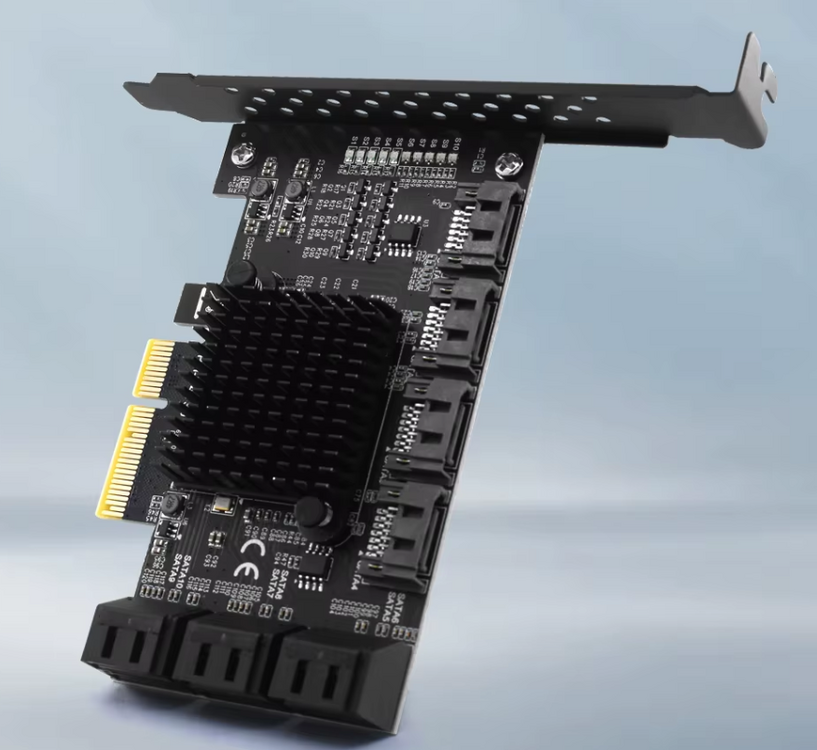
Hi, i bought this card: It supposedly is adverstised as a "PCIe SATA 4x 10 ports", with an ASM1166 + JMB5xx chipset. (i already checked the firmware, it's one of the latest). by the system it's seen as: 06:00.0 SATA controller: ASMedia Technology Inc. ASM1166 Serial ATA Controller (rev 02) Booting up the server, 1st surprise: after being initialized the board lists the drives connected to it and shows: "PCIe Gen2 x2". So, instead of being x4, it's x2. Ok, well, should be enough for 8/10 mechanical drives: 1x = 500Mb/s, x2 should be 1000Mb/s. Unraid starts, all drives listed. With DiskSpeed, checking speed for every drive connected shows good results. Problem arise when i try a cache move to array (with Turbo Write enabled) or a parity check: With 5 drives connected to the card (all array mechanical drives) i get a max speed of 54Mb/s per drive, for a grand total of 270Mb/s bandwidth. Wich is terrible (with the 2 PCIe 4 ports Marvell controllers i used before i was well over 120Mb/s per drive). So, any hint, secret driver, parameter i can play with or the controller is just a piece of junk? Thanks.
-
Hi, Now that Unraid 7 allows to move from a pool (cache) to another pool, it would be useful to be able to blacklist the array to spin-up (the array in this case would be outside of the disks in question).
-
Same thing here. Since i updated today to 7, mover stopped doing anything. I mean, it looks like it's starting but it doesn't do anything (eg: files stay in cache, no disks movement, nothing). an 10 23:02:55 Incubus webgui: Successful login user root from 10.0.1.254 Jan 10 23:03:05 Incubus emhttpd: shcmd (4003): /usr/local/sbin/mover start &> /dev/null & Jan 10 23:03:05 Incubus root: Starting Mover Jan 10 23:03:05 Incubus root: Forcing turbo write on Jan 10 23:03:05 Incubus kernel: mdcmd (43): set md_write_method 1 Jan 10 23:03:05 Incubus kernel: Jan 10 23:03:05 Incubus root: ionice -c 2 -n 0 nice -n 0 /usr/local/sbin/mover.old Jan 10 23:03:05 Incubus root: Restoring original turbo write mode Jan 10 23:03:06 Incubus kernel: mdcmd (44): set md_write_method auto Jan 10 23:03:06 Incubus kernel: :-/ EDIT: (seems solved). So, it was the TurboWrite plugin. Disabled, a run of mover, enabled again, and now it works. Weird.
-
@JorgeB Smart full test was ok. The UD mount showed all the files (never the less, for sure some of the will be damaged but i can live with that). Currently syncing the parity disk. THANKS!
-
Yup, i'll try (and cross my fingers in the while). Thanks for the help
-
I'll try that when SMART test ends, thanks. To re-sync i guess i'll have to take note of the current array config, do a new configuration, reconfigure as it was and start it, right? thanks.
-
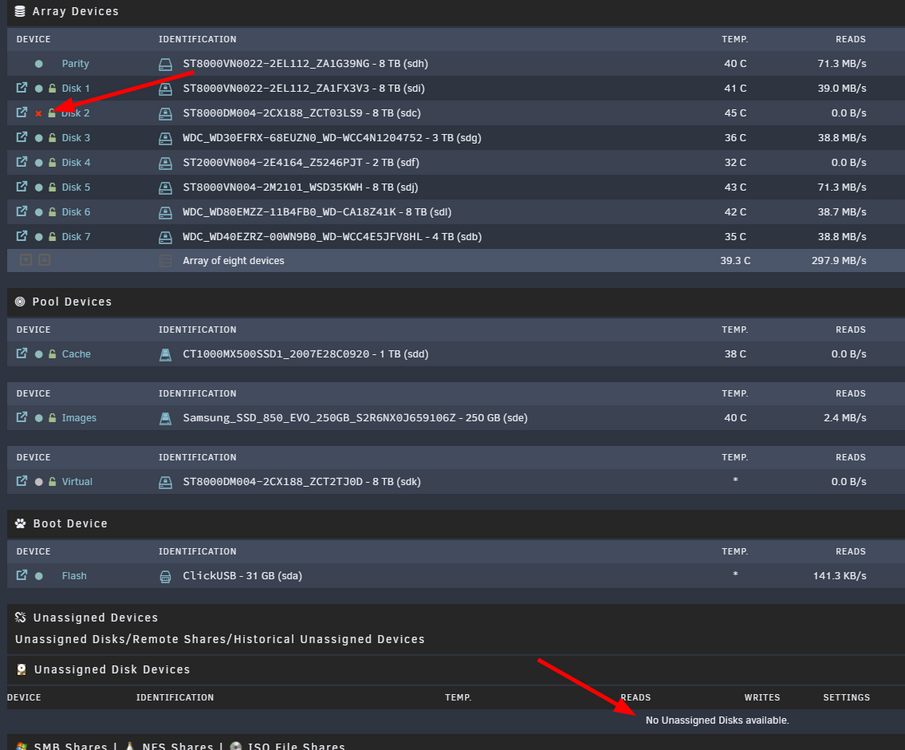
>First use the Unassigned Devices plugin to see if the old disk mounts and contents look better. The plugin atm shows "No Unassigned Disks available". The disks situation is the following: I guess i have to make the disk avaiable to the plugin un-assigning it from the array, correct? Also, if Smart comes up with no errors and i want to have again the drive on the array (so, not being emulated anymore) and resync the parity (well, in case the files that aren't anymore in the emulated are actually on the drive, seen with UD)? Thanks a lot.
-
Thanks. ATM i'm running a full SMART test on the disk and backupping on a good disk the content of emulated one. >you can first see if the actual disk mounts with UD Sorry, i don't know what you mean with that (i don't know what UD is, i guess UnraiD?) and, in case, how do i do it? Keep in mind that drives are encypted. >you can re-sync parity instead How do i do that? (i mean, it's not the "rebuild" procedure, right?). Also, any chance i can get back the files i don't see anymore in the emulated drive (it was about 3.5 tb)? Thanks.




