





mtongnz
Members
-
Joined
-
Last visited
Everything posted by mtongnz
-
@VladoPortos can I request we leave the docker label as folder.view? I don't see a need to change it as that only means we need to modify all our comps compose stacks. Cheers
-
There are 2x PRs that both address this in different ways. I went with a CSS only and JohannesHo went with a JS approach. Both work. My CSS approach - I also lined up the containers so they're all the same size. It's not the prettiest CSS but it works Mine: https://github.com/VladoPortos/folder.view/pull/12 JohannesHo: https://github.com/VladoPortos/folder.view/pull/11

-
I run a script to down then up each of my stacks in the order I want at array start. It works great: https://gist.github.com/mtongnz/f3ca13c7ff8472e54bbb7ff8cec265e1 This script also means I can add custom buttons into Folder View for each folder... I have each stack in it's own folder and a button for update, restart, down and up. Very handy
-
Install the User Scripts plugin. It comes with a script to auto remove orphan images. Set it to run on a schedule and it'll clean it up for you. It's an awesome plugin allowing php and bash scripts to be easily run from the ui.
-
I submitted a PR a while ago but it hasn't been merged yet. It fixes this issue. https://github.com/dcflachs/compose_plugin/pull/27
-
@phil1cI've just had a play with this... Think I've got it working. Try this PR & join the convo there: https://github.com/unraid/webgui/pull/1616 It fixes network name display, tweaks the IP & port mapping display, and fixes the webUI url generation.
-
Fix for 1 & 2: https://github.com/dcflachs/compose_plugin/pull/27 3 should work. Maybe try putting quotes around it
-
I put in a PR to fix this but it's not merged yet: https://github.com/dcflachs/compose_plugin/pull/27 You can manually modify the plugin and test it if you'd like.
-
Here's my PR to the unRaid webGUI git: https://github.com/unraid/webgui/pull/1616 It changes how networks, IPs and ports are displayed. Give it a try and let me know any thoughts
-
Here's my PR: https://github.com/dcflachs/compose_plugin/pull/27 This uses the existing functionality from the built in docker manager to do a check on compose manager stacks when they're run/updated and also has a manual check button. Fairly easy to modify your local server to try it out. Edit the files in /usr/local/emhttp/plugins/compose.manager as per the commits. If it's no good for you, revert by updating the compose manager plugin. Also this PR to "remove" update links for non DockerMan containers: https://github.com/unraid/webgui/pull/1582 This is a slightly different issue. The update link/button doesn't actually work for non DockerMan containers. This PR replaces those buttons with an update available message instead, leaving the update functionality to whatever is managing the container. Here's a gist for a User Script (get it from unRaid Community Apps). It allows you to call useful Docker Compose Manager functions via user script. These can be scheduled (note that if using a schedule, the defauts set at the top of the script will run). https://gist.github.com/mtongnz/f3ca13c7ff8472e54bbb7ff8cec265e1 This means you could set updates to automatically run on certain stacks if you wanted, or you can restart troublesome stacks (I called this down_up as that's what it actually is doing). I use it to start my stacks in a certain order when the array starts. Comments on these would be appreciated.
-
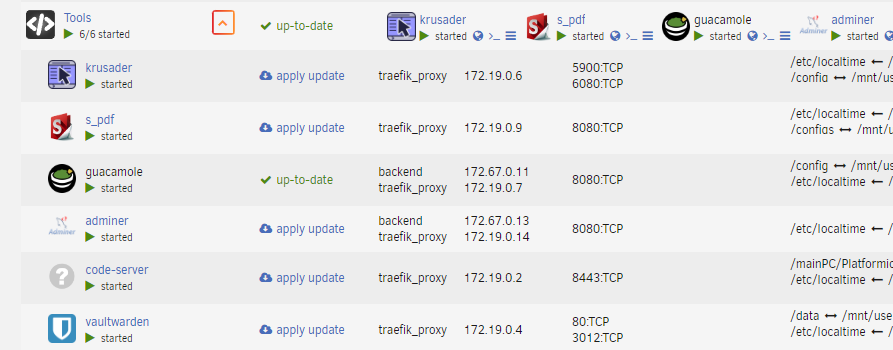
I have a feeling this is related to various other network display issues for non-dockerman containers (such as the correct network name not showing). This just got merged: https://github.com/unraid/webgui/pull/1616#issuecomment-2040820998 It shows multiple networks and the associated IPs. Ports seem to not correctly show which are internal and which are exposed for compose stacks at present - I'm currently working on a fix.
-
If you use the User Scripts plugin, I'd recommend my script here: https://gist.github.com/mtongnz/f3ca13c7ff8472e54bbb7ff8cec265e1 It lets you interact with this Compose Manager plugin via script and also run commands on multiple compose projects in a single command. Change line 5 (argumentDefault) and you can then schedule the command. I use it scheduled to "down_up" all my projects on array start - so it runs a down then an up on each stack. This ensures that all my dependencies start in the correct order as I was having issues when I left unRaid to autostart everything.
-
Sorry... Should've said docker containers. If they're on auto start, unraid starts them in whatever order it feels like
-
I had the same issue. Services seem to start in whatever random order unraid decides and this can break things. I wrote this script to address this: https://gist.github.com/mtongnz/f3ca13c7ff8472e54bbb7ff8cec265e1 I use the down_up action and run at array start and now it seems that everything works as it should. Male sure you edit line 5 of the script and list all the compose manager projects you'd like to restart - I doubt your project names match mine As a side note, I also disable all the auto start sliders on the docker page for any compose projects or the containers created by them.
-
https://github.com/dcflachs/compose_plugin
-
https://github.com/unraid/webgui/pull/1616 I've submitted a PR to address this. It's an issue with how unraid UI changed how it read the network. Hopefully this will be merged in soon. Feel free to edit your local files as per the pr to see if it works for you and also content on the pr. Cheers
-
https://github.com/unraid/webgui/pull/1582 This was just merged so I'd imagine it'll be coming in a release soon
-
What you're describing is the issue I had (and that was fixed in this latest version). The Docker Compose documentation doesn't really explain that specifying the env-file in the compose.yaml just sends the entire .env to the container - hence you can't access those values in the compose.yaml file. Having the .env file in the compose.yaml directory (or specifying it in the CLI with the --env-file flag) loads the env into the compose.yaml and you can access the values. Very confusing and annoying! I have around 30 containers and wanted to be able to easily keep all the "config" values such as appdata & document directories, database passwords, domains... all in one .env file so it's easier to update, change and migrate everything. This plufgin, with the Folder View plugin, make the unRaid docker management much easier.
-
@dcflachs has just merged my pull request for this: https://github.com/dcflachs/compose_plugin/pull/24 Should hopefully have an update available in unRaid very soon. To use it, create a file called envToUse in the project folder (i.e. where the compose.yaml file is) and put the full path to the env file. I use vscode-server to manage my files so it's pretty easy. But if there's a bit of interest, I might look at building a UI integration of some sort.
-
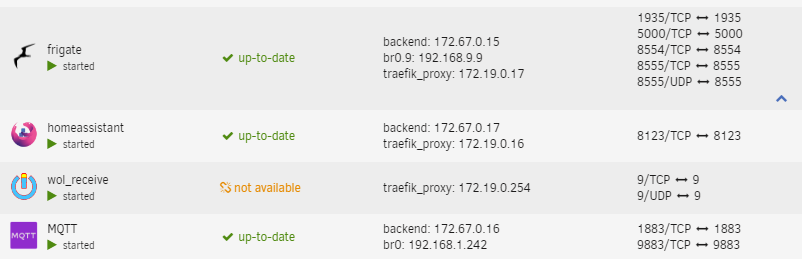
I've been playing with the code behind this plugin and have made a couple of tweaks. I'd be interested on peoples thoughts and suggestions. The first allows you to specify any .env file. This allows use of a central env for all your compose files. https://github.com/dcflachs/compose_plugin/pull/24 Update the built in unRaid image versions so the GUI correctly shows updates for containers. I'm still testing this before doing a PR. https://github.com/dcflachs/compose_plugin/commit/4297b46fdfeaa077f405a328ee074606363d5f9b I've tweaked how the network info is shown in the GUI. It now shows all network names with the associated IP. This is in the dynamix.docker.manager plugin which is a core part of unRaid's GUI - so not technically part of this plugin. You need to set the label net.unraid.docker.managed: 'composeman' for this to work (this is usually done with the overide yaml). https://github.com/unraid/webgui/issues/1569 Here's a screenshot of it: I've contemplated making the network name bold but I don't think it's needed. At present, these all need to be implemented by overwriting the files in /usr/local/emhttp/plugins/. Look at the commits to see what files need to be edited.
-
I finally got around to doing this so I could wake my sleeping VM with the keyboard. It works great. Thanks heaps. I have a minor issue however... using a Cooler Master MK750 on a Win11 VM. The capslock and numlock lights no longer work (so I can't tell if they're enabled or not). As far as I can tell, windows can't detect the keyboard anymore and only gets the events. If I try to install the Cooler Master Portal, it seems to not see any devices. Is there a way to pass keyboard events and the keyboard device so windows detects it correctly and sends back the caps/num states? I also have a win10 VM with just standard VM pass through which works fine, so it's not a keyboard issue. Thanks
-
I admit I haven't read all of the 16 pages here but have tried searching... Is there a Github repo for this? I've modified some of this plugin locally to allow use of a "master" .env with multiple projects and I'd like to share it back. I'm slowly moving alll my services to compose. I was getting annoyed having to maintain multiple identical .env files across different folders. It seems to work flawlessly and allows to easily switch between a "local" and "master" .env. If you maintain the compose files in code server (as I do) then you can modify the file to use any .env file you'd like (so you could have a few "masters")
-
I found the plugin missing a few features (like waking a sleeping VM) so I made a docker to do it. I posted it up a few posts:
-
I'm assuming you've followed the instructions and have the FIFO, user script & docker container setup. I'm also assuming the container and user script are both running. I'm also assuming you've setup the docker config.yml with the default "echo test" from the GitHub repo. Open the user script log and it should display a message when new WOL packets come in. Send a WOL packet to your containers IP using the MAC specified in the config.yml for the echo test. Broadcasting it might work but I specify the exact IP. Did the user script log show anything? If not, then something isn't setup correctly. If it shows, then the WOL is working and it's something else.
-
I made this: https://github.com/mtongnz/unraidWOLcmd It's a docker container to receive WOL packets. You can configure any command to run on your unRaid server, including the vmControl script I wrote to start/stop VMs.


