





ChrisTech
Members
-
Joined
-
Last visited
-
I've just updated to Unraid 7.1.4 (from 6.12.x), and I'm seeing that the nvidia-smi exporter isn't properly capturing the watts used for each GPU (I have two, P2000 and a 3080). This was working properly with 6.12.x, and the nvidia-smi cli command outputs it correctly: Prometheus output: nvidiasmi_power_draw_watts{id="00000000:01:00.0",uuid="GPU-9ba131ee-bd4d-3abc-12fd-62ded5dec137",name="Quadro P2000"} 0 nvidiasmi_power_limit_watts{id="00000000:01:00.0",uuid="GPU-9ba131ee-bd4d-3abc-12fd-62ded5dec137",name="Quadro P2000"} 75 ... nvidiasmi_power_draw_watts{id="00000000:06:00.0",uuid="GPU-50474d86-0357-50bf-fcd8-34609093507c",name="NVIDIA GeForce RTX 3080"} 0 nvidiasmi_power_limit_watts{id="00000000:06:00.0",uuid="GPU-50474d86-0357-50bf-fcd8-34609093507c",name="NVIDIA GeForce RTX 3080"} 320nvidia-smi cli: myusername@servername:~# nvidia-smi Thu Aug 21 10:47:41 2025 +-----------------------------------------------------------------------------------------+ | NVIDIA-SMI 580.76.05 Driver Version: 580.76.05 CUDA Version: 13.0 | +-----------------------------------------+------------------------+----------------------+ | GPU Name Persistence-M | Bus-Id Disp.A | Volatile Uncorr. ECC | | Fan Temp Perf Pwr:Usage/Cap | Memory-Usage | GPU-Util Compute M. | | | | MIG M. | |=========================================+========================+======================| | 0 Quadro P2000 Off | 00000000:01:00.0 Off | N/A | | 50% 43C P8 7W / 75W | 3MiB / 5120MiB | 0% Default | | | | N/A | +-----------------------------------------+------------------------+----------------------+ | 1 NVIDIA GeForce RTX 3080 Off | 00000000:06:00.0 Off | N/A | | 0% 31C P8 5W / 320W | 3MiB / 10240MiB | 0% Default | | | | N/A | +-----------------------------------------+------------------------+----------------------+ +-----------------------------------------------------------------------------------------+ | Processes: | | GPU GI CI PID Type Process name GPU Memory | | ID ID Usage | |=========================================================================================| | No running processes found | +-----------------------------------------------------------------------------------------+using plugin version: 2023.07.23. Thoughts on this? All other metrics (that I've been caring about/graphing), appear to be parsing correctly.
-
I had the same error. Don't know the cause, but I fixed it by removing and re-installing the plugin (requires a re-sign in on the connect page).
-
So I don't use this dashboard, but I ran into this issue after upgrading from unraid 6.12.13 to 7.0.0. I did end up figuring this out. Set your Repository to: telegraf:alpine Then under Extra Arguments, add: --entrypoint=/bin/sh Lastly, this is the important bit. Under Post Arguments, ensure yours is like this: -c "apk add --no-cache sed && sed -i 's/su-exec telegraf/su-exec root/' /entrypoint.sh && apk update && apk upgrade && apk add smartmontools curl python3 py3-pip docker && python3 -m venv /venv && source /venv/bin/activate && pip install requests && exec /entrypoint.sh telegraf" To summarize what this is doing: Starts the docker container, and sets the entrypoint to be a shell session. Installs sed, to modify the entrypoint.sh within the docker container to update the su-exec from telegraf to root. Installs the other dependencies (adjust as you see fit). Sets up a venv for python, to ensure that package installs are able to be made (PEP 668 restrictions without this). Execute the original entrypoint.sh, but it's running as root now. As this is running as root, and not telegraf, be wary of the usual security issues. I'm not responsible for anything that happens Let me know if this works for you!
-
Hi there, For the past month or so, my Windows 10 VM keeps pausing, and the only way to resolve the issue, is to Force Stop the VM, and start it again. I've attached the Diagnostics, and the last occurrence happened roughly 3/25 at 11:55pm (or after... going by last Event Viewer entry). I've looked through the logs but I haven't noticed anything. Other than the VM, everything else has been functioning fine. VM will work for a few days, then just pause without warning. The only error I see within the VM Logs is: error: kvm run failed Invalid argument Which means nothing to me. Appreciate the insight and help. Chris tower-diagnostics-20240327-1849.zip
-
Hmm, seems my rsyslog.conf was completely empty. Not sure why. It was even empty on my /boot/config volume too, so moved those to *.bak, and updated /etc/rsyslog.conf, restarted the service, now I have a syslog. Hopefully the random rsyslog.conf I found in the forums from 2015 is still up-to-date...Anyone care to share their latest so I can compare?
-
@JorgeB - Rebooted, and diag attached, but syslog still empty. @Squid - There were just some disk mounted (not as slave) warnings, and some folders on cache disk but not configured to use cache. No errors. I attempted to issue a command via CLI: logger "test", but nothing shows in syslog either. Not sure what else it could be. I can manually edit syslog (as root), so it's writable... Permissions are: -rw-r--r-- 1 root root Does that seem correct? I did end up removing two plugins because Common Problems told me it didn't know the publisher. I've now rebooted, and it's been ~12 minutes... no error about corrupted drive. 🤞 that was it. tower-diagnostics-20221005-2101.zip
-
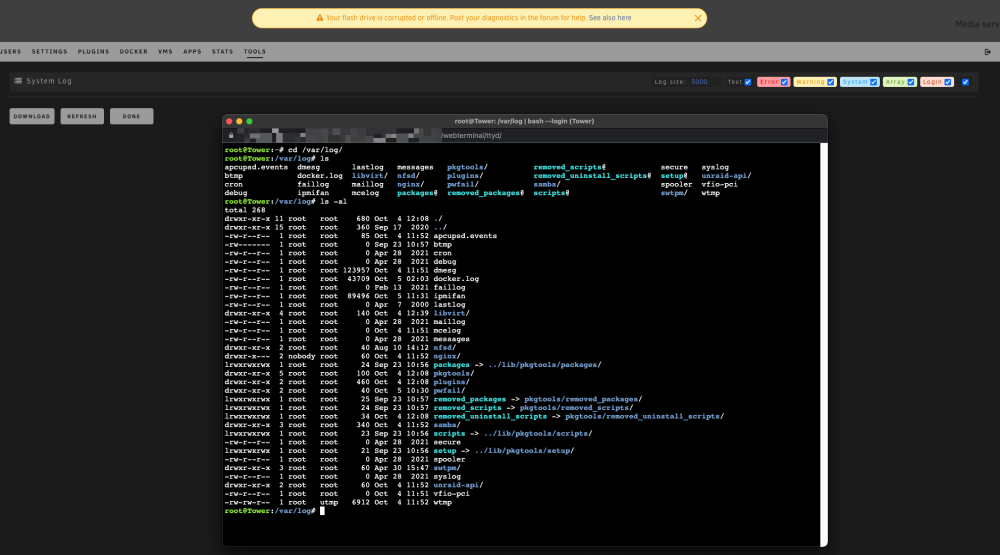
@JorgeB Thanks for the suggestion, although I'm not sure what that'll show. It's a 0 byte file in /var/log/ (see above screenshot). I'm the root user, so I can access it, but did copy it to a share I have access to, and it's still empty/0 bytes:

-
ChrisTech changed their profile photo
-
I just attempted to re-install unraid on the same flash drive, and copy over the `config` directory, but still getting the same error. Syslog is still blank too.
-
@trurl- Shows blank there too. Even `/var/log/syslog` is blank with a last update in 2021:
-
Here you go. tower-diagnostics-20221005-1050.zip
-
Hello, I've just upgraded from 6.9.2 to 6.11.0 yesterday, and am seeing the banner: `Your flash drive is corrupted or offline. Post your diagnostics in the forum for help.` Not sure what's wrong, as I'm still able to fully access the USB, and have performed several reboots, and comes up just fine. I've attached diagnostics to this post. Appreciate any help on this. tower-diagnostics-20221005-1038.zip
-
Is there a way to download dockers from DockerHub now? The "Click Here To Get More Results From DockerHub" link now opens DockerHub, not the usual search results appear where I can just click install.
-
Thanks for posting this tag...Was wondering what was going on myself, and why it wasn't working... 1.19.2-alpine resolved it for me.
-
I'm wondering if there's a plugin that can map a dockers dependencies to another docker (eg. Grafana to Prometheus/InfluxDB/etc.). I'm constantly forgetting what docker uses my MongoDB docker, or TeslaMate pushes to what database? Would be nice if I didn't have to go into each docker to confirm, but rather had some sort of dependency list.




