





Geck0
Members
-
Joined
-
Last visited
Everything posted by Geck0
-
No worries, It helps everybody if you explain what the issue is and the resolution.
-
This forum is specific to Linixserver.io's Nextcloud docker. Are you sure that's what you're using and not another Nextcloud docker? With Linuxserver.io's docker instance, you shouldn't have to change permissions, etc. I don't use AIO, I have separate dockers for everything, so apologies in advance if I have this wrong.
-
Something I thought of. Are you accessing Nextcloud using its public facing domain name, and locally via your PC?? I know you have an internal reverse proxy, do you have an external facing reverse proxy as well?? (edited above) It depends how important the Nextcloud setup is to you, vs how much time you have, etc. I haven't had to do it in a long time, but I can tell you that when things went wrong, rolling back to a previous backup or a Nextcloud rebuild became the easiest thing to do. I wouldn't want to do it now, as Nextcloud is fully integrated into the family. However, if I was you, I would use this as an opportunity to move to MariaDB. I use a single MariaDB docker for multiple databases. Its easy to edit, etc. I'm biased, as I no virtually nothing about PSQL. Good backups are important, a roll back will save you heaps of time. I've actually got another instance of NC running purely for testing an upgrade before I roll it out. That said, I often don't as I get lazy to do it twice. To me, it sounds like the easiest and quickest thing to do is scrap it and start again. It will take you less than 2 hours. Your data directory is safe (you should have backups anyway) and you're literally only losing your database driven features, like your calender, etc. Even those, you can probably backup if its worth it.
-
How'd you go? Or did I lead you up the garden path??
-
Okay, 192.1681.5 is being bruteforce throttled by NC. Try this first You may not have to, but restart your NC docker anyway. Check your logs again when you login, so we can check what is going on, whether you can or not, post the logs. If that works, try this in your config.php I think you have an issue with your reverse proxy or your Nextcloud's nginx files. Most likely your reverse proxy. It's not recognising your ip address and thinks everything is coming from the unRaid server's ip address. Its blocking 192.168.1.5, which is also the address your Redis is on, I'm guessing. If I'm right, we can sort out your nginx conf files later. If you can remember messing with your proxy recently, that maybe the goto first.
-
Is 192.168.1.5 your unRaid server? That error message is Bruteforce throttling of 192.168.1.5. I think I know what the issue is. Can you confirm if this is your server?? Although, I just had another quick look: Why do you have :444 and :443 on different ip addresses. Maybe elaborate on what these ip addresses are??
-
Then pass. There is something obvious that you're missing. Your installation seems to check out. 4482 errors in the log since 12th Feb is a Hell'uva lot?! What's in your logs under your data directory? ie. nextcloud.log. There must be an indicator in there of some sort. The log is definately complaining about something. The only other thing I can think of, which is normally a last resort, is to try "occ maintenance:repair" Its possible you're upgrade didn't complete and you're missing a few files. If OCC is running then generally the upgrade is missing files for the GUI. Have you dropped the docker and reinstalled it again? The issue with Redis also refers back to COOLWSD, which is Collabora. Maybe Redis is fine and Collabora is causing the issue. To me, it states simply that there is no connection to Redis, but its in the context of Collabora anyway.
-
Whilst I think about it, are you able to run occ commands? I'm guessing not, but try this: change 'nextcloud' to whatever your nextcloud docker is called. I missed this post from you, I was answering off my phone. If you can get to the login screen and no further. Normally, clearing cookies resolves it as a first step. Run the commands above as well. There are other occ commands, you should always run maintenance data fingerprint after an upgrade. I've really gotta go, let us know how you get on.
-
I use MariaDB / MySql, which is the recommended database for Nextcloud. The overcommitment error is if you have low memory, my understanding is that setting it gets it to act like a page file (in basic terms), so that you don't lose any read/writes. I have a 128gb, so I haven't had any issues with this error coming up. I tried adding it to my Redis container as --sysctl parameter but it didn't work and orphaned my docker. I think it can only be fixed in the .conf file directly. That's a pain, because it will likely get overridden each time Redis receives an update. We can look at it later though. I did a quick test and upgraded NC and I've got an HMAC error, which is a first for me, and I'm going to have to figure out how to resolve. If its possible, I recommend you roll back to NC 30.0.5, assuming you have an appdata backup of your database and your nextcloud? I always roll back and then try to figure out why I can't upgrade. I also then watch the Nextcloud docker log live to see if it reports any issues. My updater.log hasn't recevied a new entry since 2023, which I think is when Linuxserver.io went over to this automated update method. Here is my config.php in the meantime. I haven't updated or looked at mine in quite a while. What's interesting is that I've also got entries for app_install_overwrite, which I haven't placed into the file. I'm guessing they were inserted as part of the upgrade. Even the 'chunksize' is downgraded, I normally have it set higher.
-
If you scroll up, you'll see there is an issue in your Redis config. Look at the screenshot you posted about memory overcommit must be enabled. May be nothing, but it could possibly be the issue. I'm not an expert on Redis, for me it just works. If it's still looking for Redis and you removed it from config.php, it possibly means you didn't restart the NC docker? I'll send you a copy of my config.php when I get a chance, I'm in Oz and the morning is starting up.
-
Whats this for, in your config.php? app_install_overwrite' => array ( 0 => 'cfg_share_links', 1 => 'tasks', Generally, appinstall overwrite is to firce incompatible apps to run, regardless. Normally, Nextcloud will prevent them from running, if there is a compatibility issue. Wondering if it's causing the issue.
-
Forgot to add. Don't forget to clear your cookies on your browser before trying again. May not be necessary, but do it anyway.
-
Sorry, been really busy. If you haven't modified your config.php, since the upgrade and you can ping Redis plus Redis appears to be working, then there is a possibility that the Redis upgrade hasn't retained the password you set in config.php. I've never bothered setting one. Try removing the password line and restarting Nextcloud.
-
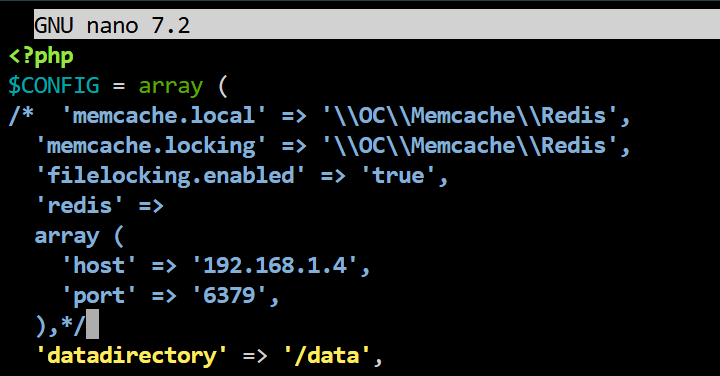
Like this Notice the /* and then the */ further down. Anything between those will be comments. ie. you could write /* Hello World */ as a comment. I just checked, I'm on 30.0.5. I never upgrade in a hurry, I always wait for the upgrade bugs to be ironed out. This may isolate if the issue is Redis. You didn't post your Redis docker log, so that's the only info I can really respond with. Unfortunately, I'm also pressed for time, so its likely I missed something.
-
Yep, if NC is configured for Redis and it can't reach it, it'll fail. Can you ping Redis on it's ip address? What do the Redis docker logs say? If Redis is okay, then it's Collabora, are you running it as a separate docker or AIO? You can temporarily comment out Redis in config.php if it's the main issue.
-
It sounds like you've thought it through and have a plan.
-
Rather than questioning the solution, why don't you try it. It's roughly the same amount of time. Skate closer to the puck.
-
Use a device password to log into the app. Upgrading Nextcloud is irrelevant to the issue. The other issues are for another day.
-
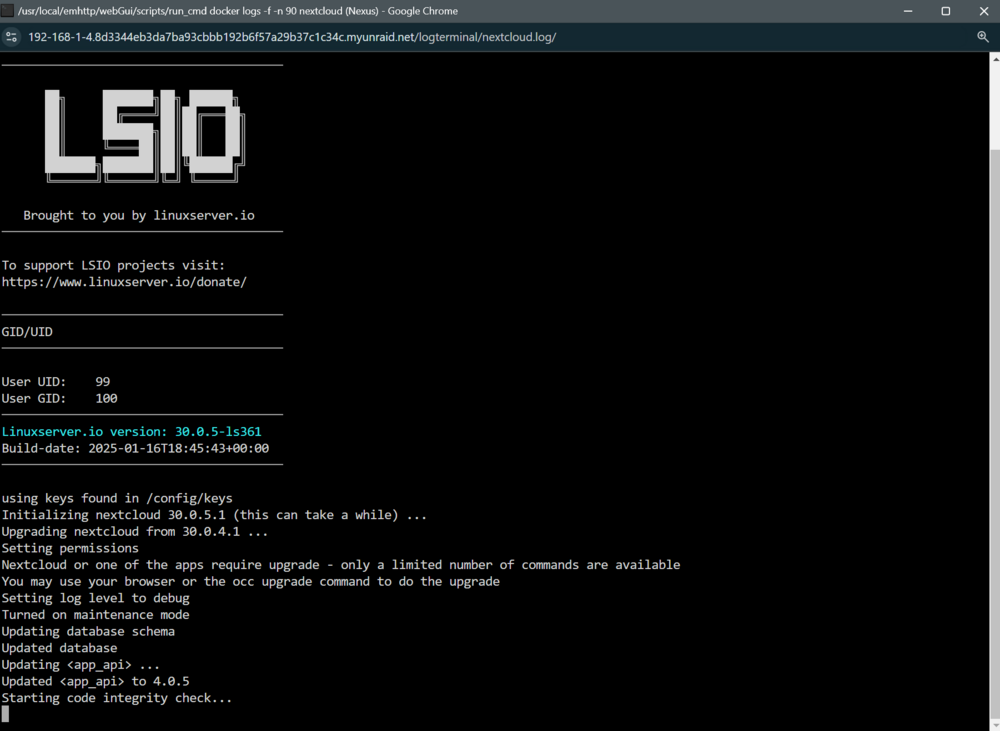
There's not enough information here, so a bit of speculation on my part. The update failed (for whatever reason), you should look at the docker's log during the upgrade to ensure that it ran smoothly. I'm guessing you went ahead when it prompted for a new user and ended up creating a new database setup. When you restored the config.php file it pointed back to the original setup. I'm guessing that you're now back on the previous version and will need to update again. The other consideration is that pointing back to the correct config.php has restored your other settings, including password salt, etc. I still think leaving your NC version label free is a bad idea. If you watch this log in your docker, you can check the outcome to see if there was an issue.
-
I think the main issue here is that you're treating NC like its a plug and play Windows app. You have to learn the fundamentals of NC, nginx, etc. If you don't have the energy or will to do the basics, then you'll always have problems. I've also had photos that didn't upload, mainly when I had no mobile data connection and afterwards it wouldn't sync. Those individual photos I've manually pulled into the NC app, deleted the originals and moved on. You may want to set the setting to only upload when charging, so it knows to wait and you don't have a failed upload. You can also attempt a re-upload in the app's settings. You've mentioned that there are multiple different versions of NC tags. If your docker isn't tagged, it will always update to the latest stable version. However, you still need to check the logs, because there is sometimes additional requirements regarding the database fields that needs to be adjusted, so additional commands need to be done afterwards. Myself and others have mentioned this in our posts on this forum, but you need to take the time to learn. The NC server logs will always prove useful if you want the support in this forum, without it there is only so much we can do. In which case, Google Photos is your friend. If its just photos you want to auto upload, then try immich instead. I don't use it, I use PhotoPrism, but immich is starting to look superior. My concern is that if you cannot figure out NC, then you likely don't have a good backup strategy and will loose your treasured memories at some point if there is corruption, failed disk, etc. Something to think about. Lastly, there is nothing wrong with NC. Most of the issues are user issues, related to a lack of understanding or a bug that got missed in the candidate release (hence why I tag my versions and wait). Complaining in the support forum that its junk isn't going to fix it.
-
You can change the tag to ":latest" which will keep your docker updated. A restart of the docker will then pull down the latest version available. I always use tags and update later than the current version. This is to ensure thst if a bug is discovered, the bug is fixed before I upgrade or at least the workaround is posted. "Also uploaded existing files" needs to be ticked under the configuration for the folders that are being auto synced. This will upload files that still exist in the folder. Android permissions have changed somthe original file can no longer be moved from its original folder (as I understand it). Hope that helps?
-
The update button is disabled in admin for a reason, although this can still be done via occ. The recommended upgrade is via lable changing versions in the docker's settings, going from one version to the next. For linuxserver.io versions anyway. If you change the lable to :latest you will likely break it. I don't recommend the above.
-
I've never tried this, I don't use the unRaid file manager. I tend to use Krusader when I want to be lazy and not bother with the CLI. Didn't know it could be modded, thanks for the update.
-
Look for posts I've made. I've commented on this several times.
-
@Jessie I use nano to edit conf files in Linux. Its a CLI tool. Hope that helps. @alturismo It would have been shorter and easier just to answer the question.

