





Geck0
Members
-
Joined
-
Last visited
Everything posted by Geck0
-
I've got the same board, also the same revision. Before I write further, did you resolve this issue? I'm running an LSI, so happy to give you some more info. Slightly older post, so didn't want to waste time if you've fixed it.
-
Not sure why, but my recent posts keep doubling up when I quote.
-
Well, I can try to give you a hand, but you'll have to bear with me, I'm really busy nowadays. If you want help, post your docker settings for MariaDb and Nextcloud, ie. I can try and help you, but be warned, I'm tied up with a few things that are keeping me busy. If you want help, post your settings page from your Nextcloud and MariaDB dockers, ie. Ideally, I would need to see the whole thing for both dockers. Secondly, post your config.php (remember to edit out the personal stuff), like your salted password, domain name, etc. Thirdly, post your admin settings' overview page. The reason I need them, people want help but don't give sufficient information and you're trying to help them blind. Lets see if we can get you up to the latest version. Upgrading the tables later is the biggest isue, I can't remember what I had to do. Its documented on the Nextcloud forum, but people had mixed success with the process. I seem to recall I had to do it differently.
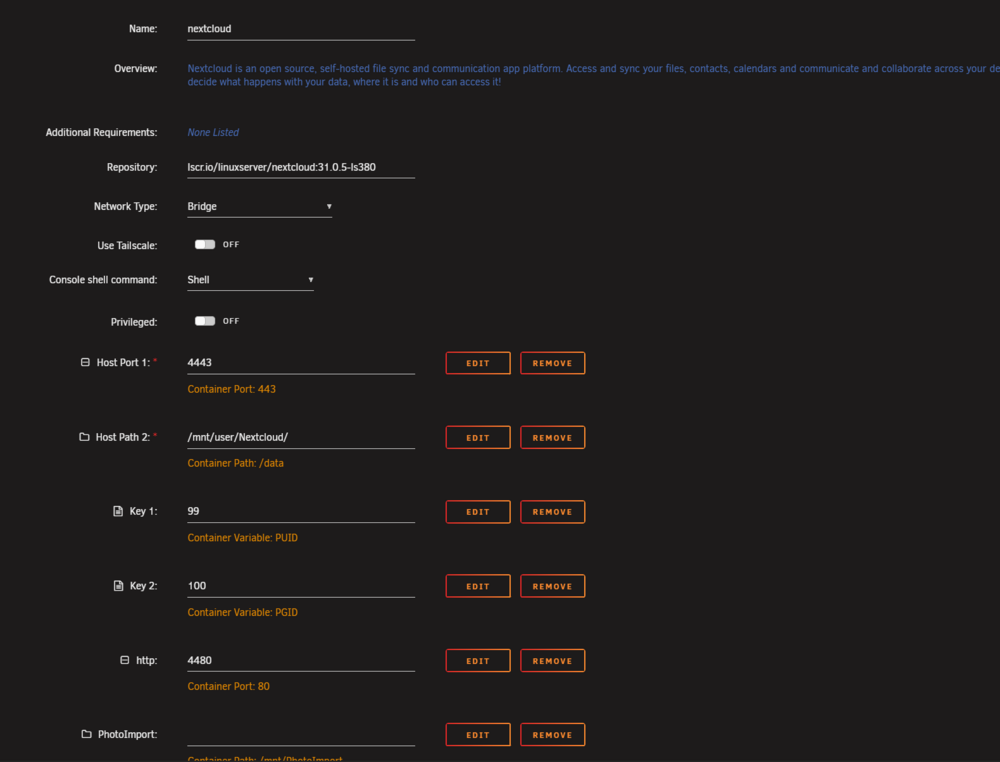
-
I used to put Nextcloud into maintenance mode, but its not neccesary. I think open files will be locked and may not be backed up, but it depends how busy your Nextcloud instance is and how important those particular files are.
-
Agreed. Mine is an external 8tb HDD, used once a month and stored on the other side of the house. SDD backups x 2 rotated as bi-weekly backups, stored offsite. Still not an elegant solution, but its what I've got. I run rClone as a script under User Scripts (although rSync would be better, but I'm used to it), to run scheduled backups. Its actually a synced script that compares. Any files that are deleted or modified in Nextcloud, are moved from the master folder on the backup disk to a separate folder marked as Backup. So, I'm keeping deleted and modified files in case there is an error / unwanted difference. The Backup folder holds sub-folders by date, effectively making the main folder the updated master copy and the sub-folders holding the changes become incremental changes. Not quite incremental backups, but you get the idea. I used to backup to a NAS, but that's been done away with in the meantime.
-
If he moves them, Nextcloud will show the files as still being there, but will report an error when he tries to click on them, as they're still being referred in the database. This is a non-issue, as it doesn't affect upgrading. He can move them back afterwards and perform file:scan --all and database maintenance fingerprint on the files after moving them back. Bottom line is, he doesn't need to move them, but he can if he feels this is the safest option. But that's a confidence issue with Nextcloud. If he somehow messes up the file structure or permissions of those files doing the move (which is linux 101, so he shouldn't), then he will have an additional step to resolve.
-
Why would you move it, when you can just rename the folder? I've only briefed through this, so some of it may be assumption. I've pulled back from responding on this thread as I've realised people want the answer, but don't want to look for it. I started like you, and learned from mistakes and trial and error. Always have backps of important data. Don't know why you would want cloud storage backup, which goes against the idea of having NC in the first place. To answer your question though, yes you can backup to cloud storage, you don't connect it through Nextcloud, you use a utility like rClone and script it to backup to the cloud. It sounds like you're not familiar with Nextcloud's workings. So, upgrading from 27 to 30 will be slightly difficult for you, as the database needs an upgrade as well between 29 and 30 if I recall. You can do it, by searching through this forum. It was raised this year, as a few people were having problems. You can keep your configuration, as long as you retain your config.php file, which doesn't get overwritten when you upgrade. When you upgrade, you do it by changing the docker's lable to the desired version. I would suggest doing this first and stepping through the major versions. You don't have to upgrade every single release. But, when you get to v.30 you will need to upgrade your database's tables, which people have strugled with. So, if you're going to upgrade, only go up to v29 first by upgrading versions. ie. v 27 ---> v.27.5 ---> v 27.9---> v. 28 ---> v 28.5 ----> v 28.9 ---> v 29 ---> v 29.9 (whatever the last version is of 29). Hopefully, you get the idea. (Alternatively), you can drop your NC and your database, delete the appdata folders for both from your appdata folder and start again at v30. What I can't tell you is if you're going to have to update the tables manually anyway. So, you might as well do point 4 and learn something. You're not going to lose your data during an upgrade, unless you do something stupid. NC references your data, it does't manipulate it. What would it mean to you, if you lost the data now? If you think you would have that sinking feeling, where your balls are in your throat, then it means something to you. So, back it up. Drives fail all the time, unRaid has redundency, but thats not the same as a backup and you can still lose your data. There have been several instances on this thread where people don't know how to upgrade correctly and its been responded to many times. I suggest you go and look at those first, search under my username because I've responded to examples like this several times. If you're really concerned, then create a second instance of NC and database, with the lastest version, referencing a new data folder. Once that is up and running, you can move your data over from old folder to new folder and tell NC to re-scan the files. You won't have any data from your calendar, deck, messenger, etc as that's in the old database, but if your only concerned about your files, then you could start there. After that's done, you can drop your old NC and Dataase from docker and appdata. Be careful of bad advice.
-
Hey Buddy, Definitely no need to apologise to anybody. I was just explaining that it's difficult to answer the question with no info. Glad you got it sorted.
-
You haven't provided sufficient information for the community to assist with this, ie. No logs, no screenshots. I've mentioned repeatedly on this forum, that leaving your MariaDB and / or Nextcloud to auto update the docker will likely lead to these scenarios.
-
I wrote this quite quickly, for 2. What I meant is to post the contents of your config.php file (remember to xxxx out parts that identify the server, ie. web address, password hash, etc. Post contents of docker config: 1. Click on the docker, like Nextcloud. 2. Select Edit. 3. Take a snapshot of the config and post it. I wrote this a while ago, so I'll need to go back and see what you're issue is. I'm on a course and kid's holidays start, so I may not respond this weekend.
-
Can you post the following as quotes: Directory of your config folder Contents of your config folder. (Remember to anonymise). Docker config for your MariaDB and Nextcloud. To get support you need to post at least the basics.
-
If its been months, why don't you just restore a backup of your MariaDB and your NC dockers to when they were last working?? That's the quickest way and then revert for advice, before you do any further upgrades. I cannot underline enough how important it is to have decent backups to resolve issues quickly. I only troubleshoot when I absolutely have to. The problem with your error, it could be a number of things. Anything from your MariaDB version being out of date and NC having the :latest tag and auto updating could be sufficient for that to happen.
-
I use Nextcloud to sync backups of my opnSense configuration, as it supports webdav and they're small files. NC is not meant for what you're trying to achieve. You're better off using rclone for this, which supports multiple protocols and its a simple cli to use. Do you need them to be accessible in NC, or its just your chosen vehicle for backup?
-
I looked this up this link for you. Read the php and nginx sections. if you're behind a reverse proxy, you will need to consider where you are placing the settings, ie. you can put the max upload file size settings, etc on the reverse proxy, along with the majority of other relevant settings or simply pass through to Nextcloud and let Nextcloud's nginx conf handle it. https://docs.nextcloud.com/server/latest/admin_manual/configuration_files/big_file_upload_configuration.html I've set it on both, as there is no harm in doing so. As for placing large files on your NC and file scanning, its simple to do. 1. Go to Nextcloud's data directory's user folder and create the folder that you want to create, make sure you check chmod and chown settings for 2. Copy over all of your files, etc. into the desired data structure you want. 3. Chmod and Chown all your files, ensuring its done recursively to the folder and all of its contents, so that it matches the permissions and ownership of the existing files. 4. run this command, "nextcloud" is the name of your NC docker container, you can substitute it. "files:scan --all" can be changed to the specific user that you "files:scan --username", entering the name of the user (which is case sensistive) so it only scans that user's files and therefore, specifically the files and folders you uploaded. This will reduce the amount of scan time, it doesn't take that long to do your whole structure anyway, unless your PC is resource light. Next time, I recommend you give more detail on your network. Are you behind a proxy, like opnSense firewall's reverse proxy or SWAG, etc. Its hard to give an answer when nothing is known about your set up.
-
Yeah, I didn't find it straightforward. Some people wrote a script to automate it, I found that even after modifying it, it wouldn't work properly for me. I had to run the commands directly in MariaDB, I can't remember exactly what I ran, I didn't document it, but it was virtually the same as whats on the Nextcloud support forum. I echo the same thought as others, this could have been integrated into the update process.
-
How did you run the upgrade? You seem to have a permissions issue, did you check the permissions of the data directory, it looks like NC can't read the directory and cannot find the .ncdata file. Either that, or your config.php is referencing the data folder incorrectly. Post your config.php.
-
mySQL and MariaDB are the recommended database engines for NC. The issue is the OP hasn't given sufficient information to get feedback on the forum. ie. NCversion --> NCversion (which versions caused the failure). What database version. Was a new docker installed, or did the OP try to use OCC Upgrade. Going from 30 --> 31 needs a bit more consideration. Mine upgraded without a hitch, but I still had to change the tables to support dynamic. Which wasn't as smooth as I thought it would be. I doubt that's the issue he has though. Bottom line is, the quality of information you put in supports the quality of the information you get out. I've stopped responding to posts for help when there is zilch information, and its not a case that I don't want to help, but people need to give more information.
-
Thanks JorgeB, didn't work, I even tried it afterwards with the -L option. I reckon its toast. Not sure what happened there. I've reformatted the drive as BTRFS and it seems fine.
-
Hi, Looking for some advice, in case I do something stupid. I have an external drive, formatted as XFS that was being used for monthly backups. It came up with a "structure needs cleaning" error message. I was able to still mount it, but there were some files that appeared to be corrupted. I ran dd to make an image file of the disk and mounted that just fine. However, it eventually failed with the same error and now I can't mount it at all. I ran It returned this; So, my question is, Can I run this command, to try and repair the image file? I'd rather ask than regret it later. I don't want to run it and it somehow starts running against the XFS drive that its sitting on. Your help appreciated it.
-
Yep, that would be the correct tag. I think you took the version I mentioned (which I got from your docker log) literally. If its not working, then restore your MariaDB from your last appdata backup. Its likely that failed migration has caused some issues. Basically, scrap your MariaDB docker and Nextcloud, roll them back to the versions you were on and restore your most recent appdata backup. That will put you back where you were before you upgraded. Once you're back where you were, then upgrade your MariaDB and then upgrade Nextcloud.
-
It's a minor update and shouldn't make a difference. Run an appdata backup first. If something goes wrong, you can delete the NC and MariaDB appdata folders and restore them from backup, rolling back the NC d9cker as well. That's far quicker than trying to fix. Personally, I would jump to 31, but doing 30.0.07 first, only takes a few minutes. Remember to update the data fingerprint afterwards.
-
Roll back your Nextcloud docker to the previous version, ie. 30.0.14 by tagging the Nextcloud docker. Once that is up and running, upgrade your MariaDB docker, make sure Nextcloud is running fine on the new MariaDB and then upgrade Nextcloud. I'm not sure if you ran the occ upgrade command, because the upgrade failed, or you're used to doing it that way. Nextcloud will automatically upgrade when you start the docker, if you have the "latest" tag or you tag a higher version than the one you were on. You shouldn't be trying manually on a tagged version.
-
I only use Samsung USB drives and they work well. I've tried Sandisk and they need replacing more often than unRaid recomends.
-
Hi JorgeB, No, its a slow download when using the online upgrade. I upgraded to 7.01 today. After an hour I had only downloaded 50mb and I'm on Gig fibre. I took the advice above, which apparently you gave originally, and setup a Wireguard vpn to Spain. Download was done in less than a couple of minutes. I haven't tried the new USB tool. Upgrade was smooth though.
-
Yep, I'm also in Australia. I came here looking for a solution, its literally like watching paint dry.


