





Geck0
Members
-
Joined
-
Last visited
Everything posted by Geck0
-
Which is better? Ghost82 says to move the disks to cache and change the VM file paths to there. I did this originally and thought that the Windows 10 vm was pretty quick. I then changed this to what doenstaffect suggested, although keeping files in iso, domains and system folder and setting shares to Prefer. After this, I thought that startup and shutdown was slower. Does setting the path to /mnt/user/(etc) and the share setting to Prefer, cause a delay, because the mechanical disk spins up regardless when you go that resource? I wouldn't have thought so, but its worth asking. Additionally, should my virtual drives be set to SCSI to take advantage of automatic shrinking of the vm disk when files are deleted and trim is run?
-
Thanks, Simon. I've tried your USB plugin. I had some limited success, but can see the benefits, great work. I've passed through the USB controllers for now, until I get to grips with how I plan to set up my VMs, I've currently only got one Windows 10 vm
-
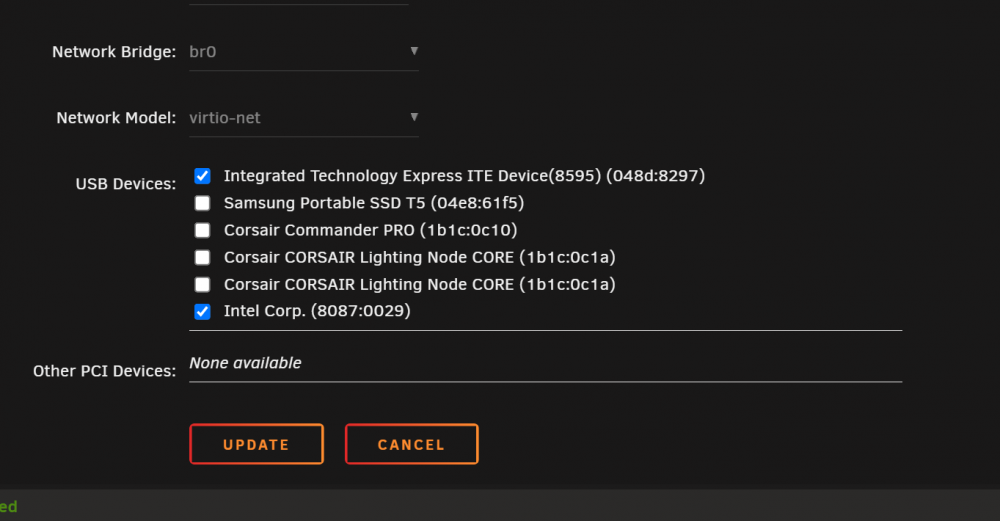
Hi, Just an update on this. I found that I actually didn't need to do the above. The nodes and the Commander Pro were already available to the VM, all I had to do was select them with a tick in the Windows 10 VM, rather than trying to bind them to the vfio under the Tools/Devices page and then select them in the Windows 10 vm. After the USB controllers were passed through, it stated that connected USB devices would be hidden, being new to IOMMU binding, I didn't fully understand and was messing around with IOMMU groups to get them to work. Hope that helps somebody.
-
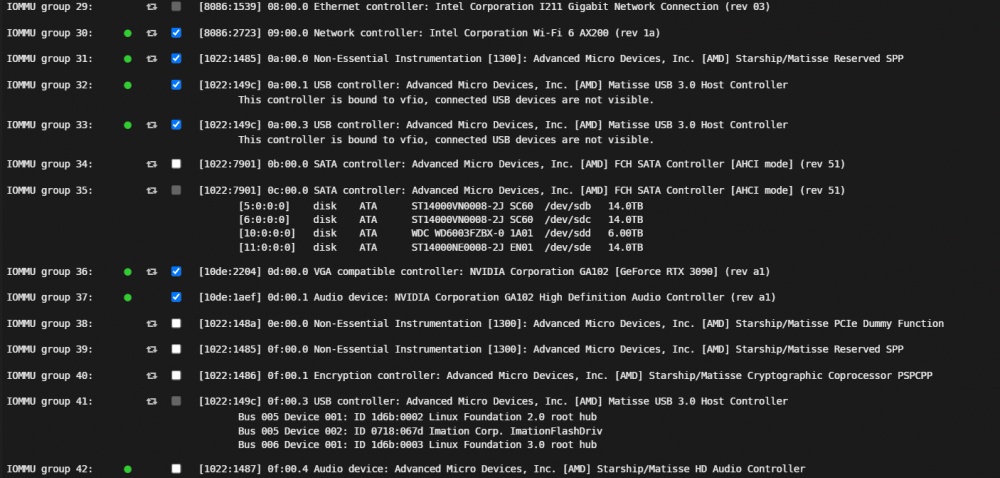
Hi, I'm currently having this issue as well. I've got a Gigabyte Aorus Extreme X570 with an AMD 5950X processor. My IOMMU: Groups 31, 32 and 33 need to be passed together. Groups 36 and 37 are the Graphics card split, because of ACS override being 'Both', which it doesn't need to be and I'll set it back. I cannot pass Group 41, as the ImationFashDrive is my unRaid flash drive. Group 42 is the HD audio controller, which shows up in the list of my Windows 10 VM as a second audio option, even if I haven't bound it to the vfio here. Irrespectively, it tells me that it cannot function without Group 39, which "isn't owned". If I pass through Group 39, it crashes unRaid when the VM starts. Logs mention that its waiting on FLR for x amount of time (not sure what that is). If I try to pass through Group 39, 40 and 42 I get a similar crash. It looks like there was a lot of work done on a custom kernal, as its an ongoing issue. Looking at the above posts, it was working in 6.9 beta. I'm on 6.9 stable and I don't seem to have a fix for this. It also looks like the kernal can be recompiled with the relevant patches. Is there anybody working on this? I'm no expert, having recompiled a linux kernal once in my lifetime. It would be great if somebody could update this patch or tell me if it will work on 6.9 and eventually 6.10. Even better, if it was incorporated into new builds of unRaid, as I can see upgrades becoming complicated. Are there alternative options: I have one PCIE slot available, which I want to use for a thunderbolt 4 card to eventually pass through an external GPU (I shudder to think that will go easily). I have a USB 2 header on the board (only one available), which is being used, but I could use a splitter. However, I think it will end up being passed with the other controllers. I have an empty USB 3 header on the board. Once again, I believe it may end up being passed with Group 31 or 32. I thought about adding an external PCI usb bracket or even internally to take the unRaid flash, but looking at the groupings I'm not convinced that these would not be passed together 31, 32 and 33, which leaves me in the same boat. I've attached my diagnostics as well. There are a lot of forum posts about this issue. This one is almost identical to mine. nexus-diagnostics-20211227-1426.zip
-
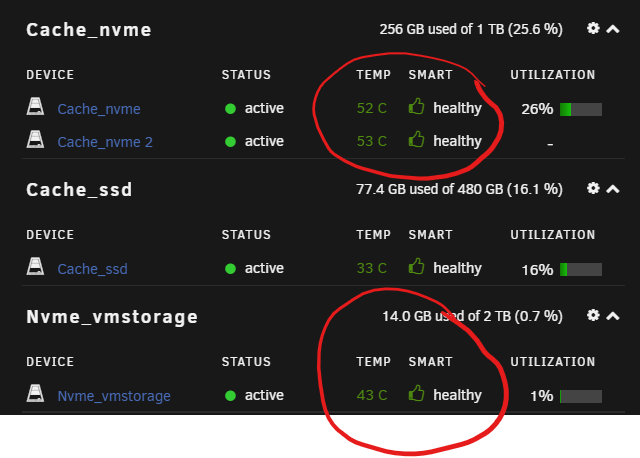
Hi, This motherboard has 3 PCIE 4 NVME slots. Slot A - Sabrent Rocket 4 2tb. Slot B - Ironwolf 525 1tb Slot C - Ironwolf 525 1tb The slots are under the metal heat spreaders on the board. Easy install, with the heat spreaders having preinstalled thermal tape. However, I'm getting very high temps. I know nvme drives run hotter than norm, however I'm getting the following: The NVME_vmstorage is the Sabrent in Slot A and I would say this is pretty good. The Ironwolf 525 drives are idling at 53 degrees, but can hit 58 - 65, to me this isnt normal, can somebody confirm what they're reaching with similar drives? I would prefer to keep the heat spreaders from the motherboard to maintain aesthetics. The temp readin inside the case is 33 degrees, running 8 fans in a push / pull configuration. The only other thing I can think of doing is moving the drives that sit directly in front of the front fan's radiator, to provide better airflow to this area. This is in the hope of cooling down the heat spreaders more, pulling the heat off them.
-
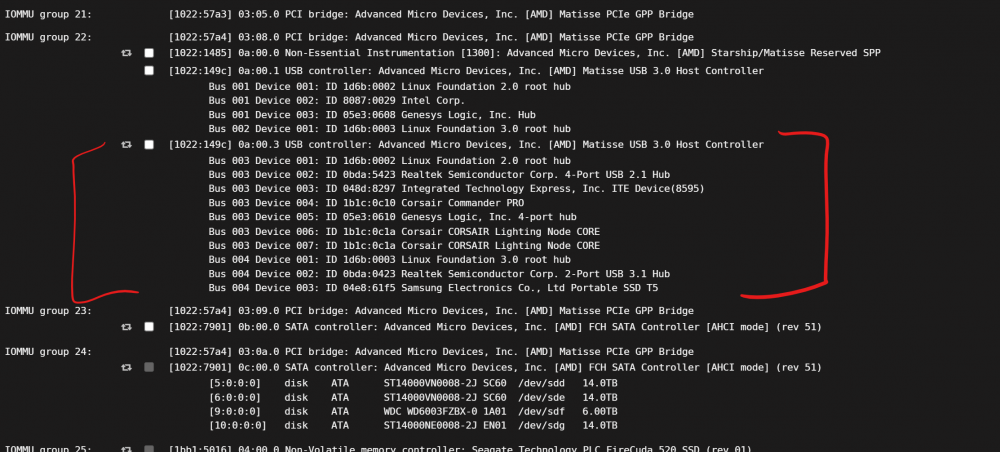
I'm new to VMs, having used unRaid for a couple of years now. I've watched the 'beginner videos' by SpaceInvader on this subject, but I am puzzled by the results. In the Bios I've enable XHCI for USB. I've enable PCIe ACS override. These are my IOMMU groupings for some of my USB controller / devices. You will notice that I' haven't select 1022:149c and my understanding is that I need to do this to bind it to VFIO. However, its still available to the VM, even if if I haven't selected it. I was having trouble starting the VM, because of the two lighting node cores having the same designations. I managed to get around this by selecting them using the BUS and Device ID, which I've posted about today. However, I added them using XML. The tick boxes in the VM remain unticked. More importantly, if I ticked them in System's device manager to be bonded to the VFIO, they don't show up in device manager, nor do they show up in the VM as an option. I have tried to find the answer to this, but its not obvious. I don't know if the reason they don't show up is because they're now hidden from unRaid, in which case how do I pass them to a particular VM?? If I leave them unselected in device manager then I would not expect them to be available to a VM. So, I'm working with it, but its not clear to me how this works?
-
Thanks, this helped with my new rig (currently, we'll see if this becomes an issue later). Corsair products on an Aorus X570. 1 x Commander Pro connected to only USB2 serial port on board. 2 x Lighting Nodes connected to Commander Pro, via Seria Ports. 4 RGB fans to each lighting node (4 each). 1 x Corsair XD5 Pump and 1 x XC7 waterblock, daisy chained to 1st rgb port on Commander Pro. The VM Windows 10 wouldn't start because it found the 2 lightning nodes with the same vendor and product id on the USB 2 and kicked up an error. I changed the Commander Pro and the 2 lighting nodes to their bus and device ids as found in the System Devices tab. This made a heck of difference to me, so thanks.
-
Hi, I have an Aorus X570 Extreme, with 3 nvme slots containing a Sabrent Rocket 4 2tb and two Ironwolf 525 1tb each in the other two slots. The Sabrent in the first slot, idles at approx. 46 degrees. The Ironwolf 525s idle at approx. 56. I would expect the nvme to sit at a higher temp to a typical SATA SSD, which I have as an Ironwolf 520 480g idling at 35 degrees. The nvme drives sit under heatspreaders on the motherboard. The thermal pads were pre-installed on the heatspreaders. To me, this does not appear to be normal temps, but I've also not had a setup like this before. Can anybody give a comparison of their Aorus board with nvme under the heat spreader? I'm wondering if I need to buy aftermarket pads, but I would have to take apart my PC to access these slots, which I would prefer to avoid if unneccesary.
-
Hi, Unassigned devices stopped showing up, I only realised when a backup failed because it couldn't find the drive. I rebooted to no avail and then uninstalled the backup and reinstalled. It showed a warning on the re-install although it seems to be working.
-
Okay, So for those following after me. I'm not very experienced with docker, but I pulled down the container manually and by doing so changed the environment variables, changing the heap size to 2g. I changed the second set of ES_JAVA_OPTS (in red) from Xms512mb -Xmx512mb to 2g instead. However, I've just noticed that there are two ES_JAVA_OPTS entries, the other one I've marked in yellow. This was a copy and paste from the original container install. No matter what I did I couldn't get the heap size to change from 512mb to any other size by setting ES_JAVA_OPTS as a variable in the CA settings for the container or via jvm.options inside the container itself. Anybody shed light on this? I would like to just pull the container down without all this phaff.
-
I've been using Elasticsearch 7.9.1. On a docker image reinstall, I'm failing to get this to work again. I've moved to 7.9.3 in case it was a bug fix. I have a heap size issue. The pull down shows completed successfully, see the environment variable: -e 'ES_JAVA_OPTS'='-Xms4g -Xmx4g' which I entered. Later in it shows this as well: -e "ES_JAVA_OPTS"="-Xms512m -Xmx512m" When I do an "echo ES_JAVA_OPTS" inside the container, it shows that only 512m memory is being used. It appears as if the 512m is taking precedent. I've also set the minimum and maximum heap size in the jvm.options file. It doesn't seem to make a difference. Below is the container pull: I've tried this for most of the day. I've not had this problem before, I urgently need to get this up and running. Can anybody advise?I added OnlyOffice Community server to my unRaid. Afterwards, I couldn't stop / start /restart, etc. This was the same for all applications under Docker when trying each one individually. If I clicked any function like start or stop it the mini menu would freeze and nothing would happen. Squid recommended removing Docker Folder, when I went to remove it I noticed a new update pushed out today. Instead of removing I updated it to v2020.05.06. This fixed it. This was the original submission: https://forums.unraid.net/topic/91994-unraid-gui-docker-apps-canot-start-stop-remove-individually/?tab=comments#comment-852609My unRaid uses an old i7 920 processor. Its running well, but I wanted to enable hardware transcoding for Jellyfin. Turns out the i7 has no capabilities for this as I understand it. Is there anything I can do with a Radeon HD5850 graphics card to enable this? Its sitting in the server not doing very much. It looks like unRaid doesn't recognise them either 🤔 I've rummaged through the internet on this, and cannot find anything that supports this.I turned my old rig into an unRaid server. I have a Radeon 5850 in my server that is water cooled. I would like to use the 5850 to offload the hardware transcoding for Jellyfin. Is this possible??Hi, Is there a way to adjust the display of the results page? The height of the rows and displaying the files and the overall window size is squashed. I cannot make out the results properly without exporting them to .csv first, which is less than ideal. I've tried looking in dupeGuru.conf file and adjusting some of the values for the layout. For example: ResultWindowIsMaximized=true ResultWindowRect=0, 40, 1280,30 (I've changed these figures already), they seem to get written back to their original values on restart.


