





Geck0
Members
-
Joined
-
Last visited
Everything posted by Geck0
-
I'm trying to use Discord on Android for push notifications. Is anybody else struggling to get Discord to produce a notification sound or show up in the lock screen? Im getting the messages just fine and they're speedy to arrive, but without sound its not going to tell me if something mission critical is going on. I've tried every setting under the sun in Android notifications and Discord, to no avail. When I do a Google search, there are so many complaints on this particular topic,
-
The idea is a portable backup, not removable media. So at least we have the latest copy of important files, photos,etc if something tragic happens. I wouldn't expect family member to be pluggin in backups to view files. I will go with XFS, thanks for your input.
-
My google account didn't display app passwords under 2FA as an option, the help was no use at all. Here is an easy link for those that follow; 2FA app password
-
I forgot to add, the mechanical backup drive will do the regular weekly and monthly backups using rClone sync with --backup-dir to create an incremental backup of sorts. The SSDs will keep an alternate monthly synced copy so I always have the latest version.
-
Hi Guys, I currently have an internal 6tb drive as an unassigned device, mounted via script to backup important files. Owing to its locality, this is a point of failure as a backup, but its mainly if an array drive fails, etc. The backups run using rClone and use --backup-dir if a file is deleted, etc. I want to use several external Samsung SSD drives like the T7 to run a monthly synced backup of data folders like Nextcloud and PhotoPrism. I wanted drives that are light, so I can carry them offsite in my bag and leave them at work, in case the house burns down. The backup drives won't be used for anything other than this, ie. I won't be plugging them into Windows to show the family photos, etc. Currently, they are exFat drives, which is a concern from a reliability point of view. Would it make more sense to format them as XFS, Ext3, Ext4? I've been slowly moving away from Windows over the years (the OS gets worse every release), so it makes sense to do this. I know XFS is not really meant for small drives, however I've just started using the File Integrity plugin. I assume with rClone scripted to make the backups, I could also include the hash files onto the drive for integrity checking if restored to another device? Does this make sense? Ideally, a back up NAS would be more practical and probably a better way to go down the line.
-
Jorge', thanks for your help. I think everything is up and running.
-
Hi Jorge, thank you for taking the time to reply. I've mounted the second drive and running an rclone copy at the moment. I was going to dd image the disks, would you say it would be prudent to do?
-
Thanks for the advice. You're right,I didn't think of that.
-
I forgot a copy of the syslog file, I downloaded it when the shares wouldn't unmount. nexus-syslog-20220711-0053.zip
-
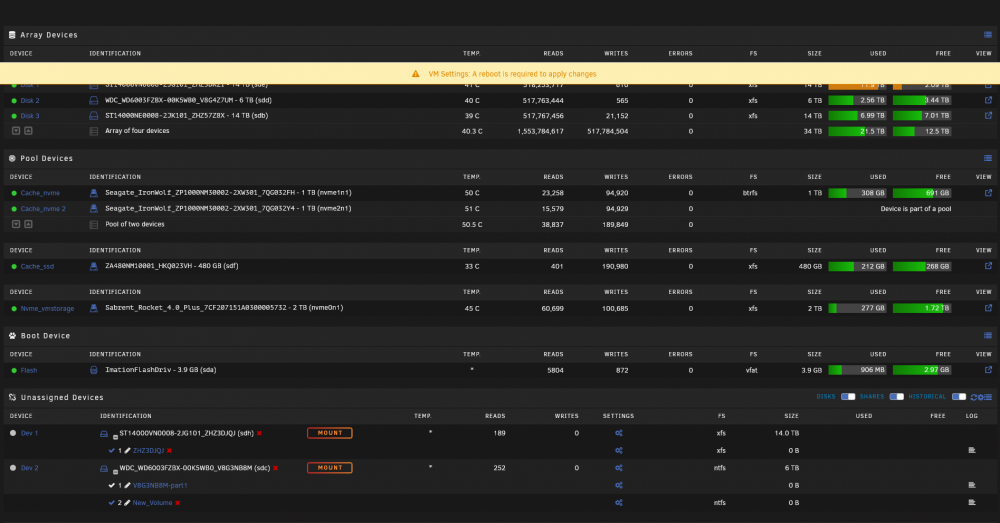
Hi, I woke up this morning to a Fix Common Problems error. This appears to be identical to this error: https://forums.unraid.net/topic/94659-solved-btrfs-issues/ My cache pool is this: I downloaded diagnostics, but it was inside a VM (stupidly), however I've attached the reports from the syslog folder. I was in a hurry to stop the server in case of corruption. Prior to this, I ran btrfs dev stats /mnt/cache_nvme It was full of errors. I tried a scrub and since rebooting I've run it again. you will note there are still errors but not nearly as much. I'm guessing the cache drives dropped out. I've attached Diagnostics.zip which was before I stopped the array. After stopping the array, it couldn't find nvme2n1. I did a reboot to clear the logs as the system log was full. I've attached full diagnostics after rebooting into maintenance mode. I cannot restart docker or VM service, as they were on these drives. Currently, status is stuck on trying to unmount shares. I've had to kill a process to get it to shutdown. Could somebody please help? Fortunately, I did a lengthy sync of the important stuff last night to an undefined drive. Im wondering if this caused the issue in part?! Last parity check was on the 02/07/2022, completed without errors. I remain unsure what the next steps are? Should I dd an image of the cache, which is 500gb? I remain concerned about bitrot, corruption, etc. I've left the server shutdown for now. Diagnostics.zip nexus-diagnostics-20220711-1034.zip

-
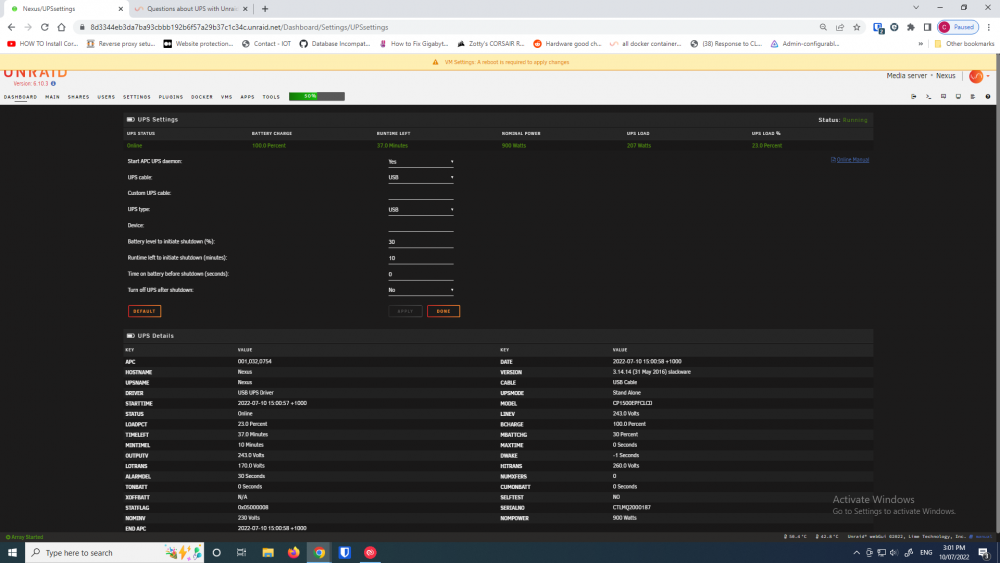
Hi, just to help out with choice. I've recently installed this: Cyberpower Systems PFC LCD 1500VA Tower UPS with AVR Model: CP1500EPFCLCD Amazon Australia It was a straight forward install, I was expecting a headache. I haven't tested it to shutdown yet, but it kicked in when I pulled the plug out of the wall and unRaid is pulling the status from the UPS fine. Hope that helps. I haven't tried installing software on the Window's VMs to shutdown gracefully yet.
-
I've tested this and passed through my digital audio, normal audio and Nvidia HDMI audio. All working and surviving multiple VM resets and I only tried one server reboot and it survived that as well. It does eventually fall over though, assuming the device cannot be reset, creating the FLR issue. If unRaid 6.10 rc4 is on linux kernal 5.15 and it says this in the quirks.c file; /* * FLR may cause the following to devices to hang: * * AMD Starship/Matisse HD Audio Controller 0x1487 * AMD Starship USB 3.0 Host Controller 0x148c * AMD Matisse USB 3.0 Host Controller 0x149c * Intel 82579LM Gigabit Ethernet Controller 0x1502 * Intel 82579V Gigabit Ethernet Controller 0x1503 * */ static void quirk_no_flr(struct pci_dev *dev) { dev->dev_flags |= PCI_DEV_FLAGS_NO_FLR_RESET; } DECLARE_PCI_FIXUP_EARLY(PCI_VENDOR_ID_AMD, 0x1487, quirk_no_flr); DECLARE_PCI_FIXUP_EARLY(PCI_VENDOR_ID_AMD, 0x148c, quirk_no_flr); DECLARE_PCI_FIXUP_EARLY(PCI_VENDOR_ID_AMD, 0x149c, quirk_no_flr); DECLARE_PCI_FIXUP_EARLY(PCI_VENDOR_ID_INTEL, 0x1502, quirk_no_flr); DECLARE_PCI_FIXUP_EARLY(PCI_VENDOR_ID_INTEL, 0x1503, quirk_no_flr); This should correct the issue. I'm trying to figure out if unRaid still needs patching or I'm passing this through incorrectly.
-
Hi, I've got this issue at the moment. I've tried everything to get rid of it, including reboots, recreating VM settings, etc. I'm on 6.10 RC4.
-
I only have the one parity drive, which I recently upgraded to an 18tb Ironwolf Pro. The original parity drive was 14 tb Iron Wolf Pro and has been added to the array. I think the trick is to have multiple backups. I have really important data on unRaid, but its also my media server, file storage and vm. As such, I backup what is important, using rClone to an unassigned drive that is offline. It comes online and backups up my Nextcloud data and Photos folders; 1. Daily 2. Weekly 3. Monthly 4 Full backup every 6 months. I then have a synced backup of Nextcloud and Photos folders to 500 gb and 1tb samsung T5 drives and m.2 drives, which I can store offsite. The internal unassigned drive is offline until needed, then mounts and backs up and unmounts again. Its not a backup if its in the same machine, hence the other backups, but it helps.
-
Im glad I helped. Thanks for adding the videos and other guides. I didn't have time to go back and find them. 😃
-
Hi, I was about to post a topic on this. However, this post seems to have a similar issue. I'm getting two errors. One is a Parity failure, which I cannot find in syslog and I've changed the Parity drive a couple of days ago after preclearing twice. I'm currently running a parity check at the moment. The other is Machine Check Events, which I've never had before. I started doing a memtest, but nothing really led me to believe it was an issue, so I abandoned it after a couple of hours testing. Could somebody cast an eye over my syslogs to see if I looked in the nerd pack plugin and I cannot find this module, although from what I could find it doesn't work properly anyway. I also came across this; Is it possible I have a memory module error? I can see in syslog there are a few unrelated errors to do with an SMB share, which I will need to fix up. However, could somebody please give this a peruse? nexus-diagnostics-20220322-1743.zip
-
With unRaid moving to version 10 and using Linux kernal 5.15.27, is this issue resolved? I can't test it, as I'm running breaking in a new parity disk, which will take a while. If you see here; This mentions the issue and the driver file that needs patching In kernal 5.15.27 the quirks.c file specifically patches this issue see line 5300; Git linux kernal quirks.c file Posted here for convenience: This looks right to me, but there are more experienced people on here. Any thoughts?
-
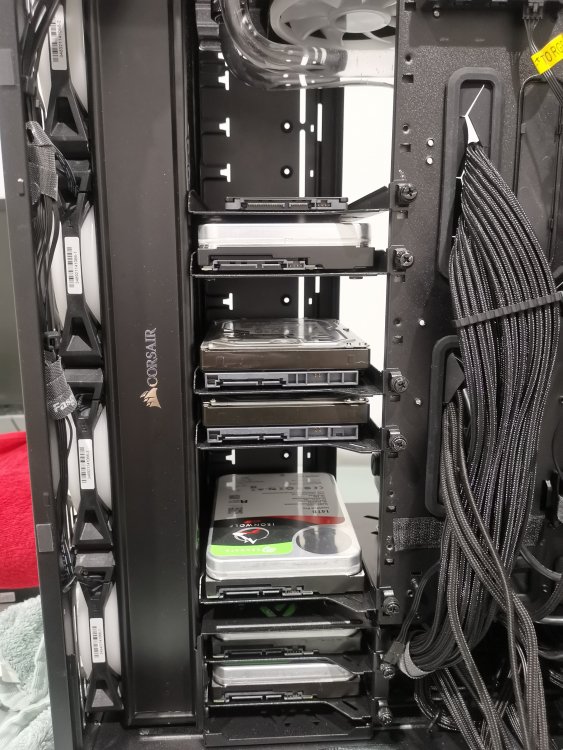
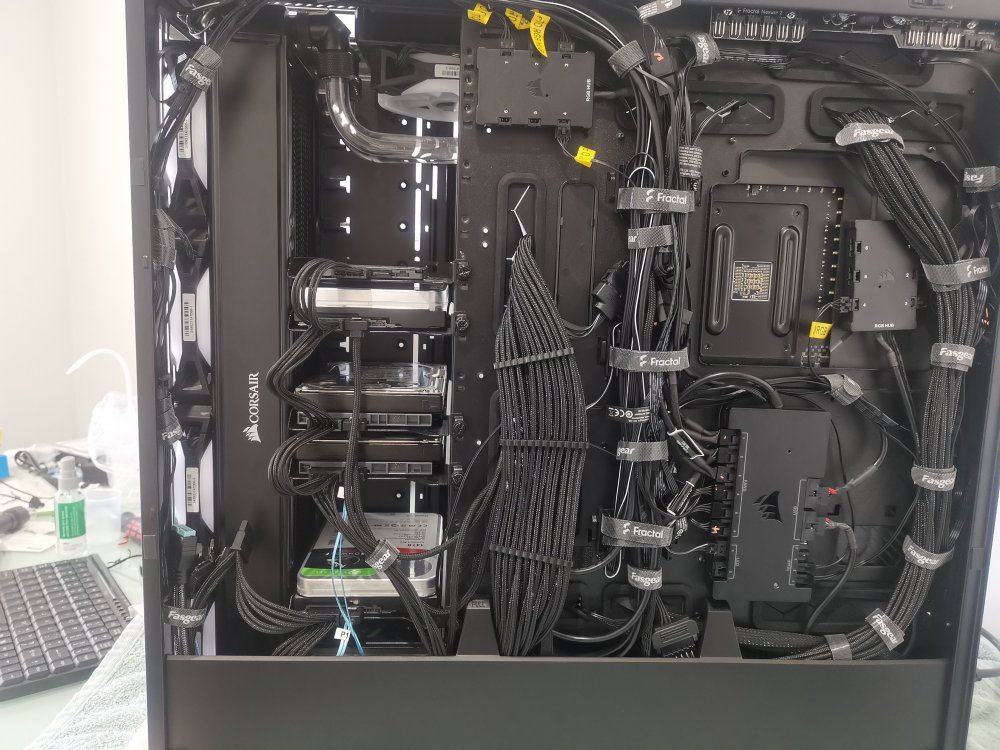
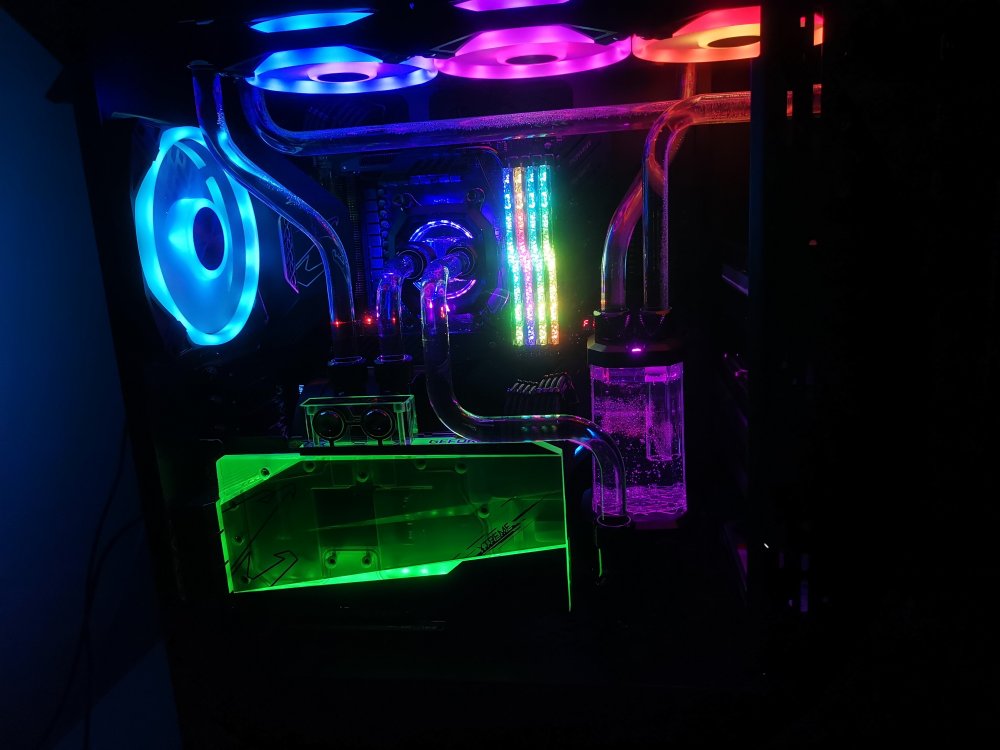
Hi Juniper, Sorry it took so long to reply. The second pick was done at a poor angle. I was tidying up the cables and just took a quick pic. There are too more drives hidden behind the cable tidy board. You can fit in 14 drives, one would need to be a sata SSD or other low profile. But if you're not water cooling, you can add two more drives. A quick shot of window of the case, so you can see what I'm running. Current temperatures are in pic 4, with parity running on a new drive, a vm that I'm typing on and several dockers.
-
Hi All, I've tried every guide on here, including Spaceinvader's excellent tutorial. Code 43 was an issue. I became frustrated with trying to dump the vbios, download copies, etc. I've managed to sort this, testing it 3 times flawlessly without the vbios being loaded. I'll keep this as brief as possible, hopefully I will help somebody and give something back to the community. If I've helped, let me know. My set up: unRaid 6.9 and I refined the process on 6.10 rc2 and now rc3. The below settings reflect unRaid 6.10 rc2 and rc3 Processor: AMD 5950x Board: Aorus extreme X570 GPU: Aorus Extreme Waterforce WB 24gb. Bios settings: SVM mode: Enabled PCIEX16 SLOT: Gen 3 (I have a Linkup PCIE 4 adapter and this is what they recommend) PCIE SLOT CONFIGURATION: Gen 3 (Changed to Gen 4 later with no problems and not relevant just commenting) IOMMU: Enabled BIOS: F34 ACE: ENABLE CSM Support: Enable STORAGE BOOT OPTION CONTROL: LEGACY OTHER PCI DEVICE ROM PRIORITY: UEFI Only unRaid Boot configuration: kernal /bzimage append initrd=/bzroot video=efifb:off acpi_enforce_resources=lax pcie_acs_override=downstream Windows 10 vm: Machine: Q35-5.0 Bios: Seabios Hyper-v: Yes USB Controller: 2.0 (EHCI) VirtIO Drivers: virtio-win-0.1.190.lso Graphics card: VNC (change later to actual graphics card) Sound: None. Process: Boot with Windows 10 iso installation. Switch to VNC and follow installation steps. Skip network enable and stick to the bare minimum, ie. no Cortana and the rest of the rubbish. After installation, go to Device Manager You will notice several PCI devices that are not installed. Right click and select the ethernet device and install via browse. Select your virtual drivers iso. In my case E:\ This will install Redhat drivers for your br0 virtual ethernet device. After installation, you can select the other devices with missing drivers or wait and they will install on their own. (You may find one that doesn't install PCI Simple Communications if I recall correctly) Go to Windows Updater and install Windows Update, including .NET framework. Install tight VNC server and configure for remote access. Record your IP address, so you can access remotely. Reboot and check that you can access your VM remotely using tight VNC. (I suggest making the ip address static, you can do this through your router in your leasing pool). Download the drivers packages for your graphics card. In my case, I downloaded both: 1. 461.72-desktop-win10-64bit-international-dch-whql 2. 496.13-desktop-win10-win11-64bit-international-dch-whql Shutdown your VM and change settings: (You should have already reserved your graphics card in Tools / System Devices and restarted for this to take effect) Remember, that you should be doing this remotely on unRaid as the efifb=off will not allow you to use the graphics card, as its also being handed off for use in the VM. Graphics: Nvidia Geforce RTX 3090 (0d:00.0) Graphics card ROM bios: none Sound card: NVIDIA GA102 HD Audio Controller (0d:00:1) Press update but do not start the VM yet. Edit the configuration of the VM again but select "form view" in top right hand corner. Find your graphics card mapping, in my case on bus='0x04' 1. add multifunction='on' to the first line of your graphics card. 2. Change the bus for the HD audio of the card to bus='0x04' as well and the function to function='0x1' I've copied the relevant section of mine below. If this does not make sense, then you need to look at Spaceinvader's tutorials and a post by Skitals here on the forum first. Click update and start the VM ( Remember, if you change the config settings in the GUI, non-form section of the configuration for the VM, you will lose these entries and have to re-add them). Start your VM. VNC into your VM and login. I suggest being patient and waiting to see if Windows will find your graphics card itself. Check the notification window by selecting it from the far right of the task bar. Check if there is a message that its trying to find the right device driver. In Device Manager, check if the graphics card has been detected. If it has, check if it has a bang error message that says it cannot be started because of an issue code 43. If you have this, don't worry. If you don't then we need to find it first. Importantly, check that all the other devices are installed. Check using View Hidden devices to ensure everything is installed. I had problems detecting my card until all devices were installed, in particular the VirtIO device. In this case, again install by selecting driver update and the Virtual driver disk, in my case E:\ If you had to do this, then restart again. You may find that Windows will install the Nvidia Control Panel at this stage, which is a good sign. You can ignore the Nvidia Control panel for now. Here comes the important bit: If you try to install the Nvidia graphics card using the downloaded software installers, you will most likely be told that the software isn't suitable for your version of Windows. Instead create a single folder called Nvdia. Leave it empty for now. Start the first software package and select the drivers install, don't worry about the Nvidia experience package. When it gets to the end, do not close the program. You will notice in the same folder as the software installer, will be the unpacked files. Copy them to the Nvidia folder created earlier. Select Close, which will delete the original unpacked folder (Hence why you copied it first). Repeat this for the second software installer You should now have 2 software installer packages unpacked in your Nvidia folder. Go to Device Manager and right click the Nvidia Graphics card. Select update driver and browse to the Nvidia folder. Install, including subdirectories. It will find and install the card and ask you to reboot. Notes: I've done this for 3 different Windows VMs with no real issues. I think a couple of times, I uninstalled the graphics adapters (both the basic Windows and RTX 3090), so I could remove the drivers. Upon reboot, it found the graphics card on its own. I don't recall if I actually had to do it or I simply decided to, to get a clean uninstalled card with no existing drivers. If I tried to install 461.72-desktop-win10-64bit-international-dch-whql it didn't work. Hence why I got the driver installer to search both unpacked installers. Afterwards, I tried to install the Audio HD device from my mainboard. This crashed the VM and it would no longer detect the graphics card, irrespective of the configuration changes I made to the VM before restarting it. Device manager would not find the graphics card after this and I ended up doing a fresh install.....so back up your VM. This is a well-known issue with the X570 board being unable to pass through the audio and not an issue with the process. Like I said, I hope this helps somebody.
-
I don't disagree, but I think if you're running a daily unRaid, 64GB is comfortable. I went the best of what I could get at the time, because I don't want to build another for a while.
-
128 gb. Was running 16gb before, but it wasn't coping with Elasticsearch, whilst running media, etc. 128gb is overkill and I think 64 would be ample for most things.
-
I have an X570 extreme board, running a 5950x processor and a 128gb memory. I have an RTX 3090 in the first PCIE slot and the third slot has a LSI card. I was keeping the middle PCIE slot for an additional graphics card. However, its too problematic with the vertical GPU riser. I looked at putting in a Maple Ridge Thunderbolt 4 card, but it looks like my motherboard may not be compatible. The idea was to have an eGPU graphics card and additional devices connected to it for a virtual machine. Does anybody have something like this? One other thought was to run a 60cm Linkup PCIE 4 cable from the PCIE slot, through the back of the PCI slots and into a customised cage holding the second graphics card. This would need a separate PSU to provide power to the graphics card and cage fans. I already have a separate PSU. I could mount the separate PSU under my desk out of site. It would also allow me to swap PCIE components easier, If I want to remove the graphics card. It would be a pain to run an additional 'hotplug' from the PSU of the server to the additional PSU, which means I would need to manually turn it on / off. Although I could do this if need be. You can see pics of the existing build here: https://forums.unraid.net/topic/120538-fractal-design-meshify-2-xl-and-define-7-xl-as-server/ You can see its pretty full, so I can install a second aircooled graphics card, behind the vertical RTX 3090, however the PCI cables may not fit because of the RTX 3090. I tried ordering 90 degree adapters a while ago but they were the wrong configuration. Putting the second card outside of the case makes sense, however if I do an EGPU, I will need to fill the middle slot with a thunderbolt card, or do the dirty external card solution, which at least plugs directly into the PCIE slot. Any thoughts?
-
Hi, I've got the Meshify 2 XL. Using an Aorus X570 extreme, RTX3090, Processor: 5950x, Trident Royale 128gb memory. I've combined watercooling and storage layout (See the manual as it proposes two layout options). The hardline tubes running to the radiators can limit the amount of storage, but I'm using Ironwolf Pro 16tb, so I have more than enough space. If you count the screw retaining holes on the front of the HDD wall in this configuration, you can only fit in 12 HDD (Two in separate drive cage below). The two drive cages that come with this case are useful, however I removed one to allow space for cables, etc. as it sits below the area that the Corsair reservoir is sitting on in the pics. In terms of temps. HDD temps are fine. I found that the m.2 drives under the heat spreaders of the X570 extreme motherboard run a bit hot, idling at 50 degrees. I had issues with faulty EK coolant, which caused serious issues after using for 20 minutes. I've had to do a full strip down and I'm rebuilding at the moment. I've spaced out the drives a bit, in line with where the m.2 drive heat spreaders are situated to allow more airflow. I've also replaced the m.2 drive thermal tape that came pre-installed on the heat X570 motherboard's heat spreader with Thermal Grizzly tape, as I found the tape wasn't contacting the chips in the middle of the drives. Its unusual to watercool an unRaid server, so I'm guessing you won't do this. This should allow you to install at least 14 drives, which is more than plenty, if you buy high capacity drives. I used 120mm fans on the front of the case, to enable a fan to be installed low down to push air across the 2 drive cage underneath. Don't use the standard included 140mm fans. That's where my parity drive is. Let me know if you have anymore questions. Pic 1 Pic 2 Pic 3 Pic 4 The pics don't show the other side, but I can update with more pics after I'm finished this build. One thing I will say, you need a backup server if you insist on watercooling. So at least you can still operate when your system is down. I have a spare case, which is a Silverstone TJ-07, best case ever at the time. I plan to build a spare server in that or use it as a backup server with basic hardware. I found the Meshify 2XL's quality was nowhere near as good. The paint can scratch easily and the threads can strip fairly easily. I have to retap some of the threads when I get a chance.
-
Hi Rachid, No ACS patch works as well. I left it on ACS patch, knowing that the difference wasn't a deal breaker. I've tried to put unRaid flash on a different USB controller, however that doesn't work because then the other 2 usb controllers cannot be bound if the the flash drive is on them. This includes the USB 2 controller that has the Corsair commander and 2 x node cores on, which means I cannot pass them to the Windows 10 VM as the two node cores appear as identical.
-
(bump)




