





Mr_Jay84
Members
-
Joined
-
Last visited
Everything posted by Mr_Jay84
-
Of course! Thanks mate!
-
I'm a bit lost here mate as the "Username" and "Token" isn't there. Do these translate to "Client ID" and "Client Secret" under the OAuth2 page?
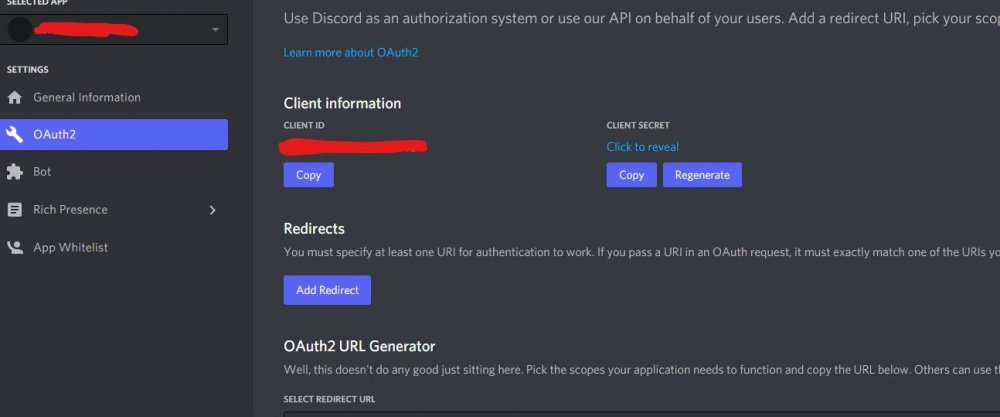
-
I had to reinstall the docker as for some reason the forced update didn't work. Now selected and functioning, thanks again mate! Excellent work!
-
Yeah I thought as much. I'll keep them spun up for now and post back when another crash happens. Thanks for responding so far mate.
-
Yeah I know about that issue. Some of these disks (particular model) don't like being spun down, that's only a recent change though as this strange crash was happening before I set the to spin down. I have a post on the HD subject
-
I just so happened to have it already set up. It crashed some time after 1300BST Ultron
-
Forced the update today with the settings quoted. ---Owncast v0.0.8 up-to-date--- ---Preparing Server--- ---Starting Server--- time="2021-08-30T16:00:21+01:00" level=info msg="Owncast v0.0.8-linux-64bit (f5a045dedc7d60e58e1c22b8f6472007738f0d6e)" time="2021-08-30T16:00:21+01:00" level=info msg="Video transcoder started using VA-API with 1 stream variants." time="2021-08-30T16:00:21+01:00" level=error msg="vaapi not enabled. either your copy of ffmpeg does not support it, your hardware does not support it, or you need to install additional drivers for your hardware." time="2021-08-30T16:00:21+01:00" level=error msg="failed to set va-api device to /dev/dri/renderD128. your system is likely not properly configured for va-api" time="2021-08-30T16:00:21+01:00" level=error msg="transcoding error. look at data/logs/transcoder.log to help debug. your copy of ffmpeg may not support your selected codec of h264_vaapi https://owncast.online/docs/troubleshooting/#codecs" time="2021-08-30T16:00:21+01:00" level=info msg="RTMP is accepting inbound streams on port 1935." time="2021-08-30T16:00:21+01:00" level=info msg="Web server is listening on IP 0.0.0.0 port 8080." time="2021-08-30T16:00:21+01:00" level=info msg="The web admin interface is available at /admin."
-
Upgrade to 6.10RC Two crashes this week so far. ultron-diagnostics-20210830-1554.zip
-
Nice one mate. I'll give this a try later on!
-
Hello All Looking to hear from owners of these drives. I'm having read error issues with the 68MYMN1 version on spin up from powered down mode yet the 68L0BN1 version (same model) has no issues. Has anyone else had the same problems? I've tried different SATA cables, power chains, Single rail. Nothing makes any difference. See this post for more on this subject
-
New SATA cables, different power chains still with read errors. I've also upgraded to 6.9.10 RC Next thing to try will be moving to an LSI card or swapping the drives for 68L0BN1 versions.

-
No joy. I'll try changing the SATA cables. The other consideration is replacing some of the WD60EFRX-68MYMN1 drives with WD60EFRX-68L0BN1 drives. Apparently these are all the same drive model with different firmware. There's two 68L0BN1 acting as a download cache. These have no issue when spinning up when tested and error free. I'll know more when the new cables come.
-
Worth a try Jorge
-
Crashed again during the night. ultron-diagnostics-20210819-1002.zip
-
They're on different power chains although the same SATA cable type. It's a problem free system. The drives were previously kept in full power mode because of this. I had tried to use power down a few months back. No add on card at present but I'm looking into picking one up for the DAS project.
-
Right so I checked all the connections, everything appears to be seated properly. The PSU was set for multi-rail mode which has now been changed to Single. Lets see how this goes.....
-
That was last year before I installed a plethora of fans lol. Rarely gets over 40c now on any of the drives. Most sit around 30c and below. This is Scotland so we only have a few hot months out the year.
-
Good question, I'm unsure. I'll check it tomorrow as it's up in the attic. I shall do that. Post back again tomorrow with my findings. Thanks to all that have replied so far.
-
It's a Corsair HX1200i PSU power shouldn't be an issue, plus the majority are powered down. Looks like I'll have to source some new SATA cables.
-
Scratch that. I still have errors when the data drives are spinning up.
-
I've noticed that if I keep the parity drives spinning there's no issue so far.
-
ultron-diagnostics-20210815-2104.zip
-
ultron-diagnostics-20210815-2104.zip Squid. Please find attached the logs. Thanks for taking the time.
-
I'm having issues with regard too read errors, it seems as if the drives are not spinning up fast enough for unraid. Is there way to get unraid to wait on the drives being ready before trying to read from them?

-
I've been suffering some strange crashes recently completely at random on 6.9.1. This morning it was at 00:46 The system can't be accessed at all via web or SSH. I did find this section in the log, can anyone tell what's happened here? New Text Document (4).txt




