






ptchernegovski
Members
-
Joined
-
Last visited
-
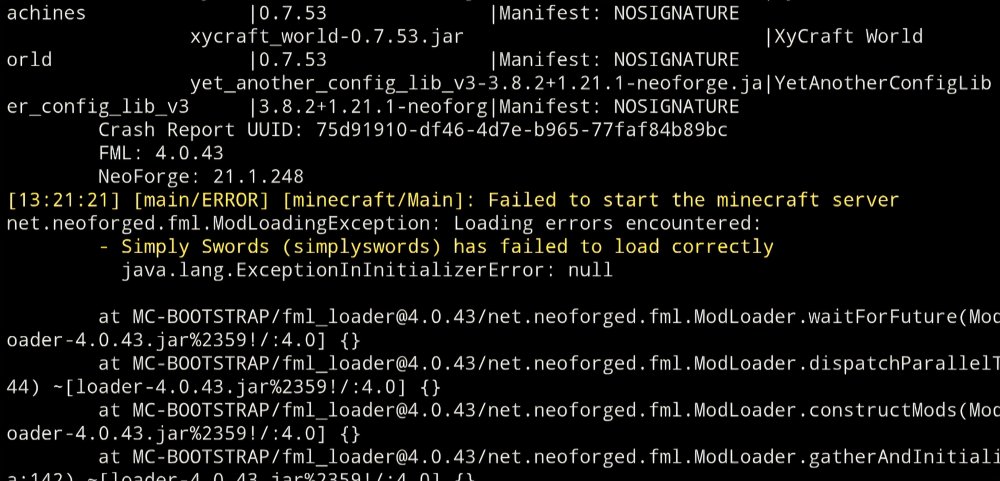
Having issues with Stoneblock 4. I have tried different versions, and deleting mods folder, etc. It always fails startup. Screenshot below, sorry on mobile remote trying to get this running. Does anyone have this running, and did they have to do anything in particular?
-
Fair enough, just do what is best for you with all this
-
Thanks for this. I am working on mine now, hopefully my stuff will be available again soon. Have to remember what settings I used in the past for Plex
-
Updated this, and see is running V2 now. Now having issues, nothing I try to run through it will connect, logs showing errors. I see they have information on the site about upgrading from V1 to V2 https://almeidapaulopt.github.io/tsdproxy/docs/upgrading/from-v1/
-
@Sportarr all good to worry when you don't know something, especially with what you have created. I have wanted a sport tracking app for ages, I just can't code, so couldn't do it haha. My only thought was calling it "Runnarr". I look forward to where this will go, but please take your time with it, and focus on the newborn. Maybe put up in your discord, or github that you will respond when can.
-
Hey @prosthetichead , Thanks for the update! Will have a play with it
-
Please let me know how you go. This is on the github Plex Sportarr supports two methods for Plex integration: Custom Metadata Provider (Recommended) For Plex 1.43.0+, use the new Custom Metadata Provider system. No plugin installation required! Open Plex Web and go to Settings → Metadata Agents Click + Add Provider Enter the URL: https://sportarr.net/plex Click + Add Agent and give it a name (e.g., "Sportarr") Restart Plex Media Server Create a TV Shows library, select your sports folder, and choose the Sportarr agent Legacy Bundle Agent For older Plex versions, download the legacy bundle from Sportarr UI (Settings > General > Media Server Agents) and copy to your Plex Plug-ins directory. Note: Plex has announced legacy agents will be deprecated in 2026. See agents/plex/README.md for detailed instructions and troubleshooting. I am on V1.42 of Plex, so can't test the new way. I have been trying to get it to see the F1, but it is having issues. Works fine from Sonarr in past
-
thanks!
-
Trying to install some servers, and having issues. Astropolis I get this + FORGE_VERSION=1.19.2-43.3.9 + cd /data + [[ true = \f\a\l\s\e ]] + echo eula=true + [[ -f Astropolis_server_pack.zip ]] + [[ -n -Xms2048m -Xmx4096m ]] + sed -i '/-Xm[s,x]/d' user_jvm_args.txt sed: can't read user_jvm_args.txt: No such file or directory + for j in ${JVM_OPTS} + sed -i '$a\-Xms2048m' user_jvm_args.txt sed: can't read user_jvm_args.txt: No such file or directory + for j in ${JVM_OPTS} + sed -i '$a\-Xmx4096m' user_jvm_args.txt sed: can't read user_jvm_args.txt: No such file or directory + [[ -n '' ]] + [[ -n world ]] + sed -i '/level-name\s*=/ c level-name=world' /data/server.properties + [[ -n '' ]] + [[ -n '' ]] + sed -i 's/server-port.*/server-port=25565/g' server.properties + chmod +x run.sh chmod: cannot access 'run.sh': No such file or directory + ./run.sh /launch.sh: line 48: ./run.sh: No such file or directory Pixelmon either won't start, or if does, when I try connect it says that it is vanilla version. FTB packs are working fine though from what I have tried
-
have installed this on my server again since upgraded some parts, but am unable to access the webui now. No more advanced controller on desktop. Have tried even from firefox, and that loads a blank page. Anyone got any ideas?
-
Hey, Are you still getting this with the latest updates? Seems to me every update I get the same error as you did.
-
excellent, thanks for that. I will play around with it when I get the next chance, and see what I can do. My response when I go to "http://your-unraid-ip:24940" is definitely changing the order, and just written continuously, not separate lines like in the example. I can screenshot when home if you need. I like the CPU lookup you added too, may have to use that as well
-
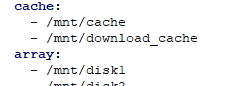
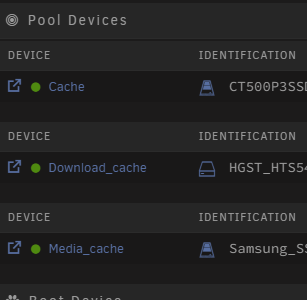
I have 3 cache pools, when I put them together like this under "cache" it combines them in homepage for space left, etc I want them to be separate in the system, so I can see each pool, and how full it is These are my 3 different pools. They are only sensed by the API, if all under the 1 "cache" heading
-
Got this installed, and running mostly. I am having issues trying to add my other caches. Have 3 different pools. Any advise?
-
It is a storage solution for 3D print models. Kind of like a selfhosted thingiverse




