





carnivorebrah
Members
-
Joined
-
Last visited
Everything posted by carnivorebrah
-
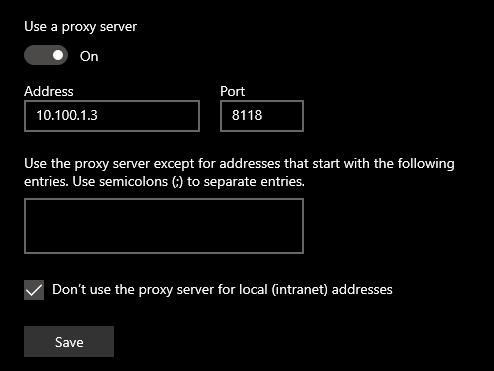
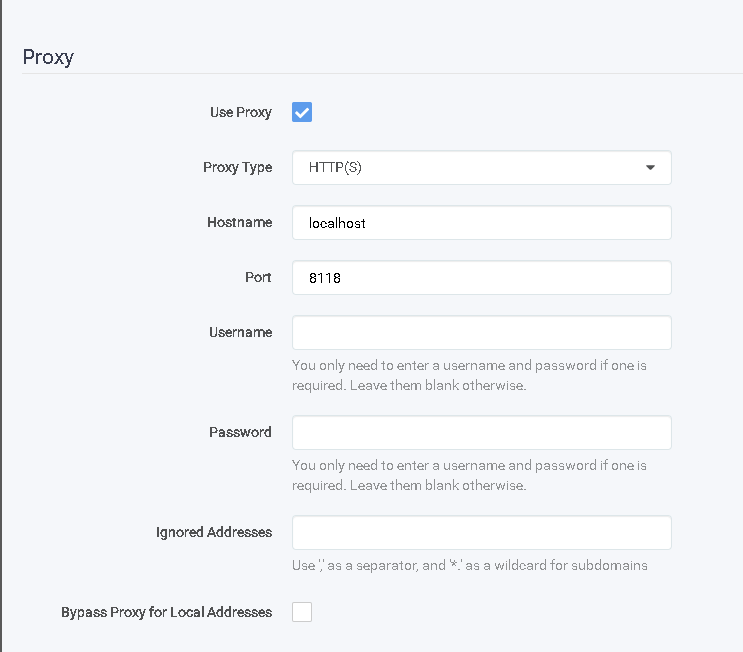
Well, I didn't add '--net=container:<name of vpn container>' to my containers. I missed that, but I see a reply stating that is not needed if you set the "localhost" IP in the web GUI of the container instead. So, I'm not sure what's going on. The part that is really killing me, is the physical device pointed through the proxy IP/port part. If I do that, I cannot access the Unraid web GUI, nor any of my dockers running in bridge or custom IP on that device. I can only access dockers running on my "proxynet" VLAN using the fully qualified public domain name, which is going out and back in using DNS resolution and Swag (i'm guessing). EDIT: Just to clarify, I point my physical laptop, desktop and mobile phone through DelugeVPN proxy, but the above issue is what happens when I do it with the latest update. Here's my proxy settings on my desktop PC:
-
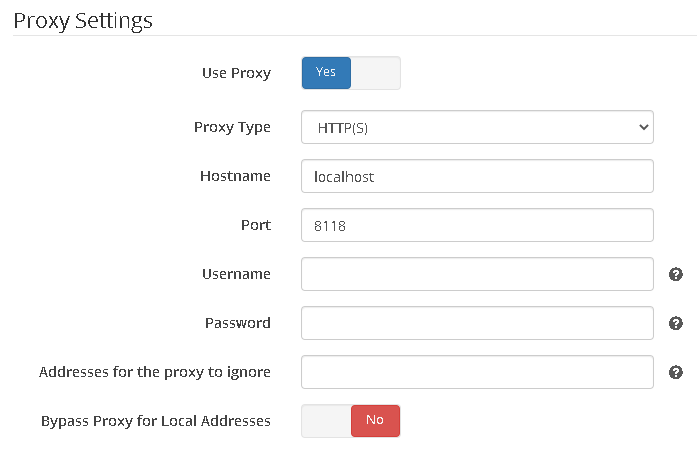
I posted screenshots of my setup a few posts up. Please let me know if you need more screenshots 1. Yes, I am routing Radarr, Sonarr and Jackett through DelugeVPN using the web GUI settings for each docker to point to the deluge container IP/port (10.100.1.3:8118). I tried using "localhost" too, but it wouldn't connect. 2. Yes, my unraid server IP is 10.100.1.3, and my LAN_NETWORK is defined as 10.100.1.0/24. 3. Yes, I have a couple containers set with static IPs (pihole and guacamole) that I can no longer access when I point a physical device to the deluge proxy. Containers using my "proxynet" vlan work fine. When I try to connect to the Unraid web gui using a physical device pointed to the proxy IP/port, it gives me a privoxy error. I will try to go through it again and get more screenshots of all of the errors, but tempted to just wait.

-
I tried those steps, but they didn't work for me. See screenshots in a few posts above. Also, when I point any physical device to the DelugeVPN proxy, I cannot connect to the Unraid web UI on that device.
-
That worked! All is well again! Thank you!
-
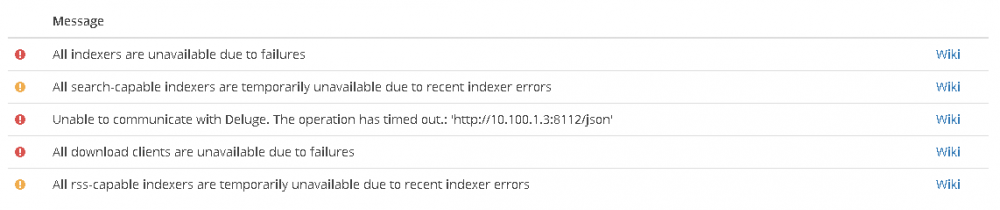
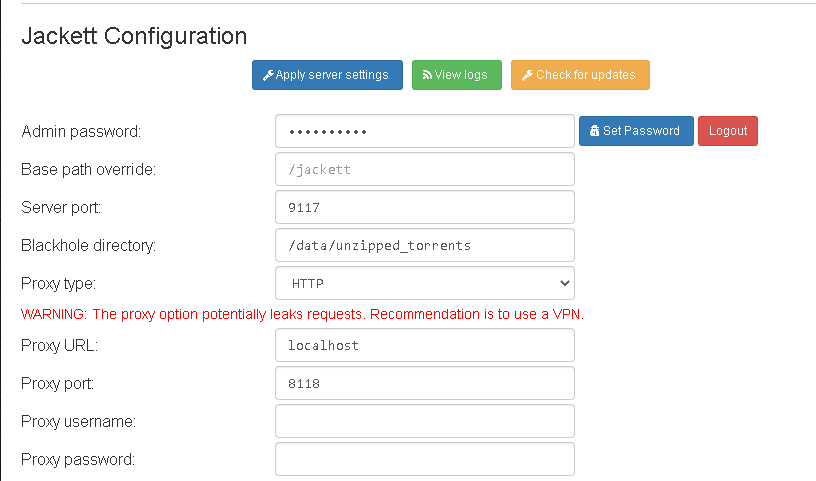
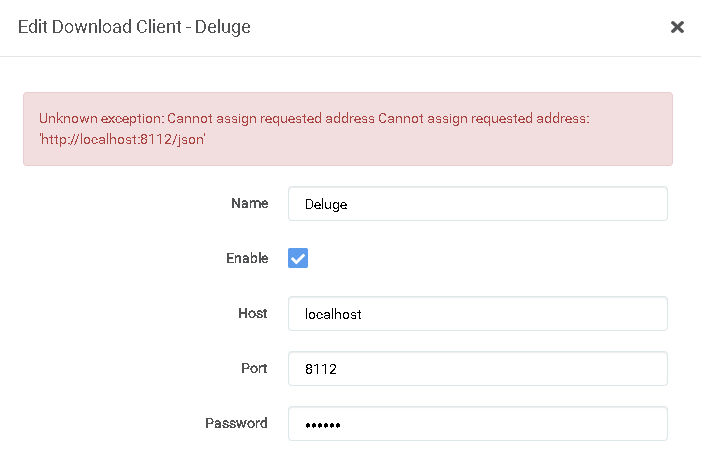
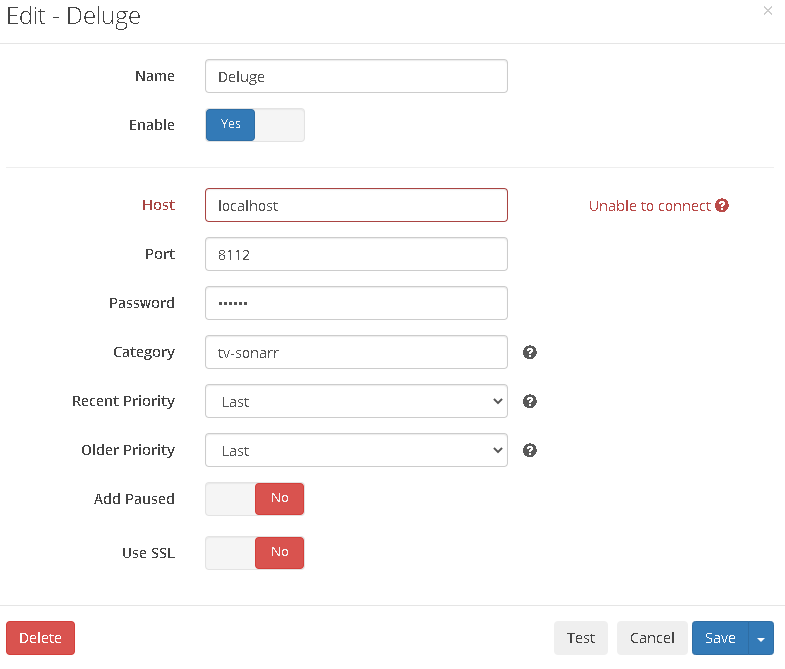
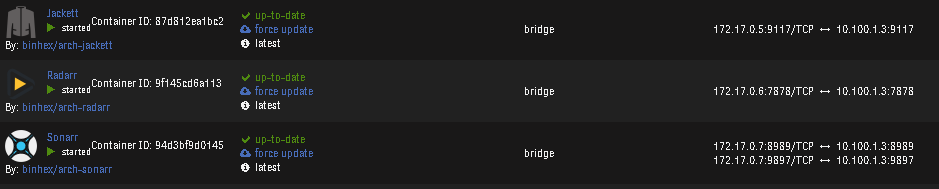
I just updated this container, and now I cannot connect Unraid local IP or to any of my dockers running on Unraid using the IP/port combo when I have DelugeVPN set as my proxy address/port. This worked right before the update. Is there something I need to update/change? EDIT: I'm also getting errors in Sonarr and Radarr that it can't connect to Jackett: What's interesting is I can use public IPs and resolve public domains just fine using the proxy. It's just local addresses. EDIT 2: I'm pretty sure I've added all the corrected settings, but it's still not working. Any ideas? If I can't fix it, can anyone tell me how to roll it back to the previous version? If I set my PC to use the deluge proxy, I can't even connect to the Unraid web UI anymore. ADDTIONAL_PORTS: Jackett: Radarr: Sonarr: DOCKERS (deluge is showing previous version because I already rolled it back before I got screenshot):



-
I hate myself sometimes. Thank you. lol
-
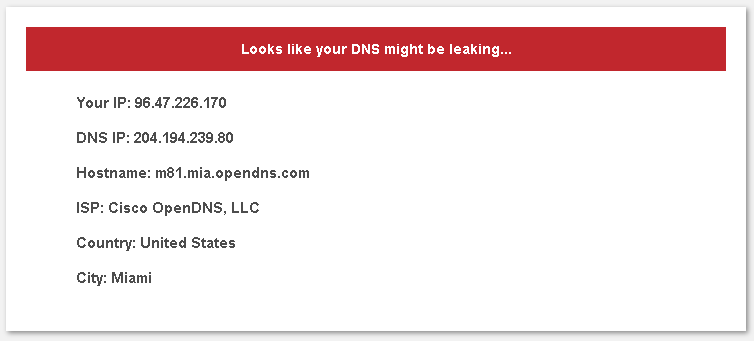
I learned today what a DNS leak test is, and how to do one. From what I understand, if the leak test fails, my ISP can see all of my DNS traffic, or am I completely misunderstanding this? If I am correct, how do I get my current setup to pass the DNS leak test by routing my PiHole traffic through my DelugeVPN container on the same box? Is that even possible? My setup: Router/Default Gateway: 10.100.1.1 Desktop PC: 10.100.1.5 Unraid Server + DelugeVPN docker as proxy server: 10.100.1.3 PiHole docker (DHCP reservations + OpenDNS): 10.100.1.2 Public IP of DelugeVPN container using VPN: 96.47.226.170 DNS Leak Test from desktop PC using DelugeVPN IP set as proxy server and PiHole IP set as DNS server:
-
Hello all, I have gone through the entire setup to the point where accessing my domain "overseerr.mydomain.com" results in just the SWAG welcome page displaying, instead of launching the Overseerr login page. Any idea what steps I may have missed? Log file for docker included. EDIT: per the norm, I misinterpreted a step, and figured out what I was doing wrong. I was missing the "conf" files that I thought I only needed to modify if changes were required.
-
I'm a complete idiot. I forgot to redownload the new config onto my devices. This fixed it. It's always the little things... *facepalm* Thank you!!!
-
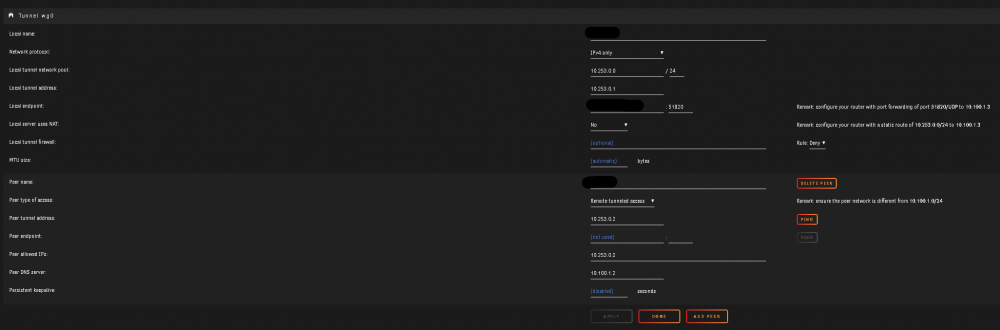
Hello all, I'm trying to setup my WireGuard VPN to work with my Pihole docker running on the same box. I tried to configure PiHole to run on a separate NIC, but I couldn't get it to recognize the bridged connection I created on the separate NIC in order to select it. So, I read through the thread more, and I made it to the point of enabling host access to custom networks in Docker settings. This allows me to now access PiHole over WireGuard on the same NIC, but if I try to access the internet with the VPN connected, it is unable to resolve any host name. How can I get my internet to work on the device with the VPN connected now? Default Gateway: 10.100.1.1 Unraid IP: 10.100.1.3 PiHole IP: 10.100.1.2 Static route setup on router: WireGuard setup:

-
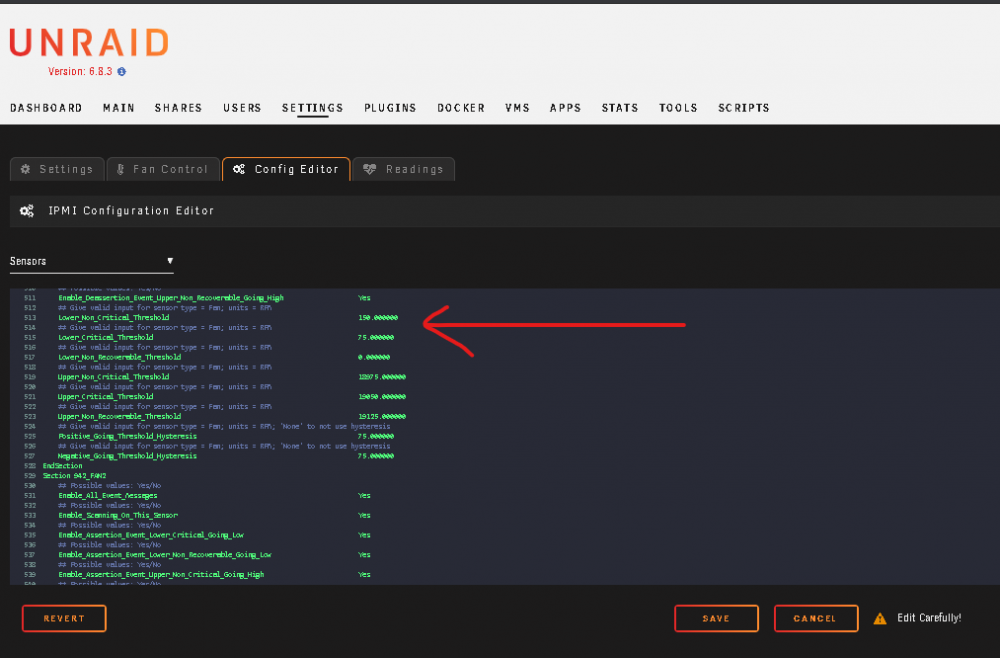
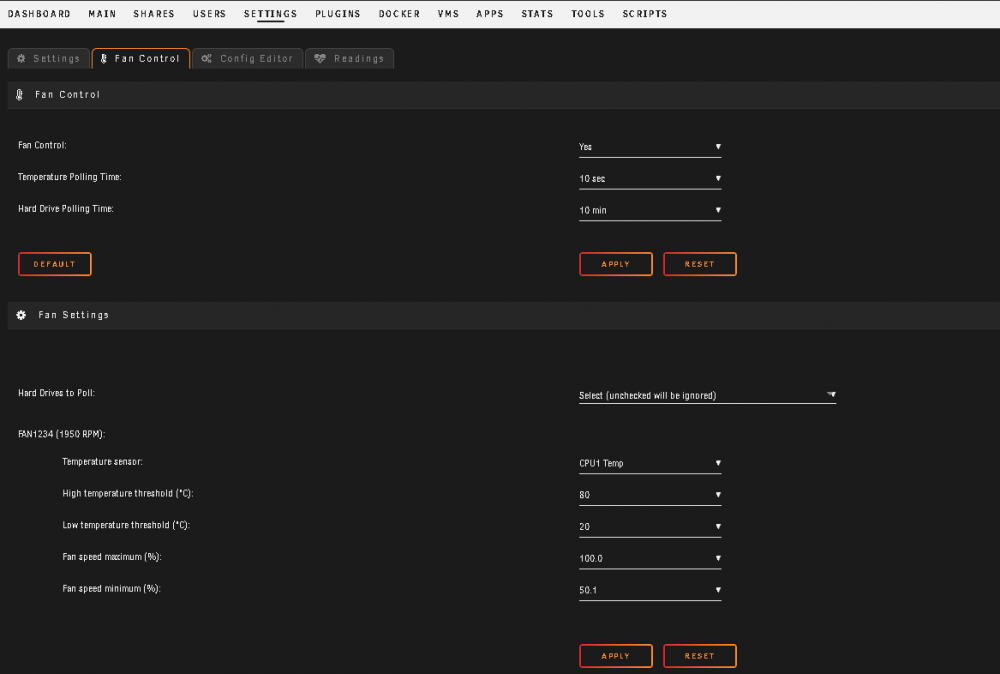
Has anyone gotten the fan control to work successfully with an X9 board? I have an X9DRL-iF board w/ two Arctic 12 semi-passive coolers. I updated the thresholds in the config for both FAN1 and FAN2 to 0, 75, 150, and set IPMI fan mode to "Standard", but since my fans intentionally stop spinning and hit 0 RPM, the IPMI causes the fans go back to 100% every time they stop spinning. So, I tried to enabled fan control in the plugin. However, this just causes the IPMI fan mode setting to change to "Full", and the fans sit at full speed. I tried changing the fan control options, resetting BMC, shutdown with power cord pulled for a few minutes, etc. Any thing else I can try?
-
Thank you for this. I was wondering what I did to start causing super low FPS and crashing, and reading this made it click in my head. Back to normal 200+ fps. In for future updates of this kernel as well. Just got my 3900X/X570 system up and running with almost everything working great (CPU pinning, GPU/USB pass though to gaming VM, dockers, plugins/apps, etc.). Although, I haven't even taken a stab at getting RGB control working. I found the docker for MSI boards, but I'm using a Gigabyte Aorus Master. I also haven't figured out how to pass through the on board audio controller to my VM. Having a weird issue where it locks up the entire Unraid OS went I attempt to boot with it passed through. Found some threads with others having the same problem, and I gave up. My workaround is to just use USB pass through to plug in my Xbox Wireless adapter for Windows for sound through my Xbox headset. Aside from this, my gaming VM is incredibly stable with no other issues. After all of this, I came across this thread after attempting to setup the temp settings, and realizing it wasn't seeing them all/correctly. Installed and tested it out to see if it worked, and saw the temps showing in Dynamix finally. Unfortunately, I'm new to Unraid, and this is my first ever build that I started fresh with 6.8 stable. I haven't found a way to convert to a next release or downgrade a fresh install. So, I had to revert back to stable, and will just have to wait and see what happens with this and the next releases.






