





carnivorebrah
Members
-
Joined
-
Last visited
Everything posted by carnivorebrah
-
Hmm, alright. It is a Supermicro X9DRL-iF, which does have IPMI and a VGA port for displaying video, but I have the BIOS set to the PCI slot the GPU is in for video output because the VGA port wouldn't work before. I can try switching the BIOS to the VGA port and seeing if it works now instead of the GPU...
-
That makes sense. No, I just have the BIOS set to the PCI slot the GPU is in for video output. I'm starting to wonder if this is an issue with 6.11.1 itself, instead of the driver, and if I should try posting in the release thread for it with details of my issue since upgrading.
-
Sorry, I edited my original post to include that Plex has zero issues transcoding with this card, except for the distorted screen that's connected to the GPU (worked before 6.11.1). I can have multiple 4K transcode streams running simultaneously, and they work great. I bought the card in 01/2021. I tried shutting down the server, reseating the card and booting back up, but got the exact same issue as before. So, I tried downgrading from "latest" to "production branch" in Nvidia Driver Settings, and rebooted. This time it gets a little further in the loading process, and it stops at a different error. Does this help indicate anything else? I also attached another copy of Diagnostics using the new driver. diagnostics-20221019-1118.zip Loading screen stops here with "production branch" driver:
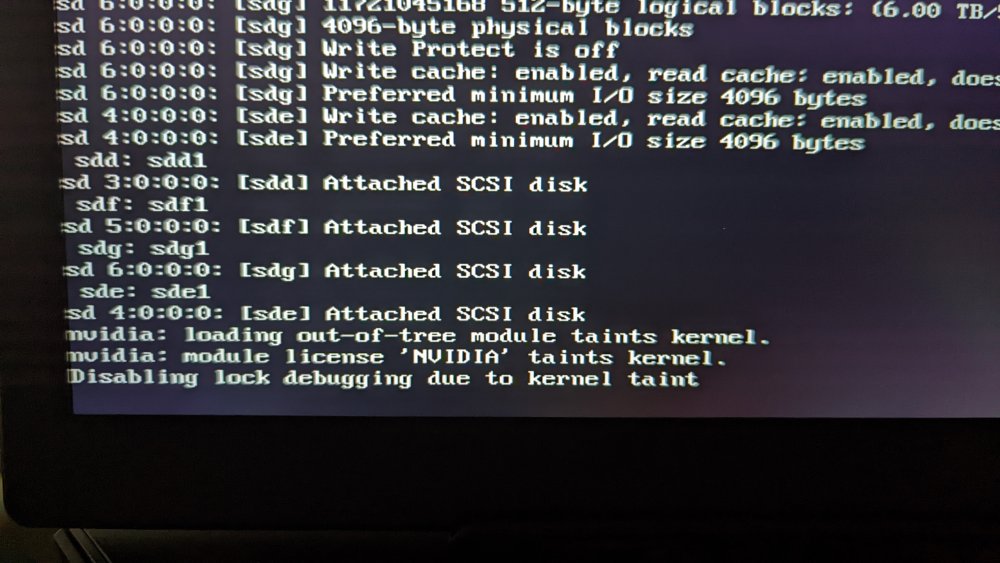
-
Diagnostics attached. diagnostics-20221019-0140.zip That would suck since it's not even 2 years old, and worked fine up until upgrading to 6.11.1 tonight. I don't have another machine I can test it with, but I can at least try shutting down the server and reseating it in the slot. It also has no issues displaying anything up until the point where it says it's mounting the disks. BIOS displays fine, etc. It also transcodes 4K just fine in Plex. It's only the Unraid console that just freezes and stops loading at boot.
-
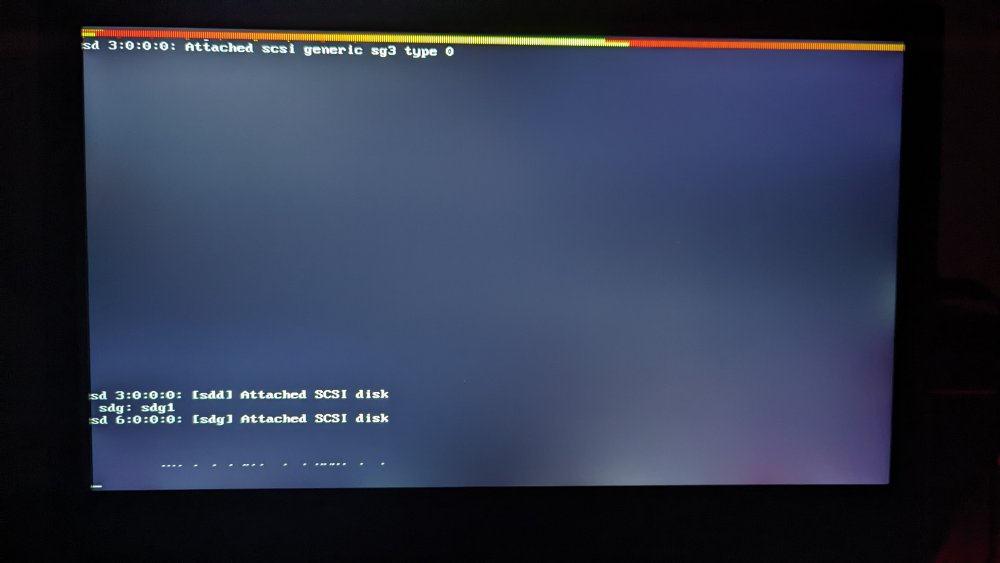
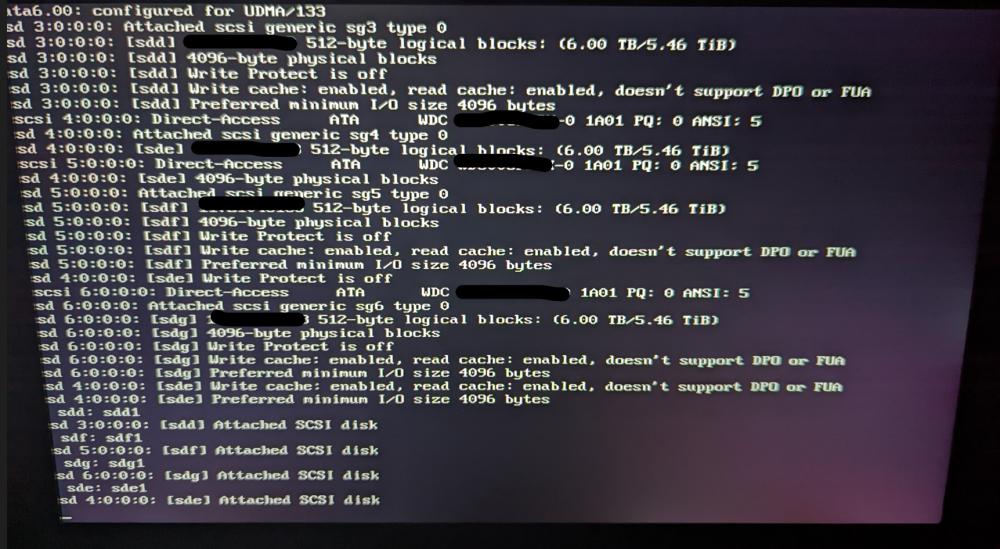
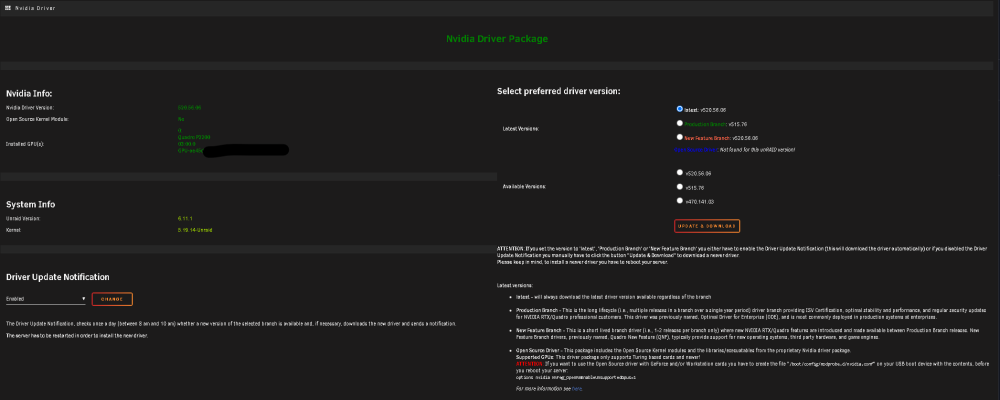
I know this sounds trivial, but I just updated to 6.11.1 and I'm no longer able to use my GPU (P2200) to display my Unraid console on a screen and for Plex transcoding simultaneously. It worked previously in 6.10.3, and versions before that. After upgrading, I noticed that the text displayed while booting would stop at the point of mounting the disks (screenshot below). Before upgrading, it would load all the way to the prompt to enter login credentials, and I could always wake the screen to login through the console. I also noticed after upgrading, if I started a transcode in Plex, the connected screen becomes distorted (screenshot below). I tried reinstalling the driver and rebooting, but the issue still remains. The GPU isn't being used by anything else and it's not stubbed at boot. It's only used for transcoding in Plex and displaying the Unraid console on a screen. I'm not sure what else to do to get this working like before. Any help is greatly appreciated. Connected screen stops here at boot: Connected screen after starting transcode in Plex: Nvidia Plugin: Syslinux config:

-
Mapping the cert files from Swag fixed it! Thank you! Yes! See the above post to map the cert files. That worked for me just now. Although, I'm using Swag, which uses a different path for the files: /mnt/user/appdata/swag/keys/letsencrypt/ instead of: /mnt/user/appdata/NginxProxyManager/letsencrypt/live/npm-33/
-
As another troubleshooting step, I completely started over from scratch by changing the data directory and setting everything back up. However, I still have the issue with emails going straight to quarantine, and the sender being added to the karma records. I can send emails without issues. All of the connection diagnostics pass as well. I'm not sure what else to try at this point.
-
Thanks. I tried this, but it's still happening. Whenever I receive an email, the sender is automatically added to the Karma records, and the email is sent to quarantine. Not sure how to fix that. I even tried deleting and reinstalling the container. Looking in the delivery logs, it just says "250 Quarantined!" when I receive an email.
-
I'm now having this same issue. It started about the middle of last month, and I'm just now noticing I had to go manually release a bunch of emails from quarantine. No emails come through automatically, and go there instead. Anyone figure it out?
-
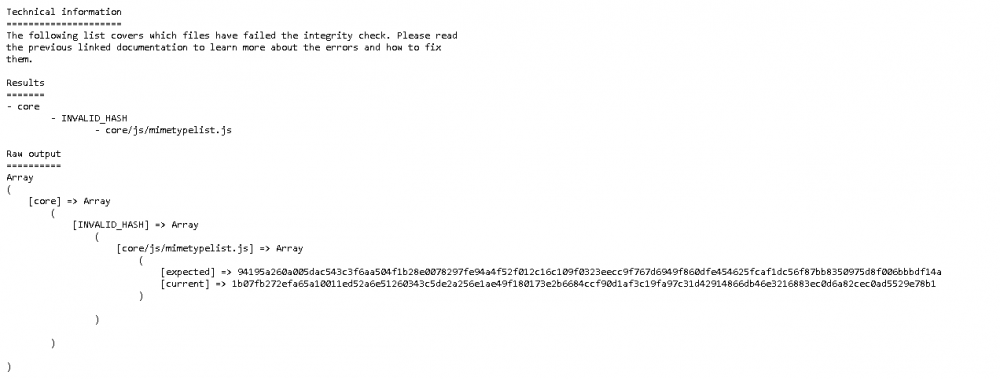
Upgraded to 23.0.2, and now I'm getting these errors. Google search says to replace the file core/js/mimetypelist.js with the file from the GitHub repo, but I'm not able to paste the file into the directory. Any ideas? EDIT: I was able to change the permissions to replace the file. I used this one and the commands below. All errors resolved. cd /mnt/user/appdata/nextcloud/www/nextcloud/core/js chmod 777 mimetypelist.js *replace file* chmod 664 mimetypelist.js Errors:

-
Has anyone successfully gotten this to allow them to access VLANs that are setup outside of Unraid and on a separate firewall/router (e.g. pfSense)? I can't seem to figure it out, and have had no luck searching. My pfSense firewall/router setup: - LAN: 10.100.1.0/24 - VLAN1: 10.100.10.0/24 - VLAN2: 10.100.20.0/24 My Unraid box is on LAN with an IP of 10.100.1.3. I can ping devices on both VLANs from a terminal session in Unraid successfully. I have also added the subnet 10.100.0.0/16 to my "Allowed IPs" list on my VPN devices. I tried manually adding routes in Unraid for both VLANs on br0, and this got my pings to the VLANs from my VPN devices to respond with "destination host unreachable", instead of just timing out. However, it broke my ability to ping anything on the VLANs directly from an Unraid terminal session. So, I think I might be on the right track, and that my issue is with routing, but I can't seem to figure out what I need to do to fix it. It would save me from having to change all of my VPN stuff over to pfSense, which I'm planning on doing if I can't get this to work.
-
I was getting the exact error above, and following the steps in the link with the corrected commands you provided fixed it for me. Thank you!
-
The file should be named "default" and located in \appdata\nextcloud\nginx\site-confs
-
Thank you! All of these steps worked for me to get the "All checks passed" after upgrading to 21.0.1. The only additional thing I had to do was clear my browser cache in order for it to get rid of this error: Your web server is not properly set up to resolve "/.well-known/webfinger".
-
UPDATE: Still going without issues. Thanks for the help!
-
diagnostics-20210327-2247.zip Diagnostics attached. I really hope it's not a bad card. I've only had it for 2 months. It worked fine up until last weekend, but I guess it could happen. I'm 99.99% sure I updated both the BIOS and BMC/IPMI firmware when I built the server. I will have to check the BIOS on the next reboot though, if it locks up again. I have a feeling (mainly hope) pulling the GT710, and running the Unraid video out through the P2200 fixed it though. I'm running a Supermicro X9DRL-iF, which only has an open-ended 8x PCI-E 3.0 slot (top) that I have the P2200 in. The other two are closed 8x PCI-E 3.0 slots, and I was using the bottom for the GT710 just to display Unraid video out. Now video out for Unraid is going through the top slot. If this does solve it, hopefully I can put the GT710 back in, stub it at boot and use it to pass through to something else.
-
Oh, wow. That just goes to show how much of a newb I am. lol I had no idea I could run the video for Unraid on the same GPU as my transcoding GPU. GT710 has been removed. Unraid video out and Plex transcoding confirmed working on just the P2200. Will report back in a few days if it hasn't happened by then.
-
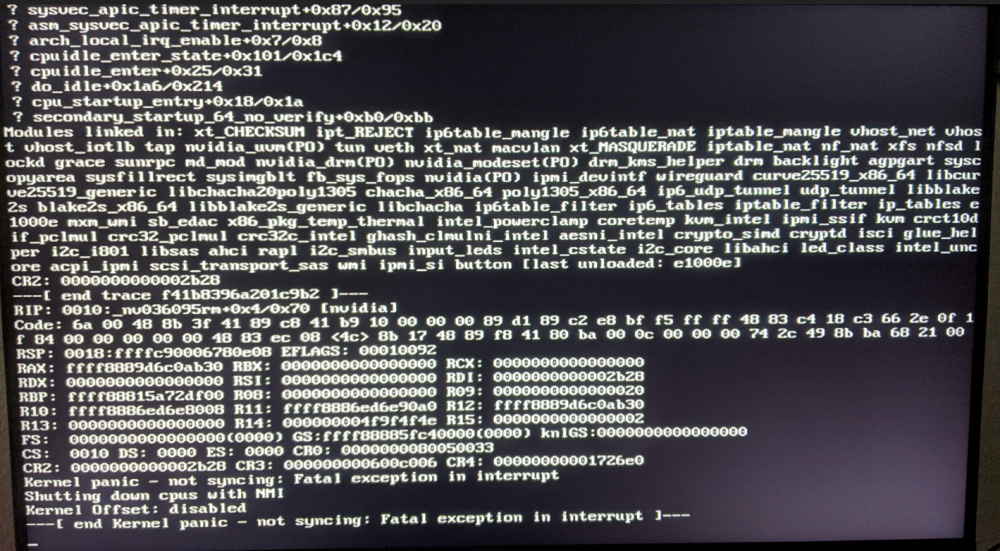
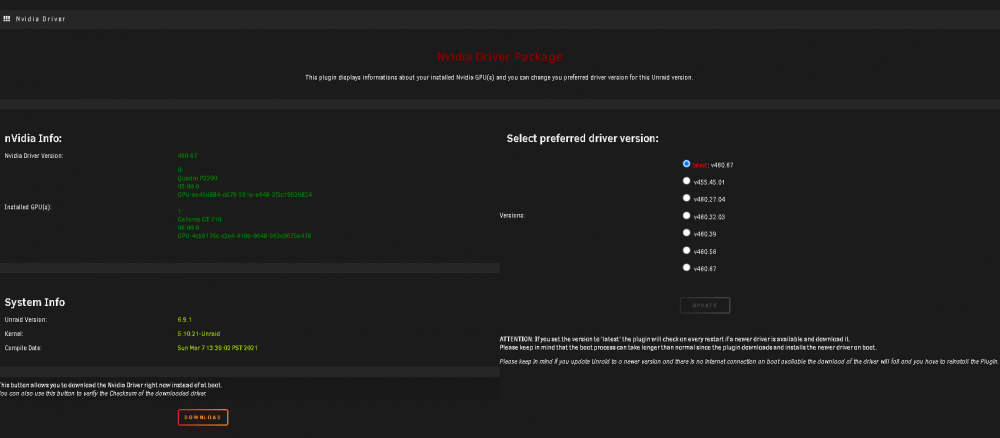
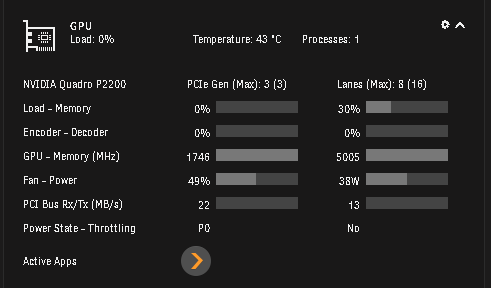
Has anyone here experienced this error happening? I am on 6.9.1 and using the latest nvidia driver (v460.67). I am running a Quadro P2200 for Plex transcoding and a GT710 for Unraid video out. I've had this error appear 4 times since Sunday, and it completely locks up the server, requiring a hard reset and parity check. The line in particular that makes me think it's related to the driver is this one, right after the end trace (maybe I'm wrong... idk): RIP: 0010:_nv036095rm+0x4/0x70 [nvidia] I also want to say that it seems like it started after I updated to this latest driver (v460.67). The first time it happened, I had to uninstall and re-install the driver because I wasn't able to get DNS to work without PiHole, but I fixed that, and the driver is back installed and working. I can transcode in Plex still. The error just randomly happens. I was going try reverting the driver back to an earlier version to see if it helps, but was just curious if anyone else had seen this, or could tell me what to do to troubleshoot it. Error: Nvidia Driver Package: GPU Statistics w/ transcoding working:
-
Well, that didn't last long. Any idea why the latest update no longer works with Swag? I can get to the web UI using the local IP/port, but my proxy-conf file, which was working before the update, is no longer working. It's only this one. All other domains/subdomains proxy-confs are still working. The container is running on "custom: br0" w/ ip address 10.100.1.9 and listening on port 80. EDIT: Figured it out. I had to switch it to my custom "proxynet", add a port mapping (8084 host to 80 container) and then update the proxy-conf to the below (my unraid server IP is 10.100.1.3): ## Version 2021/02/19 # make sure that your dns has a cname set for filebrowser and that your filebrowser container is not using a base url server { listen 443 ssl; listen [::]:443 ssl; server_name files.*; include /config/nginx/ssl.conf; client_max_body_size 0; location / { proxy_pass http://10.100.1.3:8084; proxy_buffering off; proxy_http_version 1.1; proxy_set_header X-Forwarded-For $proxy_add_x_forwarded_for; proxy_set_header Upgrade $http_upgrade; proxy_set_header Connection $http_connection; access_log off; } }
-
Should I be able to change the tab/favorite icon by putting an icon file named favicon.ico in the directory /config/img/icons/ ? I was able to get the logo to change by placing a logo.svg file in /config/img/, restarting the docker and clearing my browser cache. I just can't seem to get the tab/favorite icon to show up. I also tried just placing the favicon.ico file in the /config/img/ directory with the logo.svg file, but still got the same results. EDIT: I got it working. I missed the browserconfig.xml file. I created it and the PNG file that the XML file is referencing. Placed the XML, ICO and PNG files in /config/img/icons/,and everything is working great.
-
Has anyone been able to get 2 separate domain names (i.e. domainname1.com & domainname2.com) working through Cloudflare and SWAG? I was able to get my first domain all setup and working. I can access all the subdomains just fine. I then added a new site to Cloudflare, and verified the DNS setup is working and pointing to my public IP like my first domain. I can see communication is occurring through Cloudflare. I then added this domain to the "Extra Domains" parameter in the SWAG docker container. Restarted, and everything generated fine. It recognized the new extra domain. However, whenever I try to access the public domain name in a browser, all I get is the below error, and I'm not sure what else to do from here, or how to troubleshoot it. Any ideas? EDIT: I discovered some people having luck by adding a "server block" to the "default" file in the /appdata/swag/nginx/site-confs/ folder. Although, I'm still having the exact same issue after completing this setup. Not sure what is going on. EDIT2: It's working now. I missed one setting in Cloudflare as usual (setting SSL/TLS to "Full"). Error: "ERR_TOO_MANY_REDIRECTS" Default file in /appdata/swag/nginx/site-confs/ folder: ## Version 2021/01/03 - Changelog: https://github.com/linuxserver/docker-swag/commits/master/root/defaults/default error_page 502 /502.html; # redirect all traffic to https server { listen 80; listen [::]:80; server_name domain1.com; return 301 https://$host$request_uri; } # main server block server { listen 443 ssl http2; listen [::]:443 ssl http2; root /config/www; index index.html index.htm index.php; server_name domain1.com; # enable subfolder method reverse proxy confs include /config/nginx/proxy-confs/*.subfolder.conf; # all ssl related config moved to ssl.conf include /config/nginx/ssl.conf; client_max_body_size 0; location / { try_files $uri $uri/ /index.html /index.php?$args =404; } location ~ \.php$ { fastcgi_split_path_info ^(.+\.php)(/.+)$; fastcgi_pass 127.0.0.1:9000; fastcgi_index index.php; include /etc/nginx/fastcgi_params; } } server { listen 80; listen [::]:80; server_name domain2.com; return 301 https://$host$request_uri; } server { listen 443 ssl http2; listen [::]:443 ssl http2; root /config/www; index index.html index.htm index.php; server_name domain2.com; # enable subfolder method reverse proxy confs include /config/nginx/proxy-confs/*.subfolder.conf; # all ssl related config moved to ssl.conf include /config/nginx/ssl.conf; client_max_body_size 0; location / { try_files $uri $uri/ /index.html /index.php?$args =404; } location ~ \.php$ { fastcgi_split_path_info ^(.+\.php)(/.+)$; fastcgi_pass 127.0.0.1:9000; fastcgi_index index.php; include /etc/nginx/fastcgi_params; } } # enable subdomain method reverse proxy confs include /config/nginx/proxy-confs/*.subdomain.conf; # enable proxy cache for auth proxy_cache_path cache/ keys_zone=auth_cache:10m;
-
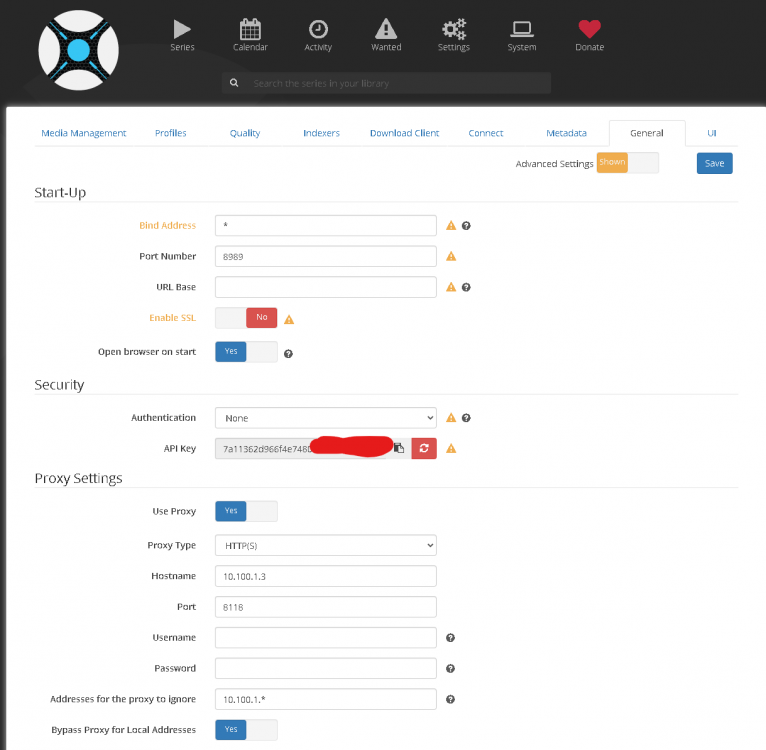
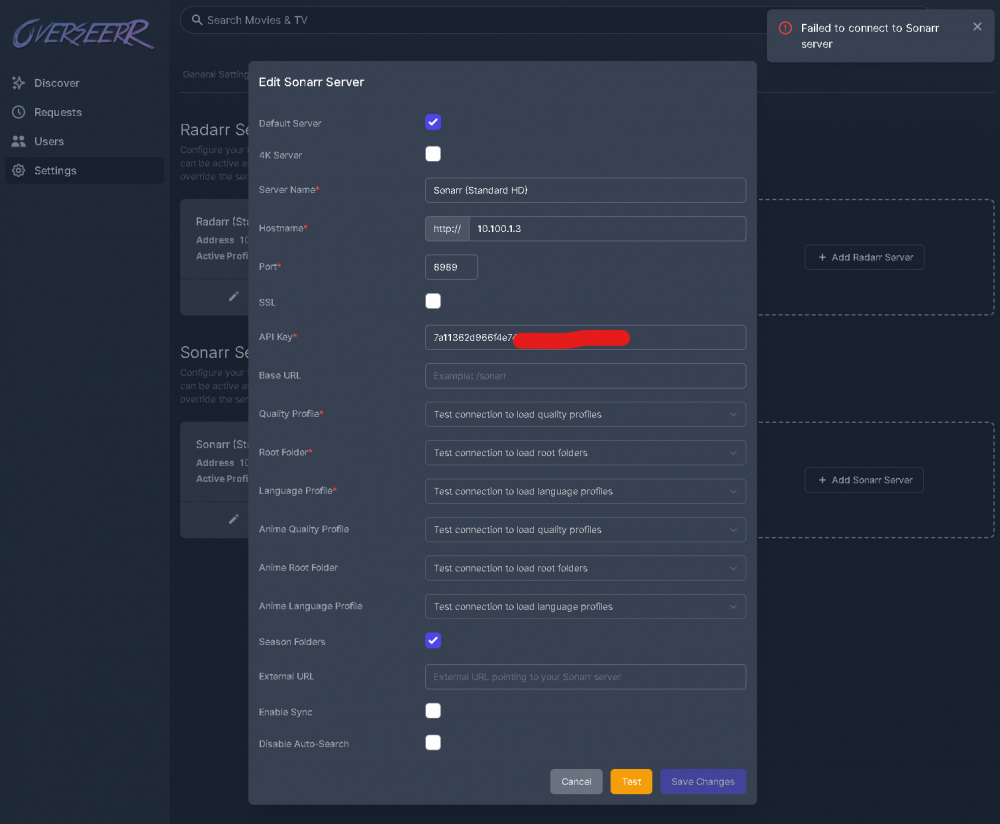
Is anyone else having issues getting Overseer to connect with Sonarr recently? I don't get as much use out of Overseerr as I would like. So, I haven't noticed it until today, as I was having issues with the recent update to DelugeVPN, and I decided to go through and check to make sure all is well with the rest of my dockers. When I try to connect to Sonarr in Overserr, it just says it can't connect. However, I can connect to Radarr (same IP/port 7878) just fine. I thought it may have been because I enabled the login page, but I disabled it, restarted and it didn't work. I made sure my API key matches, and even tried generating a new one and restarting Sonarr, but still no luck. Restarted Overseerr and Sonarr multiple times. Anything else I should try before deleting Overseer and starting over (really don't want to lol)? Unraid server IP: 10.100.1.3 Overseerr: Sonarr: EDIT: Adding Overseer logs: 2021-02-26T17:17:58.367Z [[32minfo[39m]: Starting Overseerr version 1.20.0 2021-02-26T17:17:58.501Z [[32minfo[39m][Notifications]: Registered Notification Agents 2021-02-26T17:17:58.533Z [[32minfo[39m][Jobs]: Scheduled jobs loaded 2021-02-26T17:17:58.713Z [[32minfo[39m][Server]: Server ready on port 5055 2021-02-26T17:20:00.015Z [[32minfo[39m][Jobs]: Starting scheduled job: Plex Recently Added Sync 2021-02-26T17:20:00.018Z [[32minfo[39m][Plex Sync]: Plex Sync Starting {"sessionId":"e3a3e4d8-83bc-47ff-99a3-d0303f0448af"} 2021-02-26T17:20:00.023Z [[32minfo[39m][Plex Sync]: At least one 4K Radarr server was detected. 4K movie detection is now enabled 2021-02-26T17:20:00.024Z [[32minfo[39m][Plex Sync]: At least one 4K Sonarr server was detected. 4K series detection is now enabled 2021-02-26T17:20:00.038Z [[32minfo[39m][Plex Sync]: Beginning to process recently added for library: Movies 2021-02-26T17:20:22.026Z [[32minfo[39m][Plex Sync]: Beginning to process recently added for library: TV Shows 2021-02-26T17:20:22.508Z [[31merror[39m][Sonarr API]: Request failed with status code 404 2021-02-26T17:20:22.508Z [[31merror[39m][Sonarr]: Failed to get profiles 2021-02-26T17:20:23.288Z [[31merror[39m][Sonarr API]: Request failed with status code 404 2021-02-26T17:20:23.289Z [[31merror[39m][Sonarr]: Failed to get profiles 2021-02-26T17:20:25.184Z [[31merror[39m][Sonarr API]: Request failed with status code 404 2021-02-26T17:20:25.185Z [[31merror[39m][Sonarr]: Failed to get profiles 2021-02-26T17:20:26.078Z [[31merror[39m][Sonarr API]: Request failed with status code 404 2021-02-26T17:20:26.078Z [[31merror[39m][Sonarr]: Failed to get profiles 2021-02-26T17:20:27.057Z [[32minfo[39m][Plex Sync]: Recently Added Scan Complete 2021-02-26T17:21:21.320Z [[31merror[39m][Sonarr API]: Request failed with status code 404 2021-02-26T17:21:21.323Z [[31merror[39m][Sonarr]: Failed to get profiles 2021-02-26T17:22:20.817Z [[31merror[39m][Sonarr API]: Request failed with status code 401 2021-02-26T17:22:20.817Z [[31merror[39m][Sonarr]: Failed to get profiles 2021-02-26T17:22:22.945Z [[31merror[39m][Sonarr API]: Request failed with status code 404 2021-02-26T17:22:22.945Z [[31merror[39m][Sonarr]: Failed to get profiles 2021-02-26T17:25:00.071Z [[32minfo[39m][Jobs]: Starting scheduled job: Plex Recently Added Sync 2021-02-26T17:25:00.072Z [[32minfo[39m][Plex Sync]: Plex Sync Starting {"sessionId":"d81276a9-97d5-4120-8db8-7f565ab46387"} 2021-02-26T17:25:00.076Z [[32minfo[39m][Plex Sync]: At least one 4K Radarr server was detected. 4K movie detection is now enabled 2021-02-26T17:25:00.076Z [[32minfo[39m][Plex Sync]: At least one 4K Sonarr server was detected. 4K series detection is now enabled 2021-02-26T17:25:00.108Z [[32minfo[39m][Plex Sync]: Beginning to process recently added for library: Movies 2021-02-26T17:25:20.978Z [[32minfo[39m][Plex Sync]: Beginning to process recently added for library: TV Shows 2021-02-26T17:25:25.752Z [[32minfo[39m][Plex Sync]: Recently Added Scan Complete
-
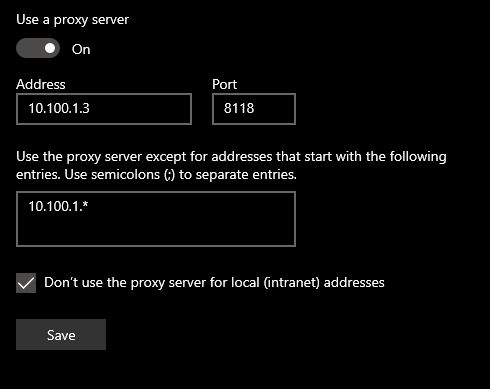
Okay, looks like adding my network "10.100.1.*" to "Ignored Addresses" in both Sonarr and Radarr fixed the connections issues between them, Jackett and DelugeVPN. It looks like just checking the box "Bypass Proxy for Local Addresses" will not work on its own. Thank you so much. This is also true for any physical devices I use, aka laptop, desktop, mobile device: You have to specify the IP addresses or entire subnet that you want to bypass the proxy for. Checking the box alone doesn't work. All issues resolved! Thank you!!!
-
I think I am using privoxy running in delugevpn, because I'm not routing the containers using '--net=container:<name of vpn container>'. I think? I honestly don't know if I'm answering your question correctly though. Anytime I want to "point" or "route" something through DelugeVPN, I enter the IP 10.100.1.3 and port 8118 on that physical device's or the docker container web UI's proxy settings. At least, that is how I've always done it.
-
See above to roll back.






