





0x00000111
Members
-
Joined
-
Last visited
-
@ibk yes, VFIO plugging shows it does support resetting.
-
One last thing, I had to manually stop the docker which was using that NFS mount: docker stop DockerName
-
Also have to manually remove the NFS mount: umount -l -f /mnt/disks/NFS_Share
-
I was having the same problem wit hthe GUI locking up after an NFS server went down that my unraid box connected to. Fixed it with: /etc/rc.d/rc.nginx restart /etc/rc.d/rc.nginx reload /etc/rc.d/rc.php-fpm restart /etc/rc.d/rc.php-fpm reload
-
worked for me, my mover has been running for 4 days straight without actually moving any files and my cache is full now. stopped and manually cleared some files to give it some breathing room and re-ran mover.
-
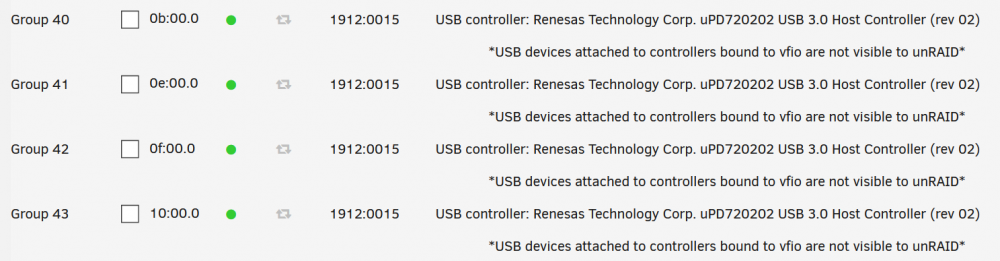
Sorry for the really late reply. I'm running a ryzen 3950x on a Asus strix x570 gamer E. This is my syslinux config: kernel /bzimage append vfio-pci.ids=1912:0015,8086:2723 pcie_acs_override=downstream,multifunction isolcpus=5-15,21-31 vfio_iommu_type1.allow_unsafe_interrupts=1 initrd=/bzroot SR-IOV is enabled in the bios.

-
I'm have the same problem with my Asus Rog Strix x570-E Gaming + 3950X. Latest bios, unraid 6.8.3. Perl installed via nerd tools, it detects the same driver above (same form running sensors-detect from ssh), but no actual probes found. Would love to monitor temps...
-
It doesn't actually give me a breakdown because I still have $170ish in credit from my $300 free trial credits for signing up. The esitmator says $4.50/month though. You do have to change the type over to archival, and if you have many small files and don't do it in one big upload (i.e. many restarts), then you pay easily $60-100 in API calls (for each file, checking date/size comparison for cloudberry to compare if needs to be re-uploaded or not). But once you get it uploaded, it looks like it should be under $5/month moving forward. And with that $300 free credit, you basically get 4 years worth of backup, though I think the credits might expire after 1 year, so just 1 year free maybe? I'll let you know next year
-
I just wanted to give an update with my situation, I was never able to get crashplan to fully back up my 4M+ files (~3.5 TB). Not only did the upload end up being capped at ~10mbps vs my 30mbps full upload, but the VM latency issues extended beyond the single main VM to all 4 gaming VMs. I ended up spending $30 for a license for Cloudberry Linux (on the app store, free 30 day trial) and setting up cloud backs with google datastore archival class for ~$5/month in fees (vs $10 for crashplan). I also really like Cloudberry's retention and versioning features and it's encryption and data compression seems to be very robust. I use it to back up locally to a fireproof USB drive as well. The docker uses less ram & CPU than crashplan's.
-
While I still haven't figured out the root of the issue, I'm seeing that performance now lasts a little longer, 25-45 minutes before it starts to get choppy. My workaround currently is using a user script to restart the docker every 30 minutes. At least stuff is getting backed up still and I can work/game for the most part without issue.
-
I'm not 100% sure it is a CPU latency issue, but the mouse gets all jerky and gaming FPS drops from 100+ to under 15 with major breaks between bursts of good performance. And audio starts clipping really bad, despite already having the MSI interupt values set (HDMI audio from the GPU) I mean it's almost like the docker is trying to use some of it's cores, despite them being isolated. Again, it's only happening to one of the 4 gaming GPU pass through VMs, which is what's really confusing me. If it was all of them, then that would make more sense, but just one and not until a solid 10-25 minutes after backups have been running does it start to get bad.
-
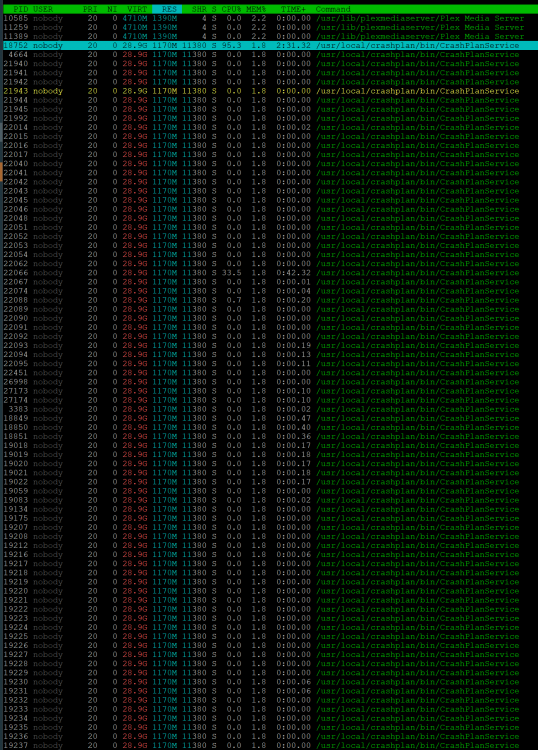
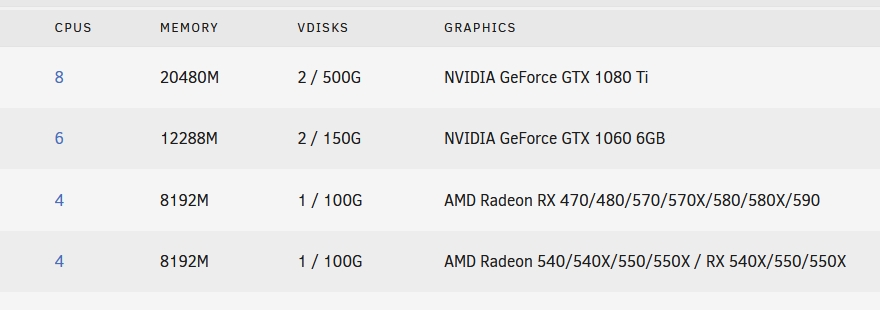
My main gaming VM experiences latency issues after about 15 minutes of the crashplanpro docker running and backing up my ~12TB array. The docker itself only eats up about 3gb (I gave it 16G in config) of ram, but it spawns a bunch of threads (/usr/local/crashplan/bin/CrashPlanService) that are asking for 29gb virtual. I tried installing a dedicated xfs formatted swap drive using the swapdisk plug in, but it's not even using it. The host has 64gb of ram, my main VM running experiencing the issue has 20gb allocated All dockers and VM's combined use 58gb (including crashplanpro). As soon as I stop the docker, the threads go away and the problem resolves. And when I start it back up, again it takes about 5-25 minutes for the problems to start again. The other 3 VM's which have GPU pass through as well don't experience any issues, only the main one. Also, I do have my datasets broken down into 4 groups that run in order: 49gb - system, crashplan config, and ISOs - backups up find 3.6TB - data file shares - finished 450gb still running which is where the problems arise. 300gb - Dockers & VMs (qcow2 files on btrfs) - never backed up 8.5TB - media files - never backed up Diag attached, thanks in advance for any help! unraid-diagnostics-20200219-1901.zip
-
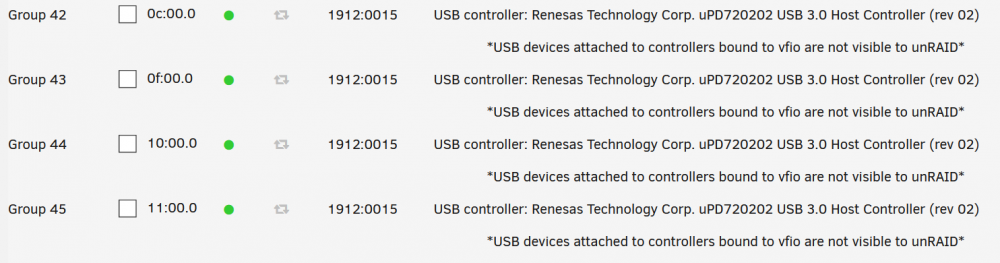
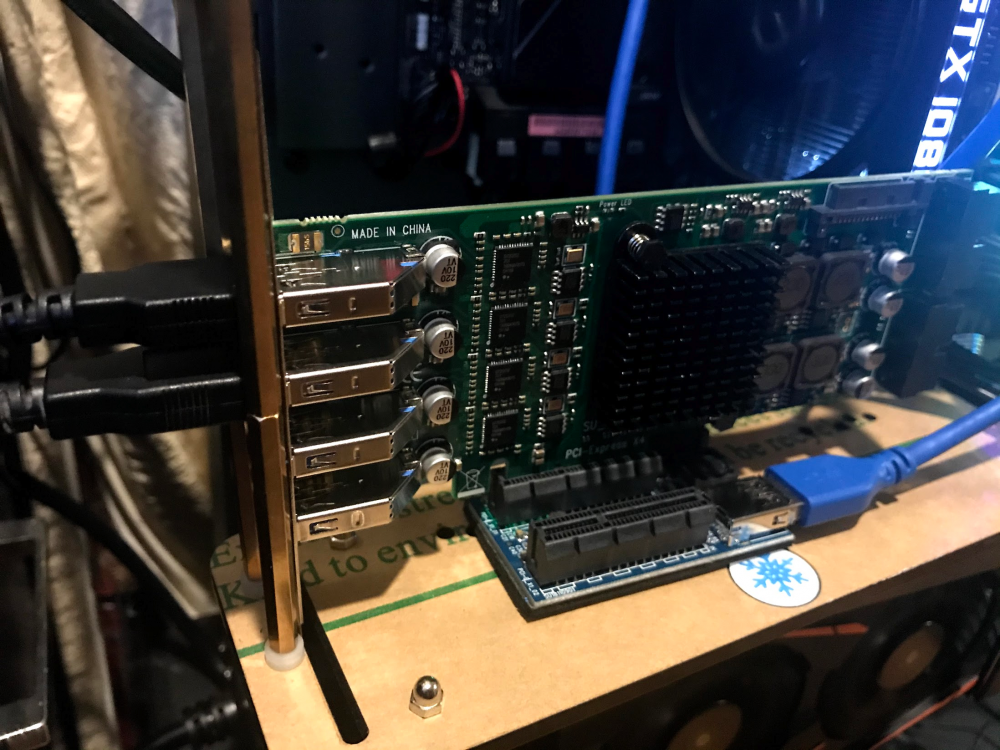
Just confirmed the 4 port card works! FebSmart FS-4C-U8S-Pro $100 (https://www.amazon.com/dp/B07WCQ64RN/). My syslinx config: append vfio-pci.ids=1912:0015 pcie_acs_override=downstream,multifunction initrd=/bzroot (your pci id will likely be different) Make sure you include pcie_acs_override=downstream,multifunction or it won't let you split the ports by VMs. Also confirmed it works great over a pcie x1 to dual x4 riser USB extension.
-
Same issue, ended up returning it. Exact card: PEXUSB3S44V (https://www.amazon.com/dp/B00HJZEA2S/). Not working: $80 Vantec Quad Chip UGT-PCE430-4C (https://www.amazon.com/dp/B00NVVSXIQ/) I'm looking for a less expensive replacement, that actually works. The only one I know for sure is the one Linus uses in his unraid multi-gaming setups is the $129 Sonnet Allegro Pro USB3-PRO-4P10-E (https://www.amazon.com/dp/B07LG5TS6H/). I'd like to see if I can go a little cheaper. Found a recommendation for the ubit card, but it's out of stock (https://www.amazon.com/dp/B07S3ZNF5R) I found a High Point controller RocketU 1144D (https://www.amazon.com/dp/B015CQ8DCS/) for $109. I've had nothing but amazing luck with high point cards, so this will be my backstop. I also see someone left a comment about it working great with windows 10 vms unraid passthru. Might work based on confirmation for the 2 port version in the commends PEXUSB314A2V. I'm going to try a different brand first after having to return my prior Startech card, but this might work (https://www.amazon.com/dp/B071DFQ6TW/) Looks like someone confirmed the FebSmart FS-4C-U8S-Pro works in the comments for $100 (https://www.amazon.com/dp/B07WCQ64RN/). I'm going to give it a shot now.






