





dglb99
Members
-
Joined
-
Last visited
Everything posted by dglb99
-
Current diagnostics. nasdex-diagnostics-20230928-0938.zip
-
Found my diagnostics on my laptop from before the unraid OS update. This is 6.11.5. nasdex-diagnostics-20230918-2238.zip
-
Hi all, My unraid server has been crashing and the frequency has continued to increase and at this point I am not sure what to do. From the persistent syslog, once this error starts it loops forever until I hard reboot the server. Sep 18 20:35:38 NASDex kernel: e1000e 0000:00:1f.6 eth0: Detected Hardware Unit Hang: Sep 18 20:35:38 NASDex kernel: TDH <0> Sep 18 20:35:38 NASDex kernel: TDT <7> Sep 18 20:35:38 NASDex kernel: next_to_use <7> Sep 18 20:35:38 NASDex kernel: next_to_clean <0> Sep 18 20:35:38 NASDex kernel: buffer_info[next_to_clean]: Sep 18 20:35:38 NASDex kernel: time_stamp <124b24440> Sep 18 20:35:38 NASDex kernel: next_to_watch <0> Sep 18 20:35:38 NASDex kernel: jiffies <124b26b80> Sep 18 20:35:38 NASDex kernel: next_to_watch.status <0> Sep 18 20:35:38 NASDex kernel: MAC Status <40080083> Sep 18 20:35:38 NASDex kernel: PHY Status <796d> Sep 18 20:35:38 NASDex kernel: PHY 1000BASE-T Status <3800> Sep 18 20:35:38 NASDex kernel: PHY Extended Status <3000> Sep 18 20:35:38 NASDex kernel: PCI Status <10> Sep 18 20:35:38 NASDex kernel: e1000e 0000:00:1f.6 eth0: Reset adapter unexpectedly Sep 18 20:35:38 NASDex kernel: br0: port 1(eth0) entered disabled state Sep 18 20:35:41 NASDex kernel: e1000e 0000:00:1f.6 eth0: NIC Link is Up 1000 Mbps Full Duplex, Flow Control: Rx/Tx Sep 18 20:35:41 NASDex kernel: br0: port 1(eth0) entered blocking state Sep 18 20:35:41 NASDex kernel: br0: port 1(eth0) entered forwarding state Sep 18 20:35:44 NASDex kernel: e1000e 0000:00:1f.6 eth0: Detected Hardware Unit Hang: Sep 18 20:35:44 NASDex kernel: TDH <0> Sep 18 20:35:44 NASDex kernel: TDT <7> Sep 18 20:35:44 NASDex kernel: next_to_use <7> Sep 18 20:35:44 NASDex kernel: next_to_clean <0> Sep 18 20:35:44 NASDex kernel: buffer_info[next_to_clean]: Sep 18 20:35:44 NASDex kernel: time_stamp <124b27c40> Sep 18 20:35:44 NASDex kernel: next_to_watch <0> Sep 18 20:35:44 NASDex kernel: jiffies <124b28301> Sep 18 20:35:44 NASDex kernel: next_to_watch.status <0> Sep 18 20:35:44 NASDex kernel: MAC Status <40080083> Sep 18 20:35:44 NASDex kernel: PHY Status <796d> Sep 18 20:35:44 NASDex kernel: PHY 1000BASE-T Status <3800> Sep 18 20:35:44 NASDex kernel: PHY Extended Status <3000> Sep 18 20:35:44 NASDex kernel: PCI Status <10> Sep 18 20:35:46 NASDex kernel: e1000e 0000:00:1f.6 eth0: Detected Hardware Unit Hang: Sep 18 20:35:46 NASDex kernel: TDH <0> Sep 18 20:35:46 NASDex kernel: TDT <7> Sep 18 20:35:46 NASDex kernel: next_to_use <7> Sep 18 20:35:46 NASDex kernel: next_to_clean <0> Sep 18 20:35:46 NASDex kernel: buffer_info[next_to_clean]: Sep 18 20:35:46 NASDex kernel: time_stamp <124b27c40> Sep 18 20:35:46 NASDex kernel: next_to_watch <0> Sep 18 20:35:46 NASDex kernel: jiffies <124b28ac0> Sep 18 20:35:46 NASDex kernel: next_to_watch.status <0> Sep 18 20:35:46 NASDex kernel: MAC Status <40080083> Sep 18 20:35:46 NASDex kernel: PHY Status <796d> Sep 18 20:35:46 NASDex kernel: PHY 1000BASE-T Status <3800> Sep 18 20:35:46 NASDex kernel: PHY Extended Status <3000> Sep 18 20:35:46 NASDex kernel: PCI Status <10> Sep 18 20:35:48 NASDex kernel: e1000e 0000:00:1f.6 eth0: Detected Hardware Unit Hang: Sep 18 20:35:48 NASDex kernel: TDH <0> Sep 18 20:35:48 NASDex kernel: TDT <7> Sep 18 20:35:48 NASDex kernel: next_to_use <7> Sep 18 20:35:48 NASDex kernel: next_to_clean <0> Sep 18 20:35:48 NASDex kernel: buffer_info[next_to_clean]: Sep 18 20:35:48 NASDex kernel: time_stamp <124b27c40> Sep 18 20:35:48 NASDex kernel: next_to_watch <0> Sep 18 20:35:48 NASDex kernel: jiffies <124b292c0> Sep 18 20:35:48 NASDex kernel: next_to_watch.status <0> Sep 18 20:35:48 NASDex kernel: MAC Status <40080083> Sep 18 20:35:48 NASDex kernel: PHY Status <796d> Sep 18 20:35:48 NASDex kernel: PHY 1000BASE-T Status <3800> Sep 18 20:35:48 NASDex kernel: PHY Extended Status <3000> Sep 18 20:35:48 NASDex kernel: PCI Status <10> Sep 18 20:35:50 NASDex kernel: e1000e 0000:00:1f.6 eth0: Detected Hardware Unit Hang: Sep 18 20:35:50 NASDex kernel: TDH <0> Sep 18 20:35:50 NASDex kernel: TDT <7> Sep 18 20:35:50 NASDex kernel: next_to_use <7> Sep 18 20:35:50 NASDex kernel: next_to_clean <0> Sep 18 20:35:50 NASDex kernel: buffer_info[next_to_clean]: Sep 18 20:35:50 NASDex kernel: time_stamp <124b27c40> Sep 18 20:35:50 NASDex kernel: next_to_watch <0> Sep 18 20:35:50 NASDex kernel: jiffies <124b29a80> Sep 18 20:35:50 NASDex kernel: next_to_watch.status <0> Sep 18 20:35:50 NASDex kernel: MAC Status <40080083> Sep 18 20:35:50 NASDex kernel: PHY Status <796d> Sep 18 20:35:50 NASDex kernel: PHY 1000BASE-T Status <3800> Sep 18 20:35:50 NASDex kernel: PHY Extended Status <3000> Sep 18 20:35:50 NASDex kernel: PCI Status <10> Sep 18 20:35:52 NASDex kernel: e1000e 0000:00:1f.6 eth0: Detected Hardware Unit Hang: Sep 18 20:35:52 NASDex kernel: TDH <0> Sep 18 20:35:52 NASDex kernel: TDT <7> Sep 18 20:35:52 NASDex kernel: next_to_use <7> Sep 18 20:35:52 NASDex kernel: next_to_clean <0> Sep 18 20:35:52 NASDex kernel: buffer_info[next_to_clean]: Sep 18 20:35:52 NASDex kernel: time_stamp <124b27c40> Sep 18 20:35:52 NASDex kernel: next_to_watch <0> Sep 18 20:35:52 NASDex kernel: jiffies <124b2a240> Sep 18 20:35:52 NASDex kernel: next_to_watch.status <0> Sep 18 20:35:52 NASDex kernel: MAC Status <40080083> Sep 18 20:35:52 NASDex kernel: PHY Status <796d> Sep 18 20:35:52 NASDex kernel: PHY 1000BASE-T Status <3800> Sep 18 20:35:52 NASDex kernel: PHY Extended Status <3000> Sep 18 20:35:52 NASDex kernel: PCI Status <10> Sep 18 20:35:53 NASDex kernel: e1000e 0000:00:1f.6 eth0: Reset adapter unexpectedly Sep 18 20:35:53 NASDex kernel: br0: port 1(eth0) entered disabled state Sep 18 20:35:57 NASDex kernel: e1000e 0000:00:1f.6 eth0: NIC Link is Up 1000 Mbps Full Duplex, Flow Control: Rx/Tx Sep 18 20:35:57 NASDex kernel: br0: port 1(eth0) entered blocking state Sep 18 20:35:57 NASDex kernel: br0: port 1(eth0) entered forwarding state Sep 18 20:35:59 NASDex kernel: e1000e 0000:00:1f.6 eth0: Detected Hardware Unit Hang: I will be posting the diagnostics soon but it will have to wait until I get home (the server is crashed at the moment). I was on 6.11.5 for a while and this was happening. I recently updated to 6.12.4 and it has not gotten any better. Motherboard is a MSI MAG B460 TOMAHAWK LGA 1200 which has two ethernet ports, 1gb NIC and 12.5gb NIC. Currently I am tied into just the 1gb NIC. Other people's solutions seem to disable NIC flow control and NIC offloading, but it feels like a band-aid fix to me and I want to address the root problem.
-
The drive is in a Rosewill hotswappable cage and none of the other drives are having issues. Is it possible the hotswap cage is at fault you think?
-
nasdex-diagnostics-20230518-0759.zip
-
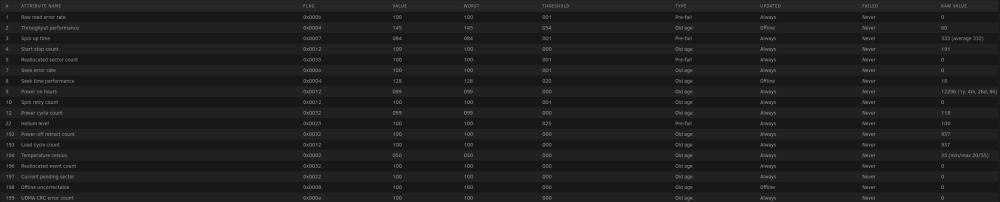
I have been having this issue where my Disk 3 will error out and gets disabled. SMART data all looks good. I usually just restart the server, wipe the disk, and rebuild the array and it is fine, but it is starting to happen with greater frequency. Last time I pulled the disk and re-seated it in case there is a connection issue. Here is a copy of the unraid logs when the disk gets disabled. May 17 17:46:58 NASDex kernel: scsi target1:0:3: handle(0x000c), sas_address(0x4433221103000000), phy(3) May 17 17:46:58 NASDex kernel: scsi target1:0:3: enclosure logical id(0x500605b006287f10), slot(4) May 17 17:46:58 NASDex kernel: sd 1:0:3:0: task abort: SUCCESS scmd(0x00000000e7172b62) May 17 17:46:59 NASDex kernel: sd 1:0:3:0: Power-on or device reset occurred May 17 17:46:59 NASDex kernel: sd 1:0:3:0: Power-on or device reset occurred May 17 17:47:06 NASDex kernel: sd 1:0:3:0: attempting task abort!scmd(0x000000008f76039a), outstanding for 7395 ms & timeout 7000 ms May 17 17:47:06 NASDex kernel: sd 1:0:3:0: [sde] tag#3095 CDB: opcode=0x12 12 00 00 00 fe 00 May 17 17:47:06 NASDex kernel: scsi target1:0:3: handle(0x000c), sas_address(0x4433221103000000), phy(3) May 17 17:47:06 NASDex kernel: scsi target1:0:3: enclosure logical id(0x500605b006287f10), slot(4) May 17 17:47:06 NASDex kernel: sd 1:0:3:0: task abort: SUCCESS scmd(0x000000008f76039a) May 17 17:47:06 NASDex kernel: sd 1:0:3:0: Power-on or device reset occurred May 17 17:47:07 NASDex kernel: sd 1:0:3:0: Power-on or device reset occurred May 17 17:47:37 NASDex kernel: sd 1:0:3:0: attempting task abort!scmd(0x000000007841706f), outstanding for 30035 ms & timeout 30000 ms May 17 17:47:37 NASDex kernel: sd 1:0:3:0: [sde] tag#3110 CDB: opcode=0x88 88 00 00 00 00 05 8b 1a d3 40 00 00 00 08 00 00 May 17 17:47:37 NASDex kernel: scsi target1:0:3: handle(0x000c), sas_address(0x4433221103000000), phy(3) May 17 17:47:37 NASDex kernel: scsi target1:0:3: enclosure logical id(0x500605b006287f10), slot(4) May 17 17:47:37 NASDex kernel: sd 1:0:3:0: task abort: SUCCESS scmd(0x000000007841706f) May 17 17:47:37 NASDex kernel: sd 1:0:3:0: Power-on or device reset occurred May 17 17:47:38 NASDex kernel: sd 1:0:3:0: Power-on or device reset occurred May 17 17:47:44 NASDex kernel: sd 1:0:3:0: attempting task abort!scmd(0x0000000057f00eb9), outstanding for 7522 ms & timeout 7000 ms May 17 17:47:44 NASDex kernel: sd 1:0:3:0: [sde] tag#3073 CDB: opcode=0x12 12 00 00 00 fe 00 May 17 17:47:44 NASDex kernel: scsi target1:0:3: handle(0x000c), sas_address(0x4433221103000000), phy(3) May 17 17:47:44 NASDex kernel: scsi target1:0:3: enclosure logical id(0x500605b006287f10), slot(4) May 17 17:47:45 NASDex kernel: sd 1:0:3:0: task abort: SUCCESS scmd(0x0000000057f00eb9) May 17 17:47:45 NASDex kernel: sd 1:0:3:0: Power-on or device reset occurred May 17 17:47:45 NASDex kernel: sd 1:0:3:0: Power-on or device reset occurred May 17 17:48:16 NASDex kernel: sd 1:0:3:0: attempting task abort!scmd(0x000000007bcdd088), outstanding for 30438 ms & timeout 30000 ms May 17 17:48:16 NASDex kernel: sd 1:0:3:0: [sde] tag#3090 CDB: opcode=0x12 12 00 00 00 24 00 May 17 17:48:16 NASDex kernel: scsi target1:0:3: handle(0x000c), sas_address(0x4433221103000000), phy(3) May 17 17:48:16 NASDex kernel: scsi target1:0:3: enclosure logical id(0x500605b006287f10), slot(4) May 17 17:48:16 NASDex kernel: sd 1:0:3:0: task abort: SUCCESS scmd(0x000000007bcdd088) May 17 17:48:16 NASDex kernel: sd 1:0:3:0: attempting task abort!scmd(0x00000000f1a23639), outstanding for 30593 ms & timeout 30000 ms May 17 17:48:16 NASDex kernel: sd 1:0:3:0: [sde] tag#3089 CDB: opcode=0x88 88 00 00 00 00 05 57 5b 2f a8 00 00 00 90 00 00 May 17 17:48:16 NASDex kernel: scsi target1:0:3: handle(0x000c), sas_address(0x4433221103000000), phy(3) May 17 17:48:16 NASDex kernel: scsi target1:0:3: enclosure logical id(0x500605b006287f10), slot(4) May 17 17:48:16 NASDex kernel: sd 1:0:3:0: No reference found at driver, assuming scmd(0x00000000f1a23639) might have completed May 17 17:48:16 NASDex kernel: sd 1:0:3:0: task abort: SUCCESS scmd(0x00000000f1a23639) May 17 17:48:16 NASDex kernel: sd 1:0:3:0: Power-on or device reset occurred May 17 17:48:17 NASDex kernel: sd 1:0:3:0: Power-on or device reset occurred May 17 17:48:23 NASDex kernel: sd 1:0:3:0: attempting task abort!scmd(0x00000000cb2e9456), outstanding for 7333 ms & timeout 7000 ms May 17 17:48:23 NASDex kernel: sd 1:0:3:0: [sde] tag#3082 CDB: opcode=0x12 12 00 00 00 fe 00 May 17 17:48:23 NASDex kernel: scsi target1:0:3: handle(0x000c), sas_address(0x4433221103000000), phy(3) May 17 17:48:23 NASDex kernel: scsi target1:0:3: enclosure logical id(0x500605b006287f10), slot(4) May 17 17:48:23 NASDex kernel: sd 1:0:3:0: [sde] tag#3093 UNKNOWN(0x2003) Result: hostbyte=0x0b driverbyte=DRIVER_OK cmd_age=115s May 17 17:48:23 NASDex kernel: sd 1:0:3:0: [sde] tag#3093 CDB: opcode=0x35 35 00 00 00 00 00 00 00 00 00 May 17 17:48:23 NASDex kernel: I/O error, dev sde, sector 0 op 0x1:(WRITE) flags 0x800 phys_seg 0 prio class 0 May 17 17:48:23 NASDex kernel: I/O error, dev sde, sector 2932785624 op 0x1:(WRITE) flags 0x800 phys_seg 1 prio class 0 May 17 17:48:23 NASDex kernel: md: disk3 write error, sector=2932785560 May 17 17:48:23 NASDex kernel: I/O error, dev sde, sector 2932785632 op 0x1:(WRITE) flags 0x800 phys_seg 1 prio class 0 May 17 17:48:23 NASDex kernel: md: disk3 write error, sector=2932785568 May 17 17:48:23 NASDex kernel: I/O error, dev sde, sector 2932785640 op 0x1:(WRITE) flags 0x800 phys_seg 1 prio class 0 May 17 17:48:23 NASDex kernel: md: disk3 write error, sector=2932785576 May 17 17:48:23 NASDex kernel: I/O error, dev sde, sector 2932785648 op 0x1:(WRITE) flags 0x800 phys_seg 1 prio class 0 May 17 17:48:23 NASDex kernel: md: disk3 write error, sector=2932785584 May 17 17:48:23 NASDex kernel: I/O error, dev sde, sector 2932785656 op 0x1:(WRITE) flags 0x800 phys_seg 1 prio class 0 May 17 17:48:23 NASDex kernel: md: disk3 write error, sector=2932785592 May 17 17:48:23 NASDex kernel: I/O error, dev sde, sector 2932785664 op 0x1:(WRITE) flags 0x800 phys_seg 1 prio class 0 May 17 17:48:23 NASDex kernel: md: disk3 write error, sector=2932785600 May 17 17:48:23 NASDex kernel: I/O error, dev sde, sector 2932785672 op 0x1:(WRITE) flags 0x800 phys_seg 1 prio class 0 May 17 17:48:23 NASDex kernel: md: disk3 write error, sector=2932785608 May 17 17:48:23 NASDex kernel: I/O error, dev sde, sector 2932785688 op 0x1:(WRITE) flags 0x800 phys_seg 1 prio class 0 May 17 17:48:23 NASDex kernel: md: disk3 write error, sector=2932785624 May 17 17:48:23 NASDex kernel: sd 1:0:3:0: task abort: SUCCESS scmd(0x00000000cb2e9456) May 17 17:48:24 NASDex kernel: sd 1:0:3:0: Power-on or device reset occurred May 17 17:48:24 NASDex kernel: sd 1:0:3:0: Power-on or device reset occurred May 17 17:48:26 NASDex kernel: br-9ca54f048d75: port 8(veth0bbba04) entered disabled state May 17 17:48:26 NASDex kernel: vethb049206: renamed from eth0 May 17 17:48:26 NASDex avahi-daemon[13085]: Interface veth0bbba04.IPv6 no longer relevant for mDNS. May 17 17:48:26 NASDex avahi-daemon[13085]: Leaving mDNS multicast group on interface veth0bbba04.IPv6 with address fe80::c441:89ff:fe63:c4c9. May 17 17:48:26 NASDex kernel: br-9ca54f048d75: port 8(veth0bbba04) entered disabled state May 17 17:48:26 NASDex kernel: device veth0bbba04 left promiscuous mode May 17 17:48:26 NASDex kernel: br-9ca54f048d75: port 8(veth0bbba04) entered disabled state May 17 17:48:26 NASDex avahi-daemon[13085]: Withdrawing address record for fe80::c441:89ff:fe63:c4c9 on veth0bbba04. May 17 17:48:26 NASDex kernel: br-9ca54f048d75: port 8(veth5568b3c) entered blocking state May 17 17:48:26 NASDex kernel: br-9ca54f048d75: port 8(veth5568b3c) entered disabled state May 17 17:48:26 NASDex kernel: device veth5568b3c entered promiscuous mode May 17 17:48:26 NASDex kernel: br-9ca54f048d75: port 8(veth5568b3c) entered blocking state May 17 17:48:26 NASDex kernel: br-9ca54f048d75: port 8(veth5568b3c) entered forwarding state May 17 17:48:26 NASDex kernel: eth0: renamed from veth0e987c1 May 17 17:48:26 NASDex kernel: IPv6: ADDRCONF(NETDEV_CHANGE): veth5568b3c: link becomes ready May 17 17:48:28 NASDex avahi-daemon[13085]: Joining mDNS multicast group on interface veth5568b3c.IPv6 with address fe80::40e6:aeff:fe78:8bac. May 17 17:48:28 NASDex avahi-daemon[13085]: New relevant interface veth5568b3c.IPv6 for mDNS. May 17 17:48:28 NASDex avahi-daemon[13085]: Registering new address record for fe80::40e6:aeff:fe78:8bac on veth5568b3c.*. May 17 17:49:01 NASDex sSMTP[17889]: Creating SSL connection to host May 17 17:49:01 NASDex sSMTP[17889]: SSL connection using TLS_AES_128_GCM_SHA256 May 17 17:49:02 NASDex sSMTP[17889]: Authorization failed (535 Authentication failed) May 17 17:49:02 NASDex sSMTP[17934]: Creating SSL connection to host May 17 17:49:02 NASDex sSMTP[17934]: SSL connection using TLS_AES_128_GCM_SHA256 May 17 17:49:03 NASDex sSMTP[17934]: Authorization failed (535 Authentication failed) It looks like the disk simply just stops responding for some reason, I am unsure what to make of this. SMART data
-
Never mind I figured it out. Here is how I did it. I opened an unraid terminal from the top right in the webui. Then I ran docker exec -it agendav /bin/bash cd .. php agendavcli migrations:migrate Hope this helps anyone else that gets stuck on this.
-
How did you run "php agendavcli migrations:migrate"? I am using the 'console' option when clicking on a container and then doing this. cd /var/www/agendav php agendavcli migrations:migrate but am greeted with this error. Warning: "continue" targeting switch is equivalent to "break". Did you mean to use "continue 2"? in /var/www/agendav/web/vendor/doctrine/orm/lib/Doctrine/ORM/UnitOfWork.php on line 2636 Warning: "continue" targeting switch is equivalent to "break". Did you mean to use "continue 2"? in /var/www/agendav/web/vendor/doctrine/orm/lib/Doctrine/ORM/UnitOfWork.php on line 2665 Loading configuration from file: migrations.yml [Doctrine\DBAL\Exception\ConnectionException] An exception occured in driver: SQLSTATE[HY000] [1045] Access denied for user 'root'@'172.17.0.1' (using password: Y ES) [Doctrine\DBAL\Driver\PDOException] SQLSTATE[HY000] [1045] Access denied for user 'root'@'172.17.0.1' (using password: YES) [PDOException] SQLSTATE[HY000] [1045] Access denied for user 'root'@'172.17.0.1' (using password: YES) migrations:migrate [--write-sql] [--dry-run] [--query-time] [--allow-no-migration] [--configuration [CONFIGURATION]] [--db-configuration [DB-CONFIGURATION]] [--] [<version>]
-
It says that the command succeeds. And I don't know what changed but I logged into my unraid server today to mess with it more and the docker container was started, so I guess it's working now. Thank you for trying to help, sorry it was a waste of time though.
-
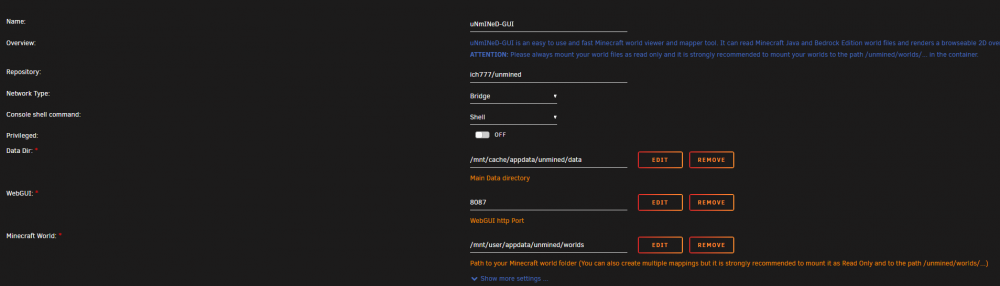
Sure, here you go. root@localhost:# /usr/local/emhttp/plugins/dynamix.docker.manager/scripts/docker run -d --name='uNmINeD-GUI' --net='bridge' --cpuset-cpus='9,19' -e TZ="America/Los_Angeles" -e HOST_OS="Unraid" -e 'DATA_PERM'='770' -e 'UMASK'='0000' -e 'UID'='99' -e 'GID'='100' -e 'CUSTOM_RES_W'='1280' -e 'CUSTOM_RES_H'='850' -p '8181:8080/tcp' -v '/mnt/user/appdata/unmined/data/':'/unmined/':'rw' -v '/mnt/user/appdata/unmined/worlds':'/unmined/worlds/':'ro' --restart=unless-stopped 'ich777/unmined' 5abe41fd4143814076dc375064a7f5c42da04ebef2f470e98d9af58628029e0f
-
I'm getting execution error, server error with your uNmINeD-GUI docker container. Here are my docker mappings, any ideas?
-
Here is he solution I found. https://github.com/hexparrot/mineos-node/issues/450#issuecomment-989127314 In the docker console run apt-get update && apt-get install -y openjdk-17-jre-headless and then restart the docker container.
-
I get to the low 60 degrees C under load. Low 50's is fine I wouldn't worry about it.
-
Would you mind posting what the suggested fix was? I don't believe we have access to that channel.
-
It looks like only one person got it working, everyone else is having issues, including the same as mine where /dev/dri shows up but the docker container cannot access VAAPI.
-
Just wanted to add another report of /dev/dri showing up but VAAPI not being accessed inside the docker containers with my i5 10400. I plan on trying to get the new intel media-driver working once I get a chance.
-
I'm starting to think that I am not the only one with quicksync issues on 10th gen intel (comet lake) cpus. I've found a few other posts of people having issues as well, and then I cam across this. From my limited knowledge of computing it looks like people had issues with the vaapi driver and comet lake processors, and they basically are saying comet lake isn't support and to use intel media-driver. Is it possible to see what intel driver unmanic is using? Or is that packaged into the unRAID kernel?
-
Has anyone gotten Intel quicksync transcoding to work with 10th gen Intel? I have to use the 6.9 rc2 due to 2.5g lan drivers but I've really been struggling getting this to work.
-
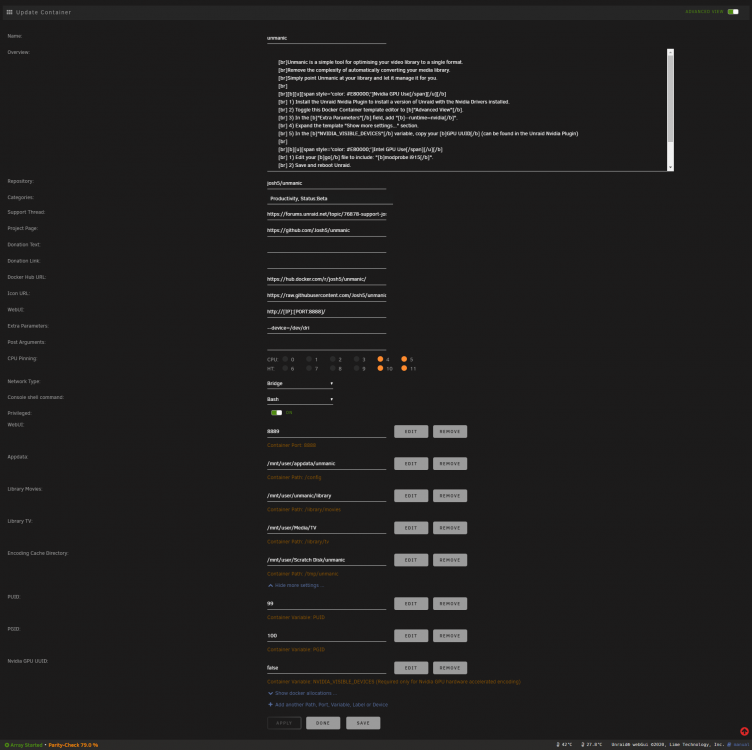
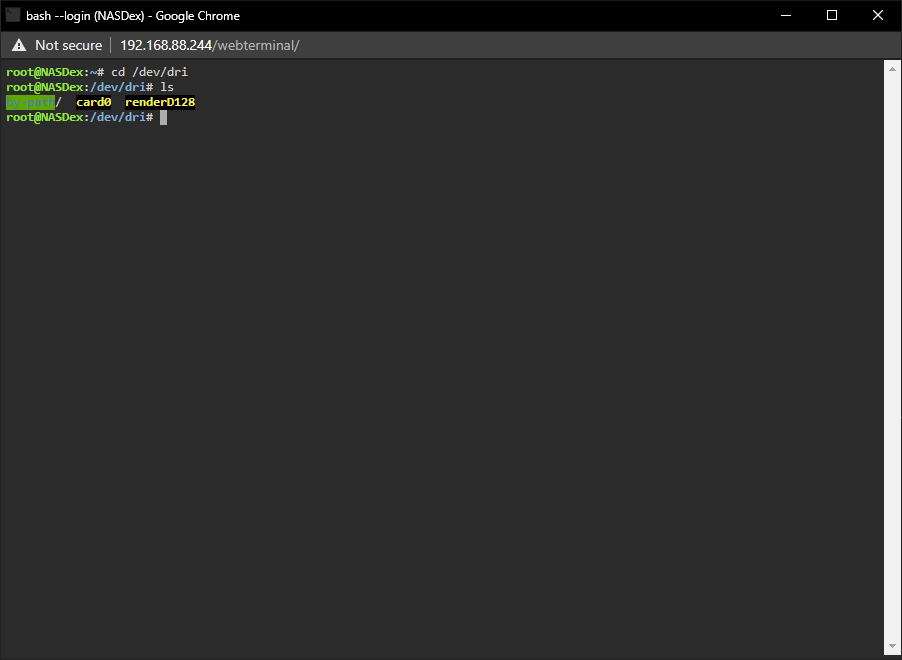
Yes, I have passed through the iGPU in the docker template per the docker template instructions using the extra parameters section. The card shows up under /dev/dri.
-
I downloaded intel gpu top, intel gpu tools, and gpu statistics. I understand that with gpu statistics I don't need intel gpu tools, correct? Should I revert my changes to the go file? Or is there no harm in leaving them? From the FFMPEG Command Log it looks like it is failing because it can't access the intel gpu still. The iGPU should be the primary graphics adapter since there is no other gpu in the system. ffmpeg version 4.3 Copyright (c) 2000-2020 the FFmpeg developers built with gcc 7 (Ubuntu 7.5.0-3ubuntu1~18.04) configuration: --disable-debug --disable-doc --disable-ffplay --enable-ffprobe --enable-avresample --enable-cuvid --enable-gpl --enable-libaom --enable-libass --enable-libfdk_aac --enable-libfreetype --enable-libkvazaar --enable-libmp3lame --enable-libopencore-amrnb --enable-libopencore-amrwb --enable-libopenjpeg --enable-libopus --enable-libtheora --enable-libv4l2 --enable-libvidstab --enable-libvmaf --enable-libvorbis --enable-libvpx --enable-libxml2 --enable-libx264 --enable-libx265 --enable-libxvid --enable-nonfree --enable-nvdec --enable-nvenc --enable-openssl --enable-small --enable-stripping --enable-vaapi --enable-vdpau --enable-version3 libavutil 56. 51.100 / 56. 51.100 libavcodec 58. 91.100 / 58. 91.100 libavformat 58. 45.100 / 58. 45.100 libavdevice 58. 10.100 / 58. 10.100 libavfilter 7. 85.100 / 7. 85.100 libavresample 4. 0. 0 / 4. 0. 0 libswscale 5. 7.100 / 5. 7.100 libswresample 3. 7.100 / 3. 7.100 libpostproc 55. 7.100 / 55. 7.100 [AVHWDeviceContext @ 0x556aac880700] libva: /usr/lib/x86_64-linux-gnu/dri/i965_drv_video.so init failed [AVHWDeviceContext @ 0x556aac880700] Failed to initialise VAAPI connection: -1 (unknown libva error). Device creation failed: -5. Failed to set value '/dev/dri/renderD128' for option 'vaapi_device': Input/output error Error parsing global options: Input/output error
-
How did you get quick sync going? I've been having a hard time getting it going myself. So far I have edited the go file to include "modprobe i915", added "--device=/dev/dri" to the docker container's extra parameters, and added the lines -vaapi_device /dev/dri/renderD128 -vf format=nv12|vaapi,hwupload to the additional command line options. Did I miss a step? As far as I was able to find that should be everything required.




