





cherrybullet
Members
-
Joined
-
Last visited
Everything posted by cherrybullet
-
I tried adding pre/post-snapshot hooks, and saw this in the log 2026-10-17 02:00:01: sh: line 1: /boot/config/plugins/buddybackup/hooks/pre-snapshot.sh: Permission denied 2026-10-17 02:00:01: WARN: pre_snapshot_script failed, 32256 at /usr/local/emhttp/plugins/buddybackup/deps/sanoid line 1841. 2026-10-17 02:00:01: Running post-snapshot hook (timeout 300s).. 2026-10-17 02:00:01: No state file found. Containers were either not stopped or the file was deleted.So the pre-snapshot hook fails to run, but post-snapshoot hook does run. The scripts are supposed to stop/start containers, I tested running them before putting them into backupbuddy hooks.
-
Hi Pirat, I just installed the new version that adds hooks support. One question, is it possible to specify when snapshots run, like on a cron job? I see that the cronjob setting is available for backups, but can't find something like it for snapshots. I was hoping to add pre/post hooks to stop/start docker containers, but I prefer stopping them at like 4am when most people are asleep. Right now, I have this retention setting, which creates one snapshot per day at around 12 am.

-
My syslog is getting filled up with errors from buddybackup. Any idea what might be causing this? Apr 3 02:12:53 yoshi sshd-session[764655]: Close session: user buddybackup from x.x.x.x port 35514 id 0 Apr 3 02:12:54 yoshi sshd-session[764655]: Starting session: forced-command (key-option) '/usr/local/emhttp/plugins/buddybackup/deps/restrict_zfs' for buddybackup from x.x.x.x port 35514 id 0 Apr 3 02:12:54 yoshi sshd-session[764655]: Close session: user buddybackup from x.x.x.x port 35514 id 0
-
I have the exact same issue. I have unraid shut down at around 20% battery left. But during that time, the power could come back, so the UPS could still have power the whole time and my unraid computer won't know that the power came back on
-
There was a power outage so one of my buddies (buddy A) went down. When the power came back and it booted, I got this error message: However, when I looked at my zfs datasets, they had all loaded fine and my containers were all running fine. I also noticed that the other buddy (buddy B) could not connect to buddy A anymore. Buddy A's sshd server failed to start on boot, so I started it. I also tried invoking a reboot on the server myself, when it booted this time, there was no error and the sshd server started fine. I'm not sure if this is a bug with BuddyBackup not setting something up with ssh because it can't find the dataset, or with unraid failing to clean things up during a power outage.
-
Hi, thank you so much for this plugin. Before this, I would use the rsync server container on both of my unraid to sync backups created from the Appdata Backup plugin. So using snapshots with this saves me a ton of space. A couple of improvements I can suggest after using the plugin for a couple of weeks: 1) An option to stop/start containers before/after snapshots are created. On some containers that use databases, they require proper shutdown to properly be backed up. I recently had to restart my server without properly stopping the containers. Some of my containers wouldn't start (immich for example), so I tried restoring from an earlier snapshot. But it wouldn't work and the containers would still not start properly. What worked was restoring a backup created by the Appdata Backup since it does stop containers before backing them up. 2) Maybe BuddyBackup could use its own ssh server on a different port. I had a bunch of settings on my ssh config, one that was interfering connecting to my other buddy server, I just had to comment those out to get it to work. Other users may have other custom ssh settings, or may not have it turned on.
-
Hello, would anyone know how to set this up with tailscale? I'm storing my keyfile in another offsite server connected through tailscale. Do plugins start before the go file? If not, how can I have the go file wait for it to start?
-
Thank you for the solution! But I wonder, why can't unraid do this itself?
-
I think the docker now comes with env variables you can set for the username/password. Try setting those instead?
-
It depends on where exactly in your server you want to move the data to. If you have another share you want to save data on, you'd have to add that share's path to the container. For example, I have the following `download` share mapped to `/media` on the container so I can save data anywhere in `/mnt/user/download`

-
Maybe it uses a different `appdata` folder? Doesn't the other docker save it in a `transmission-nzbtomedia` folder, and this one in `transmission`? try finding the settings for both and copy the old settings to the new one.
-
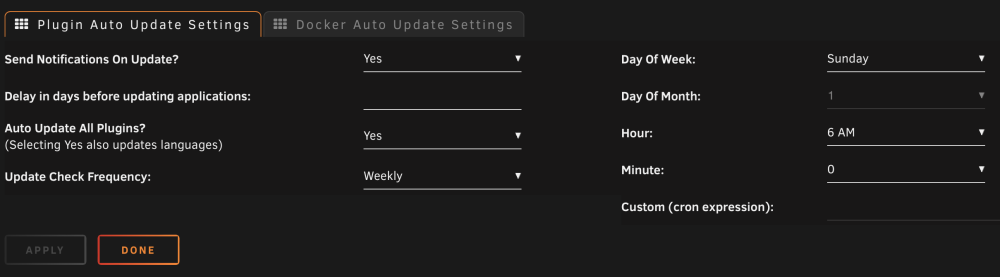
I'm not able to save the "delay in days" option for plugins. If I enter a number there and hit the Apply button and then refresh, it goes back to a blank value. Has anyone had this happen before and know the fix? I'm also not certain that auto updates for plugins is working, but it is working for docker
-
Make sure the docker is stopped when you edit and save changes to `settings.json`
-
Try going into the config, editing `settings.json` and changing `rpc-authentication-required` to false
-
You can pin your docker to a specific image version or tag by adding a colon and then the tag name. https://hub.docker.com/r/linuxserver/transmission/tags if you really wanted to, you could change the repository field in your transmission settings to `linuxserver/transmission:version-3.00-r8` but personally i also prefer Transmission Remote GUI

-
Did you change the `TRANSMISSION_WEB_HOME` env variable? I have similar experience when trying to update it to flood, I didn't see the changes for a few days, not sure why.
-
Those values are not supposed to be `iplist`, but a list of ip addresses or hosts. Not sure if `iplist` is a host, but you can try emptying the values too, those are optional. In order to edit `settings.json` you'll have to stop the container, then edit the file, save it, and then start it again. If you try editing the file while it's running, the container will update the settings file with its own copy in memory.
-
Sounds tough. You may have to move all your downloaded files into `/mnt/user` first. Not sure if unraid supports that actually but you could try it and move everything back if it doesn't work out - stop transmission - `mv /mnt/user/Downloads/* /mnt/user` - start transmission - from within transmission, "change data location" to your desired folder
-
- stop transmission - move files over from `/mnt/user/Downloads` to `/mnt/user/Media` - update the transmission settings to point to `/mnt/user/Media` - start transmission for transmission, it should not notice any change, it will keep running as if the files are in the same path.
-
I have thousands of torrents too and whenever transmission starts it always takes at least half an hour for it to be fully ready and everything seeding or downloading. It doesn't completely reverify them though, it doesn't run the hash check through file contents, that would take way longer.
-
Open your `settings.json` file, earh for "peerport" and see if there are any JSON syntax errors around it
-
Instead of editing `settings.json`, have you tried setting the `USER` and `PASS` environment variables? https://docs.linuxserver.io/images/docker-transmission#environment-variables-e
-
The container should be stopped when editing `settings.json`. Otherwise, transmission will save its current in-memory version when it exits
-
If your transmission is accessible through the Internet, someone could've brute forced their way in. That, or into your network, where they can scan internal IPs and open ports. I'd change the login on your transmission client and add a strong password. If it's an attack from inside your home network, check your computer for malware.
-
I'm getting these error messages too, except mine does connect. Although yesterday, the internet went out for a few hours, when it came back I had to restart the container for it to connect so I checked the logs.





