





Nepherim
Members
-
Joined
-
Last visited
Everything posted by Nepherim
-
What is the process for running using a separate MongoDB install for CPUs which do not support AVX?
-
Did you ever get this working? It looks like you should be able to forward port 55415 from your proxy to your uBackup server. However, I've not been able to get this to work.
-
Moving backups from one volume to another needs to be done carefully as urBackup uses hard links extensively. I just moved my backups from one unraid disk to another using Unbalance mod, and the -H parameter, and saw a large spike in incremental backup szes, I suspect due to messed up links. Not sure I'd go the route of backing up to cache.
-
Having moved backup files to a different disk using Unablance plugin and the -H parameter, I'm now trying to clean-up symbolic links with remove-unknown: sh-5.1# urbackupsrv remove-unknown 2022-12-12 22:28:39: Going to remove all unknown files and directories in the urbackup storage directory. Waiting 20 seconds... 2022-12-12 22:28:59: Shutting down all database instances... 2022-12-12 22:28:59: Opening urbackup server database... 2022-12-12 22:28:59: WARNING: SQLite: cannot open file at line 39363 of [3bfa9cc97d] errorcode: 14 2022-12-12 22:28:59: WARNING: SQLite: os_unix.c:39363: (13) open(/var/urbackup/backup_server_files.db) - errorcode: 14 2022-12-12 22:28:59: Could not open db [urbackup/backup_server_files.db] 2022-12-12 22:28:59: ERROR: Database "urbackup/backup_server_files.db" couldn't be opened 2022-12-12 22:28:59: ERROR: Couldn't open backup server database. Exiting. Expecting database at "/var/urbackup/backup_server_files.db" Any ideas? Edit 1: Solution Solution is to ensure the command is running as root user: urbackupsrv remove-unknown -u root
-
Here's where I'm at in terms of using urBackup as a means to backup Unraid shares. You need to backup a bunch of files and directories, permissions/execute flags are important. After installing urbackup client on your server, use the tar command below to make a copy of the urbackup client. (Use the server to configure paths and other client settings.) This will create a directory on your flash drive /boot/urbackup with the tar file inside: tar -cvf /boot/urbackup/urbackup.tar \ /usr/local/var/urbackup \ /usr/local/bin/urbackupclientctl \ /usr/local/sbin/uninstall_urbackupclient \ /usr/local/sbin/urbackupclient_dmsnaptool \ /usr/local/sbin/urbackupclientbackend \ /etc/default/urbackupclient Then update the /boot/config/go file: nano /boot/config/go and add the following to ensure urBackup is reinstalled and restarted on your Unraid server after reboot. tar -xvf /boot/urbackup/urbackup.tar -C / /usr/local/sbin/urbackupclientbackend -d What I'm now stumped on is how to actually have the client run. Anyone able to help identify where/how to run the client? My local client uses systemd, which isn't what unraid uses, so kind of stumped at this point. Edit 1: updated to add: Here's what the systemd service runs, which (removing the ExecStart= part) fails since there is no /etc/sysconfig on Unraid, nor is there a urbackupclient anywhere. ExecStart=/usr/local/sbin/urbackupclientbackend --config /etc/sysconfig/urbackupclient --no-consoletime Presumably urbackup has an init file somewhere, but not able to find it. Edit 2: found the daemon Updated process above to run the daemon: /usr/local/sbin/urbackupclientbackend -d
-
Is anyone able to share exactly how to do this? Which directory on the flash-drive would it be appropriate to store a copy of the client directory? I can do the copy from flash to /usr/local/bin/urbackupclientctl, but not sure how to actually have the client start up.
-
Old topic I realize, but did you ever get this working?
-
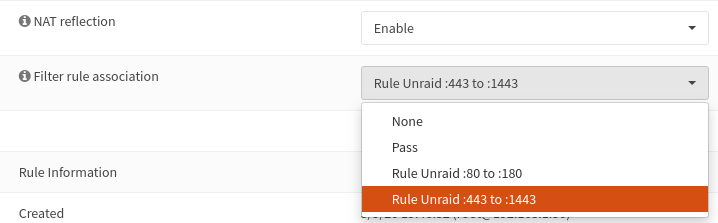
Looks like this is a known thing with OpnSense. Implementing the changes recommended here appears to get things working. Basically in OpnSense, Firewall > Settings > Advanced enable: Reflection for port forwarding 1: 1 reflection Automatic outbound NAT for reflection NAT Then add your NAT Redirection rules, Firewall > NAT > Port Forwarding: WAN TCP * * WAN address 443 (HTTPS) <<UNRAID SERVER IP>> 1443 (HTTPS) Name WAN TCP * * WAN address 80 (HTTP) <<UNRAID SERVER IP>> 180 (HTTP) Name
-
So far everything seems to be working. LetEncrypt has the certs all setup. Routing from my subdomain through to Nginx seems to all work. However, when accessing from inside my network I cannot access the subdomain -- the browser never loads the page. When I access outside the network, the login page loads. If I then switch back to access from inside the network, the login page is displayed. To me this suggests that some part of the login page is not available from inside my network, but is subsequently cached in the browser when accessed from outside the network. Which then allows internal access to function. I'm using OpnSense as my firewall, and have NAT Reflection turned on for both port forwarding rules. However, OpnSense options here are a little different to pfSense, so perhaps an alternate option is required? Particular OpnSense auto creates a Filter Rule association. Anyone have any suggestions for enabling access from within my internal network?
-
This also seems to work to get the image loaded. In my case I still can't boot, but that's probably separate as I couldn't boot using the "rename" method either.
-
Also for future reference this video details similar steps as above, although slightly different approach.
-
Have this exact issue, where the tool stops processing, and resizes the drive to ~7Gb, as others have seen. I ensured the drive was labelled "UNRAID", tried changing the block size allocation, running as admin, a many other options. None worked. What did work, as others noted, is when the Flash Creator hangs with "syncing the filesystem", open a new Explorer window, and rename the USB drive back to UNRAID. It seems like the Flash Creator tries to rename the drive and fails for some reason. This is a very common issue apparently, and has been around for 2+ years. It's pretty off putting and doesn't exactly inspire confidence. However, rest of the trial has gone pretty well so far, so faith is not entirely lost!


