DrBazUK
Members
-
Joined
-
Last visited
Everything posted by DrBazUK
-
I suspect I am doing something monumentally stupid but have come to ask for help here... Have previously been using the ARR stack successfully with SONARR/RADARR/PROWLARR/Overseerr and Binhex qbittorrentVPN for over a year with all the automations just working fine. Then it stopped working so I took the time to change my processes away from Space Invader One's guides to rebuild everything using Trash Guides and it worked fine for another several months or so... For the last few weeks, I'm getting sporadic and now constant issues where automated (and manually added) torrents refuse to download and end up in an errored state. Have managed to identify that the reason for this is invariably that the permissions on the created folders in my data/torrents and data/media folders have been created with the wrong PUID and PGID (shows as "???" in Krusader) and often with MODE 000 for Owner, Owning Group and Others. Files without folders can sometimes succeed in being added and download successfully but they won't upload. Manually changing ownership and cascading settings to files folders sometimes works, other times I need to do the change at each folder level and at file level. I have confirmed that the PUID (99) and PGID (100) and UMASK (000) are correctly set for all ARRs and qbittorrent in the settings in Unraid docker container settings. I have at various points, individually and sequentially done the following: Reinstalled all the Arrs made sure that the Set permissions is not checked in Media Management section of all the arrs... These were left as default value of CHMOD 755 and chown group is blank and the set permissions box unchecked (so should do nothing) Also tried with these set to CHMOD 777 apply Group 100 - with the set permissions box checked to see what happened, no change in behaviour Deleted the QBIT supervisordX.logs Deleted the QBIT perms.txt and restarted qbittorrent container. Manually updated ownership in Krusader (using root permissions) to change to "nobody:users" and applied effectively CHMOD 777 to all files. Have also run CHOWN nobody:users and CHMOD 777 to mnt/user/data recursively which did not fix the issue as newly created files/folders in /torrents or /media do not have the correct ownership. Also tried to run docker safe new perms and it seems to generate weird additional PUID/PGID which I cannot recall ever having used... PGID 3007, for example... **UPDATE 3-Apr** Not sure if this is related but in a last ditch attempt to fix things on the data/torrents and now data/media side, I used Krusader to CHMOD 777 for Owner, Owning Group, Others and Mask including the same Owner groups with (default) in the name. Seems fixed for now.
-
This solved it for me too... Have now completed my migration from original media management (SpaceInvaderOne) to TRASH guides/Ibracorp atomic links...
-
SOLVED: 1. click on padlock to unlock changes in Docker folders. 2. Drag one folder to a new position. 3. Drag it back to the previous position. 4. Click padlock to lock it Result - no more error on folder view.
-
Has anyone successfully managed to get the traffic from this container routed through another container (VPN) - I've attempted to use SpaceInvader One's tutorial from 3 years ago to direct all traffic through Binhex's rtorrentvpn container but wasn't able to get it to work. I was able to bash in to the consolse and use "curl ifconfig.io" to confirm the IP address was updated to use the VPN endpoint but I couldn't then access the web ui at all. Didn't matter if I pointed all TA containers to use the proxy or just the TA server and left redis and ES on bridge. Any help very gratefully received.
-
Same here... is there any easy way to determine what the start order *should* be?
-
Seems that there is a template maintained by ZappyZap: giving that a try now as the Dockerhub version didn't seem to work as expected but the template seems to just configure more OOTB. EDIT: Seems to be a lot better than the DOCKERHUB install without a template - it installs SQLite as the default DB but can also connect to InfluxDB if you have one set up. I can't see any way to import old results but I have them as a CSV for comparison.
-
Looks like the Unraid Docker for the original Speedtest-tracker has been abandoned and there is a fork of it with more up to date commits: ajustesen/speedtest-tracker - I'm giving it a go from the Docker hub to install to see if I can get it to work and will be using a backup of my original database to populate with historical transfer speeds. Will update with progress.
-
Thank you! Q26 solved the issue. For anyone else facing the same issue - this is what solved it: inside both Radarr and Sonarr in the General tab > Proxy settings and "Ignored Addresses" and adding the IP address of my UNRAID server to the Ignored Addresses field. Thanks Binhex, stellar support as always.
-
I seem to be having similar issues to @xxDeadbolt in that I can access Jackett using the GUI on port 9117 and testing the 5 indexers I have in Jackett all work as expected, each reporting a result with a green tick mark. In the Jackett GUI I have configured the proxy to point at the binhex-rTorrentVPN endpoint on port 8118 which I know is working as I can connect through that proxy with my desktop machine and it gives a different IP address than my home IP address. The issue I have is that I can't get Radarr or Sonarr to connect to Jackett (all @binhex repos). I get errors like this from Sonarr: NzbDroneErrorPipeline Invalid request Validation failed: -- Unable to connect to indexer, check the log for more details TorznabUnable to connect to indexer: HTTP request failed: [503:ServiceUnavailable] [GET] at [http://192.168.0.50:9117/api/v2.0/indexers/all/results/torznab/api?t=caps&apikey=(removed) HttpClientHTTP Error - Res: [GET] http://192.168.0.50:9117/api/v2.0/indexers/all/results/torznab/api?t=caps&apikey=(removed) 503.ServiceUnavailable and this from Radarr: 2021-3-1 17:02:48.0|Warn|HttpClient|HTTP Error - Res: [GET] http://192.168.0.50:9117/api/v2.0/indexers/all/results/torznab?t=caps&apikey=(removed) 503.ServiceUnavailable 2021-3-1 17:02:50.1|Warn|HttpClient|HTTP Error - Res: [GET] http://192.168.0.50:9117/api/v2.0/indexers/all/results/torznab?t=caps&apikey=(removed) 503.ServiceUnavailable 2021-3-1 17:02:50.1|Warn|Torznab|Unable to connect to indexer From checking the logs, the errors first started 26 Feb so I don't know if there was a change to one or more of the containers that might have caused an issue as the 4 containers seemed to have been working reasonably well until then. Reinstalling Jackett after nuking the install made no difference. I've tried to add the 9117 port to rTorrent in both the Container Variable: ADDITIONAL_PORTS section and as a separate Container Port as @xxDeadbolt did without any noticeable effect. I may be getting my wires crossed though... I'm out of ideas on what else to try. Any help very gratefully received.
-
Just in case a similar issue occurs for any other user, I think that the "CaliBlur! Dark theme" was causing issues. After I reinstalled and using the Standard Theme (light), I could see all my books and could read them within the browser after enabling the option to read in browser. But when I later switched to using the Dark theme, the issue with missing books returned. I also noted that the indexing/searching seemed to be broken when using the CaliBlur! theme such that keyword searches returned no results despite there being books tagged with a term in metadata columns and also titled using that same term. Reverting to LightUI (default) again still had missing content so I nuked the installation a third time, reinstalled and am sticking with the Standard Theme (light). So far, things appear to be showing all my books and they are readable in the browser so I'm content for now.
-
I ended up nuking Calibre-Web, removing the appdata folder and reinstalling - Calibre-Web now finds all the books that I've added previously and shows them in the interface. No idea what happened to it but it's working now.
-
Hi, Have tried that and the weird thing is I have added other books after this using the Calibre interface and these are showing up in Calibre-Web. I hadn't realised that the Calibre-Web interface permitted the addition of books. I may have to nuke the 800+ added to Calibre and add them in smaller batches with Calibre-Web offline. Thanks for the pointers.
-
This may be a silly question but is there any limit to the size of the Calibre database that Calibre-web will read? I've come across an issue where I added a whole bunch of new books using the Calibre interface and the 800+ books added are visible in the Calibre interface but not in the Calibre-web interface. Total number of books is 4977, can only see up to 4169. Numbers 4170 to 4741 were added on the same day as the preceding 6 or so books which *are* showing up in Calibre-web. Alternatively, is there any way to force Calibre-web to reload the content from the database - reconnecting using the button in the admin page doesn't seem to make any difference.
-
I *WAS* having the same issue as multiple users. I nuked the previous install as detailed in Ed's excellent video tutorial and then followed the video again to install, this time opting for Catalina rather than BigSur to see if that made any difference. Am on 6.8.3, made sure that CA User Scripts was installed and also VM_Custom_Icons before installing Macinabox. I think part of the issue may have been impatience! as when I went to get a screengrab of the "missing" scripts, lo! and behold! they were there... Cue acute embarrassment on my part but felt it important enough to let folks know that they need to be patient to see if the scripts materialise before giving up. If all else fails, install Catalina first, then consider re-running to download Big Sur in a *second* VM. Thanks Ed, all this so I can jailbreak my ipad!
-
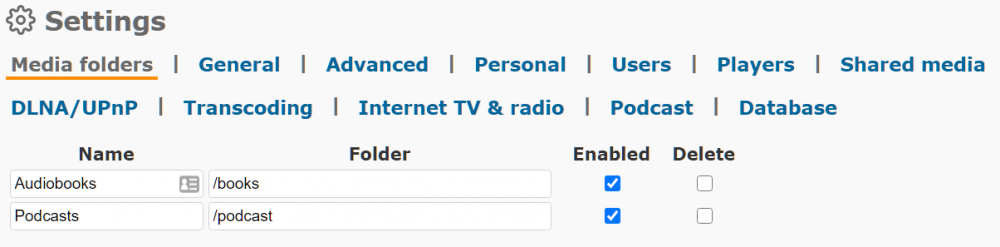
I *was* a plank. having read the run command output, I realise that the names of the folders I assigned in the container were what the GUI was expecting to have in the fields, not the *actual* paths - DOH: This is the GUI now with correctly identified paths and no more missing folders
-
thanks trurl, This is the output from the docker run command:
-
Looks like the team have just released the Booksonic-air container... - see this thread:
-
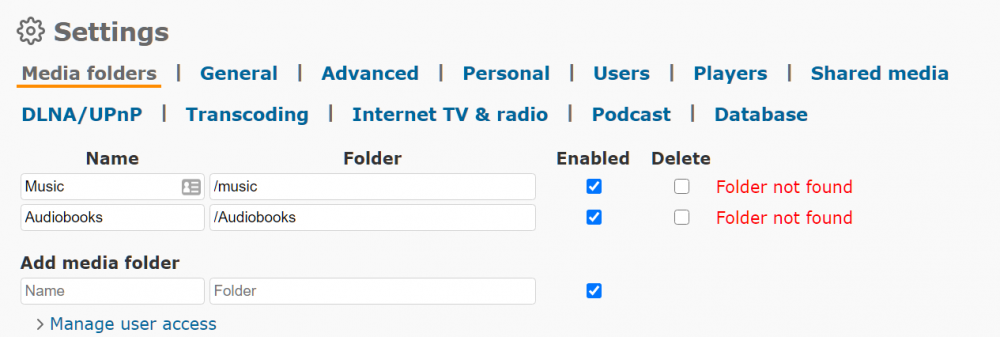
I'm probably being a plank but I can't seem to add Media folders. Configured in docker to use /mnt/user/MediaLibrary/Audiobooks/ and /mnt/user/MediaLibrary/Podcasts/ but in the interface I can't seem to add these to have the application index the folders: TBH, I'm no unraid power user and have been holding my various media shares together with lots of help from the forums and @SpaceinvaderOne's unraid tutorial vids... Plex, Calibre & Calibre Web are working fine but I suspect I'm doing something wrong in Booksonic - any help gratefully received.