





ElectroBlvd
Members
-
Joined
-
Last visited
Everything posted by ElectroBlvd
-
So I found the problem with this. The Plex docker from pms-docker from plexinc was causing the memory issue when it would run its daily maintenance. Even if I went into plex and unchecked everything in the scheduled maintenance tasks, it would still run and just flood the memory slowly until the server crashed. I stopped the official plex docker from running and installed the binhex version and have not had an issue since.
-
Ok, so how do I figure out what's going on at 4am every morning that eats up my memory forcing my server to stop a process that ultimately makes all my shares disappear? Having to restart the server every day is starting to get....frustrating. Especially if I forget to restart it before leaving for work and then need to access something on it and can't cause its down.
-
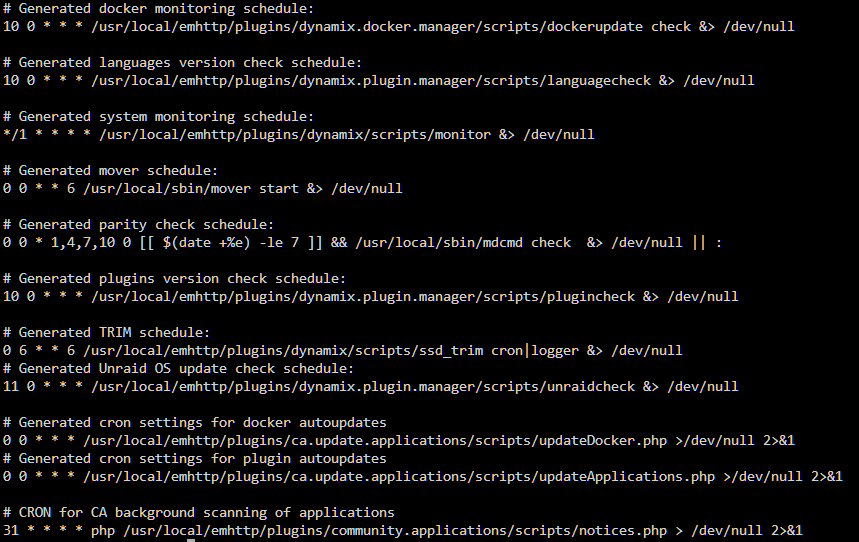
I don't see anything that says Scheduled Tasks but I do see an icon that says Scheduler. I'm assuming that's what you're referring to? Is that the only place? Cause the only things in there is Parity Check, Mover and Trim which none of those are set for 4am daily. Running the command you asked gave me.....
-
So confirmed at 430a this morning that it is happening at 4am every day. I read somewhere, before creating this thread, that there's some automated process that happens around that time built into unraid but can't remember what it was or where I read that. I looked through every setting I could think of in unraid to see if I had anything scheduled during that time and found nothing. Would you be able to advise me on where all the scheduled tasks sections are in unraid so I can make sure I didn't miss anything?
-
Here's the zip main-ur-data01-diagnostics-20250423-2213.zip
-
Eh....I clicked to download the zip file this morning when I noticed my shares were missing again. And then restarted my server. But I guess I didn't notice the file didn't download before restarting. So I don't have that zip file. I guess I'll have to wait till the shares disappear again, and then get the zip file and upload it here. EDIT: I did notice it looked like there was an oom error right before the shares went down.
-
As the title says, ever since the update to 7.0.1, my shares will disappear and I have to restart the server to get them back. I don't check my server often but noticed it when I tried to use Plex and it said Plex was offline. So I went to my docker which showed Plex was running. So then I try to access the movie directly through Windows network drive and the drive is offline. That's when I went to the shares tab and saw there were no shares. Did a google search and found if you restart the server the shares come back but that post said "It only happens one time after the update." Well, its happening more than one time to me. I've been checking my server daily and every single day my shares are gone again until I restart. What's going on? I know diag files will be needed. Do I just attach the whole zip file?
-
Do you perhaps have a link to a walk through for this? I currently download/rip to a "downloads" share. And then I move the files over to the appropriate folder in my plex media share. I'm looking for a way to automate this. So as things get downloaded into the downloads share, an app can automatically move it to the appropriate tv show/season folder. I have both Sonarr and Medusa installed currently but I have no clue how to set it up to do this. Everything I've found is to set them up to download things and then organize what they downloaded. Or to organize something a torrent app downloaded. I've searched for ways to auto move files and came up empty handed other than writing a script which wouldn't do exactly what I'm wanting (and I don't know how to program).
-
Thank you ConnerVT, I did read that on that page prior. But it seems the anonymized diagnostics still include things like IP addresses and such that I don't believe should be advertised for the world to see. I'm not a cyber security expert, though. Don't a lot of attacks start with someone figuring out what your IP address is? I have no qualms about posting up diagnostic files that don't have vulnerable info in them. Just let me know which ones are needed. It seems like I might have more issues than just the docker though. Rather than making multiple threads of each problem, I searched for an official support. I found a page for paid support that says I can get 1 on 1 support. But all of the dates are marked as unavailable? Am I doing something wrong to try and schedule this? Has anyone used the paid support before that can explain to me how it works and how I can get something scheduled in so I can get my server fixed please? I really don't mind paying for help.
-
Yes, I read the typical cause was an app writing to the docker.img instead of to a share. So I double checked that everything was mapped to a share (I have 6 containers total but only 2 are actually running). I also read that with plex containers (which this has been seeming like a plex issue from the start) its common that transcodes are writing to docker.img. That's when I found the entry in my syslog that I post and questioned if my transcoder is writing to docker.img and posted how my plex transcode directory is set up. I believe this is configured correctly. Please correct me if I am wrong. I also looked in my transcode share, saw no files, opened plex to play a video, went back to the transcode share and saw files populated. So I'm assuming it is in fact configured correctly. Since the 100GB I increased to previously was full, my server was running slow again. So that I may navigate the server quicker, I increased the size again (I may have gone overboard with this and increased it to 1000GB as it was easy to just add another 0 to the 100GB that was previously set). A new problem emerged after doing this. My CPU was very active even when nothing was going on. Many cores were constantly hitting 100% with the overall load sitting around 75%. The system ram also started filling up. I watched as it went from its normal 11% to 60% then 66%. I quickly navigated over to Tools->Processes and found that the line for /usr/bin/dockerd -p /var/run/dockerd.pid --log-opt max-size=50m --log-opt max-file=1 --log-level=fatal --storage-driver=btrfs was sitting at 25% CPU load and eating up the system ram. So I went to Settings->Docker and disabled docker. I went back to the dashboard and saw my CPU was now idling at 1% load and my system ram returned to normal at around 8% usage. Just to double check, I reenabled docker and sure enough, my CPU load skyrocketed and my system ram usage started climbing again. So I followed the very simple guide on this forum on how to create a new docker.img without losing container data (literally 2 steps. Delete the docker.img. Add containers using the templates.) While doing this I also set the docker size back to its default 20GB and rebooted the server. After all of this was done, I checked to make sure Plex was working by playing a movie. I also checked my dashboard and CPU load was normal as well as system ram usage. The docker memory is also sitting at 33% (6.37GB) and in the container size menu it is showing Plex is only using 346MB. When you say "attach the diagnostics" are you referring to the entire zip file? Isn't there sensitive info in there that shouldn't be uploaded to the internet for the world to have access to? Or is there a specific file in that zip file you need? If you need the entire zip file, could I send it to you privately? Or can I first be assured there is no sensitive info in that zip file that "hackers" could use? Please forgive my ignorance but I'm sure you can understand my caution as well.
-
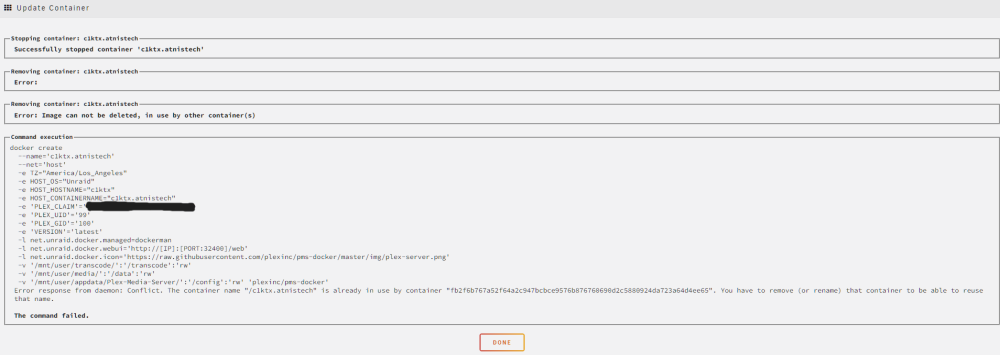
Clicking start container on the plex container would just come back with an error that the name was already taken. So I rebooted the whole server and on reboot the plex container is now running (I did not click start on the container after reboot. It started automatically.) According to the post by Squid, it seems a screen shot of the container on the docker tab is helpful? So I'm including it here. I'm also attaching the docker log file that I grabbed when I noticed the memory was full and the docker log file I grabbed just now after server reboot. If anything else is needed, I will happily learn how to get that info and provide it so please just let me know what you need. My Unraid server has been running since 2021 and I have made no changes to docker or the plex container that I know of for the docker memory to suddenly get full like this. I have done some googling and haven't found a solution either. docker 3-12-24 0822.txt docker 3-11-24 1749.txt

-
So I clicked on the orange dicker run link in your post. Read what Squid said about editing the container, change something, change it back and hit apply to get the docker run. I did that and now I can't get the plex container to start back up as the "edit" failed.
-
I figured out how to get the diagnostics zip file and opened up the logs. Found this line in the syslog file: Mar 11 02:12:13 c1ktx kernel: Out of memory: Killed process 3653 (Plex Transcoder) total-vm:28303584kB, anon-rss:28255104kB, file-rss:0kB, shmem-rss:0kB, UID:99 pgtables:55412kB oom_score_adj:0 Is the plex transcoder using the docker.img to store the transcode???? In the plex settings I have the transcoder temporary directory set to /transcode and in the docker I have: Container Path: /transcode Host Path: /mnt/user/transcode/
-
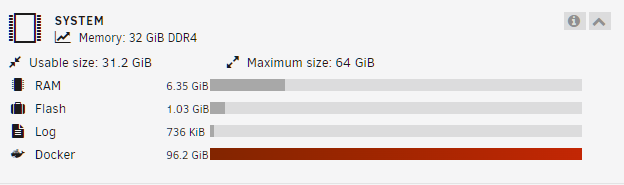
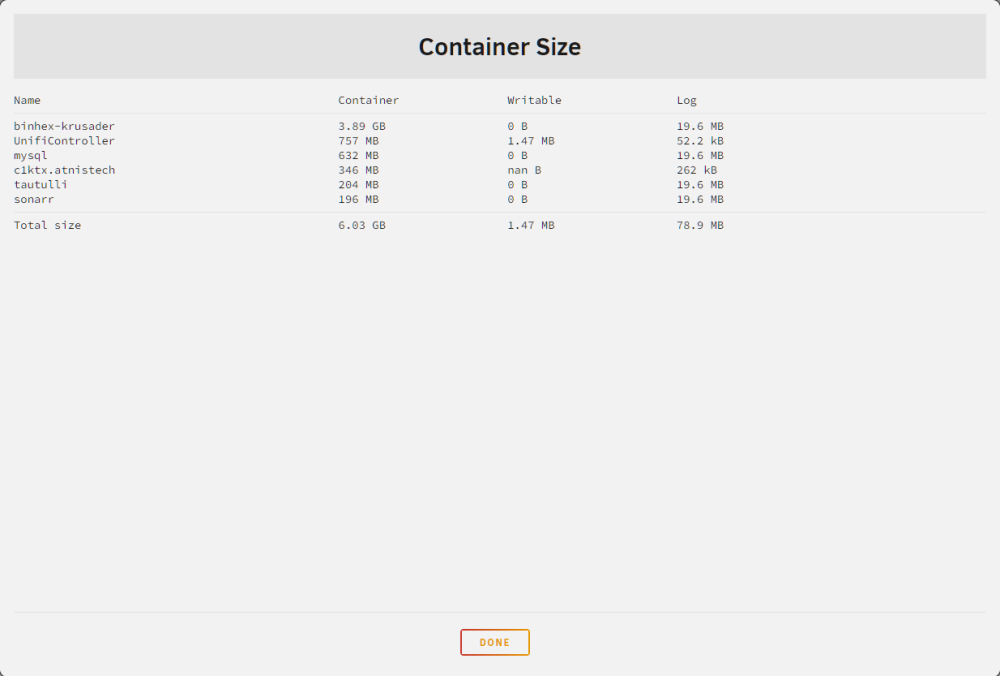
Well it's not longer saying Plex is using 7GB. It's now saying 346MB. I'll do the docker run thing as soon as I have a minute to read over what that is and how to do it. In the mean time, the issue of docker being completely full is back. But the docker container sizes don't equal the same as what the system memory says docker is using. Everything was fine for a little bit there up until last night. And then this morning it's suddenly filled all 100GB. Where should I look to figure out what happened? EDIT: The c1ktx.atnistech is plex.
-
Thank you for that. I didn't even realize that button was there. It says Plex is using the most space at 7.02GB for the container and 6.68GB for Writable. Container seems self explanatory but could you explain what Writable is please?
-
I see I see. Thanks for explaining that. Makes sense now.
-
Ok, so this patch IS correcting a problem and not just hiding a problem....? The other person is saying its just hiding it while you're saying its correcting it.
-
Why would you want to hide errors instead of fixing them?
-
I'm confused. Is this hiding a problem? Or is it fixing/correcting a problem?
-
So I got docker to start up. From my understanding, after a lot of searching and reading, the system memory graph isn't showing used ram but rather any/all used memory out of total memory allocated. This means hard drive space as well as ram. For the docker, that would be the allowed size of the docker.img file. In my case, under settings -> docker, the file was set for 20GB and I was using 19.7GB. So docker was counting this as being full and refusing to start back up. It seems, from what I read, the docker memory being full would also be the culprit to my sudden system slow downs where unraid was running so slow it seemed unresponsive. To experiment, I changed this to 30GB, hit apply and docker started just fine. I'm still at a loss, however, as from what I'm reading it seems its not normal for docker to be 20GB in size? Is my docker file unusually large? And why did the docker file suddenly become 19.7GB when I haven't made any changes to the dockers other than updating Plex and Sonarr? The docker memory usage isn't growing right now and it actually went down to 19.6GB after removing a container I do not use. Since increasing the allocated docker memory to 30GB worked, I went ahead and increased it more to 100GB in case something starts eating up the memory I'll have time to catch it before my whole server stops responding. I'll monitor the memory usage for now but I guess this issue is also solved for the moment.
-
Please bare with me and the story I'm about to tell. I'm just trying to be as thorough as possible with order of events, what I experienced/witnessed and what my problem is. I had an issue the other day when I was trying to navigate movies in Plex where everything suddenly became seemingly unresponsive. When I visually checked my server, disk 1's activity light was just on solid. I gave it a minute to see if maybe it was just fetching a lot of data or something but nothing changed. Plex said it lost connection to my server. I couldn't access the server through a browser or SSH. Windows told me it lost connection to the mapped network drive. And the activity light for disk 1 just stayed solid. So I power cycled my server. Everything went back to normal upon reboot. The next day, I noticed all the activity lights on my server blinking (I have 2 parity drives and 12 data drives for a total of 14 activity lights blinking). I checked the GUI and noticed UnRaid was running a parity check. I found this odd as I have the scheduler in UnRaid set to do parity checks on Sunday of the first week in Jan, April, July and Oct but this is March and it wasn't a Sunday (I believe it was Tuesday?). I brushed this off and let the parity check run though as it never hurts to run a parity check. During this time, everything ran fine. I could access everything in plex and the mapped network drive. The day after, UnRaid showed the parity check was finished with 0 errors. I was again on Plex when suddenly everything became unreponsive. Same issue. Disk 1's activity light is solid. I power cycled the server again and everything went back to normal. A minute later, UnRaid starts a parity check. At this point I'm assuming UnRaid does a parity check when ever there's an unsafe shutdown? Correct me if I'm wrong please. Either way, everything runs fine during the parity check. It finishes a day later with 0 errors. I go to access Plex and for the 3rd time, the server becomes unresponsive. But this time, right before I power cycled the server, disk 1's activity light returned to normal and I was able to access the server again. So I shut it down properly, pulled the drive assuming maybe the drive is going bad, checked the warranty status to see the warranty ended in 2023. I ordered a new drive. That came in yesterday. I popped it in, started up the server, started up the array and agreed to the warning that the new drive would be wiped during data rebuild. Rebuild is going at 120MB/s at first. Says 19hrs to completion. I go to bed. Wake up in the morning check UnRaid and the rebuild is running at 30MB/s with a little over 2day completion time. I don't really question it and just go about my business. Around noon I try to access the GUI again to see if the speed went back to 120MB/s and everything is seemingly unresponsive. Plex lost connection to the server. Mapped network drives says it can't connect. SSH does nothing. So I visually look over at the server fearing the worst but I see all of the activity lights are still blinking showing the rebuild process is still taking place. Even disk 1 is blinking. So I open my browser back up, type in my servers IP and just leave it there trying to connect/load the GUI. It seems unresponsive but after around 2-3 minutes it loads in half of the MAIN tab. I scroll down to check the rebuild speed and it still says 30MB/s. I click on Dashboard. It takes about 30-45 seconds and switches to the dashboard. This is where I notice in the System Memory section, Docker is red and says 100% usage. So I go to the Docker tab. Takes about 15-20 sec to load. I tell all running containers to stop. It sits there with the UnRaid loading icron for about a minute and then shows all the containers are stopped. I go to Dashboard again. Docker memory still says 100% usage. I go to the Main tab. Rebuild speed is still 30MB/s. So I go to Settings -> Docker and switch Enable Docker to No and hit apply. It takes a while for this action to complete. Once it does I go to the Dashboard and see Docker is no longer listed under System Memory. The Docker tab is also gone in the top bar. I go to the Main tab and it shows the rebuild speed is now at 150MB/s. The pages are no longer taking 30 seconds to 1minute to load. Everything is fast and snappy. My mapped network drives are connected again. Everything is running normal. So I go to Settings -> Docker and switch Enable Docker back to Yes and hit apply. After a little while the loading icon goes away. Enable Docker is set to yes. But the status still says Stopped. The Docker tab is back in the top bar so I click it and it says Docker Service Failed to Start. So question.....might this be related to the macvlan docker update thing? I haven't updated that yet as I couldn't find the update and I don't really understand what the update is for or if I need it. Or is this an entirely different problem? I read somewhere that the system share should be located in cache and not on the array. Mine is set to array. Is this the issue? The only 2 things I have set to cache is transcodes and appdata. I know someone is going to ask me to post the log file or diagnostics file or something like that. But I don't know where that is or how to get it. UnRaid Server Pro 6.12.8 Asus ROG STRIX Z590-A Gaming, Version REV 1.xx BIOS 0707 Intel Core i9 10900 2x Corsair 16GB DDR4 2933 2x Samsung 980 1TB NVMe (for cache) 3x LSI 9207-8i Flashed with IT Mode Firmware Corsair CX750M 750W
-
I couldn't find a thread on this forum regarding this issue but I see countless people in many forums stating UnRaid reports their Samsung SSD's running hot when they aren't. I have this same issue. My notifications are flooded with "cache drive over temp....cache drive returned to normal....cache drive over temp....cache drive returned to normal...." and it takes a while to clear all those notifications out. There are so many of them I can't even cypher through them to find any notifications regarding an actual problem! It's annoying! It's frustrating! And it's been doing this for 2 years now! When is this going to be fixed?!?!? I was told this is a known issue with the current linux kernel Unraid uses and once Unraid is updated to a newer kernel the issue will go away. There has been many updates since then. I'm assuming none of those updates changed the kernel since this issue still persists! Why did I pay $130 for software that has an annoying bug like this that is going unaddressed??
-
This is the second time I'm having this issue. I have no idea how to fix it. The last 6.9.x update I did left my Unraid flash drive unbootable. I restarted the server after it updated like it said to do to finalize the update but my machine would boot staright to BIOS. I searched the forums, google, facebook, etc. Found a lot of people having issues with machines booting to BIOS. Some said disable fast boot. Others said disable secure boot. And then there were those who said update the BIOS. None of this worked. I don't remember how I figured this out but something led me to look at the SSL directory. Removing the SSL files did the trick and the machine booted in to Unraid. The down side to this was not being able to use https to access the server. I tried going in to the settings -> management access and clicking provision under ca-signed certificate file. It provisioned the cert. Tried to access the server through https. Got an error. When I viewed the error it stated the SSL cert was expired. Upon checking the date in the error it showed a date that was 2 months before the date shown under management access -> ca-signed certificate file. Rebooted the machine. Boots straight to BIOS. Would not boot to Unraid again. Removed the flash drive, plugged it in to my laptop and deleted the SSL directory again. Boots in to Unraid. I tried to get a new cert but it kept telling me I already had one and couldn't renew until the one I had expired which would be in 2 months (this was back in Feburary-March). So I left it alone until the cert expiration date and then provisioned a new cert. New cert provisioned with a new expire date. Server rebooted just fine with one difference. In the past when I typed in my servers IP address it would redirect me to the https address. Now it doesn't. Ok, what ever. Not gonna nit pick. Fast forward to the 6.10.1 update. I was nervous. I updated. Rebooted. Success! Everything went great! Ok!......So then today I get a notification that 6.10.2 is out. I was a little nervous but not as much as last time. I mean, 6.10.1 updated just fine after all. So I updated. Rebooted......can't access the server through its IP. Can't SSH. Plug a monitor in and its sitting on the BIOS screen. Power cycled it. Boots straight to BIOS. What the hell man?! So I remembered from last time what I had to do. So I unplug the flash drive, plug it in to my laptop, remove the SSL directory, plug back in to the server, power it on and it boots straight to Unraid. Whyyyyyyyyyyyyyyyyyy is the SSL certs keeping my server from booting?!??!?!?!?!? How does an SSL cert even cause a drive to be non-bootable?!? ASUS Prime Z590-A LGA 1200 Motherboard Intel Core i9-10900 w/ UHD Graphics 630 Corsair Vengeance RGB Pro 32GB (2 x 16GB) DDR4 2933 2x Samsung 980 M.2 1TB SSD (Cache drives) Corsair CX-M Series 750W Semi-Modular Power Supply Norco RPC-4224 4U Rackmount Server Case w/ 24 Hot-Swap Bays Samsung BAR Plus 32GB Flash Drive (as recommended by SpaceInvader One)


