





Masterwishx
Members
-
Joined
-
Last visited
Everything posted by Masterwishx
-
@alturismo do you think it's worth to update the synchronise if you tested maybe from perspective of how unraid should work at all?
-
Yep this sound cool but don't forget this plugin called Mover tuning (not syncing), so author of plugin added synchronization some time befor leaved project. So I'm still trying to understand how to update it to be more easy to synchronise if it possible with time and ability I have. How it's working now for you? With your testing synchronise or Resynchronize maybe?
-
Multi-language support | Unraid...Multi-language support | Unraid DocsIntroduction Seems link not working : Developer Requirements for Multi-Language SupportPlugin developers must take appropriate action in their plugins to enable them to utilize the multi-language support. The details on what is required are covered in the design guide here. (https://wiki.unraid.net/images/5/5e/Multi-language_Support_Design_Guide.pdf)
-
I will check, I wanted to add shares names, maybe will add files also, you mean files by extensions?
-
you want white list for files that will be moved ?
-
For users who using synchronise :1. how do use it? If using already 2.what should be done in addition to choosing shares for synchronization?
-
Ignore files already available by settings
-
But you can set cron to be every hour or 5 min to execute and set mover tuning setting about when to move or not (thresholds etc)
-
its working by cron of mover
-
Just checked again, for sync you need to make files will be keep on primary : movingThreshold="60" -> will move files after that pool threshold until freeingThreshold freeingThreshold="40" -> files until this pool threshold will be synced So if sync enabled files will be synced when before freeing threshold. Seems it need to be changed to more easy way and set shares to choose for sync :)
-
You can find all debug and log files in /tmp/ca.mover.tuning You can also make debug.zip by click button in help menu or in cmd: mover debug
-
Just for info :

-
I need to test again how synching is working from/to primary and maybe will add option to add shares names for sync shares when will have more time ...
-
You can see in log line 18 : 01:00:01.364 Warning: Moving thresholds are equal. No action will be taken because the thresholds do not provide a gap. So if you want files to move you need to set gap between moving and freeing thresholds. But also you have many overrides for shares, check them if they configured exactly how you wanted or remove them. Do you mean syncing not working from primary to secondary ?
-
You wanted sync small files? Needs plugin debug.zip not unraid diagnostic
-
This is with synchronise enabled? Do you have files more than 10mb to move? You can check list files to see more.. Or make debug zip I will check it
-
You can check more info in logs, debug log. Or post debug.zip I will check it. Should work, what's in logs?
-
Not sure if it will do excly what you want... UNATTENDEDSTORAGE=$(find /mnt -type d -name "$SHARENAME" \ -not -path "/mnt/$PRIMARYSTORAGENAME/*" \ -not -path "/mnt/$SECONDARYSTORAGENAME/*" \ -not -path "/mnt/user*" \ -not -path "/mnt/disk*" \ -maxdepth 2 | cut -d'/' -f3)This is how Rebalanced find files, then move to/from Primary...
-
Yep, It will use fill up threshold for it
-
Please let us know if help on testing is needed ...
-
Will be added in next version
-
For Eaton 9SX or same users who use ECO by usb drive or just want to help for NUT. NUT needs you help to test bypass/ecomode commands and set variables : https://github.com/networkupstools/nut/pull/2956
-
Please read Note :
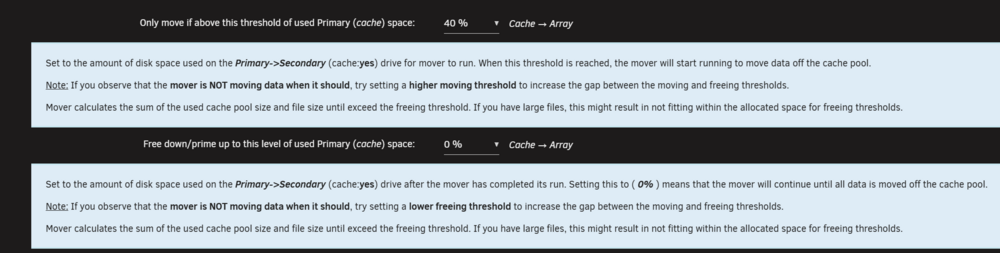
-
I will check it
-
You can find them at the end of plugin settings section


