





Masterwishx
Members
-
Joined
-
Last visited
Everything posted by Masterwishx
-
Strange but for me plugin never not worked . For example if i run video in Immich it not show any data , also not in `intel-gpu-top` , only wattage is shown: Config : MULTIGPU = "00:02.0" TEMPFORMAT = "C" UIREFRESH = 1 UIREFRESHINT = 2000 DISPCLOCKS = 1 DISPPCIUTIL = 1 DISPPWRDRAW = 1 DISPPWRSTATE = 1 DISPMEMUTIL = 0 DISPTEMP = 0 DISPFAN = 0 DISPENCDEC = 0 DISPTHROTTLE = 0 DISPSESSIONS = 0 DISP3DRENDER = 1 DISPBLITTER = 1 DISPVIDEO = 1 DISPVIDENH = 1 DISPINTERRUPT = 1 DISPPWRDRWSEL = "GPU" IGTTIMER = ".7 1.9" DISPEVENT = 0 DISPVERTEX = 0 DISPTEXTURE = 0 DISPSHADEREXP = 0 DISPSEQUENCER = 0 DISPSHADERINTER = 0 DISPSCANCON = 0 DISPPRIMASSEM = 0 DISPDEPTHBLK = 0 DISPCOLORBLK = 0 DISPGFXTRANS = 0 MULTIGPUJSON = "%7B%2200%3A02.0%22%3A%7B%22id%22%3A%2200%3A02.0%22%2C%22model%22%3A%22Alder+Lake-S+GT1+%5BUHD+Graphics+730%5D%22%2C%22vendor%22%3A%22intel%22%2C%22guid%22%3A%220000%3A00%3A02.0%22%7D%7D"
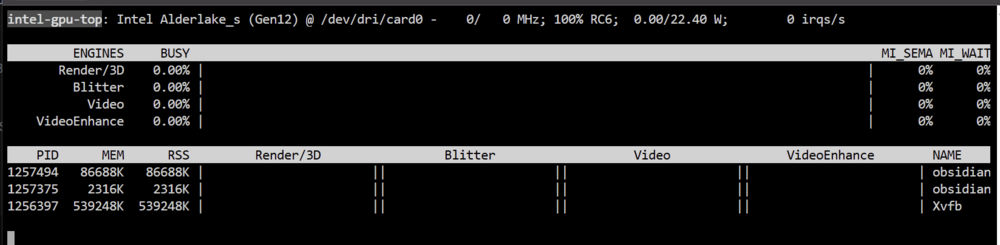
-
Strange, CPU = i5-14400 , ZFS Snapshot script Finished at: 20:09:05 Have no other scripts at this time but maybe some container load was involved here ... 2025-08-26T20:09:05+03:00 MyServer ZFS_SnapShot: All Done
-
Unraid 7.x is fine, also fixed your dark theme CSS for FV2 for docker page , the only issue is with dashboard for latest beta, but waiting for @VladoPortos will make final version :). Hope he will have time soon. Anyway nobody else we have for maintaining this plugin.
-
it seems should work fine but something happened in the way and took more that 300sec ? Also got message from WinNUT Client about 85% battery instead of 5min that was usual before, seems becouse missed on time shutdown... Aug 26 20:17:01 Myserver upsmon[9557]: UPS [email protected] on battery Aug 26 20:17:01 Myserver xnut-notify-hooks.sh: ONBATT commands are now executing in background... Aug 26 20:17:01 Myserver nut-notify: [Eaton9E2000i] UPS is on battery. The system will shutdown in 300 seconds. Aug 26 20:23:06 Myserver xnut-notify-hooks.sh: ONBATT_SHUTDOWN commands are now executing in background... Aug 26 20:23:06 Myserver nut-notify: [Eaton9E2000i] UNRAID is being gracefully shutdown from a UPS power event. Aug 26 20:24:14 Myserver upsmon[9557]: Signal 10: User requested FSD Aug 26 20:24:14 Myserver upsd[9554]: Client [email protected] set FSD on UPS [Eaton9E2000i] Aug 26 20:24:30 Myserver upsmon[9557]: Host sync timer expired, forcing shutdown Aug 26 20:24:30 Myserver upsmon[9557]: Executing automatic power-fail shutdown Aug 26 20:24:30 Myserver upsmon[9557]: Auto logout and shutdown proceeding Aug 26 20:24:38 Myserver rc.nut: Backing up last 200KB of NUT service logs to USB...
-
That is why you need to make backups of the boot disk. So like @Mattaton said you can store anywhere in boot or in Share or in github
-
I will check when power will be on again :)
-
Using priview 2.8.4 Have strange issue, now was power off our area, so waited 5 min for shutdown, but this was happened and about almost 10min was message sended to my main pc by WinNUT-Client (85% for ups battery). But have 5 min on battey in settings and this was working befor.
-
@VladoPortos I'm afraid to ask if was any time to some work maybe that clouse us to stable release. The last beta has issues in dark mode in dashboard but privios beta was fine for me but seems has issues for others. Also will be fine if expand folders in dashboard will be like in old version (Folder View) if it possible. :)
-
Yep check for hernandito icon pack, here or in old thread or in github
-
If you can explain what is confusing will be cool becouse i dont think text from right is confusing :)
-
Sure, you have both options
-
Make flash backup first, then check if some old options are same as in new plugin. Should be no issues to migrate.
-
You can enable debug log and press on debug.zip or (mover debug) in cli and post here.
-
The last update I was added some code for synchronization so you need to to count what is in help description and last Posts here on this page and befor. (synchronise will work when cache pool lower both theesholds.) also you can now set max file size for synchronization. But you need to test it by yourself. The plugin main function is to move data :)
-
You need to read help description of options by click on it. And please read this and maybe some pages back about how synchronise work.
-
Tryed again all 4 commands (storcli,storcli64,storcli2,storcli-3205). they all show No controllers. :( Have x2 same cards 9207-8i - Serial Attached SCSI controller: Broadcom / LSI SAS2308 PCI-Express Fusion-MPT SAS-2 (rev 05)
-
it seems this utility not working for cards that was flashed to IT Mode ?!?
-
Seems with plugin also : Number of Controllers = 0 only found controller 9207 by other app `sas2ircu` but still temperature is not avalible for 9207 (SAS2308) :(
-
Is some able to get temperature from 9207-8i? Just found the plugin :) When tryed to add file manually seems card not found by this utility.
-
I will try to change help description inside but, description from right is not clear?
-
Any news on final version, so I can fix css for black theme in dashboard? Is that mean any issues to leave/make visual expand folders like was in original?
-
Ohh you mean help from the right, I was thinking we are talking about help text inside, when click on option :)
-
For 9207-8i is not working : storcli-007.2707.0000.0000-1.noarch.rpm CLI Version = 007.2707.0000.0000 Dec 18, 2023 Operating system = Linux 6.12.24-Unraid Status = Failure Description = No Controller found
-
Is anyway we can check hba controller temperature in Unraid ? Have 2x 9207-8i
-
Sure I can update it but you refer to two options that have separare help texts. In test mode help text refer to another option that if it set to No. Anyway will try to update it


