





Civic1201
Members
-
Joined
-
Last visited
Everything posted by Civic1201
-
Server hängt am Fernseher mit Tastatur und beim Promt kann ich nix eingeben, aus dem Browser kann ich den Server nicht erreichen. Auch von der Fritzbox her kann ich keine Verbindung herstellen. Das mit SSH kann ich aber trotzdem mal prüfen.
-
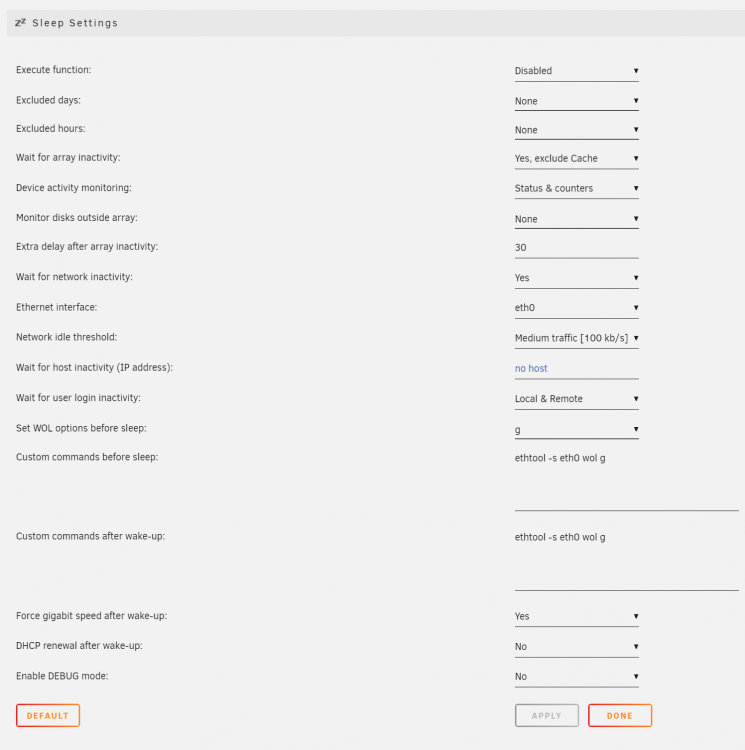
Nach meinem Hardwareuprade bekomme ich meinen Server nach einem S3 nicht mehr ans Laufen: Mainboard: Gigabyte Z590M Gaming X Ram: 2 x 16GB Gskill DDR4000/3600 CPU: Core i5 11600K Ich kann der Server per Klick / manuell in Sleep setzen und auch z.B. per Powerknopf (WOL noch nicht getestet) wieder wecken. Aber... Es kommt der login Screen, jedoch sind keine Eingaben möglich. Er reagiert nicht auf Tastatureinagben und ist auch über das Netz (LAN) zu erreichen. Es hilft dann nur ein Hardreset, dem dann ein Parity-Check folgt. Im Bios habe ich alles mir Mögliche versucht, komme aber nicht mehr weiter. https://download.gigabyte.com/FileList/Manual/mb_manual_z590-features.pdf Anbei noch ein Bild vom (deraktivierten) plugin. Für Hilfe bin ich sehr dankbar!
-
Hi, I am having big problems with this plugin and standby... No matter if I select manual or automated standy (WOL is working so system will start). I canl see the login screen on my TV (console) but I can not use my keyboard (not reacting) or the web access -> no connection. After a reset I can login (array will be checked because of hard reset). System: unraid 6.9.2 Gigabyte Z490M (rev. 1.0) Intel® Core™ i3-10100 CPU @ 3.60GHz 16GB Ram 2 x 1TB Cache SSD 3 x 10TB 1 x 3TB Any ideas? Thanks! tower-diagnostics-20210422-2230.zip
