





Civic1201
Members
-
Joined
-
Last visited
Everything posted by Civic1201
-
Stupid me.... I found the solutiion here
-
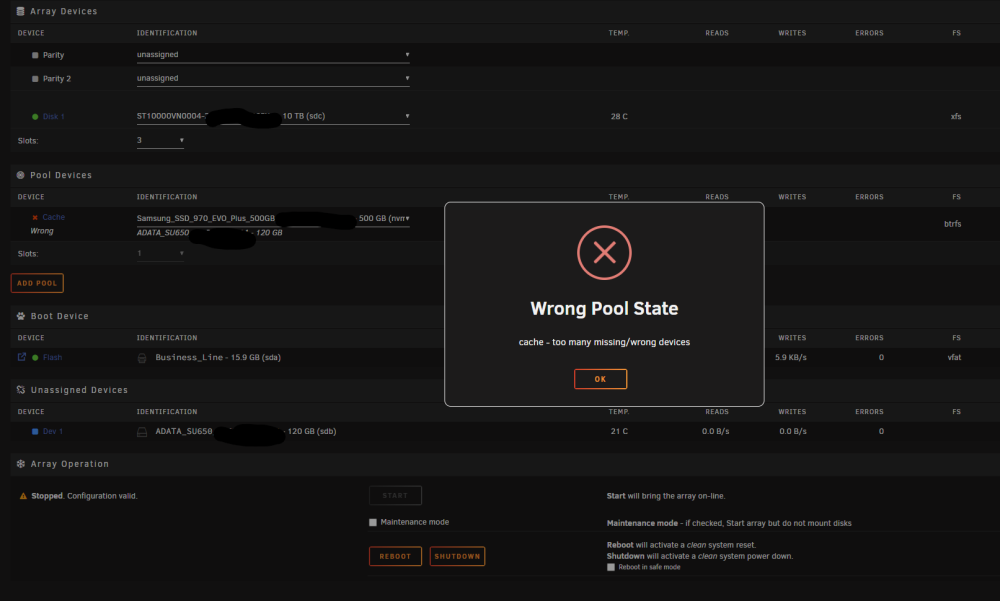
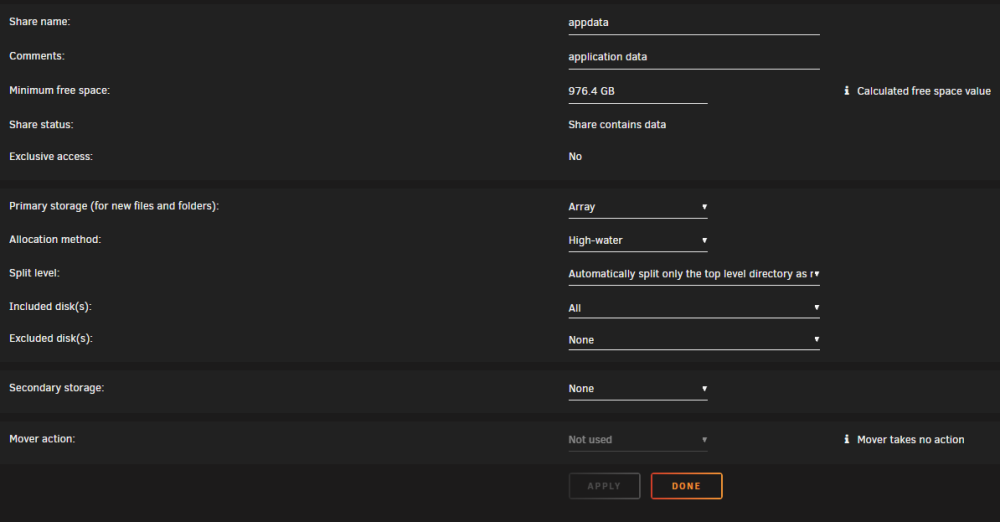
Hi there, I am trying to replace my old SATA cache drive to a new Samsung NVME. All data from old cache has been transfered to the array, cache is empty. Then i stopped the arry and tried to select the NVME and restart the array: Here is the shares setting: I also tried to reboot but the same result, please help.
-
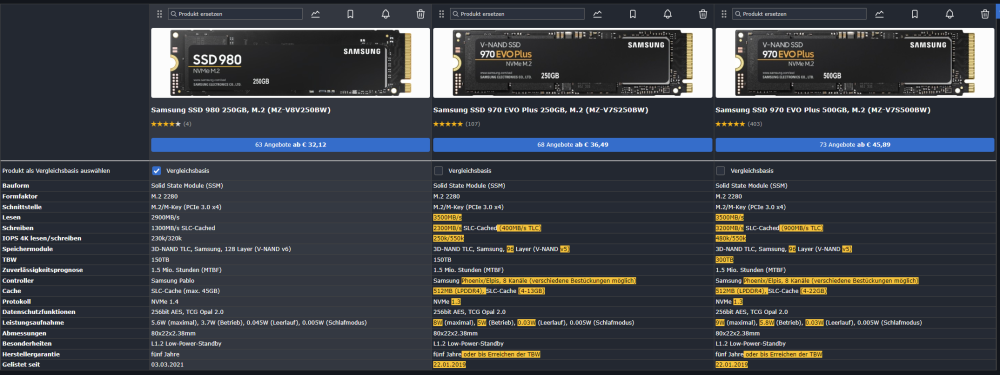
Lan läuft nur bei 1G und die Array disks werden den Cache nicht nutzen. Daten werden wenn nachts per USB HDD übertragen. Somit laufen nur die Docken drauf. Schwanke zwischen der 980 (sparsamer und neuer) und 970 Evo Plus (schneller, kleiner):
-
Hallo, da ich wegen Platzmangel meine WD Blue 1TB SATA (ohnehin zu groß) ersetzen möchte, suche ich eine passende nvme. Diese soll als cache laufen und beinhaltet nur 2 Docker. Wegen schlechter Erfahrungen hinsichtlich ASPM soll es KEINE WD werden! Als Größe würde ich 250 bis 500GB anpeilen, je nach Preis und Leistung. Samsung wird ja oft empfohlen. Welche ist für den Einsatz in 24/7 zu empfehlen: https://geizhals.de/?cat=hdssd&xf=1035_Samsung~1484_5~4832_3~7127_30.04~9903_1 Vielen Dank!
-
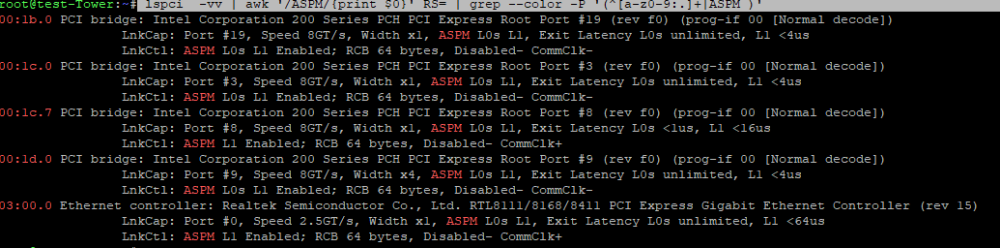
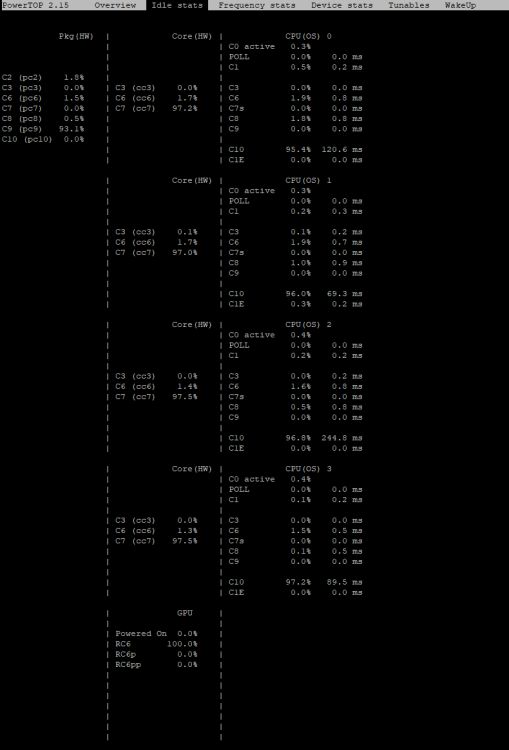
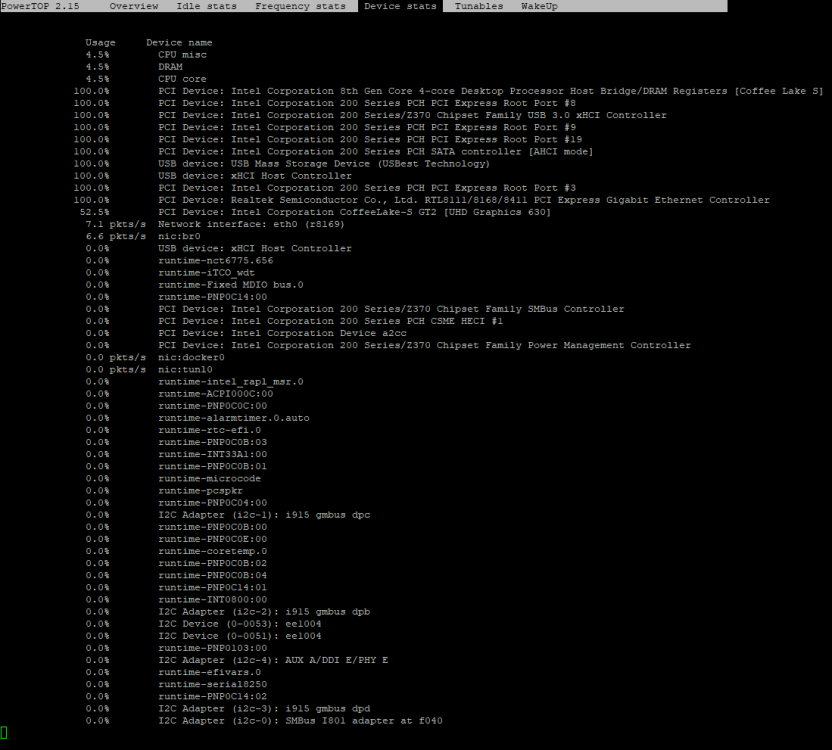
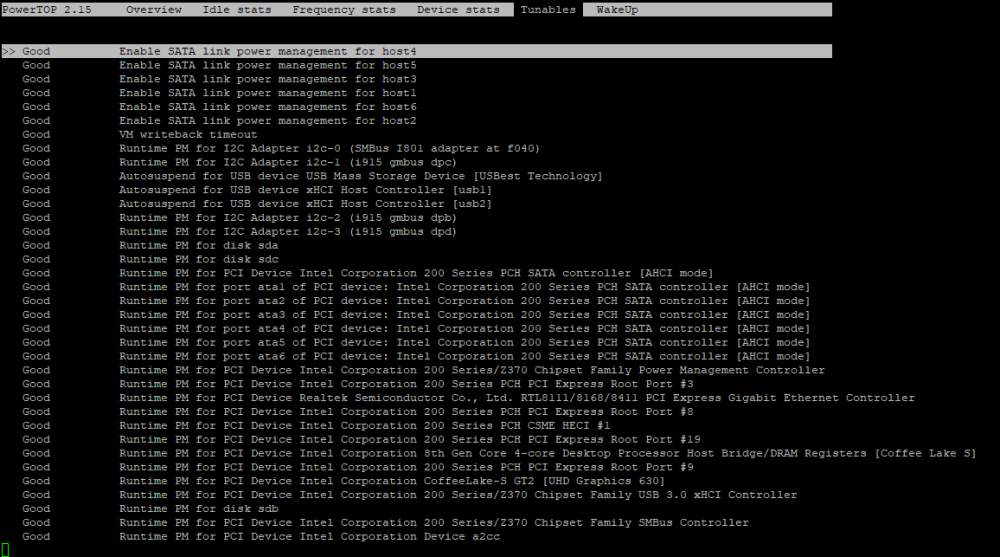
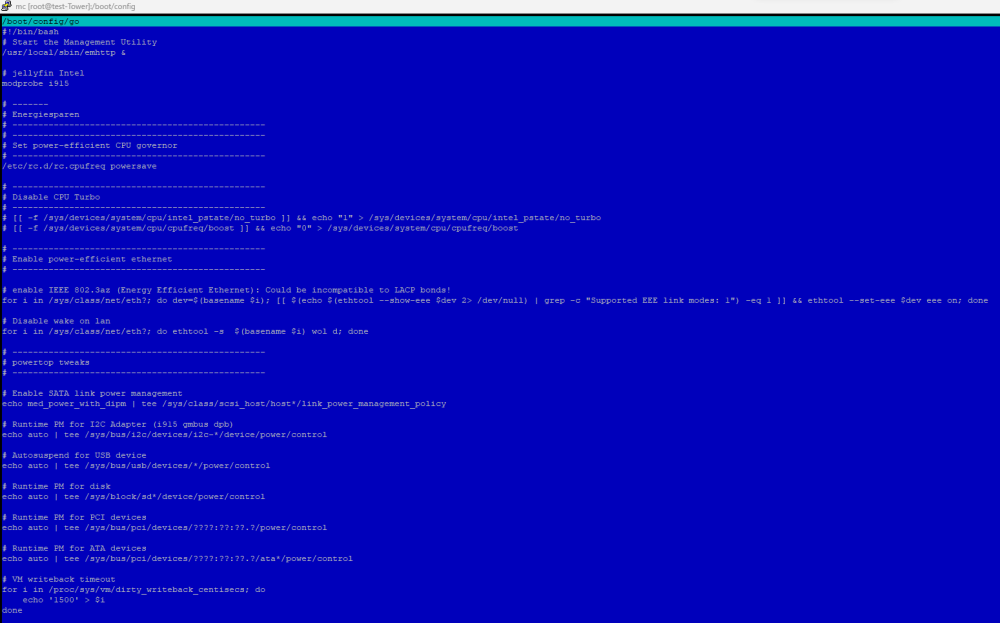
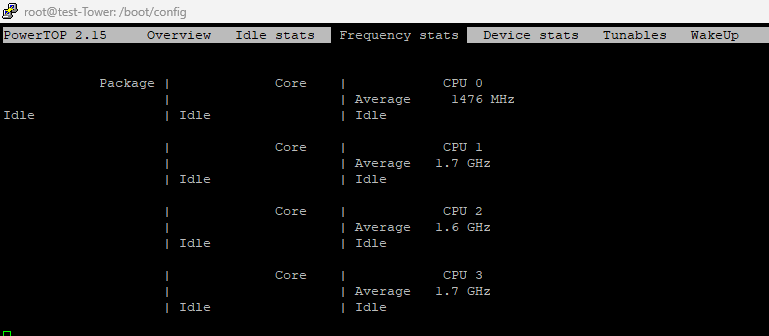
Ok, den Fehler oben konnte ich mit einem entsprechendem Eintrag eliminieren. Mit folgender Hardware erreiche ich nun folgendes: - Asus B365M-A (letztes UEFI) und alles abgeschaltet (LED, Sound etc.) und Spannungen auf Minimum gesetzt - Intel 8100T - beQuiet! System Power 300 Watt (SB9-300W) - 2 x 8GB DDR 2400Mhz - 1 x WD Blue SATA SSD 1TB (cache-drive) - 1 x Seagate Ironwolf 10TB (array) - 3 x 120mm Lüfter + Intel stock cooler - kein parity drive - Tastatur und Monitor abgeklemmt - keine weiteren Karten verbaut Befehle in der go aus dem ersten Beitrag (Turbo setting auskommentiert, da CPU keinen Turbo hat) sind gesetzt. lspci -vv | awk '/ASPM/{print $0}' RS= | grep --color -P '(^[a-z0-9:.]+|ASPM )' Powertop Leider komme ich "nur" bis C9. Jemand eine Idee wo ich für C10 noch ansetzen könnte? Vielen Dank!
-
Tried it for short time and system will only C3 state With pcie=nommconfto the errors came back... I think it might be related to my Western Digital SATA SSD. There a lot of posts with problems using their NVME drives. Should I try a different SATA drive (Crucial) for cache?
-
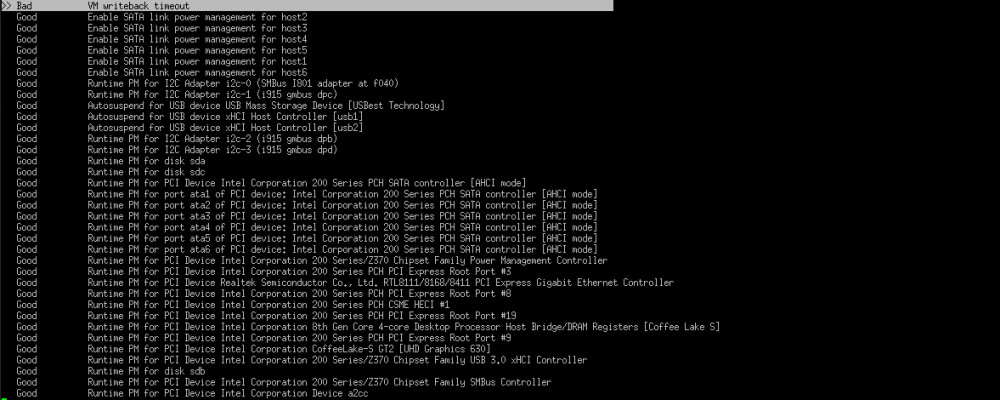
Ich habe testweise die commands aus dem ersten Post eingetragen und komme damit auf C9. Allerdings bekomme ich ein "bad" bzgl. VM writeback timeout. Kann man das beheben?
-
Hi there, I am running an Unraid 6.12.4 testserver that will replace my old J5040 (as soon it is stable). Hardware: - Asus B365M-A with latest UEFI-> iGPU is used by Jellyfin for transcoding - 2 x 8GB DDR 2400Mhz - 1 x WD SATA SSD 1TB for cache - 1 x Seagate Ironwolf 10TB for array 3 x 120mm fans + Intel stock cooler - no parity drive I am using powertop with --autotune Server will run 24/7 and draws > 12 watts with an very old bequiet! PSU. Power consumption should be better with different PSU. From time to time the logfile shows me this error: pcieport 0000:00:1c.7: AER: Corrected error received: 0000:03:00.0 Reports as 200 Series Intel but board is an B365? I checked google and the forums and found out that there are multiple ways to "fix" that: pcie-nomsi -> disables MSI pcie-noaer -> disable the use of PCIE advanced error reporting (so no fix) + no error reporting at all? pcie=nommconf -> Disable use of MMCONFIG for PCI Configuration pcie=nommconfto -> pcie_aspm=off -> will disable (all ?) power savings ? So which option should I select to fix the errors / keep the server safe and keep as most power saving options as posiible? Thank you! test-tower-diagnostics-20231106-2020.zip


-
Ok I was able to flash the backup to the thumb drive and system is back and running. Thank you.
-
Hi there, running 6.12.4 and after a reboot I can not access the GUI (webbrowser) or safemode anymore. SSH is working so far. Any ideas how to solve that issue? Thank you.
-
Hi, I found this error message in my logs: Tower kernel: xhci_hcd 0000:01:00.2: xHC error in resume, USBSTS 0x401, Reinit When I try: lsusb -t this is the output: root@Tower:~# lsusb -t /: Bus 04.Port 1: Dev 1, Class=root_hub, Driver=xhci_hcd/4p, 10000M /: Bus 03.Port 1: Dev 1, Class=root_hub, Driver=xhci_hcd/2p, 480M /: Bus 02.Port 1: Dev 1, Class=root_hub, Driver=xhci_hcd/10p, 20000M/x2 /: Bus 01.Port 1: Dev 1, Class=root_hub, Driver=xhci_hcd/16p, 480M |__ Port 5: Dev 2, If 0, Class=Wireless, Driver=btusb, 12M |__ Port 5: Dev 2, If 1, Class=Wireless, Driver=btusb, 12M |__ Port 7: Dev 3, If 0, Class=Human Interface Device, Driver=usbhid, 12M |__ Port 7: Dev 3, If 1, Class=Human Interface Device, Driver=usbhid, 12M |__ Port 7: Dev 3, If 2, Class=Human Interface Device, Driver=usbhid, 12M |__ Port 10: Dev 4, If 0, Class=Hub, Driver=hub/4p, 480M |__ Port 12: Dev 5, If 0, Class=Mass Storage, Driver=usb-storage, 480M |__ Port 13: Dev 6, If 0, Class=Human Interface Device, Driver=usbhid, 12M Is there any way to fix that?
-
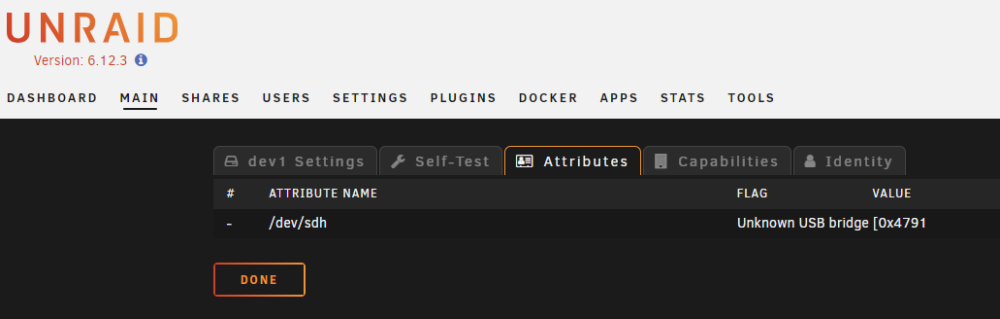
Hi there, i am unsing an external 4TB WD drive as unassigned disk, It is working so far but not showing temperatures and when I am trying to read the attribuites I receive this message: Is there any way to fix this?
-
I am running the linuxserver.io image and can proceed at: 3. Run the command "sudo -u abc php /config/www/nextcloud/updater/updater.phar" (this starts the nextcloud update to version 25) Any help?
-
Thanks, I will start with replacing the faulty 3TB drive.
-
OK thank you. The disk I want to add is coming from server No.1 and is not precleared but partition deleted. I had the idea to shut down the server, remove the 3 TB drive and replace it with a 10TB drive. Then I wanted to add another 10TB and restart the server and select the frist 10TB as a replacement and the second one as another drive and start the rebuild. When I understood you correctly this is not possible right?
-
In my second server the WD 3TB shows read errors and I want to replace this drive with a WD White 10TB. The procedure for this is clear. Is it possible to add another 10TB drive and start the data rebuild afterwards or do I have to run the rebulid 2 times? Thank you!
-
Thank you! I could disconnect the drive and the data was readable in my local PC. Rebooted the server and no unclean shutdown detected.
-
will: 1. reboot: cause an unclean shutdown? 2. manually disconnect: cause losing data? So please what is the safest way to go for?
-
Here is the file, thanks for checking. tower-diagnostics-20230809-1703.zip
-
I have a 4TB disk connected via USB3.0 that was running fine (mounting and unmounting). When I tried to unmount it today it tries to unmount but will show "mounted" a few seconds later again and again. Also I can not access the data saved on the disk. Is there a way to safely unmount the disk without restarting the sever? Thank you!
-
Ich habe selber als 2. Server das J5040 mit 16GB Ram laufen, allerdings nutze ich den nur für Jellyfin. Absolut sorgenlos im Dauerbetrieb und schön sparsam.
-
Hallo, ich spiele mit dem Gedanken mein derzeitiges Gehäuse Fractal Node 804: https://www.fractal-design.com/de/products/cases/node/node-804/black/ gegen ein anderes zu tauschen: Define R5 https://www.fractal-design.com/de/products/cases/define/define-r5/black/ Hintergund ist, neben Bastellust, dass ich mit den Temperaturen nicht so wirklich zufrieden bin. Die HDDs laufen nun seit geraumer Zeit in vertikaler Position, im neuen potentiellen Gehäuse wäre die Einbauart horizontal. Machen die Festplatten das mit oder ist (durch die Veränderung der Einbauart) mit Ausfällen zu rechnen? Vielen Dank!
-
Problem solved USB drive was not readable anymore so I used the backup from UnraidConnect and flashed it to the same drive -> server is running again! Another drive is on the way if the old one has problems again. So guys never forget you backups
-
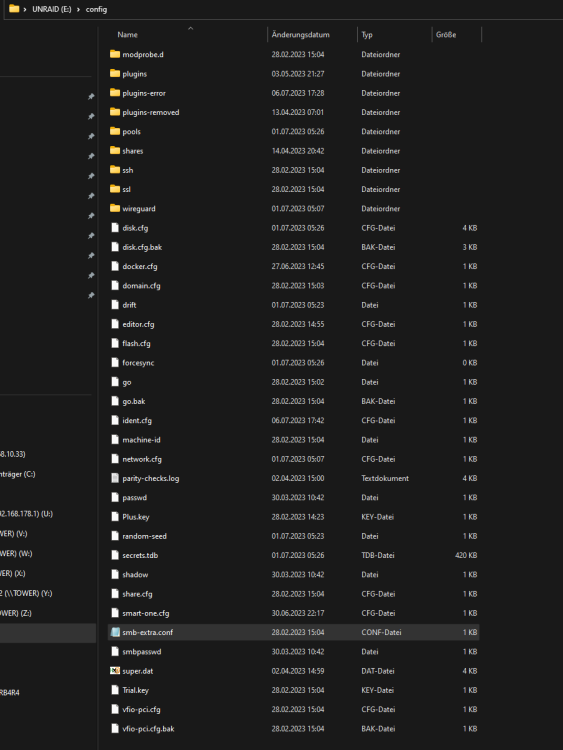
Ok USB drive is plugged into my PC and I can open the /config folder. But when I try to copy it nothing happens
-
OK, should I try the same stick? I will download a copy of the backup from unraid connect + create a backup from the running server.



