





Civic1201
Members
-
Joined
-
Last visited
Everything posted by Civic1201
-
Should I use the last backup from "Unraid connect" or create a backup from the stick? Or do I have to use the USB tool and flash an new image 6.12.2 to the same stick and restore the /config folder? This is not clear for me, sorry...
-
So move the USB drive to my computer and copy the /config folder. This is easy. Recreating the flash drive? Do you mean that I have to use the "Flash Backup" and the flash tool from unraid?
-
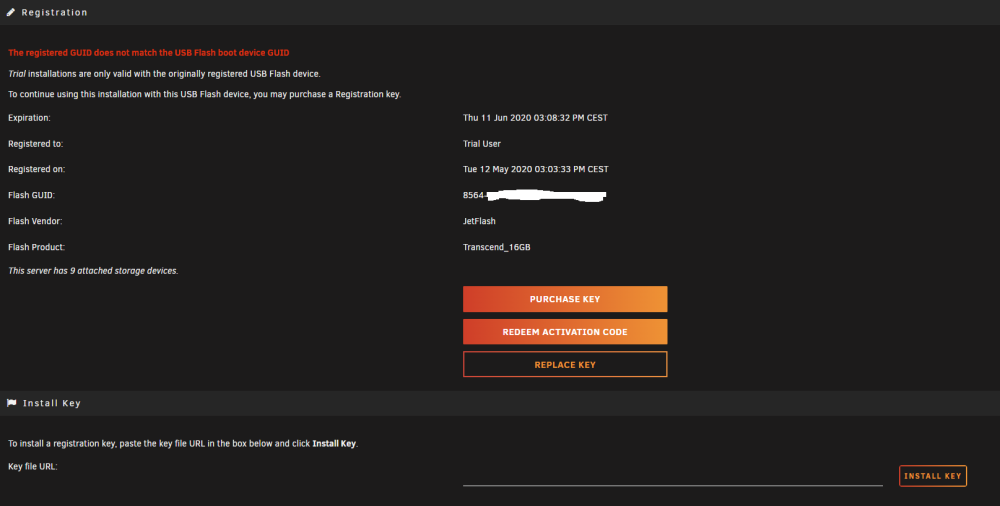
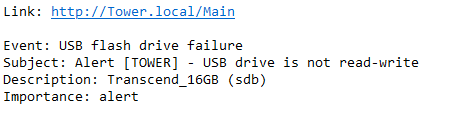
Yes same error in "Registration". Diag attached. edit: Just received this warning email from server: tower-diagnostics-20230706-1914.zip
-
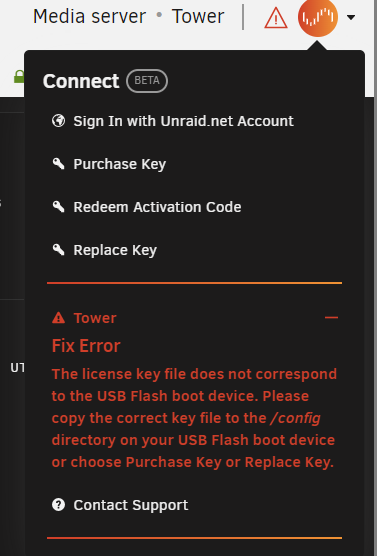
Finally the server booted after a long time. Now I got the message that the licence file does not match the USB drive. Something is really strange there..

-
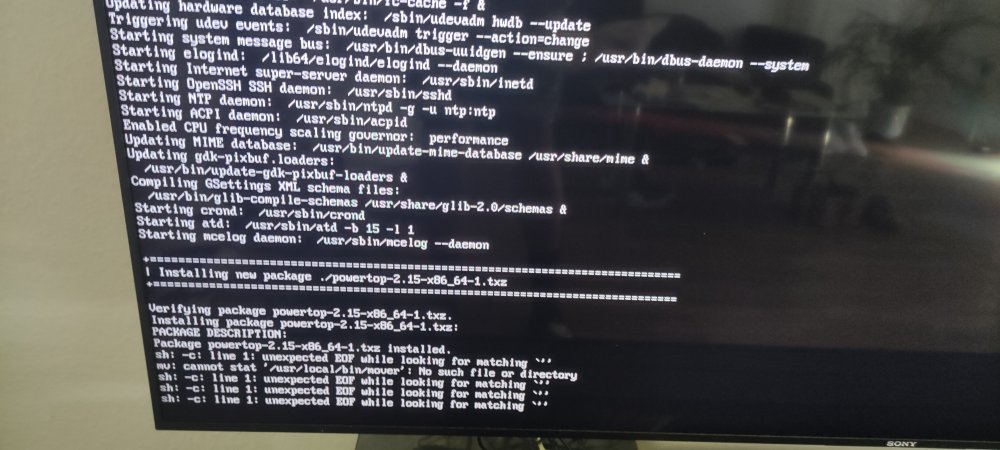
Today I wanted to update my plugins and right after that I got the message that my USB drive is corrupt and the GUI was broken. I shut down the server and tried to reboot. Now it hangs with failure messages. What can I do? Thank you.
-
That was an easy fix Thank you!
-
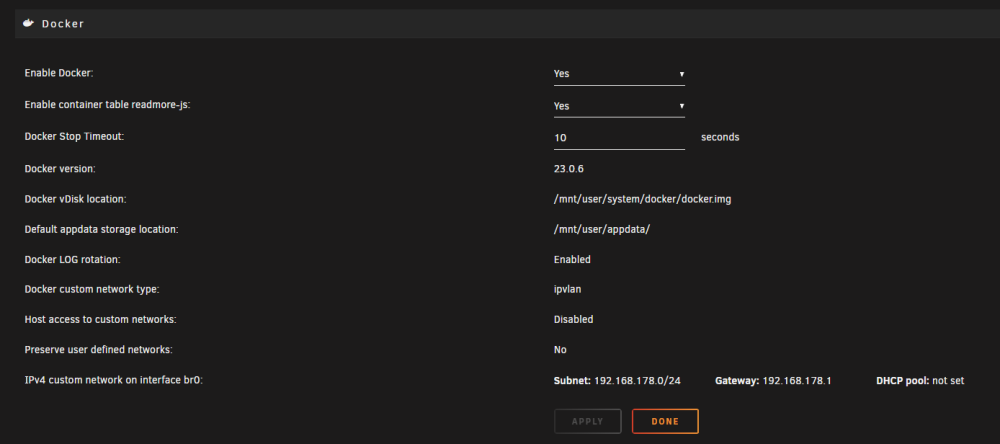
Hi there, after upgrading to version 6.12.1 I got the message from "Fix Common Problems" to change from macvlan to ipvlan. I stopped docker service and change as recommended + restarted docker service. Dockers are working fine but I still have the message: These are my docker settings: Did I missed something? Thank you.


-
Simply update the plugin is no option?
-
Maybe I found the reason and my own mistake... Checked processes and found that rsync is running 3 times: How can I kill/end them?

-
Yes to both and brand new (arrived today).
-
Hi there, I´m trying to backup my media files to transfer them to another server. Disk is a 16TB Toshiba placed in an external case and connected to the server via USB 3.0. When I run rsync -> rsync -avh -P "/mnt/user/Media/" "/mnt/disks/16TB/" my write performnance to the external disk is very slow -> around 30-45MB/s. Is this happening due to the (maybe weak) controller in the external case? When I connect the disk directly to the server will this increase write speeds? Thank you!
-
Right now I am planning to build a second server for another location. It will be a simple one with just one Jellyfin container and basic hardware. Before I move this server to it´s destination I want to transfer all media files from my main system to the new server. Transfer using LAN will take a long time (around 12TB). I found this video from Spaceinvader One but he is mounting a disk, no a share: Is there any other way for speed up the data transfer process? Thank you.
-
Ok, danke. Dann machen wir hier zu.
-
Mit Verwaltung meine ich nicht die von Jellyfin, das ist ja automatisiert. Ab und an mal ein Neustart, wenn sich die Plugins aktualisieren. Eher die "Pflege" von Unraid an sich, also Updates von Plugins, dem Docker etc. Dafür brauche ich in der Tat nur sehr wenig Bandbreite. Bei Fritz! habe ich folgende Anleitung gefunden, die sich mit direkten Wireguard Verbindungen beschäftigt. In diesem Fall "Zentrale" und "Filiale": https://avm.de/service/vpn/wireguard-vpn-zwischen-zwei-fritzbox-netzwerken-einrichten/ Und genau an diesem Punkt stehe ich zur Zeit auf dem Schlauch... Die Verbindung zwischen den beiden Netzwerken soll ja nur "on demand" bestehen. Sonst würde ja dauerhaft der gesamte Traffic über eine der Fritzboxen laufen oder? Wenn jetzt Fritzbox 1 mit dem höheren Upload die Zentrale ist, wie bekomme ich dann Fritzbox 2 (die Filiale) dazu sich auf Befehl mit der Fritzbox 1 zu verbinden, sodass ich Daten bewegen kann. Ich bin ja am Standort 1 und nicht am Standort 2. Mache ich das anders herum, habe ich ja das Problem mit dem geringen Upload, sodass die Datenbewegungen deutlich langsamer sind.
-
Danke für Deine Antwort. Ich muss das, denke ich, genauer beschreiben um nicht zu verwirren. Server 2 soll nur an lokale Clients am Standort 2 im dortigen Netz verteilen. Ersteingerichtet und "befüllt" wird der Server am Standort 1 und dann -> an Standort 2 verbracht. Um den Server 2 dann per remote zu verwalten und Medien neu einzuspielen muss ich ja eine (wireguard ?) Verbindung zu Server 1 herstellen. Ein Streamen von Server zu Server ist nicht erforderlich. Server 1 dient damit rein der Verwaltung und Pflege von Server 2, jedenfalls was externe Verbindungen angeht. Natürlich hat Server 1 im Netz von Standort 1 noch andere Aufgaben, die jedoch strikt von Server 2 getrennt werden sollen -> kein Zugriff von Server 2 auf Server 1. Somit versuche ich eine Lösung zu finden, mit der ich mit dem max. Upload von Server 1 Daten auf Server 2 schaufeln kann. Ich hoffe, ich konnte mich besser ausdrücken und bedanke mich für die Hilfe!
-
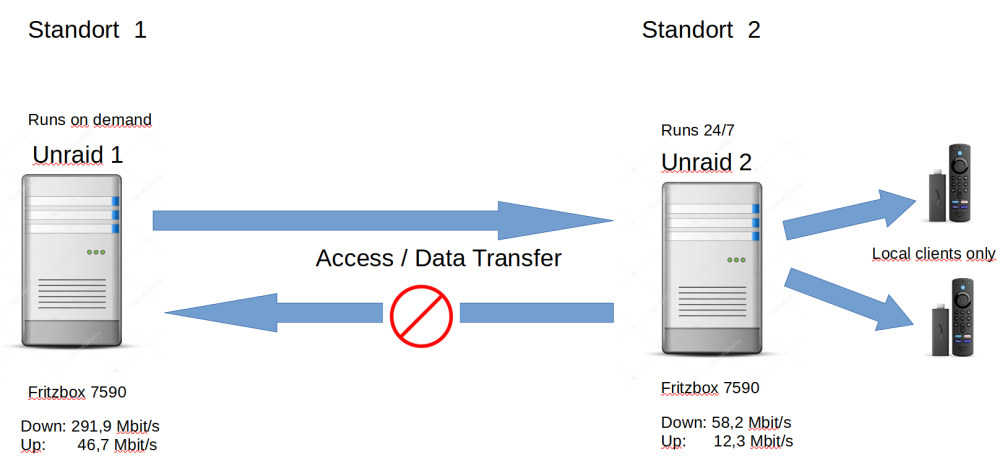
Ich habe mal versucht das Projekt grafisch darzustellen: Unraid 2 soll nur lokal verteilen, jedenfalls was Videodateien angeht. Ggf. mal ein Hörbuch per Zugriff über wireguard, aber wahrscheinlich ist das nicht. Die nächste Frage betrifft die Verwaltung von Unraid 2. Ich möchte gerne per remote von Server 1 auf Server 2 zugreifen um den Server zu verwalten und die Medienbibliotheken aktualisieren. Wie kann ich das am besten bewerkstelligen? Versucht habe ich eine wireguard Verbindung zu Server 2 über die dortige Fritzbox herzustellen. Klappt auch, nur wegen des geringen Upstreams auch sehr langsam und ich muss in wireguard den "killswitch" deaktivieren, um auf lokale Daten im Netzwerk von Server 1 zugreifen zu können. Geht das auch eleganter/performanter?
-
Ich plane einen zweiten Unraid Server aufzubauen, auf dem ausschließlich Jellyfin Server im Docker laufen soll. Dieser soll Daten an 2 Fire TVs weitergeben. Mehr wird mit dem System nicht gemacht und das auch in Zukunft nicht. Maximal werden also 2 Streams gleichzeitig (und das auch eher selten) erforderlich sein. Die Files liegen zu 98% in 1080P HEVC vor, transcoding ist also unwahrscheinlich. Folgende Hardware ist vorhanden: - ASRock J5040 - 2 x 8GB DDR4 2400 - 300 Watt beQuiet! Netzteil - 1TB WD Blue SATA SSD (Cache-Drive) - 3TB WD Red SATA HDD (Data-Drive) - diverse 120mm Gehäuselüfter Diese Hardware möchte ich gerne zusätzlich anschaffen: - 2 x 16TB Toshiba HDD, 1 davon als Parity - günstiges Gehäuse wie z.B. dieses hier: https://www.alternate.de/DeepCool/MATREXX-30-SI-Tower-Gehäuse/html/product/1768461?partner=DeGeizhals&campaign=PC-Gehäuse/DeepCool/1768461 Das Ganze soll 24/7 laufen und so wenig wie möglich Probleme machen. Zur Fernwartung kommen dann ggf. noch andere Fragen, da das System an einem anderen Standort aufgestellt wird. Packt der J5040 diese Anforderungen? Danke für Hilfe.
-
I have the same issues even with no antivirus. When using Manjaro everything is fine.
-
Anyone?
-
I have exact the same issue and can´t use the plugin. edit: problem solved. Support told me to reinstall the plugin / use the terminal of the browser.
-
Any idea how to improve the performance when using Win11? Thank you.
-
Should I consider a new / reflash or is it fine to use the stick as it is? Thank you.
-
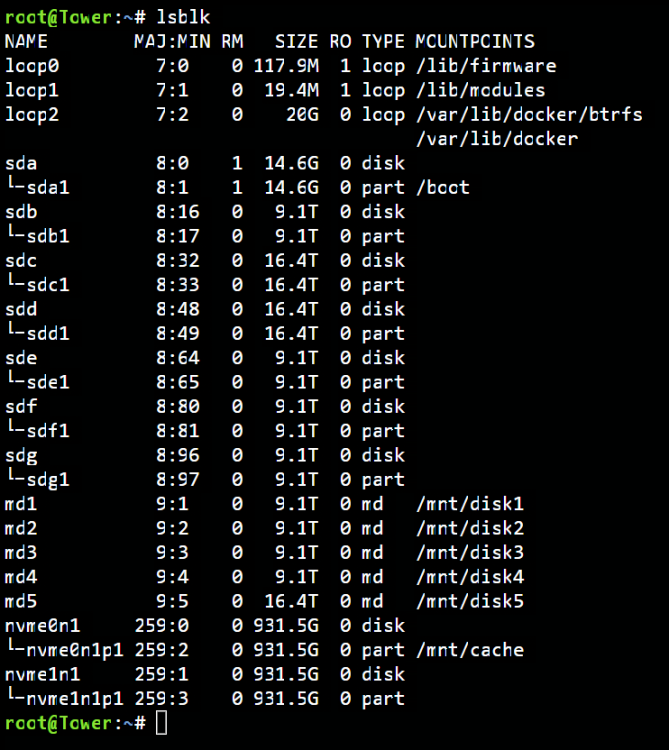
Here´s the output:
-
Wow! I was using Krusader just for copying from share to share, not from disk to disk and thought it is safe.
-
I replaced a 32GB USB3.0 Corsair stick. I downloaded the flash backup and flashed it using the windows tool (Unraid.USB.Creator.Win32-2.1.exe) It stucked at "Syncing file system". I found a thread here: So I tried renaming the drive while the process was running and I could finalize writing all data to the stick. After that I renewed the licence and system booted up successfully. Should I retry flashing the drive? Can it cause problems?



