





Alexstrasza
Members
-
Joined
-
Last visited
Everything posted by Alexstrasza
-
It should just work, because I believe UnRaid IPv4 forwarding is on by default (it did and was for me). Try double checking with https://tailscale.com/kb/1104/enable-ip-forwarding/
-
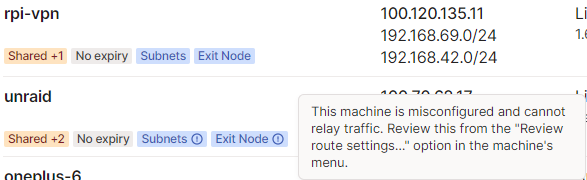
On a fresh reinstall I can confirm the template picked up had :latest, so I have no idea why I got an old 2020 build when I first downloaded. My best guess is some cursed CA caching or something, but it doesn't seem to be happening any more so I guess it's fixed 😅? Did you have a chance to look into the warning about exit nodes I mentioned above? I'm definitely still getting this on the container vs my Raspberry Pi, but the subnet and exit route features are 100% working, so I'm not sure the cause for the warning. UPDATE: This turned out to be because I had IPv6 forwarding off on my host.
-
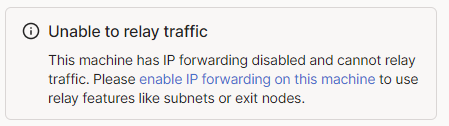
Also, please can you see if it's possible to support https://tailscale.com/kb/1103/exit-nodes? If I try to enable it, it informs me that IP forwarding is disabled and directs me to https://tailscale.com/kb/1104/enable-ip-forwarding. Thanks for the container 🐳❤️! EDIT: Huh, in actual testing it seems to work fine...? Tailscale bug perhaps?
-
Hi Dean, can you double check the template is set to use :latest? I did a fresh install from community apps today and it defaulted to a versioned tag (which is quite out of date at this point).
-
That's what I've ended up doing, but why is it that the tunnel does not come back up even if "autostart" is on?
-
Hi there all. Is it expected that adding a new peer to a tunnel will disable the tunnel when apply is pressed? I've ended up in a semi-locked out situation multiple times when adding a peer and hitting apply via another peer on an active tunnel.
-
I've just come across this thread too. I think quite a few people will have their plugins on auto-update and suddenly find themselves unable to SSH in as a result of this - That's what happened to me.
-
Did this debugging get added? I'm still not having drive images download automatically.
-
Final update: The server has not crashed again, so I can comfortably say that the problem was the overclocked RAM. Thank you everyone for your help!
-
Update: The server crashed again. I have now reset the RAM overclock so it's running at stock speeds. The panic does always appear to be in some kind of TCP stack, so that might be relevant if it crashes again.
-
Will do, thanks!
-
I've enabled "Typical current idle" and will report back if that resolves the panic.
-
Further information that may be relevant: The server has a 10GBe NIC The server is running a Ryzen 3700X The motherboard is a X470D4U by AsRock Rack I've attached the most recent diagnostics from after the reboot. sector5-diagnostics-20200621-1422.zip
-
Hi all, The past week or so I've been getting kernel panics on my server. This has definitely been happening on the most recent betas (6.9.0-beta1 and beta22) and may have been happening on the stable release as well. Unfortunately as the kernel panics, there are no logs of what was happening before or what went wrong, attached is the only screenshot I've been able to pull from the console screen. Any suggestions would be much appreciated.
.thumb.jpeg.0d671cbd100fcacbaca7b979e236f4ef.jpeg)
-
No, I don't get any errors at all, yet the drive images don't appear unless I perform that "reset image" shuffle. Scanning Hardware 19:31:49 Spinning up hard drives 19:31:49 Scanning system storage 19:31:50 Scanning USB Bus 19:31:56 Scanning hard drives 19:31:57 Scanning storage controllers 19:31:57 Scanning USB hubs & devices 19:31:57 Scanning motherboard information 19:31:57 Fetching known drive vendors from the HDDB 19:31:58 Found controller SAS2008 PCI-Express Fusion-MPT SAS-2 [Falcon] 19:31:58 Found drive Seagate ST10000DM0004 Rev: DN01 Serial: / (sdb) 19:31:58 Found drive Western Digital WD80EZAZ Rev: 83.H0A83 Serial: / (sdc) 19:31:58 Found drive Western Digital WD60EFRX Rev: 82.00A82 Serial: / (sdd) 19:31:58 Found drive Western Digital WD80EMAZ Rev: 81.00A81 Serial: / (sde) 19:31:58 Found drive Western Digital WD80EMAZ Rev: 81.00A81 Serial: / (sdf) 19:31:58 Found controller P1 NVMe PCIe SSD 19:31:58 Found drive CT1000P1SSD8 Rev: P3CR013 Serial: / (nvme0n1) 19:31:58 Found controller Matisse USB 3.0 Host Controller 19:31:58 Found drive SanDisk' Cruzer Fit Rev: 0 Serial: / (sda) 19:31:58 Found controller P1 NVMe PCIe SSD 19:31:58 Found drive CT1000P1SSD8 Rev: P3CR013 Serial: / (nvme1n1) 19:31:58 Fetching drive images 19:31:58 Fetching Drive Platter Information 19:31:59 Checking Hard Drive Database for drives 19:31:59 Configuration saved
-
For some reason drive images don't seem to be downloading for me, even though I've checked the database and my drives are present. If I add a custom image, and then click "reset image", they show up then.


.jpeg.f1cb7d7223dbd2a1f4608a4cbc55e6ca.jpeg)