feins
Members
-
Joined
-
Last visited
Everything posted by feins
-
Noted. Since i had 128GB of Ram is it better to increase the ZFS ARC and how to do it?
-
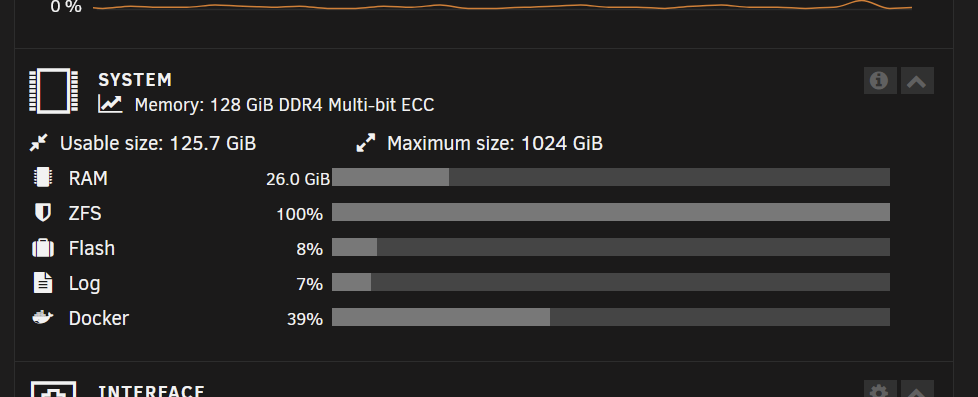
Is this Normal may i ask? Ive convert my Cache to ZFS and i notice most of the time that its 100% full. ts-p500-diagnostics-20230802-2310.zip
-
Hi All Guru does anyone happen to had any clue why each time after i reboot the Server my Unraid Connect logout by it self?
-
Thanks, Finally its resolved.
-
I just replace the cable with another. Attach latest Diagnostic. ts-p500-diagnostics-20230707-2307.zip
-
ts-p500-diagnostics-20230707-2207.zip Heres the new Diagnostic
-
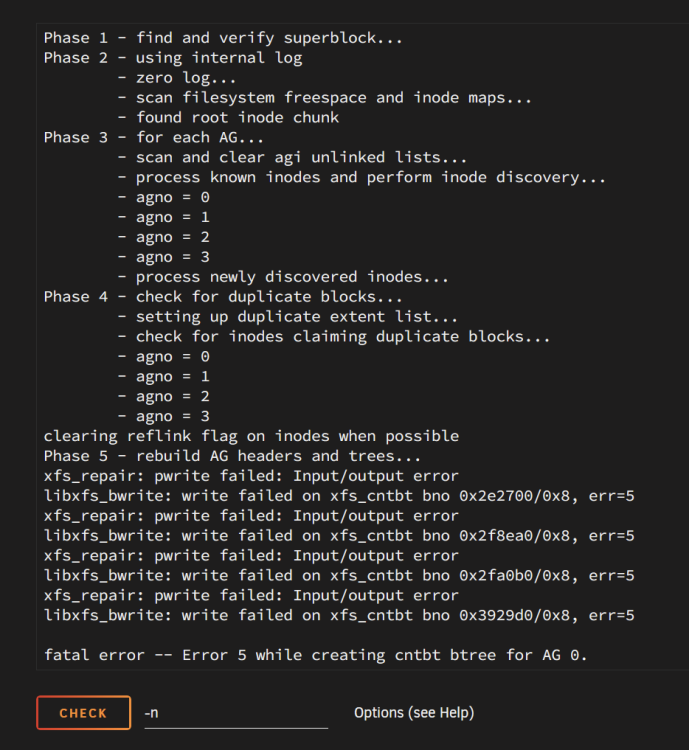
Ive just Tried relocated the cable and SATA port already. Here are the Check Filesystem Status without -n output.
-
Hi @itimpiI 've run Check Filesystem Status without -n and after normal reboot the Drive still Unmounted. Here is the latest Diagnostic after reboot. ts-p500-diagnostics-20230707-1658.zip
-
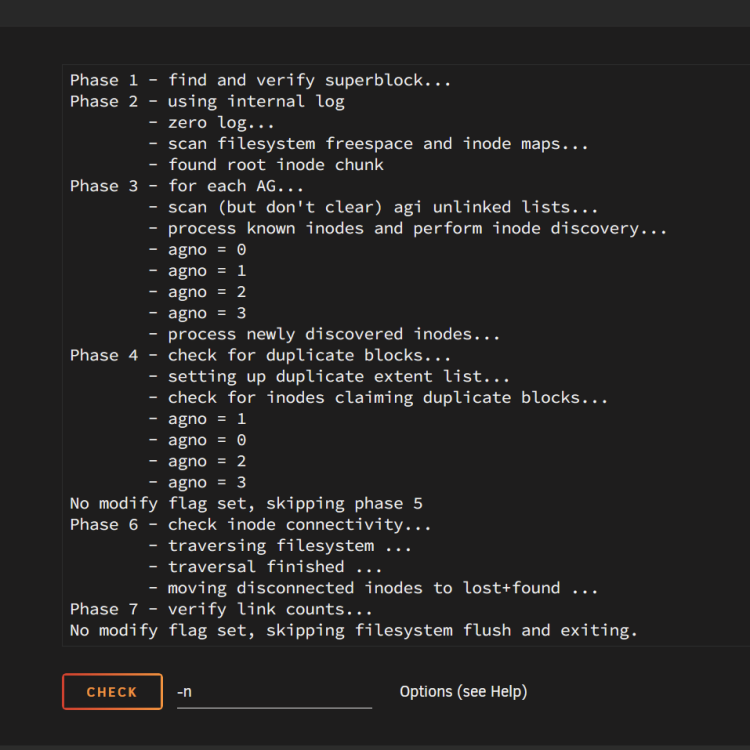
ts-p500-diagnostics-20230706-1610.zip Oooh Sorry forgot to attach the Diagnostic yesterday/ And heres the Check File System status.
-
I got one of my Drive become Unmountable: Unsupported or no file system after i reallocated it from onboard SATA to PCIE SATA. Also i did a gracefully shutdown but after boot up the parity doing resync and i dont dare to force shutdown to check on the Unsupport Drive connection. Since i had to wait for 2days for the Parity to complete Sync i've attach the Diagnostic file, hope someone could find out what might be the issue. Unraid was quite robust previously seems like there much fragile since 6.12 update.
-
The thing is that since the New 8TB drive was rebuild 3.2% when i try the method above, it don't rebuild but instead it Resync to Parity which much worst since the data in the new 8TB are not valid. Since my old Disk 2 4TB data are still valid what've done is i do a new config. So i could replace the 4TB and wont get a deny that only same size or larger size error and resync the Parity and then replace the new drive and perform a rebuild again. I'm not sure is this a good way of doing it. But sofar its seems working and now the rebuild already nearly 50%.
-
Thanks guys for the update. What I've done is after power up the Disk 1 are back online so means previously the issue mostly is the cable. But just donno why the error happen after the rebuild was running after 30min. So since my old Disk 2 4TB data are valid. i remove the Disk 2 8TB and then New Config so i could mount back the old Disk 2 4TB Enable Maintenance mode and start the server. Let it rebuild the parity from the Array. After completed the parity sync test all application and date are all okie. Then remove the old Disk 2 4TB again and upgrade to the new Disk 2 8TB drive and rebuild the Array again.
-
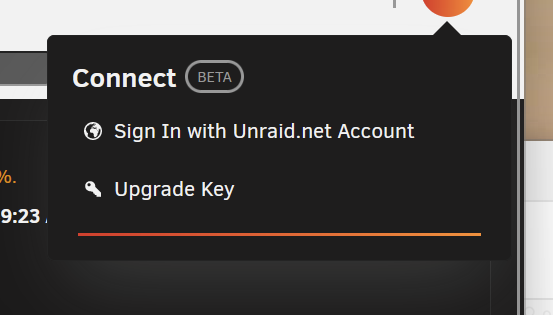
Ive notice quite sometime as if i did a reboot or shutdown and reboot the Unraid Connect will be logout aswell. So if the server was shutdown due to power disrupt and reboot after power are resume i Unraid Connect will be offline utill i manual login again. ts-p500-diagnostics-20230704-1610.zip
-
Today i was upgrading one of the Array 4TB HDD to a 8TB. Server bootup and add the new 8TB to replace my Disk 2. During rebuild Unraid prompt Disk 1 Fail, the rebuild just halt at 3.2%. Ive force to shutdown the server try to re secure all power cable and sata cable. Boot the server up and Disk 1 are back online. Notice that Disk 2 are now list as disable and the rebuild didn't continue. What should i do now. ts-p500-diagnostics-20230702-2255.zip
-
No new bios update last update was Dec 2021. Seems 1st time I’ve encounter this error. Still had like 12hr more for the parity to sync. I’ve try everything it’s just won’t respond. This morning I notice that the Parity has completed sync with no error. Ive move the appdata, domain and system share back to the Cache and reboot the server and the system are bootup and the docker are up and running. Bit i notice something during boot that there is an error from the output as rm: missing operand Try 'rm --help' for more information. mv: cannot stat '/usr/local/bin/mover': No such file or directory And the server was pause waiting for quite sometime before proceed. Latest diagnostic file attached. ts-p500-diagnostics-20230701-1415.zip Sent from my iPhone using Tapatalk
-
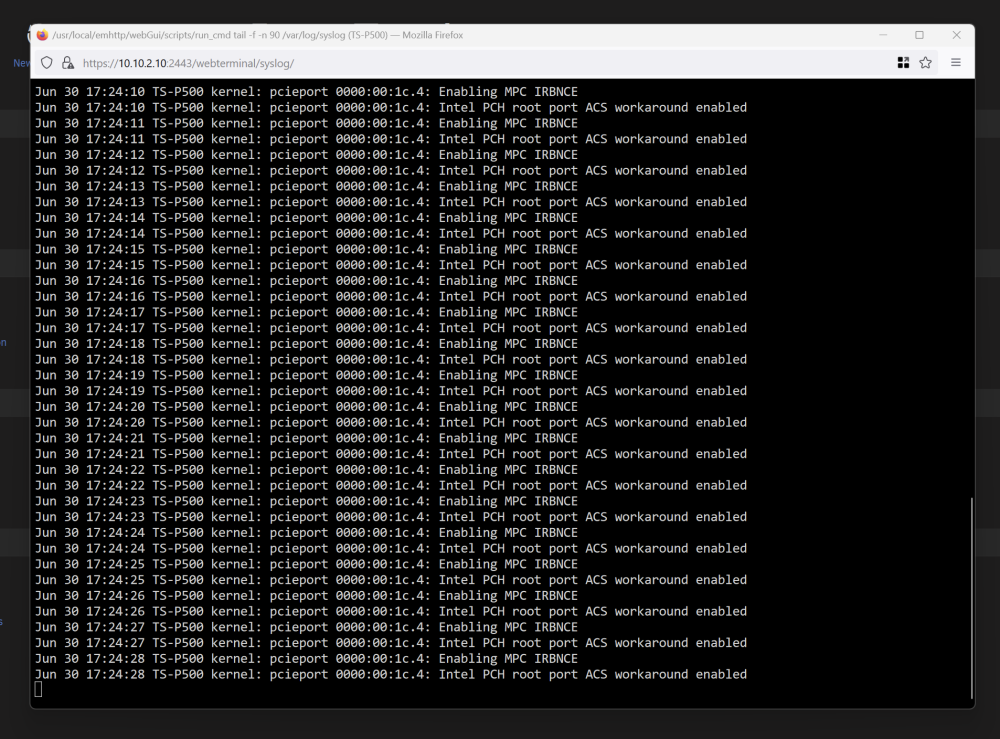
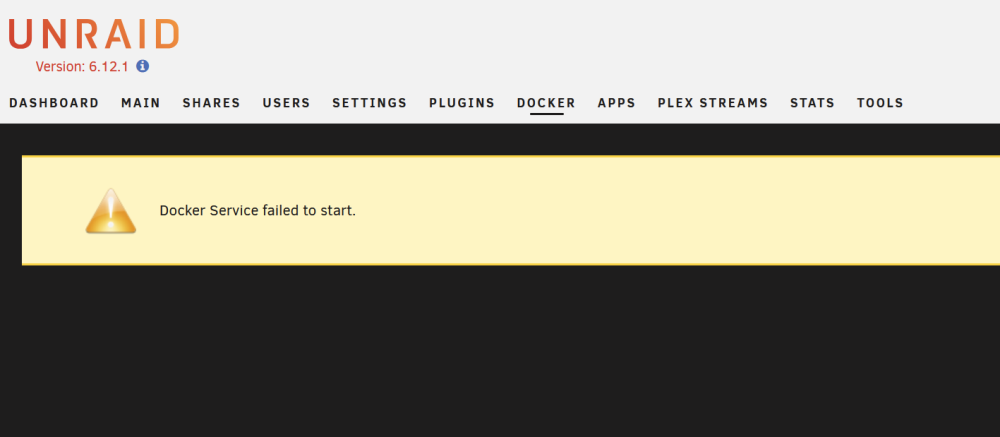
Dear All, i need some help. Today i was trying to replace my Parity to a larger Drive from 4TB to 8TB. I've move all my files and folder from Cache to the Array and everything is completed moved and shutdown the server as normal. After i replace the Parity, boot up and assign the new HDD to parity and start the server and i notice the parity is rebuilding. I try to enable docker and notice that's an error Docker Fail to Start. Also when i open the syslog i notice its full of error Intel PCH root port ACS workaround enabled. I was thinking to try to shutdown the server and check if anything loose or a reboot might solve the error but, I try to pause the parity rebuild and also try to cancel the rebuild also not responding. ts-p500-diagnostics-20230630-1721.zip
-
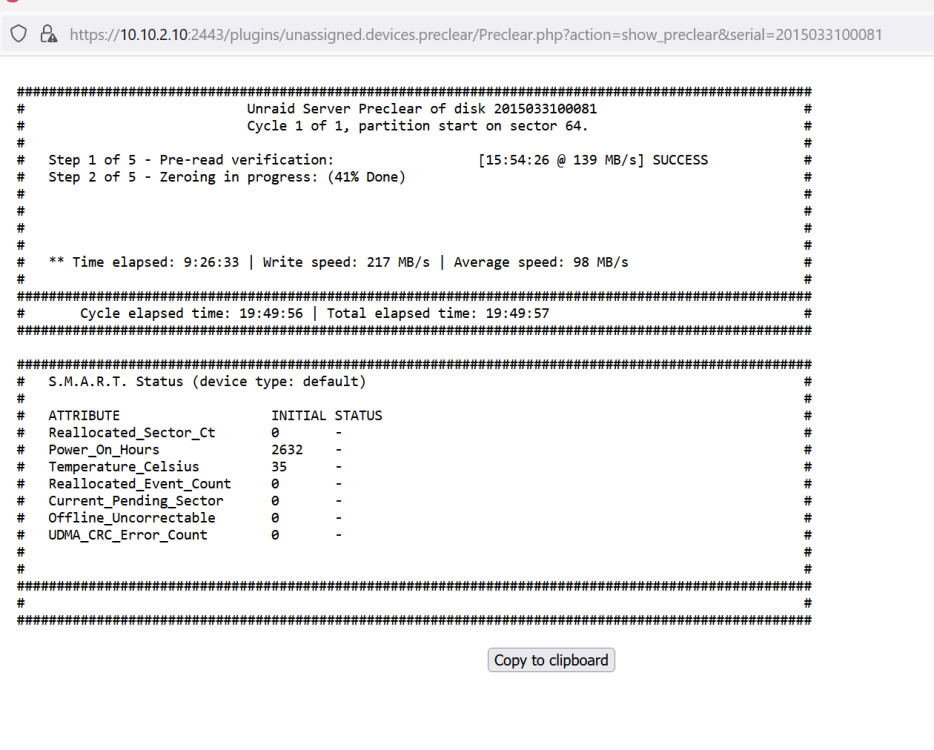
Hi @Kilrah Thansk for the info. I tried use another USB 3.0 Port still the same. Ended i stop the preclear and power cycle the server again. Now im getting over 200MBs and average over 100MBs which more like it.
-
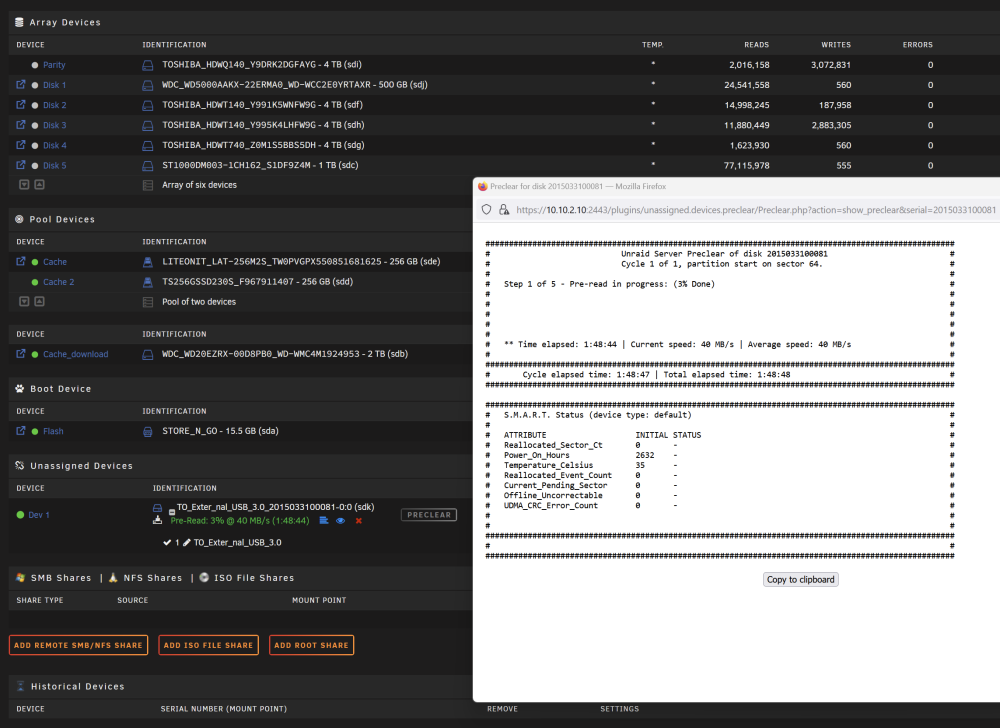
Today I just got myself some 8TB HDD and was thinking of Preclear it before upgrade my Parity and Array. As usual i will Preclear the HDD using a USB 3.0 Docking like previously. But one thing i notice is that before this the usual speed is about 120-140MBs but now its was cap at 40MBs only. Is there something change to the drivers since Unraid upgrade from previous years? ts-p500-diagnostics-20230628-1732.zip
-
Oooh ic so its nothing to worry about i guess. Thanks for the update.
-
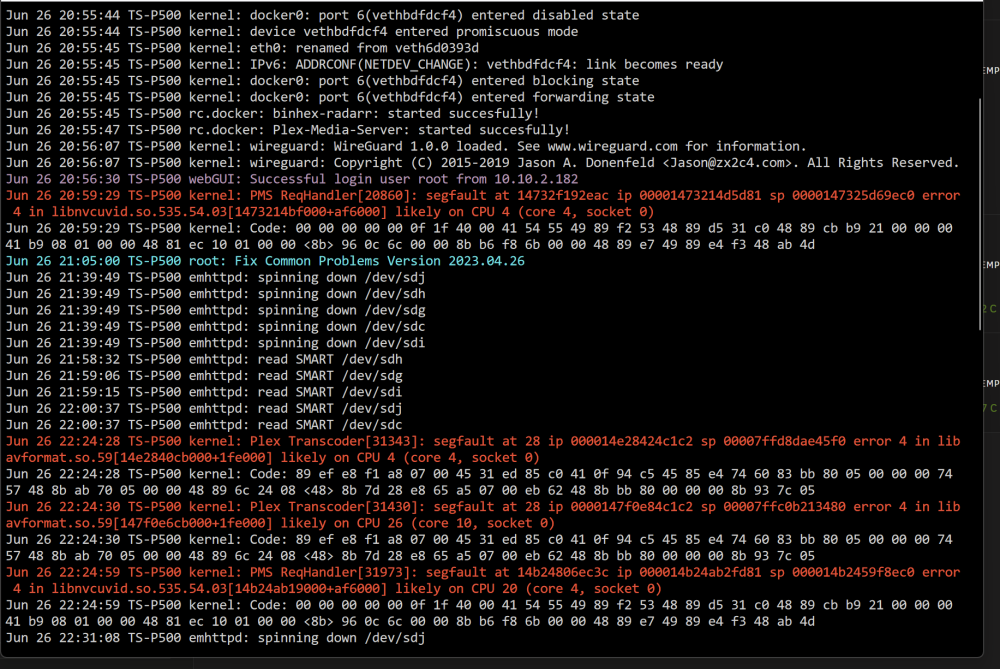
Today i notice there are some Error from my Unraid Log with "segfault" and I'm not sure what is it and how to fix it. Could anyone could help me on this? Jun 26 20:55:44 TS-P500 kernel: device vethbdfdcf4 entered promiscuous mode Jun 26 20:55:45 TS-P500 kernel: eth0: renamed from veth6d0393d Jun 26 20:55:45 TS-P500 kernel: IPv6: ADDRCONF(NETDEV_CHANGE): vethbdfdcf4: link becomes ready Jun 26 20:55:45 TS-P500 kernel: docker0: port 6(vethbdfdcf4) entered blocking state Jun 26 20:55:45 TS-P500 kernel: docker0: port 6(vethbdfdcf4) entered forwarding state Jun 26 20:55:45 TS-P500 rc.docker: binhex-radarr: started succesfully! Jun 26 20:55:47 TS-P500 rc.docker: Plex-Media-Server: started succesfully! Jun 26 20:56:07 TS-P500 kernel: wireguard: WireGuard 1.0.0 loaded. See www.wireguard.com for information. Jun 26 20:56:07 TS-P500 kernel: wireguard: Copyright (C) 2015-2019 Jason A. Donenfeld <[email protected]>. All Rights Reserved. Jun 26 20:56:30 TS-P500 webGUI: Successful login user root from 10.10.2.182 Jun 26 20:59:29 TS-P500 kernel: PMS ReqHandler[20860]: segfault at 14732f192eac ip 00001473214d5d81 sp 0000147325d69ec0 error 4 in libnvcuvid.so.535.54.03[1473214bf000+af6000] likely on CPU 4 (core 4, socket 0) Jun 26 20:59:29 TS-P500 kernel: Code: 00 00 00 00 00 0f 1f 40 00 41 54 55 49 89 f2 53 48 89 d5 31 c0 48 89 cb b9 21 00 00 00 41 b9 08 01 00 00 48 81 ec 10 01 00 00 <8b> 96 0c 6c 00 00 8b b6 f8 6b 00 00 48 89 e7 49 89 e4 f3 48 ab 4d Jun 26 21:05:00 TS-P500 root: Fix Common Problems Version 2023.04.26 Jun 26 21:39:49 TS-P500 emhttpd: spinning down /dev/sdj Jun 26 21:39:49 TS-P500 emhttpd: spinning down /dev/sdh Jun 26 21:39:49 TS-P500 emhttpd: spinning down /dev/sdg Jun 26 21:39:49 TS-P500 emhttpd: spinning down /dev/sdc Jun 26 21:39:49 TS-P500 emhttpd: spinning down /dev/sdi Jun 26 21:58:32 TS-P500 emhttpd: read SMART /dev/sdh Jun 26 21:59:06 TS-P500 emhttpd: read SMART /dev/sdg Jun 26 21:59:15 TS-P500 emhttpd: read SMART /dev/sdi Jun 26 22:00:37 TS-P500 emhttpd: read SMART /dev/sdj Jun 26 22:00:37 TS-P500 emhttpd: read SMART /dev/sdc Jun 26 22:24:28 TS-P500 kernel: Plex Transcoder[31343]: segfault at 28 ip 000014e28424c1c2 sp 00007ffd8dae45f0 error 4 in libavformat.so.59[14e2840cb000+1fe000] likely on CPU 4 (core 4, socket 0) Jun 26 22:24:28 TS-P500 kernel: Code: 89 ef e8 f1 a8 07 00 45 31 ed 85 c0 41 0f 94 c5 45 85 e4 74 60 83 bb 80 05 00 00 00 74 57 48 8b ab 70 05 00 00 48 89 6c 24 08 <48> 8b 7d 28 e8 65 a5 07 00 eb 62 48 8b bb 80 00 00 00 8b 93 7c 05 Jun 26 22:24:30 TS-P500 kernel: Plex Transcoder[31430]: segfault at 28 ip 0000147f0e84c1c2 sp 00007ffc0b213480 error 4 in libavformat.so.59[147f0e6cb000+1fe000] likely on CPU 26 (core 10, socket 0) Jun 26 22:24:30 TS-P500 kernel: Code: 89 ef e8 f1 a8 07 00 45 31 ed 85 c0 41 0f 94 c5 45 85 e4 74 60 83 bb 80 05 00 00 00 74 57 48 8b ab 70 05 00 00 48 89 6c 24 08 <48> 8b 7d 28 e8 65 a5 07 00 eb 62 48 8b bb 80 00 00 00 8b 93 7c 05 Jun 26 22:24:59 TS-P500 kernel: PMS ReqHandler[31973]: segfault at 14b24806ec3c ip 000014b24ab2fd81 sp 000014b2459f8ec0 error 4 in libnvcuvid.so.535.54.03[14b24ab19000+af6000] likely on CPU 20 (core 4, socket 0) Jun 26 22:24:59 TS-P500 kernel: Code: 00 00 00 00 00 0f 1f 40 00 41 54 55 49 89 f2 53 48 89 d5 31 c0 48 89 cb b9 21 00 00 00 41 b9 08 01 00 00 48 81 ec 10 01 00 00 <8b> 96 0c 6c 00 00 8b b6 f8 6b 00 00 48 89 e7 49 89 e4 f3 48 ab 4d Jun 26 22:31:08 TS-P500 emhttpd: spinning down /dev/sdj Jun 26 22:31:08 TS-P500 emhttpd: spinning down /dev/sdh ts-p500-diagnostics-20230627-1245.zip
-
Thanks for the info. Ive perform SMART Short and Extended Self-test with no error. Ive check the cable and power connector seems secure. I'm now doing a rebuild since no error been report after that.
-
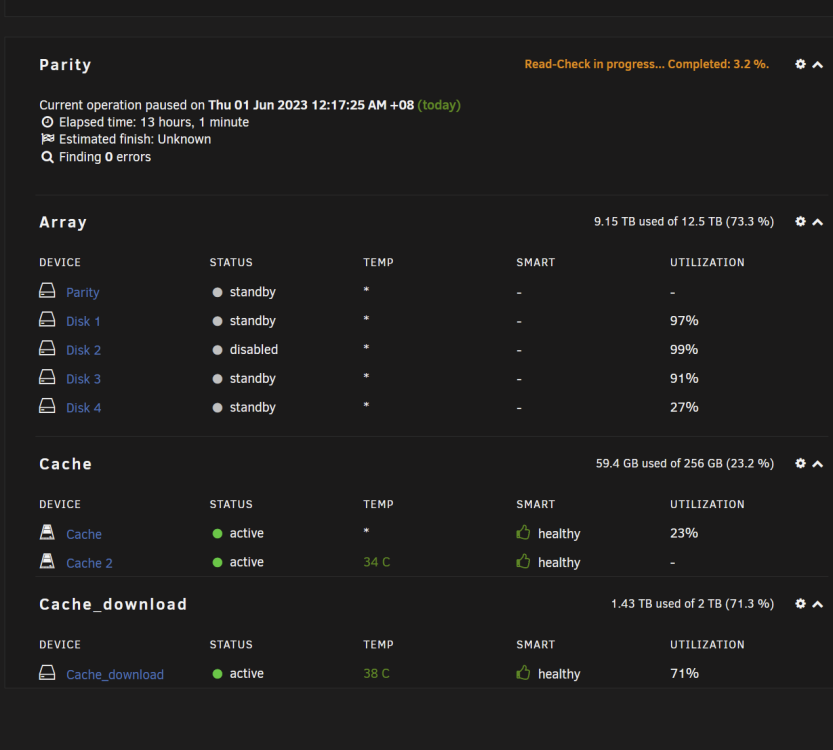
Need Help. Yesterday night my schedule Parity check started as usual and this morning when i login to my Unraid i notice that Disk 2 Disable and been notified Read Error. There i no info wats the error and now my Parity check was paused at 3.2% and my Disk 2 is under disable. What should i do now. ts-p500-diagnostics-20230601-1302.zip
-
eth0 connect to my IPS router and eth1 connect to my workstation. Now my setting are similar to guyth setup just that im still getting 2.5Gbe.
-
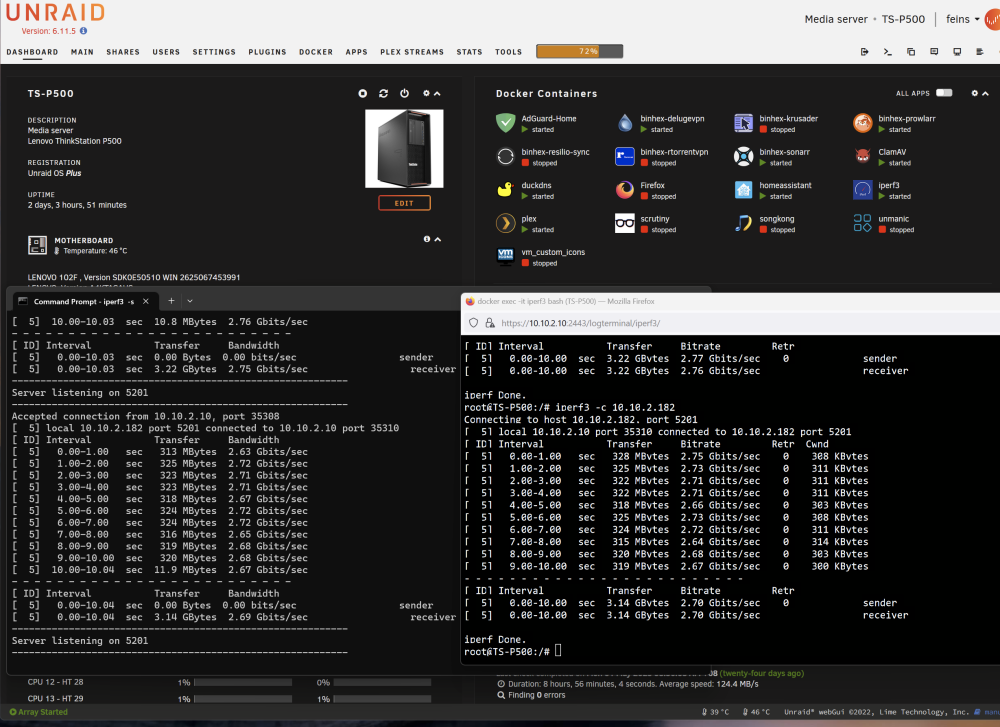
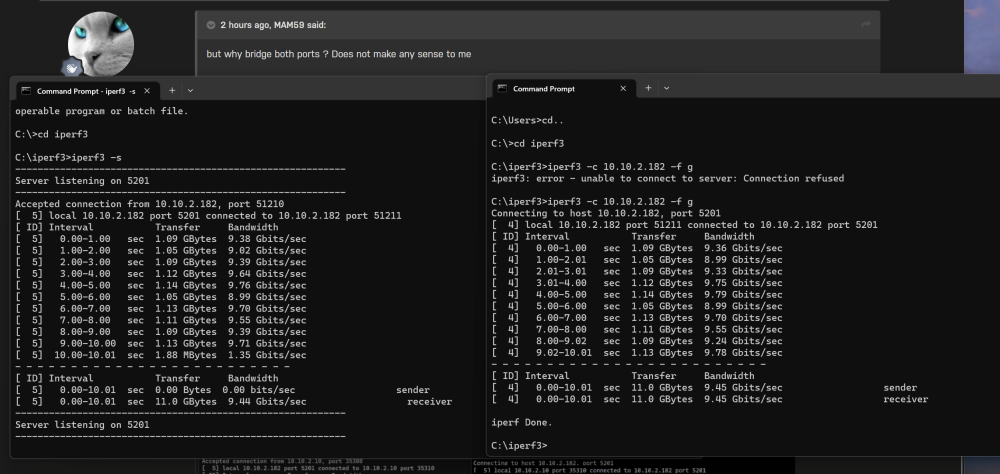
Ive tried if don't bridge eth1 i don't get any DHCP IP. Even if i configure static IP on both Port i can only ping to the Server but cant reach the internet seems it don't route out. I didn't change anything while installing iperf3 as i don't change the default setting for docker unless been told or instructed. I will change it to Host and try. Seems same result. poor throughput between Unraid and Windows. I just perform a loopback test on my workstation and seems loopback i manage to get 10Gbe throughput.
-
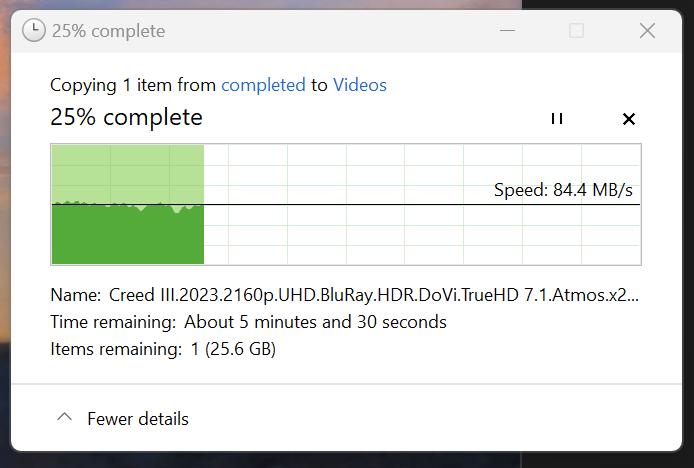
Ive bypass the switch and now doing back to back im still getting the same 2.5-3Gbe testing with iperf3. Both card are plug into a Gen 3 X16 Pcie Lane. Before this i manage to get the max SSD SATA6 speed which is about 400MB/s but recently i notice that i only manage at about 40-60MB/s that's where i start to test the connection and notice my 10Gbe only do 2.5-3Gbe speed. and file transfer wont even goes above 80MB/s