





feins
Members
-
Joined
-
Last visited
Everything posted by feins
-
Just recently one of my 4TB Toshiba HDD suddenly prompt Reallocated Sector CT from 0 to 5 then to 8, 16, 96, 104 and 112. This drive just did a preclear and was successfully completed with no error just the Reallocate Sector CT remain at 112 and Reallocated_Event_Count 14. Since preclear successful is this drive still good to used?preclear_disk_2015033100081_32492.txt #################################################################################################### # Unraid Server Preclear of disk 2015033100081 # # Cycle 1 of 1, partition start on sector 64. # # # # Step 1 of 5 - Pre-read verification: [8:06:26 @ 137 MB/s] SUCCESS # # Step 2 of 5 - Zeroing the disk: [8:06:23 @ 137 MB/s] SUCCESS # # Step 3 of 5 - Writing Unraid's Preclear signature: SUCCESS # # Step 4 of 5 - Verifying Unraid's Preclear signature: SUCCESS # # Step 5 of 5 - Post-Read verification: [8:06:29 @ 137 MB/s] SUCCESS # # # # # # # #################################################################################################### # Cycle elapsed time: 24:19:25 | Total elapsed time: 24:19:26 # #################################################################################################### #################################################################################################### # S.M.A.R.T. Status (device type: default) # # # # ATTRIBUTE INITIAL CYCLE 1 STATUS # # Reallocated_Sector_Ct 112 112 - # # Power_On_Hours 30825 30849 Up 24 # # Temperature_Celsius 31 36 Up 5 # # Reallocated_Event_Count 14 14 - # # Current_Pending_Sector 0 0 - # # Offline_Uncorrectable 0 0 - # # UDMA_CRC_Error_Count 750 750 - # # # # # #################################################################################################### # # #################################################################################################### --> ATTENTION: Please take a look into the SMART report above for drive health issues. --> RESULT: Preclear Finished Successfully!.
-
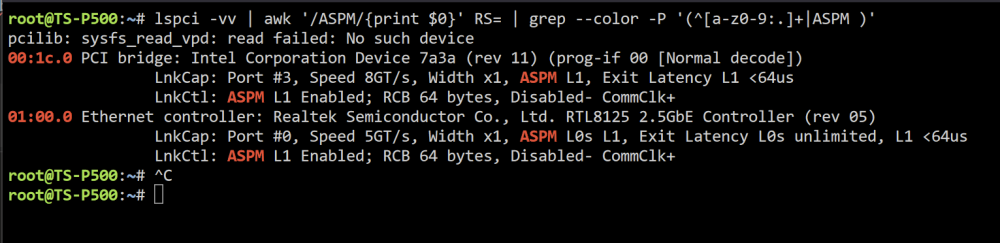
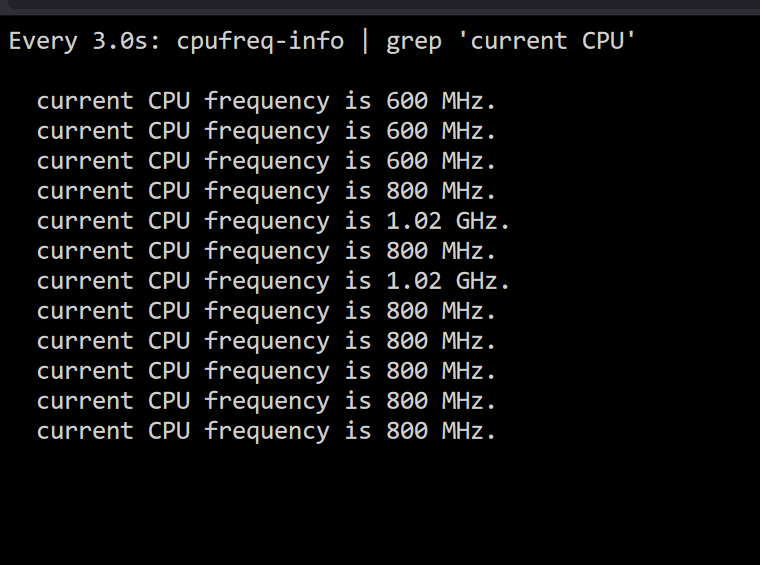
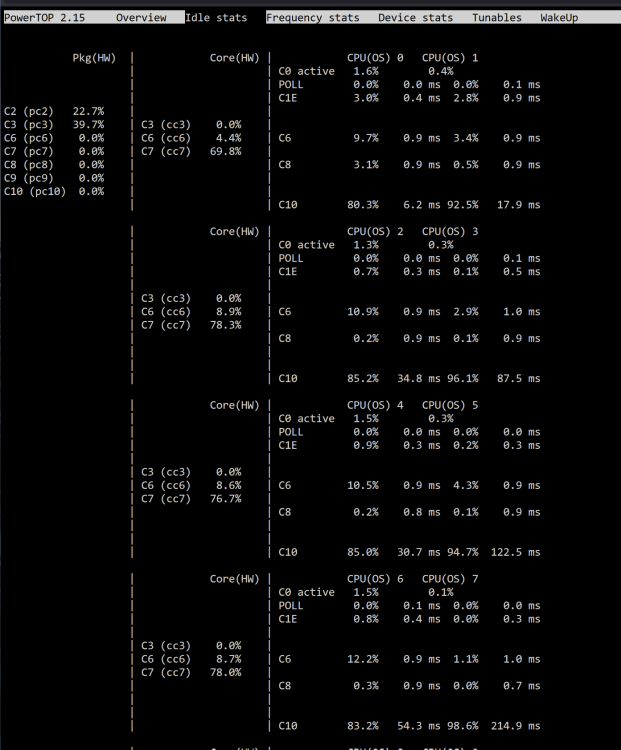
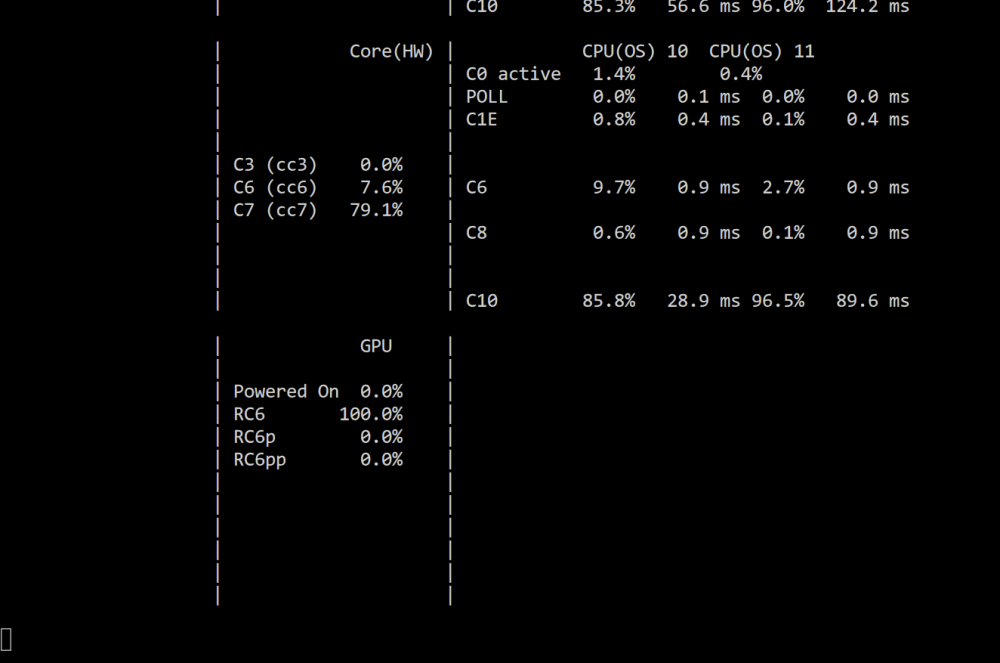
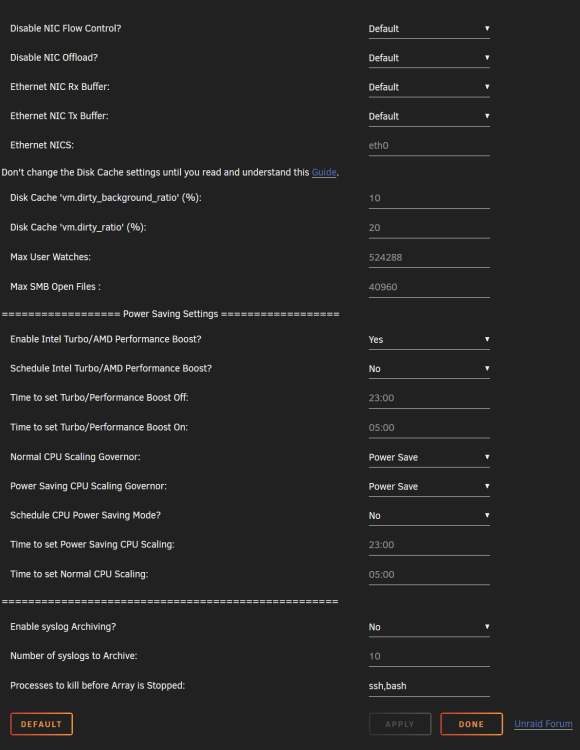
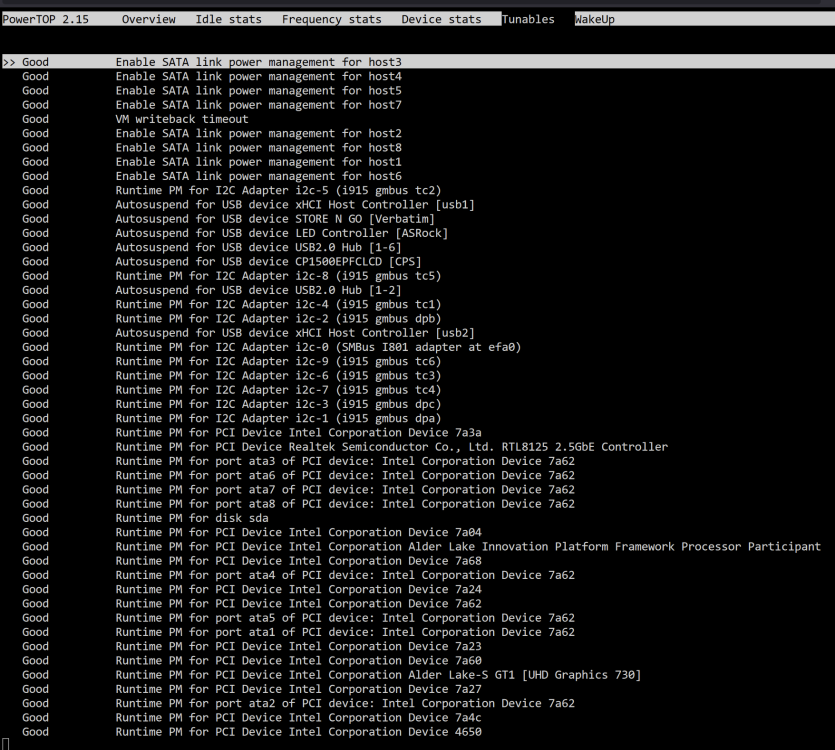
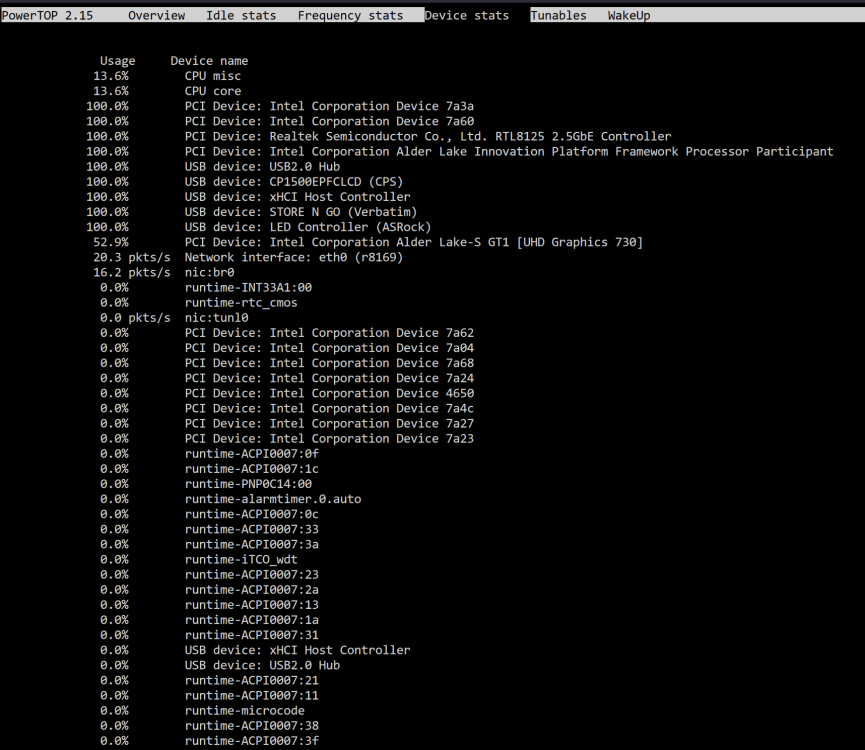
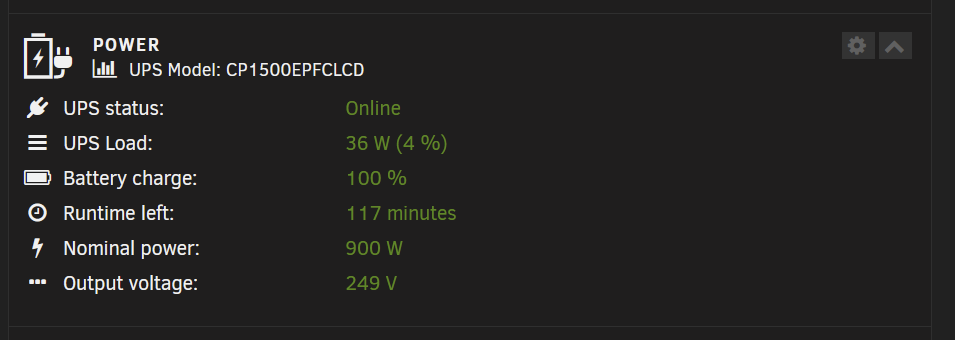
Ive just got myself an Asrock Z790 Pro RS/D4 Core i5-12400 Crucial 2X 16 GB DDR4 3200 1.2V Cooler Master MWE 850 Gold V2 PSU Ive enable all the ASPM on my bios and tested the system with barebone setup only get to C3 status. Unraid iGPU driver installed CPU Governor set to Power Save What might be the issue that i cant get any lower than C3 Barebone power consumption 36W
-
Could you be able to guide me how to do that?
-
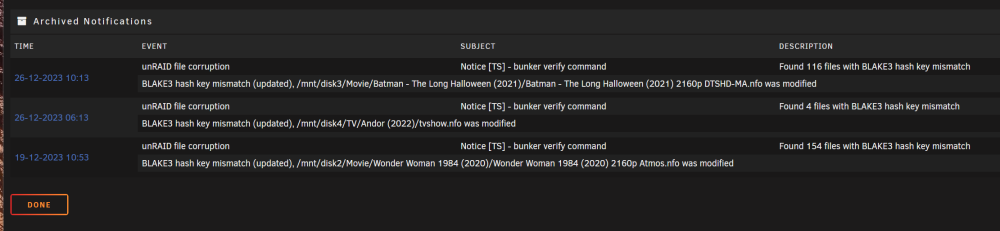
Each time when the file integrity runs i keep getting this type of errors. How to resolve this? Ive already excluded *.nfo
-
Recently the file integrity just finish checksum and this time no Pink Check box. but I'm still getting prompt that unRAID file corruption: 19-12-2023 10:53 Notice [TS] - bunker verify command Found 154 files with BLAKE3 hash key mismatch How do i find what type of files are those?
-
Dear all, Im still getting the error. Ive already excluded the files. BLAKE3 Excluded folders: .Trash-99 .Recycle.Bin .stfolder .sync .TemporaryItems @Recycle .stversions Excluded files: *.tmp , *.nfo , *.log , *.partial , *.part , *.stgnore , *.apdisk unRAID file corruption: 07-11-2023 10:27 Notice [TS] - bunker verify command Found 154 files with BLAKE3 hash key mismatch ts-p500-diagnostics-20231108-2308.zip
-
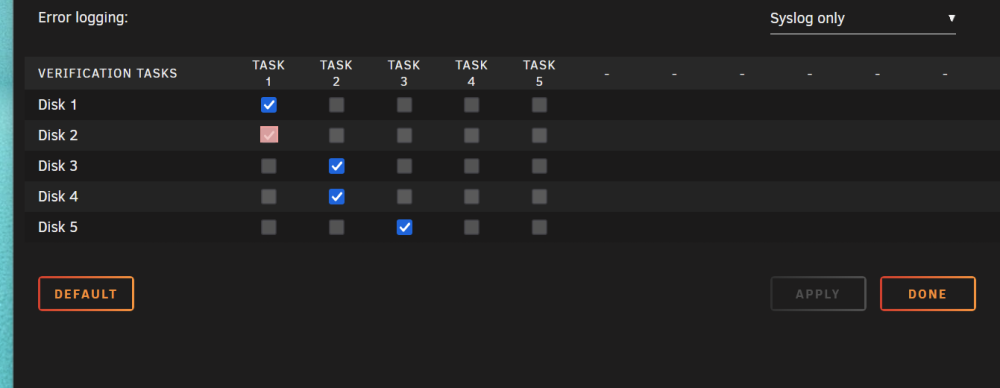
Dear All, Why Disk 2 i got a pink box? Also i notice that i got alot of hash key mismatch. ts-p500-diagnostics-20231004-1823.zip

-
Oooh that User guild i was thinking there a troubleshooting guide for the plugin itself. Ok i've just add some time out for my Docker and System shutdown since i don't use any VM. Ive also attach the Diagnostic Log, maybe you could pinpoint what might be the case that cause the Unclean Shutdown. ts-p500-diagnostics-20230930-1809.zip
-
Where is the Troubleshooting online doc?
-
The Plugin is up to date. Should i uninstall the parity check plugin?
-
my P500 also using the same chip but its been years i've trying to ask for support until now without any progress.
-
Mine a Lenovo Thinkstation P500, i try to do a sensors scan and my Nuvoton chip got this output Found unknown chip with ID 0xb732 any help?
-
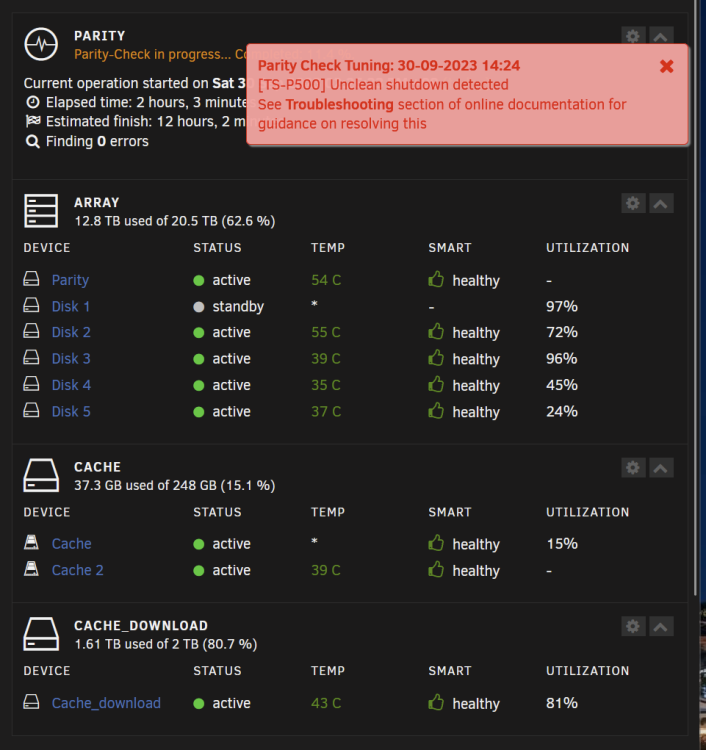
I also getting this Unclean Shutdown detected from time to time. I've just update a docker and some plugin. I did a reboot and after the server rebooted i got a message Unclean shutdown detected and my parity check start. I would like to know whats the issue as well and what should i do to resolve this. ts-p500-diagnostics-20230930-1636.zip
-
Need some help i had file Binhex file integrity install and recently after file verification and i was prompt with some file corruption error. unRAID file corruption: 26-09-2023 10:29 Notice [TS] - bunker verify command Found 41 files with BLAKE3 hash key corruption As I'm just a beginner, what should i do on this? ts-p500-diagnostics-20230927-2253.zip
-
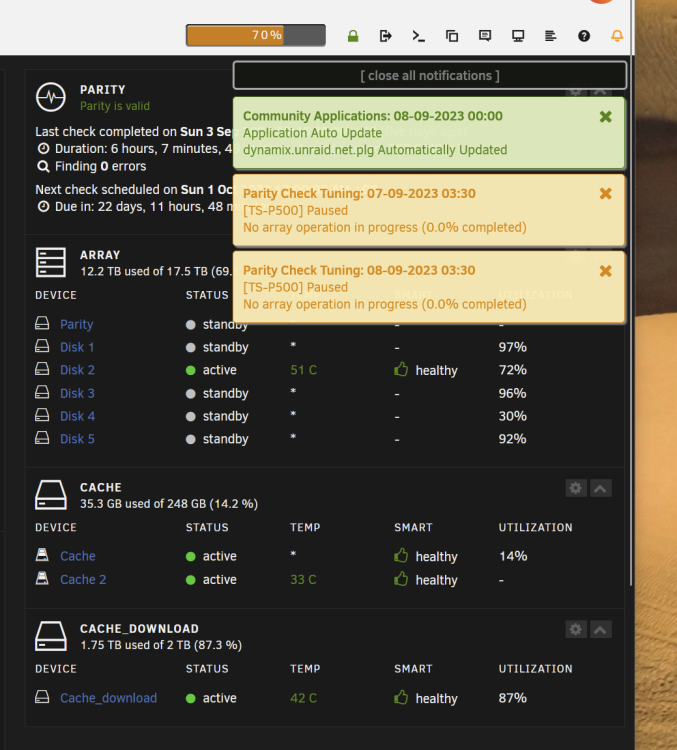
Ok im still getting the SNMP notification at 3.30am each day even there suppose to be no event. Ive attach the Diagnostic log with Testing mode logging enable. ts-p500-diagnostics-20230908-1211.zip
-
Noted, just update to the latest release will monitor for a few day.
-
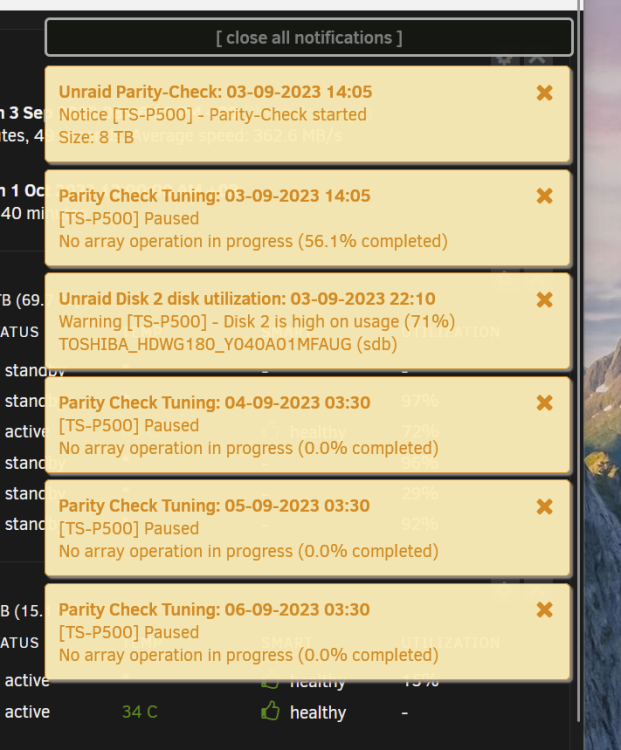
After reboot i tot its fix. but seems it still do broadcast. I dont behave at such until last week onward. ts-p500-diagnostics-20230906-1421.zip
-
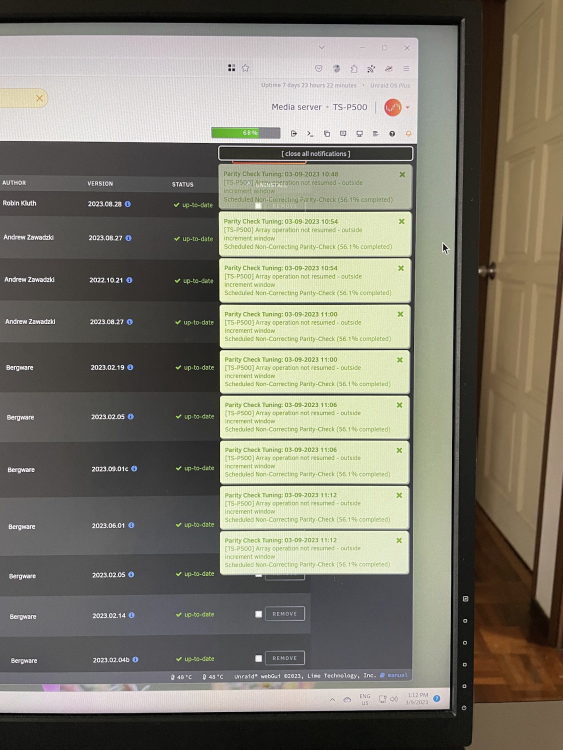
Dear All, Just recently my server just send SNMP nonstop on the same event. Its been working well until recent before that just 1 notification on 1 event only but this few day it just keep sending the same SNMP for the same event repeatably nonstop. ts-p500-diagnostics-20230903-1312.zip
-
Noted yes. New board starting to include 2.5gb nic. Not many review that actually mention about idling power. Because few mth back I help a fren to setup his unraid where he use his old Intel gen4 Core i5 4670, Asus mobo, 32gb Ram HBA card and 8HDD and his 1200W Silverstone 80+ Platinum PSU. And a Silverstone TJ07 casing. He has his roon core running 24/7 and Plex. With most of the time Plex transcoding CPU running near 100% with an impressive 70+W of power usage and idling at 30+W full system. Sent from my iPhone using Tapatalk
-
Yes i totally understand about add on card that's why at mean time my Xeon Processor doesn't come with an iGPU as such i notice that my P2000 in idle status still drawn 8W of power. HBA card i don't think there will be avoid as there wont have any board that come with more than 6 Sata port at mean time. So far this Lenovo P500 come with a 80+ Gold PSU. I understand that PSU effeciency does take into account. My system is actually a Stock Lenovo P500 Workstation pretty standard come with 128Gb of DDR4 ECC Ram a 16core Xeon E5-2698-V3, 490W 80+ Gold Lenovo PSU. The only additional item that i add in is a LSI SAS 9207 HBA, Nvidia P2000 and Intel X520-T2 10Gb Nic Card. There are a total of 7 Drive and 2 SSD a total of 9 Drive at the moment.
-
Lenovo Bios already enable Power saving mode disable any peripheral thats not in used like sound device serial and PS2 port. That's why was thinking to get something newer most likely will have better efficiency, since most of the time the server are under idle mode just Radarr and Sonarr are running at the back. Just that donno which one should go for also need to think of RoI as well.
-
Thanks for the info. I’ve tried powertop before but it screw up the system more than reduce power consumption. So I’ve remove powertop at the end after trying to tweak it but fail to get it stable. Sent from my iPhone using Tapatalk
-
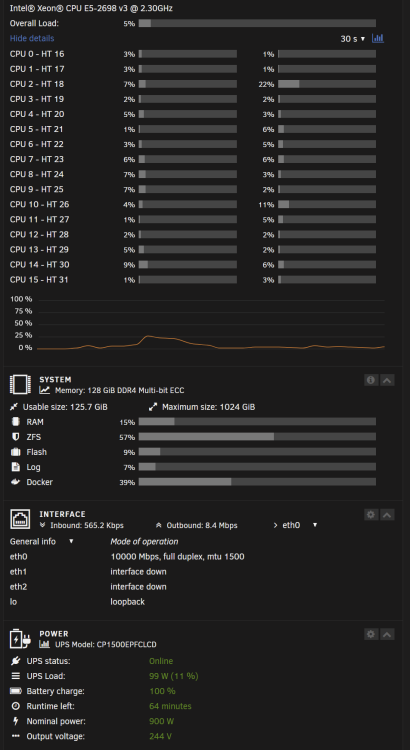
I dont mind New or Used. Basically the most important is for Plex 4K HDR Transcoding with Dolby TrueHD Dolby Atmos. Most of the time its been idle or direct play/Stream, the transcode only for mobile device to save data or sometime just dont know why Plex just transcode for no reason. As now each month 80% of the electricity bill are from here as can see while the server idling at 100+W as such was thinking a efficiency wat to reduce it is the most important. Was thinking of going new which going to spend a few thousand or trying to source something a gen generation back but still give similar result would be fine. I only know that the recent gen 13 i5 are very efficient CPU with quite some data floating around that it drawn very min amount of power during idling but i cant find any data regarding the Gen 9 to Gen 12 Processor's actual idle power consumption. As if can get the Gen9 processor that had the same idling power that will save quite a amount as there are alot of used processor and board on line.
-
I got a Coolermaster Cosmos Storm. It’s a pretty old casing but it’s still a very good case. Compare to the gen9-13 which processor you would prefer? Sent from my iPhone using Tapatalk
-
I’m thinking of going to upgrade my current build to lower the power consumption. At mean time I’m running unraid on my Lenovo Thinkstation P500 with 9 drive in total and 128gb of ddr4 ECC Ram. HBA card, And Xeon E5-2698-V3 processor and P2000 GPU, as now idle with 8drive spin down and nearly 0 CPU activity, GPU idle mode I had a power consumption around 100-130W. I’ve been searching around on the forum but can’t find the answer that I’m looking for as what’s the latest processor that unraid support so I won’t get the wrong processor as I notice previously someone mention that the 12-13gen Intel cpu are not recommended. Can someone recommend some hardware for me to go about. Thanks in advance. [emoji16] Sent from my iPhone using Tapatalk


