feins
Members
-
Joined
-
Last visited
Everything posted by feins
-
That's the thing because my Unraid the Switch and my workstation all on the same location. I can connect to all the device using just 0.5m cable. From my understanding even a typical Cat6 cable can handle 10Gbe speed at short distance. i think 0.5m are consider very short distance. Even now im connect back to back im still getting 2.5-3Gbe speed.
-
I'm connecting Back to Back actually no more goes through the 10Gbe switch. Now iperf3 for unraid is in docker now. no more under Nerdtools. Both eth0 and eth1 are 10Gbe its the same card X540-2T comes with 2 10Gbe Ether port.
-
Today ive tested direct connect to Unraid bypass my 10Gbe Switch still getting the same result. Means its nothing to do with the Switch since the connection is direct from my Windows 11 to Unraid. Any idea whats might be the issue here?
-
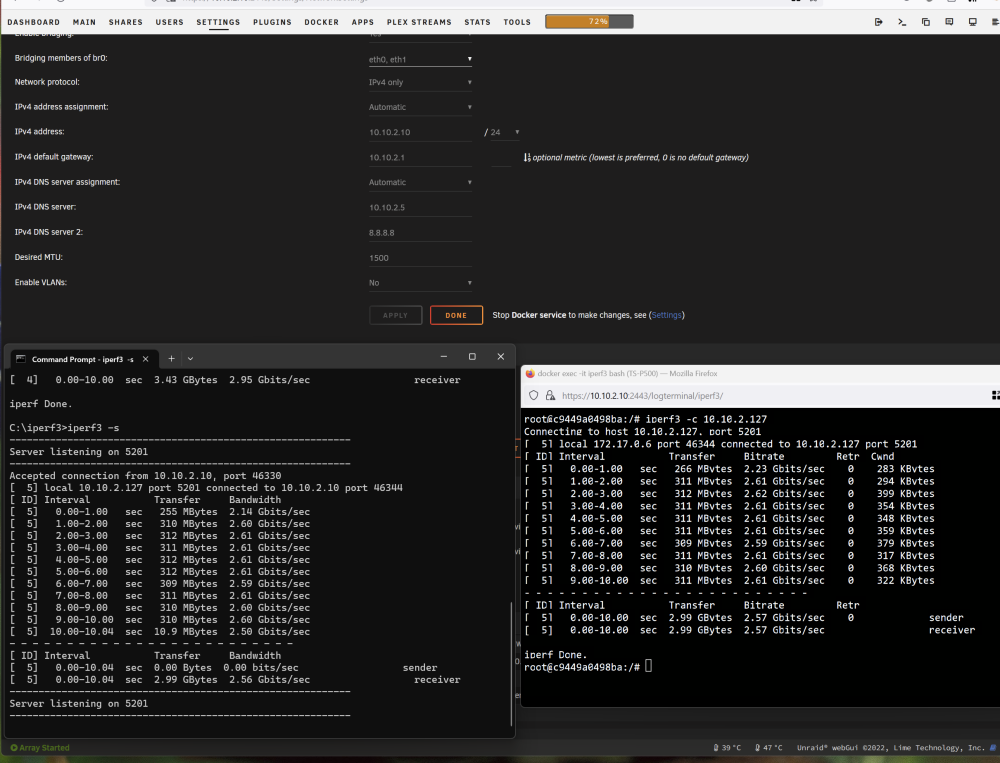
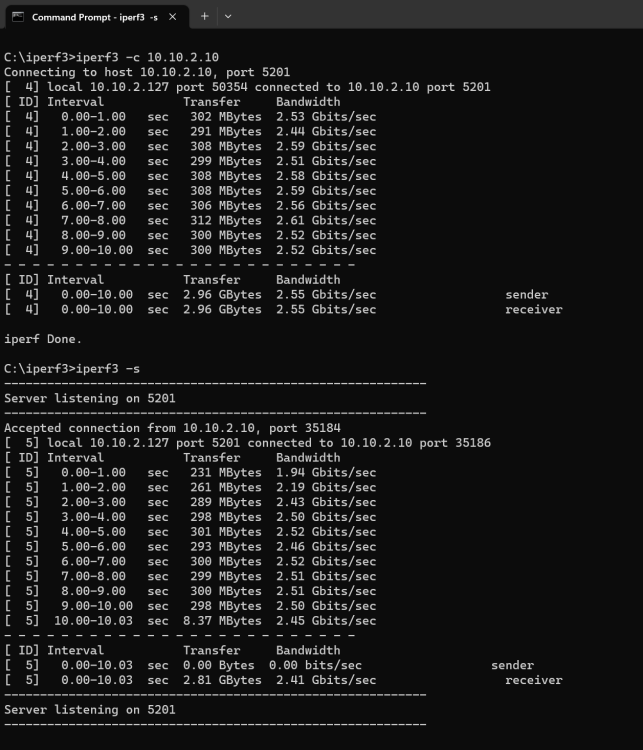
Today my Cat8 cable arrived and did a test and similar result. C:\iperf3>iperf3 -c 10.10.2.10 Connecting to host 10.10.2.10, port 5201 [ 4] local 10.10.2.127 port 56119 connected to 10.10.2.10 port 5201 [ ID] Interval Transfer Bandwidth [ 4] 0.00-1.00 sec 372 MBytes 3.12 Gbits/sec [ 4] 1.00-2.00 sec 378 MBytes 3.17 Gbits/sec [ 4] 2.00-3.00 sec 367 MBytes 3.08 Gbits/sec [ 4] 3.00-4.00 sec 384 MBytes 3.22 Gbits/sec [ 4] 4.00-5.00 sec 391 MBytes 3.28 Gbits/sec [ 4] 5.00-6.00 sec 402 MBytes 3.38 Gbits/sec [ 4] 6.00-7.00 sec 375 MBytes 3.14 Gbits/sec [ 4] 7.00-8.00 sec 386 MBytes 3.24 Gbits/sec [ 4] 8.00-9.00 sec 381 MBytes 3.20 Gbits/sec [ 4] 9.00-10.00 sec 382 MBytes 3.21 Gbits/sec - - - - - - - - - - - - - - - - - - - - - - - - - [ ID] Interval Transfer Bandwidth [ 4] 0.00-10.00 sec 3.73 GBytes 3.20 Gbits/sec sender [ 4] 0.00-10.00 sec 3.73 GBytes 3.20 Gbits/sec receiver iperf Done. root@c9449a0498ba:/# iperf3 -c 10.10.2.127 Connecting to host 10.10.2.127, port 5201 [ 5] local 172.17.0.6 port 58088 connected to 10.10.2.127 port 5201 [ ID] Interval Transfer Bitrate Retr Cwnd [ 5] 0.00-1.00 sec 293 MBytes 2.46 Gbits/sec 0 342 KBytes [ 5] 1.00-2.00 sec 290 MBytes 2.43 Gbits/sec 0 325 KBytes [ 5] 2.00-3.00 sec 302 MBytes 2.54 Gbits/sec 0 354 KBytes [ 5] 3.00-4.00 sec 319 MBytes 2.67 Gbits/sec 0 354 KBytes [ 5] 4.00-5.00 sec 319 MBytes 2.67 Gbits/sec 0 342 KBytes [ 5] 5.00-6.00 sec 324 MBytes 2.72 Gbits/sec 0 339 KBytes [ 5] 6.00-7.00 sec 321 MBytes 2.69 Gbits/sec 0 337 KBytes [ 5] 7.00-8.00 sec 325 MBytes 2.73 Gbits/sec 0 334 KBytes [ 5] 8.00-9.00 sec 296 MBytes 2.49 Gbits/sec 0 334 KBytes [ 5] 9.00-10.00 sec 324 MBytes 2.72 Gbits/sec 0 334 KBytes - - - - - - - - - - - - - - - - - - - - - - - - - [ ID] Interval Transfer Bitrate Retr [ 5] 0.00-10.00 sec 3.04 GBytes 2.61 Gbits/sec 0 sender [ 5] 0.00-10.00 sec 3.04 GBytes 2.61 Gbits/sec receiver iperf Done. Ive no idea what went wrong.
-
I’ve just order two cat 8 Shielded cable and will try it out to see hows it’s going.
-
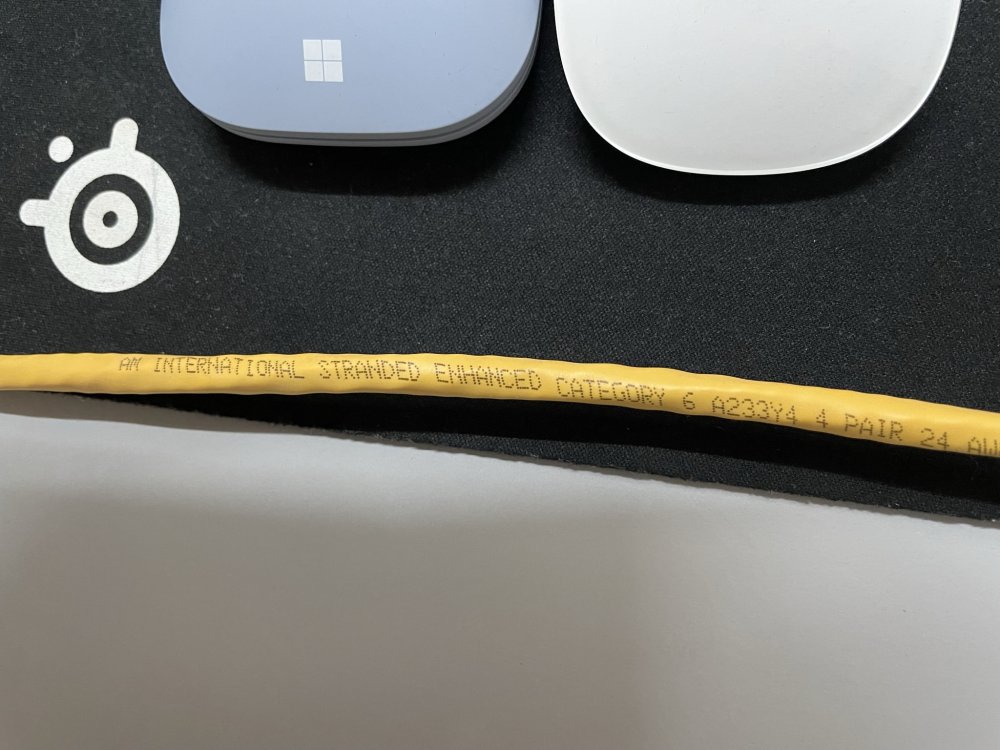
That's what i have AM cat6E 0.5M cable which I'm using or the Krone Cat6E cable which is 2M in length.
-
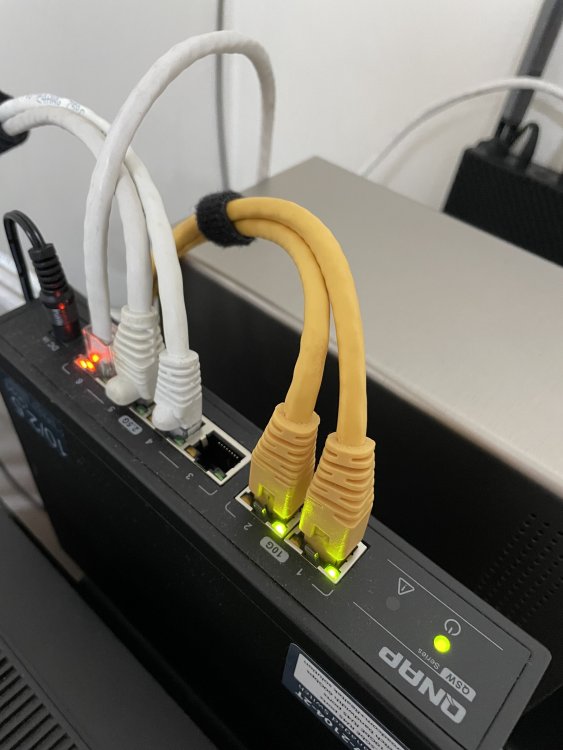
Both the 10Gbe port are connect to my Win11 Workstation and Unraid. The other 2 white cable are going to my Qnap NAS qhich is power down at meantime and the last port are going to my Telco Router so as now there is only 2 10Gbe connection are active only. When i try to copy file from my windows 11 workstation to Unraid only both the 10Gbe port are blinking.
-
Those are AM Cat6E cable.
-
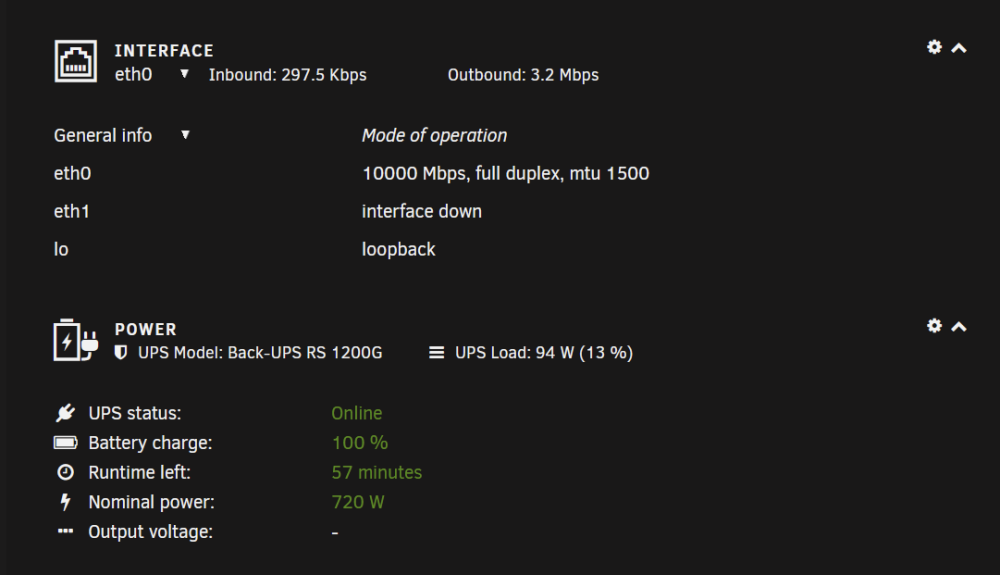
Yes both Unraid and my Workstation is connected to the 10gbit port. Picture attach. I’ve also try to change the flow control to off as suggested from my Windows 11 Setting the issue still the same. I’ve also try to enable jumbo frame to 9000 on both windows 11 and unraid tested also same result.
-
How could i pinpoint the issue? where should i start to troubleshoot?
-
The cable is Genuine AMP Cat6E cable at 0.5M length. the card is HP Intel X540-2T. connected to a Qnap QSW-2104-2T unmanage switch.
-
Its an Unmanage Qnap QWS-2104-2T switch. no setting is required. On Unraid is there such setting? I know Windows i could try to disable flow control.
-
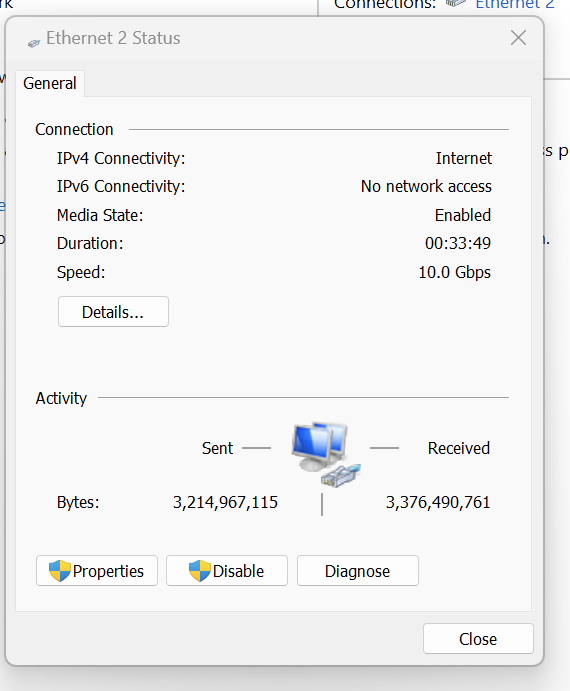
Hi all, Need some help. Ive been using 10Gbe since previous version. Its been a while i notice that during copy files i only get to 100MB and sometime drop below 40MB and rarely goes up as previous usually can saturate until my SSD speed which is around 350-400MB. I did iperf and notice that both site transfer only cap at 2.5Gbe and I'm wonder why and how to resolve this issue? Under unraid i can see the Lan connection is 10Gbe same with my Windows 11 Lan connection show 10Gbe. ts-p500-diagnostics-20230517-2004.zip
-
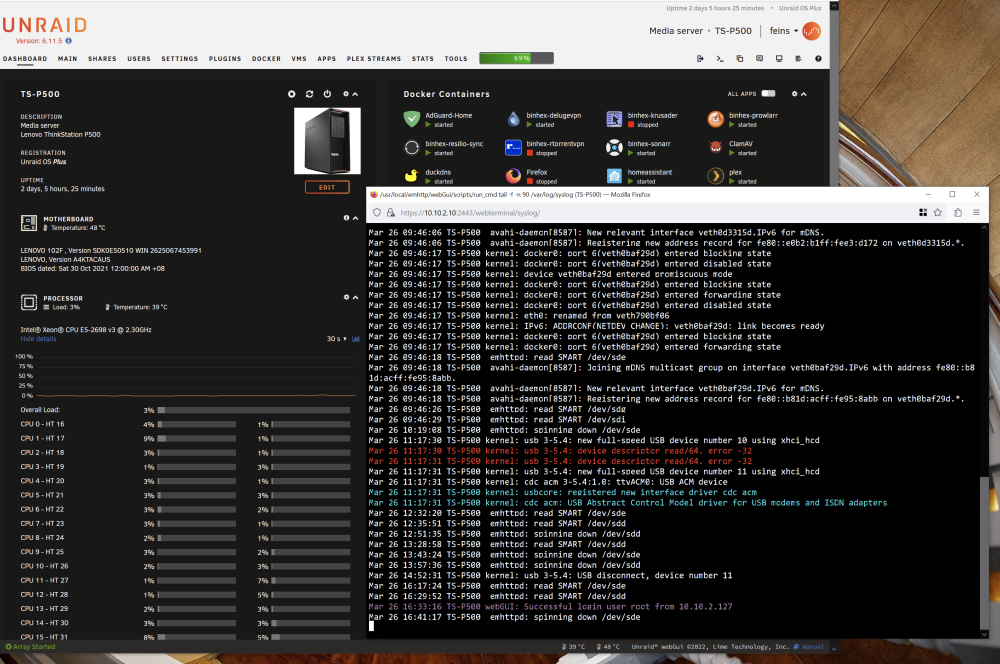
That's funny, Before this ive rebooted the Server before posting the Syslog where I notice some of my CPU are at 100% and the server are not responding and very lagging. Today i just check on the syslog again and notice all the error are no more. text error warn system array login Mar 25 20:12:58 TS-P500 avahi-daemon[8587]: Registering new address record for fe80::dcbf:67ff:fe13:3570 on vethb94c914.*. Mar 25 20:13:03 TS-P500 kernel: docker0: port 5(vethb94c914) entered disabled state Mar 25 20:13:03 TS-P500 kernel: vethe26bc6e: renamed from eth0 Mar 25 20:13:03 TS-P500 avahi-daemon[8587]: Interface vethb94c914.IPv6 no longer relevant for mDNS. Mar 25 20:13:03 TS-P500 avahi-daemon[8587]: Leaving mDNS multicast group on interface vethb94c914.IPv6 with address fe80::dcbf:67ff:fe13:3570. Mar 25 20:13:03 TS-P500 kernel: docker0: port 5(vethb94c914) entered disabled state Mar 25 20:13:03 TS-P500 kernel: device vethb94c914 left promiscuous mode Mar 25 20:13:03 TS-P500 kernel: docker0: port 5(vethb94c914) entered disabled state Mar 25 20:13:03 TS-P500 avahi-daemon[8587]: Withdrawing address record for fe80::dcbf:67ff:fe13:3570 on vethb94c914. Mar 25 22:22:19 TS-P500 webGUI: Successful login user root from 10.10.2.127 Mar 25 22:32:02 TS-P500 emhttpd: read SMART /dev/sde Mar 25 22:34:23 TS-P500 root: plugin: running: anonymous Mar 25 22:34:23 TS-P500 root: plugin: creating: /boot/config/plugins/dynamix.file.manager/dynamix.file.manager.txz - downloading from URL https://raw.githubusercontent.com/bergware/dynamix/master/archive/dynamix.file.manager.txz Mar 25 22:34:27 TS-P500 root: plugin: checking: /boot/config/plugins/dynamix.file.manager/dynamix.file.manager.txz - MD5 Mar 25 22:34:27 TS-P500 root: plugin: running: /boot/config/plugins/dynamix.file.manager/dynamix.file.manager.txz Mar 25 22:34:28 TS-P500 root: plugin: running: anonymous Mar 25 22:34:30 TS-P500 flash_backup: adding task: /usr/local/emhttp/plugins/dynamix.my.servers/scripts/UpdateFlashBackup update Mar 25 22:34:34 TS-P500 root: plugin: dynamix.file.manager.plg updated Mar 25 22:55:52 TS-P500 emhttpd: read SMART /dev/sdd Mar 25 23:13:32 TS-P500 emhttpd: spinning down /dev/sdd Mar 26 00:00:01 TS-P500 Plugin Auto Update: Checking for available plugin updates Mar 26 00:01:37 TS-P500 Plugin Auto Update: Community Applications Plugin Auto Update finished Mar 26 00:07:50 TS-P500 emhttpd: spinning down /dev/sde Mar 26 02:03:58 TS-P500 emhttpd: read SMART /dev/sdg Mar 26 02:04:09 TS-P500 emhttpd: read SMART /dev/sdf Mar 26 02:14:16 TS-P500 emhttpd: read SMART /dev/sde Mar 26 02:19:05 TS-P500 emhttpd: spinning down /dev/sdg Mar 26 02:20:18 TS-P500 emhttpd: spinning down /dev/sdf Mar 26 02:29:29 TS-P500 emhttpd: spinning down /dev/sde Mar 26 03:19:29 TS-P500 emhttpd: read SMART /dev/sde Mar 26 03:34:40 TS-P500 emhttpd: spinning down /dev/sde Mar 26 03:40:16 TS-P500 crond[1725]: exit status 1 from user root /usr/local/sbin/mover &> /dev/null Mar 26 04:40:05 TS-P500 apcupsd[7683]: apcupsd exiting, signal 15 Mar 26 04:40:05 TS-P500 apcupsd[7683]: apcupsd shutdown succeeded Mar 26 04:40:07 TS-P500 apcupsd[29382]: apcupsd 3.14.14 (31 May 2016) slackware startup succeeded Mar 26 04:40:07 TS-P500 apcupsd[29382]: NIS server startup succeeded Mar 26 05:37:21 TS-P500 emhttpd: read SMART /dev/sde Mar 26 05:37:45 TS-P500 emhttpd: read SMART /dev/sdi Mar 26 05:54:50 TS-P500 emhttpd: spinning down /dev/sde Mar 26 05:54:50 TS-P500 emhttpd: spinning down /dev/sdi Mar 26 06:00:01 TS-P500 Docker Auto Update: Community Applications Docker Autoupdate running Mar 26 06:00:01 TS-P500 Docker Auto Update: Checking for available updates Mar 26 06:04:35 TS-P500 Docker Auto Update: No updates will be installed Mar 26 06:32:03 TS-P500 nginx: 2023/03/26 06:32:03 [crit] 7889#7889: *381228 SSL_do_handshake() failed (SSL: error:141CF06C:SSL routines:tls_parse_ctos_key_share:bad key share) while SSL handshaking, client: 106.75.223.209, server: 0.0.0.0:2443 Mar 26 09:39:50 TS-P500 webGUI: Successful login user root from 10.10.2.127 Mar 26 09:46:04 TS-P500 kernel: docker0: port 5(veth0d3315d) entered blocking state Mar 26 09:46:04 TS-P500 kernel: docker0: port 5(veth0d3315d) entered disabled state Mar 26 09:46:04 TS-P500 kernel: device veth0d3315d entered promiscuous mode Mar 26 09:46:05 TS-P500 kernel: eth0: renamed from vethbe929c2 Mar 26 09:46:05 TS-P500 kernel: IPv6: ADDRCONF(NETDEV_CHANGE): veth0d3315d: link becomes ready Mar 26 09:46:05 TS-P500 kernel: docker0: port 5(veth0d3315d) entered blocking state Mar 26 09:46:05 TS-P500 kernel: docker0: port 5(veth0d3315d) entered forwarding state Mar 26 09:46:06 TS-P500 avahi-daemon[8587]: Joining mDNS multicast group on interface veth0d3315d.IPv6 with address fe80::e0b2:b1ff:fee3:d172. Mar 26 09:46:06 TS-P500 avahi-daemon[8587]: New relevant interface veth0d3315d.IPv6 for mDNS. Mar 26 09:46:06 TS-P500 avahi-daemon[8587]: Registering new address record for fe80::e0b2:b1ff:fee3:d172 on veth0d3315d.*. Mar 26 09:46:17 TS-P500 kernel: docker0: port 6(veth0baf29d) entered blocking state Mar 26 09:46:17 TS-P500 kernel: docker0: port 6(veth0baf29d) entered disabled state Mar 26 09:46:17 TS-P500 kernel: device veth0baf29d entered promiscuous mode Mar 26 09:46:17 TS-P500 kernel: docker0: port 6(veth0baf29d) entered blocking state Mar 26 09:46:17 TS-P500 kernel: docker0: port 6(veth0baf29d) entered forwarding state Mar 26 09:46:17 TS-P500 kernel: docker0: port 6(veth0baf29d) entered disabled state Mar 26 09:46:17 TS-P500 kernel: eth0: renamed from veth790bf06 Mar 26 09:46:17 TS-P500 kernel: IPv6: ADDRCONF(NETDEV_CHANGE): veth0baf29d: link becomes ready Mar 26 09:46:17 TS-P500 kernel: docker0: port 6(veth0baf29d) entered blocking state Mar 26 09:46:17 TS-P500 kernel: docker0: port 6(veth0baf29d) entered forwarding state Mar 26 09:46:18 TS-P500 emhttpd: read SMART /dev/sde Mar 26 09:46:18 TS-P500 avahi-daemon[8587]: Joining mDNS multicast group on interface veth0baf29d.IPv6 with address fe80::b81d:acff:fe95:8abb. Mar 26 09:46:18 TS-P500 avahi-daemon[8587]: New relevant interface veth0baf29d.IPv6 for mDNS. Mar 26 09:46:18 TS-P500 avahi-daemon[8587]: Registering new address record for fe80::b81d:acff:fe95:8abb on veth0baf29d.*. Mar 26 09:46:26 TS-P500 emhttpd: read SMART /dev/sdg Mar 26 09:46:29 TS-P500 emhttpd: read SMART /dev/sdi Mar 26 10:19:08 TS-P500 emhttpd: spinning down /dev/sde Mar 26 11:17:30 TS-P500 kernel: usb 3-5.4: new full-speed USB device number 10 using xhci_hcd Mar 26 11:17:30 TS-P500 kernel: usb 3-5.4: device descriptor read/64, error -32 Mar 26 11:17:31 TS-P500 kernel: usb 3-5.4: device descriptor read/64, error -32 Mar 26 11:17:31 TS-P500 kernel: usb 3-5.4: new full-speed USB device number 11 using xhci_hcd Mar 26 11:17:31 TS-P500 kernel: cdc_acm 3-5.4:1.0: ttyACM0: USB ACM device Mar 26 11:17:31 TS-P500 kernel: usbcore: registered new interface driver cdc_acm Mar 26 11:17:31 TS-P500 kernel: cdc_acm: USB Abstract Control Model driver for USB modems and ISDN adapters Mar 26 12:32:20 TS-P500 emhttpd: read SMART /dev/sde Mar 26 12:35:51 TS-P500 emhttpd: read SMART /dev/sdd Mar 26 12:51:35 TS-P500 emhttpd: spinning down /dev/sdd Mar 26 13:28:58 TS-P500 emhttpd: read SMART /dev/sdd Mar 26 13:43:24 TS-P500 emhttpd: spinning down /dev/sde Mar 26 13:57:36 TS-P500 emhttpd: spinning down /dev/sdd Mar 26 14:52:31 TS-P500 kernel: usb 3-5.4: USB disconnect, device number 11 Mar 26 16:17:24 TS-P500 emhttpd: read SMART /dev/sde Mar 26 16:29:52 TS-P500 emhttpd: read SMART /dev/sdd Mar 26 16:33:16 TS-P500 webGUI: Successful login user root from 10.10.2.127 Mar 26 16:41:17 TS-P500 emhttpd: spinning down /dev/sde Mar 26 16:45:01 TS-P500 emhttpd: spinning down /dev/sdd
-
Here's the output from crontab -l root@TS-P500:~# crontab -l # If you don't want the output of a cron job mailed to you, you have to direct # any output to /dev/null. We'll do this here since these jobs should run # properly on a newly installed system. If a script fails, run-parts will # mail a notice to root. # # Run the hourly, daily, weekly, and monthly cron jobs. # Jobs that need different timing may be entered into the crontab as before, # but most really don't need greater granularity than this. If the exact # times of the hourly, daily, weekly, and monthly cron jobs do not suit your # needs, feel free to adjust them. # # Run hourly cron jobs at 47 minutes after the hour: 47 * * * * /usr/bin/run-parts /etc/cron.hourly 1> /dev/null # # Run daily cron jobs at 4:40 every day: 40 4 * * * /usr/bin/run-parts /etc/cron.daily 1> /dev/null # # Run weekly cron jobs at 4:30 on the first day of the week: 30 4 * * 0 /usr/bin/run-parts /etc/cron.weekly 1> /dev/null # # Run monthly cron jobs at 4:20 on the first day of the month: 20 4 1 * * /usr/bin/run-parts /etc/cron.monthly 1> /dev/null 0 3 * * 1 /usr/local/emhttp/plugins/ca.backup2/scripts/backup.php &>/dev/null 2>&1 28 8 * * * /usr/local/emhttp/plugins/nvidia-driver/include/update-check.sh &>/dev/null 2>&1 root@TS-P500:~# and here's the output for cat /etc/cron.d/root root@TS-P500:~# cat /etc/cron.d/root # Generated docker monitoring schedule: 10 0 * * * /usr/local/emhttp/plugins/dynamix.docker.manager/scripts/dockerupdate check &> /dev/null # Generated system monitoring schedule: */1 * * * * /usr/local/emhttp/plugins/dynamix/scripts/monitor &> /dev/null # Generated mover schedule: 40 3 * * * /usr/local/sbin/mover &> /dev/null # Generated parity check schedule: 0 0 1 * * /usr/local/sbin/mdcmd check NOCORRECT &> /dev/null # Generated plugins version check schedule: 10 0 * * * /usr/local/emhttp/plugins/dynamix.plugin.manager/scripts/plugincheck &> /dev/null # Generated Unraid OS update check schedule: 11 0 * * * /usr/local/emhttp/plugins/dynamix.plugin.manager/scripts/unraidcheck &> /dev/null # Generated cron settings for docker autoupdates 0 6 * * * /usr/local/emhttp/plugins/ca.update.applications/scripts/updateDocker.php >/dev/null 2>&1 # Generated cron settings for plugin autoupdates 0 0 * * * /usr/local/emhttp/plugins/ca.update.applications/scripts/updateApplications.php >/dev/null 2>&1 # CRON for CA background scanning of applications 50 * * * * php /usr/local/emhttp/plugins/community.applications/scripts/notices.php > /dev/null 2>&1 # Generated file integrity check schedule: 0 3 * * 2 bash /boot/config/plugins/dynamix.file.integrity/integrity-check.sh &> /dev/null # Generated system data collection schedule: */1 * * * * /usr/local/emhttp/plugins/dynamix.system.stats/scripts/sa1 1 1 &> /dev/null root@TS-P500:~#
-
I didn't add any Custom (cron expression) at all and here is the screenshot of my CA Update Application plugin.
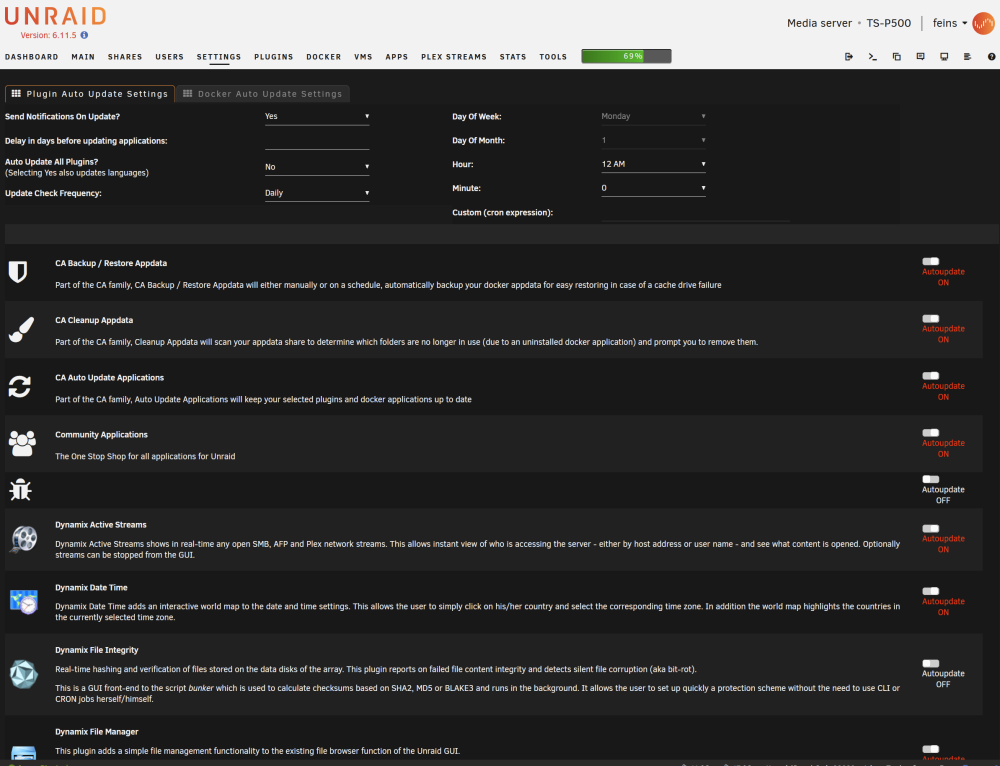
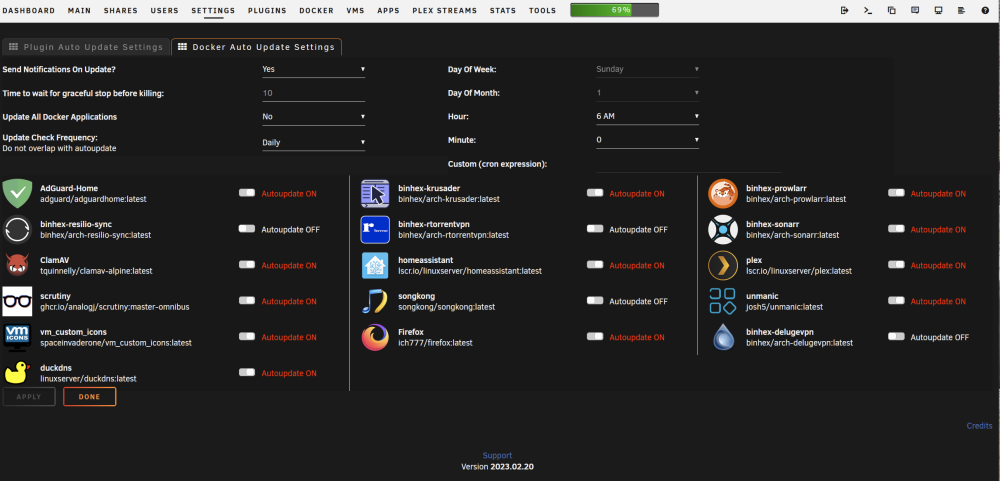
-
Dear Community recently my server start to behave funny like crash or all CPU Processor at 100% until i need to do a force restart and so on. What i notice that after reboot i notice such output from the Syslog terminal. Mar 21 01:20:08 TS-P500 root: plugin: setting: /tmp/unassigned.devices/add-smb - mode to 0770 Mar 21 01:20:08 TS-P500 root: plugin: running: anonymous Mar 21 01:20:08 TS-P500 root: plugin: unassigned.devices.plg updated Mar 21 01:20:32 TS-P500 flash_backup: adding task: /usr/local/emhttp/plugins/dynamix.my.servers/scripts/UpdateFlashBackup update Mar 21 01:21:01 TS-P500 crond[1737]: failed parsing crontab for user root: Invalid frequency setting of /usr/local/emhttp/plugins/ca.update.applications/scripts/updateApplications.php >/dev/null 2>&1 Mar 21 01:39:32 TS-P500 flash_backup: adding task: /usr/local/emhttp/plugins/dynamix.my.servers/scripts/UpdateFlashBackup update Mar 21 01:42:01 TS-P500 crond[1737]: failed parsing crontab for user root: Invalid frequency setting of /usr/local/emhttp/plugins/ca.update.applications/scripts/updateApplications.php >/dev/null 2>&1 Mar 21 02:02:11 TS-P500 crond[1737]: failed parsing crontab for user root: Invalid frequency setting of /usr/local/emhttp/plugins/ca.update.applications/scripts/updateApplications.php >/dev/null 2>&1 Mar 21 02:19:34 TS-P500 flash_backup: adding task: /usr/local/emhttp/plugins/dynamix.my.servers/scripts/UpdateFlashBackup update Mar 21 02:23:11 TS-P500 crond[1737]: failed parsing crontab for user root: Invalid frequency setting of /usr/local/emhttp/plugins/ca.update.applications/scripts/updateApplications.php >/dev/null 2>&1 Mar 21 02:33:35 TS-P500 flash_backup: adding task: /usr/local/emhttp/plugins/dynamix.my.servers/scripts/UpdateFlashBackup update Mar 21 02:35:35 TS-P500 flash_backup: adding task: /usr/local/emhttp/plugins/dynamix.my.servers/scripts/UpdateFlashBackup update Mar 21 02:45:01 TS-P500 crond[1737]: failed parsing crontab for user root: Invalid frequency setting of /usr/local/emhttp/plugins/ca.update.applications/scripts/updateApplications.php >/dev/null 2>&1 Mar 21 03:05:11 TS-P500 crond[1737]: failed parsing crontab for user root: Invalid frequency setting of /usr/local/emhttp/plugins/ca.update.applications/scripts/updateApplications.php >/dev/null 2>&1 Mar 21 03:15:38 TS-P500 emhttpd: spinning down /dev/sdg Mar 21 03:23:42 TS-P500 emhttpd: read SMART /dev/sdg Mar 21 03:26:11 TS-P500 crond[1737]: failed parsing crontab for user root: Invalid frequency setting of /usr/local/emhttp/plugins/ca.update.applications/scripts/updateApplications.php >/dev/null 2>&1 Mar 21 04:39:54 TS-P500 emhttpd: spinning down /dev/sdg Mar 21 04:44:12 TS-P500 emhttpd: read SMART /dev/sdg Mar 21 04:45:23 TS-P500 crond[1737]: exit status 1 from user root /usr/local/sbin/mover &> /dev/null Mar 21 04:46:01 TS-P500 crond[1737]: failed parsing crontab for user root: Invalid frequency setting of /usr/local/emhttp/plugins/ca.update.applications/scripts/updateApplications.php >/dev/null 2>&1 Mar 21 04:59:18 TS-P500 emhttpd: spinning down /dev/sdg Mar 21 05:04:23 TS-P500 emhttpd: read SMART /dev/sdg Mar 21 05:06:11 TS-P500 crond[1737]: failed parsing crontab for user root: Invalid frequency setting of /usr/local/emhttp/plugins/ca.update.applications/scripts/updateApplications.php >/dev/null 2>&1 Mar 21 05:19:30 TS-P500 emhttpd: spinning down /dev/sdg Mar 21 05:24:40 TS-P500 emhttpd: read SMART /dev/sdg Mar 21 05:27:11 TS-P500 crond[1737]: failed parsing crontab for user root: Invalid frequency setting of /usr/local/emhttp/plugins/ca.update.applications/scripts/updateApplications.php >/dev/null 2>&1 Mar 21 05:41:38 TS-P500 emhttpd: spinning down /dev/sdg Mar 21 05:43:45 TS-P500 emhttpd: read SMART /dev/sdg Mar 21 05:48:01 TS-P500 crond[1737]: failed parsing crontab for user root: Invalid frequency setting of /usr/local/emhttp/plugins/ca.update.applications/scripts/updateApplications.php >/dev/null 2>&1 Mar 21 05:58:52 TS-P500 emhttpd: spinning down /dev/sdg Mar 21 06:00:01 TS-P500 Docker Auto Update: Community Applications Docker Autoupdate running Mar 21 06:00:01 TS-P500 Docker Auto Update: Checking for available updates Mar 21 06:04:37 TS-P500 Docker Auto Update: No updates will be installed Mar 21 06:04:37 TS-P500 crond[1737]: failed parsing crontab for user root: Invalid frequency setting of /usr/local/emhttp/plugins/ca.update.applications/scripts/updateApplications.php >/dev/null 2>&1 Mar 21 06:05:13 TS-P500 emhttpd: read SMART /dev/sdg Mar 21 06:20:20 TS-P500 emhttpd: spinning down /dev/sdg Mar 21 06:25:11 TS-P500 crond[1737]: failed parsing crontab for user root: Invalid frequency setting of /usr/local/emhttp/plugins/ca.update.applications/scripts/updateApplications.php >/dev/null 2>&1 Mar 21 06:27:41 TS-P500 emhttpd: read SMART /dev/sdg Mar 21 06:42:47 TS-P500 emhttpd: spinning down /dev/sdg Mar 21 06:46:11 TS-P500 crond[1737]: failed parsing crontab for user root: Invalid frequency setting of /usr/local/emhttp/plugins/ca.update.applications/scripts/updateApplications.php >/dev/null 2>&1 Mar 21 06:49:35 TS-P500 emhttpd: read SMART /dev/sdg Mar 21 07:04:42 TS-P500 emhttpd: spinning down /dev/sdg Mar 21 07:07:01 TS-P500 crond[1737]: failed parsing crontab for user root: Invalid frequency setting of /usr/local/emhttp/plugins/ca.update.applications/scripts/updateApplications.php >/dev/null 2>&1 Mar 21 07:11:59 TS-P500 emhttpd: read SMART /dev/sdg Mar 21 07:28:01 TS-P500 crond[1737]: failed parsing crontab for user root: Invalid frequency setting of /usr/local/emhttp/plugins/ca.update.applications/scripts/updateApplications.php >/dev/null 2>&1 Mar 21 07:29:25 TS-P500 emhttpd: spinning down /dev/sdg Mar 21 07:35:54 TS-P500 emhttpd: read SMART /dev/sdg Mar 21 07:48:11 TS-P500 crond[1737]: failed parsing crontab for user root: Invalid frequency setting of /usr/local/emhttp/plugins/ca.update.applications/scripts/updateApplications.php >/dev/null 2>&1 Mar 21 07:51:01 TS-P500 emhttpd: spinning down /dev/sdg Mar 21 07:58:40 TS-P500 emhttpd: read SMART /dev/sdg Mar 21 08:09:01 TS-P500 crond[1737]: failed parsing crontab for user root: Invalid frequency setting of /usr/local/emhttp/plugins/ca.update.applications/scripts/updateApplications.php >/dev/null 2>&1 Mar 21 08:13:45 TS-P500 emhttpd: spinning down /dev/sdg Mar 21 08:16:09 TS-P500 emhttpd: read SMART /dev/sdg Mar 21 08:30:01 TS-P500 crond[1737]: failed parsing crontab for user root: Invalid frequency setting of /usr/local/emhttp/plugins/ca.update.applications/scripts/updateApplications.php >/dev/null 2>&1 Mar 21 08:42:56 TS-P500 emhttpd: spinning down /dev/sdg Mar 21 08:51:01 TS-P500 crond[1737]: failed parsing crontab for user root: Invalid frequency setting of /usr/local/emhttp/plugins/ca.update.applications/scripts/updateApplications.php >/dev/null 2>&1 Mar 21 09:06:03 TS-P500 emhttpd: read SMART /dev/sdg Mar 21 09:11:11 TS-P500 crond[1737]: failed parsing crontab for user root: Invalid frequency setting of /usr/local/emhttp/plugins/ca.update.applications/scripts/updateApplications.php >/dev/null 2>&1 Mar 21 09:32:11 TS-P500 crond[1737]: failed parsing crontab for user root: Invalid frequency setting of /usr/local/emhttp/plugins/ca.update.applications/scripts/updateApplications.php >/dev/null 2>&1 Mar 21 09:53:01 TS-P500 crond[1737]: failed parsing crontab for user root: Invalid frequency setting of /usr/local/emhttp/plugins/ca.update.applications/scripts/updateApplications.php >/dev/null 2>&1 Mar 21 10:14:01 TS-P500 crond[1737]: failed parsing crontab for user root: Invalid frequency setting of /usr/local/emhttp/plugins/ca.update.applications/scripts/updateApplications.php >/dev/null 2>&1 Mar 21 10:35:01 TS-P500 crond[1737]: failed parsing crontab for user root: Invalid frequency setting of /usr/local/emhttp/plugins/ca.update.applications/scripts/updateApplications.php >/dev/null 2>&1 Mar 21 10:50:17 TS-P500 emhttpd: spinning down /dev/sdg Mar 21 10:56:01 TS-P500 crond[1737]: failed parsing crontab for user root: Invalid frequency setting of /usr/local/emhttp/plugins/ca.update.applications/scripts/updateApplications.php >/dev/null 2>&1 Mar 21 11:16:11 TS-P500 crond[1737]: failed parsing crontab for user root: Invalid frequency setting of /usr/local/emhttp/plugins/ca.update.applications/scripts/updateApplications.php >/dev/null 2>&1 Mar 21 11:32:48 TS-P500 webGUI: Successful login user root from 10.10.2.127 Mar 21 11:33:24 TS-P500 kernel: mdcmd (37): set md_num_stripes 1280 Mar 21 11:33:24 TS-P500 kernel: mdcmd (38): set md_queue_limit 80 Mar 21 11:33:24 TS-P500 kernel: mdcmd (39): set md_sync_limit 5 Mar 21 11:33:24 TS-P500 kernel: mdcmd (40): set md_write_method Mar 21 11:34:04 TS-P500 flash_backup: adding task: /usr/local/emhttp/plugins/dynamix.my.servers/scripts/UpdateFlashBackup update Mar 21 11:34:27 TS-P500 kernel: md: sync done. time=38009sec Mar 21 11:34:27 TS-P500 kernel: md: recovery thread: exit status: 0 Mar 21 11:35:04 TS-P500 flash_backup: adding task: /usr/local/emhttp/plugins/dynamix.my.servers/scripts/UpdateFlashBackup update Mar 21 11:37:40 TS-P500 emhttpd: read SMART /dev/sdg Mar 21 11:38:01 TS-P500 crond[1737]: failed parsing crontab for user root: Invalid frequency setting of /usr/local/emhttp/plugins/ca.update.applications/scripts/updateApplications.php >/dev/null 2>&1 Mar 21 11:49:29 TS-P500 emhttpd: spinning down /dev/sdd Mar 21 11:52:46 TS-P500 emhttpd: spinning down /dev/sdg Mar 21 11:58:01 TS-P500 crond[1737]: failed parsing crontab for user root: Invalid frequency setting of /usr/local/emhttp/plugins/ca.update.applications/scripts/updateApplications.php >/dev/null 2>&1 Mar 21 11:59:05 TS-P500 flash_backup: adding task: /usr/local/emhttp/plugins/dynamix.my.servers/scripts/UpdateFlashBackup update Mar 21 12:00:05 TS-P500 flash_backup: adding task: /usr/local/emhttp/plugins/dynamix.my.servers/scripts/UpdateFlashBackup update Mar 21 12:01:05 TS-P500 flash_backup: adding task: /usr/local/emhttp/plugins/dynamix.my.servers/scripts/UpdateFlashBackup update Mar 21 12:02:05 TS-P500 flash_backup: adding task: /usr/local/emhttp/plugins/dynamix.my.servers/scripts/UpdateFlashBackup update Mar 21 12:03:06 TS-P500 flash_backup: adding task: /usr/local/emhttp/plugins/dynamix.my.servers/scripts/UpdateFlashBackup update Mar 21 12:05:06 TS-P500 flash_backup: adding task: /usr/local/emhttp/plugins/dynamix.my.servers/scripts/UpdateFlashBackup update Mar 21 12:06:06 TS-P500 flash_backup: adding task: /usr/local/emhttp/plugins/dynamix.my.servers/scripts/UpdateFlashBackup update Mar 21 12:11:06 TS-P500 flash_backup: adding task: /usr/local/emhttp/plugins/dynamix.my.servers/scripts/UpdateFlashBackup update Mar 21 12:12:03 TS-P500 emhttpd: read SMART /dev/sdd Mar 21 12:12:06 TS-P500 flash_backup: adding task: /usr/local/emhttp/plugins/dynamix.my.servers/scripts/UpdateFlashBackup update ts-p500-diagnostics-20230321-1211.zip
-
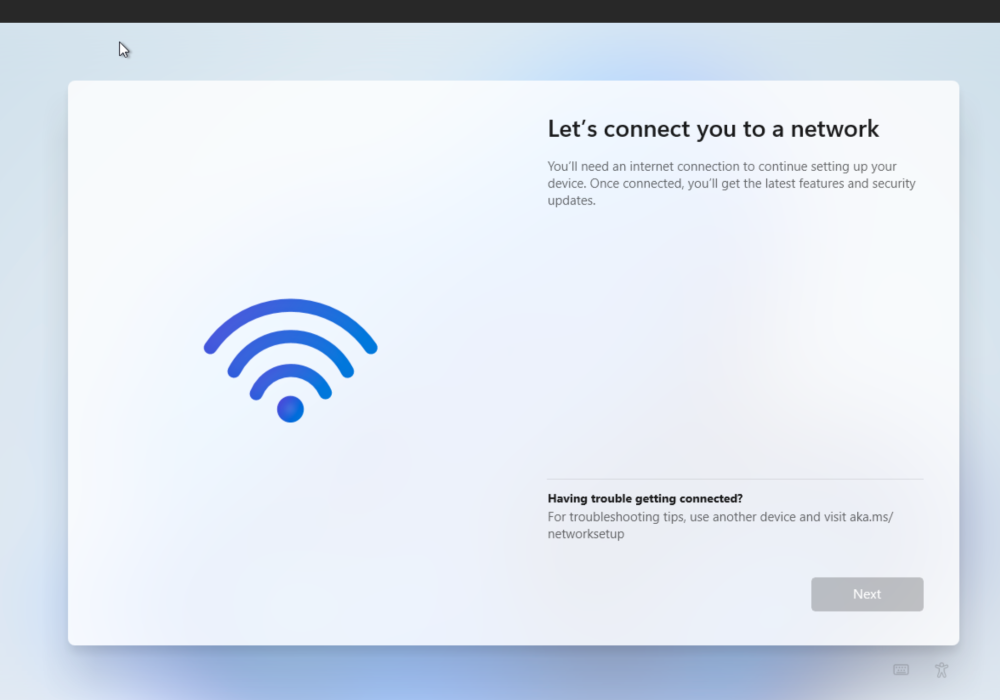
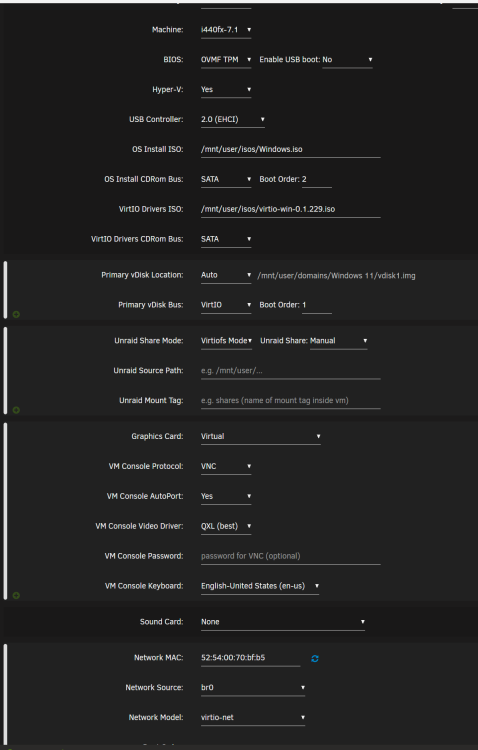
I'm trying to play around VM trying to install Win 11. I manage to get the installation started following Space Invader's video. But once i got to this screen I'm stick as its waiting for internet access to progress forward. How do i manage to get to the next option?
-
Oooh. means that would be an issue as i only had one subnet throughout my network.
-
Thanks i'll remove the 1st line at leave the other for now. How bout the error Multiple NICs on the same IPv4 networketh0 and eth1 both have IP addresses on the 10.10.2.0 network, should i just ignore them? Another question since both Ethernet port 0 and 1 are connected to the switch and should i enable bridging for both port or just eth0 since all the docker and VM are point to Eth0?
-
Do i still need to add the below config in SMB Extra Configuration? server multi channel support = yes aio read size = 1 aio write size = 1 I received this error Multiple NICs on the same IPv4 networketh0 and eth1 both have IP addresses on the 10.10.2.0 network. This is rarely a valid configuration in Fix Common Problem.
-
I would like to know how do i manage to enable SMB Multichannel. I had a 4Port Intel Pro/1000PT and onboard Intel Gigabit lan Port. I had multiple Lan connection to the Server using link aggregation but as i understand that Unraid 6.11.5 already support SMB Multichannel and would like to know how do i enable it.
-
Thanks for the update. It resolved the issue.
-
Hi JorgeB i've updated the gmail SNMP password again and the error for the SNMP resolved. Just the server was not responding justnow and even i did a SSH and perform powerdown -r the server wont power down also. I perform a force shutdown and just reboot the server again. Now everything was runing as it is all docker the array and even the dashboard all up as usual and no error whatever. I just dont understand what had happen before that. Ths issue started 2 days and suddently it just went away just like that.
-
Few day i've receive read error from one of my HDD and i've replace and rebuild the drive sucessfully. But after that i notice that the array not start after rebuild so i reboot the server and i receive email from snmp prompt there error. The array keep unable to start after that. and i notice that there is and Error at the bottom left status Array Stopped. Stale Configuration. I've notice there is an update from 6.11.0 to 6.11.1 and hope that will fix the issue and after updated the server from 6.11.0 to 6.11.1 and seems the Array start but im still getting snmp error after the server rebooted. This is the 4 email i keep receiving each time after the server rebooted. I try to generate the Diagnostice file but fail to finish generate so i capture the Syslog as attach below. Server Name: TS-P500 IP Address: 10.10.2.10 Date/Time: Oct 7 12:10:42 BUG: unable to handle page fault for address: ffffc90008012200 Server Name: TS-P500 IP Address: 10.10.2.10 Date/Time: Oct 7 12:10:42 #PF: supervisor write access in kernel mode Server Name: TS-P500 IP Address: 10.10.2.10 Date/Time: Oct 7 12:10:42 #PF: error_code(0x0002) - not-present page Server Name: TS-P500 IP Address: 10.10.2.10 Date/Time: Oct 7 12:10:48 BUG: unable to handle page fault for address: ffffc900028cfb48 Server Name: TS-P500 IP Address: 10.10.2.10 Date/Time: Oct 7 12:10:48 #PF: supervisor read access in kernel mode Server Name: TS-P500 IP Address: 10.10.2.10 Date/Time: Oct 7 12:10:48 #PF: error_code(0x0000) - not-present page text error warn system array login Oct 7 12:10:48 TS-P500 kernel: ? uvm_global_init+0x10d/0x770 [nvidia_uvm] Oct 7 12:10:48 TS-P500 kernel: ? uvm_init+0xe/0x2a3 [nvidia_uvm] Oct 7 12:10:48 TS-P500 kernel: ? uvm_init_entry+0x82/0x1000 [nvidia_uvm] Oct 7 12:10:48 TS-P500 kernel: ? slab_post_alloc_hook+0x4d/0x15e Oct 7 12:10:48 TS-P500 kernel: ? 0xffffffffa06b7000 Oct 7 12:10:48 TS-P500 kernel: ? do_one_initcall+0x85/0x196 Oct 7 12:10:48 TS-P500 kernel: ? do_init_module+0x22/0x1d4 Oct 7 12:10:48 TS-P500 kernel: ? kmem_cache_alloc_trace+0x11e/0x149 Oct 7 12:10:48 TS-P500 kernel: ? do_init_module+0x4b/0x1d4 Oct 7 12:10:48 TS-P500 kernel: ? __do_sys_finit_module+0x9e/0xc8 Oct 7 12:10:48 TS-P500 kernel: ? do_syscall_64+0x6b/0x81 Oct 7 12:10:48 TS-P500 kernel: ? entry_SYSCALL_64_after_hwframe+0x63/0xcd Oct 7 12:10:48 TS-P500 kernel: </TASK> Oct 7 12:10:48 TS-P500 kernel: Modules linked in: nvidia_uvm(PO+) xt_CHECKSUM ipt_REJECT nf_reject_ipv4 ip6table_mangle ip6table_nat iptable_mangle vhost_net tun vhost vhost_iotlb tap veth xt_nat xt_tcpudp xt_conntrack xt_MASQUERADE nf_conntrack_netlink nfnetlink xfrm_user xfrm_algo xt_addrtype iptable_nat nf_nat nf_conntrack nf_defrag_ipv6 nf_defrag_ipv4 br_netfilter xfs nfsd auth_rpcgss oid_registry lockd grace sunrpc md_mod iscsi_tcp libiscsi_tcp libiscsi scsi_transport_iscsi lm75 regmap_i2c efivarfs ip6table_filter ip6_tables iptable_filter ip_tables x_tables af_packet 8021q garp mrp bridge stp llc bonding tls ipv6 e1000e nvidia_drm(PO) nvidia_modeset(PO) nvidia(PO) wmi_bmof intel_wmi_thunderbolt drm_kms_helper drm i2c_i801 backlight i2c_smbus x86_pkg_temp_thermal intel_powerclamp coretemp kvm_intel kvm crct10dif_pclmul crc32_pclmul crc32c_intel ghash_clmulni_intel aesni_intel crypto_simd cryptd rapl intel_cstate intel_uncore mpt3sas i2c_core syscopyarea raid_class sysfillrect tpm_tis tpm_tis_core Oct 7 12:10:48 TS-P500 kernel: sysimgblt ahci scsi_transport_sas fb_sys_fops tpm libahci wmi button unix [last unloaded: e1000e] Oct 7 12:10:48 TS-P500 kernel: CR2: ffffc900028cfb48 Oct 7 12:10:48 TS-P500 kernel: ---[ end trace 0000000000000000 ]--- Oct 7 12:10:48 TS-P500 kernel: RIP: 0010:os_mem_copy_custom+0x2c/0x5f [nvidia] Oct 7 12:10:48 TS-P500 kernel: Code: 44 00 00 83 fa 7f 49 89 f8 48 89 f9 76 0b 48 89 f8 48 09 f0 83 e0 03 74 06 89 d2 31 c0 eb 24 89 d1 83 e2 03 c1 e9 02 8b 3c 86 <41> 89 3c 80 48 ff c0 48 39 c8 75 f1 48 c1 e0 02 49 8d 0c 00 48 01 Oct 7 12:10:48 TS-P500 kernel: RSP: 0018:ffffc900028cf760 EFLAGS: 00010206 Oct 7 12:10:48 TS-P500 kernel: RAX: 0000000000000000 RBX: ffff8881d19fa0d8 RCX: 0000000000000200 Oct 7 12:10:48 TS-P500 kernel: RDX: 0000000000000000 RSI: ffff8881d3e2f008 RDI: 000000000000000c Oct 7 12:10:48 TS-P500 kernel: RBP: ffff8881d43f5be0 R08: ffffc90008012200 R09: 0000000000000000 Oct 7 12:10:48 TS-P500 kernel: R10: 0000000000000000 R11: ffff8881d50ce008 R12: 000000000000000c Oct 7 12:10:48 TS-P500 kernel: R13: ffff8881a895c008 R14: ffff8881d1168008 R15: ffff8881d3e2f010 Oct 7 12:10:48 TS-P500 kernel: FS: 000015304acfb740(0000) GS:ffff889fff600000(0000) knlGS:0000000000000000 Oct 7 12:10:48 TS-P500 kernel: CS: 0010 DS: 0000 ES: 0000 CR0: 0000000080050033 Oct 7 12:10:48 TS-P500 kernel: CR2: ffffc900028cfb48 CR3: 00000001d14d2006 CR4: 00000000001706f0 Oct 7 12:10:48 TS-P500 kernel: note: modprobe[10898] exited with preempt_count 1 Oct 7 12:10:48 TS-P500 kernel: br0: port 2(vnet0) entered blocking state Oct 7 12:10:48 TS-P500 kernel: br0: port 2(vnet0) entered disabled state Oct 7 12:10:48 TS-P500 kernel: device vnet0 entered promiscuous mode Oct 7 12:10:48 TS-P500 kernel: br0: port 2(vnet0) entered blocking state Oct 7 12:10:48 TS-P500 kernel: br0: port 2(vnet0) entered forwarding state Oct 7 12:10:48 TS-P500 avahi-daemon[9090]: Joining mDNS multicast group on interface veth774d568.IPv6 with address fe80::1447:d6ff:fe8e:4a92. Oct 7 12:10:48 TS-P500 avahi-daemon[9090]: New relevant interface veth774d568.IPv6 for mDNS. Oct 7 12:10:48 TS-P500 avahi-daemon[9090]: Registering new address record for fe80::1447:d6ff:fe8e:4a92 on veth774d568.*. Oct 7 12:10:49 TS-P500 kernel: bond0: (slave eth0): speed changed to 0 on port 1 Oct 7 12:10:49 TS-P500 kernel: bond0: (slave eth0): link status definitely down, disabling slave Oct 7 12:10:49 TS-P500 avahi-daemon[9090]: Joining mDNS multicast group on interface vnet0.IPv6 with address fe80::fc54:ff:feb3:c2e1. Oct 7 12:10:49 TS-P500 avahi-daemon[9090]: New relevant interface vnet0.IPv6 for mDNS. Oct 7 12:10:49 TS-P500 avahi-daemon[9090]: Registering new address record for fe80::fc54:ff:feb3:c2e1 on vnet0.*. Oct 7 12:10:50 TS-P500 tips.and.tweaks: Tweaks Applied Oct 7 12:10:50 TS-P500 unassigned.devices: Mounting 'Auto Mount' Remote Shares... Oct 7 12:10:50 TS-P500 sudo: root : PWD=/ ; USER=root ; COMMAND=/bin/bash -c /usr/local/emhttp/plugins/unbalance/unbalance -port 6237 Oct 7 12:10:50 TS-P500 sudo: pam_unix(sudo:session): session opened for user root(uid=0) by (uid=0) Oct 7 12:10:52 TS-P500 kernel: e1000e 0000:00:19.0 eth0: NIC Link is Up 1000 Mbps Full Duplex, Flow Control: None Oct 7 12:10:52 TS-P500 kernel: bond0: (slave eth0): link status definitely up, 1000 Mbps full duplex Oct 7 12:11:01 TS-P500 sSMTP[11516]: Creating SSL connection to host Oct 7 12:11:02 TS-P500 sSMTP[11516]: SSL connection using TLS_AES_256_GCM_SHA384 Oct 7 12:11:02 TS-P500 nmbd[9049]: [2022/10/07 12:11:02.468373, 0] ../../source3/nmbd/nmbd_become_lmb.c:398(become_local_master_stage2) Oct 7 12:11:02 TS-P500 nmbd[9049]: ***** Oct 7 12:11:02 TS-P500 nmbd[9049]: Oct 7 12:11:02 TS-P500 nmbd[9049]: Samba name server TS-P500 is now a local master browser for workgroup WORKGROUP on subnet 10.10.2.10 Oct 7 12:11:02 TS-P500 nmbd[9049]: Oct 7 12:11:02 TS-P500 nmbd[9049]: ***** Oct 7 12:11:03 TS-P500 sSMTP[11516]: Authorization failed (535 5.7.8 https://support.google.com/mail/?p=BadCredentials i11-20020a170902cf0b00b00176e8f85147sm441536plg.83 - gsmtp) Oct 7 12:12:41 TS-P500 ntpd[1720]: kernel reports TIME_ERROR: 0x41: Clock Unsynchronized Oct 7 12:12:59 TS-P500 kernel: usb 4-5.1: new SuperSpeed USB device number 3 using xhci_hcd Oct 7 12:12:59 TS-P500 kernel: usb-storage 4-5.1:1.0: USB Mass Storage device detected Oct 7 12:12:59 TS-P500 kernel: scsi host10: usb-storage 4-5.1:1.0 Oct 7 12:13:00 TS-P500 kernel: scsi 10:0:0:0: Direct-Access TO Exter nal USB 3.0 0104 PQ: 0 ANSI: 6 Oct 7 12:13:00 TS-P500 kernel: sd 10:0:0:0: Attached scsi generic sg9 type 0 Oct 7 12:13:00 TS-P500 kernel: sd 10:0:0:0: [sdj] 976773168 512-byte logical blocks: (500 GB/466 GiB) Oct 7 12:13:00 TS-P500 kernel: sd 10:0:0:0: [sdj] Write Protect is off Oct 7 12:13:00 TS-P500 kernel: sd 10:0:0:0: [sdj] Mode Sense: 47 00 00 08 Oct 7 12:13:00 TS-P500 kernel: sd 10:0:0:0: [sdj] Write cache: enabled, read cache: enabled, doesn't support DPO or FUA Oct 7 12:13:00 TS-P500 kernel: sdj: sdj1 Oct 7 12:13:00 TS-P500 kernel: sd 10:0:0:0: [sdj] Attached SCSI disk Oct 7 12:13:01 TS-P500 unassigned.devices: Disk with ID 'TO_Exter_nal_USB_3.0_2015033100081-0:0 (sdj)' is not set to auto mount. Oct 7 12:16:12 TS-P500 nmbd[9049]: [2022/10/07 12:16:12.538742, 0] ../../source3/nmbd/nmbd_become_lmb.c:398(become_local_master_stage2) Oct 7 12:16:12 TS-P500 nmbd[9049]: ***** Oct 7 12:16:12 TS-P500 nmbd[9049]: Oct 7 12:16:12 TS-P500 nmbd[9049]: Samba name server TS-P500 is now a local master browser for workgroup WORKGROUP on subnet 192.168.122.1 Oct 7 12:16:12 TS-P500 nmbd[9049]: Oct 7 12:16:12 TS-P500 nmbd[9049]: ***** Oct 7 12:16:12 TS-P500 nmbd[9049]: [2022/10/07 12:16:12.538884, 0] ../../source3/nmbd/nmbd_become_lmb.c:398(become_local_master_stage2) Oct 7 12:16:12 TS-P500 nmbd[9049]: ***** Oct 7 12:16:12 TS-P500 nmbd[9049]: Oct 7 12:16:12 TS-P500 nmbd[9049]: Samba name server TS-P500 is now a local master browser for workgroup WORKGROUP on subnet 172.17.0.1 Oct 7 12:16:12 TS-P500 nmbd[9049]: Oct 7 12:16:12 TS-P500 nmbd[9049]: ***** Oct 7 12:20:00 TS-P500 root: Fix Common Problems Version 2022.09.26 Oct 7 12:22:23 TS-P500 root: Fix Common Problems: Warning: Complex bonding mode on eth0 ** Ignored Oct 7 12:22:24 TS-P500 root: Fix Common Problems: Warning: Share Download set to use pool cache_download, but files / folders exist on the cache pool Oct 7 12:22:24 TS-P500 sSMTP[32157]: Creating SSL connection to host Oct 7 12:22:25 TS-P500 sSMTP[32157]: SSL connection using TLS_AES_256_GCM_SHA384 Oct 7 12:22:26 TS-P500 sSMTP[32157]: Authorization failed (535 5.7.8 https://support.google.com/mail/?p=BadCredentials x24-20020aa79418000000b00537f16e25d3sm484447pfo.75 - gsmtp) Oct 7 12:32:57 TS-P500 emhttpd: TO_Exter_nal_USB_3.0_2015033100081-0:0 (sdj) 512 976773168 Oct 7 12:32:57 TS-P500 emhttpd: read SMART /dev/sdj