





4554551n
Members
-
Joined
-
Last visited
Everything posted by 4554551n
-
Yes. So that makes sense then
-
4554551n-diagnostics-20211216-1442.zip Here it is with everything working as expected. This is after changing appdata to cache yes. Invoking mover then back to prefere and invoking mover. It was only 30GB but for some reason took about 2 hours each way to do the move. Is that normal? Seems like it should have been a LOT faster. Do you need me to upload diagnostics again when the issue happens again? Let me know.
-
I am having trouble with my cache disk jumping from 30% full to 100% instantly (70% warning never triggers). Yet the gui shows size 120GB, used 35GB, free 0B I don't understand how that is possible. The only things on cache are appdata-prefer downloads-yes domains-yes (empty) appdata and downloads have min space set to 2gb It has happened 3 times in 12 hours, each different. 1st time. Disabled docker, invoked mover. All good 2nd. Disabled dockers 1 at a time invoking mover each time, after the deluge docker and mover it returned to normal - I'm thinking I've narrowed it down 3rd. Disabled deluge, invoked mover. Nothing. Disabled docker, invoked mover, Nothing........(Though I am now realizing possibly because it had nothing to move from the downloads as I moved it before and there were no new downloads happening) Changed appdata cache prefer>yes invoked mover. Working Before the mover even finished, almost when it started moving the 30ish GB of appdata the gui started reporting used 30GB free 90GB, instead of the 0B seconds ago I am very confused by this and would really appreciate some help. PS: Drive passes SMART test.
-
Sad self bump?
-
Not easily. I've got the swag container reverse proxy pointing to a nextcloud container, and ssh through a jumphost which hasn't been on for a couple of months. The timing coincides with a reboot, so maybe it did something funky and recreated the keys? Though rebooting since doesn't cause a problem. I did find this:? ``` root@[unraid]:~# cat /etc/rc.d/rc.sshd #!/bin/sh # Start/stop/restart the secure shell server: sshd_start() { # make sure ssh dir exists on flash mkdir -p /boot/config/ssh # restore saved keys, config file, etc. (but not subdirs) cp /boot/config/ssh/* /etc/ssh &>/dev/null chmod 600 /etc/ssh/* &>/dev/null # Create host keys if needed and copy any newly generated key(s) back to flash ssh-keygen -A cp -n /etc/ssh/ssh_host*_key* /boot/config/ssh/ /usr/sbin/sshd } ``` So... things didn't copy from boot properly maybe?
-
Does anyone have any insight into this?
-
Hi, I tried to log into my unraid (6.9.2) via ssh today and discovered that the host keys had changed, which freaked me out a bit. I took a look and it looks like they were recreated 4 days ago, which coincides with a reboot. However, rebooting again, they keys didn't change. I've also had the server for coming on 4 years and this is the first time this has happened. I am a little concerned there may have been a breach or something, but the fact that it coincides with a reboot is helping me chill a little. Could someone please let me know why they keys would have updated and how I can stop it happening in the future.
-
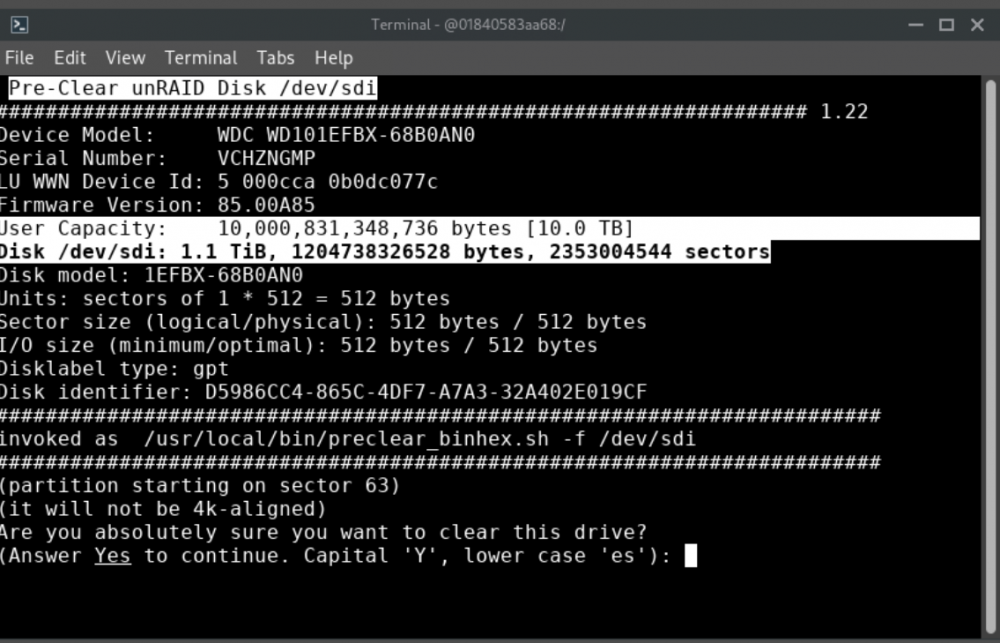
I am trying to preclear a 10tb drive to replace an old drive. I have done this before about a year ago, and everything worked (last time wd red 10tb, and now wd red 10tb) However, this time, I am getting an issue with preclear binhex and the plugin, and unassigned devices, where it only detects the drive as 1.1tb. Doing a smart disk check on the disk in unraid reveals it as 10tb. Starting the binhex preclear also shows user capacity as 10tb, but disk as only 1tb. Could someone please advise?
-
I think a lot of your users will be using it with linuxsever.io containers of swag and nextcloud, as per the video by spaceinvader (let'sencrypt is now swag) But it seems to pass through fine, but still gives the 400 error
-
They're just variables, aren't they? Pretty sure you could just as easily make it $left_bananas What did you do to eventually get it working? It looks like you just stripped a bunch of configs from spaceinvader1, and I'm not sure what they do. What ended up working for you?
-
I am not understanding the differences between: ``` set $upstream_docs OnlyOfficeDocumentServer; proxy_pass https://$upstream_docs:443; ``` and ``` set $upstream_app OnlyOfficeDocumentServer; set $upstream_port 443; set $upstream_proto https; proxy_pass $upstream_proto://$upstream_app:$upstream_port; ``` Seems like the proxy_pass command would evaluate to the same thing in both documents. So what are the differences in the two files that are allowing you to make headway? Is it perhaps one of these lines, that I don't fully understand? ``` proxy_redirect off; proxy_set_header Host $host; proxy_set_header X-Real-IP $remote_addr; proxy_set_header X-Forwarded-For $proxy_add_x_forwarded_for; proxy_set_header X-Forwarded-Host $server_name; proxy_set_header X-Forwarded-Proto $scheme; ```
-
For me the webui gives me the unraid login page. But if I go to the URL I set in nextcloud via spaceinvader instructions, instead of getting the document server welcome screen, I get the 400 error
-
@Siwat2545 Can you please help us out? We would really appreciate it
-
I did this, then force updated and restarted the container. I get the same error. Here is the output of the logs option in unraid for the docker: I hope this helps. Any more advise would be very welcome, thank you ``` * Starting PostgreSQL 12 database server ...done. * Starting RabbitMQ Messaging Server rabbitmq-server ...done. pgrep: cannot allocate 4611686018427387903 bytes /etc/init.d/supervisor: 100: [: -eq: unexpected operator Starting supervisor: supervisord. * Starting periodic command scheduler cron ...done. * Starting nginx nginx ...done. Generating AllFonts.js, please wait...Done Generating presentation themes, please wait...Done Generating presentation themes, please wait...Done ds:docservice: stopped ds:docservice: started ds:converter: stopped ds:converter: started * Reloading nginx configuration nginx ...done. ==> /var/log/onlyoffice/documentserver/converter/err.log <== ==> /var/log/onlyoffice/documentserver/converter/out.log <== [2021-02-17T03:06:27.232] [WARN] nodeJS - update cluster with 1 workers [2021-02-17T03:07:08.079] [WARN] nodeJS - update cluster with 1 workers [2021-02-17T03:07:08.085] [WARN] nodeJS - worker 1063 started. [2021-02-17T03:07:08.086] [WARN] nodeJS - update cluster with 1 workers [2021-02-17T03:09:38.832] [WARN] nodeJS - update cluster with 1 workers [2021-02-17T03:09:38.844] [WARN] nodeJS - worker 952 started. [2021-02-17T03:09:38.847] [WARN] nodeJS - update cluster with 1 workers [2021-02-17T03:10:16.126] [WARN] nodeJS - update cluster with 1 workers [2021-02-17T03:10:16.132] [WARN] nodeJS - worker 1065 started. [2021-02-17T03:10:16.133] [WARN] nodeJS - update cluster with 1 workers ==> /var/log/onlyoffice/documentserver/docservice/err.log <== ==> /var/log/onlyoffice/documentserver/docservice/out.log <== [2021-02-17T03:06:29.043] [WARN] nodeJS - Express server listening on port 8000 in production-linux mode [2021-02-17T03:07:06.597] [WARN] nodeJS - Express server starting... [2021-02-17T03:07:06.599] [WARN] nodeJS - Failed to subscribe to plugin folder updates. When changing the list of plugins, you must restart the server. https://nodejs.org/docs/latest/api/fs.html#fs_availability [2021-02-17T03:07:06.707] [WARN] nodeJS - Express server listening on port 8000 in production-linux mode [2021-02-17T03:09:39.258] [WARN] nodeJS - Express server starting... [2021-02-17T03:09:39.261] [WARN] nodeJS - Failed to subscribe to plugin folder updates. When changing the list of plugins, you must restart the server. https://nodejs.org/docs/latest/api/fs.html#fs_availability [2021-02-17T03:09:40.291] [WARN] nodeJS - Express server listening on port 8000 in production-linux mode [2021-02-17T03:10:14.647] [WARN] nodeJS - Express server starting... [2021-02-17T03:10:14.649] [WARN] nodeJS - Failed to subscribe to plugin folder updates. When changing the list of plugins, you must restart the server. https://nodejs.org/docs/latest/api/fs.html#fs_availability [2021-02-17T03:10:14.759] [WARN] nodeJS - Express server listening on port 8000 in production-linux mode ==> /var/log/onlyoffice/documentserver/metrics/err.log <== ==> /var/log/onlyoffice/documentserver/metrics/out.log <== counter_rates: { 'statsd.bad_lines_seen': 0, 'statsd.packets_received': 0, 'statsd.metrics_received': 0 }, sets: {}, pctThreshold: [ 90 ] } 17 Feb 03:06:25 - [889] reading config file: ./config/config.js 17 Feb 03:06:25 - server is up INFO 17 Feb 03:09:38 - [898] reading config file: ./config/config.js 17 Feb 03:09:38 - server is up INFO ==> /var/log/onlyoffice/documentserver/nginx.error.log <== ==> /var/log/onlyoffice/documentserver/spellchecker/err.log <== ==> /var/log/onlyoffice/documentserver/spellchecker/out.log <== [2021-02-15T09:20:36.538] [WARN] nodeJS - Express server starting... [2021-02-15T09:20:36.600] [WARN] nodeJS - Express server listening on port 8080 in production-linux mode [2021-02-17T03:06:25.970] [WARN] nodeJS - start cluster with 1 workers [2021-02-17T03:06:25.975] [WARN] nodeJS - worker 940 started. [2021-02-17T03:06:26.962] [WARN] nodeJS - Express server starting... [2021-02-17T03:06:27.030] [WARN] nodeJS - Express server listening on port 8080 in production-linux mode [2021-02-17T03:09:38.610] [WARN] nodeJS - start cluster with 1 workers [2021-02-17T03:09:38.624] [WARN] nodeJS - worker 934 started. [2021-02-17T03:09:39.103] [WARN] nodeJS - Express server starting... [2021-02-17T03:09:39.147] [WARN] nodeJS - Express server listening on port 8080 in production-linux mode ```
-
So that makes at least 3.. @Siwat2545 please help?
-
It's set to auto update, so the latest? How would I check in unraid?
-
I've been having this exact issue for a couple of months now. @Siwat2545 could you please advise? These are the instructions here. It worked for me when I first set it up, then one day just broke. Error when trying to connect (Client error: `GET https://[mydomain]/healthcheck` resulted in a `400 Bad Request` response: 400 Bad Request 400 Bad Request ngin (truncated...) )
-
I am also curious why we are told to open 49152-49172 in the router config, but the default template in the docker uses 49152:65535? Would the lack of these additional ports cause issues? Additionally, and this is the big one, @joroga22 perhaps you could help me with this, I cannot seem to get things running with your settings. Nextcloud doesn't seem to want to connect to the turn server, where you have a tick next to the delete button, mine just spins forever The logs in the coturn server via the logs drop down are giving me: A few lines about listener addresses, real addresses and relay addresses, then 47 lines of socket: Protocol not supported Also, for anyone getting certificate/key errors in the log cert=/coturn/keys/turnserver.crt pkey=/coturn/keys/turnserver.key cipher-list=“ECDHE-RSA-AES256-GCM-SHA512:DHE-RSA-AES256-GCM-SHA512:ECDHE-RSA-AES256-GCM-SHA384:ECDHE-RSA-AES256-SHA384″ This at the bottom of the turnserver.conf should help, point cert and pkey to where you copied the keys from the swag/letsencrypt container to.
-
Does anyone know a way to configure coturn docker with some soft of fail2ban or similar, that will block connections using the wrong secret? Am I to understand that users talk to the nextcloud server, which securely gives them the secret with which to connect to the coturn server? In which case any attempts with the wrong key should just be an instant and lengthy/permanent ban. edit: With the amount of ports that need to be forwarded to unraid it makes me a little nervous, so some form of ban process for hack attempts would be good if possible
-
Hi all, I noticed this morning that my mariadb docker was simply gone, causing all sorts of issues for me. I managed to repair it by going into apps, previous apps, reinstall mariadb, and it seems to have picked up it's old database etc and things *seem* fine. Then for some reason, in the docker list, it needed an update. Though it was only gone maybe a day, and I have auto updates turned on. I was just wondering what could have caused it to drop out like that?
-
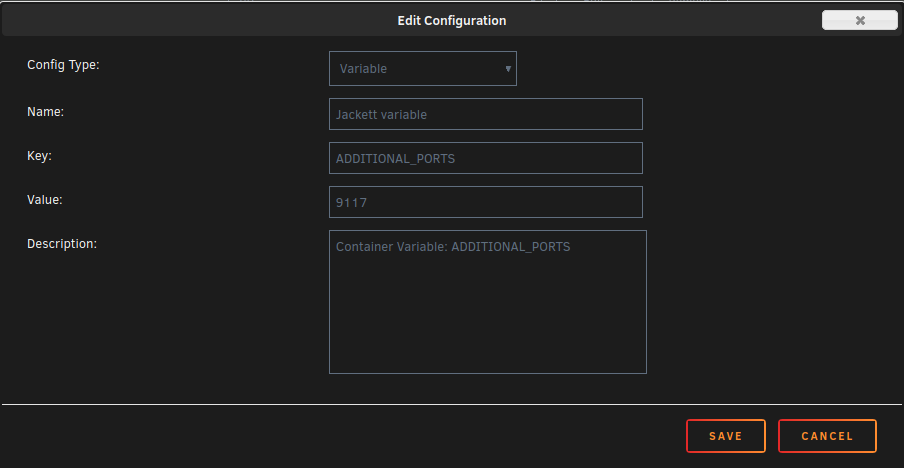
Oh. It works now. I changed nothing. It's set to auto update, maybe you fixed something in the last couple of days? But now it works... The space invader video was missing the "additional_ports" variable. But now it works. Thank you!
-
Hey, so did you ever get this working? I'm having the same sort of problems
-
Is there any way I can DM you that information?
-
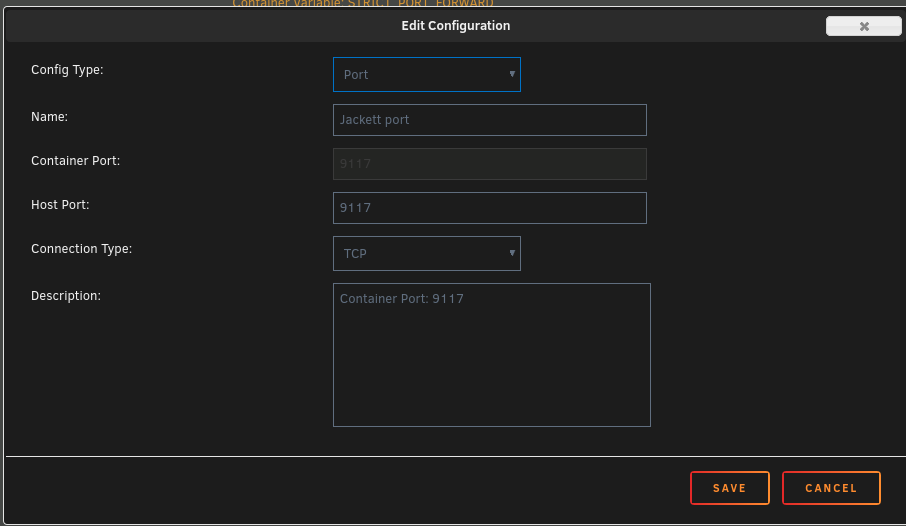
I have added the following, and am still having no luck (I have also tried adding them one at a time, in case I didn't need both)

-
Is anyone else having these SFTP issues, or could offer me a pointer in the right direction please?

