





4554551n
Members
-
Joined
-
Last visited
Everything posted by 4554551n
-
Not that I've set up, unless unraid does something out of the box? I could run some commands to check whatever you need ps -ef|grep-i virsh ps -ef|grep qemu-monitor-command don't give me results Do you have any idea what "tainted: custom-monior" could mean? Not a lot about that on google
-
I don't suppose you've had a chance to take a look?
-
Thank you, please find attached unraid-diagnostics-20250216-1122.7z
-
Hey folks, I'm on unraid 6.12.14 I use 2 vms, and Im having issues with my /var/log/libvrt/libvrtd.log Filing up with warning: qemuDomainObjTaintMsg:6464 : Domain id=[id] name=[name] uuid=[uuid] tainted: custom-monior for each machine, every 3ish seconds. 2vms, different operating systems. Getting about an MB a day of this. Can't find anything online and would love advice, thank you
-
I don't know if it's relevant, but the VM is also virbr0, doesn't have it's own IP
-
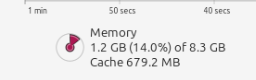
Hey all, I have a problem with my VMs. When I use a VM with a virtual graphics card, and a linuxOS like mint, i can set it to x GB ram. With linux, there's the RAM actually used, and the cache ram where things can cycle in and out but it's not the system actively using/reserving it. Well, I have a problem where when the cache ram hits the ram limit, the VNC crashes, while the system keeps running. Instead of cycling something out of the cache so VNC can keep running. This seems like a bug, but is there a work around for this? Attached photos of what I mean by Cache ram (low atm as I've just restarted after another crash). A VNC crash looks either like a linux mint logo, or just a black screen, depending on the day. Note, this is a VM for backups, so cache will keep filling up forever, adding more RAM won't help. (more details here https://www.linuxatemyram.com/) Unraid 6.12.13 Linux mint 22
-
Hello, I am really REALLY sorry for posting this here as I know it's offtopic, I just wanted to get spaceinvaderones attention regarding nextcloud-aio-mastercontainer as it doesn't have it's own support page. I just wanted to ask, if I have the linuxserver.io nextcloud container up and running, is there a guide/simple way for me to migrate everything to the nextcloud-aio-mastercontainer container? Again, apologies for it being offtopic, just the nextcloud docker doesn't have it's own forum page, and I don't know any discords or anything spaceinvaderone is in.
-
Hi all, I am looking for a little help with the stun-turn-server container. I have my nextcloud set up on unraid following spaceinvaderone instructions. With the linuxserver.io nextcloud container, and the linuxserver.io swag container, which functions as the reverse proxy, all on the proxynet. I believe the same setup as the user from page 13 of this board. Could I please have some assistance in setting up this server. I believe the swag server already created certs (probably keys, I don't know how this works) for my domain, so I may need to copy them over into the stun server. Also, swag (nginx reverse proxy) is being used, so is there a way I can avoid forwarding the extra ports through my firewall, and have everything go through my.domain.com:443? So perhaps stun.my.domain.com:443 TCP and UDP connections can be picked up by the swag container, and forwarded to the turn server on the correct ports? This keeps ports to a minimum, all security in the one place, and allows me to make use of the swag fail2ban feature. I would love help finding the access log for the stun server, so if someone tries to get in with a bad secret (presumably through a brute force, having not recieved it from nextcloud first) it would just block off the IP. Thank you in advance. It is my understanding that the setup I have-being done via spaceinvaderone is a very common one, so hopefully someone picks this up.
-
You're a legend!
-
I'll see if he responds, maybe he knows something off hand. If not I'll post it. I've got a lot of dockers and plugins, idk what personal info they could leak.
-
You can't see it in the screenshot, but my mouse pointer is hovering over Cache_vms, and you can see it's not selecting and greyed out as an option

-
Hi, Could anyone please advise how to configure the edit docker settings to use a DOH (DNS over HTTPS provider). I would like to use the mullvad server for all upstream checks. I've been trying to use the DOH client docker, with the following config ## Google's resolver, good ECS, good DNSSEC #[[upstream.upstream_ietf]] # url = "https://doh.mullvad.net/dns-query" # weight = 50 ## CloudFlare's resolver, bad ECS, good DNSSEC ## ECS is disabled for privacy by design: https://developers.cloudflare.com/1.1.1.1/nitty-gritty-details/#edns-c> [[upstream.upstream_ietf]] url = "https://cloudflare-dns.com/dns-query" weight = 50 But when I enable the mullvad ones I get HTTP error from upstream https://doh.mullvad.net/dns-query: 400 Bad Request In the logs. ALTERNATIVELY Is there a way to feed the pihole container through the binhex-deluge-vpn docker? I've got my jacket going through it. If I could feed pihole through it, I would be able to use mullvad's regular DNS they use for users on the VPN. But there's a lot more port management with pihole than there is jackett. I tried and failed.
-
Yes, I have 1 drive in the cache_vms pool, and it's set to xfs no problem. The issue is I am then unable to allocate that pool to a share-that is where it is greyed out.
-
I followed spaceinvaders instructions here: To create an xfs cache disk. I cannot add it as a cache pool for a share. It's greyed out, and cannot be changed for an existing share, or added for a new share. Deleting the pool and recreating it with BTRFS works as expected. Trying again with xfs gets the consistent issue where it's greyed out for selection (on the share screen, where you allocate a specific pool to a share). Also, weirdly, it's showing as using 14GB, when it's just created, unused, with nothing there: (image attached) Could someone please advise

-
No, so depending on the VPN you're using (presumably pia) you need to go into your pia account and forward a port from there. They will give you a port to use, and you plug that port into deluge. Then you can add this magnet link as a torrent to deluge: magnet:?xt=urn:btih:4d60844af7e42602086266fcde02971a4fea29cf&dn=checkmyiptorrent%20Tracking%20Link&tr=http%3a%2f%2f143.110.208.40%2f It'll create a torrent that in the status tab under tracker status, will give you an error with the IP of your VPN connection. Then you can use something like: https://portchecker.co/ To plug in the IP from the error, and the port from pia you've put into deluge to see if it's working. You don't need to worry about your router, because the router isn't the end point of the connection, the exit server of the vpn connection is the end point that other torrent clients will see and try to connect to. Though depending on how you have your vpn set up, the server you connect to *may*change, when you restart the docker/server or something else maybe. So just keep an eye on that and if it does change use the port checker again, but pia should be able to keep the port forwarded regardless of external IP, just keep an eye on it periodically.
-
Hey all. I found about 15 threads on this topic but no solutions. I'm using all @binhex containers. Deluge, sonarr, radarr. The issue is that when a torrent completed, deluge pauses it. radarr/sonarr both import the completed torrent. But they do not delete the torrent from cache, and they do not delete the torrent/extra crap that comes with the file from deluge. I've confirmed that they can download the file. I confirmed that deluge stops the torrent. I've confirmed that sonarr/radarr both have the tickbox to remove the completed torrent. I am not seeing any errors in any logs. I have recently rebuilt the server. I've moved to a new server with more drives etc, and migrated my old everything, including restoring my dockers. Prior to this, sonarr and radarr were deleting the files from cache upon ingestion, but they still weren't deleting the torrent and extra files. Now I appear to have gone back a step and they're not even deleting the file on ingestion. Please can I get some help with this, I must have read every thread on this topic and looked at every setting. (I've even tried the label addon in deluge and setting lables in the connection settings in radarr/sonarr. That didn't work, and caused errors on restart of deluge as deluge seems to disable the label addon on restart-neither here nor there really) Spent days on this. Please someone help
-
Ok, I have a fix with the help of one Spad from the discord chat. So. 1. Stop nextcloud docker 2. Create new /appdata folder as /appdata/nextcloud-custom 3. Move /appdata/nextcloud/custom-cont-init.d and custom-services.d there with their contents, but make sure they're root owned 4. Delete readme files from both of those folders 5. In the docker settings, create 2 new volume mounts, pointing to those locations. -container path /custom-services.d -/mnt/user/appdata/nextcloud-custom/custom-services.d-fix/ -Same for cont-init -Make sure they are both read only 6. Start docker They've made a change where they now look for files in that old location and if it's there, generate that log message. There is a bug where that log message tries to be read as a script, fails, and we get what we get. A fix is in the pipe. Be sure you deleted the readme files from the folders, or it'll generate a slightly different, but related error. If you skipped the step, do it, then you have to go into docker settings, and force an update on the container to get unraid to recreate it.
-
I am having a similar issue, probably the same cause. Docker won't start, getting errors about this file. It looks like it wants /etc/s6-overlay/s6-rc.d/user/contents.d/custom-svc-README.txt/run to be an executable script, shebang and all. But it's just that message and it can't execute it. I THINK. Though how to fix it, no idea. Still struggling. Deleting it and restarting the containter, it goes straight back. Deleting it, or the entire /etc/s6-overlay/s6-rc.d/user/contents.d/custom-svc-README.txt while it's running also doesn't work. I would really like to know the fix too
-
Something I've just discovered is if you do this, you end up with this issue here: https://github.com/rustdesk/rustdesk/issues/499 The solution as mentioned is you need to copy the key files from hbbs to hbbr, then restart hbbr.
-
Yea, i got the pub key all sorted, encryption is working well, it's just mandating it, so I can open it to the world and not have randoms try use it. Ok, so there are two containers, the RustDeskServer and RustDeskServer-relay. I seem to need both (internally at least, doesn't just run with the server. don't know why). So I can go into RustDeskServer>edit and in post arguments where it has /usr/bin/hbbs, I change it to /usr/bin/hbbs -k _ and in RustDeskServer-relay>edit /usr/bin/hbbr becomes /usr/bin/hbbr -k _ Is that correct? Also, if I do this, and open it to the world, that would stop randoms from using it legitimately. Assuming there's some issue/vulnerability in rustdesk (I'm paranoid), how much protection does unraid offer me if someone connects on one of those ports and starts doing shit? I don't think I can even use port triggering for bonus protection because it starts with an inbound connection, yea? Also, looking at the instructions, it seems to need ./hbbs -r <relay-server-ip[:port]> -k _ So If I set hbbs -k _, how is the relay server IP being worked into it? Also, just for the record, you're amazing and thank you for your time!
-
Could you please help me with exactly what I should be putting there? I don't really know docker. It's extra confusing because it wouldn't be an "extra" parameter, it would be modifying part of the existing docker yml, wouldn't it? Because it would already have the command to run the program in there wouldn't it?
-
How can I perform the steps found here https://rustdesk.com/docs/en/self-host/install/#key To mandate encryption using your containers? I'd like to stop anyone else who finds the open ports from using them. Also, I'm still unclear on relay vs server, could you please explain in a little more detail? I currently have it set up using both internally, encrypted and unencrypted both work. I haven't opened the ports yet until I can enforce encryption, not just allow it.
-
YES! OK! If anyone is having problems with the spaceinvader guide getting the 400 error ***proxy_set_header Host $host;*** ^^^ This right here is the problem! Comment that out, and it'll work, I don't know why, I don't know what it does, but that's the problem! You'll also need to comment out proxy_redirect off; Because it gives that line 19 error, not sure what that's about either, but the logs point straight to it so I can see people have worked it out. But # proxy_set_header Host $host; That's the poison causing the 400 error. ******For bonus points, those wanting to secure their onlyoffice, you need to add the following to the onlyoffice docker***** Variable Name:secret Key:JWT_ENABLED Value:true and Variable Name:Secret Key Key:JWT_SECRET Value: password123 Then you can add password123 in your secret key right under ONLYOFFICE docs address for a secure connection *mic drop* That took me like 5 hours, enjoy it! PS: Change "password123" to something else, that's my password and no one else is allowed to use it, I own the NFT
-
Thank you, I will do that. Any advice on the original issue?
-
I have appdata as cache-prefer, but system as cache-yes. Is that a problem? Does that mean the docker.img should also live on the cache disk? I had mine keep blowing up to 100GB a year and a half or so ago, so I think I changed it to cache yes. I honestly don't know what it actually does, but my understanding was that it's what holds the containers and it's used when they first load. So it shouldn't matter that it's on the array when it's only accessed when dockers are started or updated? I don't know why it grows like that when I'm not adding more containers. Currently it's 14gb set to 50 when it was recreated a yearish ago. So Is there a big advantage to it being cache prefer over cache yes? How do I stop it blowing out? What should I do if it does? - Last time I just deleted it, and went to the history of my dockers, and re-downloaded all the dockers. That doesn't seem like something that should be a regular task. Do you really think 120GB is not enough for cache?... it's currently under 30gb of appdata, and I've got some torrents going so it's closer to 40 total use. I've had some issues if I'm downloading a 100gb torrent, obviously that doesn't work and I have to get creative. But even if the docker was 20gb that would still give me 70gb of flexible cache, is that not enough??..... Lastly, what the heck could have been causing the actual issue I was having above? Since moving app data to cache yes, invoking mover, setting it to cache prefer, invoking mover, it's been running good for about a day. But the whole size 120gb, used 30gb, free 0b still seems super messed up and I would like to know how it's possible and what caused it.



