





mattie112
Members
-
Joined
-
Last visited
Everything posted by mattie112
-
Why do you need that? It is not really the docker-way to access your container (except perhaps for debugging). There should really be no need for it. But from your Unraid CLI you can do something like `docker exec -it pihole bash`, then you have a shell inside container and you can install sshd and whatnot
-
You can use my fork for now: https://hub.docker.com/r/mattie112/docker-nginx-proxy-manager (which I will delete if/when this gets implemented by Djoss) My fork is 100% the same code except that it listens on 80/443. Here is the diff if you are concerned: https://github.com/jlesage/docker-nginx-proxy-manager/compare/master...Mattie112:default-ports
-
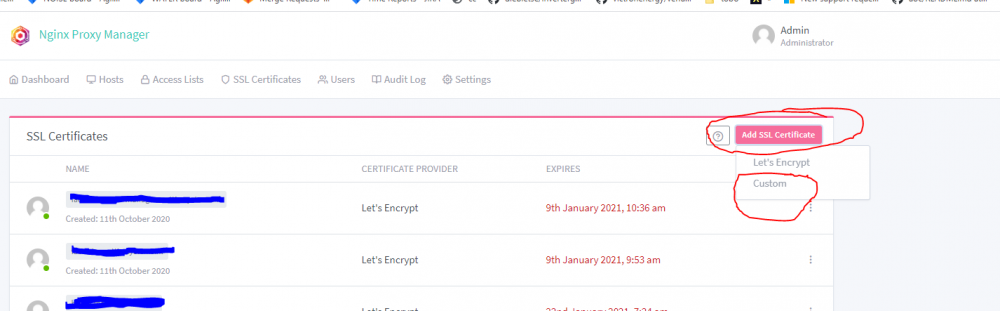
There should be a dropdown, perhaps try an other browser?
-
You could try it, go to the folder I mentioned, upload a file (perhaps a big one?) and see if anything get's added to that folder.
-
Perhaps this one? root@Tower:~# docker exec -it NginxProxyManager bash bash-5.0# cat /etc/nginx/nginx.conf | grep temp client_body_temp_path /var/tmp/nginx/body 1 2; include /data/nginx/temp/*.conf; bash-5.0# If not I think the nginx default is used
-
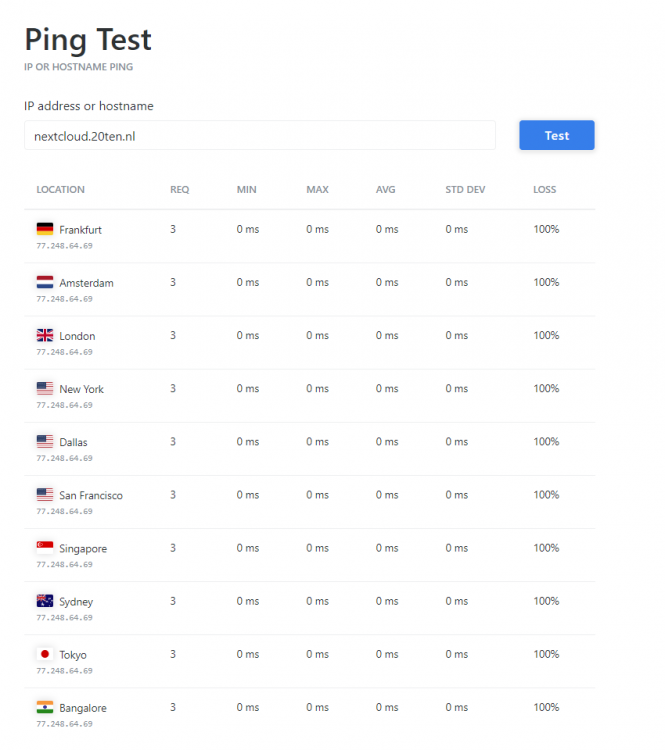
There really is a connectivity issue on your (providers) end. From my 4G (tele2) I cannot ping. So either something is wrong with your router/firewall or your provider has some issues. Also see tools like the one below but this is simply not a NPM issue letsencrypt can simply not reach your server. https://tools.keycdn.com/ping Oh and perhaps your mobile provider is in the same network (or is the same provider) as your internet connection perhaps they "simply" have some routing issues. edit: @jowi it seems to be working now! I do get your nextcloud login page (but I still cannot ping so guessing that is blocked?)
-
Confirmed, from within NL, Germany and the USA all timeout
-
You can confirm if it is indeed still in bridge mode. And just to confirm if I ping my parents (also Ziggo) I go get a ping reply (non-bridged modem). If you continue to have issues I think you should start a new topic as this issue is not related to NPM (feel free to tag me there).
-
In case you have not done it before: perhaps reboot your modem? And if you have your own router also reboot that one. Or log in into your router to confirm the portforwarding / firewall settings are still correct. Perhaps Ziggo pushed an update and some settings got reset. edit: And just to confirm, I cannot ping your IP from home (t-mobiel) or from my VPSses (in NL, DE and USA)
-
ACL = access control list I thought perhaps you only allow certain IP's to connect. I don't know if this is just a private internet connection but you can do `curl ifconfig.me` to get your external IP through the commandline just to confirm.
-
Dou you have an ACL configured? I cannot access nextcloud[dot]20ten[dot]nl from here. Or perhaps your external IP changed? Can you access your sites/services through 4G for example? (Here it resolves to 77.248.64.xx and I cannot ping that IP (timeout)) so it seems that indeed letsencrypt cannot access your NPM to verify it is correct.
-
You have to run these commands within your NPM container, please see the posts here: and check a few posts before and after to see if you have the same issue
-
What errors exactly? You can also check:
-
Do you also need this due to IPv6? You can change it yourself if you want or you can use my fork: https://hub.docker.com/repository/docker/mattie112/docker-nginx-proxy-manager https://github.com/Mattie112/docker-nginx-proxy-manager/tree/default-ports
-
Did you ever find a solution? I'd like to have Unraid in Hyper-V just to test / demo it. It works perfectly by booting from a VHDX but no network really makes it unusable
-
So: You have some hosts you want to be able to access publicly? And some host you only want to use internally. I also consider VPN internally. In that case you can simple leave out the access list for the first one and on the second one you should only have to add your internal IP range (e.g. 192.168.x.x/24 or whatever your range is). Your VPN will most likely assign you an IP in your internal/private range. If it uses an other range you should allow that range as well. If you still have trouble provide us with some more info in your IP ranges and a screenshot on how NPM is configured.
-
Unraid is already using 80 (and potentially 443) so if you want to use those ports you should give your NPM a dedicated IP
-
You can try to stop your docker container and then use the `exec` step so that you are the only one running certbot. I assume a restart of the container did not work? You can check to see if your DNS is configured correctly by using https://dnscheck.ripe.net/ for example. (Or sharing your domain here)
-
Did you try the things I suggested a few weeks ago: (also see the other posts on that page)
-
Perhaps you need to also add some other directories? For example I found this post: https://www.reddit.com/r/PleX/comments/3xz4ph/plex_behind_a_ssl_nginx_reverse_proxy/cy9l9fj/?utm_source=reddit&utm_medium=web2x&context=3
-
The 'custom locations' can be used for a /plex solution or do you run into trouble there?
-
As it basically is just Nginx you can look into: https://docs.nginx.com/nginx/admin-guide/web-server/reverse-proxy/ For example: location /some/path/ { proxy_set_header Host $host; proxy_set_header X-Real-IP $remote_addr; proxy_pass http://localhost:8000; } I did not test it but I assume you can use this in the advanced config part
-
I would suggest to do that yeah. It seems not to resolve correctly (or at least what you expect) You don't Your external ip: 1.1.1.1 Your NPM: 192.168.1.1 You forward external:80 and external:443 to NPM Then you can do: domainA.com -> 1.1.1.1 domainB.com -> 1.1.1.1 domainC.com -> 1.1.1.1 NPM can then do: if i get some connection that wants domainA.com -> go to 192.168.1.2:1234 domainB.com -> 192.168.1.123:80 domainC.com -> 192.168.1.1:9234 So NPM is your only "visible" endpoint and that takes care of multiple hosts / subdomains
-
So it seems that letsencrypt cannot access the fiel it want's. When I go to the website mentioned I get redirected to a site "survey-smiles" (with a huge alert from MalwareBytes) so I can only assume that letsencrypt faces the same issue. If you go to your site do you end up correctly? (Assuming the survey-smiles thing is not yours). And just for funs here is the output of that domain: xx@xx:~# curl irc.spectralforceservers.net <html><head><title>Loading...</title></head><body><script type='text/javascript'>window.location.replace('http://irc.spectralforceservers.net/?js=eyJhbGciOiJIUzI1NiIsInR5cCI6IkpXVCJ9.eyJhdWQ<removed>TUsInRzIjoxNjA2NzQ5MjE1MzI2OTIyfQ.iwTewrvuWy6FWsN3bbD0pVnXh36dwDhFwp0Hamm07RY&sid=9db9<removed>cc3238fa');</script></body></html> So yes your site does issue a redirect (the same happens with /.well-kown/acme-challenge/somerandomstring)
-
Perhaps you can try `certbot renew --dry-run` just to see if that works? Or perhaps `certbot --test-cert` ro verify letsencrypt could be reached. And just to be really sure: can you ping from within the NPM container to the internet?



