





mattie112
Members
-
Joined
-
Last visited
Everything posted by mattie112
-
What are your volumes mounted? It does not seem happy on chown: /config/log/log: Symbolic link loop Not sure if that is the problem but it might be.
-
Please share the output of the ssllabs cipher part. Did you also asked some one else with an iPhone to test it?
-
Well the error seem to originate from certbox internals (so not really something with NPM). I thought perhaps something is corrupted there. I don't think that removing all config would have any effect. There are lots of hits on the error 'pkg_resources.DistributionNotFound: The 'mock' distribution was not found and is required by the application' most being solved by upgrading/reinstalling pyton.
-
Hm that is really strange. Just to be sure did you already try to restart the NPM container? Perhaps you can extract the certificate and check the serialnumber to see if it matches what your browsers tells you. I still don't really understand the error perhaps reinstall / force update the container? Just in case?
-
I think this file only exists in the NPM container yes. docker exec -it NginxProxyManager bash and then (you are now in the container) cat /tmp/logfile What do you want to test? Your website? Simply visit it from your phone 4G? Or am I not understanding your question correctly. I don't use cloudflare / duckdns but genrally the idea is that you have somekind of dynamic DNS (duckdns) and then your domain will point to that. So: randomname.duckdns -> your public ip will get automatically updated unraid.yourdomain.com -> CNAME -> randomname.duckdns
-
Hm that is strange, you could try to do the commands manually with some debug info / dry-run. Look into this topic posts from me should be some info. Never seen before is there anything in the log file specified? Of when you run with -v ?
-
That error simply means that letsenctypt cannot verify your domain. It needs access to unencrypted http (the '.well-known') directory. Confirm if that works for you (so, http port 80).
-
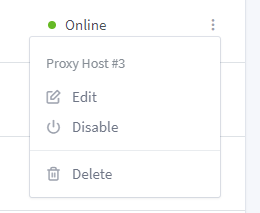
The file for your proxy host, you can either check them manually or see the UI for the ID
-
Allright just making sure And is there anything in the logs of NPM? Or in the logs for the proxy itself? /mnt/user/appdata/NginxProxyManager/log
-
Did you confirm the IPs? So: 'ping internal.lan' -> does that resolve to your unraid server (or npm docker address) correctly
-
Can you confirm you cannot reach your NPM? Or NPM cannot reach a container? Assuming the first case: double-check if your unraid/NPM still has the same IP and if you can view NPM by using the IP instead of the hostname
-
I dont use CloudFlare myself (don't see the need for that). But: letsencrypt needs an unencrypted connection always! (So every 90 days to renew). Why? Well if you don't have a valid certificate how can letsencrypt connect to your server to verify? But: perhaps you can only allow the /.well_known directory? That is what letsencrypt uses
-
It seem to resolve to a IPv6 address (http://[2606:4700:3032::6815:1f71]/) that gives me an error. Do you get the NPM "welcome" page when you go to yourdomain.tld? Letsencrypt needs unencrypted (port 80/http) access in order to create a certificate. And also are you sure `deluge.mydomainname.tld` resolves correctly?
-
It will be (see "Cron jobs in Docker" on that page) docker exec --user www-data <container> /usr/local/bin/php /var/www/html/artisan firefly-iii:cron Just confirm the name of the container in your Unraid
-
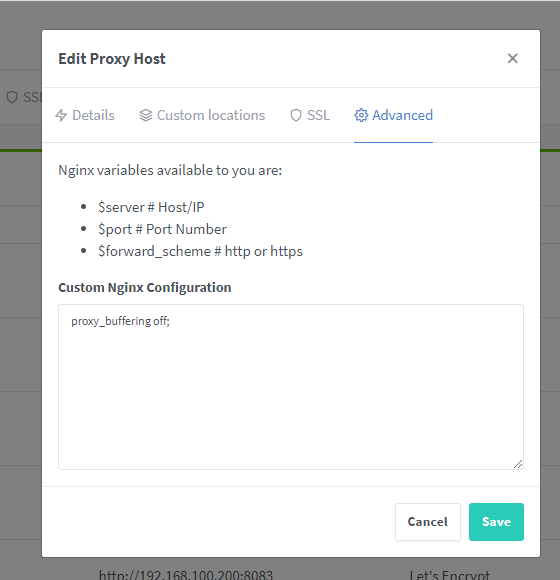
It needs to be added to the proxy module config (http://nginx.org/en/docs/http/ngx_http_proxy_module.html#proxy_buffering) Afaik that can be simply added to the "custom nginx configuration" in NPM I would suggest to simply try it... And if it doesn't work you can try to manually edit the file in /mnt/user/appdata/NginxProxyManager/nginx/proxy_host
-
You can use the User Scripts plugin and then add the comments to run there. For example I run my nextcloud cron every 5 minutes with this as script docker exec -u www-data Nextcloud php -f /var/www/html/cron.php So you docker exec (then optionally the user) then the name of the container and last the command you want to run
-
I'm sorry what I said is not 100% correct. You can use 80/443 but then you MUST use "br0" as network. As your unraid already listens to 80 (and/or 443). By using "br0" your NPM get it's own IP. You really only need my fork if you use IPv6 as you cannot simply forward a port there (and then the solution is to run NPM om 80/443). If you use IPv4 only then yes use br0 and have the config the way you have it.
-
If you want your NPM to be on 80/443 you'll need to use my fork (or change it yourself): as the current image does not support it (yet). What container are you using for nextcloud? The official container (https://hub.docker.com/_/nextcloud) uses http and suggest you use a reverse-proxy (like NPM) to terminate SSL edit: So that would be 80 -> 8888 for example in your nextcloud docker config and then http://unraidip:8888 in NPM
-
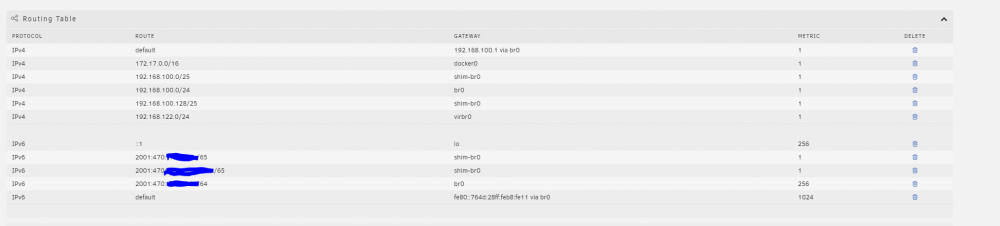
Yeah that seems to fix it! I've noticed some routes where added: The 'shim-br0' ones didn't exist earlier
-
It should work but I'm assuming you don't have a valid SSL certificate on your nextcloud internal endpoint so I think it will fail somewhere due to that. Nextcloud works fine with http, see my screenshot, I only forward 80 of the nextcloud container to 8888 and use that in NPM
-
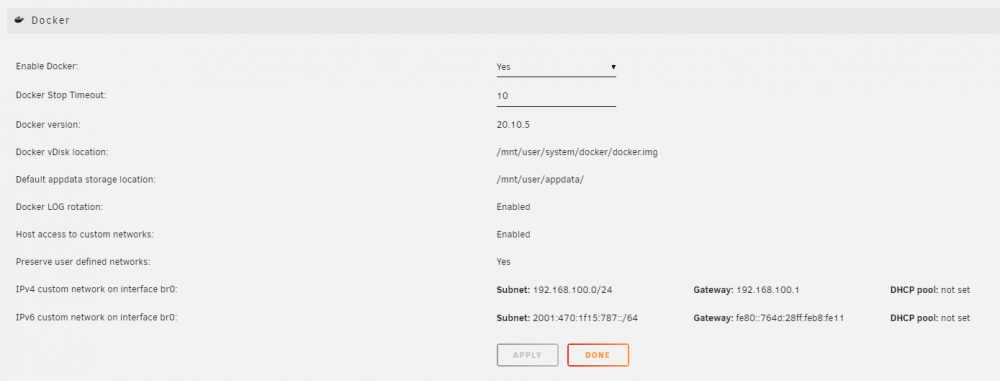
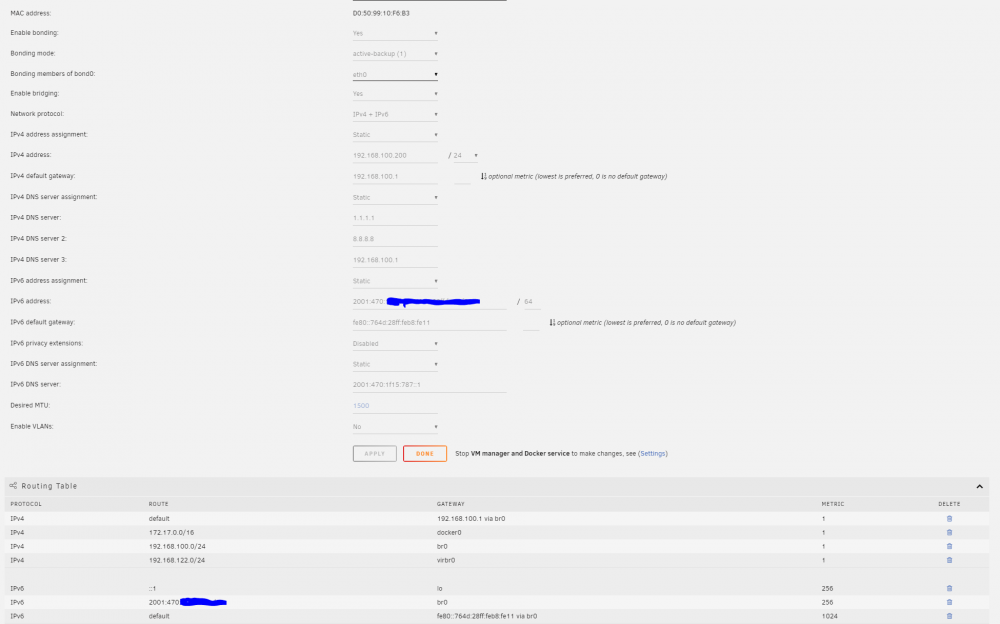
Due to a power outage my server did a hard reboot and now I have issues with my reverse proxy. It seems it cannot access any containers listening on the IP of the host. Host network access is enabled. Any ideas? 192.168.100.200 is my Unraid IP root@Tower:~# docker exec -it NginxProxyManager bash bash-5.0# ping 192.168.100.200 PING 192.168.100.200 (192.168.100.200): 56 data bytes ^C --- 192.168.100.200 ping statistics --- 3 packets transmitted, 0 packets received, 100% packet loss bash-5.0# ping 192.168.100.220 PING 192.168.100.220 (192.168.100.220): 56 data bytes 64 bytes from 192.168.100.220: seq=0 ttl=128 time=0.412 ms ^C --- 192.168.100.220 ping statistics --- 1 packets transmitted, 1 packets received, 0% packet loss round-trip min/avg/max = 0.412/0.412/0.412 ms bash-5.0# Any the reverse-proxy container has this configured: edit: for completeness the network settings:

-
Normally the flow is: http endpoint locally (eg http://1.2.3.4:port) https endpoint 'exposed' (eg https://domain.com) In this case the application itself (nextcloud) does not need to know anything from SSL, not the cipers not the certificate, nothing. NPM simply accepts the incoming request, handles the SSL part and then forwards the traffic to a local (unencrypted) endpoint. You are doing: https external -> https internal In that case you would need to have a SSL cert on both endpoints For example:


-
I've noticed a problem related to the changes I've made regarding saving the config file. Last night my server went down due to a lightning strike killing the power. And I've notices it remained offline on my monitoring. So: I checked the config but hey there are no "snmp" settings anymore how strange. Went to reinstall/download the plugin and then I saw: Executing install script for unraid-snmp-2021.05.21-x86_64-1.txz. Set permissions and move into dir /usr/local/emhttp/plugins/snmp Set shell script executable permissions Set read only permissions for other files Checking if /etc/rc.d/rc.snmpd exists before editing Stop SNMP daemon if it is currently running Shutting down snmpd: DONE Using the user-defined config /boot/config/plugins/snmp/snmpd.conf, backing up the original Editing SNMP startup options in rc.snmpd to be [-LF 0-5 /var/log/snmpd.log -A -p /var/run/snmpd -a] Restart SNMP daemon now that we've adjusted how rc.snmpd starts it Starting snmpd: /usr/sbin/snmpd -LF 0-5 /var/log/snmpd.log -A -p /var/run/snmpd -a -c /etc/snmp/snmpd.conf PID of started SNMP daemon is 20036 Package unraid-snmp-2021.05.21-x86_64-1.txz installed. +============================================================================== | Testing SNMP by listing mounts, /boot should be present +============================================================================== snmpwalk -v 2c localhost -c public hrFSMountPoint snmpwalk failureCouldn't find /boot mount point. SNMP output: Timeout: No Response from localhost plugin: run failed: /bin/bash retval: 1 Updating Support Links Finished Installing. If the DONE button did not appear, then you will need to click the red X in the top right corner So yeah! If it uses my config then accessing localhost with public as a community does not work! When rebooting it "reinstalls" the plugin and that seem to fail. No idea why this did not happen to me when testing it.... So @kubed_zero I think we can do a couple of things: - First start the service with default config in order to test it, then restart it with the user config - Always append a `rocommunity public 127.0.0.1` to allow this to happen - Don't fail when the snmpwalk fails (when using custom config) Do you have any preferences? For me I now have added option 2 as that was the quickest way to fix it. It seems when manually installing it the plugin IS installed (I have the settings) but when I check the installed plugins it is not listed so that might be somekind of Unraid bug.
-
Are you sure you want to proxy traffic TO a HTTPS endpoint? Normally your 'internal' endpoint is unencrypted/http.
-
So you have a proxy configured in NPM for your nextcloud? On myurl.com? And http://myurl.com works but https://myurl.com does not? If it is configured it should work (but with a default/invalid certificate). Is there anything in the logs of NPM why the certificate fails?



