





mattie112
Members
-
Joined
-
Last visited
Everything posted by mattie112
-
I simply searched in CA for "snmp" (from kubedzero version 2020.12.20) Is that not the current version? I will try to manually install the plg file. edit: Same after a manuall install (from https://raw.githubusercontent.com/kubedzero/unraid-snmp/main/snmp.plg): plugin: installing: https://raw.githubusercontent.com/kubedzero/unraid-snmp/main/snmp.plg plugin: downloading https://raw.githubusercontent.com/kubedzero/unraid-snmp/main/snmp.plg plugin: downloading: https://raw.githubusercontent.com/kubedzero/unraid-snmp/main/snmp.plg ... done plugin: downloading: https://raw.githubusercontent.com/kubedzero/unraid-snmp/main/packages/perl-5.32.0-x86_64-1.txz ... done +============================================================================== | Skipping package perl-5.32.0-x86_64-1 (already installed) +============================================================================== plugin: downloading: https://raw.githubusercontent.com/kubedzero/unraid-snmp/main/packages/libnl-1.1.4-x86_64-3.txz ... done +============================================================================== | Installing new package /boot/config/plugins/snmp/libnl-1.1.4-x86_64-3.txz +============================================================================== Verifying package libnl-1.1.4-x86_64-3.txz. Installing package libnl-1.1.4-x86_64-3.txz: PACKAGE DESCRIPTION: # libnl (netlink socket library) # # libnl is a library for applications dealing with netlink sockets. # The library provides an interface for raw netlink messaging and # various netlink family specific interfaces. # # Homepage: http://people.suug.ch/~tgr/libnl/ # # Executing install script for libnl-1.1.4-x86_64-3.txz. Package libnl-1.1.4-x86_64-3.txz installed. plugin: downloading: https://raw.githubusercontent.com/kubedzero/unraid-snmp/main/packages/net-snmp-5.9-x86_64-1.txz ... done +============================================================================== | Installing new package /boot/config/plugins/snmp/net-snmp-5.9-x86_64-1.txz +============================================================================== Verifying package net-snmp-5.9-x86_64-1.txz. Installing package net-snmp-5.9-x86_64-1.txz: PACKAGE DESCRIPTION: # net-snmp (Simple Network Management Protocol tools) # # Various tools relating to the Simple Network Management Protocol: # # An extensible agent # An SNMP library # Tools to request or set information from SNMP agents # Tools to generate and handle SNMP traps # A version of the UNIX 'netstat' command using SNMP # A graphical Perl/Tk/SNMP based mib browser # Executing install script for net-snmp-5.9-x86_64-1.txz. Package net-snmp-5.9-x86_64-1.txz installed. plugin: downloading: https://raw.githubusercontent.com/kubedzero/unraid-snmp/main/packages/unraid-snmp-2020.12.20-x86_64-1.txz ... done +============================================================================== | Installing new package /boot/config/plugins/snmp/unraid-snmp-2020.12.20-x86_64-1.txz +============================================================================== Verifying package unraid-snmp-2020.12.20-x86_64-1.txz. Installing package unraid-snmp-2020.12.20-x86_64-1.txz: PACKAGE DESCRIPTION: # unraid-snmp # # unraid-snmp assists with installing a custom extension of net-snmp # and configuring it for use on Unraid. # # nano /etc/snmp/snmpd.conf # edit config # bash /etc/rc.d/rc.snmpd restart # stop and start daemon # tail -f /var/log/snmpd.log # tail logs # # https://github.com/kubedzero/unraid-snmp # Executing install script for unraid-snmp-2020.12.20-x86_64-1.txz. Set permissions and move into dir /usr/local/emhttp/plugins/snmp/ Set shell script executable permissions Set read only permissions for other files Checking if /etc/rc.d/rc.snmpd exists before editing Stop SNMP daemon if it is currently running Shutting down snmpd: DONE Replace default snmpd.conf with our own, backing up the original SNMP logging flag already present in rc.snmpd, skipping modification Restart SNMP daemon now that we've adjusted how rc.snmpd starts it Starting snmpd: /usr/sbin/snmpd -LF w /var/log/snmpd.log -A -p /var/run/snmpd -a -c /usr/local/emhttp/plugins/snmp/snmpd.conf PID of started SNMP daemon is 4184 Package unraid-snmp-2020.12.20-x86_64-1.txz installed. +============================================================================== | Testing SNMP by listing mounts, /boot should be present +============================================================================== snmpwalk -v 2c localhost -c public hrFSMountPoint SNMP appears to be working. Output: HOST-RESOURCES-MIB::hrFSMountPoint.1 = STRING: "/mnt/disk1" [..] +============================================================================== | Other SNMP Examples +============================================================================== Here are how sharefree lines look: snmpwalk -v 2c -c public localhost 'NET-SNMP-EXTEND-MIB::nsExtendOutLine."sharefree"' [..] Here are how all custom extensions look: snmpwalk -v 2c -c public localhost nsExtendOutLine NET-SNMP-EXTEND-MIB::nsExtendOutLine."cpumhz".1 = STRING: 2713.370 MHz NET-SNMP-EXTEND-MIB::nsExtendOutLine."meminfo".1 = STRING: MemTotal: 33567850496 [..] +============================================================================== | snmp version 2020.12.20 has been installed. +============================================================================== plugin: snmp.plg installed I have never developed something for Unraid but I will look into it to see if I can create a PR
-
It seems that when I install this it uses a different config file: root@Tower:~# ps auxf | grep snmpd root 16826 0.0 0.0 3904 1916 pts/2 S+ 20:16 0:00 \_ grep snmpd root 16351 0.0 0.0 22996 8204 ? S 20:16 0:00 /usr/sbin/snmpd -LF w /var/log/snmpd.log -A -p /var/run/snmpd -a -c /usr/local/emhttp/plugins/snmp/snmpd.conf But in the link from @kubed_zero above it looks like what file should be copied to /etc/snmp/snmpd.conf? Am I doing something wrong? Simply installed this plugin and I did nothing else so? So should I then edit that file? Or can we make a change to choose what file to use? Might be a nice config option right? That you can provide the path to the config file? Then you can even save that file on flash if this process starts before the array.
-
Yeah I believe the docker internal DNS only works within the single-network scope (e.g. with docker-compose)Do you have a redis container running? And the PAPERLESS_REDIS environment variable correctly set? It uses redis to schedule tasks (like consuming) I have `sameersbn/redis` running with no other config then the port (6379) and the env variable for paperless set to: redis://iip_unraid_server:6379Yeah there is a "upload document" option. It works here, can you check the logs of the paperless container? Perhaps the directory is not writeable or something like that? And also: for consuming you should not really need to do a lot of config, does it not work when you add some documents to the "scans" (consume) folderI don't think this option exists in NPM but you can inject your own nginx config so perhaps you can do it manually? http://nginx.org/en/docs/http/load_balancing.htmlHm strange, do you happen to have a PDF with no details (like a last blank page or something) so I can just try it on my paperless to see if it consumes?Is this always the same document or different ones? Is your consume directory mapped by docker but local on Unraid or is it somekind of network directory? Also does it tries a couple of times and does it work or does it never consume that pdf?No reason really, I only care about 80/443 the WebUI port is fine on 8181 but it would also be fine on any other portI have also seen this but it seems the documents are parsed correctly. Is that not the case for your document?I installed "linuxserver/tvheadend" through the CA app store Then I added a host to NPM And yeah what can I say, I can now access it: So: what is different with your config? It seems to work just fine here.
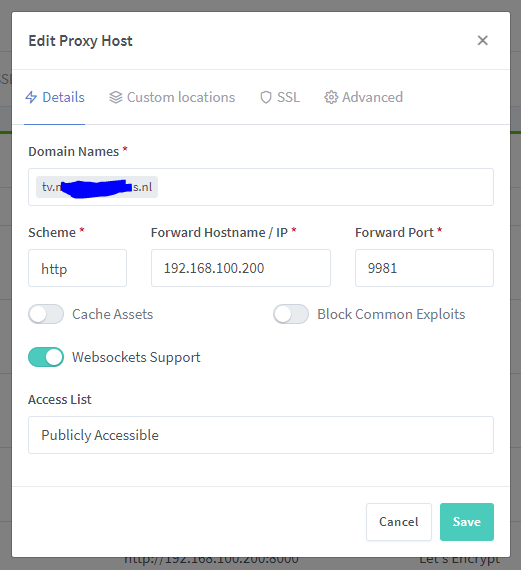
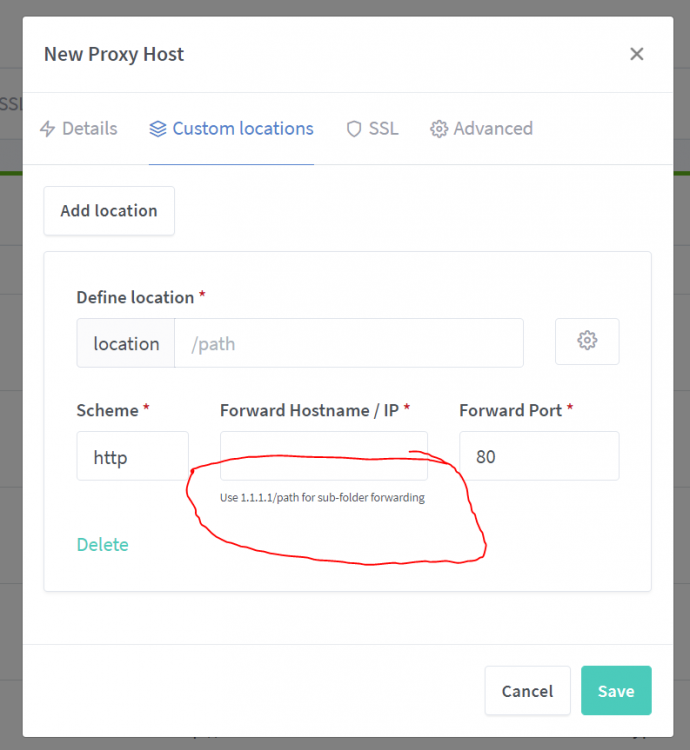
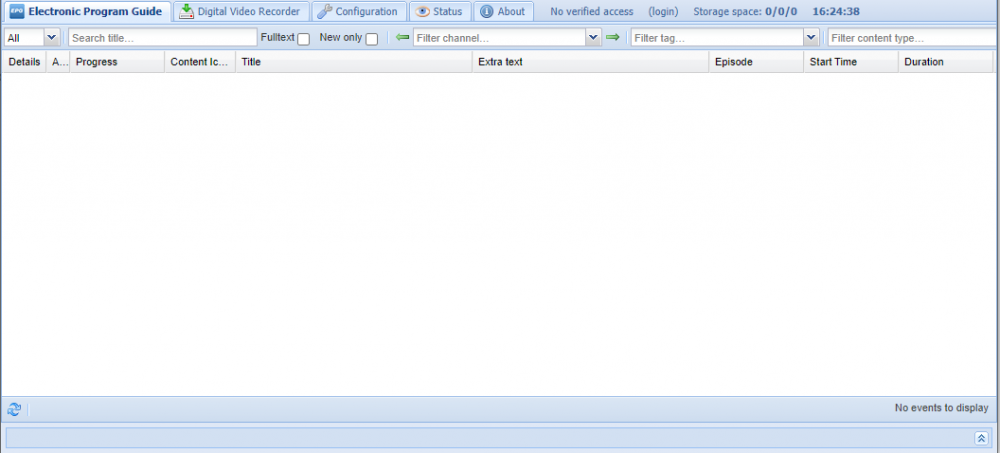 Can you confirm that your backend works when you go to http://192.168.178.103:9981? Do you have any other hosts configured? Do they work or do they also have problems?Can you share your config?Yup works like a charm here!Do you want to mount the 'consume' directory via NFS? Why? Ionotify works fine on docker just the regular folder mapping/mount.I have just installed paperless-ng. A year ago I was using the 'old' paperless and I have a backup of that database. All files seem present but when I search for a text It will not return any results. It should work as when I go to that document and check the 'content' tab it has that exact string I am searching for. Is there anything I need to do when coming from an old database? Perhaps reindex or something? On the site I see "docker-compose run --rm webserver document_index reindex" but I don't use docker-compose (I use this template) so where can I find this script? Ah I see it now: I was confused by the webserver part at firstYou can add "Custom Nginx Configuration" to a proxy host. If you need additional modules I would say fork the container and add them yourself. Not sure if additional modules can be added in an other way. And for other Nginx config see: https://nginxproxymanager.com/advanced-config/#custom-nginx-configurationsI have made a fork if you want to use 80/443:This option?
 For IPv6 there is no NAT so that is in my opinion the best argument on why one would need 80/443. (wel technically you could NAT IPv6 but hey...)Did you use NPM in the past? Perhaps you still have a data directory with your old/own account?You can still add a container with 'bridge' as network, then it will just get it's own internal IP so yes that is still possible. But yeah you will kill your DNS if you take your server offline yes... (or use both your unraid/docker + a pi then you can also take your pi offline without problems!)Letsencrypt uses port 80 for it's verification. 443 cannot be used because that would be SSL and requires a certificate in order to function. You can however manually get the certificates (or use DNS validation for example) and load them into NPM.By default docker uses the DNS from the host, so if you want you could change the DNS settings in Unraid. And also: why dont you change from it within the pihole settings? Just get another container with Unbound and point your pihole to that?

