





Verme123
Members
-
Joined
Everything posted by Verme123
-
The amount of posts in this thread is huge, sorry if this has been asked already. Now that there is an internal boot option, is it safe to assume the 'Backup the flash drive?' option works with a boot drive in the same fashion as the flash drive? Thanks
-
Hi folks, I was going to change over to an internal boot and change my licensing to tpm instead of the flash drive I currently have running. I haven't seen anything regarding minimum requirements for the drives. I have 6 open mb sata ports so I was going to buy two cheapo ssd drives, as my m2 slots are already being used for my cache drive. I'd mirror these two new drives. Are there any requirements or suggestions for drives? I was gonna grab a few of these type of things off of amazon - https://www.amazon.ca/Patriot-Burst-Elite-120GB-Solid/dp/B08LKMQ9T4 ... size and speed don't matter right? What file system would make sense for the mirrored boot drive in this case? Thanks.
-
Leaving this here for someone else..... found it. If you are running VMs .. or even have the VM service running, it uses port 53 for some reason. Unfortunately I had to disable the VM service completely in the settings menu to resolve this issue. Unfortunately pihole/adguard home using port 53 by default won't work with VMs enabled in any way.
-
Hi, I'm trying to install adguard home and something is already using port 53. It's not a docker allocation though, is there a way I can view the ports used in Unraid as a whole? I don't see 53 being used in any settings anywhere either, so I'm a bit confused. I tried looking around the tools menu but see nothing with lists tcp/udp ports used on the system, thanks in advance!
-
Works like a charm, just updated and mounted without issue to a smb share on a Truenas box, thank you.
-
omg thank god. This has been driving me nuts all morning... and ofc I just took too long to come here and check.
-
Hi folks, I know there are a few options for this. I'm not a script genius by any stretch, so I thought I'd ask for options. I have a remote smb share mounted in unraid I'd like to make a backup nightly to. The drive in my array is zfs (snapshot of my containers) and I'd like to back it up on my Truenas box (again, mounted smb share). A snapshot to the other machine isn't necessary, just a nightly copy. Bonus points if I can somehow keep incrementals for a week or 2 .. no idea. App/plugin/script? Not a clue... open to anything, thanks. I don't even know if I need to remotely mount a smb share since it's accessible by ip anyways? Who knows... (not me)
-
I'm changing hba's since the adaptec unit needs around 200cfm airflow at all times. My server chasis, although it has a bunch of fans doesn't get this forced air flow. I've got a small fan strapped to the heatsink, but it's not enough for the whole card. That high pitched alarm goes off quite a lot, not cool. I'm under the impression that the lsi runs cooler... and has a bigger heatsink (pic on ebay ... fingers crossed). Has anyone else made the hba card switch? The LSI is already in IT mode, so I'm pretty sure this is just a plug/play change when it comes to Unraid, just making sure, thanks.
-
Hi everyone, I woke up this morning to a nice red error message from Unraid stating I had a hardware error of some kind. I'm no server guru, however I know enough to be able to attach the diagnostics file as instructed ... I don't see any drive errors or anything in the Unraid gui, so the issue is currently unknown for me. I tried to read the diag files, but I don't know what I'm looking for. If anyone can provide guidance based on this info, that'd be awesome, thanks.
-
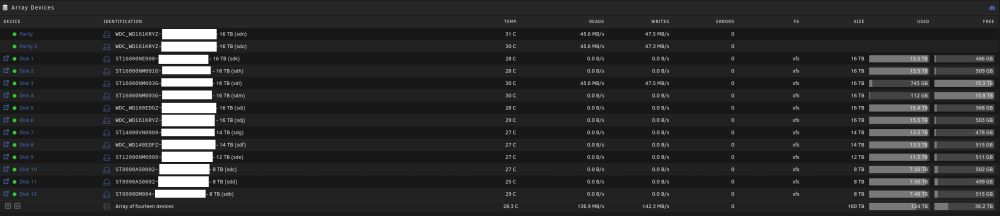
Let me start by saying I don't have experience with zfs, so I'm looking for some info. As you can see from the attachment, I have 1 large xfs data array. I have 2 new disks in it, which allows me to empty 2 others at the same time if needed using Unbalance. I'm wondering if it's worth changing to zfs for it's added resiliency benefits. Speed is not a huge concern for me, although I don't want to slow down to a crawl. My questions are: 1) If I make 1 large zfs pool, can I add drives as I go along like I currently can with the xfs setup? 2) I'm assuming I'd have to do 1 or 2 drives at a time and spend forever copying files over should I change formats? 3) Are parity drives needed anymore, or can I recover the 32tb used by parity currently? I may be way off base and have no issues leaving things the way they are, but zfs is the buzzword for the last while, it seems worth checking out now. I apologise in advance if this post makes no sense, I don't know what I don't know ... thanks.
-
Can confirm, something is wrong. I'm online in the forums status, however the unraid server has an API error. Restarting the unraid-api is a no-go.
-
How does this make Plex go down? The only outage I'm seeing on my side is the My Servers plugin. Everything else seems to still be working fine.
-
Must be an outage, same here.
-
My driver installed again no problems after I uninstalled/reinstalled the plugin, thanks for the fix! I don't see the video card section under the unraid dashboard anymore however, is this by design? Thanks.
-
Same here, fingers crossed. I get a mouseover message 'Current Server - Not connected to Mothership'
-
Ya, I figure once it's more balanced the share allocation method would take care of the rest.. fair enough, thanks.
-
I guess this is a dumb question? I have no idea... just looking for something similar to drivepool (Windows) balance function, thanks.
-
Just a quick question, my array is around 80% used, however some drives are more full than others. Rather than manually using unbalance to move files around, I was hoping to find out if there is a plugin or method to automatically balance (sizewise) the data which IS ALREADY EXISTING. I used high-water for the shares which is fine going forward, but after some disk swaps, everything is a little unbalanced. Thanks in advance.
-
Great, thanks folks. I'm re-clearing them out first just in case anything happens and I'll be adding them into the array afterward.
-
I've got 14tb worth of drives which are indicating smart errors. If these can pass a pre-clear, are they ok to use? I'm not sure how to continue with that, they are currently unassigned, but it's a fair bit of space, see these pics for what i'm seeing. Is there a different way to test these things in unraid? Thanks a ton! https://imgur.com/a/DPeDDD0
-
I unfortunately don't have other logs. Is there a way I can get them? As for the Marvel, it's the old one I threw into the system just in case, last night when the errors happened it was an adaptec asr-71605 hba, thanks. I guess ideally I would need to attach existing drives and data .. which have already been in the array, back into the array without the need to format them. Otherwise I'm a little out of luck and will need to power everything down until I get a new 16tb drive to use as a temp to move everything
-
Very good point! Thanks. server-diagnostics-20211202-1422.zip I should also mention based on google searches I have changed to another Sata controller card and all different sata cables. I was running an hba w/sas2sata cables. Now it's my old SIL 8 port sata controller in the machine, same thing though.
-
I went to bed last night and everything was working properly. I'm moving to unraid from another os and copying drives overnight etc. When I woke up, the server was completely down. I suspect the drives filled up but I really have no idea. I was finally able to get into the gui and this is what the drive setup looked like: https://imgur.com/a/iTdNevW Obviously /sdg and /sdf should be in the array. The weird thing is though is that when I unmount the array, I'm able to mount the 2 listed unmountable drives as unassigned. All the data is still there, but I can't get these drives back into the array where they belong: https://imgur.com/a/OgviEO1 I'm really hoping the array gods can shine down upon me and offer assistance. I don't have a spare drive at this point to move things to if I had to re-format the drives to re-add them to the array ... any assistance would be fantastic, thanks! When I try to add the drives back to the array in the main menu, the result is 'Too many wrong and/or missing disks!' I should also note I did something I shouldn't have, I don't think, I cannot add the drives back to the array anymore, they are coming in as new disks and need formatting, *great*.
-
That is fantastic info, just what I will do myself, thanks a ton!
-
I see, so make a 1 disk cache and use the other drive for docker containers? Can a drive drive not in the cache array be used for the docker containers? I have another ssd sitting around somewhere. I was going to 2x the cache drives as well as the parity just in case.

