





petjek
Members
-
Joined
-
Last visited
Everything posted by petjek
-
I think I found and solved the problem with a littel help from Claude. I had NetBIOS set active in Samba settings. I changed and restarted Samba service. Looks good now. No more warnings flooding syslog.
-
Did so and it really took a while to restart. Today I checked again just to see the log is already 62% full. hightower-diagnostics-20260702-1312.zip
-
Hi all, I just updated to 7.3.1 the other day and checking Fix common problems had to find out there are warnings. Running Unraid for many years now I don't remember ever having this waring before. Any idea what's going on? hightower-diagnostics-20260701-1244.zip Edit: sorry forgot to mention: warning is "/var/log is getting full (currently 100 % used)"
-
Finally I got my server updated to 6.12.3 yesterday. There was a BIOS update available from May 2023 and I switched back to UEFI. In the past that caused some trouble with my Dell Precision 5820 but yesterday it booted perfectly at second try. First try didn't (Legacy) but did not reboot automaticly either. That's intresting because on 6.11.5. it was opposite. Also I uninstalled gpustat.plg as recommended by update assistant. But I don't think, this caused the problem as the reboot happened at a very early stage in booting. At least it might be worth giving a try if one didn't uninstall allready.
-
Same here. And there are some others having the same issue since 6.12. obviously. I have a spare server with a Supermicro board / Intel Xeon/ 32GB Ram as well, that one runs flawless on 6.12.3. Not so my Dell (productive) server. Did you try the suggestions? There is no newer BIOS for my Dell so this is no option for me. Maybe removing my graphics cards may help but I did not try this yet. UEFI Boot is is deactivated as this did led to a similar failure for me.
-
So 6.12.3 is available now. Did someone already give it a try?
-
Same here. I was able to successfully downgrade to 6.11.5 again by copying all files from folder previous to root. I created a new 6.12.2-USB stick using USB Creator. That one didn't boot either. What is that tmpfs 32M 340K 32M 2% /run thing about? I do have a Plex container running as well. Regards, petjek
-
Yay! That worked flawless! Is there any need to change settings back to UEFI boot? Any advantages doing so?
-
Well, no it doesn't. I just updated the Nvidia driver and with the next restart the same problem reoccurs. I made some adjustments in BIOS like switching from UEFI to legacy boot. Unfortunately that didn't change a thing. Actually I think of following the advice to create a new boot stick. I found that on reddit a lot. I was able to copy the config folder from the original stick to my Mac and will have the new stick created soon. Do I have to copy anything else but the config folder?
-
Okay, UEFI probably was the problem here. I checked BIOS settings, activated UEFI and set the flash drive as the only boot device. First boot led to another error at first but eventually the server booted correctly. Thx!
.thumb.jpeg.c24db7556dd60fde53708b044b3cfc77.jpeg)
-
Erm, what is CSM boot? I think UEFI boot is currently disabled so probably it is CSM although I don't know what it is.
-
Hi there, I recently swapped most of my hardware from an almost 13 Year old custom PC to a more actual Dell Precision 5820. The Dell came with two 1TB SSD that I now want to replace my actual 256GB cache drive. My idea was to add one of the SSDs first, have mover to bring all appdata (not having VMs yet) to the new drive and then replace the old one to have a cache pool in RAID1 mode. Unfortunately I never get so far because the moment I add the 1TB SSD and do a reboot I run into a kernel panic. end kernel panic - not syncing: VFS: unable to mount root fs on unknown-block(0,0) I found another post here that sounds similar but does not describe exactly my situation. I don't think I have a faulty flash drive as it boots perfectly the moment I remove the SSD from the system again. Any idea what might cause this? Regards petjek EDIT: forgot to mention I am on v6.11.5, Intel® Xeon® W-2123 CPU @ 3.60GHz, 8GB DDR4 Single-bit ECC RAM
-
Oh man, sorry. Ich habe schon recht viel im Post gelesen, diesen Teil aber tatsächlich nicht. Ist jetzt durch gelaufen. Danke!
-
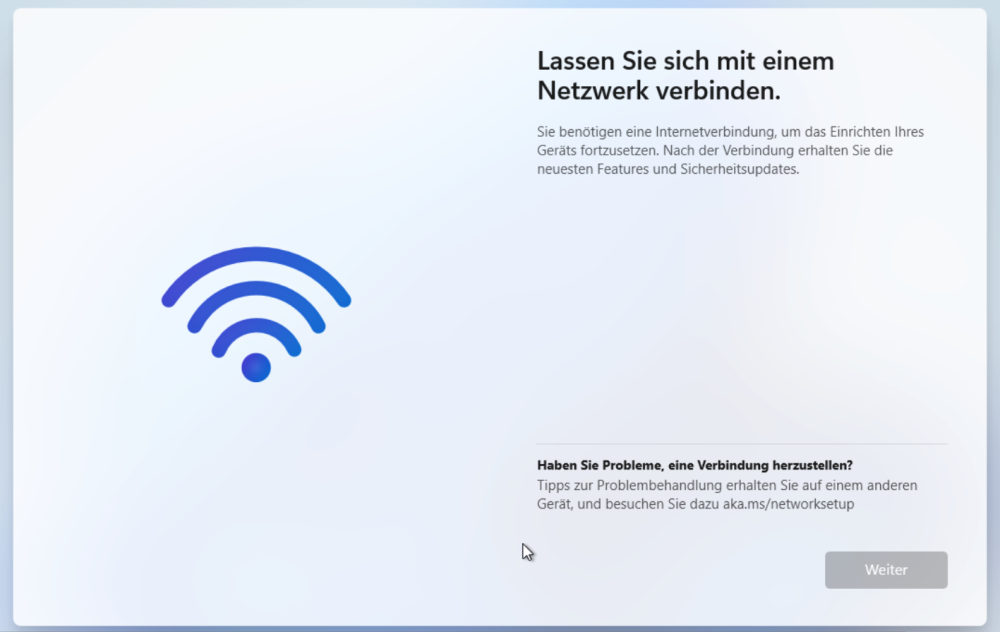
Okay, ich will nicht noch mal editieren. Daher neuer Beitrag. Das Setup startet jetzt problemlos und ich komme zum Einrichtungsassistenten. Da hänge ich nun aber bei der Netzwerkverbindung. Mit ein bisschen goolen bin ich auf den Befehl pnputil /add-driver e:\ *.inf gestoßen, den man in der Eingabeaufforderung eingeben muss. E ist die VirtioCD, nur in welchem der Ordner finde ich nun die Treiber für die Netzwerkkomponente?
-
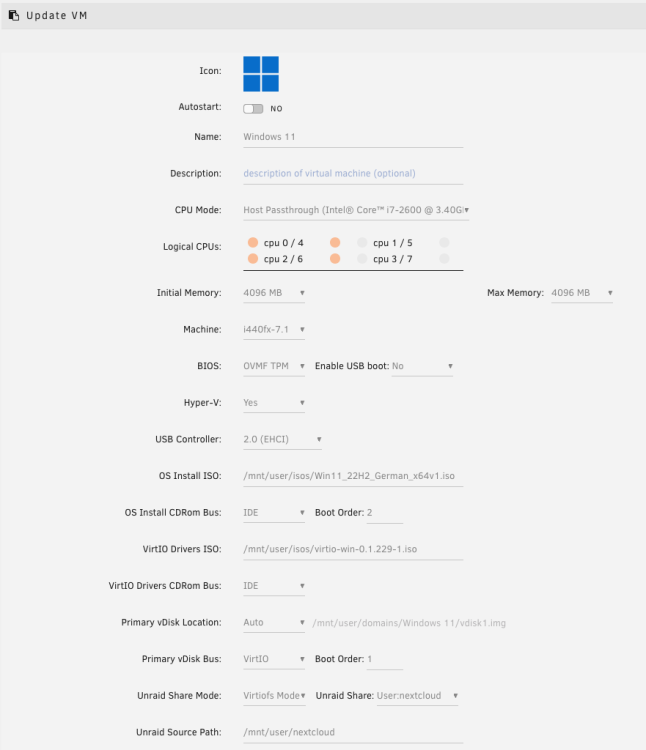
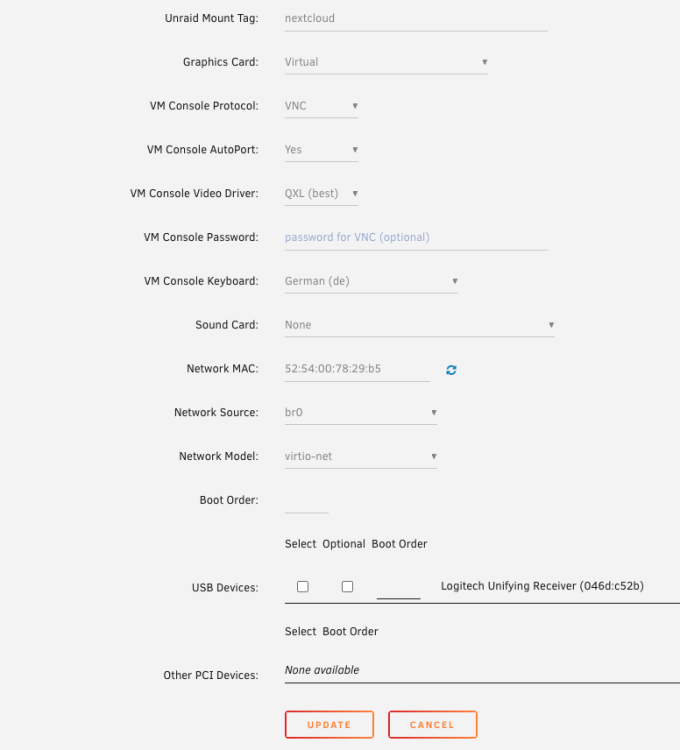
Wenn ich keine zuweise, lasse ich die Zuordnung so wie sie vorgeschlagen wird? Sprich: nur die erste markiert? Gute Frage, hatte ich nicht drauf geachtet und stand wohl noch von einem älteren Versuch. Auch das war ein Vorschlagswert. Hab den jetzt auf Q35-7.1 (weil: neuste?) geändert, was beim erneuten Start der VM zu einer Fehlermeldung geführt hat. Hab die VM dann noch mal neu angelegt und nun meint Windows Setup, "Dieser PC erfüllt nicht die Mindestsystemanforderungen zum Installieren dieser Windows-Version." Liegt's am TPM? VG Nachtrag: ne, nicht nur EINE CPU, dann reicht's nicht, was die Systemressourcen angeht.
-
Hi, ich komme hier irgendwie nicht weiter. Ich hab's so installiert, wie oben beschrieben (allerdings ohne dies vorher zu lesen) und alles läuft okay, bis der (erste?) Reboot ansteht. Er zählt munter die Sekungen runter, danach wird der Bildschirm blau und das war es dann. Beenden kann ich die VM nur über "Force Stop", wenn ich dann aber neu starte, bekomme ich die Fehlermeldung, dass die Installation unterbrochen wurde und nicht fortgesetzt werden kann. Jemand eine Idee, woran es liegen könnte? VG
-
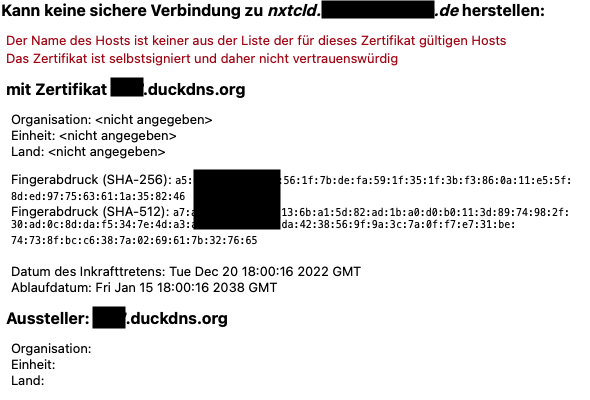
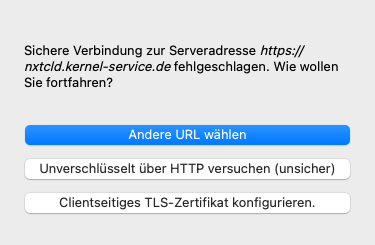
Hi there, I realy hope this is the right place to ask as I'm not sure my problem is related to Swag. Might be a Nextcloud or even macOS problem as well. I'm running a Nextcloud and Swag container as shown in spaceinvaders tutorial. Everything works well so far until I recently bought myself a new Mac mini. When setting up the Nextcloud app I get an error message telling me the certificate is self signed and cannot be trusted. As one can see the URL used is https://nxtcld.my-domain.de. For this subdomain I have a CNAME configures pointing to my DuckDNS domain mynextcloud.duckdns.org. Sorry, German system so German error message. But I guess one can see the issue here. Swag is configured for the subdomain nxtcld.my-domain.de (as well as for a Bitwarden subdomain) and not the DuckDNS URL. Why is DuckDNS even mentioned here? I do not have this issue with my iOS devices nor my WIndows computers. I renewed the certificate manually with no no change in this behavior. Setting the checkbos to trust the certificate anyway does not solve this. I tried and got the options to use another URL, try an unsecure connection or to configure a client side certificate. For the last option I have no idea what to do here. Using the unsecure http option doesn't work too beside the fact I wouldn't like to use an unsecure connection. Finaly I get the error message the server has answered "400 Bad request". That's were I'm currently stucked. Any idea what can be the problem here? Regards petjek
-
Ich gebe zu, die Kiste ist ordentlich in die Jahre gekommen. In der Tat besteht der komplette unRaid Server eher aus Restbeständen. Bis auf die Festplatten/SSD, die sind brandneu. Ist tatsächlich eine Überlegung wert, da mal zu investieren. Danke euch für die Tipps, ich bin mal shoppen...
-
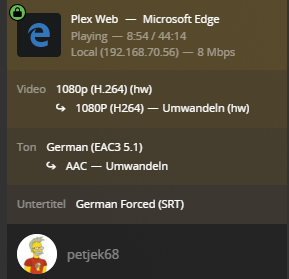
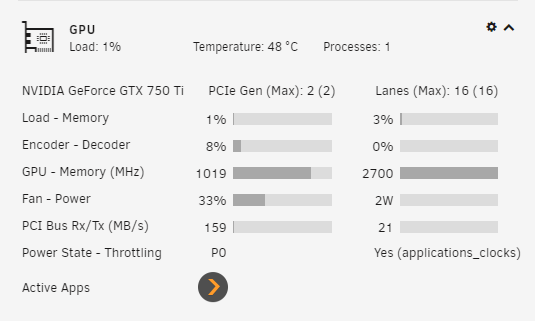
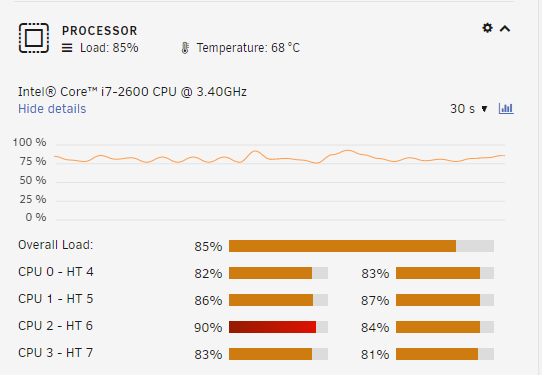
Oh, sorry, ja da war ich etwas knapp mit Informationen. Der NVIDIA-Treiber ist korrekt installiert und konfiguriert, daran wird es wohl eher nicht liegen. Auch wenn ich eine 1080p H.264 konvertiere, geht die Prozessorlast hoch (htop zeigt hier das gleiche wie das Dashboard). Wenn ich allerdings auf "nur" 720p konvertiere läuft das eigentlich gut. Die GTX 750Ti war halt über, daher ist die da gelandet, wo sie ist. Aber nach einer andere GPU zu schauen ist vielleicht wirklich sinnvoll. T400 oder T600 wäre hier das Mittel der Wahl?
-
Hi, ich zweifele gerade stark daran, dass das HW-Encoding unter Plex bei mir wirklich funktioniert. Ich habe den linuxserver/plex seit Jahren installiert und die Konfiguration ist m.E. korrekt. Wenn ich einen Film umwandle, sehe ich im Dashboard Plex als aktive App. Gleichzeitig geht aber auch die Prozessorlast durch die Decke. Die Konvertierung läuft schnarchlangsam. Sieht für mich so aus, als würde die GPU gar nicht genutzt. Oder doch? Bin gerade etwas ratlos. VG petjek

-
Hi all, I recently changed the server hardware a bit and am now facing a massive problem. I switched from an older Intel board/cpu to a not so old Gigabyte AX370 board with an AMD Ryzen 5 1600 Six-Core @ 3200 MHz. Performance was brilliant for some days so I started some care taking. My HDDs are still reiserfs and as suggested I started to migrate to xfs. I added a blank HDD and started to move data. To speed up the file transfer I unassigned the parity drive temporarily. VM is deactivated, Docker containers are all down and I deactivated SMB to make sure there are no file operations. Nevertheless, after a while the server stops running. Maybe within 2 - 3 hours. From that moment I cannot access the WebIF neither can I ssh into console. The server is even not pingable nor visible in the router device overview. I do have a monitor attached that continuously shows messages I do not understand. After resetting the server the same happens again and again. After a restart I took a look at the logs but can only see data since the latest restart. Is there a place I can access older logs? Did I miss something mandatory after the hardware change? This is not the first time I changed hardware. The server is running for many many years now and maybe 6 years ago I switched the board and CPU from AMD to Intel. No problems then but unfortunately now. Actually I have no idea what to check and I'm really looking for any advice. petjek hightower-diagnostics-20221130-0758.zip
.jpeg.aa13e016eba781ccfe470989613495ef.jpeg)



