FQs19
Members
-
Joined
-
Last visited
-
I would reboot the server. If that doesn't allow the sign in button to appear, remove the unRAID Connect app, then reinstall it.
-
try that reboot trick again. Otherwise submit a ticket. It's obvious this update had issues.
-
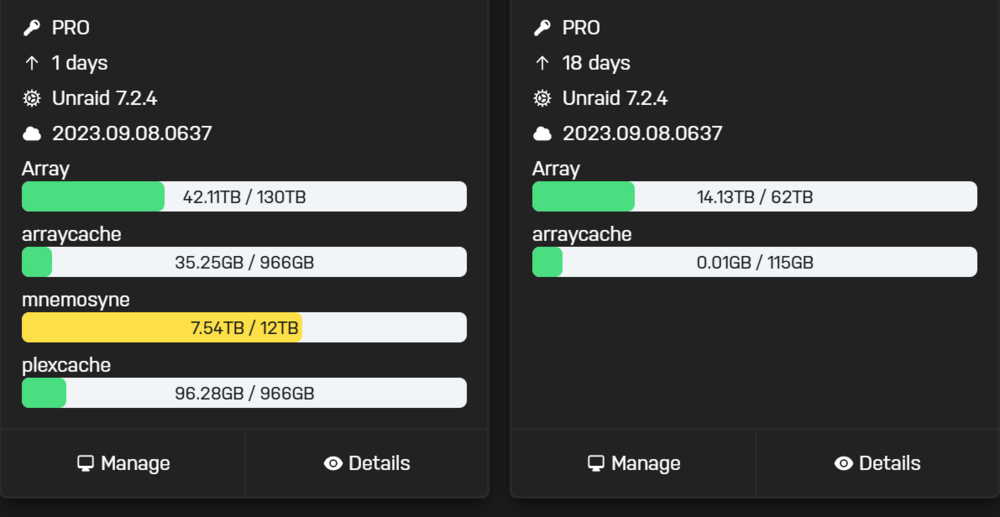
Not sure, but I believe that number is the version that was used first to link unRAID Connect with your server. Just a guess. Here is mine:
-
the classic fix. Nice.
-
Start on your server: Settings>MGMT Access then go to the Unraid API Settings tab. Click on Sign in to Unraid.net That should start the process of getting it connected. If you have to add your key at some point too, I had to, it will tell you how to do it. It's basically just clicking on the boxes that are hidden links.
-
Thank you for submitting the ticket and reporting back it's fixed. I was able to register my server again. Cheers.
-
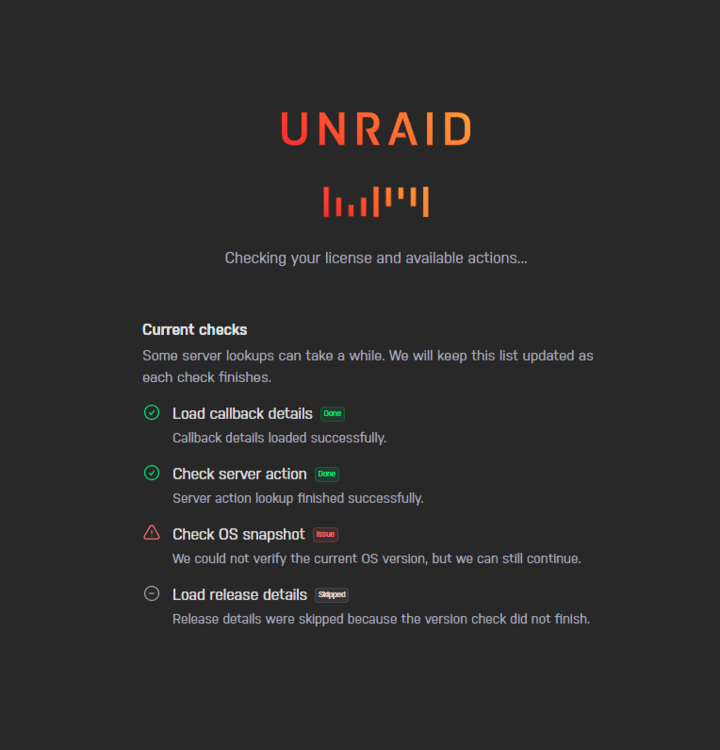
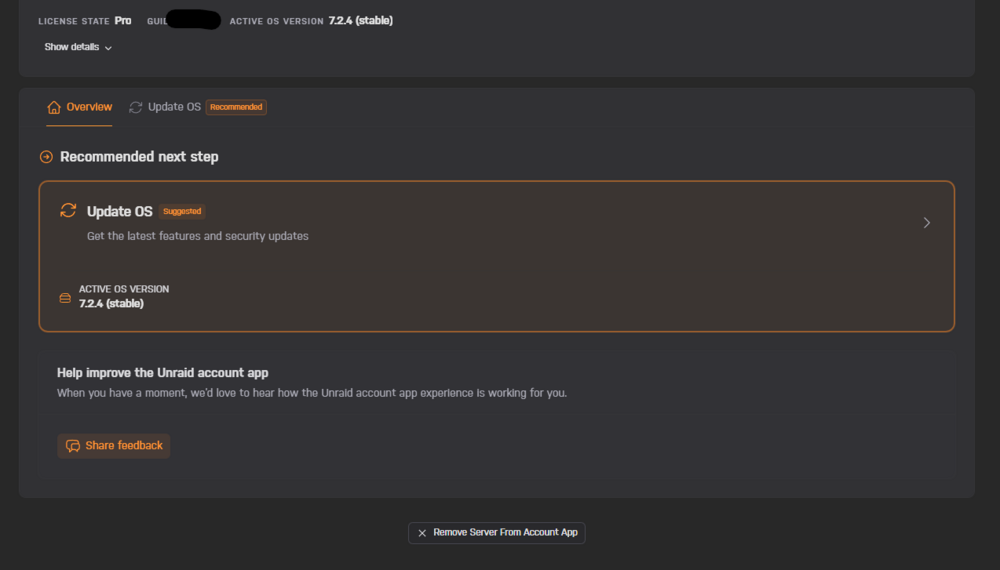
Updated Connect to 2026.03.23.2309 just now on one of my unRAID Pro servers. It gives this error when trying to sign in: This was after it deleted the key on the unRAID server I updated Connect on. I was able to link the key back to my server, then this screen came up. I can't get it to connect at all and now both of my unRAID servers are OFFLINE on Connect Dashboard. Both servers are on 7.2.4. There is no stable release above that. So why does it tell me to update?: Wonderful update! Please fix.
-
I've had two issues with this plugin since updating to unRAID 7.1.2. I'm on version 2024.11.21. The first issue was with a Docker app not backing up. I was able to resolve that issue. The second issue continues to be a problem that I can't resolve. The error is: [MAIN] Copying flash backup to destination failed! The error only happens when Auto Backups are run. This error does not happen if I Manually Backup. My flash backups are copied to a custom destination, which is an Unassigned Disk. The drive has no errors, is available under SMB, and formatted as NTFS. I've been using this same drive for years with no issues. Also, the CA backup folder was never created on my array share. So I don't have a folder under CA Backups/7.1.2/backups/ that shows as ab_20250609_060001-failed. Does anyone have an idea of what is going on? I've attached the unRAID diagnostics and here is the Appdata Backup ID: 90980e6b-4bde-496d-ad2a-81e4862ba041 myers19-diagnostics-20250609-1239.zip
-
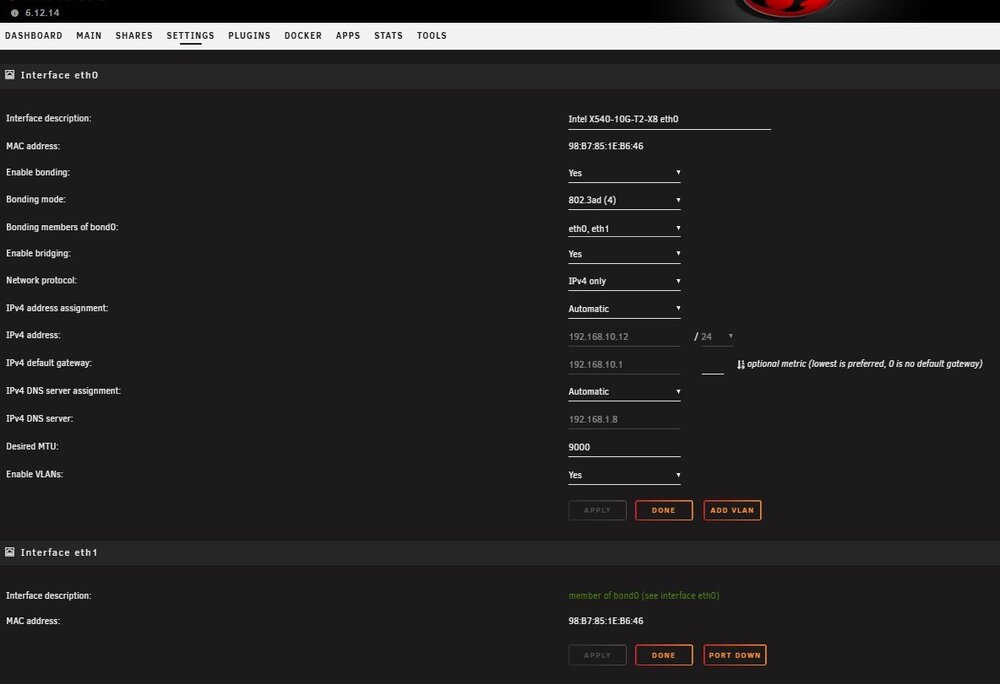
I never even thought of unchecking eth1 from being its own bridge member, so that it would be available to eth0. Thank you so much for the help. I really think eth0 should be able to override any current settings on eth1, but hopefully I'll remember this in the future. root@Myers19:~# iperf3 -c 192.168.10.10 Connecting to host 192.168.10.10, port 5201 [ 5] local 192.168.10.12 port 45504 connected to 192.168.10.10 port 5201 [ ID] Interval Transfer Bitrate Retr Cwnd [ 5] 0.00-1.00 sec 1.10 GBytes 9.45 Gbits/sec 702 647 KBytes [ 5] 1.00-2.00 sec 1.13 GBytes 9.69 Gbits/sec 236 577 KBytes [ 5] 2.00-3.00 sec 1.13 GBytes 9.70 Gbits/sec 314 664 KBytes [ 5] 3.00-4.00 sec 1.10 GBytes 9.46 Gbits/sec 559 647 KBytes [ 5] 4.00-5.00 sec 1.12 GBytes 9.63 Gbits/sec 298 612 KBytes [ 5] 5.00-6.00 sec 1.12 GBytes 9.65 Gbits/sec 396 647 KBytes [ 5] 6.00-7.00 sec 1.09 GBytes 9.38 Gbits/sec 479 682 KBytes [ 5] 7.00-8.00 sec 1.10 GBytes 9.49 Gbits/sec 501 751 KBytes [ 5] 8.00-9.00 sec 1.13 GBytes 9.69 Gbits/sec 159 664 KBytes [ 5] 9.00-10.00 sec 1.13 GBytes 9.70 Gbits/sec 151 682 KBytes - - - - - - - - - - - - - - - - - - - - - - - - - [ ID] Interval Transfer Bitrate Retr [ 5] 0.00-10.00 sec 11.2 GBytes 9.58 Gbits/sec 3795 sender [ 5] 0.00-10.00 sec 11.1 GBytes 9.58 Gbits/sec receiver iperf Done. root@Myers19:~#
-
I'm not sure what you mean? I can't select eth1 under 'Bridging members of bro0'. This is my problem.

-
@bmartino1 Here you go. This is with eth1 Disabled on my switch since it would cause STP errors. Let me know if you would like me to enable eth1 and place it on another network. root@Myers19:~# ip a 1: lo: <LOOPBACK,UP,LOWER_UP> mtu 65536 qdisc noqueue state UNKNOWN group default qlen 1000 link/loopback 00:00:00:00:00:00 brd 00:00:00:00:00:00 inet 127.0.0.1/8 scope host lo valid_lft forever preferred_lft forever inet6 ::1/128 scope host valid_lft forever preferred_lft forever 2: tunl0@NONE: <NOARP> mtu 1480 qdisc noop state DOWN group default qlen 1000 link/ipip 0.0.0.0 brd 0.0.0.0 5: eth0: <BROADCAST,MULTICAST,UP,LOWER_UP> mtu 9000 qdisc mq master br0 state UP group default qlen 1000 link/ether 98:b7:85:1e:b6:46 brd ff:ff:ff:ff:ff:ff 6: eth1: <NO-CARRIER,BROADCAST,MULTICAST,UP> mtu 9000 qdisc mq master br1 state DOWN group default qlen 1000 link/ether 98:b7:85:1e:b6:47 brd ff:ff:ff:ff:ff:ff 7: br0: <BROADCAST,MULTICAST,UP,LOWER_UP> mtu 9000 qdisc noqueue state UP group default qlen 1000 link/ether 98:b7:85:1e:b6:46 brd ff:ff:ff:ff:ff:ff inet 192.168.10.12/24 brd 192.168.10.255 scope global dynamic noprefixroute br0 valid_lft 5182952sec preferred_lft 4534952sec 8: br1: <NO-CARRIER,BROADCAST,MULTICAST,UP> mtu 9000 qdisc noqueue state DOWN group default qlen 1000 link/ether 98:b7:85:1e:b6:47 brd ff:ff:ff:ff:ff:ff 9: docker0: <NO-CARRIER,BROADCAST,MULTICAST,UP> mtu 1500 qdisc noqueue state DOWN group default link/ether 02:42:9b:e6:28:81 brd ff:ff:ff:ff:ff:ff inet 172.17.0.1/16 brd 172.17.255.255 scope global docker0 valid_lft forever preferred_lft forever root@Myers19:~# ip link 1: lo: <LOOPBACK,UP,LOWER_UP> mtu 65536 qdisc noqueue state UNKNOWN mode DEFAULT group default qlen 1000 link/loopback 00:00:00:00:00:00 brd 00:00:00:00:00:00 2: tunl0@NONE: <NOARP> mtu 1480 qdisc noop state DOWN mode DEFAULT group default qlen 1000 link/ipip 0.0.0.0 brd 0.0.0.0 5: eth0: <BROADCAST,MULTICAST,UP,LOWER_UP> mtu 9000 qdisc mq master br0 state UP mode DEFAULT group default qlen 1000 link/ether 98:b7:85:1e:b6:46 brd ff:ff:ff:ff:ff:ff 6: eth1: <NO-CARRIER,BROADCAST,MULTICAST,UP> mtu 9000 qdisc mq master br1 state DOWN mode DEFAULT group default qlen 1000 link/ether 98:b7:85:1e:b6:47 brd ff:ff:ff:ff:ff:ff 7: br0: <BROADCAST,MULTICAST,UP,LOWER_UP> mtu 9000 qdisc noqueue state UP mode DEFAULT group default qlen 1000 link/ether 98:b7:85:1e:b6:46 brd ff:ff:ff:ff:ff:ff 8: br1: <NO-CARRIER,BROADCAST,MULTICAST,UP> mtu 9000 qdisc noqueue state DOWN mode DEFAULT group default qlen 1000 link/ether 98:b7:85:1e:b6:47 brd ff:ff:ff:ff:ff:ff 9: docker0: <NO-CARRIER,BROADCAST,MULTICAST,UP> mtu 1500 qdisc noqueue state DOWN mode DEFAULT group default link/ether 02:42:9b:e6:28:81 brd ff:ff:ff:ff:ff:ff I don't like switching to new version releases until a month or more after they release. I'm also thinking of starting fresh with 7.0.0.
-
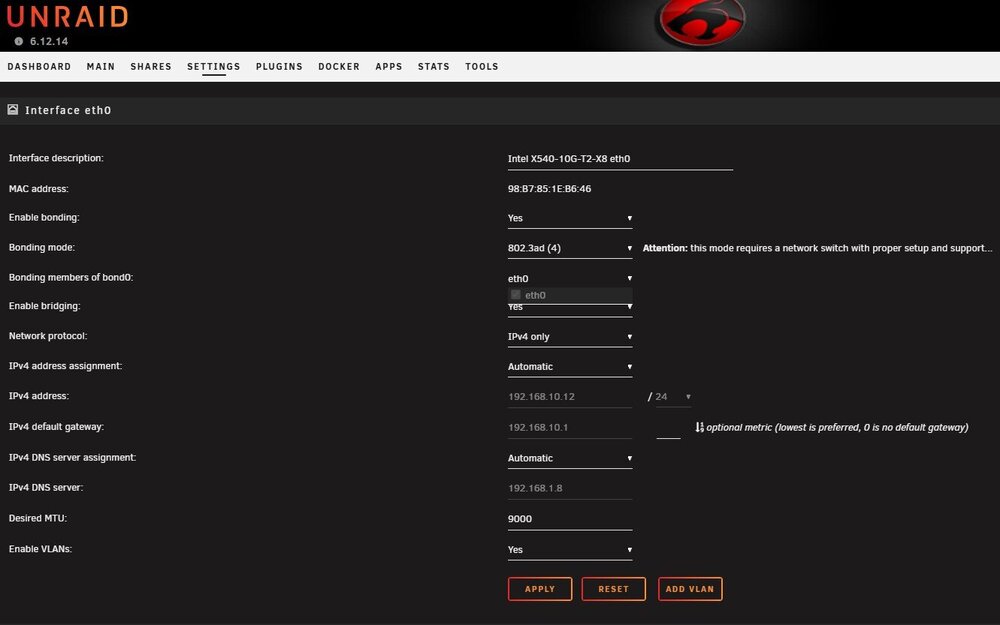
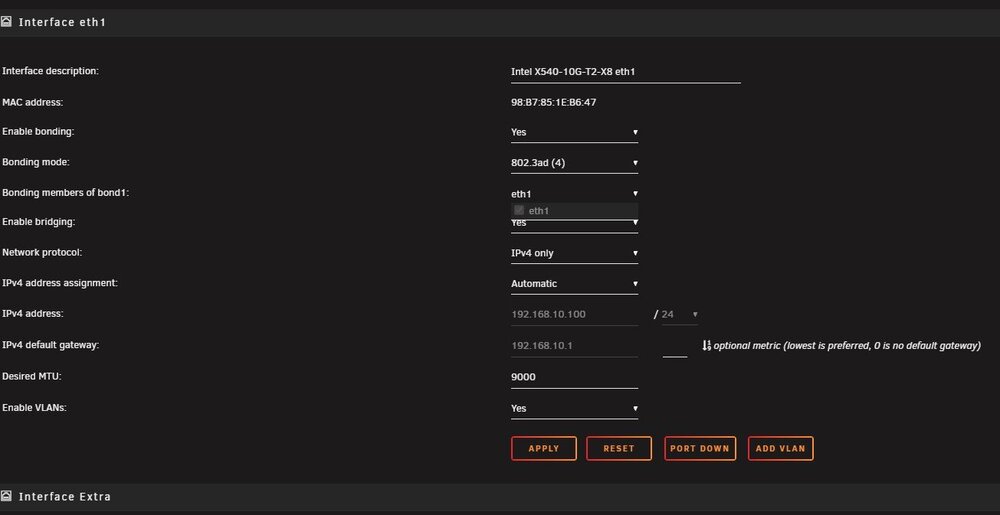
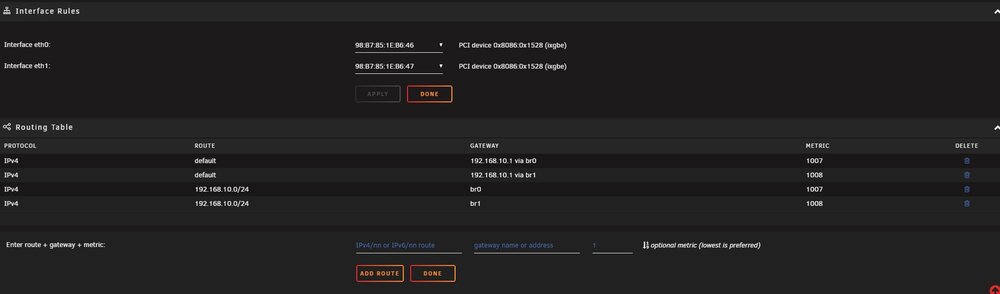
I want to go back to using bonding on my unRAID 6.12.14 server, but the UI will not allow me to do it. Specifically, after enabling bonding and selecting 802.3ad mode, the UI will only show one ethernet port under Bonding Members. So eth0 can only bond with eth0 and the same with eth1. I've tried multiple reboots, verified both ethernet ports on active and shown in unRAID, verified the nic is in a x16 slot using x8 PCIe lanes, and also removed the Tips & Tweaks plugin because that was giving unreliable information. I would change a setting on Tips & Tweaks, like disable NIC Flow Control, but the Current NIC Settings column would still show the NIC Flow Control was enabled. Does anyone else have this issue or know how I can resolve it? myers19-diagnostics-20250119-1412.zip

-
Thank you for the info. Just wanted to make sure I wasn't doing something wrong.
-
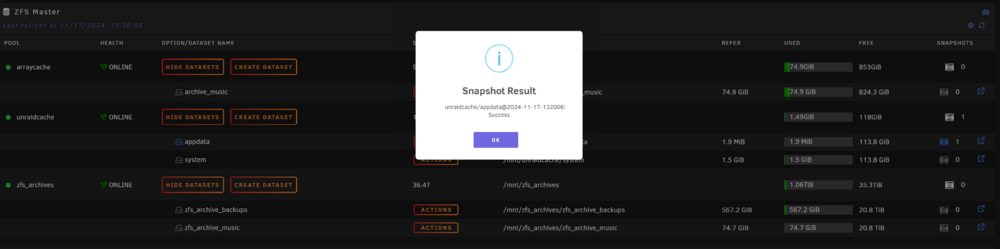
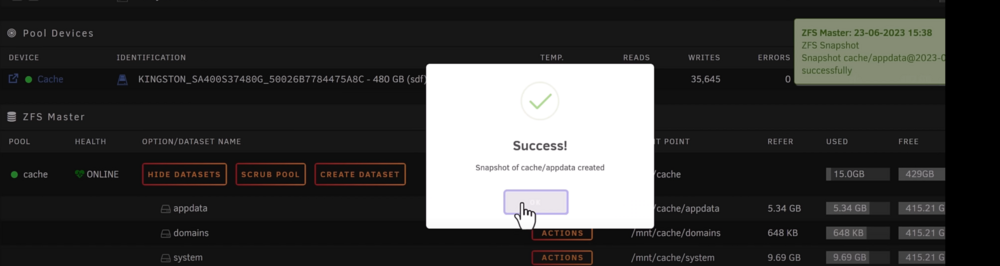
I'm doing some testing with ZFS and your plugin on 6.12.13 in preparation for unRAID 7. Why am I getting a blue I symbol for successful confirmations when working with ZFS and not a green checkmark? When viewing spaceinvader one videos, his successful confirmations are green checkmarks. myers19-diagnostics-20241117-1518.zip
-
I'm not sure why, but I'm unable to create a folder on any DISK in my array. I'm specifically trying to create a 'clear-me' folder on Disk 7 after I removed all contents to take the drive out of the array. The CREATE button is greyed out and becomes usable only after going into user share. Is creating on a DISK not possible using DFM? threadripper19-diagnostics-20240913-1403.zip