





Redskyer
Members
-
Joined
-
Last visited
Everything posted by Redskyer
-
The same for me. The new driver works! 👍
-
Thanks for the advice, I wrote an email to the support and will post the answer from the support here. It seems that my card "DVB-S2X/-S Quad-Tuner TV-Card PCIe" isn't supported ☹️
-
Hi, I have the same problem. I switched to the LibreELEC Drivers, but that doest't seem to work. lspci -v 07:00.0 Multimedia controller: TBS Technologies DVB Tuner PCIe Card Subsystem: Device 6904:0020 Flags: fast devsel, IRQ 5, IOMMU group 15 Memory at f7100000 (32-bit, non-prefetchable) [disabled] [size=256K] Capabilities: [50] Power Management version 3 Capabilities: [70] MSI: Enable- Count=1/1 Maskable- 64bit+ Capabilities: [90] Express Endpoint, IntMsgNum 0 Capabilities: [100] Device Serial Number 00-00-00-00-00-00-00-00 So, I just can go back to Unraid 7.2.6, until the release of new drivers. Do I have any other options?

-
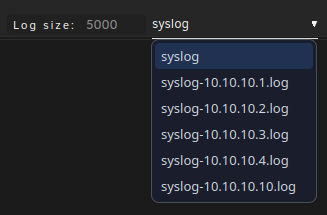
Hi, I want to ask, if it is possible to choose a syslog file in this tool, because I have more than one. In the original syslog tool, I have that option. How does Enhanced Log choose the correct syslog file? Best regards 😊
-
Cool, thanks. 😊
-
-
If I choose that option, the original mover is used and all other options (filters) will be ignored. I just wanted to ask, no hurry. 🙂
-
I would like to ask if it is also possible to implement the option to set the percentage to 0 instead of 5? 😅
-
Jup, so betreibe ich es auch (alles in Docker). Bisher fehlt es mir an nichts.
-
Ich nutze ebenfalls den ConBee2.
-
Ich nutze den offiziellen Docker Container (nicht über UNRaid) und konnte bisher keine Probleme feststellen. homeassistant/home-assistant:stable Home Assistant 2023.2.1 Frontend 20230201.0 - latest
-
Puh, das wird echt schwierig. Da fällt mir im Moment auch nichts Sinnvolles ein, wie man das lösen könnte. Ganz nebenbei sollte man Drucker auch nie ganz vom Strom trennen, aber das ist ein anderes Thema 😅
-
Ich verstehe noch nicht zu 100 Prozent, wo genau der Zigbee Switch zwischen hängt, bzw. was dessen Aufgabe ist. An welchem Gerät hängt der Netzwerkdrucker? Kannst du dazu vielleicht eine kleine Zeichnung machen?
-
I tried it, but everything seemed okay. Anyway, I found another solution for me. I put every file, what shouldn't be moved to another share, which is only on the cache drive.
-
I've got a similar problem and also have no solution for that.
-
Hi, I have a similar problem as he had and tried to solve it with these tips, but nothing worked and I don't have any idea what the problem could be. I've configured a moverignore.txt that contains the following: /mnt/cache/Docker/Logging/Pi-Hole/pihole.log /mnt/cache/Docker/Logging/TeamSpeak/ts3server_0.log /mnt/cache/Docker/Logging/TeamSpeak/ts3server_1.log /mnt/cache/Docker/Logging/Traefik/access.log /mnt/cache/Docker/Logging/Traefik/traefik.log /mnt/cache/Docker/Logging/Filebot/filebot.log /mnt/cache/Backups/Docker/Wordpress/Uploads/uploads.ini /mnt/cache/Downloads/Temp/* /mnt/cache/Docker/Logging/SmartHome/home-assistant.log /mnt/cache/Docker/Logging/Matrix/matrix-server.log /mnt/cache/Docker/Compose/Matrix/shared_secret_authenticator.py /mnt/cache/Docker/Logging/Paperless/paperless.log That's the out output form the log file: Jun 23 05:35:25 Media-Server root: mover: started Jun 23 05:35:27 Media-Server move: file: /mnt/cache/Backups/Docker/Wordpress/Uploads/uploads.ini Jun 23 05:35:29 Media-Server move: skip: /mnt/cache/Docker/Logging/TeamSpeak/ts3server_0.log Jun 23 05:35:29 Media-Server move: skip: /mnt/cache/Docker/Logging/TeamSpeak/ts3server_1.log Jun 23 05:35:30 Media-Server move: skip: /mnt/cache/Docker/Logging/Pi-Hole/pihole.log Jun 23 05:35:30 Media-Server move: skip: /mnt/cache/Docker/Logging/SmartHome/home-assistant.log Jun 23 05:35:30 Media-Server move: skip: /mnt/cache/Docker/Logging/Traefik/access.log Jun 23 05:35:31 Media-Server move: skip: /mnt/cache/Docker/Logging/Traefik/traefik.log Jun 23 05:35:31 Media-Server move: skip: /mnt/cache/Docker/Logging/Matrix/matrix-server.log Jun 23 05:35:31 Media-Server move: file: /mnt/cache/Docker/Logging/Paperless/paperless.log Jun 23 05:35:32 Media-Server move: file: /mnt/cache/Docker/Compose/Matrix/shared_secret_authenticator.py Jun 23 05:35:32 Media-Server root: mover: finished Why is the mover ignoring just some files and not all? Does anyone have an idea what I can try? moverignore.txt
-
Alles klar. Vielen Dank nochmal, von meiner Seite aus, kann hier geschlossen werden. 😉
-
Interessant zu wissen, aber bevor ich das RAM tausche, werde ich wohl die gesamte Platform auf etwas potenteres umziehen. DANKE! Das ist die Lösung! Daran hatte ich nicht gedacht, das wurde von Windows immer automatisch gemacht und ich ging davon aus, dass das auch bei UNRaid der Fall ist. Ich habe jetzt 24 GB in unter 5 Minuten kopieren können, es gab ca. einmal pro Minute nen kurzen Einbruch auf ca 40-60 mb/s, aber das hat sich sofort erholt und sprang wieder auf ungefähr 110 mb/s was so ziemlich das Limit sein dürfte. Ich werde das Plugin auf jeden Fall installieren und dem Problem zukünfitig aus dem Weg gehen. Das erklärt am Ende auch warum es bis vor einiger Zeit alles normal funktioniert hat. Das werde ich erstmal ignorieren, da ich mit der aktuellen Lösung sehr zufrieden bin und jetzt wieder alles funktioniert wie gewünscht. Noch eine andere Frage, macht es Sinn diesen Beitrag inkl. der Lösung nochmal im englischen Teil zu posten (natürlich auf englisch)?
-
Das kann ich nachvollziehen, jedoch habe ich die Probleme ja erst seit ein paar Monaten. Ich konnte Anfang des Jahres ohne Probleme größere Dateien kopieren. Darum bin ich überhaupt stutzig geworden. Ja, ich konnte das nachvollziehen, auch ohne Neustart. Mehr RAM ist leider nicht möglich, das Board ist eigentlich sogar nur für 8 GB spezifiziert, aber ich habe vor dem Kauf recherchiert, dass wohl auch 16 GB laufen sollte, so wie es im Moment der Fall ist. Eine neue SSD kommt vorerst auch nicht in Frage, da kann ich noch am ehesten komplett auf die SSD verzichten (außer für Docker) und hätte schon einen Performancegewinn. Das alles ist natürlich schon ein gutes halbes Jahr her, darum kann ich das nur noch grob wiedergeben. Nachdem ich das Update durchgeführt hatte, ist der Server nicht mehr sauber gestartet. Es gab jedes Mal einen Kernel-Error oder Kernel-Panic und die Kiste stand. Ich musste dann aus einem Backup den Bootstick wieder herstellen und konnte die alte Version wieder zum Laufen bringen. Bei einem weiteren Anlauf wollte einfach der Docker-Deamon nicht starten, bzw. hat dieser die einzelnen Container nicht gestartet. Manuell hat das auch nicht funktioniert. Ich konnte den Deamon nicht starten und nicht beenden und die Container auch nicht. Bei jedem 10 Reboot funktionierte der Boot-Vorgang sauber. Das war aber nicht mein Anspruch, also bin ich nochmal zurück zur alten Version, bis ich dann vor ca 2 Wochen doch nochmal einen Anlauf gestartet habe. Bis jetzt läuft alles soweit ganz gut. Der erneute Updatevorgang war eigentlich nur die Hoffnung auf Besserung bei meinem vorhin beschriebenen SMB-Problem. Ich habe durch ein paar Platzprobleme auch eine etwas besondere Konstellation, die hier wahrscheinlich nicht sehr viele betreiben und die ich auch so schnell wie möglich umbauen würde, jedoch fehlt im Moment einfach der Platz. Ursprünglich war das nämlich mal ein Windows-Server (mit Docker) fürs Wohnzimmer, der direkt an den TV angeschlossen ist (wegen Kodi). Inzwischen haben sich ein paar Rahmenbedingungen geändert. Ich benötige Kodi nicht mehr und Docker läuft einfach besser unter Linux. Außerdem ist der Wartungsaufwand deutlich geringer und ich muss nicht regelmäßig den Server rebooten (wegen Windowsupdates). Lange Rede kurzer Sinn, im Server-Gehäuse befinden sich derzeit aus Platzgründen nur die SSD und die beiden 4TB-Platten. Die anderen Platten befinden sich in einem externen HDD-Gehäuse, welches per USB3 angeschlossen ist. Das ist leider die einzige Möglichkeit gewesen den Speicherplatz zu erweitern und ich bin froh, dass alles überhaupt so läuft, wie es das im Moment und auch schon über ein Jahr lang tut. Als ich damals alles von Windows auf UNRaid migriert habe, konnte ich problemlos mehrere TB über die SSD schieben (ich weißt, eigentlich auch nicht sehr clever), aber darum bin ich so sicher, dass alles einmal problemlos funktioniert hat.
-
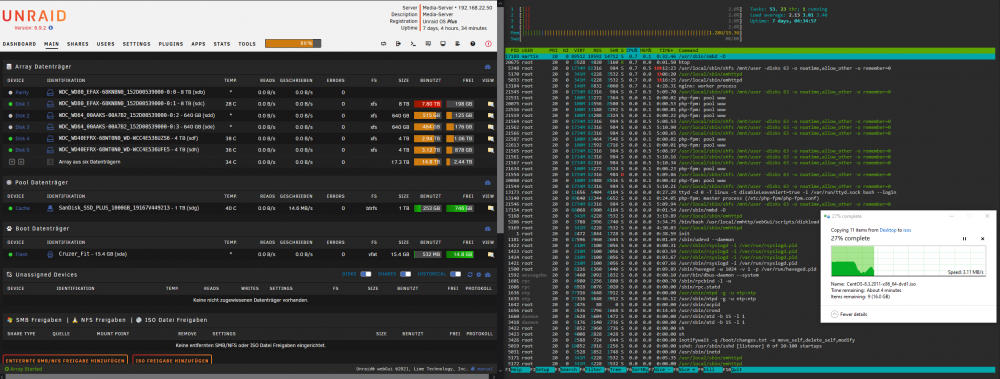
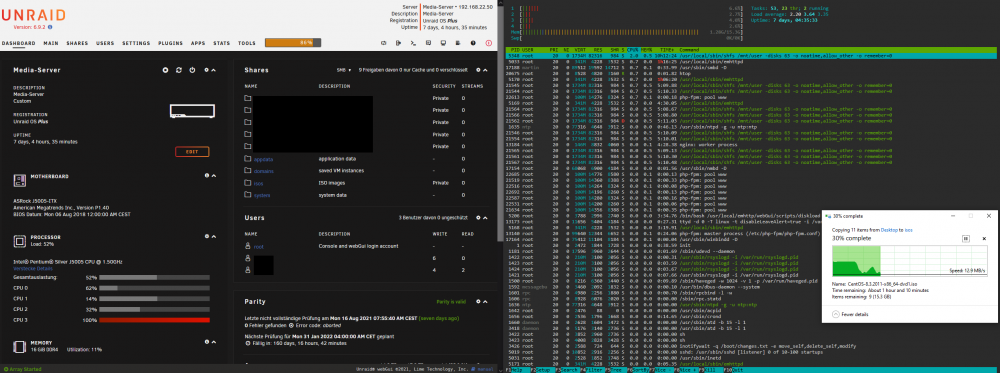
Hallo, nachdem ich inzwischen schon mehrere Tage damit zugebracht habe, das Problem zu analysieren und zu forschen was die Ursache ist, möchte ich es auf diesem Weg einmal versuchen. Ich habe vorher natürlich schon versucht hier im Forum passende Threats zu finden, jedoch hat keiner davon wirklich gepasst oder zur Lösung beigetragen. Ich kann nicht mit 100-prozentiger Sicherheit sagen, seit wann das Problem auftritt, jedoch kann ich mit Sicherheit sagen, dass es nicht schon immer bestanden hat. Meine Vermutung ist, dass durch ein Upgrade auf Version 6.9.2 (von 6.9.1) etwas schiefgelaufen ist. Ich hatte mit dem Upgrade auf diese Version einige Probleme, welche inzwischen behoben sind. Jedoch hat auch der Downgrade nicht ganz sauber funktioniert. Nach mehreren Up- und Downgrades habe ich das System wieder stabil bekommen. Wie auf den Screenshots zu sehen ist, läuft im Moment die aktuellste Version 6.9.2. Noch als kurze Zusatzinformation, ich habe mit der 6.9 Beta 33 (glaube ich) vor ca. einem Jahr mit UNRaid gestartet. Tatsache ist, dass nach dem Kopieren weniger GB, meistens ca. 2-5, von meinem PC zum UNRaid-Server, die Übertragungsrate von 110 mb/s auf 1-3 mb/s fällt und sich auch nicht mehr wirklich erholt. Ich habe sogar den Docker Dienst deaktiviert und nebenbei mit htop die Auslastung überwacht. Ich kann mir einfach nicht erklären, was die Ursache für diesen extremen Einbruch ist. Immerhin werden alle Daten direkt auf die SSD geschrieben. Ich würde mich freuen, wenn jemand noch Anregungen hat, was ich noch testen könnte. Falls ich noch Angaben vergessen habe, die notwendig sind, kann ich diese gerne nachreichen. Vielen Dank im Voraus! Martin
-
Thank you very much! It works pertfectly! Problem solved for me.
-
That happens in my case too, but just until RC1. Since RC2 UNRaid doesn't detect the spin-up and I don't know why. I don't use any of them.
-
Not this time. I accessed that drive and thatswhy it spun up, but that message doesn't appear in RC2 or the release version on an access.
-
I'm back on 6.9.0 RC1, the last working build for me. I found a small difference in the log between 6.9.0 RC1 and 6.9.0. If I access one of these external drives than appears the following message in the log file: "Mar 3 08:15:29 Media-Server emhttpd: read SMART /dev/sdc" That doesn't happen in the release version and that's the reason why UNRaid isn't able to spin-down the drives, because UNRaid doesn't notice that the access happens and the drive spun-up. I attached a new diagnostic file from RC1. media-server-diagnostics-20210303-0816.zip
-
I got the same error. I noticed this error with 6.9.0 RC2. Before that Version everything was working like expected. In the Array Monitor the disks were shown as spin down, but I can hear the disks running. Edit: My problem is mayby a bit different as the described one above. I'm using a small server with an external 4-bay USB 3.0 storage device from Fantec. It is connected by USB 3.0 and I have 4 WD Red in that case. Additionally 2 WD Red + 1 SSD in the server case connected via S-ATA. Since UNRaid 6.9.0 RC2 the disks in the external case were not detected corretly. If the drives spin-up because of an access, UNRaid doesn't notice that. I got no SMART values. And because of that they won't spin-down correctly, because UNRaid doesn't know that they're up. But if I spin them up manually everything is working fine. They spin down after 30 min and I get the values. Every drive on the screenshot should be green, because they're running. I hope, that someony has an idea what I can do. media-server-diagnostics-20210302-1301.zip





