





brent3000
Members
-
Joined
-
Last visited
Everything posted by brent3000
-
Yes I found that out the hard way that enable of IPv6 in Networking dosnt enable it on Docker until you check the box But thats the funny thing, the Docker page is missing the option for 101 but all others are showing even when SLAAC is disabled,
-
Ive made the change but still not seeing any IPv6 details in my dockers on that VLAN Or would I be able to just add , [IPv6 address] and tyest it?
-
Ok I can enable it for that VLAN and see, You mentioned about scripts etc once I make the change did I need to run something to make the interface refresh or re-check the IPv6? I'm running in Mode4
-
Its just odd when I checked, the 113 network (which is showing with the IPv6) actually had it disabled on the firewall but it shows up, So the quick fix is to enable SLAAC and then I can select the IPv6 for that vlan?
-
But they all have the same settings and SLAAC is disabled on all of them why would 101 be any different?
-
DHCP is turned on however I typically allocate the IP's manually when I set things up so I can reserve the IP's vs having them shift around I have SLAAC disabled on all of them
-
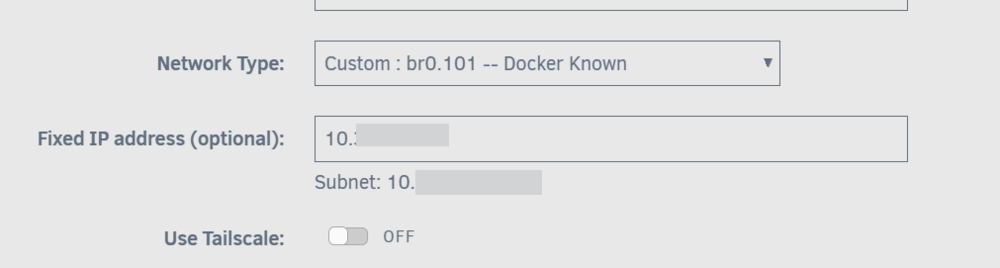
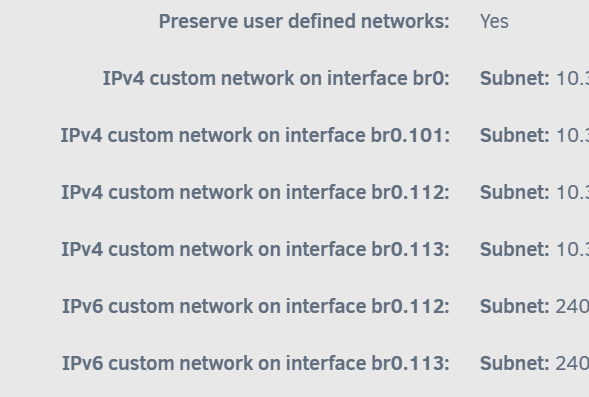
Hi Team, I'm hoping to get some help RE some Ipv6 which I'm wanting to start getting spun up on my Unraid, I have configured my Firewall Enabled IPv6 in Networking (IPv4+IPv6) I have enabled IPv4 and IPv6 in the Vlans I have enabled IPv6 Custom Networks on the Docker Interface However..... For some reason the Ipv6 option isnt showing for my 101 network but its showing for all others, So when I'm using a Docker for 101 I see But any of the others which show Ipv6 I see Did I miss a step which would prevent me from allocating the IP on the specific Docker Network under 101? I dont know why one would show when the others do not, I have also attached my Diagnosticglados-diagnostics-20260102-1252.zip if needed


-
Looks like we are finally back in business It seems to be running a balance but most important its writing to the drive again! Goes to show the cables I had in them weren't as long lasting as I would have hoped, cant say I have had a dead sata cable on me before :/ Thanks again @JorgeB Ill let it run its thing and then I can finally get back onto updating it from 7 to the latest, I was wanting this fixed first before heading down the update route
-
@JorgeB I did both but I did get an error but continued as there is plenty of space on the drive currently btrfs balance start -f -dconvert=single -mconvert=dup /mnt/cache ERROR: error during balancing '/mnt/cache': No space left on device There may be more info in syslog - try dmesg | tail btrfs device remove missing /mnt/cacheSee attached updated diag also glados-diagnostics-20251103-0959.zip
-
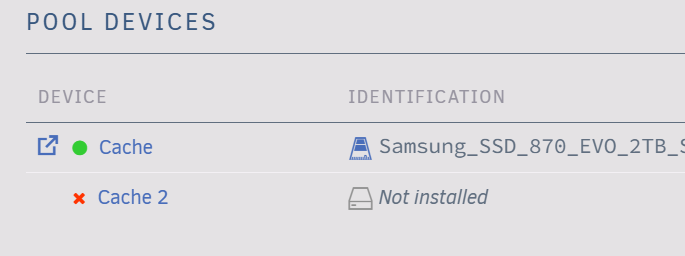
@JorgeB I finally got around to replacing the cable due to just having time etc, Server is showing the drive and also showing a missing drive on the cache, I don't seem to see similar errors but I could just be looking at the wrong spot on the logs, can you confirm the logs look correct and whats next to clear this error and re-make the cache? glados-diagnostics-20251102-1717.zip
-
Seems like both are online does this look right? glados-diagnostics-20250921-1516.zip Just interesting that there isnt any write actions on the other drive just yet

-
Thanks for the details, give me some time to do some more testing, I may take the drive out and see how it runs on a bench system as a quick validate if the drive is causing the issues as I have moved it around in the system and the port remains working for other drives so not sure if its the port or something else, Will report back, for now I have rebooted and the drive is back online
-
It was online during the time I was testing it before, would there be a SMART test I can try and validate it with? In the interim can I do everything you said above until the part of adding it into the pool again? just to stop the errors? aka this portion?
-
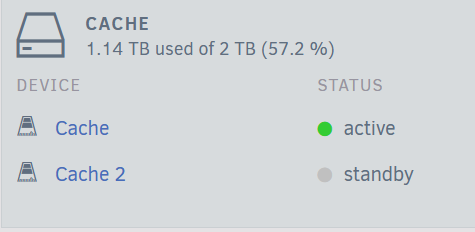
I see the part I missed which was the 1 slot section, my bad, See attached,glados-diagnostics-20250919-0835.zip This was then running with 1 drive, I then stopped the array changed to 2 and selected sdd into the pool and the below is that diag. It did say it would wipe the 2nd drive (which I assume would be normal to setup back into the pool format) glados-diagnostics-20250919-0839.zip I also got this error do I need to re-balance? It does say there is a 'BTRFS operation is running' so I should leave it to re-setup itself? Once its all back online I assume I can remove the Historical unassigned drive which is showing as the drive? Adding some more info, seems the drive is in standby mode and logs are re-filling up again, is there a possible drive issue? Logs seem to be getting the same issue again Sep 19 08:52:50 GLaDOS kernel: sd 3:0:0:0: [sdd] tag#0 access beyond end of device Sep 19 08:52:50 GLaDOS kernel: sd 3:0:0:0: [sdd] tag#1 access beyond end of device Sep 19 08:52:50 GLaDOS kernel: sd 3:0:0:0: [sdd] tag#2 access beyond end of device Sep 19 08:52:50 GLaDOS kernel: sd 3:0:0:0: [sdd] tag#3 access beyond end of device Sep 19 08:52:50 GLaDOS kernel: sd 3:0:0:0: [sdd] tag#4 access beyond end of device Sep 19 08:52:50 GLaDOS kernel: sd 3:0:0:0: [sdd] tag#5 access beyond end of device Sep 19 08:52:50 GLaDOS kernel: sd 3:0:0:0: [sdd] tag#6 access beyond end of device Sep 19 08:52:50 GLaDOS kernel: sd 3:0:0:0: [sdd] tag#7 access beyond end of device Sep 19 08:52:50 GLaDOS kernel: sd 3:0:0:0: [sdd] tag#8 access beyond end of device Sep 19 08:52:50 GLaDOS kernel: sd 3:0:0:0: [sdd] tag#9 access beyond end of device

-
Ok I did get upto the last parts and oddly with over 50% free space I did get this error but it did most of it as it was down to the final 1% during the balance but still had plenty of storage left ERROR: error during balancing '/mnt/cache': No space left on device There may be more info in syslog - try dmesg | tail I did run the other command tho and I didnt get any response back after running the command so I assume it completed as intended? see attachedglados-diagnostics-20250919-0024.zip
-
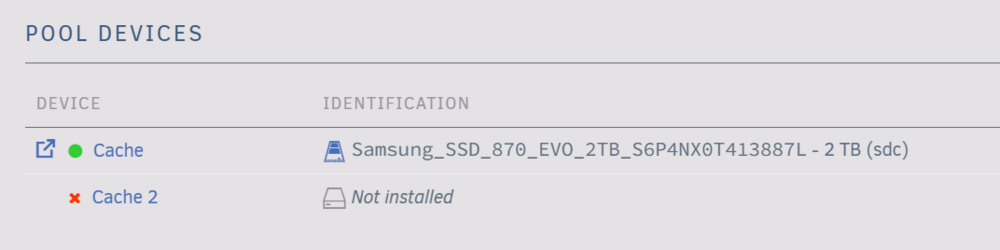
Followed and got some errors showing like this now glados-diagnostics-20250918-1348.zip I did select both the drives with sdc in slot 1 and sdd in slot 2 and the it moved it to un-assigned drives
-
Sorry missed that portion :) See attached,glados-diagnostics-20250915-1255.zip
-
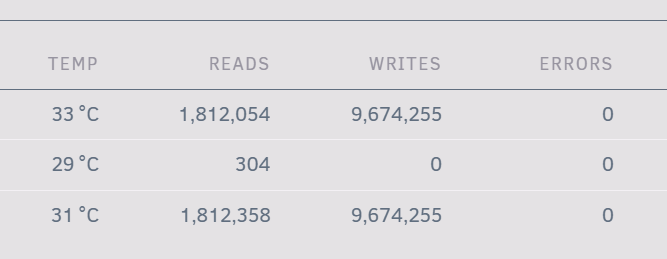
I did do a reboot and it seems the logs arnt filling up as bad as they were, both the cache drives show as online but it seems like one just isnt writing? Do I need to make them re-sync or something or should it have self corrected by now?
-
Hi Team, Hope someone can help me I noticed some of my dockers were running abit slower than normal and I found my logs were at 100%, strange so I found a thread about clearing that and then when i looked as my syslog files I found alot of 'access beyond end of device' seems to be filling these up, When reading some of the issues seem to point to a dead drive but it still seems to be showing as normal in the system so not sure if its dead or something else causing issues? Attached is the diag file if someone can provide some guidance :) glados-diagnostics-20250911-1039.zip Sep 11 08:20:32 GLaDOS kernel: sd 3:0:0:0: [sdd] tag#10 access beyond end of device Sep 11 08:20:32 GLaDOS kernel: sd 3:0:0:0: [sdd] tag#11 access beyond end of device Sep 11 08:20:32 GLaDOS kernel: sd 3:0:0:0: [sdd] tag#12 access beyond end of device Sep 11 08:20:32 GLaDOS kernel: sd 3:0:0:0: [sdd] tag#13 access beyond end of device Sep 11 08:20:32 GLaDOS kernel: sd 3:0:0:0: [sdd] tag#14 access beyond end of device Sep 11 08:20:32 GLaDOS kernel: sd 3:0:0:0: [sdd] tag#15 access beyond end of device Sep 11 08:20:32 GLaDOS kernel: sd 3:0:0:0: [sdd] tag#16 access beyond end of device Sep 11 08:20:32 GLaDOS kernel: sd 3:0:0:0: [sdd] tag#17 access beyond end of device Sep 11 08:20:32 GLaDOS kernel: sd 3:0:0:0: [sdd] tag#18 access beyond end of device Sep 11 08:20:32 GLaDOS kernel: sd 3:0:0:0: [sdd] tag#19 access beyond end of device Sep 11 08:20:32 GLaDOS kernel: sd 3:0:0:0: [sdd] tag#20 access beyond end of device Sep 11 08:20:32 GLaDOS kernel: sd 3:0:0:0: [sdd] tag#21 access beyond end of device Sep 11 08:20:32 GLaDOS kernel: sd 3:0:0:0: [sdd] tag#22 access beyond end of device Sep 11 08:20:32 GLaDOS kernel: sd 3:0:0:0: [sdd] tag#23 access beyond end of device Sep 11 08:20:32 GLaDOS kernel: sd 3:0:0:0: [sdd] tag#31 access beyond end of device
-
Hi All, not sure if I'm meant to be posting some logs or more info please let me know so I can try and resolve this issue. Happy to try some more processes to see if this can be resolved but I believe I have tried a few steps and just the lack of connection not sure if the VPN or a setting as no VPN it does work fine. Or is having some of these style of dockers not running over the VPN container supported? If they arnt I can just remove them but I was hoping to route a few of them over it but if they arnt supported Ill revert back and run them all direct if thats best use-case. Currently its just prowlarr and flaresolverr for validating the tracker but they both are having the connection issues (As posted above)
-
Just hoping to re-tag this, still having very odd issues where my prowlarr and flaresolverr dont seem to be resolving via the VPN client
-
Just looking over some of the recent posts, was there something major breaking in the latest release? suddenly all my indexers are all offline and I'm getting a bunch of errors now when I try and validate VPN using containers e.g. "Unable to connect to indexer, please check your DNS settings and ensure IPv6 is working or disabled. The SSL connection could not be established, see inner exception" This has taken off all my trackers :/ I also get this error when trying to validate with Flaresolverr "Unable to connect to proxy: Connection refused (<ip of the VPN Container>:8191). Check the log surrounding this error for details" But I can validate all of my other clients which are not sitting on the VPN container
-
How big was your backup @john_smith My backup is only a 430bytes and Ive been running it for a long time :/ THought it would be alot bigger Ok so I did abit of a cheat, as I have been using PGAdmin4 for another project and to keep backups I thought to just go and use that and ended up being alot simpler to connect, backup and do a clean restore into the new system, As it stands seems like everything is as normal, going to try the actual docker update now for TM and hope nothing else breaks :) I ended up being on Postgres 12.5 so I was well out of date as its now on 17 :) Thanks for the above guide helped with the process to make it all work and now I have a separate data backup process at least :)
-
@john_smith would it be possible to ask for a step by step of what you did to possibly avoid the issues you ran into? I'm looking to make the changes on my side and hoping to avoid issues/data-loss so it would be great if you happen to remember or have a short guide you followed if its now in a working state :)
-
This is why Its very odd, my other server had no issues but this one that call fails, I may try re-creating the network config for this vlan just to remove that as a possible issue Its really got me stumped





