brent3000
Members
-
Joined
-
Last visited
Everything posted by brent3000
-
Thats whats odd, this is a brand new install of unraid and the other server is up and running fine with the only issue being it keeps maxing ram I may tru and re-install unraid and see if anything changes This was the error i sometimes get when trying a new install on this server ---Checking if configuration is in place--- ---Configuration not found, downloading...--- ---Checking if PublicIP is in place--- ---No PublicIP found in PalWorldSettings.ini, trying to obtain it...--- ---Can't get PublicIP, please set it manually in your PalWorldSettings.ini!--- ---Prepare Server--- ---Server ready--- ---Start Server--- What does it use to try and get the public IP which I can try and test to diagnose?
-
No worries I was going to re ping it hahah Nothing but this was just me testing the server's and network config stability. I also had a speedtester running for a few days before with no faults so more just 'the network seems to be fine' This was when i loaded the logs from the docker (Clicking the container and going -> logs). I was able to load the game and connect (From the game to my local server IP within my network) but the game will drop me and present me with an error and the logs just show me as leaving the server. The Log snippit i posted shows in just downloading the update it lost the connection multiple times for just the steamcmd update. I'm using a Dell server and it has 4 Nic's two Ethernet 2 fibre. I was using the dual nics in failover mode I disabled it to see if that was an issue now its connected via Eth0 Ok so I should let the Docker download/install itself first then just dump the save directly where the world data appears to be, noted. tower-diagnostics-20240719-2015.zip
-
I'm trying to diagnose an issue and hoping there may be a way to see if there is a miss-config somewhere with unraid or the way these dockers are working, Now I have tried this with a copy of previous data and a copy of new data and re-installed but for the life of me I cant figure out what to test next. As it stands I have run connection tests by downloading 2tb worth of data using a filezilla docker with no issues at all (no drops, re-tries etc for the 10min i watched it FIlezillla was downloading at ~300mbps and overall downloaded a large volume of data) Now the fun part, WHen I installed the game server there was a bunch of issues which looked abit odd (re-downloading, unable to find public IP and reverting to local etc) just odd things. Now I had an issue which I wanted to switch over to this server running Palworld and it would connect, but after a few min would kick me saying connection was lost (This was via direct local network connection not even via my ISP) Would there be some info or way to test why this specific docker is having such a hard time staying connected vs my other one which is running with no issues (apart from running out of ram ) Is there an issue with this docker if there is more than 1 nic or something else which would cause it to go online/offline regularly which would not impact others? I can also both hold a solid ping to the server and from the server to google so the pysical connection isnt breaking. The Firewall is also set (as part of my testing) for all outbound access steamcmd has been disconnected from steam with result 3 (No Connection) Update state (0x61) downloading, progress: 83.23 (2410055957 / 2895735061) Update state (0x61) downloading, progress: 83.23 (2410055957 / 2895735061) Update state (0x61) downloading, progress: 83.23 (2410055957 / 2895735061) Update state (0x61) downloading, progress: 83.23 (2410055957 / 2895735061) Update state (0x61) downloading, progress: 84.24 (2439416085 / 2895735061) Update state (0x61) downloading, progress: 85.94 (2488712912 / 2895735061) Update state (0x61) downloading, progress: 87.83 (2543238864 / 2895735061) Update state (0x61) downloading, progress: 89.86 (2602140480 / 2895735061) Update state (0x61) downloading, progress: 93.48 (2706991434 / 2895735061) Update state (0x61) downloading, progress: 96.31 (2788780309 / 2895735061) Update state (0x61) downloading, progress: 98.23 (2844354837 / 2895735061) Update state (0x61) downloading, progress: 99.24 (2873714965 / 2895735061) Update state (0x61) downloading, progress: 99.24 (2873714965 / 2895735061) Update state (0x61) downloading, progress: 99.31 (2875812117 / 2895735061) Update state (0x61) downloading, progress: 99.31 (2875812117 / 2895735061) Update state (0x61) downloading, progress: 99.31 (2875812117 / 2895735061) Update state (0x61) downloading, progress: 99.42 (2878957845 / 2895735061) Update state (0x61) downloading, progress: 99.60 (2884200725 / 2895735061) Update state (0x61) downloading, progress: 99.78 (2889443605 / 2895735061) Update state (0x61) downloading, progress: 99.78 (2889443605 / 2895735061) Update state (0x61) downloading, progress: 99.78 (2889443605 / 2895735061) Update state (0x61) downloading, progress: 99.82 (2890492181 / 2895735061) Update state (0x61) downloading, progress: 99.89 (2892589333 / 2895735061) Update state (0x61) downloading, progress: 99.89 (2892589333 / 2895735061) Update state (0x61) downloading, progress: 99.89 (2892589333 / 2895735061) Update state (0x61) downloading, progress: 99.89 (2892589333 / 2895735061) Update state (0x61) downloading, progress: 99.89 (2892589333 / 2895735061) Update state (0x61) downloading, progress: 99.89 (2892589333 / 2895735061) Update state (0x61) downloading, progress: 99.89 (2892589333 / 2895735061) Update state (0x61) downloading, progress: 99.89 (2892589333 / 2895735061) Update state (0x61) downloading, progress: 99.89 (2892589333 / 2895735061) Update state (0x61) downloading, progress: 99.89 (2892589333 / 2895735061) Update state (0x61) downloading, progress: 99.89 (2892589333 / 2895735061) Update state (0x61) downloading, progress: 99.89 (2892589333 / 2895735061) Update state (0x61) downloading, progress: 99.89 (2892589333 / 2895735061) steamcmd has been disconnected from steam with result 3 (No Connection) Also what is the propper process for moving game files (Palworld in this example) from one server to another? SHould a direct copy paste while the server is offline be ok or do I need to do any permission changes?
-
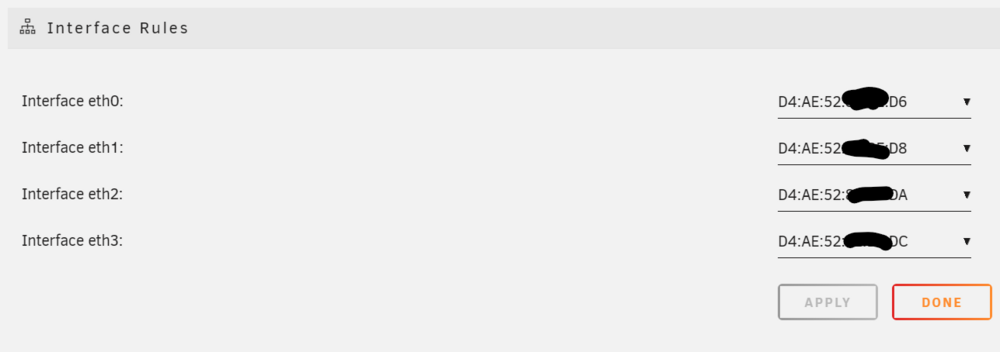
How would one do this? As my cards arnt connected (no cable connected) but its showing as Eth0 and I cant see any settings to switch them or change the mapping? Or would that be this section here? Also I would guess making this change would kill my connection I assume i should make these changes on the terminal? Can you start the GUI from the CLI in the terminal or does it need a reboot?
-
Hi all, I have been using unraid for sometime but am spinning up a new server with some more resources and running in a rack mount vs a tower. Now this server has alot of extra ports (which i may not be using for some time at least) but it seems to have selected the fiber cards as eth0 and the ethernet ports dont kick in until Eth2. Now for a summary eth0-1 - Fiber cards both disconnected eth2-3 configured in 802.3ad bonding (Connected to a Fortinet unit and supports aggregation ) Now I have already found it odd that eth0 seems to be the source of the DNS as for some reason there is no DNS collected from by ethernet cards and i needed to manually enter 1.1.1.1 for any DNS to actually resolve even when the card is not connected. Now I wanted to know, best practice as I have seen some comments and posts online where comments have been 'just add everything to Eth0 and if its offline it wont impact anything' but if i plan to enable these ports later that will likely cause some down the track issues im sure. The main reason why I'm asking is there is a number of odd issues I have noticed in this, my second Unraid deployment which seem to all point back to Eth0 not being used as the IP source. The issues I have come across are - Unable to load dicker web UI on bridged and get 'about:blank#blocked' but works when manually typing in the port on the server - Some docker containers seem to have very slow or in-consistant network connections (I tested downloading 1tb via bridged on the 802.3ad so that seems to be stable but some odd errors like servers unable to source the public IP address and needing it manually entered) So I'm hoping someone can shed some light or is the true fix 'just add all the ethernet to Eth0 and bond that with 802.3ad untill they are activated?
-
No that was just when the log started for the day, the issue is it for some reason dropped my network so I wasnt able to access Plex for example, Why would it have done that? Whats an OOM error? Did it max out the ram? My server normally sits around 50% usage would it have spiked? How would i cap the ram for a docker?
-
Ok so its been stable for a few days after not hhaving browser open and so far seems to not be an issue,, however there has been two issues which happened early morning which seemed to have self resolved, I'm typically listening to Plex at this hour using the server remotly and in the last two days the connection and all access to plex (and my dockers) goes offline while im remote. The issue seems to self resolve after 10-30min but its very annoying while im remote it cuts my music. Is this related or another issue as its impacting the connection but self resolves Log 1 - Caused plex and my connection to my server remote to go offline Jul 1 05:04:13 GLaDOS root: /etc/libvirt: 1022.1 MiB (1071775744 bytes) trimmed on /dev/loop3 Jul 1 05:04:13 GLaDOS root: /var/lib/docker: 10 GiB (10712465408 bytes) trimmed on /dev/loop2 Jul 1 05:04:13 GLaDOS root: /mnt/cache: 1.5 TiB (1613986529280 bytes) trimmed on /dev/sdd1 Jul 1 06:33:01 GLaDOS kernel: eth0: renamed from veth326c7eb Jul 1 06:33:06 GLaDOS kernel: veth249e5f9: renamed from eth0 Jul 1 06:33:59 GLaDOS kernel: eth0: renamed from vethc717400 Jul 1 06:35:06 GLaDOS kernel: vetha9a0769: renamed from eth0 Jul 1 06:35:06 GLaDOS kernel: eth0: renamed from veth94c14f7 Jul 1 06:35:26 GLaDOS kernel: vethc5307d2: renamed from eth0 Jul 1 06:35:27 GLaDOS kernel: eth0: renamed from veth0874c68 Jul 1 06:35:29 GLaDOS kernel: veth1d5f1f8: renamed from eth0 Jul 1 06:35:30 GLaDOS kernel: eth0: renamed from veth780f3ed Jul 1 06:35:42 GLaDOS kernel: vetha1480a3: renamed from eth0 Jul 1 06:41:09 GLaDOS kernel: eth0: renamed from vetha250ae6 Log 2 was the same issue (cant connect) but lasted alot longer until self resolved Jul 4 05:32:22 GLaDOS winbindd[16157]: [2024/07/04 05:32:22.826511, 0] ../../source3/winbindd/winbindd_samr.c:71(open_internal_samr_conn) Jul 4 05:32:22 GLaDOS winbindd[16157]: open_internal_samr_conn: Could not connect to samr pipe: NT_STATUS_CONNECTION_DISCONNECTED Jul 4 05:57:22 GLaDOS winbindd[16157]: [2024/07/04 05:57:22.161361, 0] ../../source3/winbindd/winbindd_samr.c:111(open_internal_lsa_conn) Jul 4 05:57:22 GLaDOS winbindd[16157]: open_internal_lsa_conn: Could not connect to lsarpc pipe: NT_STATUS_IO_TIMEOUT Jul 4 06:03:17 GLaDOS winbindd[16157]: [2024/07/04 06:03:17.497066, 0] ../../source3/winbindd/winbindd_samr.c:71(open_internal_samr_conn) Jul 4 06:03:17 GLaDOS winbindd[16157]: open_internal_samr_conn: Could not connect to samr pipe: NT_STATUS_CONNECTION_DISCONNECTED Jul 4 06:03:43 GLaDOS winbindd[16157]: [2024/07/04 06:03:43.514443, 0] ../../source3/winbindd/winbindd_samr.c:71(open_internal_samr_conn) Jul 4 06:03:43 GLaDOS winbindd[16157]: open_internal_samr_conn: Could not connect to samr pipe: NT_STATUS_CONNECTION_DISCONNECTED Jul 4 06:04:43 GLaDOS winbindd[16157]: [2024/07/04 06:04:43.484744, 0] ../../source3/winbindd/winbindd_samr.c:71(open_internal_samr_conn) Jul 4 06:04:43 GLaDOS winbindd[16157]: open_internal_samr_conn: Could not connect to samr pipe: NT_STATUS_CONNECTION_DISCONNECTED Jul 4 06:05:21 GLaDOS winbindd[16157]: [2024/07/04 06:05:21.241991, 0] ../../source3/winbindd/winbindd_samr.c:71(open_internal_samr_conn) Jul 4 06:05:21 GLaDOS winbindd[16157]: open_internal_samr_conn: Could not connect to samr pipe: NT_STATUS_CONNECTION_DISCONNECTED Jul 4 06:06:31 GLaDOS winbindd[16157]: [2024/07/04 06:06:30.989496, 0] ../../source3/winbindd/winbindd_samr.c:71(open_internal_samr_conn) Jul 4 06:06:31 GLaDOS winbindd[16157]: open_internal_samr_conn: Could not connect to samr pipe: NT_STATUS_CONNECTION_DISCONNECTED Jul 4 06:06:51 GLaDOS winbindd[16157]: [2024/07/04 06:06:51.035935, 0] ../../source3/winbindd/winbindd_samr.c:71(open_internal_samr_conn) Jul 4 06:06:51 GLaDOS winbindd[16157]: open_internal_samr_conn: Could not connect to samr pipe: NT_STATUS_IO_TIMEOUT Jul 4 06:07:20 GLaDOS winbindd[16157]: [2024/07/04 06:07:20.660462, 0] ../../source3/winbindd/winbindd_samr.c:111(open_internal_lsa_conn) Jul 4 06:07:20 GLaDOS winbindd[16157]: open_internal_lsa_conn: Could not connect to lsarpc pipe: NT_STATUS_IO_TIMEOUT Jul 4 06:14:23 GLaDOS winbindd[16157]: [2024/07/04 06:14:23.503915, 0] ../../source3/winbindd/winbindd_samr.c:71(open_internal_samr_conn) Jul 4 06:14:23 GLaDOS winbindd[16157]: open_internal_samr_conn: Could not connect to samr pipe: NT_STATUS_CONNECTION_DISCONNECTED Jul 4 06:14:52 GLaDOS winbindd[16157]: [2024/07/04 06:14:52.556514, 0] ../../source3/winbindd/winbindd_samr.c:71(open_internal_samr_conn) Jul 4 06:14:52 GLaDOS winbindd[16157]: open_internal_samr_conn: Could not connect to samr pipe: NT_STATUS_CONNECTION_DISCONNECTED Jul 4 06:15:58 GLaDOS winbindd[16157]: [2024/07/04 06:15:58.575032, 0] ../../source3/winbindd/winbindd_samr.c:71(open_internal_samr_conn) Jul 4 06:15:58 GLaDOS winbindd[16157]: open_internal_samr_conn: Could not connect to samr pipe: NT_STATUS_CONNECTION_DISCONNECTED Jul 4 06:29:16 GLaDOS winbindd[16157]: [2024/07/04 06:29:16.576549, 0] ../../source3/winbindd/winbindd_samr.c:71(open_internal_samr_conn) Jul 4 06:29:16 GLaDOS winbindd[16157]: open_internal_samr_conn: Could not connect to samr pipe: NT_STATUS_CONNECTION_DISCONNECTED Jul 4 06:58:20 GLaDOS apcupsd[7188]: Power failure. Jul 4 07:05:21 GLaDOS kernel: Kestrel Timer invoked oom-killer: gfp_mask=0x140cca(GFP_HIGHUSER_MOVABLE|__GFP_COMP), order=0, oom_score_adj=0 Jul 4 07:05:21 GLaDOS kernel: CPU: 4 PID: 22104 Comm: Kestrel Timer Tainted: P O 6.1.79-Unraid #1 Jul 4 07:05:21 GLaDOS kernel: Hardware name: To Be Filled By O.E.M. To Be Filled By O.E.M./C236 WSI, BIOS P2.70 11/13/2019 Jul 4 07:05:21 GLaDOS kernel: Call Trace: Jul 4 07:05:21 GLaDOS kernel: <TASK> Jul 4 07:05:21 GLaDOS kernel: dump_stack_lvl+0x44/0x5c Jul 4 06:58:23 GLaDOS apcupsd[7188]: Power is back. UPS running on mains. Jul 4 07:05:21 GLaDOS kernel: dump_header+0x4a/0x211 Jul 4 07:05:21 GLaDOS kernel: oom_kill_process+0x80/0x111 Jul 4 07:05:21 GLaDOS kernel: out_of_memory+0x3b3/0x3e5 Jul 4 07:05:21 GLaDOS kernel: __alloc_pages_slowpath.constprop.0+0x7cf/0x8de Jul 4 07:05:21 GLaDOS kernel: __alloc_pages+0x132/0x1e8 Jul 4 07:05:21 GLaDOS kernel: folio_alloc+0x14/0x35 Jul 4 07:05:21 GLaDOS kernel: __filemap_get_folio+0x185/0x213 Jul 4 07:05:21 GLaDOS kernel: ? preempt_latency_start+0x1e/0x46 Jul 4 07:05:21 GLaDOS kernel: filemap_fault+0x317/0x52f Jul 4 07:05:21 GLaDOS kernel: __do_fault+0x2a/0x6b Jul 4 07:05:21 GLaDOS kernel: __handle_mm_fault+0xa22/0xcf9 Jul 4 07:05:21 GLaDOS kernel: handle_mm_fault+0x13d/0x20f Jul 4 07:05:21 GLaDOS kernel: do_user_addr_fault+0x2c3/0x48d Jul 4 07:05:21 GLaDOS kernel: exc_page_fault+0xfb/0x11d Jul 4 07:05:21 GLaDOS kernel: asm_exc_page_fault+0x22/0x30 Jul 4 07:05:21 GLaDOS kernel: RIP: 0033:0x153b5ae23433 Jul 4 07:05:21 GLaDOS kernel: Code: Unable to access opcode bytes at 0x153b5ae23409. Jul 4 07:05:21 GLaDOS kernel: RSP: 002b:0000153a8aea01b0 EFLAGS: 00010202 Jul 4 07:05:21 GLaDOS kernel: RAX: 0000153a6c000fd0 RBX: 00000000000001fa RCX: 0000000000000107 Jul 4 07:05:21 GLaDOS kernel: RDX: 0000564735e0eda0 RSI: 0000000000000000 RDI: 0000564735ccc038 Jul 4 07:05:21 GLaDOS kernel: RBP: 0000153a8aea01d0 R08: 0000000000000015 R09: 0000000000000000 Jul 4 07:05:21 GLaDOS kernel: R10: 0000153ae36334a8 R11: 0000153aac0ff8b0 R12: 0000153ae2104ef8 Jul 4 07:05:21 GLaDOS kernel: R13: 0000000000000001 R14: 0000153ae1b545f0 R15: 0000000000000000 Jul 4 07:05:21 GLaDOS kernel: </TASK> Jul 4 07:05:21 GLaDOS kernel: Mem-Info: Jul 4 07:05:21 GLaDOS kernel: active_anon:174069 inactive_anon:7693737 isolated_anon:0 Jul 4 07:05:21 GLaDOS kernel: active_file:260 inactive_file:17749 isolated_file:288 Jul 4 07:05:21 GLaDOS kernel: unevictable:0 dirty:0 writeback:0 Jul 4 07:05:21 GLaDOS kernel: slab_reclaimable:87313 slab_unreclaimable:82003 Jul 4 07:05:21 GLaDOS kernel: mapped:51226 shmem:338638 pagetables:23572 Jul 4 07:05:21 GLaDOS kernel: sec_pagetables:0 bounce:0 Jul 4 07:05:21 GLaDOS kernel: kernel_misc_reclaimable:0 Jul 4 07:05:21 GLaDOS kernel: free:51197 free_pcp:125 free_cma:0 Jul 4 07:05:21 GLaDOS kernel: Node 0 active_anon:696276kB inactive_anon:30774948kB active_file:1040kB inactive_file:70996kB unevictable:0kB isolated(anon):0kB isolated(file):1152kB mapped:204904kB dirty:0kB writeback:0kB shmem:1354552kB shmem_thp: 0kB shmem_pmdmapped: 0kB anon_thp: 8175616kB writeback_tmp:0kB kernel_stack:28592kB pagetables:94288kB sec_pagetables:0kB all_unreclaimable? no Jul 4 07:05:21 GLaDOS kernel: Node 0 DMA free:15360kB boost:0kB min:28kB low:40kB high:52kB reserved_highatomic:0KB active_anon:0kB inactive_anon:0kB active_file:0kB inactive_file:0kB unevictable:0kB writepending:0kB present:15980kB managed:15360kB mlocked:0kB bounce:0kB free_pcp:0kB local_pcp:0kB free_cma:0kB Jul 4 07:05:21 GLaDOS kernel: lowmem_reserve[]: 0 2142 32012 32012 32012 Jul 4 07:05:21 GLaDOS kernel: Node 0 DMA32 free:123700kB boost:0kB min:4520kB low:6712kB high:8904kB reserved_highatomic:0KB active_anon:308kB inactive_anon:2085564kB active_file:0kB inactive_file:12kB unevictable:0kB writepending:0kB present:2318428kB managed:2228280kB mlocked:0kB bounce:0kB free_pcp:500kB local_pcp:0kB free_cma:0kB Jul 4 07:05:21 GLaDOS kernel: lowmem_reserve[]: 0 0 29869 29869 29869 Jul 4 07:05:21 GLaDOS kernel: Node 0 Normal free:65728kB boost:90112kB min:153140kB low:183724kB high:214308kB reserved_highatomic:0KB active_anon:695968kB inactive_anon:28689384kB active_file:472kB inactive_file:71416kB unevictable:0kB writepending:0kB present:31162368kB managed:30586228kB mlocked:0kB bounce:0kB free_pcp:0kB local_pcp:0kB free_cma:0kB Jul 4 07:05:21 GLaDOS kernel: lowmem_reserve[]: 0 0 0 0 0 Jul 4 07:05:21 GLaDOS kernel: Node 0 DMA: 0*4kB 0*8kB 0*16kB 0*32kB 0*64kB 0*128kB 0*256kB 0*512kB 1*1024kB (U) 1*2048kB (M) 3*4096kB (M) = 15360kB Jul 4 07:05:21 GLaDOS kernel: Node 0 DMA32: 314*4kB (UME) 460*8kB (UME) 785*16kB (UME) 601*32kB (UME) 385*64kB (UME) 181*128kB (UME) 76*256kB (UME) 24*512kB (UME) 7*1024kB (ME) 0*2048kB 0*4096kB = 123448kB Jul 4 07:05:21 GLaDOS kernel: Node 0 Normal: 152*4kB (UME) 3880*8kB (UME) 1772*16kB (UME) 179*32kB (UE) 0*64kB 0*128kB 0*256kB 0*512kB 0*1024kB 0*2048kB 0*4096kB = 65728kB Jul 4 07:05:21 GLaDOS kernel: Node 0 hugepages_total=0 hugepages_free=0 hugepages_surp=0 hugepages_size=1048576kB Jul 4 07:05:21 GLaDOS kernel: Node 0 hugepages_total=0 hugepages_free=0 hugepages_surp=0 hugepages_size=2048kB Jul 4 07:05:21 GLaDOS kernel: 357150 total pagecache pages Jul 4 07:05:21 GLaDOS kernel: 0 pages in swap cache Jul 4 07:05:21 GLaDOS kernel: Free swap = 0kB Jul 4 07:05:21 GLaDOS kernel: Total swap = 0kB Jul 4 07:05:21 GLaDOS kernel: 8374194 pages RAM Jul 4 07:05:21 GLaDOS kernel: 0 pages HighMem/MovableOnly Jul 4 07:05:21 GLaDOS kernel: 166727 pages reserved Jul 4 07:05:21 GLaDOS kernel: 0 pages cma reserved Jul 4 07:05:21 GLaDOS kernel: Tasks state (memory values in pages): Jul 4 07:05:21 GLaDOS kernel: [ pid ] uid tgid total_vm rss pgtables_bytes swapents oom_score_adj name Jul 4 07:05:21 GLaDOS kernel: [ 844] 0 844 4640 963 57344 0 -1000 udevd Jul 4 07:05:21 GLaDOS kernel: [ 1398] 68 1398 759 399 40960 0 0 dhcpcd Jul 4 07:05:21 GLaDOS kernel: [ 1399] 0 1399 764 546 40960 0 0 dhcpcd Jul 4 07:05:21 GLaDOS kernel: [ 1400] 68 1400 726 66 40960 0 0 dhcpcd Jul 4 07:05:21 GLaDOS kernel: [ 1418] 68 1418 761 75 40960 0 0 dhcpcd Jul 4 07:05:21 GLaDOS kernel: [ 1459] 68 1459 764 76 40960 0 0 dhcpcd Jul 4 07:05:21 GLaDOS kernel: [ 1470] 68 1470 758 443 40960 0 0 dhcpcd Jul 4 07:05:21 GLaDOS kernel: [ 1471] 0 1471 764 548 40960 0 0 dhcpcd Jul 4 07:05:21 GLaDOS kernel: [ 1472] 68 1472 726 67 40960 0 0 dhcpcd Jul 4 07:05:21 GLaDOS kernel: [ 1488] 68 1488 760 75 40960 0 0 dhcpcd Jul 4 07:05:21 GLaDOS kernel: [ 1521] 68 1521 764 77 40960 0 0 dhcpcd Jul 4 07:05:21 GLaDOS kernel: [ 1553] 81 1553 1295 383 49152 0 0 dbus-daemon Jul 4 07:05:21 GLaDOS kernel: [ 1564] 0 1564 1580 624 45056 0 0 elogind-daemon Jul 4 07:05:21 GLaDOS kernel: [ 1663] 44 1663 18648 747 57344 0 0 ntpd Jul 4 07:05:21 GLaDOS kernel: [ 1670] 0 1670 650 24 40960 0 0 acpid Jul 4 07:05:21 GLaDOS kernel: [ 1688] 0 1688 643 407 45056 0 0 crond Jul 4 07:05:21 GLaDOS kernel: [ 1692] 0 1692 664 367 40960 0 0 atd Jul 4 07:05:21 GLaDOS kernel: [ 1789] 0 1789 800 37 40960 0 0 mcelog Jul 4 07:05:21 GLaDOS kernel: [ 1891] 0 1891 1004 597 40960 0 0 monitor_nchan Jul 4 07:05:21 GLaDOS kernel: [ 3857] 0 3857 1283 777 45056 0 0 atd Jul 4 07:05:21 GLaDOS kernel: [ 3859] 0 3859 996 760 40960 0 0 sh Jul 4 07:05:21 GLaDOS kernel: [ 3861] 0 3861 1114 763 40960 0 0 sh Jul 4 07:05:21 GLaDOS kernel: [ 3862] 0 3862 693 217 40960 0 0 inotifywait Jul 4 07:05:21 GLaDOS kernel: [ 7045] 0 7045 652 210 40960 0 0 agetty Jul 4 07:05:21 GLaDOS kernel: [ 7046] 0 7046 652 208 40960 0 0 agetty Jul 4 07:05:21 GLaDOS kernel: [ 7047] 0 7047 652 211 40960 0 0 agetty Jul 4 07:05:21 GLaDOS kernel: [ 7048] 0 7048 652 220 40960 0 0 agetty Jul 4 07:05:21 GLaDOS kernel: [ 7049] 0 7049 652 217 40960 0 0 agetty Jul 4 07:05:21 GLaDOS kernel: [ 7050] 0 7050 652 236 40960 0 0 agetty Jul 4 07:05:21 GLaDOS kernel: [ 7117] 0 7117 2264 167 53248 0 -1000 sshd Jul 4 07:05:21 GLaDOS kernel: [ 7125] 0 7125 1081 60 45056 0 0 inetd Jul 4 07:05:21 GLaDOS kernel: [ 7126] 0 7126 69883 582 77824 0 0 emhttpd Jul 4 07:05:21 GLaDOS kernel: [ 7188] 0 7188 35651 574 65536 0 0 apcupsd Jul 4 07:05:21 GLaDOS kernel: [ 7367] 0 7367 23202 2120 159744 0 0 php-fpm Jul 4 07:05:21 GLaDOS kernel: [ 7458] 0 7458 36756 1003 57344 0 0 nginx Jul 4 07:05:21 GLaDOS kernel: [ 7459] 0 7459 37066 1910 77824 0 0 nginx Jul 4 07:05:21 GLaDOS kernel: [ 15316] 0 15316 35062 574 57344 0 0 shfs Jul 4 07:05:21 GLaDOS kernel: [ 15326] 0 15326 174588 15812 372736 0 0 shfs Jul 4 07:05:21 GLaDOS kernel: [ 15563] 0 15563 70375 645 73728 0 0 rsyslogd Jul 4 07:05:21 GLaDOS kernel: [ 16131] 0 16131 20023 1731 139264 0 0 smbd Jul 4 07:05:21 GLaDOS kernel: [ 16134] 0 16134 19543 1216 131072 0 0 smbd-notifyd Jul 4 07:05:21 GLaDOS kernel: [ 16135] 0 16135 19547 1071 131072 0 0 cleanupd Jul 4 07:05:21 GLaDOS kernel: [ 16136] 0 16136 17163 1063 106496 0 0 nmbd Jul 4 07:05:21 GLaDOS kernel: [ 16149] 0 16149 647 446 40960 0 0 wsdd2 Jul 4 07:05:21 GLaDOS kernel: [ 16155] 0 16155 19048 1491 131072 0 0 winbindd Jul 4 07:05:21 GLaDOS kernel: [ 16157] 0 16157 19060 1649 135168 0 0 winbindd Jul 4 07:05:21 GLaDOS kernel: [ 16202] 61 16202 1394 612 45056 0 0 avahi-daemon Jul 4 07:05:21 GLaDOS kernel: [ 16203] 61 16203 1329 68 45056 0 0 avahi-daemon Jul 4 07:05:21 GLaDOS kernel: [ 16211] 0 16211 669 30 40960 0 0 avahi-dnsconfd Jul 4 07:05:21 GLaDOS kernel: [ 16678] 0 16678 1394116 20089 1921024 0 0 dockerd Jul 4 07:05:21 GLaDOS kernel: [ 16930] 0 16930 188467 6066 212992 0 0 containerd Jul 4 07:05:21 GLaDOS kernel: [ 18791] 0 18791 8103 1438 102400 0 0 virtlockd Jul 4 07:05:21 GLaDOS kernel: [ 18857] 0 18857 8103 1403 102400 0 0 virtlogd Jul 4 07:05:21 GLaDOS kernel: [ 18931] 0 18931 19235 1415 135168 0 0 winbindd Jul 4 07:05:21 GLaDOS kernel: [ 18971] 0 18971 364343 3229 290816 0 0 libvirtd Jul 4 07:05:21 GLaDOS kernel: [ 19129] 99 19129 1890 525 49152 0 0 dnsmasq Jul 4 07:05:21 GLaDOS kernel: [ 19130] 0 19130 1857 85 49152 0 0 dnsmasq Jul 4 07:05:21 GLaDOS kernel: [ 21548] 0 21548 2583 1025 49152 0 0 ttyd Jul 4 07:05:21 GLaDOS kernel: [ 18488] 0 18488 180677 2746 131072 0 1 containerd-shim Jul 4 07:05:21 GLaDOS kernel: [ 18507] 0 18507 56 1 24576 0 0 dumb-init Jul 4 07:05:21 GLaDOS kernel: [ 18553] 0 18553 9453 4702 110592 0 0 supervisord Jul 4 07:05:21 GLaDOS kernel: [ 18872] 0 18872 1987 211 53248 0 0 start.sh Jul 4 07:05:21 GLaDOS kernel: [ 18873] 99 18873 56 1 24576 0 0 watchdog.sh Jul 4 07:05:21 GLaDOS kernel: [ 18874] 99 18874 2117 330 53248 0 0 bash Jul 4 07:05:21 GLaDOS kernel: [ 19100] 0 19100 1987 210 53248 0 0 start.sh Jul 4 07:05:21 GLaDOS kernel: [ 19102] 0 19102 5979 579 81920 0 0 openvpn Jul 4 07:05:21 GLaDOS kernel: [ 19233] 99 19233 155888 11932 270336 0 0 deluged Jul 4 07:05:21 GLaDOS kernel: [ 19364] 99 19364 22029 11670 212992 0 0 deluge-web Jul 4 07:05:21 GLaDOS kernel: [ 21059] 0 21059 180741 2469 126976 0 1 containerd-shim Jul 4 07:05:21 GLaDOS kernel: [ 21078] 0 21078 56 1 24576 0 0 dumb-init Jul 4 07:05:21 GLaDOS kernel: [ 21091] 0 21091 9557 4712 118784 0 0 supervisord Jul 4 07:05:21 GLaDOS kernel: [ 21155] 99 21155 56 1 24576 0 0 start.sh Jul 4 07:05:21 GLaDOS kernel: [ 21156] 99 21156 1871 106 49152 0 0 bash Jul 4 07:05:21 GLaDOS kernel: [ 21158] 99 21158 1138233 117327 2158592 0 0 Prowlarr Jul 4 07:05:21 GLaDOS kernel: [ 21317] 0 21317 180741 2458 126976 0 1 containerd-shim Jul 4 07:05:21 GLaDOS kernel: [ 21338] 0 21338 56 1 24576 0 0 dumb-init Jul 4 07:05:21 GLaDOS kernel: [ 21398] 0 21398 9555 4571 110592 0 0 supervisord Jul 4 07:05:21 GLaDOS kernel: [ 21458] 99 21458 56 1 24576 0 0 start.sh Jul 4 07:05:21 GLaDOS kernel: [ 21459] 99 21459 1871 81 49152 0 0 bash Jul 4 07:05:21 GLaDOS kernel: [ 21460] 99 21460 1142489 63753 1138688 0 0 Radarr Jul 4 07:05:21 GLaDOS kernel: [ 21624] 0 21624 180677 2344 126976 0 1 containerd-shim Jul 4 07:05:21 GLaDOS kernel: [ 21644] 0 21644 56 1 24576 0 0 dumb-init Jul 4 07:05:21 GLaDOS kernel: [ 21674] 0 21674 9393 4456 110592 0 0 supervisord Jul 4 07:05:21 GLaDOS kernel: [ 21730] 99 21730 56 1 24576 0 0 start.sh Jul 4 07:05:21 GLaDOS kernel: [ 21731] 99 21731 1855 69 53248 0 0 bash Jul 4 07:05:21 GLaDOS kernel: [ 21732] 99 21732 1081078 24963 1134592 0 0 python3 Jul 4 07:05:21 GLaDOS kernel: [ 21944] 0 21944 180805 2752 131072 0 1 containerd-shim Jul 4 07:05:21 GLaDOS kernel: [ 21963] 0 21963 56 1 24576 0 0 dumb-init Jul 4 07:05:21 GLaDOS kernel: [ 21995] 0 21995 9573 4526 110592 0 0 supervisord Jul 4 07:05:21 GLaDOS kernel: [ 22067] 99 22067 56 1 24576 0 0 start.sh Jul 4 07:05:21 GLaDOS kernel: [ 22068] 99 22068 1871 85 49152 0 0 bash Jul 4 07:05:21 GLaDOS kernel: [ 22069] 99 22069 1278035 90440 1961984 0 0 Sonarr Jul 4 07:05:21 GLaDOS kernel: [ 22794] 0 22794 180677 2423 131072 0 1 containerd-shim Jul 4 07:05:21 GLaDOS kernel: [ 22814] 1000 22814 558 17 40960 0 0 dumb-init Jul 4 07:05:21 GLaDOS kernel: [ 22827] 1000 22827 97792 25789 299008 0 0 python Jul 4 07:05:21 GLaDOS kernel: [ 22860] 1000 22860 5755 1339 81920 0 0 Xvfb Jul 4 07:05:21 GLaDOS kernel: [ 27056] 0 27056 180741 2555 126976 0 1 containerd-shim Jul 4 07:05:21 GLaDOS kernel: [ 27075] 1883 27075 868 98 45056 0 0 mosquitto Jul 4 07:05:21 GLaDOS kernel: [ 27233] 0 27233 180741 2349 131072 0 1 containerd-shim Jul 4 07:05:21 GLaDOS kernel: [ 27256] 0 27256 1733 72 45056 0 0 start.sh Jul 4 07:05:21 GLaDOS kernel: [ 27307] 0 27307 1782 68 49152 0 0 su Jul 4 07:05:21 GLaDOS kernel: [ 27312] 99 27312 1733 70 53248 0 0 start-server.sh Jul 4 07:05:21 GLaDOS kernel: [ 27595] 99 27595 8406700 6353178 57765888 0 0 PalServer-Linux Jul 4 07:05:21 GLaDOS kernel: [ 27687] 0 27687 180741 3017 131072 0 1 containerd-shim Jul 4 07:05:21 GLaDOS kernel: [ 27708] 0 27708 52 7 28672 0 0 s6-svscan Jul 4 07:05:21 GLaDOS kernel: [ 27760] 0 27760 53 6 28672 0 0 s6-supervise Jul 4 07:05:21 GLaDOS kernel: [ 27761] 0 27761 50 1 28672 0 0 s6-linux-init-s Jul 4 07:05:21 GLaDOS kernel: [ 27768] 0 27768 53 5 28672 0 0 s6-supervise Jul 4 07:05:21 GLaDOS kernel: [ 27769] 0 27769 53 5 28672 0 0 s6-supervise Jul 4 07:05:21 GLaDOS kernel: [ 27770] 0 27770 53 5 28672 0 0 s6-supervise Jul 4 07:05:21 GLaDOS kernel: [ 27771] 0 27771 53 5 28672 0 0 s6-supervise Jul 4 07:05:21 GLaDOS kernel: [ 27772] 0 27772 53 5 28672 0 0 s6-supervise Jul 4 07:05:21 GLaDOS kernel: [ 27773] 0 27773 53 5 28672 0 0 s6-supervise Jul 4 07:05:21 GLaDOS kernel: [ 27774] 0 27774 53 6 28672 0 0 s6-supervise Jul 4 07:05:21 GLaDOS kernel: [ 27781] 0 27781 47 1 28672 0 0 s6-ipcserverd Jul 4 07:05:21 GLaDOS kernel: [ 27799] 0 27799 974 57 49152 0 0 bash Jul 4 07:05:21 GLaDOS kernel: [ 27805] 0 27805 936 63 45056 0 0 cron Jul 4 07:05:21 GLaDOS kernel: [ 27987] 0 27987 974 70 40960 0 0 bash Jul 4 07:05:21 GLaDOS kernel: [ 28006] 33 28006 1257 332 40960 0 0 lighttpd Jul 4 07:05:21 GLaDOS kernel: [ 28046] 33 28046 49473 2183 131072 0 0 php-cgi Jul 4 07:05:21 GLaDOS kernel: [ 28071] 33 28071 49608 2521 118784 0 0 php-cgi Jul 4 07:05:21 GLaDOS kernel: [ 28072] 33 28072 49565 2478 126976 0 0 php-cgi Jul 4 07:05:21 GLaDOS kernel: [ 28073] 33 28073 49605 2484 118784 0 0 php-cgi Jul 4 07:05:21 GLaDOS kernel: [ 28074] 33 28074 49568 2503 126976 0 0 php-cgi Jul 4 07:05:21 GLaDOS kernel: [ 1751] 0 1751 180741 2931 126976 0 1 containerd-shim Jul 4 07:05:21 GLaDOS kernel: [ 1786] 0 1786 51 1 28672 0 0 s6-svscan Jul 4 07:05:21 GLaDOS kernel: [ 1961] 0 1961 51 1 28672 0 0 s6-supervise Jul 4 07:05:21 GLaDOS kernel: [ 2188] 0 2188 51 1 28672 0 0 s6-supervise Jul 4 07:05:21 GLaDOS kernel: [ 2191] 99 2191 87910 36922 765952 0 0 Plex Media Serv Jul 4 07:05:21 GLaDOS kernel: [ 2249] 99 2249 16314 8220 143360 0 0 Plex Script Hos Jul 4 07:05:21 GLaDOS kernel: [ 2339] 99 2339 10729 502 94208 0 0 Plex Tuner Serv Jul 4 07:05:21 GLaDOS kernel: [ 2895] 0 2895 180741 2133 126976 0 1 containerd-shim Jul 4 07:05:21 GLaDOS kernel: [ 2914] 70 2914 48263 2993 126976 0 0 postgres Jul 4 07:05:21 GLaDOS kernel: [ 2998] 70 2998 48296 17559 311296 0 0 postgres Jul 4 07:05:21 GLaDOS kernel: [ 2999] 70 2999 48294 2465 155648 0 0 postgres Jul 4 07:05:21 GLaDOS kernel: [ 3000] 70 3000 48279 1350 98304 0 0 postgres Jul 4 07:05:21 GLaDOS kernel: [ 3001] 70 3001 48448 1001 155648 0 0 postgres Jul 4 07:05:21 GLaDOS kernel: [ 3002] 70 3002 11897 274 73728 0 0 postgres Jul 4 07:05:21 GLaDOS kernel: [ 3003] 70 3003 48408 494 106496 0 0 postgres Jul 4 07:05:21 GLaDOS kernel: [ 4406] 0 4406 180741 2775 131072 0 1 containerd-shim Jul 4 07:05:21 GLaDOS kernel: [ 4425] 10000 4425 618 25 40960 0 0 tini Jul 4 07:05:21 GLaDOS kernel: [ 4456] 10000 4456 806755 63825 847872 0 0 beam.smp Jul 4 07:05:21 GLaDOS kernel: [ 4570] 10000 4570 849 36 40960 0 0 epmd Jul 4 07:05:21 GLaDOS kernel: [ 4574] 10000 4574 616 22 40960 0 0 erl_child_setup Jul 4 07:05:21 GLaDOS kernel: [ 4663] 0 4663 180805 2746 126976 0 1 containerd-shim Jul 4 07:05:21 GLaDOS kernel: [ 4683] 472 4683 396873 15510 671744 0 0 grafana Jul 4 07:05:21 GLaDOS kernel: [ 4775] 10000 4775 848 28 45056 0 0 inet_gethost Jul 4 07:05:21 GLaDOS kernel: [ 4776] 10000 4776 848 34 45056 0 0 inet_gethost Jul 4 07:05:21 GLaDOS kernel: [ 4777] 70 4777 49209 35958 385024 0 0 postgres Jul 4 07:05:21 GLaDOS kernel: [ 4778] 70 4778 65361 37663 512000 0 0 postgres Jul 4 07:05:21 GLaDOS kernel: [ 4779] 70 4779 64752 35936 401408 0 0 postgres Jul 4 07:05:21 GLaDOS kernel: [ 4780] 70 4780 65285 36559 512000 0 0 postgres Jul 4 07:05:21 GLaDOS kernel: [ 4781] 70 4781 65079 37656 507904 0 0 postgres Jul 4 07:05:21 GLaDOS kernel: [ 4782] 70 4782 65069 37611 507904 0 0 postgres Jul 4 07:05:21 GLaDOS kernel: [ 4783] 70 4783 64868 36771 507904 0 0 postgres Jul 4 07:05:21 GLaDOS kernel: [ 4784] 70 4784 64932 37446 507904 0 0 postgres Jul 4 07:05:21 GLaDOS kernel: [ 4785] 70 4785 65049 37445 507904 0 0 postgres Jul 4 07:05:21 GLaDOS kernel: [ 8412] 0 8412 180741 2577 122880 0 1 containerd-shim Jul 4 07:05:21 GLaDOS kernel: [ 8432] 0 8432 5841 83 106496 0 0 run.sh Jul 4 07:05:21 GLaDOS kernel: [ 8552] 0 8552 4315 40 77824 0 0 jsvc Jul 4 07:05:21 GLaDOS kernel: [ 8553] 99 8553 2485052 236817 2830336 0 0 jsvc Jul 4 07:05:21 GLaDOS kernel: [ 8844] 99 8844 326268 105050 1441792 0 0 mongod Jul 4 07:05:21 GLaDOS kernel: [ 8918] 99 8918 143755 2866 188416 0 0 EMS main loop Jul 4 07:05:21 GLaDOS kernel: [ 5462] 0 5462 974 70 45056 0 0 bash Jul 4 07:05:21 GLaDOS kernel: [ 5477] 999 5477 974 58 45056 0 0 bash Jul 4 07:05:21 GLaDOS kernel: [ 5478] 999 5478 160919 2246 155648 0 0 pihole-FTL Jul 4 07:05:21 GLaDOS kernel: [ 21958] 99 21958 649 20 40960 0 0 EasyAudioEncode Jul 4 07:05:21 GLaDOS kernel: [ 26631] 0 26631 180741 1654 131072 0 1 containerd-shim Jul 4 07:05:21 GLaDOS kernel: [ 26650] 0 26650 110 15 28672 0 0 s6-svscan Jul 4 07:05:21 GLaDOS kernel: [ 26723] 0 26723 54 7 24576 0 0 s6-supervise Jul 4 07:05:21 GLaDOS kernel: [ 26725] 0 26725 51 1 24576 0 0 s6-linux-init-s Jul 4 07:05:21 GLaDOS kernel: [ 26743] 0 26743 54 6 24576 0 0 s6-supervise Jul 4 07:05:21 GLaDOS kernel: [ 26744] 0 26744 54 5 24576 0 0 s6-supervise Jul 4 07:05:21 GLaDOS kernel: [ 26745] 0 26745 54 7 24576 0 0 s6-supervise Jul 4 07:05:21 GLaDOS kernel: [ 26746] 0 26746 54 6 24576 0 0 s6-supervise Jul 4 07:05:21 GLaDOS kernel: [ 26754] 0 26754 52 7 24576 0 0 s6-ipcserverd Jul 4 07:05:21 GLaDOS kernel: [ 26862] 0 26862 405 16 36864 0 0 busybox Jul 4 07:05:21 GLaDOS kernel: [ 26863] 99 26863 312318 1671 135168 0 0 syncthing Jul 4 07:05:21 GLaDOS kernel: [ 26891] 99 26891 313054 3785 212992 0 0 syncthing Jul 4 07:05:21 GLaDOS kernel: [ 27244] 0 27244 180741 1144 122880 0 1 containerd-shim Jul 4 07:05:21 GLaDOS kernel: [ 27265] 472 27265 399323 14037 692224 0 0 grafana Jul 4 07:05:21 GLaDOS kernel: [ 27390] 0 27390 180741 965 122880 0 1 containerd-shim Jul 4 07:05:21 GLaDOS kernel: [ 27428] 0 27428 1857812 92318 2830336 0 0 influxd Jul 4 07:05:21 GLaDOS kernel: [ 27469] 0 27469 180741 1888 126976 0 1 containerd-shim Jul 4 07:05:21 GLaDOS kernel: [ 27495] 99 27495 398080 32350 516096 0 0 python Jul 4 07:05:21 GLaDOS kernel: [ 14984] 99 14984 87198 73321 733184 0 0 Plex Transcoder Jul 4 07:05:21 GLaDOS kernel: [ 15470] 0 15470 654 17 45056 0 0 healthcheck.sh Jul 4 07:05:21 GLaDOS kernel: [ 15471] 0 15471 4492 99 77824 0 0 curl Jul 4 07:05:21 GLaDOS kernel: [ 15516] 0 15516 12105 109 81920 0 0 dig Jul 4 07:05:21 GLaDOS kernel: [ 15955] 0 15955 12105 110 86016 0 0 dig Jul 4 07:05:21 GLaDOS kernel: [ 16410] 0 16410 12105 109 81920 0 0 dig Jul 4 07:05:21 GLaDOS kernel: [ 16808] 0 16808 12105 110 81920 0 0 dig Jul 4 07:05:21 GLaDOS kernel: [ 17194] 0 17194 12105 109 86016 0 0 dig Jul 4 07:05:21 GLaDOS kernel: [ 17600] 0 17600 12105 108 86016 0 0 dig Jul 4 07:05:21 GLaDOS kernel: [ 18010] 0 18010 12105 109 86016 0 0 dig Jul 4 07:05:21 GLaDOS kernel: [ 18377] 0 18377 654 22 40960 0 0 healthcheck.sh Jul 4 07:05:21 GLaDOS kernel: [ 18422] 0 18422 12105 110 81920 0 0 dig Jul 4 07:05:21 GLaDOS kernel: [ 19560] 0 19560 12105 108 81920 0 0 dig Jul 4 07:05:21 GLaDOS kernel: [ 22008] 0 22008 12105 110 90112 0 0 dig Jul 4 07:05:21 GLaDOS kernel: [ 22092] 0 22092 644 24 40960 0 0 sh Jul 4 07:05:21 GLaDOS kernel: [ 22161] 10000 22161 848 34 45056 0 0 inet_gethost Jul 4 07:05:21 GLaDOS kernel: [ 23222] 0 23222 4065 82 65536 0 0 curl Jul 4 07:05:21 GLaDOS kernel: [ 23649] 0 23649 4769 131 69632 0 0 curl Jul 4 07:05:21 GLaDOS kernel: [ 23795] 0 23795 1530 122 49152 0 0 cron Jul 4 07:05:21 GLaDOS kernel: [ 23888] 0 23888 12105 109 86016 0 0 dig Jul 4 07:05:21 GLaDOS kernel: [ 24351] 0 24351 12105 111 81920 0 0 dig Jul 4 07:05:21 GLaDOS kernel: [ 24772] 0 24772 12105 109 90112 0 0 dig Jul 4 07:05:21 GLaDOS kernel: [ 25044] 0 25044 12105 109 86016 0 0 dig Jul 4 07:05:21 GLaDOS kernel: [ 25459] 0 25459 12105 109 86016 0 0 dig Jul 4 07:05:21 GLaDOS kernel: [ 26180] 0 26180 12105 110 90112 0 0 dig Jul 4 07:05:25 GLaDOS kernel: oom_reaper: reaped process 27595 (PalServer-Linux), now anon-rss:0kB, file-rss:0kB, shmem-rss:2052kB Jul 4 07:05:25 GLaDOS kernel: veth2abe097: renamed from eth0 Jul 4 07:05:26 GLaDOS kernel: eth0: renamed from veth40d18f6
-
Is there no other possible reason for this? Seems like something which should not be an issue or not be the reason to occur, Also when it happened the 2nd time I was not on the server at all as it happened early morning, does the issue linger or is there a way to break out of this type of error?
-
I have been having some issues recently with the system after some time of being hands off it has recently started becoming unresponsive and loading anything has failed or taken a very very long time to load. I was able to see some errors in the logs Jun 26 21:10:02 GLaDOS php-fpm[12057]: [WARNING] [pool www] child 8904 exited on signal 9 (SIGKILL) after 16.242907 seconds from start Jun 26 21:10:11 GLaDOS php-fpm[12057]: [WARNING] [pool www] child 8918 exited on signal 9 (SIGKILL) after 16.399034 seconds from start Jun 26 21:10:18 GLaDOS php-fpm[12057]: [WARNING] [pool www] child 8956 exited on signal 9 (SIGKILL) after 14.934914 seconds from start Jun 26 21:10:30 GLaDOS php-fpm[12057]: [WARNING] [pool www] child 9169 exited on signal 9 (SIGKILL) after 17.600304 seconds from start Jun 26 21:10:32 GLaDOS php-fpm[12057]: [WARNING] [pool www] child 9179 exited on signal 9 (SIGKILL) after 13.364128 seconds from start Jun 26 21:10:46 GLaDOS php-fpm[12057]: [WARNING] [pool www] child 9192 exited on signal 9 (SIGKILL) after 14.993311 seconds from start Jun 26 21:10:49 GLaDOS php-fpm[12057]: [WARNING] [pool www] child 9194 exited on signal 9 (SIGKILL) after 16.267399 seconds from start Jun 26 21:11:04 GLaDOS php-fpm[12057]: [WARNING] [pool www] child 9262 exited on signal 9 (SIGKILL) after 16.425441 seconds from start Jun 26 21:11:07 GLaDOS php-fpm[12057]: [WARNING] [pool www] child 9438 exited on signal 9 (SIGKILL) after 17.533343 seconds from start I'm not sure what but I was able to find some refrence to the above linking to an issue having the server page open for long periods of time (which hasnt been an issue for me before and always leave a docker tab open from time to time) but this caused me to reboot the server (I didnt have a monitor or keyboard connected before so wasnt able to access the console of the system due to the setup) The issue then happened again overnight after a few days of being fine and the check finishing but it happened when there was no browser or PC connected (just normal server operations) Jun 29 13:44:23 GLaDOS php-fpm[7349]: [WARNING] [pool www] child 29734 exited on signal 9 (SIGKILL) after 335.589081 seconds from start Jun 29 13:44:25 GLaDOS php-fpm[7349]: [WARNING] [pool www] child 30129 exited on signal 9 (SIGKILL) after 304.473957 seconds from start Jun 29 13:44:35 GLaDOS php-fpm[7349]: [WARNING] [pool www] child 1066 exited on signal 9 (SIGKILL) after 12.108611 seconds from start Jun 29 13:44:37 GLaDOS php-fpm[7349]: [WARNING] [pool www] child 1086 exited on signal 9 (SIGKILL) after 12.124888 seconds from start This would mean there may be something else playing up as when no browser or PC was connected this error came back which I now have a screen and keyboard connected if it comes back i can do a grace shutdown but not sure if anyone has more info from the above or attached? syslog-10.33.100.3.log The diag and log are attached if that helps glados-diagnostics-20240629-1409.zip I was running 6.12.8 and following this I updated to now be on 6.12.10
-
Its funny me playing around I came across the script the docker runs (https://github.com/ich777/docker-steamcmd-server/blob/master/scripts/start-server.sh) and noticed that the GAMEID seems to be the spot where that command would fit in when the docker runs, some testing it seems to be loading now just working on some config changes. I wish I read all the orange font not just the first portion where the '.' is silly me. Would have saved me needing to dig into the code for it Handy to know on the validate section also will remove that as it seems to be online for now. I did have to do some resets and full reinstalls of the docker which lead me to the fact that is not the way it should be done Tried to over diagnose it but got there in the end. Also appreciate the reply, I shall read all the text next time for these dockers I at least read the notes where the config and default passwords are all located, so there is that bonus
-
So there was and is going to be updates soon which will support Xbox for Palworld via the Steam server (https://tech.palworldgame.com/getting-started/for-xbox-dedicated-server) I was trying to get this updated as currently its in testing and am stuck when i try and run /serverdata/steamcmd/steamcmd.sh +login anonymous +app_update 2394010 -beta insiderprogram validate +quit I get the following Redirecting stderr to '/root/Steam/logs/stderr.txt' Logging directory: '/root/Steam/logs' [ 0%] Checking for available updates... [----] Verifying installation... UpdateUI: skip show logoSteam Console Client (c) Valve Corporation - version 1718751852 -- type 'quit' to exit -- Loading Steam API...OK Connecting anonymously to Steam Public...OK Waiting for client config...OK Waiting for user info...OK ERROR! Failed to install app '2394010' (Missing file permissions) Some redit posts have found that the server needs to be re-installed fully using the beta branch but as this docker does it all automatically on boot (Thanks btw ) how would one go about getting this sorted? or how can one bypass this error above?
-
Just wanted to check @Jidovu Marius Adrian if your plans to v2 this had come out? I was reviewing your GitHub and there was discussions/plans as I'm looking for a channel downloader vs single video links, (even a playlist downloader) was wondering if this got to your 'working on it' list. Maybe suggest to remove/hide the app from the app store while its not working at all?
-
Ok it seems the delete port and the vpn port is new (odd how its still working on my older system with no issues hahah) But it seems they are coming online and can be accessed. Willl continue to test and advise if other issues arise, thanks @binhex
-
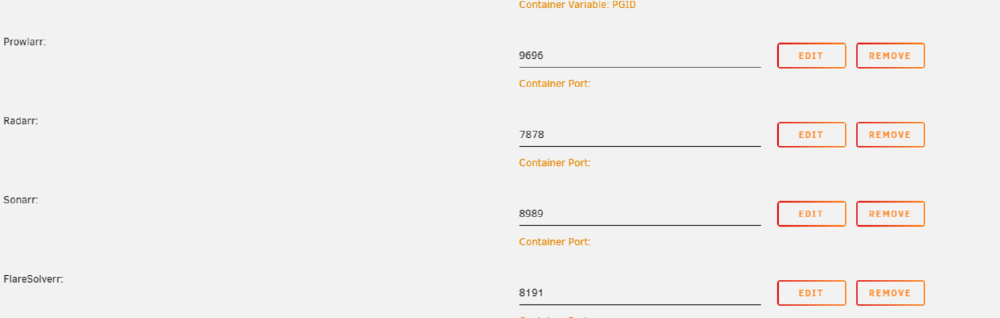
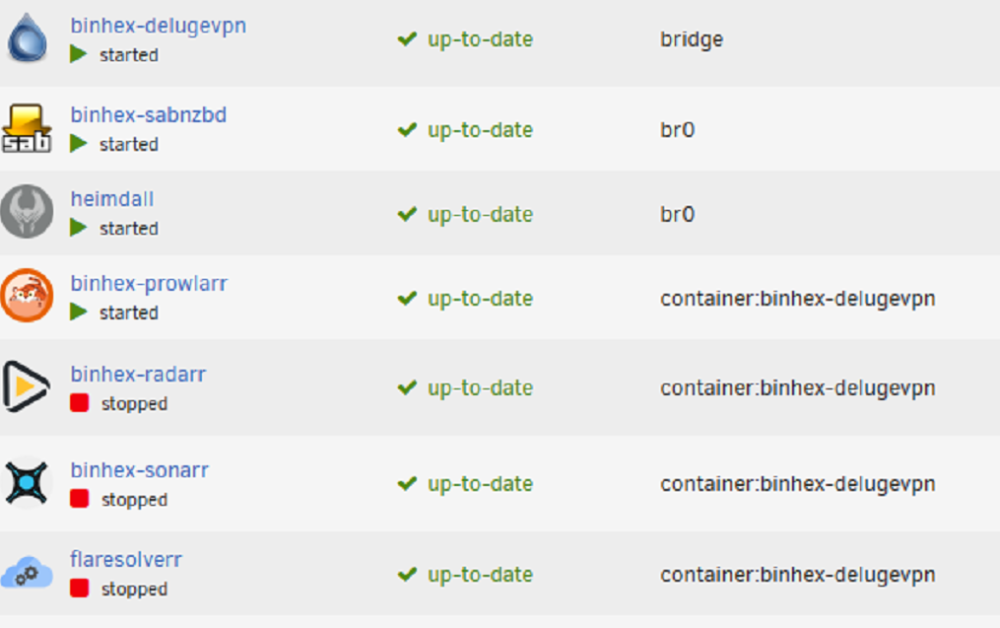
I have all my dockers routed via the VPN container using '--net=container:binhex-delugevpn' in the Extra Parameters of each of the other containers as below I have then added the container ports to the vpn docker as below When running in bridged mode, deluge wont load but all the other containers work a treat. When bridge mode is enabled none of the docker ports seem to load and only deluge works at this point.
-
Well that explains it well on why one works and one dosnt, is that a recent change? I swear this was working before at one stage. The issue I oddly then get is when i have a docker using the dlugevpn as its network for some reason in this format I cant access the other docker when its being router via the bridge version (yet what its setup like before, Deluge wont load but all the other docker containers work fine via the IP) (--net=container:binhex-delugevpn) Would some of the network changes impact that from working while in bridge mode? Thats following the guide above i posted from Space Invader
-
Ok so when i set it to 'Bridge' mode it works but when i try and set it to custom IP address it seems the error comes back, However i have the exact sane setup on another system (just that one has VLAN's this one dosnt) and it works a treat. Screen from one which isnt working This is from another box i have and its working fine


-
Not sure if you need that specific guide but I followed this video and it worked for me (its abit out of date on some of the button locations but helped me get it done using the GUI)
-
Am I not able to have a different IP for the docker container? I have it on another IP on another system?

-
Soooo this is from way back, See attached, Also using a normal network nothing too fancy just a normal router with a DHCP PC network range is 192.168.1.63 and docker is 192.168.1.30 both on /24supervisord.log
-
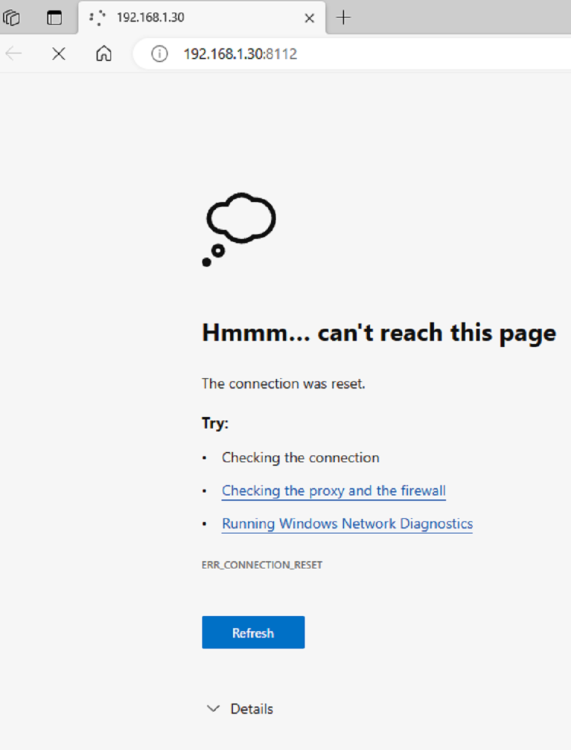
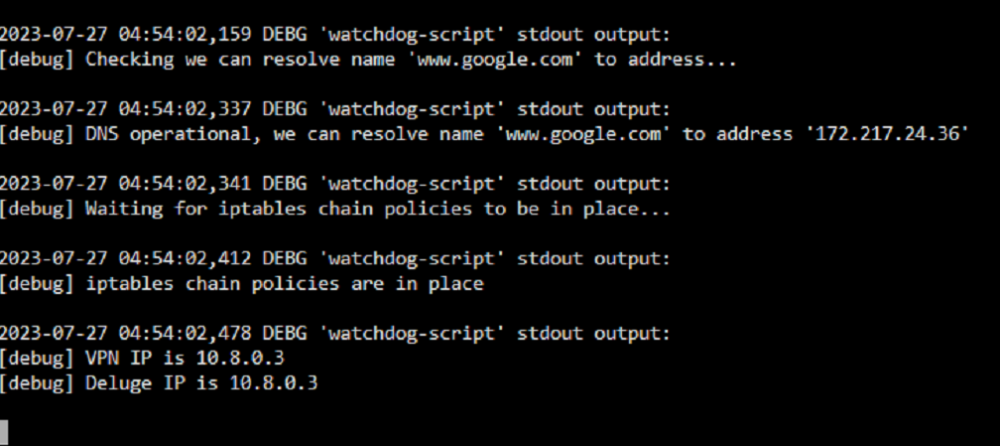
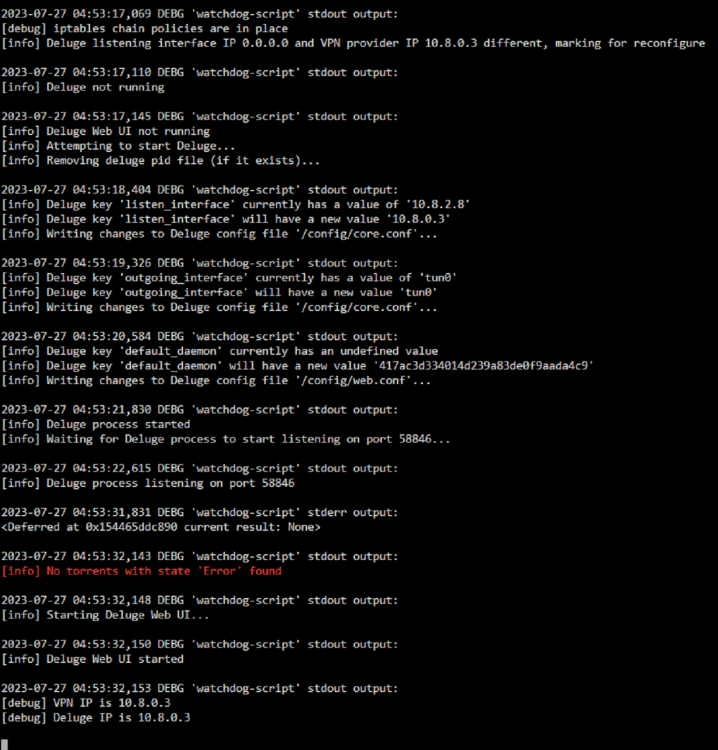
I hope someone can provide some guidance on this issue which came up recently since upgrading to 6.12.2 my deluge client has just stopped loading for some reason. The docker loads up and shows everything as all good but unable to load the web UI at all, What info can I supply or any suggestions on how to fix? I can ping, VPN connects and has IP I have re-downloaded and removed the old appdata folder but but same results,

-
Would anyone happen to know, fresh install of ripper, loaded a disc, worked a treat, ripped FLAC and MP3 with the file/folder names as per the sources, One issue which I noticed, the MP3 files seem to have no meta data unlike the FLAC file seems to have all the details such as artist and album etc, Do I need to change something out of the gate to make the MP3 files save with this data?
-
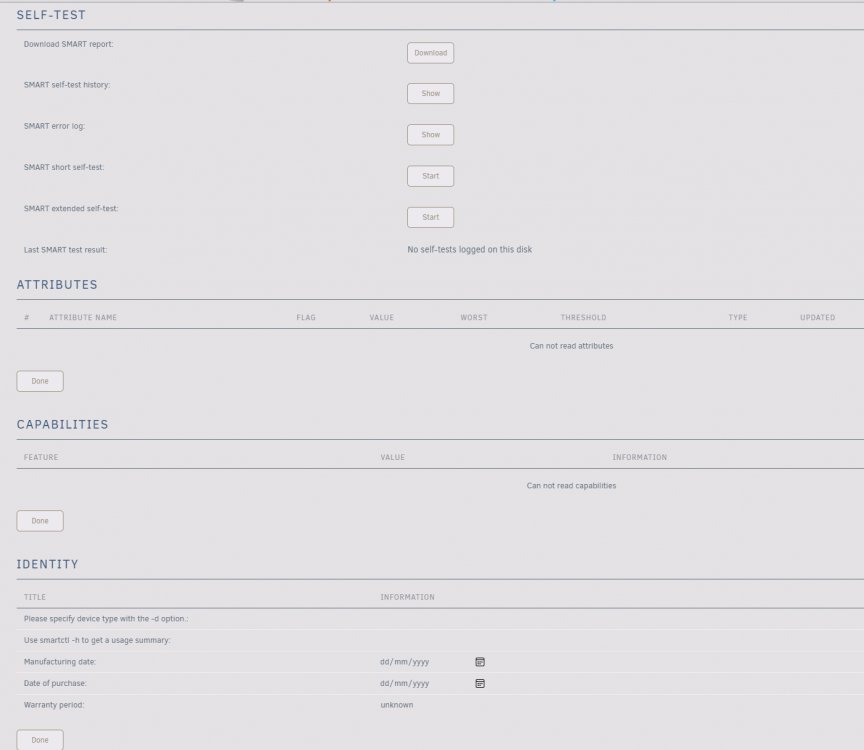
So i did some more testing on the server, ended up doing a reboot to see if any charge, smart ended up showing till i hit the re-scan then went back to blank, Connected to my Windows PC to see if an issue wiht the unit and it loaded just fine, formatted it, copied a bunch of files to it, so not sure why it would keep not showing, Would unraid not load a drive once it has specific bad blocks i guess? It is an old drive but iv been using it as a temp data dump/scratch drive for about a yr or so now, so be a shame for it to finally wrap up
-
Did that get Aug 23 23:19:25 GLaDOS kernel: blk_update_request: I/O error, dev sdk, sector 976762864 op 0x0:(READ) flags 0x0 phys_seg 3 prio class 0 Seeing I/O Error would it be safe to assume hardware issue with the drive Or can i try a re-format of it? but guessing if it wont even mount or change the ID its prob not going to allow anything ot be done?
-
Ahhh sorry here is the screen and diagglados-diagnostics-20210823-2312.zip

-
Oh sorry didnt know what page you mean? I just updated it before as m,entioned above when i saw the spin down error, DId you mean this page?